With Windows Movie Maker
     Done by: Hessa
         Shaima
Content
•
•
•
•


•
What is windows movie maker

•
History of windows movie maker

• 2000 : Windows Movie Maker 1.0 (Windows Me)
• 2001 : Windows Movie Maker 1.1 (Windows XP)
• 2002 : Windows Movie Maker 2.0 (Windows XP)
• 2004 : Windows Movie Maker 2.1 (Windows XP SP2)
• 2004 : Windows Movie Maker 2.5 (Windows XP Media
  Center Edition 2005)
• 2006 : Windows Movie Maker 2.6 (Windows Vista)
• 2007 : Windows Movie Maker 6.0 (Windows Vista)
-   Windows movie maker
            features.

•
•
•
•
• Tasks
• Timeline
• Preview
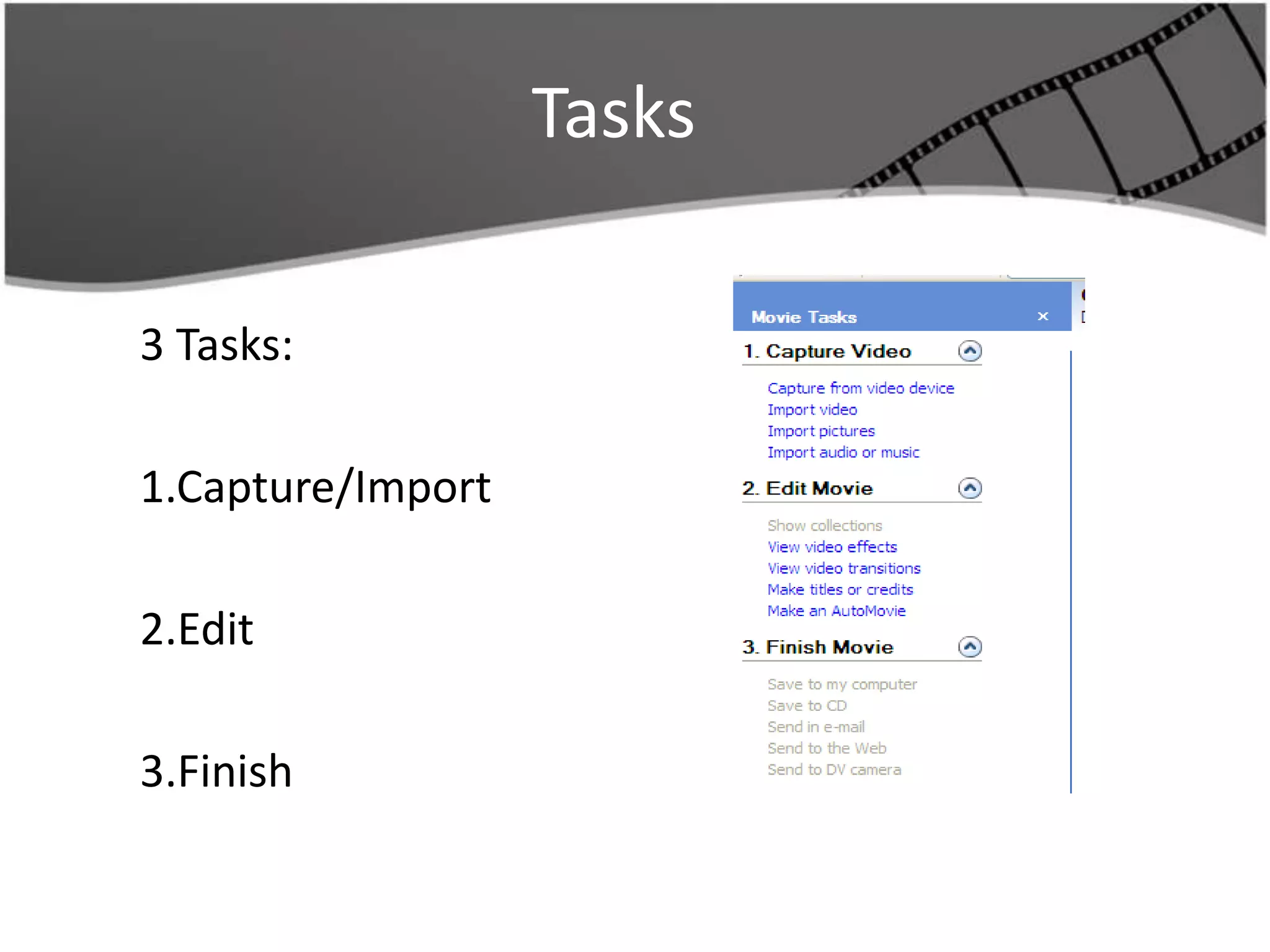
Tasks

3 Tasks:

1.Capture/Import

2.Edit

3.Finish
Timeline/ storyboard
• 5 Tracks
  – Video
  – Transition
  – Audio
  – Audio/music
  – Title

• When we edit our movie, different
  parts will go in these tracks
preview

•
1- Import media into movie maker:

•      Capture video clips or pics from digital
    camera, or import from files saved on your
    computer.

    – Click on import video/pics
2- Move video/pics to the timeline:
• Each item will appear in the collections part
• Drag each item to the story board and drop
   them in the order you wish them to appear.
3- picture time:
• You can also change the length of time that the picture shown
  in the movie
• By default each picture will be shown for 5 seconds
• If you want to change that amount of time drag the ā€œend trim
  handleā€ , notice when you click and drag the amount of time
  will show in the window.
• If you are using video you can crop the length of the video
  using the same process.
4- Video effects:
• You can employ different effects that
   will jazz up the video.
• In the task part, under step 2, click on
   ā€œview video effectsā€
• The collection of effects will appear in
   the collections area
• click and drag an perfect effect down to
   the clip in the storyboard
• You can use multiple effects on an item
How to create a movie

• There is star will appear to represent an effect
  is on the picture

• You will notice that there are 2 stars on a
  picture with 2 effects

• You can preview the effect on your
  pictures/video
How to create a movie
5- Transitions:
• You can employ different transitions to jazz up
   the video
• In the task part, under step 2, click on ā€œview
   video transitionsā€
• The collection of transitions will appear in the
   collections area
• Drag the transition between the clips in the
   storyboard.
• A blue line will appear to show where the
   trans will go
How to create movie

   6- Titles / Credits
• Again, in the task part, under step 2 click on ā€œMake
  titlesā€¦ā€

• Chose where you want to put the title/credits
• Type the title in the text box
• Below, you can change the animation or the font and
  color
• Once complete, click on Done.
Resource
•   MediaCollege.com. (n.d.). Windows Movie Maker Overview. Retrieved
    November 17, 2011, from MediaCollege.com:
    http://www.mediacollege.com/microsoft/windows/movie-maker/intro.html

•   PCWorld. (1998-2011). Windows Live Movie Maker . Retrieved October
    19, 2011, from PCWorld Communications:
    http://www.pcworld.com/downloads/file/fid,157414/description.html

•   Texas, U. o. (2005). Introduction to Windows Movie Maker 2. Retrieved October
    20, 2011, from Ischool.utexas:
    http://www.ischool.utexas.edu/technology/tutorials/graphics/moviemaker2/
    MM2handout.pdf

Windows Movie Maker

  • 1.
    With Windows MovieMaker Done by: Hessa Shaima
  • 2.
  • 3.
    What is windowsmovie maker •
  • 4.
    History of windowsmovie maker • 2000 : Windows Movie Maker 1.0 (Windows Me) • 2001 : Windows Movie Maker 1.1 (Windows XP) • 2002 : Windows Movie Maker 2.0 (Windows XP) • 2004 : Windows Movie Maker 2.1 (Windows XP SP2) • 2004 : Windows Movie Maker 2.5 (Windows XP Media Center Edition 2005) • 2006 : Windows Movie Maker 2.6 (Windows Vista) • 2007 : Windows Movie Maker 6.0 (Windows Vista)
  • 5.
    - Windows movie maker features. • • • •
  • 6.
  • 7.
  • 8.
    Timeline/ storyboard • 5Tracks – Video – Transition – Audio – Audio/music – Title • When we edit our movie, different parts will go in these tracks
  • 9.
  • 10.
    1- Import mediainto movie maker: • Capture video clips or pics from digital camera, or import from files saved on your computer. – Click on import video/pics 2- Move video/pics to the timeline: • Each item will appear in the collections part • Drag each item to the story board and drop them in the order you wish them to appear.
  • 11.
    3- picture time: •You can also change the length of time that the picture shown in the movie • By default each picture will be shown for 5 seconds • If you want to change that amount of time drag the ā€œend trim handleā€ , notice when you click and drag the amount of time will show in the window. • If you are using video you can crop the length of the video using the same process.
  • 12.
    4- Video effects: •You can employ different effects that will jazz up the video. • In the task part, under step 2, click on ā€œview video effectsā€ • The collection of effects will appear in the collections area • click and drag an perfect effect down to the clip in the storyboard • You can use multiple effects on an item
  • 13.
    How to createa movie • There is star will appear to represent an effect is on the picture • You will notice that there are 2 stars on a picture with 2 effects • You can preview the effect on your pictures/video
  • 14.
    How to createa movie 5- Transitions: • You can employ different transitions to jazz up the video • In the task part, under step 2, click on ā€œview video transitionsā€ • The collection of transitions will appear in the collections area • Drag the transition between the clips in the storyboard. • A blue line will appear to show where the trans will go
  • 15.
    How to createmovie 6- Titles / Credits • Again, in the task part, under step 2 click on ā€œMake titlesā€¦ā€ • Chose where you want to put the title/credits • Type the title in the text box • Below, you can change the animation or the font and color • Once complete, click on Done.
  • 16.
    Resource • MediaCollege.com. (n.d.). Windows Movie Maker Overview. Retrieved November 17, 2011, from MediaCollege.com: http://www.mediacollege.com/microsoft/windows/movie-maker/intro.html • PCWorld. (1998-2011). Windows Live Movie Maker . Retrieved October 19, 2011, from PCWorld Communications: http://www.pcworld.com/downloads/file/fid,157414/description.html • Texas, U. o. (2005). Introduction to Windows Movie Maker 2. Retrieved October 20, 2011, from Ischool.utexas: http://www.ischool.utexas.edu/technology/tutorials/graphics/moviemaker2/ MM2handout.pdf