Recommended
PDF
PDF
OpenIndiana vWire Demo (Japanese)
PDF
ブロケード FC ファブリックスイッチ オペレーション講座(後編)
PDF
PDF
Apache cloudstack4.0インストール
PDF
PDF
FC SAN Fabric環境におけるパフォーマンストラブルの対処法
PDF
ブロケード FC ファブリックスイッチオペレーション講座(前編)
PDF
PDF
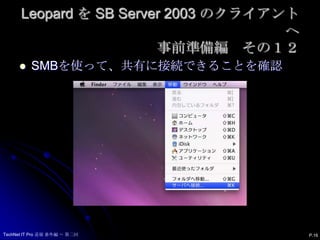
KEY
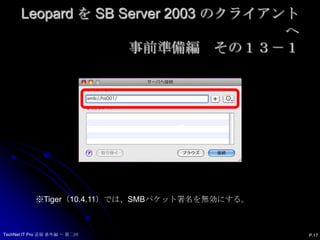
PDF
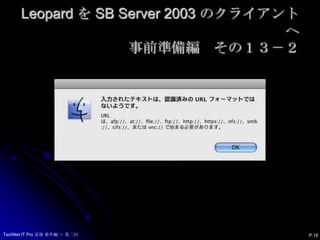
Hydrogen → Helium での Linux kernel の違い
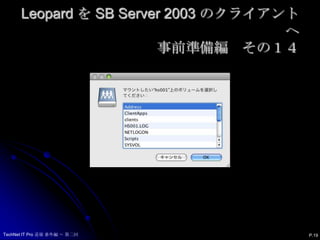
PDF
PDF
「さくらのクラウド」におけるVyattaの活用事例
PDF
君にもできる! にゅーとろん君になってみよー!! 「Neutronになって理解するOpenStack Net - OpenStack最新情報セミナー ...
PDF
PDF
PDF
“見てわかる”ファイバーチャネルSAN基礎講座(第6弾: 最終回)~困った時もこれで安心(?)、FC SANにおけるトラブルシューティングのコツとは??~
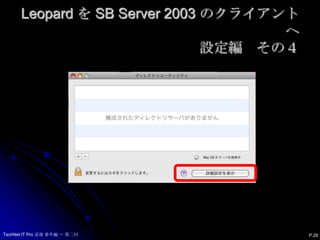
PDF
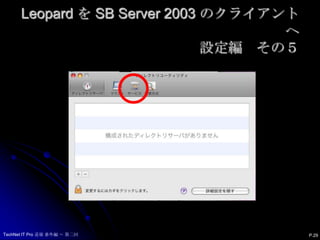
第20回 OpenStack勉強会 Neutron Deep Dive - DVR
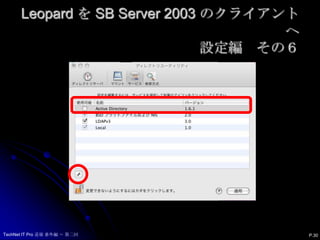
PDF
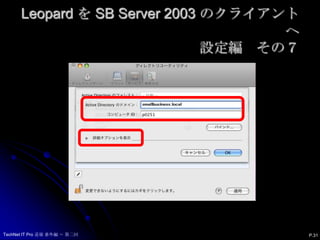
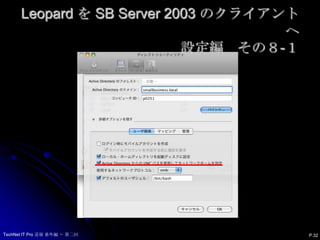
PDF
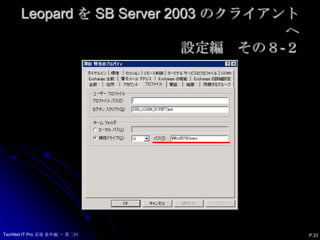
PDF
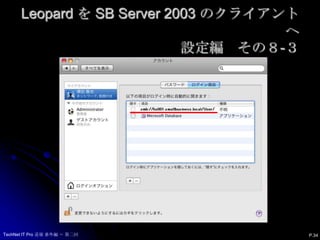
PDF
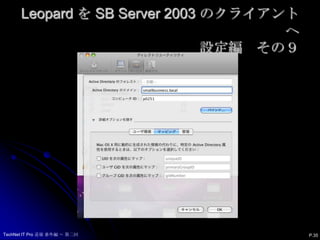
OpenStack-Ansibleで作るOpenStack HA環境 Kilo版
PDF
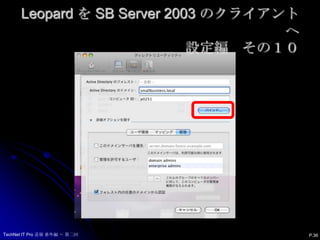
PacemakerのMaster/Slave構成の基本と事例紹介(DRBD、PostgreSQLレプリケーション) @Open Source Confer...
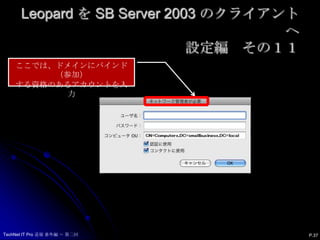
PPTX
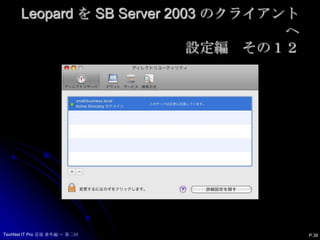
WAN SDN 実践入門! ~ OpenDayLightのPCEP/BGPに触れてみる ~
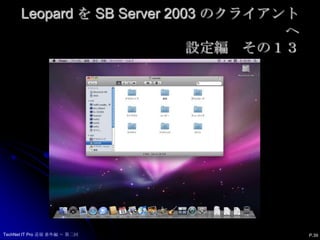
PDF
Linux-HA Japanプロジェクトのこれまでとこれから
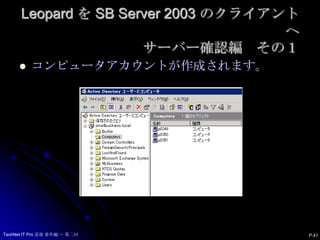
PDF
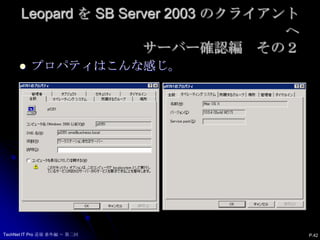
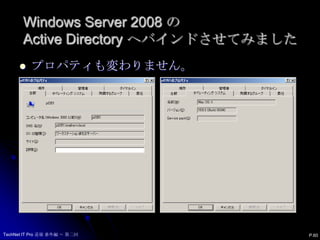
Cloud stack徹底入門7章 20130514
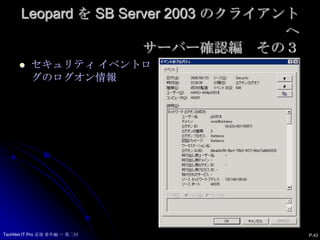
PDF
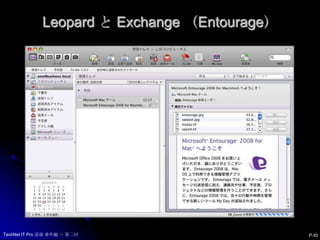
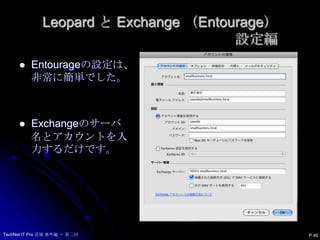
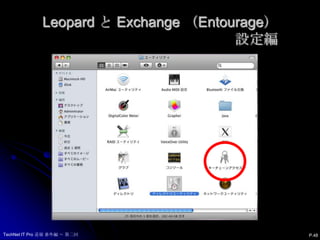
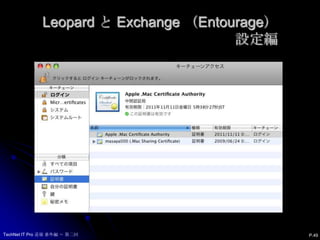
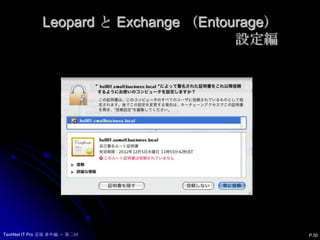
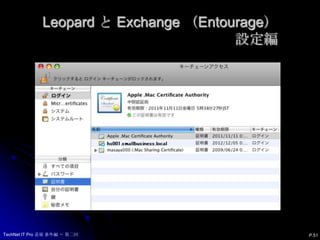
PPTX
Green valuation (taxateur) vs investeerder
PDF
More Related Content
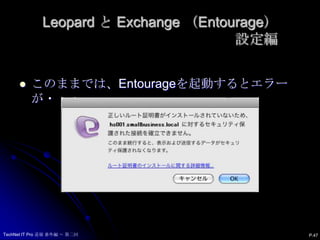
PDF
PDF
OpenIndiana vWire Demo (Japanese)
PDF
ブロケード FC ファブリックスイッチ オペレーション講座(後編)
PDF
PDF
Apache cloudstack4.0インストール
PDF
PDF
FC SAN Fabric環境におけるパフォーマンストラブルの対処法
PDF
ブロケード FC ファブリックスイッチオペレーション講座(前編)
What's hot
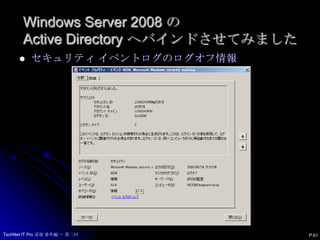
PDF
PDF
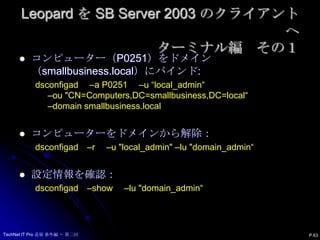
KEY
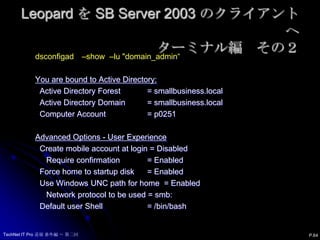
PDF
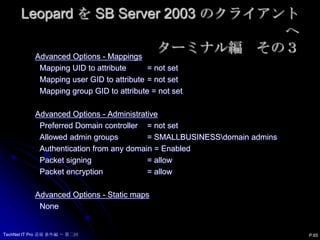
Hydrogen → Helium での Linux kernel の違い
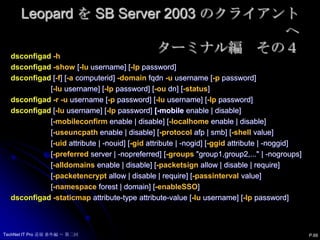
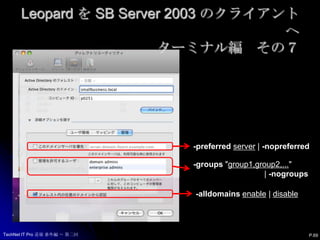
PDF
PDF
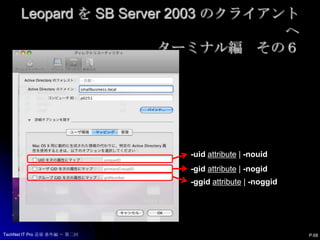
「さくらのクラウド」におけるVyattaの活用事例
PDF
君にもできる! にゅーとろん君になってみよー!! 「Neutronになって理解するOpenStack Net - OpenStack最新情報セミナー ...
PDF
PDF
PDF
“見てわかる”ファイバーチャネルSAN基礎講座(第6弾: 最終回)~困った時もこれで安心(?)、FC SANにおけるトラブルシューティングのコツとは??~
PDF
第20回 OpenStack勉強会 Neutron Deep Dive - DVR
PDF
PDF
PDF
PDF
OpenStack-Ansibleで作るOpenStack HA環境 Kilo版
PDF
PacemakerのMaster/Slave構成の基本と事例紹介(DRBD、PostgreSQLレプリケーション) @Open Source Confer...
PPTX
WAN SDN 実践入門! ~ OpenDayLightのPCEP/BGPに触れてみる ~
PDF
Linux-HA Japanプロジェクトのこれまでとこれから
PDF
Cloud stack徹底入門7章 20130514
PDF
Viewers also liked
PPTX
Green valuation (taxateur) vs investeerder
PDF
PDF
PPTX
Energiebesparing in de verpleging/verzorging
PDF
PPTX
PDF
PPTX
PPTX
PDF
Step by step deployment of sampleappv406
PPT
PHP Developer Tools - Arabic
PDF
PDF
PPT
presentatie fin sturing 6 juli 2010
PDF
PDF
PPT
PPT
PPTX
The Beginners Guide to VA Home Loans by Low VA Rates
PPTX
Architecten en energieprestatiecontracten
More from Masaya Sawada
PDF
PPTX
Windows server の新しい管理ツール 北陸編
PDF
PDF
[Lt]windows ブートマネージャーのスクリーンショットをとる方法
PDF
PDF
開発者のためのWindows7 & windows server r2
PDF
PDF
ユーザー視点・管理者視点で見るSbs2008のポイント
PDF
PDF
PDF
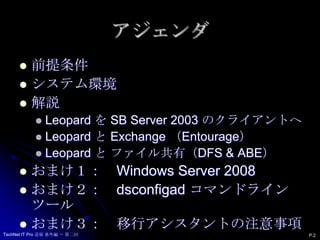
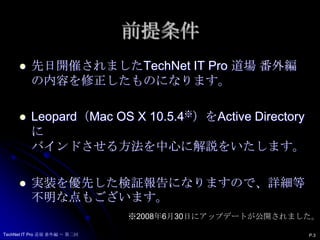
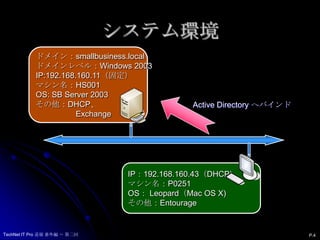
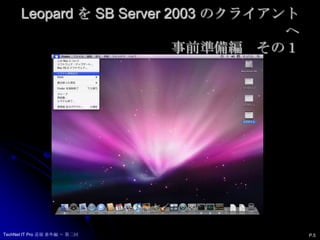
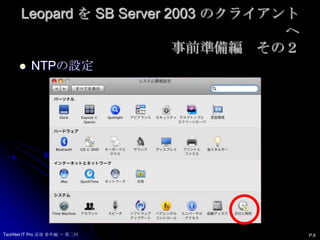
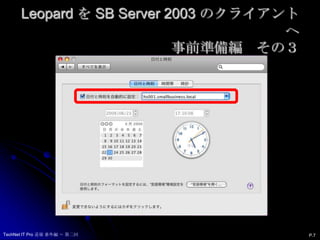
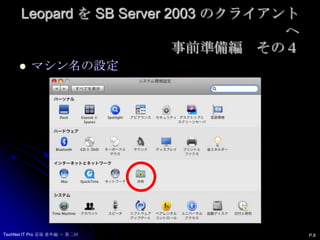
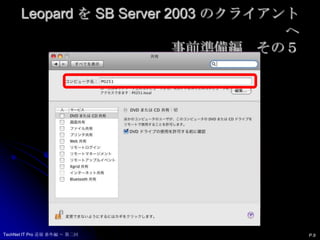
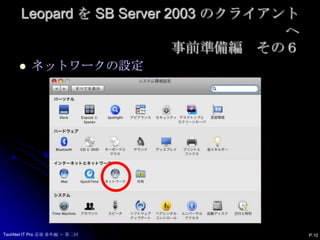
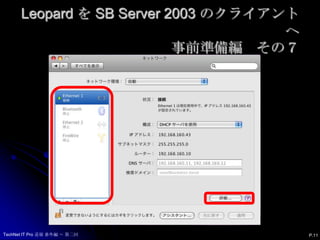
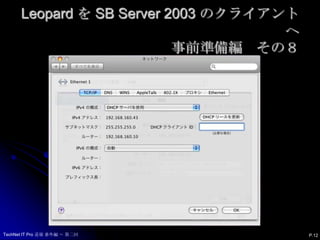
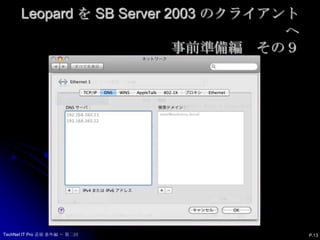
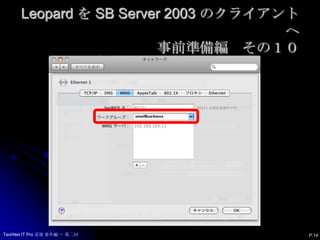
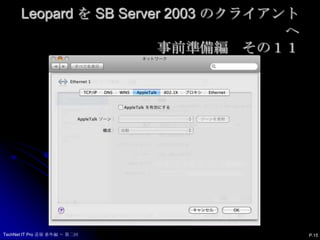
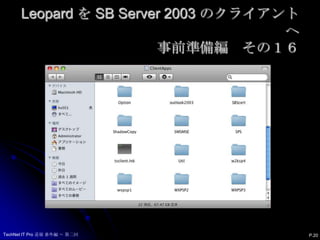
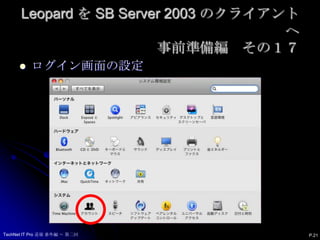
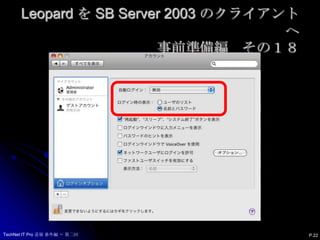
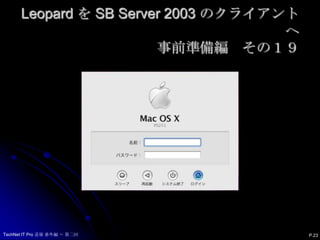
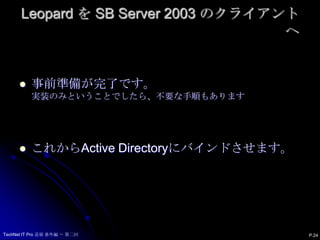
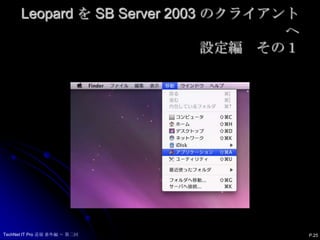
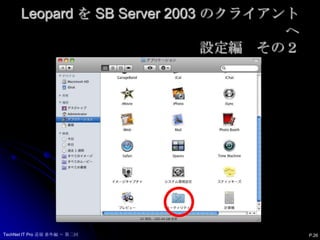
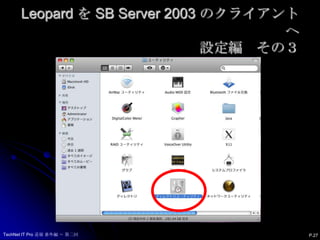
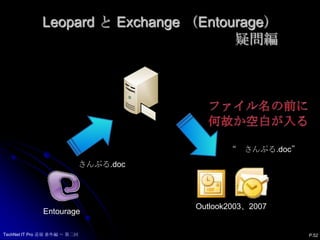
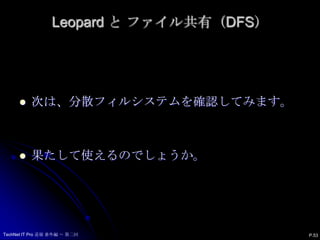
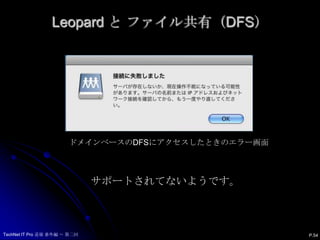
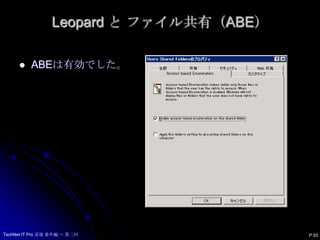
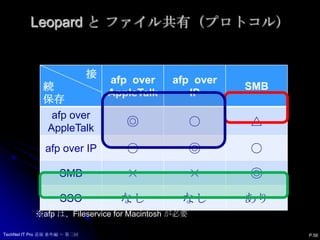
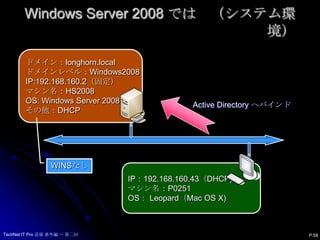
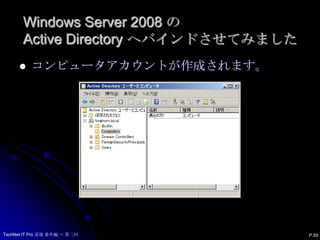
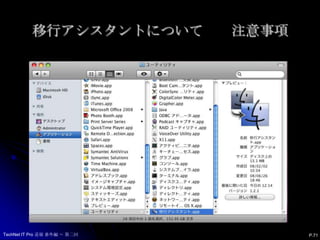
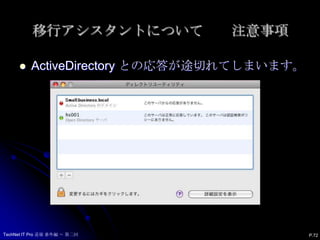
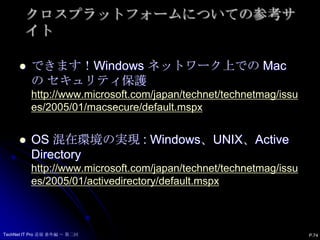
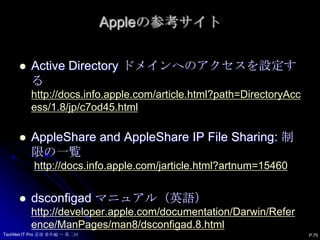
Windows と leopard 1. 2. アジェンダ前提条件システム環境解説Leopard を SB Server 2003 のクライアントへLeopard と Exchange (Entourage)Leopard と ファイル共有(DFS & ABE)おまけ1: WindowsServer2008おまけ2: dsconfigad コマンドラインツールおまけ3: 移行アシスタントの注意事項P.2TechNet IT Pro 道場 番外編 ~ 第二回 3. 前提条件先日開催されましたTechNet IT Pro 道場 番外編 の内容を修正したものになります。Leopard(Mac OS X 10.5.4※)をActive Directoryにバインドさせる方法を中心に解説をいたします。実装を優先した検証報告になりますので、詳細等不明な点もございます。※2008年6月30日にアップデートが公開されました。TechNet IT Pro 道場 番外編 ~ 第二回P.3 4. 5. Leopard を SB Server 2003 のクライアントへ事前準備編 その1P.5TechNet IT Pro 道場 番外編 ~ 第二回 6. Leopard を SB Server 2003 のクライアントへ事前準備編 その2NTPの設定P.6TechNet IT Pro 道場 番外編 ~ 第二回 7. Leopard を SB Server 2003 のクライアントへ事前準備編 その3P.7TechNet IT Pro 道場 番外編 ~ 第二回 8. Leopard を SB Server 2003 のクライアントへ事前準備編 その4マシン名の設定P.8TechNet IT Pro 道場 番外編 ~ 第二回 9. Leopard を SB Server 2003 のクライアントへ事前準備編 その5P.9TechNet IT Pro 道場 番外編 ~ 第二回 10. Leopard を SB Server 2003 のクライアントへ事前準備編 その6ネットワークの設定P.10TechNet IT Pro 道場 番外編 ~ 第二回 11. Leopard を SB Server 2003 のクライアントへ事前準備編 その7P.11TechNet IT Pro 道場 番外編 ~ 第二回 12. Leopard を SB Server 2003 のクライアントへ事前準備編 その8P.12TechNet IT Pro 道場 番外編 ~ 第二回 13. Leopard を SB Server 2003 のクライアントへ事前準備編 その9P.13TechNet IT Pro 道場 番外編 ~ 第二回 14. Leopard を SB Server 2003 のクライアントへ事前準備編 その10P.14TechNet IT Pro 道場 番外編 ~ 第二回 15. Leopard を SB Server 2003 のクライアントへ事前準備編 その11P.15TechNet IT Pro 道場 番外編 ~ 第二回 16. Leopard を SB Server 2003 のクライアントへ事前準備編 その12P.16SMBを使って、共有に接続できることを確認TechNet IT Pro 道場 番外編 ~ 第二回 17. Leopard を SB Server 2003 のクライアントへ事前準備編 その13-1※Tiger(10.4.11)では、SMBパケット署名を無効にする。P.17TechNet IT Pro 道場 番外編 ~ 第二回 18. Leopard を SB Server 2003 のクライアントへ事前準備編 その13-2P.18TechNet IT Pro 道場 番外編 ~ 第二回 19. Leopard を SB Server 2003 のクライアントへ事前準備編 その14P.19TechNet IT Pro 道場 番外編 ~ 第二回 20. Leopard を SB Server 2003 のクライアントへ事前準備編 その16P.20TechNet IT Pro 道場 番外編 ~ 第二回 21. Leopard を SB Server 2003 のクライアントへ事前準備編 その17ログイン画面の設定P.21TechNet IT Pro 道場 番外編 ~ 第二回 22. Leopard を SB Server 2003 のクライアントへ事前準備編 その18P.22TechNet IT Pro 道場 番外編 ~ 第二回 23. Leopard を SB Server 2003 のクライアントへ事前準備編 その19P.23TechNet IT Pro 道場 番外編 ~ 第二回 24. Leopard を SB Server 2003 のクライアントへP.24事前準備が完了です。実装のみということでしたら、不要な手順もありますこれからActive Directoryにバインドさせます。TechNet IT Pro 道場 番外編 ~ 第二回 25. Leopard を SB Server 2003 のクライアントへ設定編 その1P.25TechNet IT Pro 道場 番外編 ~ 第二回 26. Leopard を SB Server 2003 のクライアントへ設定編 その2P.26TechNet IT Pro 道場 番外編 ~ 第二回 27. Leopard を SB Server 2003 のクライアントへ設定編 その3P.27TechNet IT Pro 道場 番外編 ~ 第二回 28. Leopard を SB Server 2003 のクライアントへ設定編 その4P.28TechNet IT Pro 道場 番外編 ~ 第二回 29. Leopard を SB Server 2003 のクライアントへ設定編 その5P.29TechNet IT Pro 道場 番外編 ~ 第二回 30. Leopard を SB Server 2003 のクライアントへ設定編 その6P.30TechNet IT Pro 道場 番外編 ~ 第二回 31. Leopard を SB Server 2003 のクライアントへ設定編 その7P.31TechNet IT Pro 道場 番外編 ~ 第二回 32. Leopard を SB Server 2003 のクライアントへ設定編 その8-1P.32TechNet IT Pro 道場 番外編 ~ 第二回 33. Leopard を SB Server 2003 のクライアントへ設定編 その8-2P.33TechNet IT Pro 道場 番外編 ~ 第二回 34. Leopard を SB Server 2003 のクライアントへ設定編 その8-3P.34TechNet IT Pro 道場 番外編 ~ 第二回 35. Leopard を SB Server 2003 のクライアントへ設定編 その9P.35TechNet IT Pro 道場 番外編 ~ 第二回 36. Leopard を SB Server 2003 のクライアントへ設定編 その10P.36TechNet IT Pro 道場 番外編 ~ 第二回 37. Leopard を SB Server 2003 のクライアントへ設定編 その11ここでは、ドメインにバインド(参加)する資格のあるアカウントを入力P.37TechNet IT Pro 道場 番外編 ~ 第二回 38. Leopard を SB Server 2003 のクライアントへ設定編 その12P.38TechNet IT Pro 道場 番外編 ~ 第二回 39. Leopard を SB Server 2003 のクライアントへ設定編 その13P.39TechNet IT Pro 道場 番外編 ~ 第二回 40. Leopard を SB Server 2003 のクライアントへP.40バインドが完了すると Windows Serverでは・・・TechNet IT Pro 道場 番外編 ~ 第二回 41. Leopard を SB Server 2003 のクライアントへサーバー確認編 その1コンピュータアカウントが作成されます。P.41TechNet IT Pro 道場 番外編 ~ 第二回 42. Leopard を SB Server 2003 のクライアントへサーバー確認編 その2P.42プロパティはこんな感じ。TechNet IT Pro 道場 番外編 ~ 第二回 43. Leopard を SB Server 2003 のクライアントへサーバー確認編 その3セキュリティ イベントログのログオン情報P.43TechNet IT Pro 道場 番外編 ~ 第二回 44. Leopard と Exchange (Entourage) P.44Active Directory にバインドがされました。Exchangeからメールを取得してみます。TechNet IT Pro 道場 番外編 ~ 第二回 45. 46. 47. 48. Leopard と Exchange (Entourage)設定編P.47このままでは、Entourageを起動するとエラーが・・・。TechNet IT Pro 道場 番外編 ~ 第二回 49. 50. 51. 52. 53. Leopard と Exchange (Entourage)疑問編ファイル名の前に何故か空白が入る“ さんぷる.doc”さんぷる.docOutlook2003、2007EntourageP.52TechNet IT Pro 道場 番外編 ~ 第二回 54. 55. 56. 57. 58. 59. Windows Server 2008 では (システム環境)ドメイン:longhorn.localドメインレベル:Windows2008IP:192.168.160.2(固定)マシン名:HS2008OS: WindowsServer 2008その他:DHCPActive Directory へバインドWINSなしIP:192.168.160.43(DHCP)マシン名:P0251OS: Leopard(Mac OS X)P.58TechNet IT Pro 道場 番外編 ~ 第二回 60. Windows Server 2008 の Active Directoryへバインドさせてみました コンピュータアカウントが作成されます。P.59TechNet IT Pro 道場 番外編 ~ 第二回 61. 62. Windows Server 2008 の Active Directoryへバインドさせてみましたセキュリティ イベントログのログオフ情報P.61TechNet IT Pro 道場 番外編 ~ 第二回 63. 64. Leopard を SB Server 2003 のクライアントへターミナル編 その1コンピューター(P0251)をドメイン(smallbusiness.local)にバインド:dsconfigad –a P0251 –u “local_admin“ –ou "CN=Computers,DC=smallbusiness,DC=local“ –domain smallbusiness.localコンピューターをドメインから解除:dsconfigad –r –u "local_admin" –lu "domain_admin“設定情報を確認:dsconfigad –show –lu "domain_admin“P.63TechNet IT Pro 道場 番外編 ~ 第二回 65. Leopard を SB Server 2003 のクライアントへターミナル編 その2dsconfigad –show –lu "domain_admin“You are bound to Active Directory: Active Directory Forest = smallbusiness.local Active Directory Domain = smallbusiness.local Computer Account = p0251 Advanced Options - User Experience Create mobile account at login = Disabled Require confirmation = Enabled Force home to startup disk = Enabled Use Windows UNC path for home = Enabled Network protocol to be used = smb: Default user Shell = /bin/bash P.64TechNet IT Pro 道場 番外編 ~ 第二回 66. Leopard を SB Server 2003 のクライアントへターミナル編 その3Advanced Options - Mappings Mapping UID to attribute = not set Mapping user GID to attribute = not set Mapping group GID to attribute = not set Advanced Options - Administrative Preferred Domain controller = not set Allowed admin groups = SMALLBUSINESS\domain admins Authentication from any domain = Enabled Packet signing = allow Packet encryption = allow Advanced Options - Static maps NoneP.65TechNet IT Pro 道場 番外編 ~ 第二回 67. Leopard を SB Server 2003 のクライアントへターミナル編 その4dsconfigad-hdsconfigad-show [-lu username] [-lp password]dsconfigad[-f] [-acomputerid] -domainfqdn-u username [-p password] [-lu username] [-lp password] [-oudn] [-status]dsconfigad-r -u username [-p password] [-lu username] [-lp password]dsconfigad[-lu username] [-lp password] [-mobile enable | disable] [-mobileconfirm enable | disable] [-localhome enable | disable] [-useuncpath enable | disable] [-protocolafp | smb] [-shell value] [-uid attribute | -nouid] [-gid attribute | -nogid] [-ggid attribute | -noggid] [-preferred server | -nopreferred] [-groups "group1,group2,..." | -nogroups] [-alldomains enable | disable] [-packetsign allow | disable | require] [-packetencrypt allow | disable | require] [-passinterval value] [-namespace forest | domain] [-enableSSO]dsconfigad-staticmap attribute-type attribute-value [-lu username] [-lp password]P.66TechNet IT Pro 道場 番外編 ~ 第二回 68. Leopard を SB Server 2003 のクライアントへターミナル編 その5TechNet IT Pro 道場 番外編 ~ 第二回-domainfqdn-acomputerid-mobileenable | disable-mobileconfirmenable | disable-localhomeenable | disable-useuncpathenable | disable-protocolafp | smb-shellvalueP.67 69. Leopard を SB Server 2003 のクライアントへターミナル編 その6TechNet IT Pro 道場 番外編 ~ 第二回-uidattribute | -nouid-gidattribute | -nogid-ggidattribute | -noggidP.68 70. Leopard を SB Server 2003 のクライアントへターミナル編 その7TechNet IT Pro 道場 番外編 ~ 第二回-preferredserver | -nopreferred-groups "group1,group2,..." | -nogroups-alldomainsenable | disableP.69 71. 72. 73. 74. 75. クロスプラットフォームについての参考サイトP.74できます!Windows ネットワーク上での Mac の セキュリティ保護http://www.microsoft.com/japan/technet/technetmag/issues/2005/01/macsecure/default.mspxOS 混在環境の実現 : Windows、UNIX、Active Directoryhttp://www.microsoft.com/japan/technet/technetmag/issues/2005/01/activedirectory/default.mspxTechNet IT Pro 道場 番外編 ~ 第二回

![Leopard を SB Server 2003 のクライアントへターミナル編 その4dsconfigad-hdsconfigad-show [-lu username] [-lp password]dsconfigad[-f] [-acomputerid] -domainfqdn-u username [-p password] [-lu username] [-lp password] [-oudn] [-status]dsconfigad-r -u username [-p password] [-lu username] [-lp password]dsconfigad[-lu username] [-lp password] [-mobile enable | disable] [-mobileconfirm enable | disable] [-localhome enable | disable] [-useuncpath enable | disable] [-protocolafp | smb] [-shell value] [-uid attribute | -nouid] [-gid attribute | -nogid] [-ggid attribute | -noggid] [-preferred server | -nopreferred] [-groups "group1,group2,..." | -nogroups] [-alldomains enable | disable] [-packetsign allow | disable | require] [-packetencrypt allow | disable | require] [-passinterval value] [-namespace forest | domain] [-enableSSO]dsconfigad-staticmap attribute-type attribute-value [-lu username] [-lp password]P.66TechNet IT Pro 道場 番外編 ~ 第二回](https://image.slidesharecdn.com/windowsleopard-100413054922-phpapp01/85/Windows-leopard-67-320.jpg)


![[Lt]hyper vの仮想ネットワーク](https://cdn.slidesharecdn.com/ss_thumbnails/lthyper-v-100608092558-phpapp01-thumbnail.jpg?width=640&height=640&fit=bounds)
![[Lt]windows ブートマネージャーのスクリーンショットをとる方法](https://cdn.slidesharecdn.com/ss_thumbnails/ltwindows-100608092215-phpapp02-thumbnail.jpg?width=640&height=640&fit=bounds)
![[Lt]今年は物理サーバーを仮想化してみましょう](https://cdn.slidesharecdn.com/ss_thumbnails/lt-100608091942-phpapp01-thumbnail.jpg?width=640&height=640&fit=bounds)


