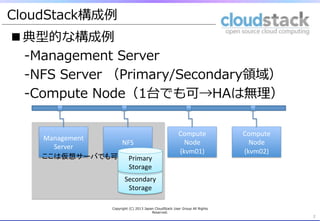
■典型的な構成例例
-‐‑‒Management Server
-‐‑‒NFS Server (Primary/Secondary領領域)
-‐‑‒Compute Node(1台でも可→HAは無理理)
2
CloudStack構成例例
Management
Server
NFS
Compute
Node
(kvm01)
Compute
Node
(kvm02)
Secondary
Storage
Primary
Storage
ここは仮想サーバでも可
Copyright (C) 2013 Japan CloudStack User Group All Rights
Reserved.
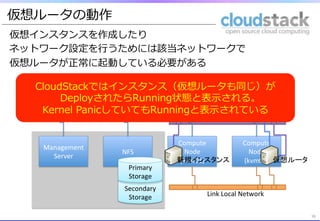
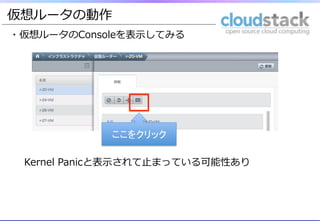
仮想ルータの動作
■仮想ルータ異異常
・FWやLBの設定に失敗する
・新しい仮想インスタンスを作成できない
2012-‐10-‐15
10:46:57,820
WARN
[network.firewall.FirewallManagerImpl]
(Job-‐
Executor-‐49:job-‐60965)
Failed
to
apply
firewall
rules
due
to
2012-‐10-‐15
12:20:01,434
WARN
[cloud.vm.UserVmManagerImpl]
(UserVm-‐Scavenger-‐1:null)
Failed
to
cleanup
resources
as
a
part
of
vm
VM[User|VM名]
expunge
2012-‐10-‐15
11:23:01,490
WARN
[cloud.network.NetworkManagerImpl]
(UserVm-‐Scavenger-‐1:null)
Problems
with
VirtualRouter
but
pushing
on
2012-‐10-‐15
11:28:13,031
WARN
[network.firewall.FirewallManagerImpl]
(UserVm-‐
Scavenger-‐1:null)
Rules
are
not
completely
applied
2012-‐10-‐15
13:33:09,726
WARN
[cloud.vm.UserVmManagerImpl]
(UserVm-‐Scavenger-‐1:null)
Failed
to
cleanup
resources
as
a
part
of
vm
VM[User|VM名]
expunge
2012-‐10-‐15
15:21:06,520
WARN
[network.rules.RulesManagerImpl]
(UserVm-‐Scavenger-‐1:null)
Failed
to
disable
one
to
one
nat
for
the
ip
address
id187875
/var/log/cloud/management/management-‐‑‒server.log
Copyright (C) 2013 Japan CloudStack User Group All Rights
Reserved.
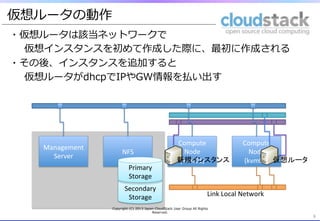
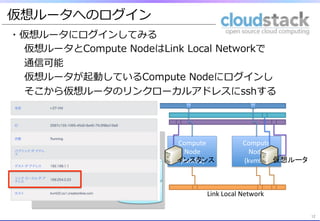
仮想ルータへのログイン
・仮想ルータにログインしてみる
仮想ルータとCompute NodeはLink Local Networkで
通信可能
仮想ルータが起動しているCompute Nodeにログインし
そこから仮想ルータのリンクローカルアドレスにsshする
12
12
12
Management
Server
NFS
Compute
Node
(kvm01)
Compute
Node
(kvm02)
Secondary
Storage
Primary
Storage
仮想ルータ
インスタンス
Link
Local
Network
13.
仮想ルータへのログイン
13
仮想ルータにホストからsshできます
13
[root@node006
~]#
ssh
-i
.ssh/id_rsa.cloud
169.254.3.116
-p
3922
Linux
r-5-VM
2.6.32-5-686-bigmem
#1
SMP
Mon
Jan
16
16:42:05
UTC
2012
i686
The
programs
included
with
the
Debian
GNU/Linux
system
are
free
software;
the
exact
distribution
terms
for
each
program
are
described
in
the
individual
files
in
/usr/share/doc/*/copyright.
Debian
GNU/Linux
comes
with
ABSOLUTELY
NO
WARRANTY,
to
the
extent
permitted
by
applicable
law.
Last
login:
Sun
Dec
9
14:20:04
2012
from
169.254.0.1
Linux
r-5-VM
2.6.32-5-686-bigmem
#1
SMP
Mon
Jan
16
16:42:05
UTC
2012
i686
The
programs
included
with
the
Debian
GNU/Linux
system
are
free
software;
the
exact
distribution
terms
for
each
program
are
described
in
the
individual
files
in
/usr/share/doc/*/copyright.
Debian
GNU/Linux
comes
with
ABSOLUTELY
NO
WARRANTY,
to
the
extent
permitted
by
applicable
law.
root@r-5-VM:~#
root@r-5-VM:~#
date;
ifconfig
–a
eth0
Link
encap:Ethernet
HWaddr
02:00:6b:3d:00:02
inet
addr:10.1.1.1
Bcast:10.1.1.255
Mask:255.255.255.0
UP
BROADCAST
RUNNING
MULTICAST
MTU:1500
Metric:1
RX
packets:11592
errors:0
dropped:0
overruns:0
frame:0
TX
packets:8741
errors:0
dropped:0
overruns:0
carrier:0
collisions:0
txqueuelen:1000
RX
bytes:972709
(949.9
KiB)
TX
bytes:2582211
(2.4
MiB)
eth1
Link
encap:Ethernet
HWaddr
0e:00:a9:fe:03:74
inet
addr:169.254.3.116
Bcast:169.254.255.255
Mask:255.255.0.0
UP
BROADCAST
RUNNING
MULTICAST
MTU:1500
Metric:1
RX
packets:12285
errors:0
dropped:0
overruns:0
frame:0
TX
packets:10166
errors:0
dropped:0
overruns:0
carrier:0
collisions:0
txqueuelen:1000
RX
bytes:1937229
(1.8
MiB)
TX
bytes:1915520
(1.8
MiB)
Copyright (C) 2013 Japan CloudStack User Group All Rights
Reserved.
14.
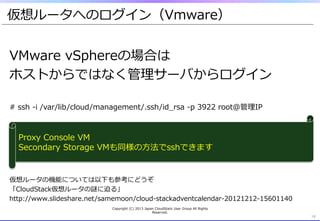
仮想ルータへのログイン(Vmware)
14
VMware vSphereの場合は
ホストからではなく管理理サーバからログイン
# ssh -‐‑‒i /var/lib/cloud/management/.ssh/id_̲rsa -‐‑‒p 3922 root@管理理IP
仮想ルータの機能については以下も参考にどうぞ
「CloudStack仮想ルータの謎に迫る」
http://www.slideshare.net/samemoon/cloud-‐‑‒stackadventcalendar-‐‑‒20121212-‐‑‒15601140
14
Proxy Console VM
Secondary Storage VMも同様の⽅方法でsshできます
Copyright (C) 2013 Japan CloudStack User Group All Rights
Reserved.
15.
SystemVMの動作
■SystemVM異異常
・SnapShotを取得できない
ERROR
[storage.snapshot.SnapshotManagerImpl]
(Job-‐Executor-‐156:job-‐65771)
Failed
to
destroy
snapshot
id:7257
for
volume:
10221
due
to
failed
to
delete
snapshot
/mnt/SecStorage/
05da41ca-‐20b3-‐3f1a-‐a4af-‐4e9279f3ed63/snapshots/117/10221/*/snapshots/1/117/10221/
_20121024060343*
,
err=Failed
to
delete
file
/mnt/SecStorage/05da41ca-‐20b3-‐3f1a-‐
a4af-‐4e9279f3ed63/snapshots/117/10221/*/snapshots/1/117/10221/
detached_20121024060343*,
err=java.io.IOExcepion:
Cannot
run
program
"/bin/bash":
java.io.IOExcepion:
error=24,
Too
many
open
files
ERROR
[storage.snapshot.SnapshotManagerImpl]
(Job-‐Executor-‐156:job-‐65771)
Failed
to
destroy
snapshot
id:7257
for
volume:
10221
due
to
failed
to
delete
snapshot
/mnt/SecStorage/
05da41ca-‐20b3-‐3f1a-‐a4af-‐4e9279f3ed63/snapshots/117/10221/*/snapshots/1/117/10221/
detached_20121024060343*
,
err=Failed
to
delete
file
/mnt/SecStorage/05da41ca-‐20b3-‐3f1a-‐
a4af-‐4e9279f3ed63/snapshots/117/10221/*/snapshots/1/117/10221/_20121024060343*,
err=java.io.IOExcepion:
Cannot
run
program
"/bin/bash":
java.io.IOExcepion:
error=24,
Too
many
open
files
/var/log/cloud/management/management-‐‑‒server.log
Copyright (C) 2013 Japan CloudStack User Group All Rights
Reserved.
16.
SecondarySystemVMにssh鍵認証でログイン
16
[root@kvm02
~]#
ssh
-‐i
/root/.ssh/id_rsa.cloud
169.254.1.108
-‐p
3922
Linux
s-‐30-‐VM
2.6.32-‐5-‐686-‐bigmem
#1
SMP
Mon
Jan
16
16:42:05
UTC
2012
i686
The
programs
included
with
the
Debian
GNU/Linux
system
are
free
solware;
the
exact
distribuion
terms
for
each
program
are
described
in
the
individual
files
in
/usr/share/doc/*/copyright.
Debian
GNU/Linux
comes
with
ABSOLUTELY
NO
WARRANTY,
to
the
extent
permiped
by
applicable
law.
Last
login:
Wed
Nov
14
10:57:33
2012
from
169.254.0.1
Linux
s-‐30-‐VM
2.6.32-‐5-‐686-‐bigmem
#1
SMP
Mon
Jan
16
16:42:05
UTC
2012
i686
The
programs
included
with
the
Debian
GNU/Linux
system
are
free
solware;
the
exact
distribuion
terms
for
each
program
are
described
in
the
individual
files
in
/usr/share/doc/*/copyright.
Debian
GNU/Linux
comes
with
ABSOLUTELY
NO
WARRANTY,
to
the
extent
permiped
by
applicable
law.
root@s-‐30-‐VM:~#
SSVMの動作
Copyright (C) 2013 Japan CloudStack User Group All Rights
Reserved.
17.
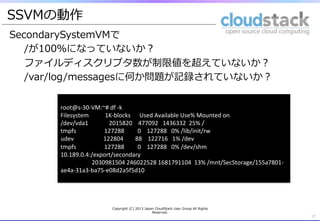
SecondarySystemVMで
/が100%になっていないか?
ファイルディスクリプタ数が制限値を超えていないか?
/var/log/messagesに何か問題が記録されていないか?
17
root@s-‐30-‐VM:~#
df
-‐k
Filesystem
1K-‐blocks
Used
Available
Use%
Mounted
on
/dev/vda1
2015820
477092
1436332
25%
/
tmpfs
127288
0
127288
0%
/lib/init/rw
udev
122804
88
122716
1%
/dev
tmpfs
127288
0
127288
0%
/dev/shm
10.189.0.4:/export/secondary
2030981504
246022528
1681791104
13%
/mnt/SecStorage/155a7801-‐
ae4a-‐31a3-‐ba75-‐e08d2a5f5d10
SSVMの動作
Copyright (C) 2013 Japan CloudStack User Group All Rights
Reserved.
18.
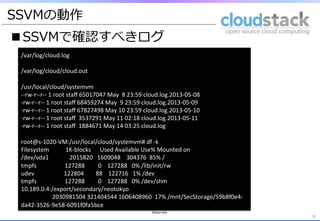
■SSVMで確認すべきログ
18
/var/log/cloud.log
/var/log/cloud/cloud.out
/usr/local/cloud/systemvm
-‐-‐rw-‐r-‐-‐r-‐-‐
1
root
staff
65017047
May
8
23:59
cloud.log.2013-‐05-‐08
-‐rw-‐r-‐-‐r-‐-‐
1
root
staff
68459274
May
9
23:59
cloud.log.2013-‐05-‐09
-‐rw-‐r-‐-‐r-‐-‐
1
root
staff
67827498
May
10
23:59
cloud.log.2013-‐05-‐10
-‐rw-‐r-‐-‐r-‐-‐
1
root
staff
3537291
May
11
02:18
cloud.log.2013-‐05-‐11
-‐rw-‐r-‐-‐r-‐-‐
1
root
staff
1884671
May
14
03:25
cloud.log
root@s-‐1020-‐VM:/usr/local/cloud/systemvm#
df
-‐k
Filesystem
1K-‐blocks
Used
Available
Use%
Mounted
on
/dev/vda1
2015820
1609048
304376
85%
/
tmpfs
127288
0
127288
0%
/lib/init/rw
udev
122804
88
122716
1%
/dev
tmpfs
127288
0
127288
0%
/dev/shm
10.189.0.4:/export/secondary/neotokyo
2030981504
321404544
1606408960
17%
/mnt/SecStorage/59b8f0e4-‐
da42-‐3526-‐9e58-‐6091f0fa5bce
SSVMの動作
Copyright (C) 2013 Japan CloudStack User Group All Rights
Reserved.
![構築時のよくあるコト
■SystemVMが起動しない
GUIで確認するとProxy Console VMと
Secondary Storage VMが「Starting」のまま
4
2012-‐11-‐09
05:52:31,071
ERROR
[cloud.vm.VirtualMachineManagerImpl]
(consoleproxy-‐1:null)
Failed
to
start
instance
VM[ConsoleProxy|v-‐2-‐VM]
2012-‐11-‐09
05:52:32,944
ERROR
[cloud.vm.VirtualMachineManagerImpl]
(secstorage-‐1:null)
Failed
to
start
instance
VM[SecondaryStorageVm|s-‐1-‐VM]
2012-‐11-‐09
05:52:47,271
ERROR
[cloud.vm.VirtualMachineManagerImpl]
(consoleproxy-‐1:null)
Failed
to
start
instance
VM[ConsoleProxy|v-‐2-‐VM]
2012-‐11-‐09
05:52:47,433
ERROR
[cloud.vm.VirtualMachineManagerImpl]
(secstorage-‐1:null)
Failed
to
start
instance
VM[SecondaryStorageVm|s-‐1-‐VM]
2012-‐11-‐09
05:53:17,043
ERROR
[cloud.vm.VirtualMachineManagerImpl]
(consoleproxy-‐1:null)
Failed
to
start
instance
VM[ConsoleProxy|v-‐2-‐VM]
2012-‐11-‐09
05:53:17,841
ERROR
[cloud.vm.VirtualMachineManagerImpl]
(secstorage-‐1:null)
Failed
to
start
instance
VM[SecondaryStorageVm|s-‐3-‐VM]
/var/log/cloud/management/management-‐‑‒server.log
なんかものすごい勢い
でSystemVMが作られ
ては消えてゆく
Copyright (C) 2013 Japan CloudStack User Group All Rights
Reserved.](https://image.slidesharecdn.com/cloudstack720130514-130515205053-phpapp02/85/Cloud-stack-7-20130514-4-320.jpg)
![SystemVMの動作
(1)NFS
・Compute NodeをCloudStack Agentとして登録すると
Compute NodeがPrimaryStorage領領域をmountする
・SystemVM起動(Deploy)時はPrimaryStorage領領域に書き込む
5
Copyright (C) 2012 Japan CloudStack User Group All Rights
Reserved.
5
Management
Server
NFS
Compute
Node
(kvm01)
Compute
Node
(kvm02)
Secondary
Storage
Primary
Storage
[root@kvm01
~]#
df
-‐kh
Filesystem
Size
Used
Avail
Use%
マウント位置
192.168.1.2:/export/primary
66G
8.5G
54G
14%
/mnt/cd80731a-‐f898-‐3ed1-‐9538-‐0f345d1bac6d
SystemVM
NFSの設定を誤るとmount領域のownerがnobody:nobodyになり
仮想イメージを書き込めない。そのためSystemVMをDeployできない 。
正しくroot:rootでmountされていることを確認しましょう
[root@kvm01
mnt]#
ls
-‐lsa
/mnt/cd80731a-‐f898-‐3ed1-‐9538-‐0f345d1bac6d
合計 4727732
4
drwxr-‐xr-‐x.
3
root
root
4096
11月 14
11:53
2012
.](https://image.slidesharecdn.com/cloudstack720130514-130515205053-phpapp02/85/Cloud-stack-7-20130514-5-320.jpg)
![仮想ルータの動作
■仮想ルータ異異常
・FWやLBの設定に失敗する
・新しい仮想インスタンスを作成できない
2012-‐10-‐15
10:46:57,820
WARN
[network.firewall.FirewallManagerImpl]
(Job-‐
Executor-‐49:job-‐60965)
Failed
to
apply
firewall
rules
due
to
2012-‐10-‐15
12:20:01,434
WARN
[cloud.vm.UserVmManagerImpl]
(UserVm-‐Scavenger-‐1:null)
Failed
to
cleanup
resources
as
a
part
of
vm
VM[User|VM名]
expunge
2012-‐10-‐15
11:23:01,490
WARN
[cloud.network.NetworkManagerImpl]
(UserVm-‐Scavenger-‐1:null)
Problems
with
VirtualRouter
but
pushing
on
2012-‐10-‐15
11:28:13,031
WARN
[network.firewall.FirewallManagerImpl]
(UserVm-‐
Scavenger-‐1:null)
Rules
are
not
completely
applied
2012-‐10-‐15
13:33:09,726
WARN
[cloud.vm.UserVmManagerImpl]
(UserVm-‐Scavenger-‐1:null)
Failed
to
cleanup
resources
as
a
part
of
vm
VM[User|VM名]
expunge
2012-‐10-‐15
15:21:06,520
WARN
[network.rules.RulesManagerImpl]
(UserVm-‐Scavenger-‐1:null)
Failed
to
disable
one
to
one
nat
for
the
ip
address
id187875
/var/log/cloud/management/management-‐‑‒server.log
Copyright (C) 2013 Japan CloudStack User Group All Rights
Reserved.](https://image.slidesharecdn.com/cloudstack720130514-130515205053-phpapp02/85/Cloud-stack-7-20130514-8-320.jpg)
![仮想ルータへのログイン
13
仮想ルータにホストからsshできます
13
[root@node006
~]#
ssh
-i
.ssh/id_rsa.cloud
169.254.3.116
-p
3922
Linux
r-5-VM
2.6.32-5-686-bigmem
#1
SMP
Mon
Jan
16
16:42:05
UTC
2012
i686
The
programs
included
with
the
Debian
GNU/Linux
system
are
free
software;
the
exact
distribution
terms
for
each
program
are
described
in
the
individual
files
in
/usr/share/doc/*/copyright.
Debian
GNU/Linux
comes
with
ABSOLUTELY
NO
WARRANTY,
to
the
extent
permitted
by
applicable
law.
Last
login:
Sun
Dec
9
14:20:04
2012
from
169.254.0.1
Linux
r-5-VM
2.6.32-5-686-bigmem
#1
SMP
Mon
Jan
16
16:42:05
UTC
2012
i686
The
programs
included
with
the
Debian
GNU/Linux
system
are
free
software;
the
exact
distribution
terms
for
each
program
are
described
in
the
individual
files
in
/usr/share/doc/*/copyright.
Debian
GNU/Linux
comes
with
ABSOLUTELY
NO
WARRANTY,
to
the
extent
permitted
by
applicable
law.
root@r-5-VM:~#
root@r-5-VM:~#
date;
ifconfig
–a
eth0
Link
encap:Ethernet
HWaddr
02:00:6b:3d:00:02
inet
addr:10.1.1.1
Bcast:10.1.1.255
Mask:255.255.255.0
UP
BROADCAST
RUNNING
MULTICAST
MTU:1500
Metric:1
RX
packets:11592
errors:0
dropped:0
overruns:0
frame:0
TX
packets:8741
errors:0
dropped:0
overruns:0
carrier:0
collisions:0
txqueuelen:1000
RX
bytes:972709
(949.9
KiB)
TX
bytes:2582211
(2.4
MiB)
eth1
Link
encap:Ethernet
HWaddr
0e:00:a9:fe:03:74
inet
addr:169.254.3.116
Bcast:169.254.255.255
Mask:255.255.0.0
UP
BROADCAST
RUNNING
MULTICAST
MTU:1500
Metric:1
RX
packets:12285
errors:0
dropped:0
overruns:0
frame:0
TX
packets:10166
errors:0
dropped:0
overruns:0
carrier:0
collisions:0
txqueuelen:1000
RX
bytes:1937229
(1.8
MiB)
TX
bytes:1915520
(1.8
MiB)
Copyright (C) 2013 Japan CloudStack User Group All Rights
Reserved.](https://image.slidesharecdn.com/cloudstack720130514-130515205053-phpapp02/85/Cloud-stack-7-20130514-13-320.jpg)
![SystemVMの動作
■SystemVM異異常
・SnapShotを取得できない
ERROR
[storage.snapshot.SnapshotManagerImpl]
(Job-‐Executor-‐156:job-‐65771)
Failed
to
destroy
snapshot
id:7257
for
volume:
10221
due
to
failed
to
delete
snapshot
/mnt/SecStorage/
05da41ca-‐20b3-‐3f1a-‐a4af-‐4e9279f3ed63/snapshots/117/10221/*/snapshots/1/117/10221/
_20121024060343*
,
err=Failed
to
delete
file
/mnt/SecStorage/05da41ca-‐20b3-‐3f1a-‐
a4af-‐4e9279f3ed63/snapshots/117/10221/*/snapshots/1/117/10221/
detached_20121024060343*,
err=java.io.IOExcepion:
Cannot
run
program
"/bin/bash":
java.io.IOExcepion:
error=24,
Too
many
open
files
ERROR
[storage.snapshot.SnapshotManagerImpl]
(Job-‐Executor-‐156:job-‐65771)
Failed
to
destroy
snapshot
id:7257
for
volume:
10221
due
to
failed
to
delete
snapshot
/mnt/SecStorage/
05da41ca-‐20b3-‐3f1a-‐a4af-‐4e9279f3ed63/snapshots/117/10221/*/snapshots/1/117/10221/
detached_20121024060343*
,
err=Failed
to
delete
file
/mnt/SecStorage/05da41ca-‐20b3-‐3f1a-‐
a4af-‐4e9279f3ed63/snapshots/117/10221/*/snapshots/1/117/10221/_20121024060343*,
err=java.io.IOExcepion:
Cannot
run
program
"/bin/bash":
java.io.IOExcepion:
error=24,
Too
many
open
files
/var/log/cloud/management/management-‐‑‒server.log
Copyright (C) 2013 Japan CloudStack User Group All Rights
Reserved.](https://image.slidesharecdn.com/cloudstack720130514-130515205053-phpapp02/85/Cloud-stack-7-20130514-15-320.jpg)
![SecondarySystemVMにssh鍵認証でログイン
16
[root@kvm02
~]#
ssh
-‐i
/root/.ssh/id_rsa.cloud
169.254.1.108
-‐p
3922
Linux
s-‐30-‐VM
2.6.32-‐5-‐686-‐bigmem
#1
SMP
Mon
Jan
16
16:42:05
UTC
2012
i686
The
programs
included
with
the
Debian
GNU/Linux
system
are
free
solware;
the
exact
distribuion
terms
for
each
program
are
described
in
the
individual
files
in
/usr/share/doc/*/copyright.
Debian
GNU/Linux
comes
with
ABSOLUTELY
NO
WARRANTY,
to
the
extent
permiped
by
applicable
law.
Last
login:
Wed
Nov
14
10:57:33
2012
from
169.254.0.1
Linux
s-‐30-‐VM
2.6.32-‐5-‐686-‐bigmem
#1
SMP
Mon
Jan
16
16:42:05
UTC
2012
i686
The
programs
included
with
the
Debian
GNU/Linux
system
are
free
solware;
the
exact
distribuion
terms
for
each
program
are
described
in
the
individual
files
in
/usr/share/doc/*/copyright.
Debian
GNU/Linux
comes
with
ABSOLUTELY
NO
WARRANTY,
to
the
extent
permiped
by
applicable
law.
root@s-‐30-‐VM:~#
SSVMの動作
Copyright (C) 2013 Japan CloudStack User Group All Rights
Reserved.](https://image.slidesharecdn.com/cloudstack720130514-130515205053-phpapp02/85/Cloud-stack-7-20130514-16-320.jpg)