Educational Tools of Web 2.0 Expand your curriculum with the free tools of Web 2.0. In this session you will be introduced to and will use such free tools as Flickr, Delicious, Bubbleshare. Take time to explore how they can be integrated into your class work . Putting ideas to work –  123.writeboard.com/b2109008530af5eb5
What is Web 2.0 A paradigm shift in thinking about the web from static to collaborative sharing Social collaboration Students can create new learning opportunities
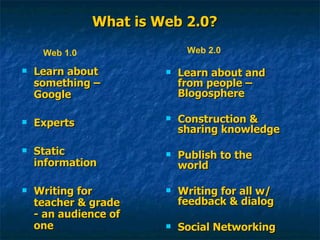
What is Web 2.0? Learn about something – Google Experts Static information Writing for teacher & grade - an audience of one Learn about and from people – Blogosphere Construction & sharing knowledge Publish to the world Writing for all w/ feedback & dialog Social Networking Web 1.0 Web 2.0
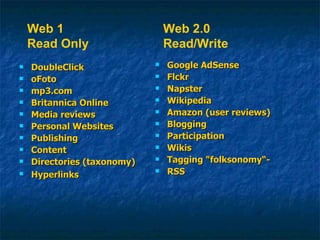
DoubleClick oFoto mp3.com Britannica Online Media reviews  Personal Websites Publishing Content Directories (taxonomy) Hyperlinks Google AdSense Flckr Napster Wikipedia Amazon (user reviews) Blogging Participation Wikis Tagging "folksonomy“- RSS Web 1 Read Only Web 2.0 Read/Write
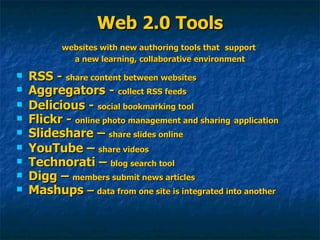
Web 2.0 Tools websites with new authoring tools that   support  a new learning, collaborative environment RSS -  share content between websites Aggregators -  collect RSS feeds Delicious -  social bookmarking tool   Flickr -  online photo management and sharing   application Slideshare –  share slides online YouTube –  share videos   Technorati –  blog search tool Digg –  members submit news articles Mashups  –  data from one site is integrated into another
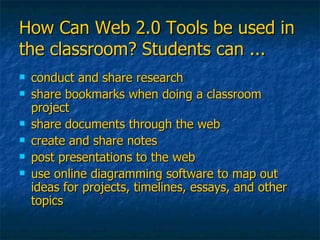
How Can Web 2.0 Tools be used in the classroom? Students can ... conduct and share research share bookmarks when doing a classroom project share documents through the web create and share notes post presentations to the web use online diagramming software to map out ideas for projects, timelines, essays, and other topics
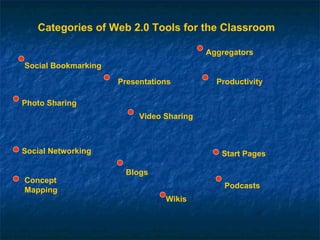
Categories of Web 2.0 Tools for the Classroom Social Bookmarking Photo Sharing Productivity Concept Mapping Wikis Blogs Video Sharing Podcasts Aggregators Social Networking Start Pages Presentations

Web 2.0 workshop

  • 1.
    Educational Tools ofWeb 2.0 Expand your curriculum with the free tools of Web 2.0. In this session you will be introduced to and will use such free tools as Flickr, Delicious, Bubbleshare. Take time to explore how they can be integrated into your class work . Putting ideas to work – 123.writeboard.com/b2109008530af5eb5
  • 2.
    What is Web2.0 A paradigm shift in thinking about the web from static to collaborative sharing Social collaboration Students can create new learning opportunities
  • 3.
    What is Web2.0? Learn about something – Google Experts Static information Writing for teacher & grade - an audience of one Learn about and from people – Blogosphere Construction & sharing knowledge Publish to the world Writing for all w/ feedback & dialog Social Networking Web 1.0 Web 2.0
  • 4.
    DoubleClick oFoto mp3.comBritannica Online Media reviews Personal Websites Publishing Content Directories (taxonomy) Hyperlinks Google AdSense Flckr Napster Wikipedia Amazon (user reviews) Blogging Participation Wikis Tagging "folksonomy“- RSS Web 1 Read Only Web 2.0 Read/Write
  • 5.
    Web 2.0 Toolswebsites with new authoring tools that support a new learning, collaborative environment RSS - share content between websites Aggregators - collect RSS feeds Delicious - social bookmarking tool Flickr - online photo management and sharing application Slideshare – share slides online YouTube – share videos Technorati – blog search tool Digg – members submit news articles Mashups – data from one site is integrated into another
  • 6.
    How Can Web2.0 Tools be used in the classroom? Students can ... conduct and share research share bookmarks when doing a classroom project share documents through the web create and share notes post presentations to the web use online diagramming software to map out ideas for projects, timelines, essays, and other topics
  • 7.
    Categories of Web2.0 Tools for the Classroom Social Bookmarking Photo Sharing Productivity Concept Mapping Wikis Blogs Video Sharing Podcasts Aggregators Social Networking Start Pages Presentations