Layout Editor


Present by Nguyen Huu Phuoc, Founder of NextCMS
             thenextcms@gmail.com
ļ‚— NextCMS is a content management, built on top of
 zend framework, dojo toolkit, and jquery

ļ‚— It is free and open source software


ļ‚— This slide tell you one of many reasons why you should
 choose NextCMS instead of other one
We need a Layout Editor (or Template Builder, or
whatever you say) which is:

ļ‚— Easy to use for both end-users and developers


ļ‚— Easy to customize the layout of page
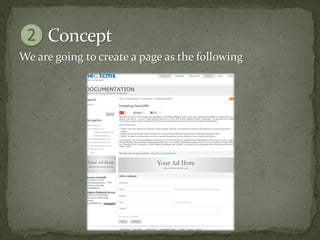
We are going to create a page as the following
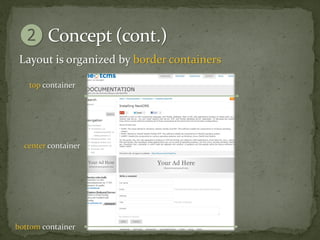
Layout is organized by border containers

   top container


  center container


bottom container
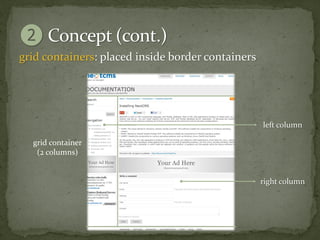
grid containers: placed inside border containers


                                                   left column

  grid container
   (2 columns)


                                                   right column
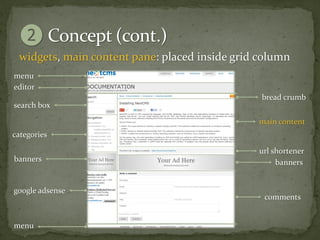
widgets, main content pane: placed inside grid column
menu
editor
                                                bread crumb
search box

                                               main content
categories

                                               url shortener
banners                                             banners


google adsense
                                                comments


menu
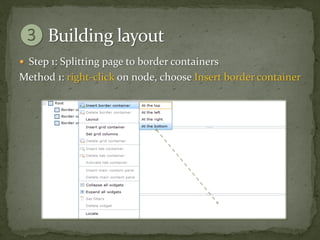
ļ‚— Step 1: Splitting page to border containers
Method 1: right-click on node, choose Insert border container
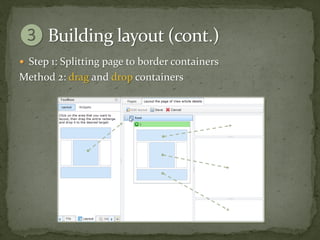
ļ‚— Step 1: Splitting page to border containers
Method 2: drag and drop containers
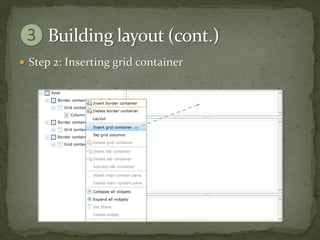
ļ‚— Step 2: Inserting grid container
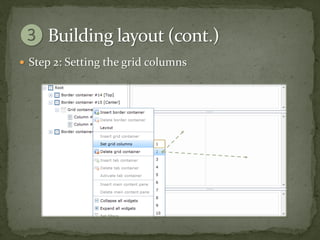
ļ‚— Step 2: Setting the grid columns
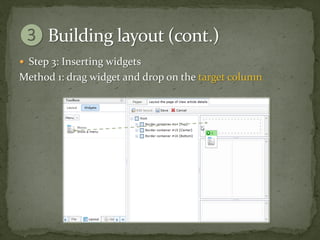
ļ‚— Step 3: Inserting widgets
Method 1: drag widget and drop on the target column
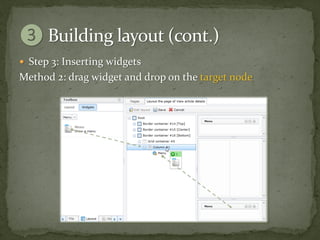
ļ‚— Step 3: Inserting widgets
Method 2: drag widget and drop on the target node
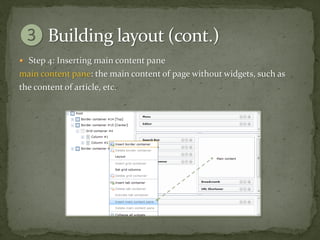
ļ‚— Step 4: Inserting main content pane
main content pane: the main content of page without widgets, such as
the content of article, etc.
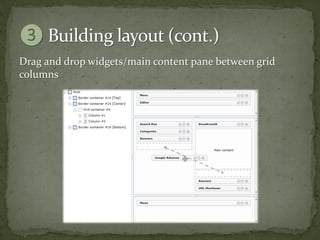
Drag and drop widgets/main content pane between grid
columns
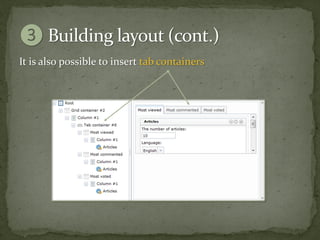
It is also possible to insert tab containers
We need to mofify the content, such as:

ļ‚— Replace special characters with emotion icons in the article’s content


ļ‚— Replace bad word with pre-defined characters in the article’s content


ļ‚— Create a slideshow consisting of all images taken from the article’s
  content

ļ‚— etc.


Content modifiers are called as FILTERS
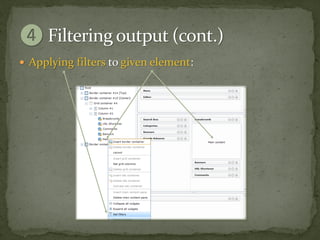
ļ‚— Applying filters to given element:
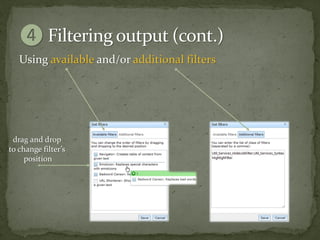
Using available and/or additional filters


 drag and drop
to change filter’s
     position
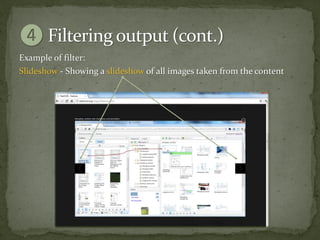
Example of filter:
Slideshow - Showing a slideshow of all images taken from the content
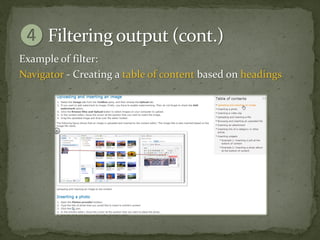
Example of filter:
Navigator - Creating a table of content based on headings
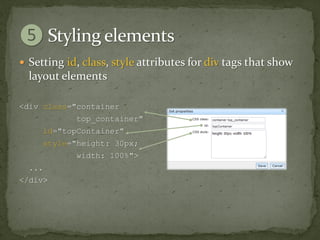
ļ‚— Setting id, class, style attributes for div tags that show
  layout elements

<div class="container
            top_container"
     id="topContainer"
     style="height: 30px;
            width: 100%">
  ...
</div>
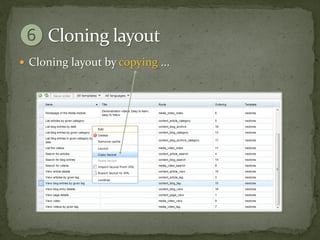
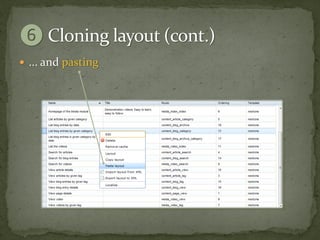
ļ‚— Cloning layout by copying ...
ļ‚— ... and pasting
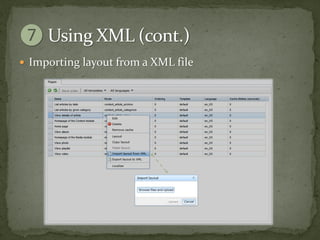
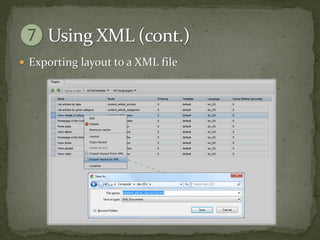
It is possible to define the layout in a XML file:

ļ‚— Template providers can package the template with pre-
  defined layouts

ļ‚— Community can share the layout with each other


ļ‚— Administrator can backup and restore the layout
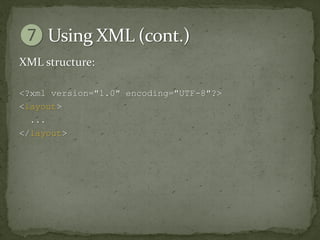
XML structure:

<?xml version="1.0" encoding="UTF-8"?>
<layout>
  ...
</layout>
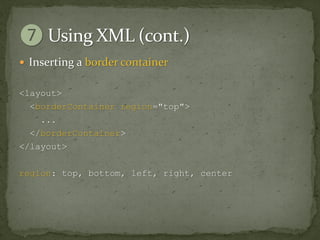
ļ‚— Inserting a border container


<layout>
  <borderContainer region="top">
    ...
  </borderContainer>
</layout>

region: top, bottom, left, right, center
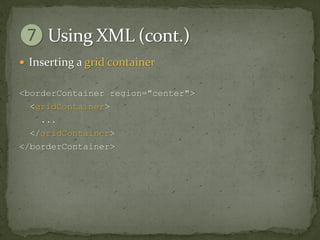
ļ‚— Inserting a grid container


<borderContainer region="center">
  <gridContainer>
    ...
  </gridContainer>
</borderContainer>
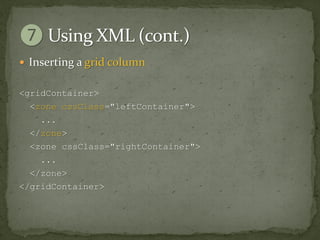
ļ‚— Inserting a grid column


<gridContainer>
  <zone cssClass="leftContainer">
    ...
  </zone>
  <zone cssClass="rightContainer">
    ...
  </zone>
</gridContainer>
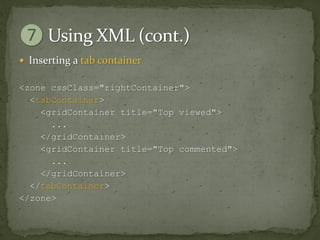
ļ‚— Inserting a tab container

<zone cssClass="rightContainer">
  <tabContainer>
    <gridContainer title="Top viewed">
      ...
    </gridContainer>
    <gridContainer title="Top commented">
      ...
    </gridContainer>
  </tabContainer>
</zone>
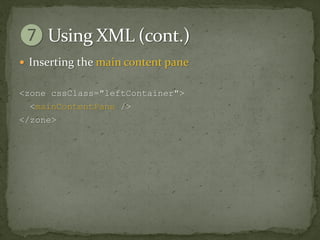
ļ‚— Inserting the main content pane


<zone cssClass="leftContainer">
  <mainContentPane />
</zone>
ļ‚— Inserting a widget

<zone>
  <widget module="content" name="articles"
           title="Latest articles">
    <params>
       <param name="data_source">
         <value><![CDATA[...]]></value>
       </param>
       <param name="template" value="list" />
       <param name="limit" value="4" />
       <param name="category_id" value="__AUTO__" />
    </params>
  </widget>
</zone>
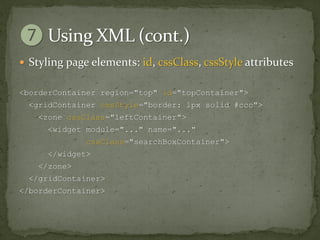
ļ‚— Styling page elements: id, cssClass, cssStyle attributes

<borderContainer region="top" id="topContainer">
  <gridContainer cssStyle="border: 1px solid #ccc">
    <zone cssClass="leftContainer">
      <widget module="..." name="..."
              cssClass="searchBoxContainer">
      </widget>
    </zone>
  </gridContainer>
</borderContainer>
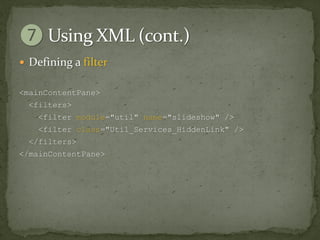
ļ‚— Defining a filter

<mainContentPane>
  <filters>
    <filter module="util" name="slideshow" />
    <filter class="Util_Services_HiddenLink" />
  </filters>
</mainContentPane>
ļ‚— Importing layout from a XML file
ļ‚— Exporting layout to a XML file
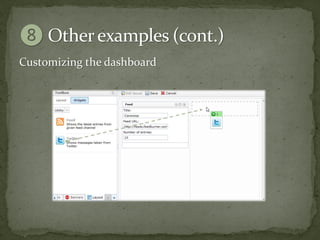
Customizing the dashboard
dashboard: where displays the data you care most

ļ‚— Latest unactivated articles/comments


ļ‚— Latest unread private messages


ļ‚— Uncompleted todo list


ļ‚— etc.
Customizing the dashboard
Have you ever wished?

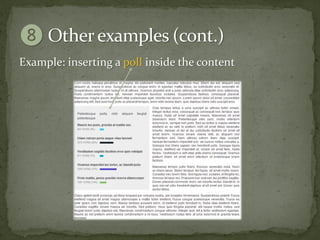
ļ‚— Place a poll inside an article’s content


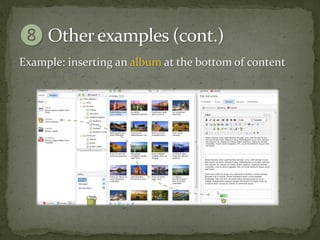
ļ‚— Place a photo slideshow at the end of article’s content


ļ‚— Place a Google Adsense banners inside an article’s
  content

ļ‚— etc.
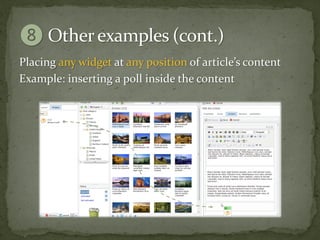
Placing any widget at any position of article’s content
Example: inserting a poll inside the content
Example: inserting an album at the bottom of content
We listen to you!

On social networks
ļ‚— twitter.com/thenextcms
ļ‚— facebook.com/nextcms
ļ‚— youtube.com/thenextcms
ļ‚— slideshare.net/thenextcms
ļ‚— github.com/thenextcms


Email
thenextcms@gmail.com
ļ‚—nextcms.org
ļ‚—nextcms.tv

 Ā© 2012 Nguyen Huu Phuoc
  thenextcms@gmail.com

Why NextCMS: Layout Editor

  • 1.
    Layout Editor Present byNguyen Huu Phuoc, Founder of NextCMS thenextcms@gmail.com
  • 2.
    ļ‚— NextCMS isa content management, built on top of zend framework, dojo toolkit, and jquery ļ‚— It is free and open source software ļ‚— This slide tell you one of many reasons why you should choose NextCMS instead of other one
  • 3.
    We need aLayout Editor (or Template Builder, or whatever you say) which is: ļ‚— Easy to use for both end-users and developers ļ‚— Easy to customize the layout of page
  • 4.
    We are goingto create a page as the following
  • 5.
    Layout is organizedby border containers top container center container bottom container
  • 6.
    grid containers: placedinside border containers left column grid container (2 columns) right column
  • 7.
    widgets, main contentpane: placed inside grid column menu editor bread crumb search box main content categories url shortener banners banners google adsense comments menu
  • 8.
    ļ‚— Step 1:Splitting page to border containers Method 1: right-click on node, choose Insert border container
  • 9.
    ļ‚— Step 1:Splitting page to border containers Method 2: drag and drop containers
  • 10.
    ļ‚— Step 2:Inserting grid container
  • 11.
    ļ‚— Step 2:Setting the grid columns
  • 12.
    ļ‚— Step 3:Inserting widgets Method 1: drag widget and drop on the target column
  • 13.
    ļ‚— Step 3:Inserting widgets Method 2: drag widget and drop on the target node
  • 14.
    ļ‚— Step 4:Inserting main content pane main content pane: the main content of page without widgets, such as the content of article, etc.
  • 15.
    Drag and dropwidgets/main content pane between grid columns
  • 16.
    It is alsopossible to insert tab containers
  • 17.
    We need tomofify the content, such as: ļ‚— Replace special characters with emotion icons in the article’s content ļ‚— Replace bad word with pre-defined characters in the article’s content ļ‚— Create a slideshow consisting of all images taken from the article’s content ļ‚— etc. Content modifiers are called as FILTERS
  • 18.
    ļ‚— Applying filtersto given element:
  • 19.
    Using available and/oradditional filters drag and drop to change filter’s position
  • 20.
    Example of filter: Slideshow- Showing a slideshow of all images taken from the content
  • 21.
    Example of filter: Navigator- Creating a table of content based on headings
  • 22.
    ļ‚— Setting id,class, style attributes for div tags that show layout elements <div class="container top_container" id="topContainer" style="height: 30px; width: 100%"> ... </div>
  • 23.
    ļ‚— Cloning layoutby copying ...
  • 24.
  • 25.
    It is possibleto define the layout in a XML file: ļ‚— Template providers can package the template with pre- defined layouts ļ‚— Community can share the layout with each other ļ‚— Administrator can backup and restore the layout
  • 26.
    XML structure: <?xml version="1.0"encoding="UTF-8"?> <layout> ... </layout>
  • 27.
    ļ‚— Inserting aborder container <layout> <borderContainer region="top"> ... </borderContainer> </layout> region: top, bottom, left, right, center
  • 28.
    ļ‚— Inserting agrid container <borderContainer region="center"> <gridContainer> ... </gridContainer> </borderContainer>
  • 29.
    ļ‚— Inserting agrid column <gridContainer> <zone cssClass="leftContainer"> ... </zone> <zone cssClass="rightContainer"> ... </zone> </gridContainer>
  • 30.
    ļ‚— Inserting atab container <zone cssClass="rightContainer"> <tabContainer> <gridContainer title="Top viewed"> ... </gridContainer> <gridContainer title="Top commented"> ... </gridContainer> </tabContainer> </zone>
  • 31.
    ļ‚— Inserting themain content pane <zone cssClass="leftContainer"> <mainContentPane /> </zone>
  • 32.
    ļ‚— Inserting awidget <zone> <widget module="content" name="articles" title="Latest articles"> <params> <param name="data_source"> <value><![CDATA[...]]></value> </param> <param name="template" value="list" /> <param name="limit" value="4" /> <param name="category_id" value="__AUTO__" /> </params> </widget> </zone>
  • 33.
    ļ‚— Styling pageelements: id, cssClass, cssStyle attributes <borderContainer region="top" id="topContainer"> <gridContainer cssStyle="border: 1px solid #ccc"> <zone cssClass="leftContainer"> <widget module="..." name="..." cssClass="searchBoxContainer"> </widget> </zone> </gridContainer> </borderContainer>
  • 34.
    ļ‚— Defining afilter <mainContentPane> <filters> <filter module="util" name="slideshow" /> <filter class="Util_Services_HiddenLink" /> </filters> </mainContentPane>
  • 35.
    ļ‚— Importing layoutfrom a XML file
  • 36.
  • 37.
    Customizing the dashboard dashboard:where displays the data you care most ļ‚— Latest unactivated articles/comments ļ‚— Latest unread private messages ļ‚— Uncompleted todo list ļ‚— etc.
  • 38.
  • 39.
    Have you everwished? ļ‚— Place a poll inside an article’s content ļ‚— Place a photo slideshow at the end of article’s content ļ‚— Place a Google Adsense banners inside an article’s content ļ‚— etc.
  • 40.
    Placing any widgetat any position of article’s content Example: inserting a poll inside the content
  • 41.
    Example: inserting apoll inside the content
  • 42.
    Example: inserting analbum at the bottom of content
  • 43.
    We listen toyou! On social networks ļ‚— twitter.com/thenextcms ļ‚— facebook.com/nextcms ļ‚— youtube.com/thenextcms ļ‚— slideshare.net/thenextcms ļ‚— github.com/thenextcms Email thenextcms@gmail.com
  • 44.
    ļ‚—nextcms.org ļ‚—nextcms.tv Ā© 2012Nguyen Huu Phuoc thenextcms@gmail.com