Dr. Danielle Babb Website Project
The Extensions JContent Subscription Juser DocMan Marketplace Fireboard Digistore RSS Feeder Glossary Jom Comment Phil-a-Form Seyret My Blog Socioword SocioTag AllVideos SimpleGalleryPro
Sub Headers: PIPE We need DIVIDERS:  |   ( pipe )  in between each link Basic HTML Modification
the   Positioning of the Layout From the TOP
Layout Positioning This is the current Positioning Recommended Positioning Work left to do Notice how the positioning of the layout from the top of the page I recommend that we remove the FONT resizing tools – it’s not necessary for the time being…  We need more space for viewing so we push the layout area up some changing the height between the top of the page and the top of the layout area Basic HTML Modification
Dem   BREADCRUMBS!
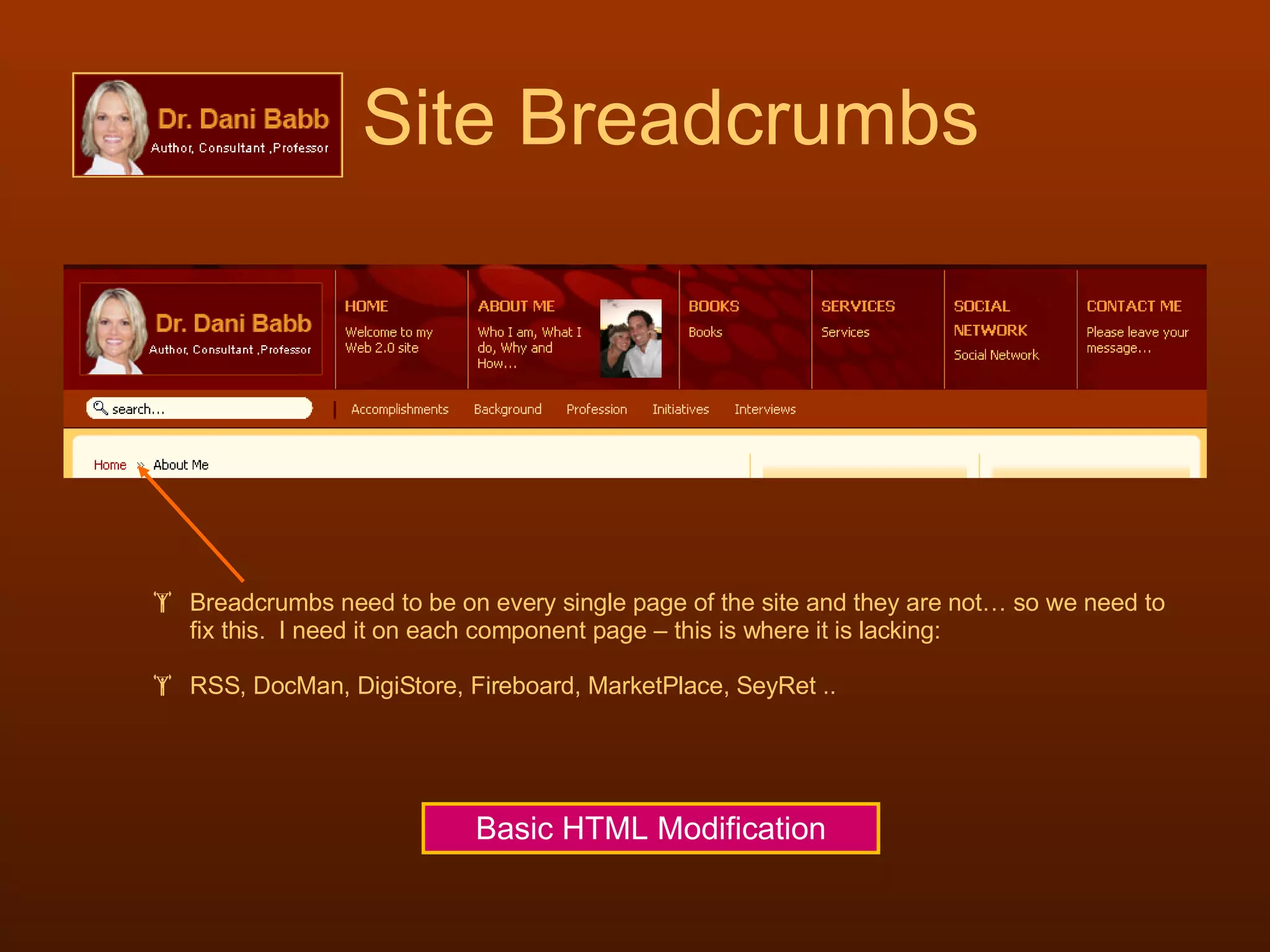
Site Breadcrumbs Breadcrumbs need to be on every single page of the site and they are not… so we need to fix this.  I need it on each component page – this is where it is lacking: RSS, DocMan, DigiStore, Fireboard, MarketPlace, SeyRet .. Basic HTML Modification
the   DISCUSSION FORUMS Fireboard
Fireboard Forum Work left to do The login needs to be synchronized with JContentSubscription Remove un-needed links at the footer JOOMLA  Modification
Fireboard Facelift Work left to do We need to change this background color to #FFFFCC and still leave the same border around it We need to change all of these default icons to something that matches the color scheme of the site Basic CSS Modification and Basic Graphics Editing
the  TEXTBOOK EXCHANGE MarketPlace
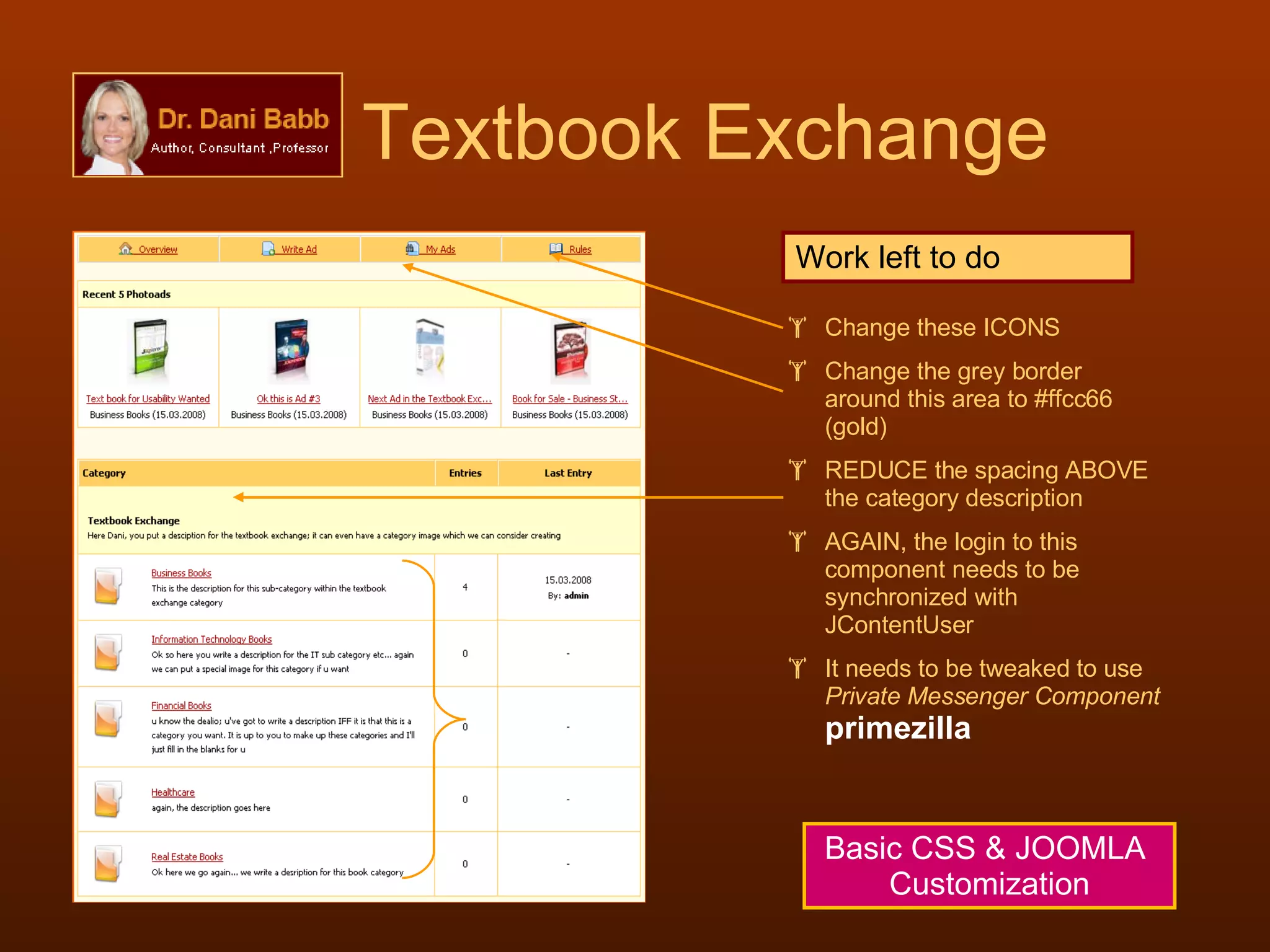
Textbook Exchange Work left to do Change these ICONS Change the grey border around this area to #ffcc66 (gold) REDUCE the spacing ABOVE the category description AGAIN, the login to this component needs to be synchronized with JContentUser It needs to be tweaked to use  Private Messenger Component   primezilla Basic CSS & JOOMLA  Customization
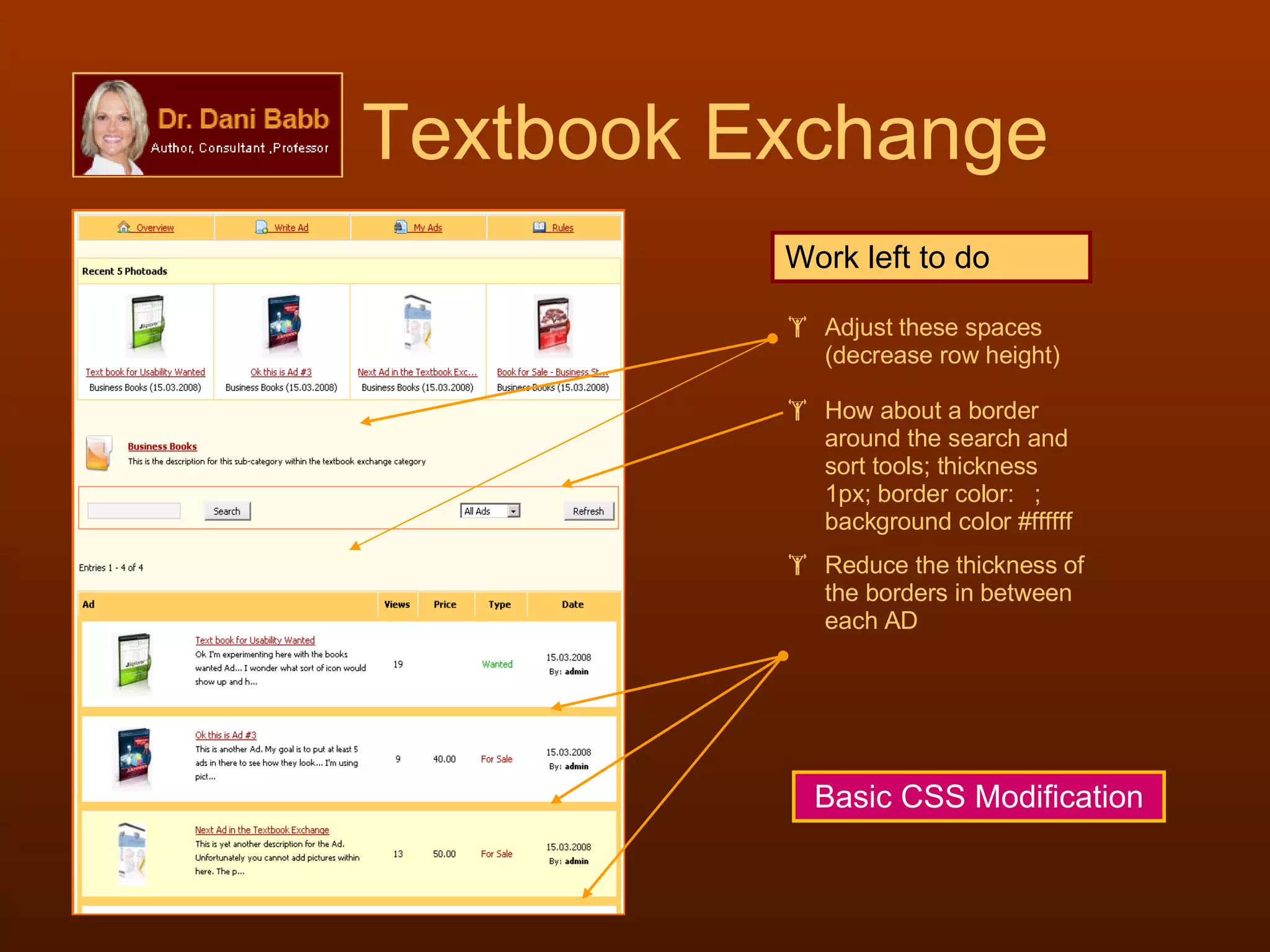
Textbook Exchange Work left to do Adjust these spaces (decrease row height) How about a border around the search and sort tools; thickness 1px; border color:  ; background color #ffffff Reduce the thickness of the borders in between each AD Basic CSS Modification
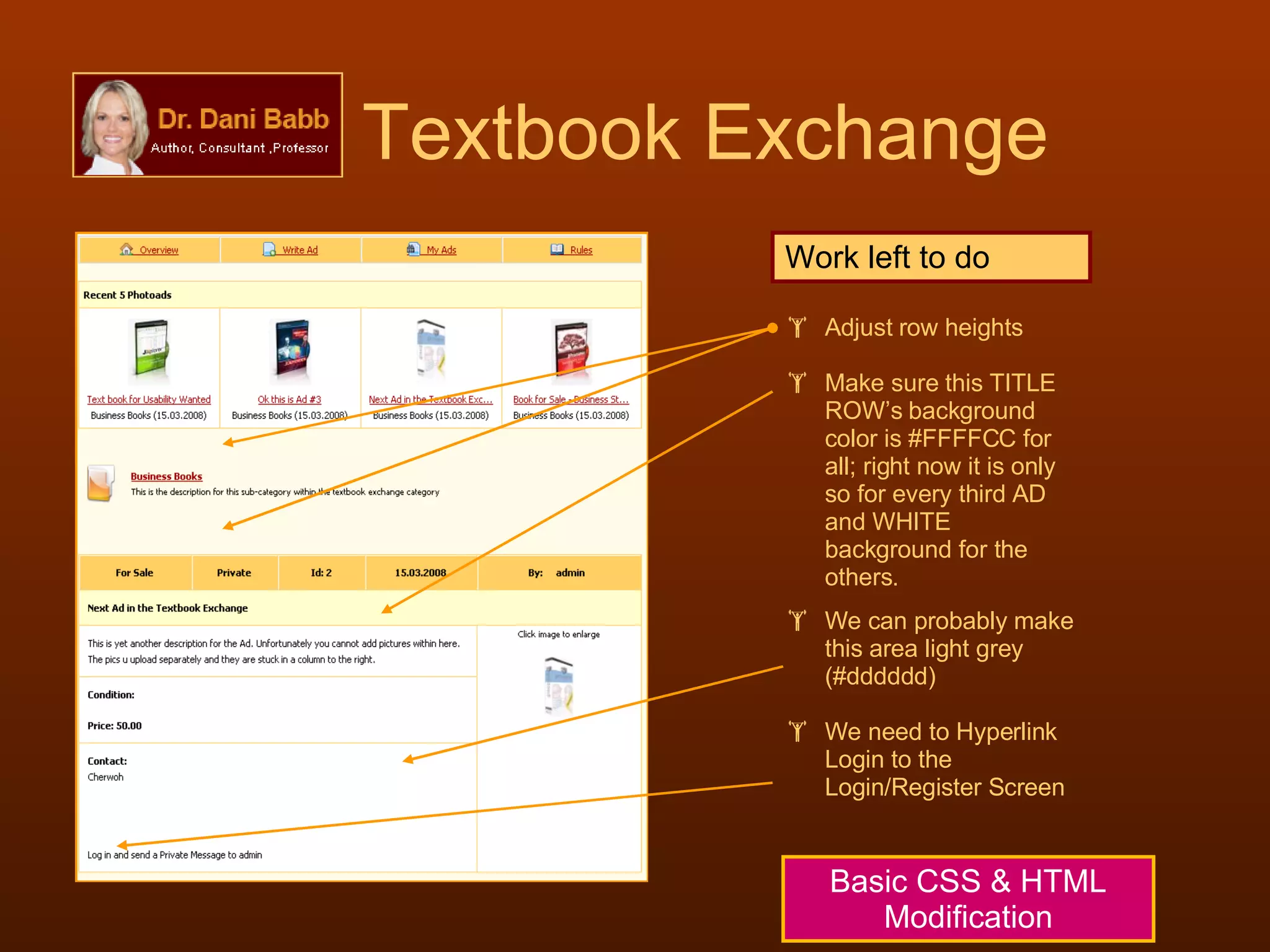
Textbook Exchange Basic CSS & HTML Modification Work left to do Adjust row heights Make sure this TITLE ROW’s background color is #FFFFCC for all; right now it is only so for every third AD and WHITE background for the others.  We can probably make this area light grey (#dddddd) We need to Hyperlink Login to the Login/Register Screen
the   PRIVATE MESSAGE SYSTEM Primezilla
But WHY  primezilla CENTRALIZATION     Different components can use the same SIMPLE System for private messages; primezilla has a  simple and clean  interface It is also the only Private Message System that works with Marketplace ( for your Textbook Exchange ) It also works with Fireboard ( your discussion forums ) It also works with Community Builder ( for social networking – I am thinking of adding this component to the mix) But  primezilla  comes with PROBLEMS - CONFLICTS
primezilla Conflicts The Problem:  Once logged in to primezilla, the Slide Menu (your sliding navigation buttons in the HEADER that uses MooTools), no longer shows up; it disappears. The  Preferences  hyperlink does not work Isolating the Problems I changed the navigation buttons from mootools driven (Slide) to DROPLINE and then SPLIT, same problem I disabled the FONT RESIZE user tools, same problem I disabled all Modules on the page, same problem I then changed the templates to various others, the problem goes away Problem Found: Something in the coding of the  template  is conflicting with the coding in  primezilla  and this conflict has to be resolved.
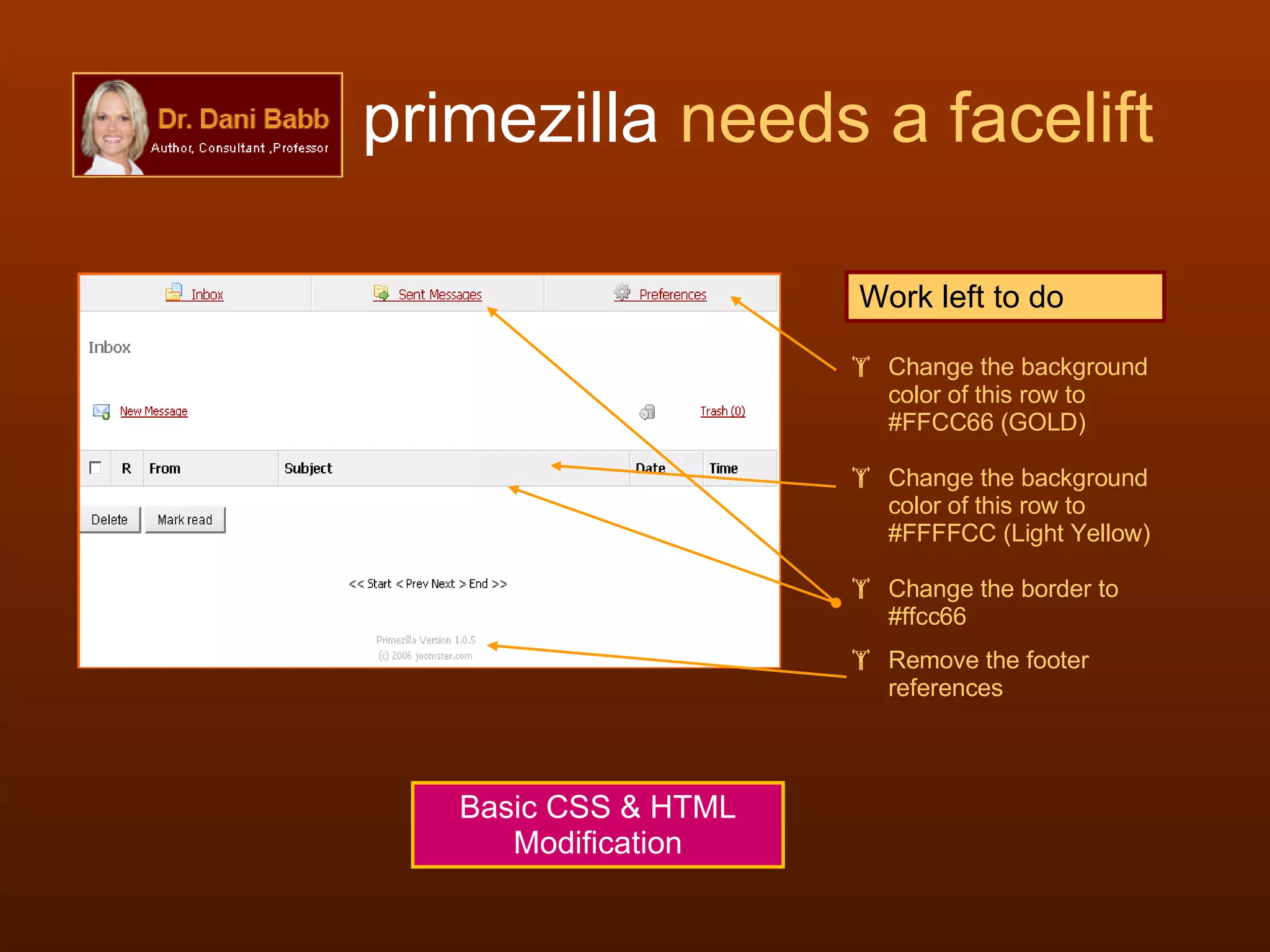
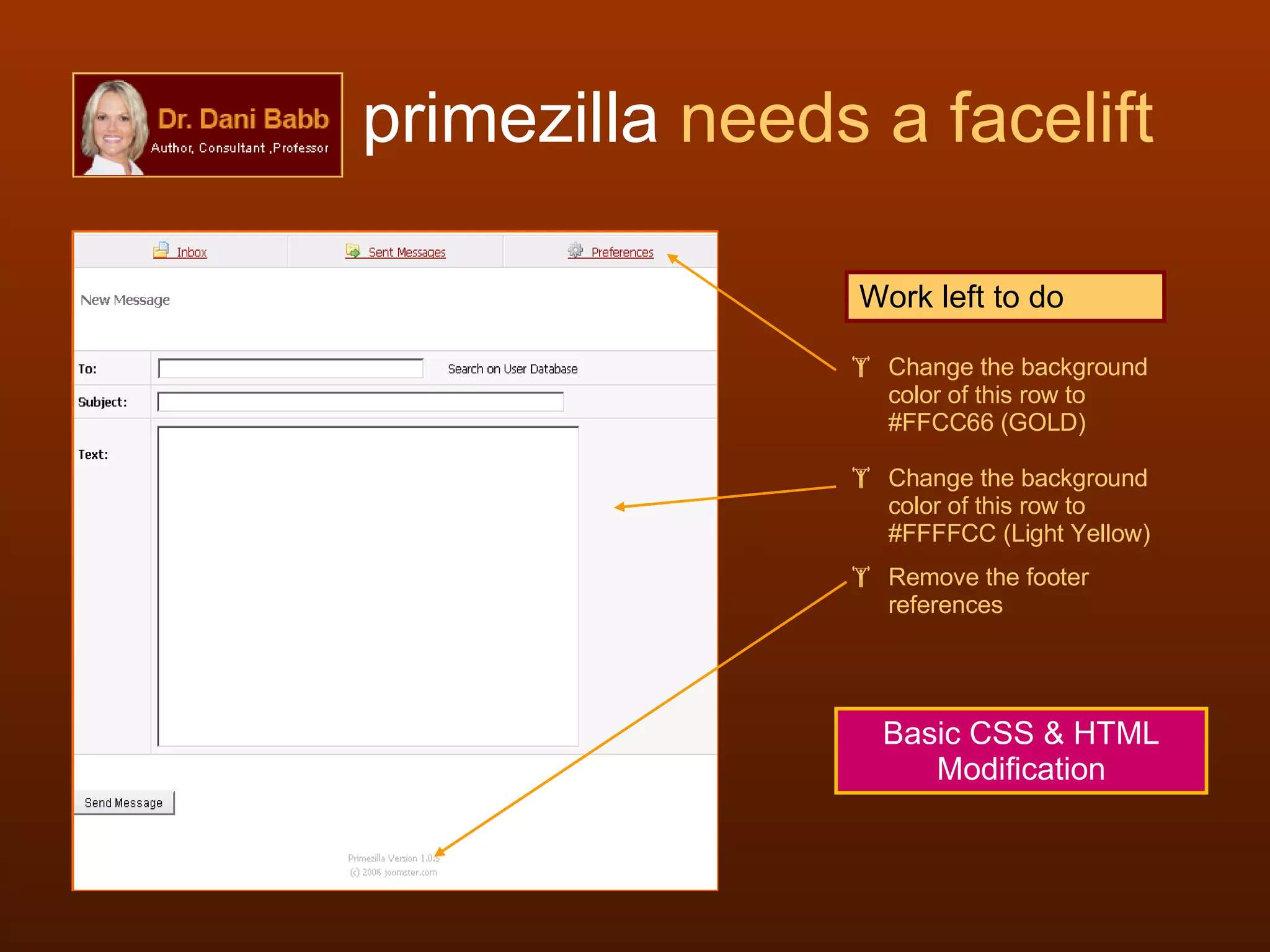
primezilla  needs a facelift Work left to do Change the background color of this row to #FFCC66 (GOLD) Change the background color of this row to #FFFFCC (Light Yellow) Change the border to #ffcc66 Remove the footer references Basic CSS & HTML Modification
primezilla  needs a facelift Work left to do Change the background color of this row to #FFCC66 (GOLD) Change the background color of this row to #FFFFCC (Light Yellow) Remove the footer references Basic CSS & HTML Modification
Sub Headings Work to Do Change the sub headings under each heading in Navigation Bar Hyperlink the Amazon books in NEW WINDOW over to the respective AMAZON links Basic  HTML Modification
Store & Banners ADS for Each Store Category DigiStore
The Store needs work Work to Do Breadcrumbs go here Remove ALL CATEGORIES Create ADS for each section of the store. Maybe we can use the same background and some catchy statement therein with a nice image to the left. Remove these spaces for the description -underneath. The AD should suffice. Remove “View Products” Basic CSS & HTML Modification & Graphics Editing
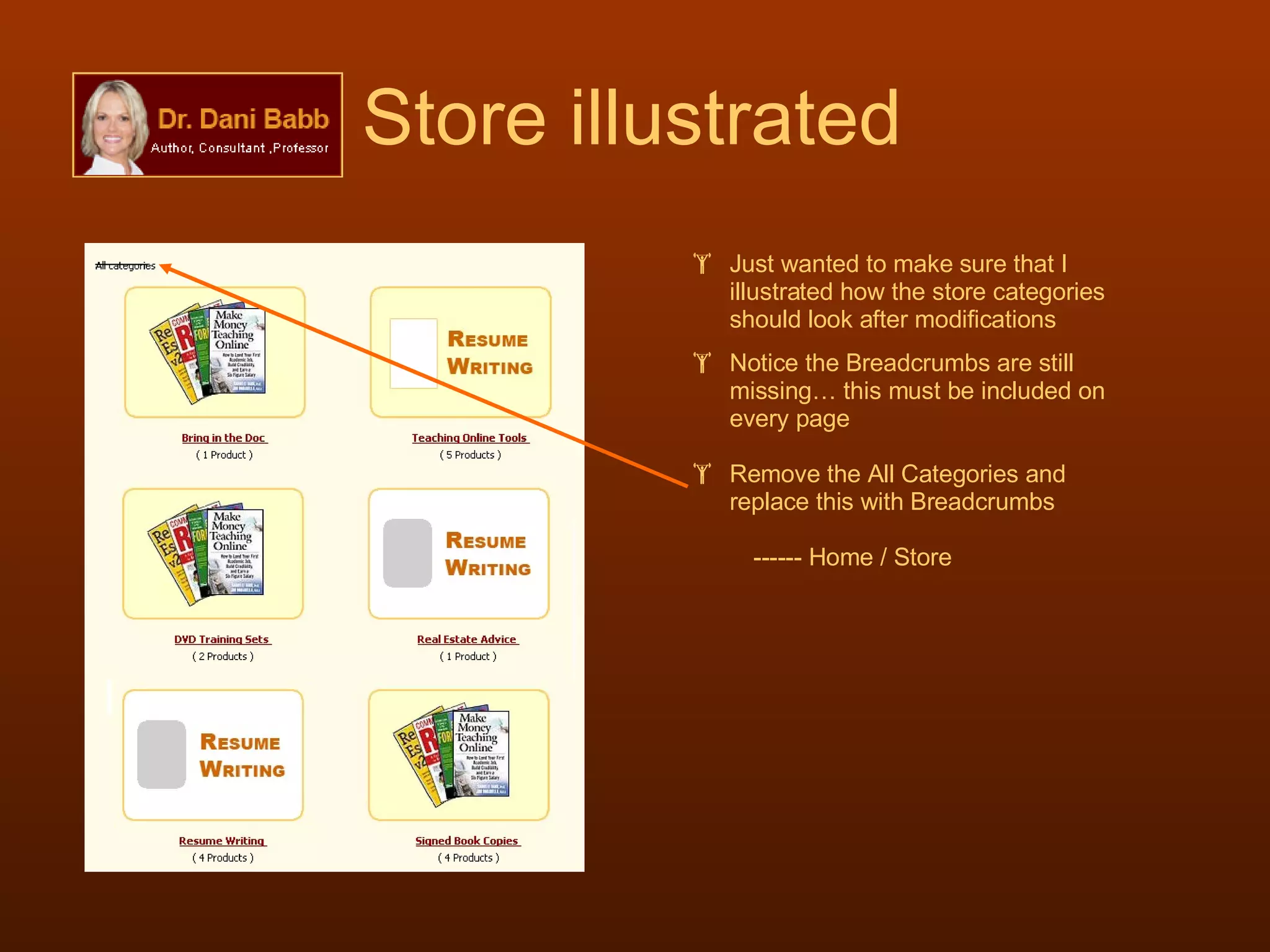
Store illustrated Just wanted to make sure that I illustrated how the store categories should look after modifications Notice the Breadcrumbs are still missing… this must be included on every page Remove the All Categories and replace this with Breadcrumbs ------ Home / Store
the Document Management System DocMan
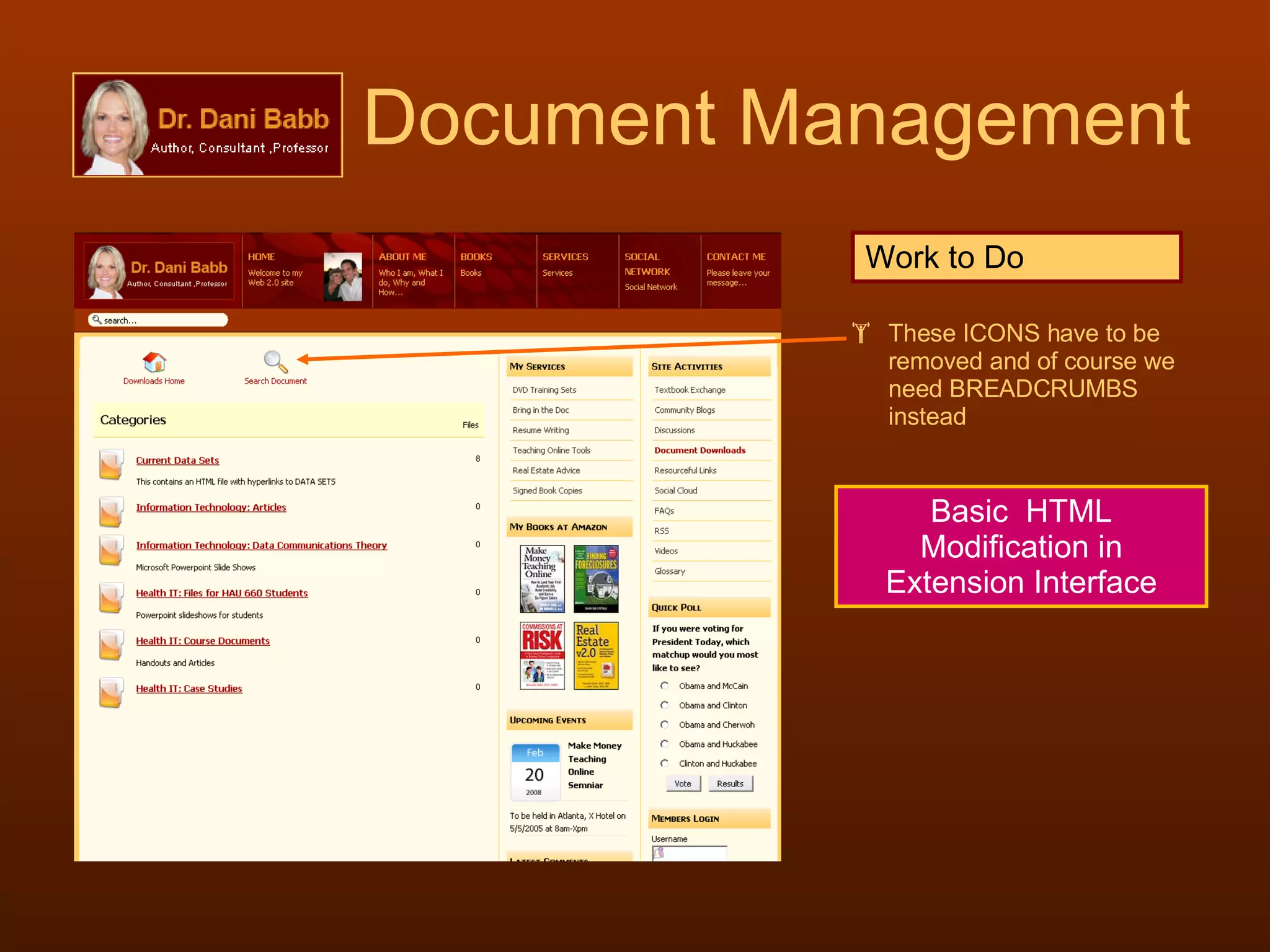
Document Management These ICONS have to be removed and of course we need BREADCRUMBS instead Work to Do Basic  HTML Modification in Extension Interface
Documents Listed Remove the “Details Link” Work to Do Basic  HTML Modification within extension interface
the Contact Page Joomla Native
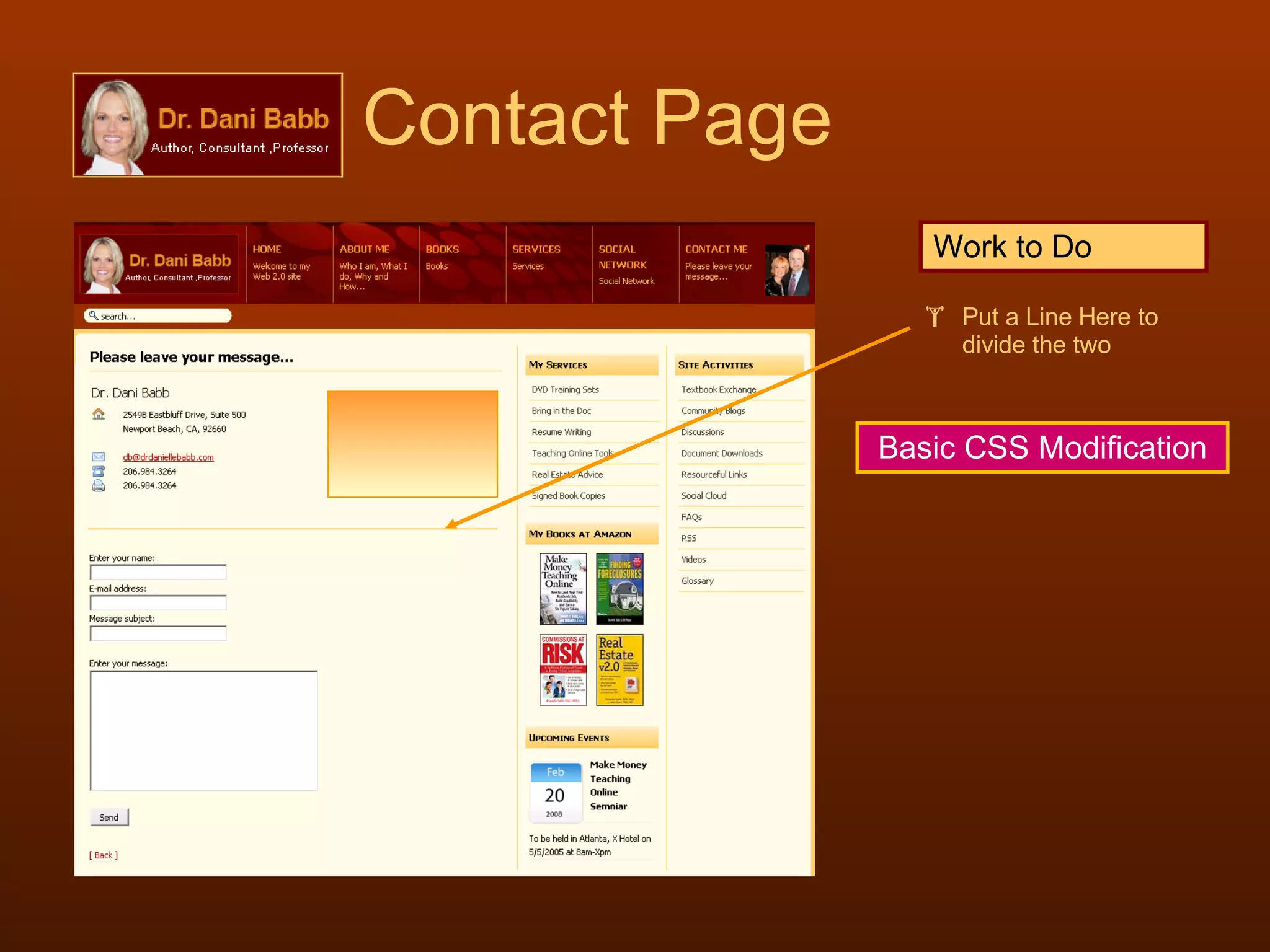
Contact Page Work to Do Put a Line Here to divide the two Basic CSS Modification
the Video Component Seyret
Seyret - After Work Already Done I left the Buttons on the top; those we should change. I removed the information box under the video box I changed the background of the video box to black; it’s quite effective – especially with the 4px border around it We need nicer thumbnails for each video. We need to create them carefully
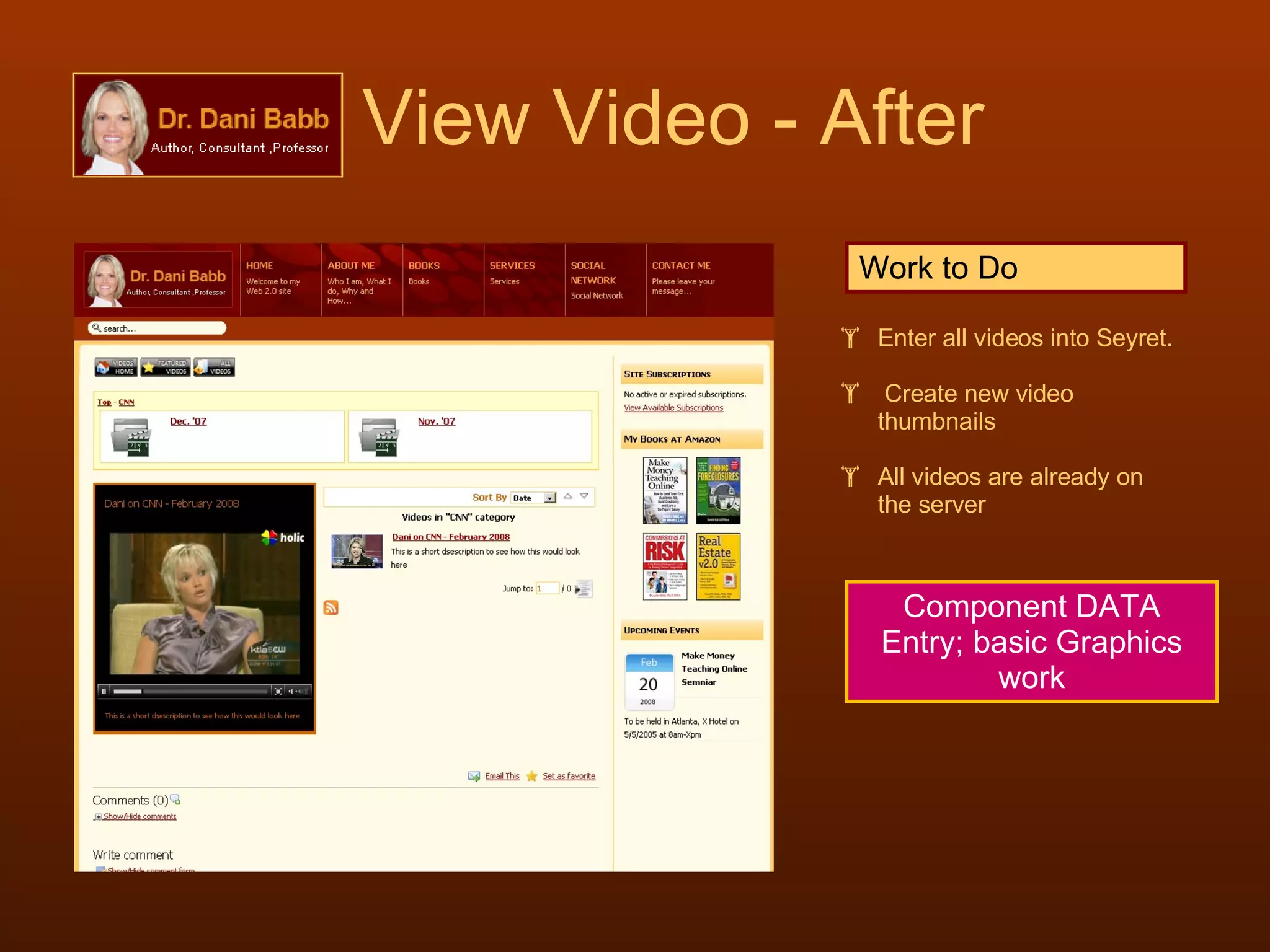
View Video - After Work to Do Enter all videos into Seyret. Create new video thumbnails All videos are already on the server Component DATA Entry; basic Graphics work
OMG!   The FOOTER 
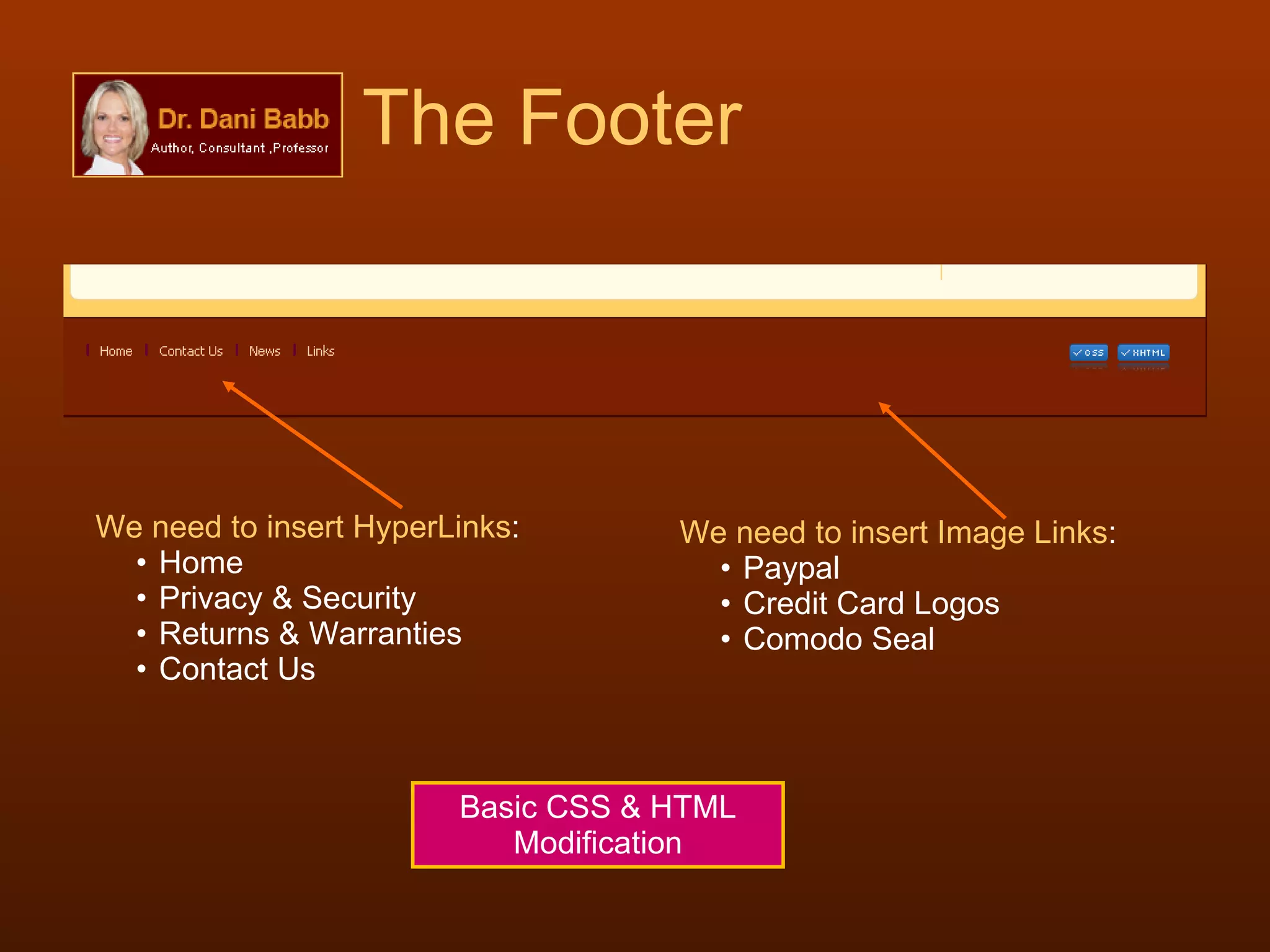
The Footer We need to insert HyperLinks : Home Privacy & Security Returns & Warranties Contact Us We need to insert Image Links : Paypal Credit Card Logos Comodo Seal Basic CSS & HTML Modification
SimpleGalleryPro There is some sort of conflict where the Lightbox effects do not work – please resolve Remove border and shadow from around each image (edit CSS accordingly) Category Image  Conflict Resolution
And now for the   USER EXPERIENCE
The User Experience WATCH Videos Clips Pictures Slide Shows LISTEN Audio Clips Video Clips READ Static Content FAQs About Me Dynamic Content Blogs Comments Discussions BUY Products Services Advertising Tags SUBSCRIBE Memberships Free Paid PARTICIPATE Discussions Text Exchange Blogs & Comments Submit Glossary Terms Download Documents Browse through Links Syndicate Site Contents Vote in Blogs Email to a Friend Bookmark  Add to Favorites  “  OMG… so many things to do here!  "
We’ve got to CENTRALIZE Joomla Customization using integration tool within  JContent -Subscription and JUser   
LOG ON - Centralization Participate Community Downloads Post BLOG Entries Post Comments Submit  Glossary Terms Purchase Products Services Exchange  Text Books Create/Respond Discussion Threads VIEW Content Add Subscriptions Use  JContent Subscription  as the central point for all logon. Synchronize it with  JUser 
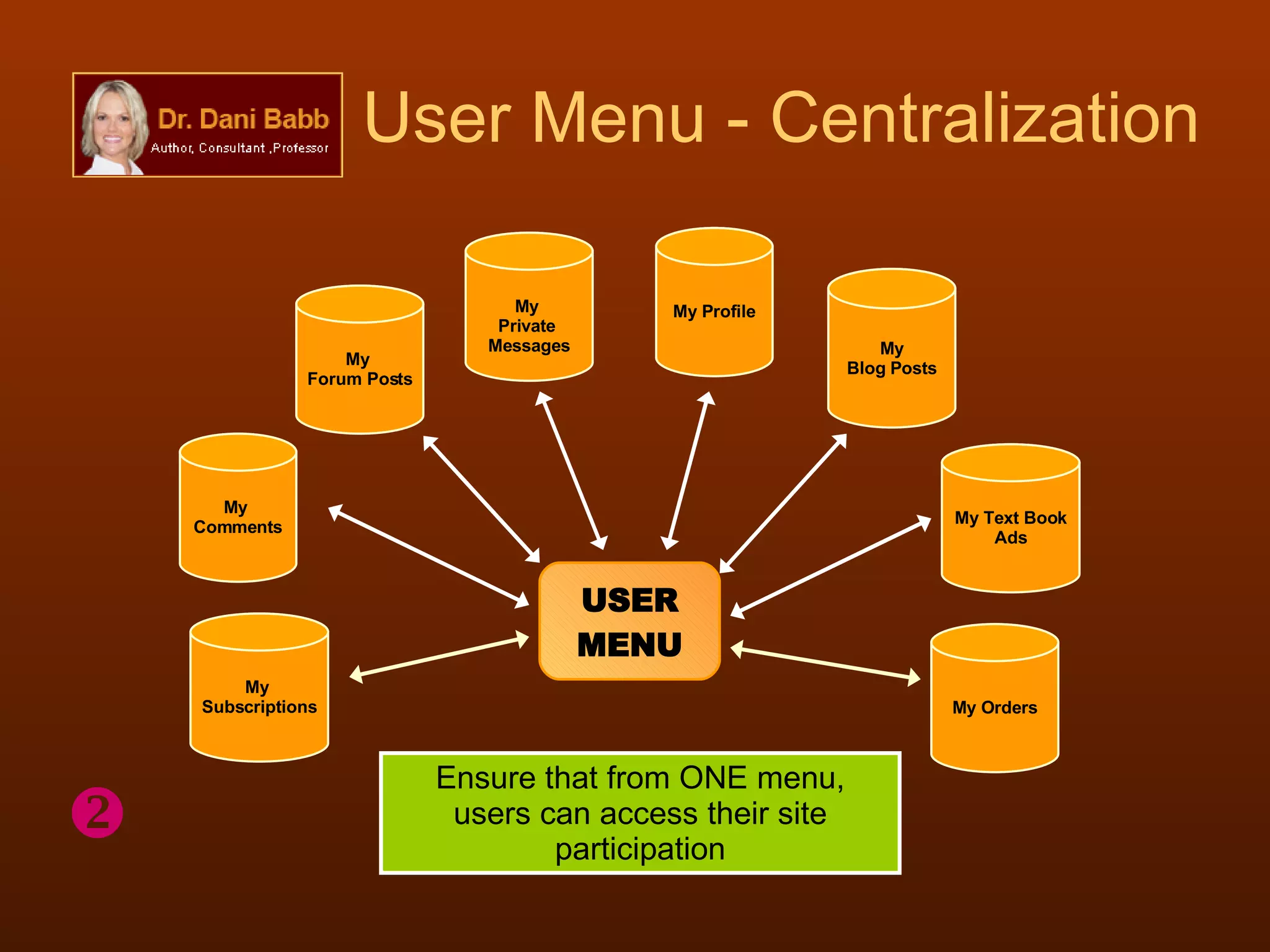
User Menu - Centralization USER MENU My  Comments My  Forum Posts My Blog Posts My Text Book Ads My Profile Ensure that from ONE menu, users can access their site participation My Orders My  Subscriptions My  Private  Messages 
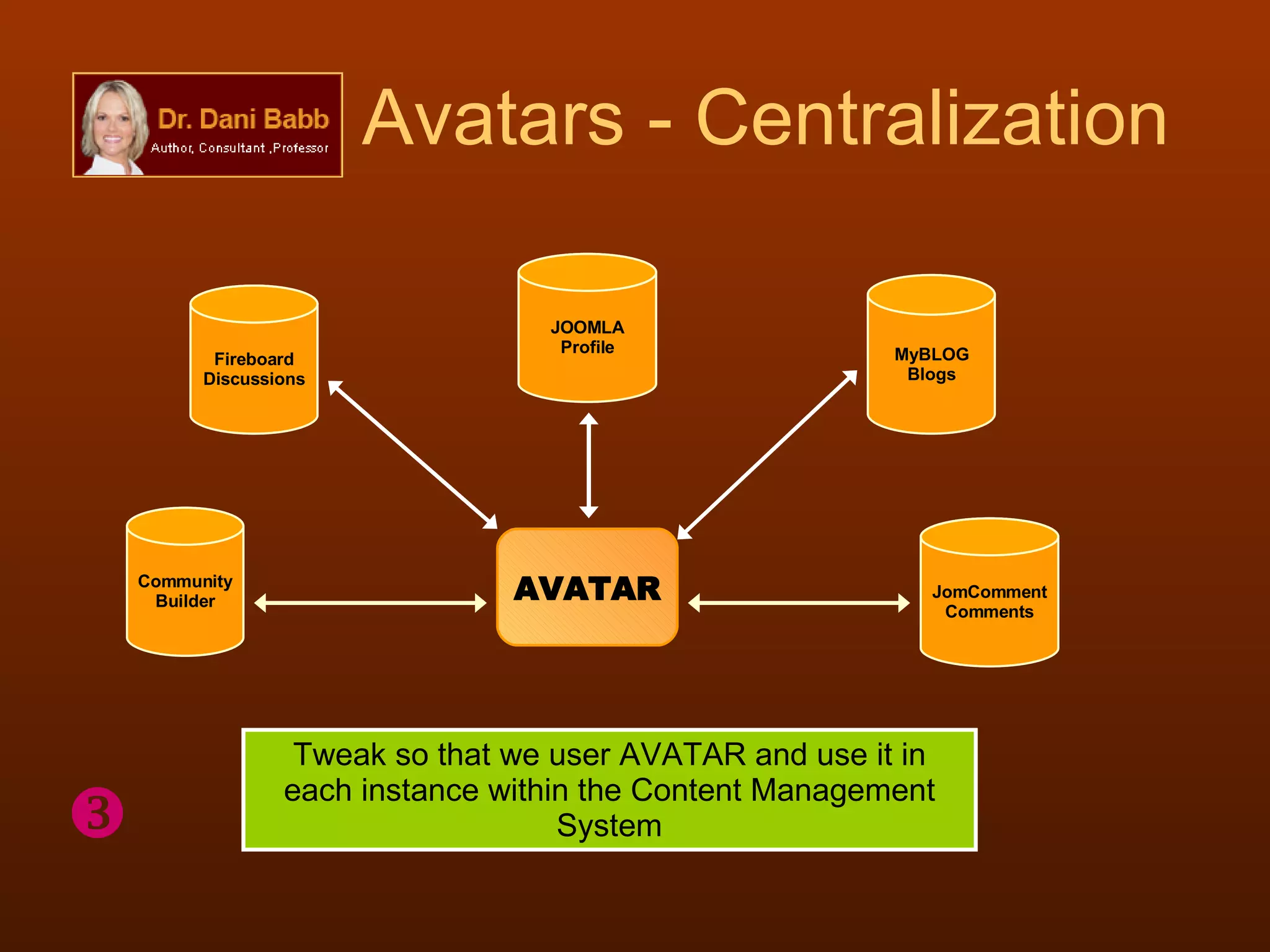
Avatars - Centralization AVATAR Tweak so that we user AVATAR and use it in each instance within the Content Management System  Community Builder Fireboard Discussions MyBLOG Blogs JomComment Comments JOOMLA Profile
PMS - Centralization PMS Community Builder Fireboard Discussions Textbook Exchange Let users use ONE  Private Message System  each of the components that use them Joomla Customization
Validate Site As XHTML & CSS Compliant Basic CSS & HTML
Protect Joomla Code Jdefender Configure Accordingly Extension Customization

Project2 Design Specs

  • 1.
    Dr. Danielle BabbWebsite Project
  • 2.
    The Extensions JContentSubscription Juser DocMan Marketplace Fireboard Digistore RSS Feeder Glossary Jom Comment Phil-a-Form Seyret My Blog Socioword SocioTag AllVideos SimpleGalleryPro
  • 3.
    Sub Headers: PIPEWe need DIVIDERS: | ( pipe ) in between each link Basic HTML Modification
  • 4.
    the Positioning of the Layout From the TOP
  • 5.
    Layout Positioning Thisis the current Positioning Recommended Positioning Work left to do Notice how the positioning of the layout from the top of the page I recommend that we remove the FONT resizing tools – it’s not necessary for the time being… We need more space for viewing so we push the layout area up some changing the height between the top of the page and the top of the layout area Basic HTML Modification
  • 6.
    Dem BREADCRUMBS!
  • 7.
    Site Breadcrumbs Breadcrumbsneed to be on every single page of the site and they are not… so we need to fix this. I need it on each component page – this is where it is lacking: RSS, DocMan, DigiStore, Fireboard, MarketPlace, SeyRet .. Basic HTML Modification
  • 8.
    the DISCUSSION FORUMS Fireboard
  • 9.
    Fireboard Forum Workleft to do The login needs to be synchronized with JContentSubscription Remove un-needed links at the footer JOOMLA Modification
  • 10.
    Fireboard Facelift Workleft to do We need to change this background color to #FFFFCC and still leave the same border around it We need to change all of these default icons to something that matches the color scheme of the site Basic CSS Modification and Basic Graphics Editing
  • 11.
    the TEXTBOOKEXCHANGE MarketPlace
  • 12.
    Textbook Exchange Workleft to do Change these ICONS Change the grey border around this area to #ffcc66 (gold) REDUCE the spacing ABOVE the category description AGAIN, the login to this component needs to be synchronized with JContentUser It needs to be tweaked to use Private Messenger Component primezilla Basic CSS & JOOMLA Customization
  • 13.
    Textbook Exchange Workleft to do Adjust these spaces (decrease row height) How about a border around the search and sort tools; thickness 1px; border color: ; background color #ffffff Reduce the thickness of the borders in between each AD Basic CSS Modification
  • 14.
    Textbook Exchange BasicCSS & HTML Modification Work left to do Adjust row heights Make sure this TITLE ROW’s background color is #FFFFCC for all; right now it is only so for every third AD and WHITE background for the others. We can probably make this area light grey (#dddddd) We need to Hyperlink Login to the Login/Register Screen
  • 15.
    the PRIVATE MESSAGE SYSTEM Primezilla
  • 16.
    But WHY primezilla CENTRALIZATION Different components can use the same SIMPLE System for private messages; primezilla has a simple and clean interface It is also the only Private Message System that works with Marketplace ( for your Textbook Exchange ) It also works with Fireboard ( your discussion forums ) It also works with Community Builder ( for social networking – I am thinking of adding this component to the mix) But primezilla comes with PROBLEMS - CONFLICTS
  • 17.
    primezilla Conflicts TheProblem: Once logged in to primezilla, the Slide Menu (your sliding navigation buttons in the HEADER that uses MooTools), no longer shows up; it disappears. The Preferences hyperlink does not work Isolating the Problems I changed the navigation buttons from mootools driven (Slide) to DROPLINE and then SPLIT, same problem I disabled the FONT RESIZE user tools, same problem I disabled all Modules on the page, same problem I then changed the templates to various others, the problem goes away Problem Found: Something in the coding of the template is conflicting with the coding in primezilla and this conflict has to be resolved.
  • 18.
    primezilla needsa facelift Work left to do Change the background color of this row to #FFCC66 (GOLD) Change the background color of this row to #FFFFCC (Light Yellow) Change the border to #ffcc66 Remove the footer references Basic CSS & HTML Modification
  • 19.
    primezilla needsa facelift Work left to do Change the background color of this row to #FFCC66 (GOLD) Change the background color of this row to #FFFFCC (Light Yellow) Remove the footer references Basic CSS & HTML Modification
  • 20.
    Sub Headings Workto Do Change the sub headings under each heading in Navigation Bar Hyperlink the Amazon books in NEW WINDOW over to the respective AMAZON links Basic HTML Modification
  • 21.
    Store & BannersADS for Each Store Category DigiStore
  • 22.
    The Store needswork Work to Do Breadcrumbs go here Remove ALL CATEGORIES Create ADS for each section of the store. Maybe we can use the same background and some catchy statement therein with a nice image to the left. Remove these spaces for the description -underneath. The AD should suffice. Remove “View Products” Basic CSS & HTML Modification & Graphics Editing
  • 23.
    Store illustrated Justwanted to make sure that I illustrated how the store categories should look after modifications Notice the Breadcrumbs are still missing… this must be included on every page Remove the All Categories and replace this with Breadcrumbs ------ Home / Store
  • 24.
  • 25.
    Document Management TheseICONS have to be removed and of course we need BREADCRUMBS instead Work to Do Basic HTML Modification in Extension Interface
  • 26.
    Documents Listed Removethe “Details Link” Work to Do Basic HTML Modification within extension interface
  • 27.
    the Contact PageJoomla Native
  • 28.
    Contact Page Workto Do Put a Line Here to divide the two Basic CSS Modification
  • 29.
  • 30.
    Seyret - AfterWork Already Done I left the Buttons on the top; those we should change. I removed the information box under the video box I changed the background of the video box to black; it’s quite effective – especially with the 4px border around it We need nicer thumbnails for each video. We need to create them carefully
  • 31.
    View Video -After Work to Do Enter all videos into Seyret. Create new video thumbnails All videos are already on the server Component DATA Entry; basic Graphics work
  • 32.
    OMG! The FOOTER 
  • 33.
    The Footer Weneed to insert HyperLinks : Home Privacy & Security Returns & Warranties Contact Us We need to insert Image Links : Paypal Credit Card Logos Comodo Seal Basic CSS & HTML Modification
  • 34.
    SimpleGalleryPro There issome sort of conflict where the Lightbox effects do not work – please resolve Remove border and shadow from around each image (edit CSS accordingly) Category Image Conflict Resolution
  • 35.
    And now forthe USER EXPERIENCE
  • 36.
    The User ExperienceWATCH Videos Clips Pictures Slide Shows LISTEN Audio Clips Video Clips READ Static Content FAQs About Me Dynamic Content Blogs Comments Discussions BUY Products Services Advertising Tags SUBSCRIBE Memberships Free Paid PARTICIPATE Discussions Text Exchange Blogs & Comments Submit Glossary Terms Download Documents Browse through Links Syndicate Site Contents Vote in Blogs Email to a Friend Bookmark Add to Favorites  “ OMG… so many things to do here! "
  • 37.
    We’ve got toCENTRALIZE Joomla Customization using integration tool within JContent -Subscription and JUser   
  • 38.
    LOG ON -Centralization Participate Community Downloads Post BLOG Entries Post Comments Submit Glossary Terms Purchase Products Services Exchange Text Books Create/Respond Discussion Threads VIEW Content Add Subscriptions Use JContent Subscription as the central point for all logon. Synchronize it with JUser 
  • 39.
    User Menu -Centralization USER MENU My Comments My Forum Posts My Blog Posts My Text Book Ads My Profile Ensure that from ONE menu, users can access their site participation My Orders My Subscriptions My Private Messages 
  • 40.
    Avatars - CentralizationAVATAR Tweak so that we user AVATAR and use it in each instance within the Content Management System  Community Builder Fireboard Discussions MyBLOG Blogs JomComment Comments JOOMLA Profile
  • 41.
    PMS - CentralizationPMS Community Builder Fireboard Discussions Textbook Exchange Let users use ONE Private Message System each of the components that use them Joomla Customization
  • 42.
    Validate Site AsXHTML & CSS Compliant Basic CSS & HTML
  • 43.
    Protect Joomla CodeJdefender Configure Accordingly Extension Customization