#CLOwebinar
Speakers: Steven Rath Morgan
Global Learning Process and Innovation –
Corporate Human Resources
Xerox Corp.
David Wentworth
Senior Learning Analyst
Brandon Hall Group
Kellye Whitney
Associate Editorial Director
Chief Learning Officer magazine
The Evolution of Mobile Learning
#CLOwebinar
Tools You Can Use
Audio Control
– A dial in number will not be provided.
– The audio will come through your
computer speakers or headphones.
– Check the internal volume on your
computer, external speakers or headsets.
#CLOwebinar
Tools You Can Use
Question & Answer
– Click the question icon on the floating
toolbar in the bottom right corner.
– Type your question in the space at the
bottom.
– Click “Send.”
#CLOwebinar
Frequently Asked Questions
1. May I receive a copy of the slides?
YES! You will receive a link to today’s recording, along with a link
to download the slides shortly after the presentation
concludes.
2. May I review the webinar recording at a later time?
YES! You may log in again. A link that will be provided in an email
after the event to review the presentation on-demand.
#CLOwebinar
Mobile Learning:
The Evolution of Content
Kellye Whitney
Associate Editorial Director
Chief Learning Officer magazine
kwhitney@humancapitalmedia.com
2004 – M-Learning: The Next Wave for Training
and Development
2005 – Mobile Learning: The Next Evolution of
Education
2007 – Mobile Learning: The Next Step in
Technology-Mediated Learning
There’s something new on the market…
www.CLOmedia.com
2007 – How the iPhone Will Shape the Future of
Mobile Learning
2008 – Merrill Lynch: Bullish on Mobile Learning
2012 – Your Brain on Apps
2012 – Is Mobile Learning Right for You?
But we need more information…
www.CLOmedia.com
2013 – Is There an App for Leadership
Development?
2013 – Learning 2014: Mobile and Social
Opportunities
2014 – Working Out the Kinks: Companies
Experiment with Mobile
Now let’s talk specifics…
www.CLOmedia.com
Mobile Learning Research
#CLOwebinar
David Wentworth
Senior Learning Analyst
Brandon Hall Group
David.Wentworth@brandonhall.com
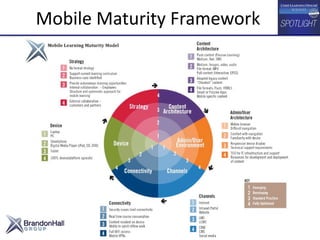
Mobile Maturity Framework
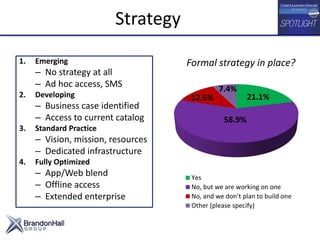
Strategy
1. Emerging
– No strategy at all
– Ad hoc access, SMS
2. Developing
– Business case identified
– Access to current catalog
3. Standard Practice
– Vision, mission, resources
– Dedicated infrastructure
4. Fully Optimized
– App/Web blend
– Offline access
– Extended enterprise
21.1%
58.9%
12.6%
7.4%
Yes
No, but we are working on one
No, and we don’t plan to build one
Other (please specify)
Formal strategy in place?
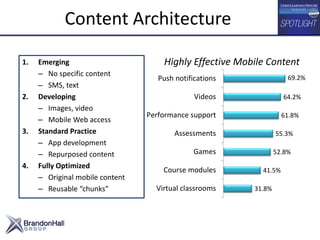
Content Architecture
1. Emerging
– No specific content
– SMS, text
2. Developing
– Images, video
– Mobile Web access
3. Standard Practice
– App development
– Repurposed content
4. Fully Optimized
– Original mobile content
– Reusable “chunks”
Highly Effective Mobile Content
31.8%
41.5%
52.8%
55.3%
61.8%
64.2%
69.2%
Virtual classrooms
Course modules
Games
Assessments
Performance support
Videos
Push notifications
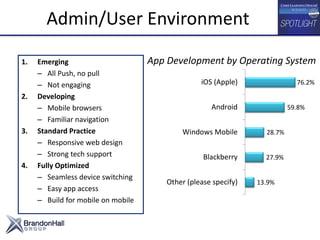
Admin/User Environment
1. Emerging
– All Push, no pull
– Not engaging
2. Developing
– Mobile browsers
– Familiar navigation
3. Standard Practice
– Responsive web design
– Strong tech support
4. Fully Optimized
– Seamless device switching
– Easy app access
– Build for mobile on mobile
App Development by Operating System
13.9%
27.9%
28.7%
59.8%
76.2%
Other (please specify)
Blackberry
Windows Mobile
Android
iOS (Apple)
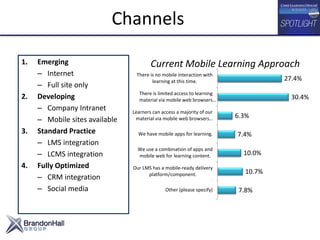
Channels
1. Emerging
– Internet
– Full site only
2. Developing
– Company Intranet
– Mobile sites available
3. Standard Practice
– LMS integration
– LCMS integration
4. Fully Optimized
– CRM integration
– Social media
Current Mobile Learning Approach
7.8%
10.7%
10.0%
7.4%
6.3%
30.4%
27.4%
Other (please specify)
Our LMS has a mobile-ready delivery
platform/component.
We use a combination of apps and
mobile web for learning content.
We have mobile apps for learning.
Learners can access a majority of our
material via mobile web browsers…
There is limited access to learning
material via mobile web browsers…
There is no mobile interaction with
learning at this time.
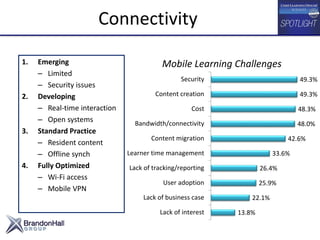
Connectivity
1. Emerging
– Limited
– Security issues
2. Developing
– Real-time interaction
– Open systems
3. Standard Practice
– Resident content
– Offline synch
4. Fully Optimized
– Wi-Fi access
– Mobile VPN
Mobile Learning Challenges
13.8%
22.1%
25.9%
26.4%
33.6%
42.6%
48.0%
48.3%
49.3%
49.3%
Lack of interest
Lack of business case
User adoption
Lack of tracking/reporting
Learner time management
Content migration
Bandwidth/connectivity
Cost
Content creation
Security
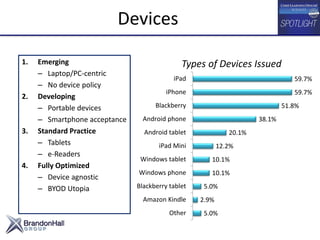
Devices
1. Emerging
– Laptop/PC-centric
– No device policy
2. Developing
– Portable devices
– Smartphone acceptance
3. Standard Practice
– Tablets
– e-Readers
4. Fully Optimized
– Device agnostic
– BYOD Utopia
Types of Devices Issued
5.0%
2.9%
5.0%
10.1%
10.1%
12.2%
20.1%
38.1%
51.8%
59.7%
59.7%
Other
Amazon Kindle
Blackberry tablet
Windows phone
Windows tablet
iPad Mini
Android tablet
Android phone
Blackberry
iPhone
iPad
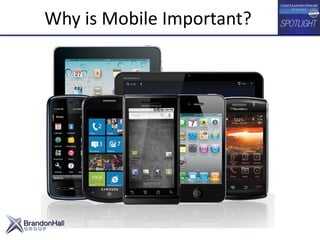
Why is Mobile Important?
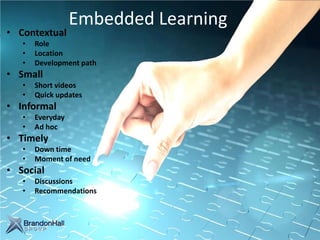
Embedded Learning
• Contextual
• Role
• Location
• Development path
• Small
• Short videos
• Quick updates
• Informal
• Everyday
• Ad hoc
• Timely
• Down time
• Moment of need
• Social
• Discussions
• Recommendations
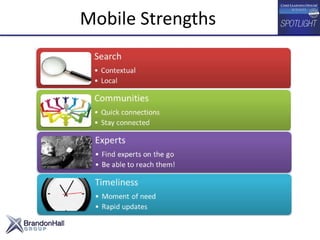
Mobile Strengths
• Ask “Why?” What’s the business case? What’s the learning challenge?
• Mobile isn’t right for everything.
• Your LMS won’t fit on a phone.
• Mobile is unique and different.
• Start small: one piece of one program to one group.
• Develop a content strategy that compliments traditional learning design
structure.
• Don’t devote all your time to breaking down traditional content. Start
building new for mobile delivery.
• Identify existing elements that could be delivered via mobile.
• Establish metrics to continuously measure and improve mobile learning
nuggets.
Getting Started and Moving Ahead
Spotlight on Xerox:
The Evolution of Mobile Learning
Steven Rath Morgan
Xerox Global Learning
Corporate Human Resources
Steven.rathmorgan@xerox.com‘
For use by permission only
Ready For Real Business
Founded: 1906
Revenue: $22.3 billion (2012)
Employees: 140,000 in 160 countries
Partners: > 60,000 who work under the brand
Xerox at a glance
Global Learning Priorities
Transition from Training to culture of Learning
• Cultivate workforce engagement – Individual ownership for
learning
• Build practice of workforce knowledge sharing
• Reduce time out of the field for learning
• Drive global workforce capability
• Deliver higher quality and lower cost learning solutions
• Enable workforce mobility, mobile access to content
Integrate learning
with work
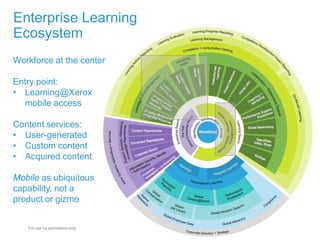
Enterprise Learning
Ecosystem
March 14, 2014 Xerox Internal Use Only
25
Workforce at the center
Entry point:
• Learning@Xerox
mobile access
Content services:
• User-generated
• Custom content
• Acquired content
Mobile as ubiquitous
capability, not a
product or gizmo
For use by permission only
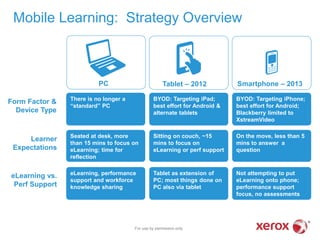
Mobile Learning: Strategy Overview
PC Tablet – 2012 Smartphone – 2013
There is no longer a
“standard” PC
BYOD: Targeting iPad;
best effort for Android &
alternate tablets
BYOD: Targeting iPhone;
best effort for Android;
Blackberry limited to
XstreamVideo
Seated at desk, more
than 15 mins to focus on
eLearning; time for
reflection
Sitting on couch, ~15
mins to focus on
eLearning or perf support
On the move, less than 5
mins to answer a
question
eLearning, performance
support and workforce
knowledge sharing
Tablet as extension of
PC; most things done on
PC also via tablet
Not attempting to put
eLearning onto phone;
performance support
focus, no assessments
Form Factor &
Device Type
eLearning vs.
Perf Support
Learner
Expectations
For use by permission only
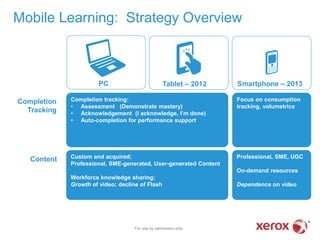
Custom and acquired;
Professional, SME-generated, User-generated Content
Workforce knowledge sharing;
Growth of video; decline of Flash
Mobile Learning: Strategy Overview
PC Tablet – 2012 Smartphone – 2013
Completion tracking:
• Assessment (Demonstrate mastery)
• Acknowledgement (I acknowledge, I’m done)
• Auto-completion for performance support
Focus on consumption
tracking, volumetrics
Professional, SME, UGC
On-demand resources
Dependence on video
Completion
Tracking
Content
For use by permission only
Workforce knowledge sharing
through user-generated video
For use by permission only
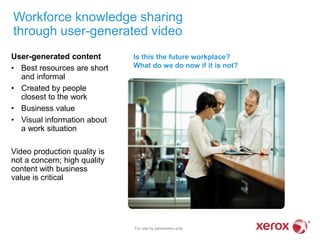
User-generated content
• Best resources are short
and informal
• Created by people
closest to the work
• Business value
• Visual information about
a work situation
Video production quality is
not a concern; high quality
content with business
value is critical
Is this the future workplace?
What do we do now if it is not?
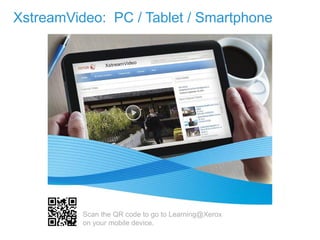
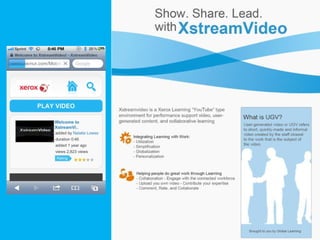
XstreamVideo: PC / Tablet / Smartphone
March 14, 2014 Xerox Internal Use Only29
Page 29
Scan the QR code to go to Learning@Xerox
on your mobile device.
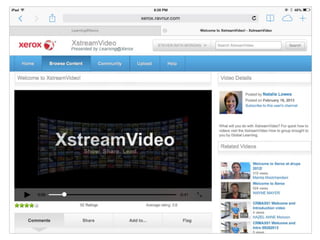
March 14, 2014 Xerox Internal Use Only30
Page 30
Scan the QR code to go to Learning@Xerox
on your mobile device.
XstreamVideo: PC / Tablet / Smartphone
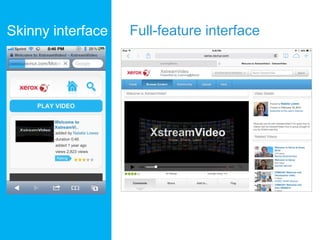
Skinny interface Full-feature interface
For use by permission only
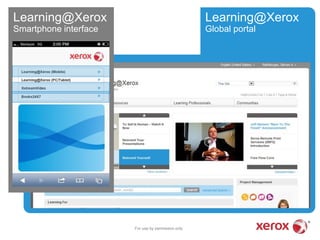
Learning@Xerox Learning@Xerox
Smartphone interface Global portal
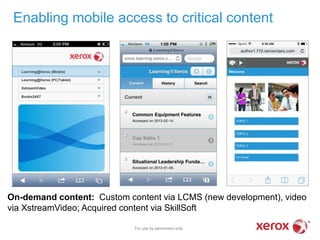
On-demand content: Custom content via LCMS (new development), video
via XstreamVideo; Acquired content via SkillSoft
Enabling mobile access to critical content
For use by permission only
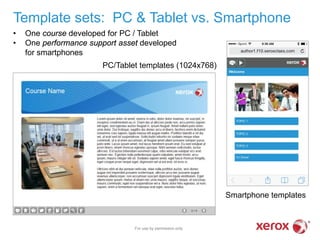
• One course developed for PC / Tablet
• One performance support asset developed
for smartphones
PC/Tablet templates (1024x768)
Smartphone templates
Template sets: PC & Tablet vs. Smartphone
For use by permission only
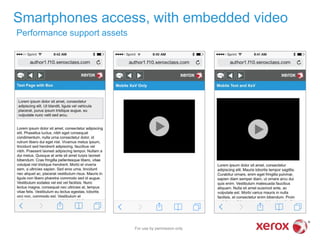
Smartphones access, with embedded video
Performance support assets
For use by permission only
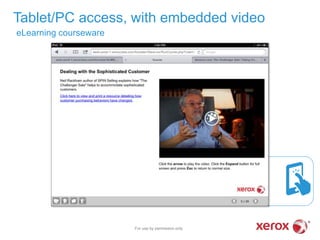
Tablet/PC access, with embedded video
eLearning courseware
For use by permission only
Xerox Internal Use Only
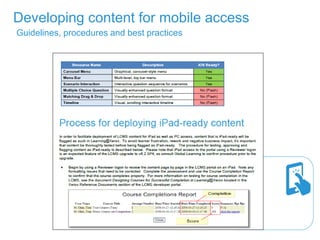
Developing content for mobile access
Guidelines, procedures and best practices
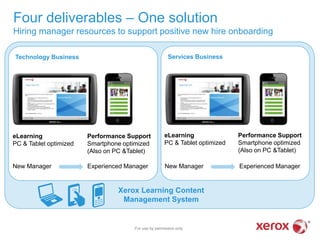
Xerox Learning Content
Management System
Services BusinessTechnology Business
Four deliverables – One solution
Hiring manager resources to support positive new hire onboarding
For use by permission only
eLearning
PC & Tablet optimized
Performance Support
Smartphone optimized
(Also on PC &Tablet)
eLearning
PC & Tablet optimized
Performance Support
Smartphone optimized
(Also on PC &Tablet)
New Manager Experienced Manager New Manager Experienced Manager
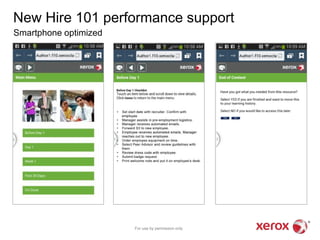
New Hire 101 performance support
Smartphone optimized
For use by permission only
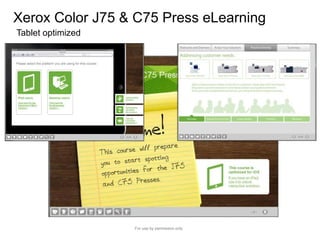
Xerox Color J75 & C75 Press eLearning
Tablet optimized
For use by permission only
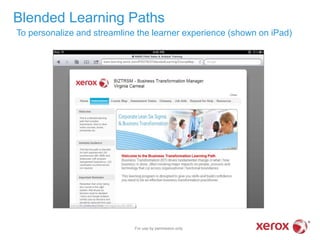
Blended Learning Paths
To personalize and streamline the learner experience (shown on iPad)
For use by permission only
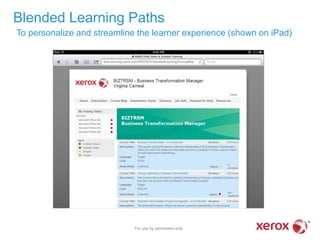
Blended Learning Paths
To personalize and streamline the learner experience (shown on iPad)
For use by permission only
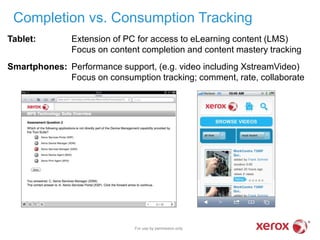
Tablet: Extension of PC for access to eLearning content (LMS)
Focus on content completion and content mastery tracking
Smartphones: Performance support, (e.g. video including XstreamVideo)
Focus on consumption tracking; comment, rate, collaborate
Completion vs. Consumption Tracking
For use by permission only
Success criteria
Utilization
Stickiness
Quantity
Quality
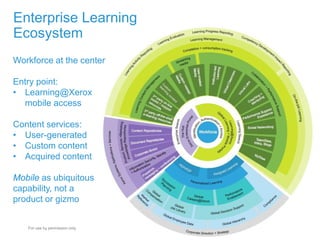
Enterprise Learning
Ecosystem
March 14, 2014 Xerox Internal Use Only
46
Workforce at the center
Entry point:
• Learning@Xerox
mobile access
Content services:
• User-generated
• Custom content
• Acquired content
Mobile as ubiquitous
capability, not a
product or gizmo
For use by permission only
#CLOwebinar
47
#CLOwebinar
Join our next Webinar!
Better Learning Outcomes in 2014 - Focus
Learning On Jobs, Skills and Required
Outcomes
Thursday, March 20, 2014
Webinars start at 2 p.m. Eastern / 11 a.m. Pacific
Register for all upcoming CLO Webinars at
http://clomedia.com/webinars

The Evolution of Mobile Learning

  • 1.
    #CLOwebinar Speakers: Steven RathMorgan Global Learning Process and Innovation – Corporate Human Resources Xerox Corp. David Wentworth Senior Learning Analyst Brandon Hall Group Kellye Whitney Associate Editorial Director Chief Learning Officer magazine The Evolution of Mobile Learning
  • 2.
    #CLOwebinar Tools You CanUse Audio Control – A dial in number will not be provided. – The audio will come through your computer speakers or headphones. – Check the internal volume on your computer, external speakers or headsets.
  • 3.
    #CLOwebinar Tools You CanUse Question & Answer – Click the question icon on the floating toolbar in the bottom right corner. – Type your question in the space at the bottom. – Click “Send.”
  • 4.
    #CLOwebinar Frequently Asked Questions 1.May I receive a copy of the slides? YES! You will receive a link to today’s recording, along with a link to download the slides shortly after the presentation concludes. 2. May I review the webinar recording at a later time? YES! You may log in again. A link that will be provided in an email after the event to review the presentation on-demand.
  • 5.
    #CLOwebinar Mobile Learning: The Evolutionof Content Kellye Whitney Associate Editorial Director Chief Learning Officer magazine kwhitney@humancapitalmedia.com
  • 6.
    2004 – M-Learning:The Next Wave for Training and Development 2005 – Mobile Learning: The Next Evolution of Education 2007 – Mobile Learning: The Next Step in Technology-Mediated Learning There’s something new on the market… www.CLOmedia.com
  • 7.
    2007 – Howthe iPhone Will Shape the Future of Mobile Learning 2008 – Merrill Lynch: Bullish on Mobile Learning 2012 – Your Brain on Apps 2012 – Is Mobile Learning Right for You? But we need more information… www.CLOmedia.com
  • 8.
    2013 – IsThere an App for Leadership Development? 2013 – Learning 2014: Mobile and Social Opportunities 2014 – Working Out the Kinks: Companies Experiment with Mobile Now let’s talk specifics… www.CLOmedia.com
  • 9.
    Mobile Learning Research #CLOwebinar DavidWentworth Senior Learning Analyst Brandon Hall Group David.Wentworth@brandonhall.com
  • 10.
  • 11.
    Strategy 1. Emerging – Nostrategy at all – Ad hoc access, SMS 2. Developing – Business case identified – Access to current catalog 3. Standard Practice – Vision, mission, resources – Dedicated infrastructure 4. Fully Optimized – App/Web blend – Offline access – Extended enterprise 21.1% 58.9% 12.6% 7.4% Yes No, but we are working on one No, and we don’t plan to build one Other (please specify) Formal strategy in place?
  • 12.
    Content Architecture 1. Emerging –No specific content – SMS, text 2. Developing – Images, video – Mobile Web access 3. Standard Practice – App development – Repurposed content 4. Fully Optimized – Original mobile content – Reusable “chunks” Highly Effective Mobile Content 31.8% 41.5% 52.8% 55.3% 61.8% 64.2% 69.2% Virtual classrooms Course modules Games Assessments Performance support Videos Push notifications
  • 13.
    Admin/User Environment 1. Emerging –All Push, no pull – Not engaging 2. Developing – Mobile browsers – Familiar navigation 3. Standard Practice – Responsive web design – Strong tech support 4. Fully Optimized – Seamless device switching – Easy app access – Build for mobile on mobile App Development by Operating System 13.9% 27.9% 28.7% 59.8% 76.2% Other (please specify) Blackberry Windows Mobile Android iOS (Apple)
  • 14.
    Channels 1. Emerging – Internet –Full site only 2. Developing – Company Intranet – Mobile sites available 3. Standard Practice – LMS integration – LCMS integration 4. Fully Optimized – CRM integration – Social media Current Mobile Learning Approach 7.8% 10.7% 10.0% 7.4% 6.3% 30.4% 27.4% Other (please specify) Our LMS has a mobile-ready delivery platform/component. We use a combination of apps and mobile web for learning content. We have mobile apps for learning. Learners can access a majority of our material via mobile web browsers… There is limited access to learning material via mobile web browsers… There is no mobile interaction with learning at this time.
  • 15.
    Connectivity 1. Emerging – Limited –Security issues 2. Developing – Real-time interaction – Open systems 3. Standard Practice – Resident content – Offline synch 4. Fully Optimized – Wi-Fi access – Mobile VPN Mobile Learning Challenges 13.8% 22.1% 25.9% 26.4% 33.6% 42.6% 48.0% 48.3% 49.3% 49.3% Lack of interest Lack of business case User adoption Lack of tracking/reporting Learner time management Content migration Bandwidth/connectivity Cost Content creation Security
  • 16.
    Devices 1. Emerging – Laptop/PC-centric –No device policy 2. Developing – Portable devices – Smartphone acceptance 3. Standard Practice – Tablets – e-Readers 4. Fully Optimized – Device agnostic – BYOD Utopia Types of Devices Issued 5.0% 2.9% 5.0% 10.1% 10.1% 12.2% 20.1% 38.1% 51.8% 59.7% 59.7% Other Amazon Kindle Blackberry tablet Windows phone Windows tablet iPad Mini Android tablet Android phone Blackberry iPhone iPad
  • 17.
    Why is MobileImportant?
  • 18.
    Embedded Learning • Contextual •Role • Location • Development path • Small • Short videos • Quick updates • Informal • Everyday • Ad hoc • Timely • Down time • Moment of need • Social • Discussions • Recommendations
  • 19.
  • 20.
    • Ask “Why?”What’s the business case? What’s the learning challenge? • Mobile isn’t right for everything. • Your LMS won’t fit on a phone. • Mobile is unique and different. • Start small: one piece of one program to one group. • Develop a content strategy that compliments traditional learning design structure. • Don’t devote all your time to breaking down traditional content. Start building new for mobile delivery. • Identify existing elements that could be delivered via mobile. • Establish metrics to continuously measure and improve mobile learning nuggets. Getting Started and Moving Ahead
  • 21.
    Spotlight on Xerox: TheEvolution of Mobile Learning Steven Rath Morgan Xerox Global Learning Corporate Human Resources Steven.rathmorgan@xerox.com‘ For use by permission only
  • 22.
    Ready For RealBusiness Founded: 1906 Revenue: $22.3 billion (2012) Employees: 140,000 in 160 countries Partners: > 60,000 who work under the brand Xerox at a glance
  • 23.
    Global Learning Priorities Transitionfrom Training to culture of Learning • Cultivate workforce engagement – Individual ownership for learning • Build practice of workforce knowledge sharing • Reduce time out of the field for learning • Drive global workforce capability • Deliver higher quality and lower cost learning solutions • Enable workforce mobility, mobile access to content
  • 24.
  • 25.
    Enterprise Learning Ecosystem March 14,2014 Xerox Internal Use Only 25 Workforce at the center Entry point: • Learning@Xerox mobile access Content services: • User-generated • Custom content • Acquired content Mobile as ubiquitous capability, not a product or gizmo For use by permission only
  • 26.
    Mobile Learning: StrategyOverview PC Tablet – 2012 Smartphone – 2013 There is no longer a “standard” PC BYOD: Targeting iPad; best effort for Android & alternate tablets BYOD: Targeting iPhone; best effort for Android; Blackberry limited to XstreamVideo Seated at desk, more than 15 mins to focus on eLearning; time for reflection Sitting on couch, ~15 mins to focus on eLearning or perf support On the move, less than 5 mins to answer a question eLearning, performance support and workforce knowledge sharing Tablet as extension of PC; most things done on PC also via tablet Not attempting to put eLearning onto phone; performance support focus, no assessments Form Factor & Device Type eLearning vs. Perf Support Learner Expectations For use by permission only
  • 27.
    Custom and acquired; Professional,SME-generated, User-generated Content Workforce knowledge sharing; Growth of video; decline of Flash Mobile Learning: Strategy Overview PC Tablet – 2012 Smartphone – 2013 Completion tracking: • Assessment (Demonstrate mastery) • Acknowledgement (I acknowledge, I’m done) • Auto-completion for performance support Focus on consumption tracking, volumetrics Professional, SME, UGC On-demand resources Dependence on video Completion Tracking Content For use by permission only
  • 28.
    Workforce knowledge sharing throughuser-generated video For use by permission only User-generated content • Best resources are short and informal • Created by people closest to the work • Business value • Visual information about a work situation Video production quality is not a concern; high quality content with business value is critical Is this the future workplace? What do we do now if it is not?
  • 29.
    XstreamVideo: PC /Tablet / Smartphone March 14, 2014 Xerox Internal Use Only29 Page 29 Scan the QR code to go to Learning@Xerox on your mobile device.
  • 30.
    March 14, 2014Xerox Internal Use Only30 Page 30 Scan the QR code to go to Learning@Xerox on your mobile device. XstreamVideo: PC / Tablet / Smartphone
  • 31.
  • 33.
    For use bypermission only Learning@Xerox Learning@Xerox Smartphone interface Global portal
  • 34.
    On-demand content: Customcontent via LCMS (new development), video via XstreamVideo; Acquired content via SkillSoft Enabling mobile access to critical content For use by permission only
  • 35.
    • One coursedeveloped for PC / Tablet • One performance support asset developed for smartphones PC/Tablet templates (1024x768) Smartphone templates Template sets: PC & Tablet vs. Smartphone For use by permission only
  • 36.
    Smartphones access, withembedded video Performance support assets For use by permission only
  • 37.
    Tablet/PC access, withembedded video eLearning courseware For use by permission only
  • 38.
    Xerox Internal UseOnly Developing content for mobile access Guidelines, procedures and best practices
  • 39.
    Xerox Learning Content ManagementSystem Services BusinessTechnology Business Four deliverables – One solution Hiring manager resources to support positive new hire onboarding For use by permission only eLearning PC & Tablet optimized Performance Support Smartphone optimized (Also on PC &Tablet) eLearning PC & Tablet optimized Performance Support Smartphone optimized (Also on PC &Tablet) New Manager Experienced Manager New Manager Experienced Manager
  • 40.
    New Hire 101performance support Smartphone optimized For use by permission only
  • 41.
    Xerox Color J75& C75 Press eLearning Tablet optimized For use by permission only
  • 42.
    Blended Learning Paths Topersonalize and streamline the learner experience (shown on iPad) For use by permission only
  • 43.
    Blended Learning Paths Topersonalize and streamline the learner experience (shown on iPad) For use by permission only
  • 44.
    Tablet: Extension ofPC for access to eLearning content (LMS) Focus on content completion and content mastery tracking Smartphones: Performance support, (e.g. video including XstreamVideo) Focus on consumption tracking; comment, rate, collaborate Completion vs. Consumption Tracking For use by permission only
  • 45.
  • 46.
    Enterprise Learning Ecosystem March 14,2014 Xerox Internal Use Only 46 Workforce at the center Entry point: • Learning@Xerox mobile access Content services: • User-generated • Custom content • Acquired content Mobile as ubiquitous capability, not a product or gizmo For use by permission only
  • 47.
  • 48.
    #CLOwebinar Join our nextWebinar! Better Learning Outcomes in 2014 - Focus Learning On Jobs, Skills and Required Outcomes Thursday, March 20, 2014 Webinars start at 2 p.m. Eastern / 11 a.m. Pacific Register for all upcoming CLO Webinars at http://clomedia.com/webinars