






A ROAD MAP TO
    MOBILE
   LEARNING
 MARCUS TURNER   SANJAY NASTA
 @ATOMICAXIS     @MICROASSIST
WHAT IS
  MOBILE
LEARNING?
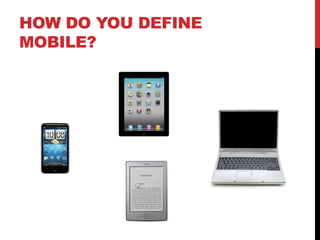
HOW DO YOU DEFINE
MOBILE?
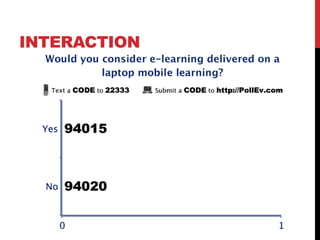
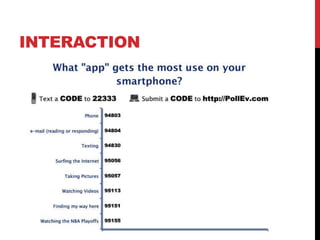
INTERACTION
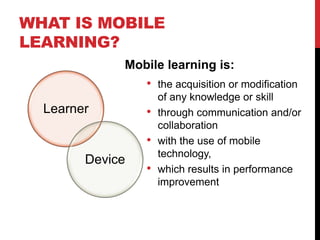
WHAT IS MOBILE
LEARNING?
             Mobile learning is:
                 •   the acquisition or modification
                     of any knowledge or skill
  Learner        •   through communication and/or
                     collaboration
                 •   with the use of mobile
                     technology,
        Device
                 •   which results in performance
                     improvement
WHY MOBILE
LEARNING?
GROWTH OF MOBILE
WHY MOBILE LEARNING?


  MOVE TO A
   MOBILE
   SOCIETY
WHY MOBILE LEARNING?


  ANYTIME
 ANYWHERE
WHY MOBILE LEARNING?


NEW MODES
WHY MOBILE LEARNING?


     REDUCED
      COST?
DEMO (AUGMENTED REALITY, TIME OF
NEED, LOCATION BASED LEARNING)


AUGMENTED REALITY
DEMO (REWARDS BASED LEARNING, LOCATION
BASED LEARNING, MICO LEARNING & SOCIAL
AWARENESS)


GREEN GAMIFICATION
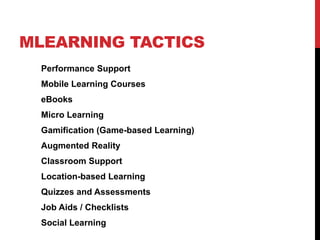
MLEARNING TACTICS
  Performance Support
  Mobile Learning Courses
  eBooks
  Micro Learning
  Gamification (Game-based Learning)
  Augmented Reality
  Classroom Support
  Location-based Learning
  Quizzes and Assessments
  Job Aids / Checklists
  Social Learning
CREATING A
MLEARNING
 STRATEGY
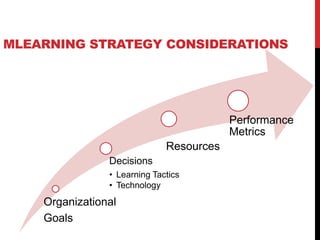
MLEARNING STRATEGY CONSIDERATIONS


                                          Performance
                                          Metrics
                              Resources
                Decisions
                • Learning Tactics
                • Technology
    Organizational
    Goals
TECHNOLOGY & TACTICS


    DEVICE
  CAPABILITIES
INTERACTION
MOBILE CAPABILITIES
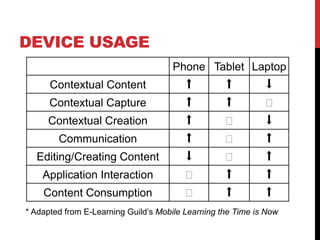
DEVICE USAGE
                                     Phone Tablet Laptop
      Contextual Content                 ⬆         ⬆         ⬇
      Contextual Capture                 ⬆         ⬆         ⬌
     Contextual Creation                 ⬆         ⬌         ⬇
        Communication                    ⬆         ⬌         ⬆
  Editing/Creating Content               ⬇         ⬌         ⬆
    Application Interaction             ⬌          ⬆         ⬆
    Content Consumption                 ⬌          ⬆         ⬆
* Adapted from E-Learning Guild’s Mobile Learning the Time is Now
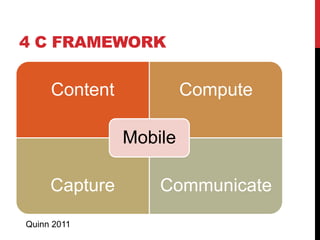
4 C FRAMEWORK


     Content            Compute

               Mobile

     Capture       Communicate
Quinn 2011
TECH
DECISIONS
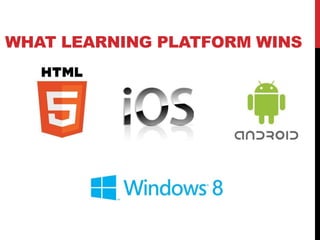
WHAT LEARNING PLATFORM WINS
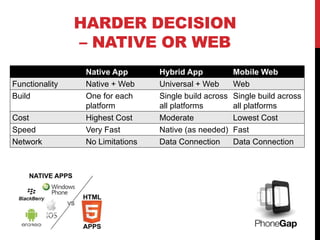
HARDER DECISION
                – NATIVE OR WEB
                 Native App       Hybrid App            Mobile Web
Functionality    Native + Web     Universal + Web       Web
Build            One for each     Single build across   Single build across
                 platform         all platforms         all platforms
Cost             Highest Cost     Moderate              Lowest Cost
Speed            Very Fast        Native (as needed)    Fast
Network          No Limitations   Data Connection       Data Connection
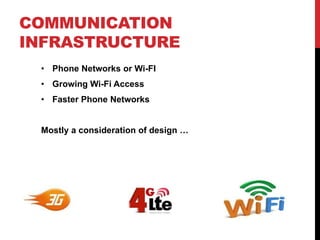
COMMUNICATION
INFRASTRUCTURE
 • Phone Networks or Wi-FI
 • Growing Wi-Fi Access
 • Faster Phone Networks


 Mostly a consideration of design …
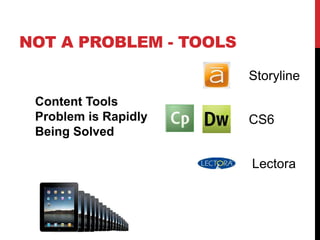
NOT A PROBLEM - TOOLS

                        Storyline
 Content Tools
 Problem is Rapidly     CS6
 Being Solved

                        Lectora
TECHNICAL CONSIDERATIONS
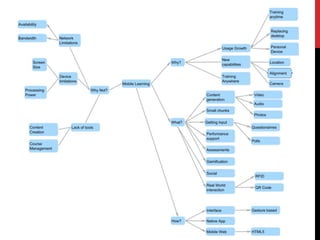
  Network Limitations
  Device Limitations (especially smartphone)
  Backend Integration – LMS, LCMS, etc
  Reuse, Build vs. Buy
  Cost


 For the most part, it’s all about the user experience …
MLEARNING ADOPTION BARRIERS
    Concerns for Content Security
    Lack of Standards
    Integration with Enterprise Platforms
    Standard Set of Tools
    Existing content
                                   E-Learning Guild Survey
MLEARNING CONSTRAINTS


     NOT
 TECHNOLOGY
 …KNOWLEDGE
RESOURCES
  E-Learning Council
  •   Peer-to-Peer community
  •   www.elearningcouncil.com
  mLearning Council
  • Open BLOG for (just started)
  • www.mlearningcouncil.com
•   Mobile Learning      •   Mobile Learning
•   Mobile Strategy      •   E-Learning
•   Mobile Web           •   Courseware Development
•   Mobile App Dev       •   LMS Implementation
•   Mobile Marketing     •   App Dev


    www.atomicaxis.com       www.microassist.com
      1.866.200.6650           512-794-8440

Roadmap to Mobile Learning

  • 1.
    A ROAD MAPTO MOBILE LEARNING MARCUS TURNER SANJAY NASTA @ATOMICAXIS @MICROASSIST
  • 2.
    WHAT IS MOBILE LEARNING?
  • 3.
    HOW DO YOUDEFINE MOBILE?
  • 4.
  • 6.
    WHAT IS MOBILE LEARNING? Mobile learning is: • the acquisition or modification of any knowledge or skill Learner • through communication and/or collaboration • with the use of mobile technology, Device • which results in performance improvement
  • 7.
  • 8.
  • 9.
    WHY MOBILE LEARNING? MOVE TO A MOBILE SOCIETY
  • 10.
    WHY MOBILE LEARNING? ANYTIME ANYWHERE
  • 11.
  • 12.
    WHY MOBILE LEARNING? REDUCED COST?
  • 13.
    DEMO (AUGMENTED REALITY,TIME OF NEED, LOCATION BASED LEARNING) AUGMENTED REALITY
  • 14.
    DEMO (REWARDS BASEDLEARNING, LOCATION BASED LEARNING, MICO LEARNING & SOCIAL AWARENESS) GREEN GAMIFICATION
  • 15.
    MLEARNING TACTICS Performance Support Mobile Learning Courses eBooks Micro Learning Gamification (Game-based Learning) Augmented Reality Classroom Support Location-based Learning Quizzes and Assessments Job Aids / Checklists Social Learning
  • 16.
  • 17.
    MLEARNING STRATEGY CONSIDERATIONS Performance Metrics Resources Decisions • Learning Tactics • Technology Organizational Goals
  • 18.
    TECHNOLOGY & TACTICS DEVICE CAPABILITIES
  • 19.
  • 20.
  • 21.
    DEVICE USAGE Phone Tablet Laptop Contextual Content ⬆ ⬆ ⬇ Contextual Capture ⬆ ⬆ ⬌ Contextual Creation ⬆ ⬌ ⬇ Communication ⬆ ⬌ ⬆ Editing/Creating Content ⬇ ⬌ ⬆ Application Interaction ⬌ ⬆ ⬆ Content Consumption ⬌ ⬆ ⬆ * Adapted from E-Learning Guild’s Mobile Learning the Time is Now
  • 22.
    4 C FRAMEWORK Content Compute Mobile Capture Communicate Quinn 2011
  • 23.
  • 24.
  • 25.
    HARDER DECISION – NATIVE OR WEB Native App Hybrid App Mobile Web Functionality Native + Web Universal + Web Web Build One for each Single build across Single build across platform all platforms all platforms Cost Highest Cost Moderate Lowest Cost Speed Very Fast Native (as needed) Fast Network No Limitations Data Connection Data Connection
  • 26.
    COMMUNICATION INFRASTRUCTURE • PhoneNetworks or Wi-FI • Growing Wi-Fi Access • Faster Phone Networks Mostly a consideration of design …
  • 27.
    NOT A PROBLEM- TOOLS Storyline Content Tools Problem is Rapidly CS6 Being Solved Lectora
  • 28.
    TECHNICAL CONSIDERATIONS Network Limitations  Device Limitations (especially smartphone)  Backend Integration – LMS, LCMS, etc  Reuse, Build vs. Buy  Cost For the most part, it’s all about the user experience …
  • 29.
    MLEARNING ADOPTION BARRIERS  Concerns for Content Security  Lack of Standards  Integration with Enterprise Platforms  Standard Set of Tools  Existing content E-Learning Guild Survey
  • 30.
    MLEARNING CONSTRAINTS NOT TECHNOLOGY …KNOWLEDGE
  • 31.
    RESOURCES E-LearningCouncil • Peer-to-Peer community • www.elearningcouncil.com mLearning Council • Open BLOG for (just started) • www.mlearningcouncil.com
  • 32.
    Mobile Learning • Mobile Learning • Mobile Strategy • E-Learning • Mobile Web • Courseware Development • Mobile App Dev • LMS Implementation • Mobile Marketing • App Dev www.atomicaxis.com www.microassist.com 1.866.200.6650 512-794-8440

Editor's Notes

  • #2 Laptop Used a few times a day, but for extended periodsNot always with ownerAd hoc connectionsMobile DeviceUsed continuously during more times a day, but only for very brief periods Within 2’ of its owner at all timesContinuous Connection
  • #5 The video shows mobile is growing very rapidly and will soon become the first way that people will access information on the Internet. As training professionals it is a trend we have to consider and plan for.
  • #6 Move from desktop to mobile = Not just talking device growth. Work is happening everywhere. Emails are being answered in airports and taxis. Documents are now drafted in the air. Content is being created in context. Our learners want learning when they need it, where they need it rather than when we can deliver it. your device is always with you, it’s always connected to the network. This makes it easy to delivery learning at the point of need rather than learning
  • #7 Your phoneis always with you, it’s always connected to the network—always on/always there. This makes it easy to delivery learning at the point of need rather than learning in a classroom far from the point of need.The always on/always there nature also enables Gamification as well as Micro-Learning. Training Anywhere/Anytime = Increase learner’s access to information
  • #8 Smartphones enable new modes of learning. Smartphones have easily accessible sensor packages such as cameras, GPS and microphones that enable interaction with the Real World. Smartphones are also natively setup for collaboration—At it’s base it’s a communication device—a phone. Phone/Email functionality is baseline but most smartphones are setup to also enable easy interaction with Social Media such as Facebook and Twitter
  • #9 CanmLearning reduce the cost of training? Doesn’t it cost a lot to recreate content for mobile devices? Perhaps? Something to consider is that mLearning might reduce the Total Cost of Training. Learning is not restricted to the classroom or the desktop but can be done out in the field. Is learning at the time of need more effective?You decideShould this be changed to TCO Cost Reduction?Should these all be on one slide?
  • #10 Quick Sky Map Demo – Solar Eclipse, Venus Transit. An example of Learning in ContextAurasma Demo – An example of Augmented Reality
  • #11 Atomic Axis created this app for Whole Planet Foundation and Whole Foods. The goal of the app is to educate Whole Food customer on green behavior and then provide motivation for the consumer to exhibit green behaviorDEMOShow Green Actions, show explanation of green actionsShow AwardsShow charities and explanation of charitiesSo this app teaches by giving information in small chunks, it motivates using gamification and real world awards in the form of coupons. It re-inforces the teaching by providing repeated access to information
  • #12 We have demonstrated some of the commonmLearning Tactics. Performance Support is often the easiest to implement and the first tactic. Sending small of information at a regular basis is another common tactic used to Alex will show you how some of these tactics are being used by Dell.
  • #13 So we’ve shown that mobile is growing. We’ve shown some powerful uses for mLearning. We strongly believe that every organization needs to start creating an mLearning Strategy NOW
  • #14 The over mLearning Strategy should be driven by the organization’s goals. The Learning Tactics and technology support the organization’s goals as well. We have demonstrated some of the common tactics that are useful for mLearning. Alex will demonstrate a few more when he shows us how Dell is using mLearning. Marcus and I will talk about the technology issues for mLearning
  • #16 As you can see from the answers a modern mobile device combines the capabilities of a variety of devices in a well integrated package. PhoneEmailCameraVideo CameraGPSTVAnd of course a Computer. Unlike a computer you do not have to connect, install or configure the device. All of these capabilities are available when you are designing learning.
  • #17 This chart was adapted from E-Learning Guild’s Mobile Learning the Time is Now. Phone’s and Tablet’s are used in slightly different ways than a laptop. I translate Contextual, in Context implies out in the real world. As you can see phones and Tablets are pretty good at capturing content in the real world (think cameras, sounds, etc.) They don’t work as well as a Laptop of Desktop at Editing/Creating Content. It’s hard to edit a movie on a phone.
  • #19 Some of the decisions for creating mLearning are easy. Flash cannot be a development platform for mobile development. It is not supported by iOS. Even if it is supported, it is too processor intensive for mobile devices. At the moment iOS and Android are 2 platforms of choice for mobile Could Windows 8 allow Microsoft to enter the fray this fall? Especially for the enterprise? Stay tuned.
  • #20 Native appHas to be build for each platformHigher CostNative FunctionalityApp Store Approval RequiredMobile WebSingle build across platformsLower CostWeb FunctionalityNo App Store Approval Required
  • #21 You have to consider the communications infrastructure when designing mLearning. Wi-Fi Access is growing as are faster phone networks. However, the era of unlimited bandwidth is over. Bandwidth costs and you have to consider that cost. Are your users going to be accessing your training on phone networks or are they going to be able to access training over relatively cheap wi-fi?
  • #22 mLearning Content Tool problem is being solved in the latest generation. Articulate, Adobe and Lectora have released products that allow you to create mobile learning content.
  • #23 So what are some of the constraints We’ve discussed Network Limitations in terms of bandwidth. The devices themselves have limitations including screensize, processing power, etc. LMS’ are just starting to become mobile friendlyCost is always a constraint. The cost of developing mLearning, especially as a Native App can be high.
  • #24 When learning professionals were surveyed by E-Learning Guild they identified the following barriers
  • #25 I think the biggest barrier towards great mLearning being developed is Knowledge of BenefitsStrategyProcessBoth among e-Learning Practitioners and Managers.I hope today’s session has sparked your imagination.