Week 4: Twitter
The Indispensable News Tool
1/ This week: following and sourcing news
on Twitter
2/ Next class: producing news on Twitter
3/ Practice: finding what you’re looking for
on Twitter
4/ blog workshop
Is Twitter really that
indispensable?
Why?
News breaks faster on Twitter than
anywhere else, including the agencies that
once dominated the speed contest.
If you’re not on Twitter, in a position to find
and follow the breaking news, chances are
you’ll be among the last to know.
Use caution
But sometimes news breaks too
fast.
What examples?
Use caution
• Set up systems to follow the news with
sources you trust (we’ll talk about how)
• Verify or source all the news (we’ll also talk
about that)
• But start by being engaged: creating
community, a reputation, and above all just
figuring out how to navigate in the Twitter
system.
Learn the language and customs.
Following news on Twitter
• follow the actors in your stories: in other
words the accounts tweeting about your beats
and your interests.
• Find those people on twitter and follow them.
Who should you follow?
How do you find them?
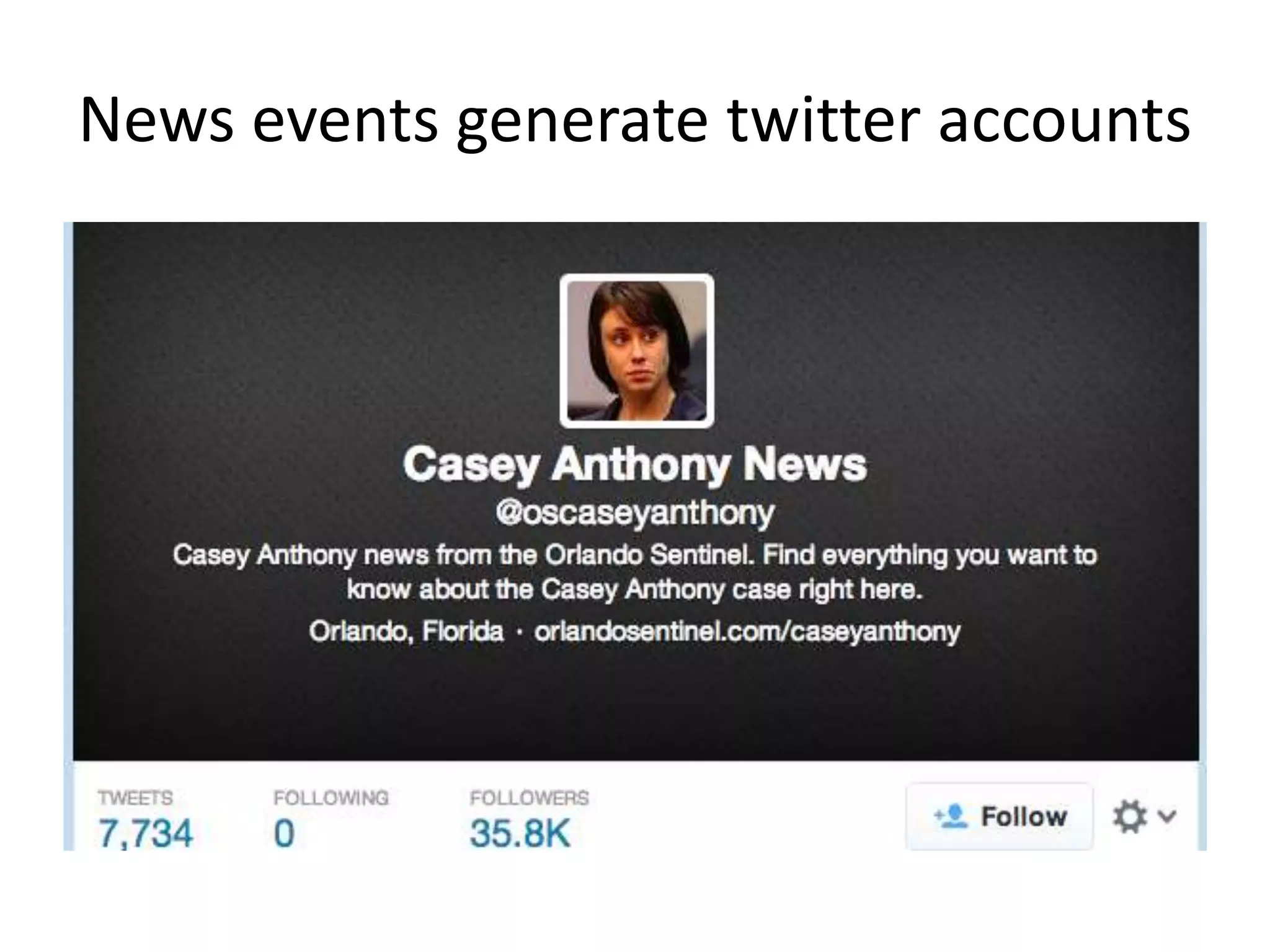
News events generate twitter accounts
Following news on Twitter
• Create lists
• Create lists especially if you have multiple
beats or verticals of interest.
• Look at other people’s lists and subscribe (you
don’t have to follow any of the people on the
list to subscribe)
• Make lists as you go along (too time-
consuming later)
What kind of lists might you want to create?
Following news on Twitter
• Use #hashtags
• Locate the ones relevant to your beat or
community, or relevant to an event
How do you know what the right ones are?
How do you find out what’s trending?
Searching for news on Twitter
Twitter has lots of great, advanced search tools
integrated within the search function, easy to
use (and so do lots of twitter clients).
• Experiment with searching on Twitter
• Simple search, advanced search
• Save your searches!
Why would you want to save your searches?
Saved searches
If you’re covering a community or a
beat, you'll want to craft some custom
searches that turn up useful sources
and observations.
You can save these searches and check
them daily.
Do you know these twitter clients?
HootSuite
TweetDeck
Seesmic
Beyond Twitter Itself
There are dozens of great tools to help
journalists find news on Twitter, with more
being developed all the time.
Twitter is aggressively pursuing this (and
then buying them out).
Some Examples: SnapBird
SnapBird:
Free tool allows you to search by keyword for a
particular tweet in your timeline, as well as
favourites and mentions. You can also search
these categories in other people's tweets, while
searching for direct messages is of course
limited to your own account only.
Some Examples: Topsy
Topsy:
Topsy is a search engine that lets you find
archived tweets – and now includes every tweet
sent since the dawn of Twitter. Literally.
Still being tested and reinvented:
A new partnership between Dataminr, Twitter
and CNN, announced last year:
Dataminr technology looks at tweets and finds
patterns that can reveal breaking news when it’s
still in its “infancy.” Those alerts can be delivered
to journalists in a variety of ways, including via
desktop applications, email, mobile alerts, and
pop-up alerts.
How to start using twitter
to source news?
Start by using Twitter regularly.
Don’t wait for the breaking
news to break to figure out how
to use it.
Once you start searching and
gathering, you’ll also need to
start verifying.
This is just part of the way
twitter works. It’s not a media,
it’s a platform.
Verifying news on Twitter
Who is the source?
• Have you interacted before?
• How long have then been on twitter?
• What’s in their previous tweets?
• Are they an expert?
• Check who the person follows and who follows
them: what does this say?
• Do they have other elements of identification in
their bio: a blog, an address, a number?
Verifying news on Twitter
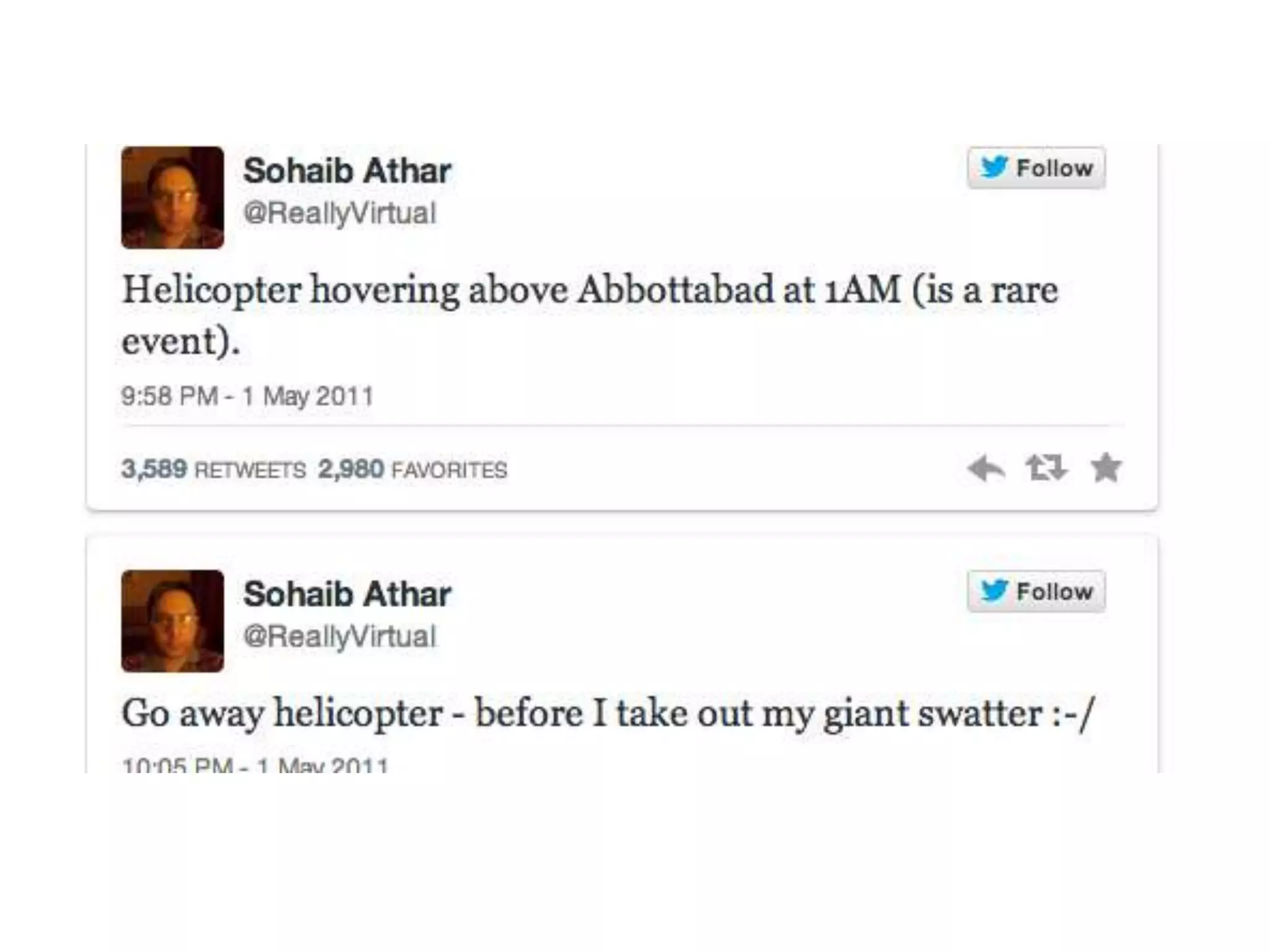
What’s in the Tweet?
• If it’s breaking news and an eye witenss, check
the time of tweet and if there’s a photo
• Use advanced search to find other tweets
about same news to confirm (or infirm)
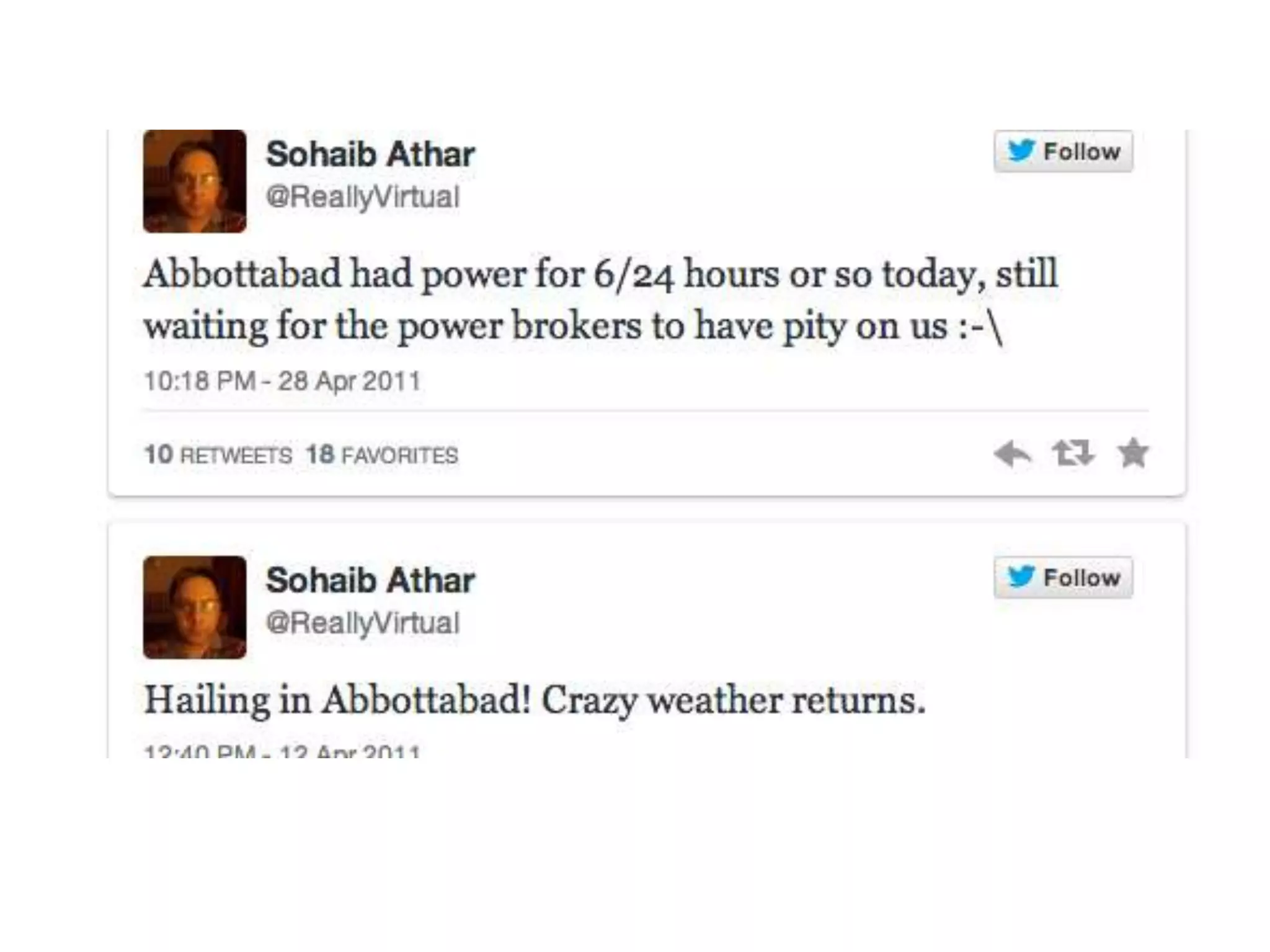
• If it’s eye-witness account, check person’s
previous tweets to confirm that they live
in/have access to/know about the news
they’re tweeting
What are some more aggressive
ways to verify information?
Verifying news on Twitter
• DM them if they follow you
• Follow them, they might follow back and DM
• Send them a tweet starting with @theirname
asking them to contact you via email or phone
• Find a non-Twitter contact for them: is there a
blog, affiliation, FB page mentioned in the bio?
Find them on FB and send message
• If you can reach the source, ask tough questions
(ie what they saw in person vs. What they heard
from someone else, can they send more pictures)
Verifying news on Twitter
Crowdsourcing verification.
• Another reason to have built up a community
on twitter is when you want to ask whether
people can confirm a fact
• Send put a question with a hashtag of the
news event to broaden the reach
• But then make sure to verify the sources of th
answers you receive
end
Set Up Third Party Apps
• Work with multiple Twitter accounts simultaneously
• View multiple streams of Twitter information
simultaneously
• Schedule tweets for posting when you're away
• Add photos to tweets
• Faster/smoother/more keyboardable performance
• Tracking and analytics
• Better URL shortening
• Integration with other social networks

Week 4 twitter indispensable news tool.2014

  • 1.
    Week 4: Twitter TheIndispensable News Tool
  • 2.
    1/ This week:following and sourcing news on Twitter 2/ Next class: producing news on Twitter 3/ Practice: finding what you’re looking for on Twitter 4/ blog workshop
  • 3.
    Is Twitter reallythat indispensable? Why?
  • 4.
    News breaks fasteron Twitter than anywhere else, including the agencies that once dominated the speed contest. If you’re not on Twitter, in a position to find and follow the breaking news, chances are you’ll be among the last to know.
  • 5.
    Use caution But sometimesnews breaks too fast. What examples?
  • 6.
    Use caution • Setup systems to follow the news with sources you trust (we’ll talk about how) • Verify or source all the news (we’ll also talk about that) • But start by being engaged: creating community, a reputation, and above all just figuring out how to navigate in the Twitter system. Learn the language and customs.
  • 7.
    Following news onTwitter • follow the actors in your stories: in other words the accounts tweeting about your beats and your interests. • Find those people on twitter and follow them. Who should you follow? How do you find them?
  • 8.
    News events generatetwitter accounts
  • 9.
    Following news onTwitter • Create lists • Create lists especially if you have multiple beats or verticals of interest. • Look at other people’s lists and subscribe (you don’t have to follow any of the people on the list to subscribe) • Make lists as you go along (too time- consuming later) What kind of lists might you want to create?
  • 10.
    Following news onTwitter • Use #hashtags • Locate the ones relevant to your beat or community, or relevant to an event How do you know what the right ones are? How do you find out what’s trending?
  • 11.
    Searching for newson Twitter Twitter has lots of great, advanced search tools integrated within the search function, easy to use (and so do lots of twitter clients). • Experiment with searching on Twitter • Simple search, advanced search • Save your searches! Why would you want to save your searches?
  • 12.
    Saved searches If you’recovering a community or a beat, you'll want to craft some custom searches that turn up useful sources and observations. You can save these searches and check them daily.
  • 13.
    Do you knowthese twitter clients? HootSuite TweetDeck Seesmic
  • 14.
    Beyond Twitter Itself Thereare dozens of great tools to help journalists find news on Twitter, with more being developed all the time. Twitter is aggressively pursuing this (and then buying them out).
  • 15.
    Some Examples: SnapBird SnapBird: Freetool allows you to search by keyword for a particular tweet in your timeline, as well as favourites and mentions. You can also search these categories in other people's tweets, while searching for direct messages is of course limited to your own account only.
  • 16.
    Some Examples: Topsy Topsy: Topsyis a search engine that lets you find archived tweets – and now includes every tweet sent since the dawn of Twitter. Literally.
  • 17.
    Still being testedand reinvented: A new partnership between Dataminr, Twitter and CNN, announced last year: Dataminr technology looks at tweets and finds patterns that can reveal breaking news when it’s still in its “infancy.” Those alerts can be delivered to journalists in a variety of ways, including via desktop applications, email, mobile alerts, and pop-up alerts.
  • 18.
    How to startusing twitter to source news? Start by using Twitter regularly. Don’t wait for the breaking news to break to figure out how to use it.
  • 19.
    Once you startsearching and gathering, you’ll also need to start verifying. This is just part of the way twitter works. It’s not a media, it’s a platform.
  • 20.
    Verifying news onTwitter Who is the source? • Have you interacted before? • How long have then been on twitter? • What’s in their previous tweets? • Are they an expert? • Check who the person follows and who follows them: what does this say? • Do they have other elements of identification in their bio: a blog, an address, a number?
  • 21.
    Verifying news onTwitter What’s in the Tweet? • If it’s breaking news and an eye witenss, check the time of tweet and if there’s a photo • Use advanced search to find other tweets about same news to confirm (or infirm) • If it’s eye-witness account, check person’s previous tweets to confirm that they live in/have access to/know about the news they’re tweeting
  • 24.
    What are somemore aggressive ways to verify information?
  • 25.
    Verifying news onTwitter • DM them if they follow you • Follow them, they might follow back and DM • Send them a tweet starting with @theirname asking them to contact you via email or phone • Find a non-Twitter contact for them: is there a blog, affiliation, FB page mentioned in the bio? Find them on FB and send message • If you can reach the source, ask tough questions (ie what they saw in person vs. What they heard from someone else, can they send more pictures)
  • 26.
    Verifying news onTwitter Crowdsourcing verification. • Another reason to have built up a community on twitter is when you want to ask whether people can confirm a fact • Send put a question with a hashtag of the news event to broaden the reach • But then make sure to verify the sources of th answers you receive
  • 27.
  • 28.
    Set Up ThirdParty Apps • Work with multiple Twitter accounts simultaneously • View multiple streams of Twitter information simultaneously • Schedule tweets for posting when you're away • Add photos to tweets • Faster/smoother/more keyboardable performance • Tracking and analytics • Better URL shortening • Integration with other social networks