Recommended
PPTX
Android - Intents and Filters hgfh gfh.pptx
PPTX
Intents in Mobile Application Development.pptx
PDF
PPTX
PDF
PPTX
DOCX
PPTX
Week 06 - Using Explicit Intents in Android.pptx
PPTX
PPTX
MAD_Intentuffjgfjjjhgjjgjjggjghggghggh.pptx
PPTX
Android - Intents - Mazenet Solution
PPTX
learn about Android Extended Intents.pptx
PDF
PPTX
Android Application managing activites.pptx
PPTX
W5_Lec09_Lec10_Intents.pptx
PDF
PPTX
Pertemuan 03 - Activities and intents.pptx
PPTX
MAD mobile application development you can learn from here , we perform all c...
PPTX
Data Transfer between activities and Database
PPT
Android Bootcamp Tanzania:intents
PPTX
PDF
Android App Development 07 : Intent & Share
PPT
Types of intents in android application development
PDF
Ch5 intent broadcast receivers adapters and internet
ODP
PPT
Android - Android Intent Types
PPTX
Msbte__________________CHPter_6_MAD.pptx
DOCX
Android intents in android application-chapter7
PPTX
Week 12 - Using RecyclerView and Custom Adapter in Android.pptx
PPTX
Week 10 - Using Device Sensors in Android.pptx
More Related Content
PPTX
Android - Intents and Filters hgfh gfh.pptx
PPTX
Intents in Mobile Application Development.pptx
PDF
PPTX
PDF
PPTX
DOCX
PPTX
Week 06 - Using Explicit Intents in Android.pptx
Similar to Week 07 - Using Implicit Intents in Android.pptx
PPTX
PPTX
MAD_Intentuffjgfjjjhgjjgjjggjghggghggh.pptx
PPTX
Android - Intents - Mazenet Solution
PPTX
learn about Android Extended Intents.pptx
PDF
PPTX
Android Application managing activites.pptx
PPTX
W5_Lec09_Lec10_Intents.pptx
PDF
PPTX
Pertemuan 03 - Activities and intents.pptx
PPTX
MAD mobile application development you can learn from here , we perform all c...
PPTX
Data Transfer between activities and Database
PPT
Android Bootcamp Tanzania:intents
PPTX
PDF
Android App Development 07 : Intent & Share
PPT
Types of intents in android application development
PDF
Ch5 intent broadcast receivers adapters and internet
ODP
PPT
Android - Android Intent Types
PPTX
Msbte__________________CHPter_6_MAD.pptx
DOCX
Android intents in android application-chapter7
More from RashidFaridChishti
PPTX
Week 12 - Using RecyclerView and Custom Adapter in Android.pptx
PPTX
Week 10 - Using Device Sensors in Android.pptx
PPTX
Week 09 - Using Media Player to Play mp3 files.pptx
PPTX
Week 08 - Using Notifications in Android.pptx
PPTX
Week 05 - Using SharedPreferences in Android.pptx
PPTX
Week 04 - Custom Fonts, Styles & Theming.pptx
PPTX
Week 03 - Advanced UI Components & Notifications.pptx
PPTX
Week 02 - Designing User Interfaces in Android.pptx
PPTX
Week 01 - Introduction to Android Studio.pptx
PPTX
DBMS: Week 15 - Database Security and Access Control
PPTX
DBMS: Week 14 - Backup and Recovery in MySQL
PPTX
DBMS: Week 13 - Transactions and Concurrency Control
PPTX
DBMS: Week 12 - Triggers in MySQL Database Server
PPTX
DBMS: Week 11 - Stored Procedures and Functions
PPTX
DBMS: Week 10 - Database Design and Normalization
PPTX
DBMS: Week 09 - SQL Constraints and Indexing
PPTX
DBMS: Week 08 - Joins and Views in MySQL
PPTX
DBMS: Week 07 - Advanced SQL Queries in MySQL
PPTX
DBMS: Week 06 - SQL - Data Manipulation Language (DML)
PPTX
DBMS: Week 05 - Introduction to SQL Query
Recently uploaded
PPTX
Central Line Associated Bloodstream Infection
PDF
Fast Followers Project, Embedding Net Zero into Wakefield Metropolitan Distri...
PDF
Risks and opportunities of artificial intelligence in education: A critical view
PPTX
YSPH VMOC Special Report - Measles - The Americas 1-25-2026
PPTX
TLE 8 W1 Q4 D2.pptx COMMON FLOOR PLAN SYMBOLS PLUMBING SYMBOLS
PPTX
28 January 2026 Rebecca Frankum Are high-stakes exams and assessments still r...
PPTX
Appreciations - Jan 26 01.pptxkkkmmkmkmkmkm
PDF
Beak Modifications by Dr. Ramzan Virani pptx.pdf
PDF
West Hatch High School - GCSE Media Specification
PPTX
Payment Follow-Up via WhatsApp in Odoo 18.1 Accounting
PPTX
That long silence - Novel by Shashi Deshapande
PPTX
West Hatch High School -- GCSE Geography
PPTX
Metabolism ( BIOCHEMISTRY & CLINICAL PATHOLOGY )
PPTX
Day 2 ppt english.powerpoint presentation ppt
PPTX
Powerpoint for testing in embed test with Sway
PDF
West Hatch High School - GCSE French Specification
PPTX
Grade 9 and 10 learner Fuse and Switch.pptx
PPTX
Appreciations - Jan 26 01.pptxkjkjkkjkjkjkj
PPTX
Unit 3- Culture.pptx....................
PDF
Aminoglycosides.pdf for B.Pharmacy Medicinal Chemistry-III (BP601T), GPAT, a...
Week 07 - Using Implicit Intents in Android.pptx 1. International Islamic University H-10, Islamabad, Pakistan
Mobile Applications Development
Week 07
Using Implicit Intents
in Android
Engr. Rashid Farid Chishti
http://youtube.com/rfchishti
http://sites.google.com/site/chisht
i
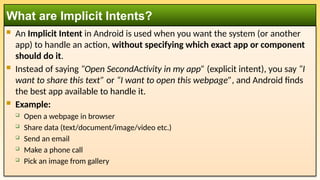
2. An Implicit Intent in Android is used when you want the system (or another
app) to handle an action, without specifying which exact app or component
should do it.
Instead of saying “Open SecondActivity in my app” (explicit intent), you say “I
want to share this text” or “I want to open this webpage”, and Android finds
the best app available to handle it.
Example:
Open a webpage in browser
Share data (text/document/image/video etc.)
Send an email
Make a phone call
Pick an image from gallery
What are Implicit Intents?
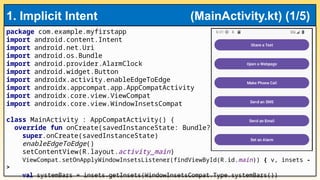
3. 4. 5. 6. package com.example.myfirstapp
import android.content.Intent
import android.net.Uri
import android.os.Bundle
import android.provider.AlarmClock
import android.widget.Button
import androidx.activity.enableEdgeToEdge
import androidx.appcompat.app.AppCompatActivity
import androidx.core.view.ViewCompat
import androidx.core.view.WindowInsetsCompat
class MainActivity : AppCompatActivity() {
override fun onCreate(savedInstanceState: Bundle?) {
super.onCreate(savedInstanceState)
enableEdgeToEdge()
setContentView(R.layout.activity_main)
ViewCompat.setOnApplyWindowInsetsListener(findViewById(R.id.main)) { v, insets -
>
val systemBars = insets.getInsets(WindowInsetsCompat.Type.systemBars())
1. Implicit Intent (MainActivity.kt) (1/5)
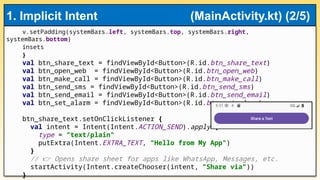
7. v.setPadding(systemBars.left, systemBars.top, systemBars.right,
systemBars.bottom)
insets
}
val btn_share_text = findViewById<Button>(R.id.btn_share_text)
val btn_open_web = findViewById<Button>(R.id.btn_open_web)
val btn_make_call = findViewById<Button>(R.id.btn_make_call)
val btn_send_sms = findViewById<Button>(R.id.btn_send_sms)
val btn_send_email = findViewById<Button>(R.id.btn_send_email)
val btn_set_alarm = findViewById<Button>(R.id.btn_set_alarm)
btn_share_text.setOnClickListener {
val intent = Intent(Intent.ACTION_SEND).apply {
type = "text/plain"
putExtra(Intent.EXTRA_TEXT, "Hello from My App")
}
// Opens share sheet for apps like WhatsApp, Messages, etc.
👉
startActivity(Intent.createChooser(intent, "Share via"))
}
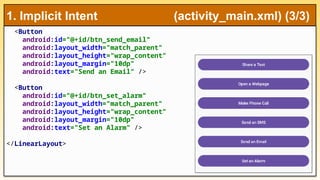
1. Implicit Intent (MainActivity.kt) (2/5)
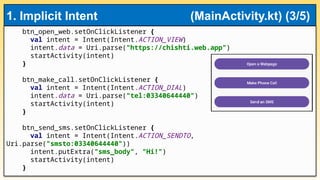
8. btn_open_web.setOnClickListener {
val intent = Intent(Intent.ACTION_VIEW)
intent.data = Uri.parse("https://chishti.web.app")
startActivity(intent)
}
btn_make_call.setOnClickListener {
val intent = Intent(Intent.ACTION_DIAL)
intent.data = Uri.parse("tel:03340644440")
startActivity(intent)
}
btn_send_sms.setOnClickListener {
val intent = Intent(Intent.ACTION_SENDTO,
Uri.parse("smsto:03340644440"))
intent.putExtra("sms_body", "Hi!")
startActivity(intent)
}
1. Implicit Intent (MainActivity.kt) (3/5)
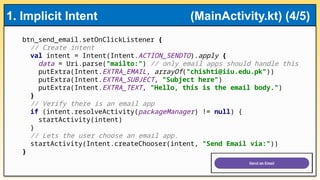
9. btn_send_email.setOnClickListener {
// Create intent
val intent = Intent(Intent.ACTION_SENDTO).apply {
data = Uri.parse("mailto:") // only email apps should handle this
putExtra(Intent.EXTRA_EMAIL, arrayOf("chishti@iiu.edu.pk"))
putExtra(Intent.EXTRA_SUBJECT, "Subject here")
putExtra(Intent.EXTRA_TEXT, "Hello, this is the email body.")
}
// Verify there is an email app
if (intent.resolveActivity(packageManager) != null) {
startActivity(intent)
}
// Lets the user choose an email app.
startActivity(Intent.createChooser(intent, "Send Email via:"))
}
1. Implicit Intent (MainActivity.kt) (4/5)
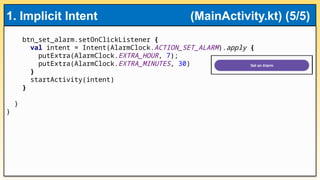
10. btn_set_alarm.setOnClickListener {
val intent = Intent(AlarmClock.ACTION_SET_ALARM).apply {
putExtra(AlarmClock.EXTRA_HOUR, 7);
putExtra(AlarmClock.EXTRA_MINUTES, 30)
}
startActivity(intent)
}
}
}
1. Implicit Intent (MainActivity.kt) (5/5)
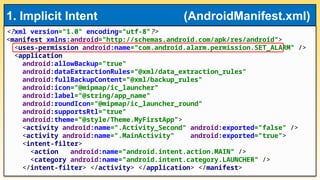
11. <?xml version="1.0" encoding="utf-8"?>
<manifest xmlns:android="http://schemas.android.com/apk/res/android">
<uses-permission android:name="com.android.alarm.permission.SET_ALARM" />
<application
android:allowBackup="true"
android:dataExtractionRules="@xml/data_extraction_rules"
android:fullBackupContent="@xml/backup_rules"
android:icon="@mipmap/ic_launcher"
android:label="@string/app_name"
android:roundIcon="@mipmap/ic_launcher_round"
android:supportsRtl="true"
android:theme="@style/Theme.MyFirstApp">
<activity android:name=".Activity_Second" android:exported="false" />
<activity android:name=".MainActivity" android:exported="true">
<intent-filter>
<action android:name="android.intent.action.MAIN" />
<category android:name="android.intent.category.LAUNCHER" />
</intent-filter> </activity> </application> </manifest>
1. Implicit Intent (AndroidManifest.xml)
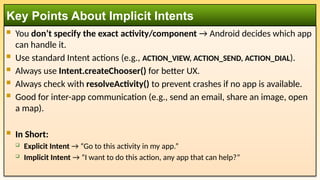
12. You don’t specify the exact activity/component → Android decides which app
can handle it.
Use standard Intent actions (e.g., ACTION_VIEW, ACTION_SEND, ACTION_DIAL).
Always use Intent.createChooser() for better UX.
Always check with resolveActivity() to prevent crashes if no app is available.
Good for inter-app communication (e.g., send an email, share an image, open
a map).
In Short:
Explicit Intent → “Go to this activity in my app.”
Implicit Intent → “I want to do this action, any app that can help?”
Key Points About Implicit Intents