DBMS: Week 13 - Transactions and Concurrency Control
1.
International Islamic UniversityH-10, Islamabad, Pakistan
Database Managements Systems
Week 13
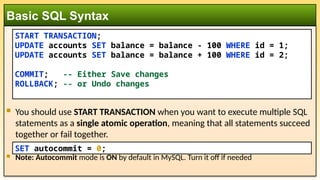
Transactions and
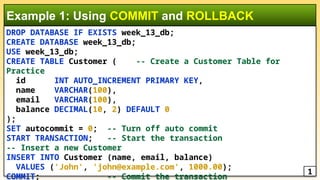
Concurrency Control
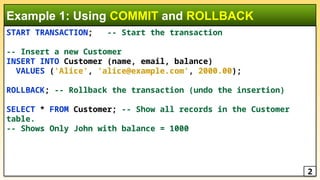
Engr. Rashid Farid Chishti
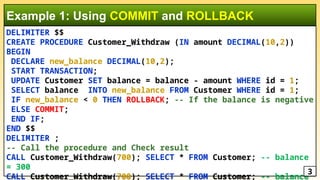
http://youtube.com/rfchishti
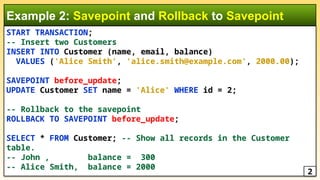
http://sites.google.com/site/chisht
i
2.
Understand theconcept of transactions in a database system.
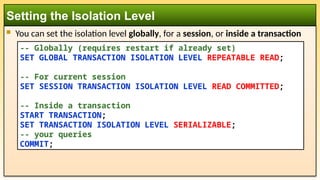
Learn about the ACID properties of transactions.
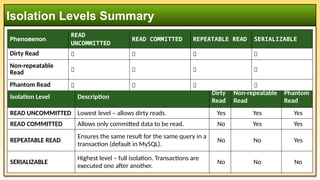
Understand concurrency control and its importance in a multi-user
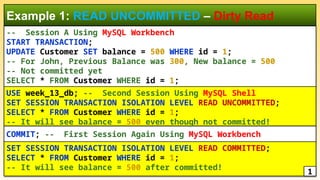
environment.
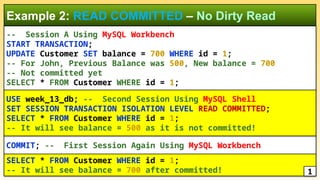
Explore various locking mechanisms and isolation levels to manage
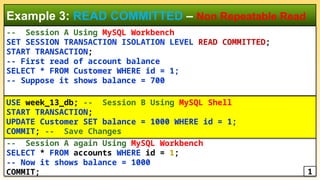
concurrent transactions.
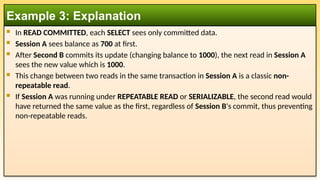
Learning Objectives
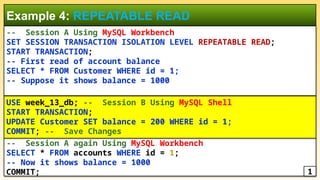
3.
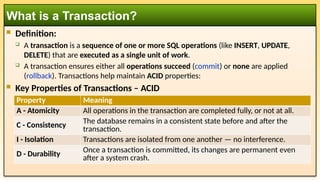
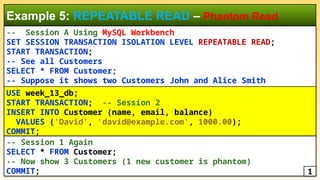
Definition:
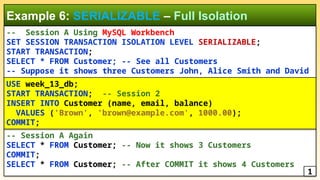
Atransaction is a sequence of one or more SQL operations (like INSERT, UPDATE,
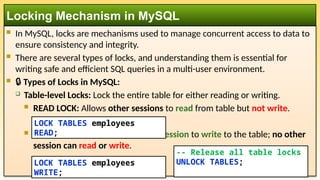
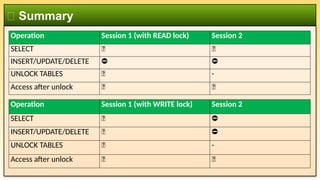
DELETE) that are executed as a single unit of work.
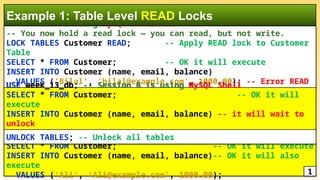
A transaction ensures either all operations succeed (commit) or none are applied
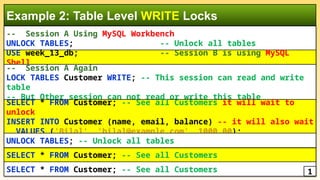
(rollback). Transactions help maintain ACID properties:
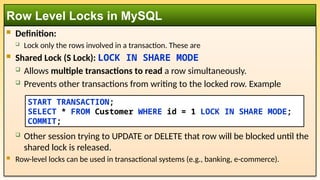
Key Properties of Transactions – ACID
What is a Transaction?
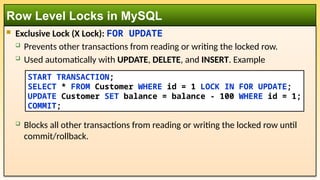
Property Meaning
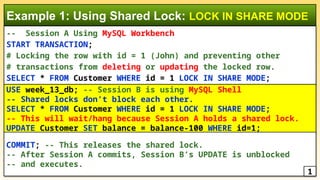
A - Atomicity All operations in the transaction are completed fully, or not at all.
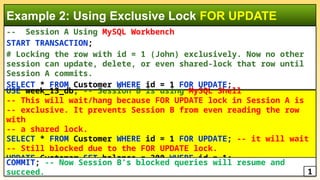
C - Consistency The database remains in a consistent state before and after the
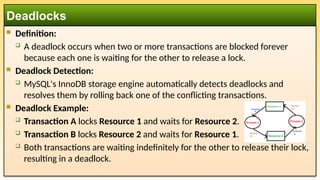
transaction.
I - Isolation Transactions are isolated from one another — no interference.
D - Durability
Once a transaction is committed, its changes are permanent even
after a system crash.
4.
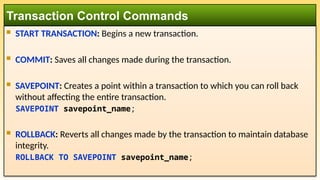
START TRANSACTION:Begins a new transaction.
COMMIT: Saves all changes made during the transaction.
SAVEPOINT: Creates a point within a transaction to which you can roll back
without affecting the entire transaction.
SAVEPOINT savepoint_name;
ROLLBACK: Reverts all changes made by the transaction to maintain database
integrity.
ROLLBACK TO SAVEPOINT savepoint_name;
Transaction Control Commands
5.
You shoulduse START TRANSACTION when you want to execute multiple SQL
statements as a single atomic operation, meaning that all statements succeed
together or fail together.
Note: Autocommit mode is ON by default in MySQL. Turn it off if needed
Basic SQL Syntax
START TRANSACTION;
UPDATE accounts SET balance = balance - 100 WHERE id = 1;
UPDATE accounts SET balance = balance + 100 WHERE id = 2;
COMMIT; -- Either Save changes
ROLLBACK; -- or Undo changes
SET autocommit = 0;
6.
DROP DATABASE IFEXISTS week_13_db;
CREATE DATABASE week_13_db;
USE week_13_db;
CREATE TABLE Customer ( -- Create a Customer Table for
Practice
id INT AUTO_INCREMENT PRIMARY KEY,
name VARCHAR(100),
email VARCHAR(100),
balance DECIMAL(10, 2) DEFAULT 0
);
SET autocommit = 0; -- Turn off auto commit
START TRANSACTION; -- Start the transaction
-- Insert a new Customer
INSERT INTO Customer (name, email, balance)
VALUES ('John', 'john@example.com', 1000.00);
COMMIT; -- Commit the transaction
Example 1: Using COMMIT and ROLLBACK
1
7.
START TRANSACTION; --Start the transaction
-- Insert a new Customer
INSERT INTO Customer (name, email, balance)
VALUES ('Alice', 'alice@example.com', 2000.00);
ROLLBACK; -- Rollback the transaction (undo the insertion)
SELECT * FROM Customer; -- Show all records in the Customer
table.
-- Shows Only John with balance = 1000
Example 1: Using COMMIT and ROLLBACK
2
8.
DELIMITER $$
CREATE PROCEDURECustomer_Withdraw (IN amount DECIMAL(10,2))
BEGIN
DECLARE new_balance DECIMAL(10,2);
START TRANSACTION;
UPDATE Customer SET balance = balance - amount WHERE id = 1;
SELECT balance INTO new_balance FROM Customer WHERE id = 1;
IF new_balance < 0 THEN ROLLBACK; -- If the balance is negative
ELSE COMMIT;
END IF;
END $$
DELIMITER ;
-- Call the procedure and Check result
CALL Customer_Withdraw(700); SELECT * FROM Customer; -- balance
= 300
CALL Customer_Withdraw(700); SELECT * FROM Customer; -- balance
Example 1: Using COMMIT and ROLLBACK
3
9.
START TRANSACTION;
-- Inserttwo Customers
INSERT INTO Customer (name, email, balance)
VALUES ('Alice Smith', 'alice.smith@example.com', 2000.00);
SAVEPOINT before_update;
UPDATE Customer SET name = 'Alice' WHERE id = 2;
-- Rollback to the savepoint
ROLLBACK TO SAVEPOINT before_update;
SELECT * FROM Customer; -- Show all records in the Customer
table.
-- John , balance = 300
-- Alice Smith, balance = 2000
Example 2: Savepoint and Rollback to Savepoint
2
10.
Definition: Concurrencycontrol refers to managing simultaneous transactions
in a multi-user environment to ensure the consistency of the database.
Why it's important:
Prevents conflicts that arise when multiple transactions try to access the
same data at the same time.
Ensures that the ACID properties are maintained in a multi-user system.
Concurrency Control
11.
Lost Updates:Two transactions read the same data and then update it, leading
to one update being lost.
Example: Two users withdraw money from the same bank account simultaneously.
Temporary Inconsistency (Dirty Reads): A transaction reads data written by
another transaction that is later rolled back.
Example: Transaction A writes data, and Transaction B reads it before A commits, but A
then rolls back.
Uncommitted Data (Non-repeatable Reads): A transaction reads the same
data twice and gets different values because another transaction updated it in
between.
Phantom Reads: A transaction reads a set of rows that satisfy a condition, but
another transaction inserts or deletes rows that change the result set.
Problems in Concurrency
12.
READ UNCOMMITTED:Allows transactions to read uncommitted changes made by other
transactions. This can lead to dirty reads.
Transaction A can read data modified by Transaction B, even if B hasn’t committed.
READ COMMITTED: Ensures that a transaction can only read data that has been committed.
It prevents dirty reads but still allows non-repeatable reads.
REPEATABLE READ: Ensures that data read during a transaction cannot be modified by
other transactions. It prevents dirty reads and non-repeatable reads but may allow
phantom reads.
Transaction A will see the same value if it reads the same data multiple times, even if
Transaction B modifies it.
SERIALIZABLE: The highest level of isolation. It ensures that transactions are executed in
such a way that the result is the same as if they were executed serially (one after the other),
preventing dirty reads, non-repeatable reads, and phantom reads.
Isolation Levels in MySQL for Concurrency Control
13.
You canset the isolation level globally, for a session, or inside a transaction
Setting the Isolation Level
-- Globally (requires restart if already set)
SET GLOBAL TRANSACTION ISOLATION LEVEL REPEATABLE READ;
-- For current session
SET SESSION TRANSACTION ISOLATION LEVEL READ COMMITTED;
-- Inside a transaction
START TRANSACTION;
SET TRANSACTION ISOLATION LEVEL SERIALIZABLE;
-- your queries
COMMIT;
14.
Isolation Levels Summary
IsolationLevel Description
Dirty
Read
Non-repeatable
Read
Phantom
Read
READ UNCOMMITTED Lowest level – allows dirty reads. Yes Yes Yes
READ COMMITTED Allows only committed data to be read. No Yes Yes
REPEATABLE READ
Ensures the same result for the same query in a
transaction (default in MySQL).
No No Yes
SERIALIZABLE
Highest level – full isolation. Transactions are
executed one after another.
No No No
Phenomenon
READ
UNCOMMITTED
READ COMMITTED REPEATABLE READ SERIALIZABLE
Dirty Read ✅ ❌ ❌ ❌
Non-repeatable
Read ✅ ✅ ❌ ❌
Phantom Read ✅ ✅ ✅ ❌
15.
-- Session AUsing MySQL Workbench
START TRANSACTION;
UPDATE Customer SET balance = 500 WHERE id = 1;
-- For John, Previous Balance was 300, New balance = 500
-- Not committed yet
SELECT * FROM Customer WHERE id = 1;
Example 1: READ UNCOMMITTED – Dirty Read
COMMIT; -- First Session Again Using MySQL Workbench
USE week_13_db; -- Second Session Using MySQL Shell
SET SESSION TRANSACTION ISOLATION LEVEL READ UNCOMMITTED;
SELECT * FROM Customer WHERE id = 1;
-- It will see balance = 500 even though not committed!
SET SESSION TRANSACTION ISOLATION LEVEL READ COMMITTED;
SELECT * FROM Customer WHERE id = 1;
-- It will see balance = 500 after committed!
1
16.
-- Session AUsing MySQL Workbench
START TRANSACTION;
UPDATE Customer SET balance = 700 WHERE id = 1;
-- For John, Previous Balance was 500, New balance = 700
-- Not committed yet
SELECT * FROM Customer WHERE id = 1;
Example 2: READ COMMITTED – No Dirty Read
COMMIT; -- First Session Again Using MySQL Workbench
USE week_13_db; -- Second Session Using MySQL Shell
SET SESSION TRANSACTION ISOLATION LEVEL READ COMMITTED;
SELECT * FROM Customer WHERE id = 1;
-- It will see balance = 500 as it is not committed!
SELECT * FROM Customer WHERE id = 1;
-- It will see balance = 700 after committed! 1
17.
-- Session AUsing MySQL Workbench
SET SESSION TRANSACTION ISOLATION LEVEL READ COMMITTED;
START TRANSACTION;
-- First read of account balance
SELECT * FROM Customer WHERE id = 1;
-- Suppose it shows balance = 700
Example 3: READ COMMITTED – Non Repeatable Read
-- Session A again Using MySQL Workbench
SELECT * FROM accounts WHERE id = 1;
-- Now it shows balance = 1000
COMMIT;
USE week_13_db; -- Session B Using MySQL Shell
START TRANSACTION;
UPDATE Customer SET balance = 1000 WHERE id = 1;
COMMIT; -- Save Changes
1
18.
In READCOMMITTED, each SELECT sees only committed data.
Session A sees balance as 700 at first.
After Second B commits its update (changing balance to 1000), the next read in Session A
sees the new value which is 1000.
This change between two reads in the same transaction in Session A is a classic non-
repeatable read.
If Session A was running under REPEATABLE READ or SERIALIZABLE, the second read would
have returned the same value as the first, regardless of Session B's commit, thus preventing
non-repeatable reads.
Example 3: Explanation
19.
-- Session AUsing MySQL Workbench
SET SESSION TRANSACTION ISOLATION LEVEL REPEATABLE READ;
START TRANSACTION;
-- First read of account balance
SELECT * FROM Customer WHERE id = 1;
-- Suppose it shows balance = 1000
Example 4: REPEATABLE READ
-- Session A again Using MySQL Workbench
SELECT * FROM accounts WHERE id = 1;
-- Now it shows balance = 1000
COMMIT;
USE week_13_db; -- Session B Using MySQL Shell
START TRANSACTION;
UPDATE Customer SET balance = 200 WHERE id = 1;
COMMIT; -- Save Changes
1
20.
-- Session AUsing MySQL Workbench
SET SESSION TRANSACTION ISOLATION LEVEL REPEATABLE READ;
START TRANSACTION;
-- See all Customers
SELECT * FROM Customer;
-- Suppose it shows two Customers John and Alice Smith
Example 5: REPEATABLE READ – Phantom Read
-- Session 1 Again
SELECT * FROM Customer;
-- Now show 3 Customers (1 new customer is phantom)
COMMIT; 1
USE week_13_db;
START TRANSACTION; -- Session 2
INSERT INTO Customer (name, email, balance)
VALUES ('David', 'david@example.com', 1000.00);
COMMIT;
21.
-- Session AUsing MySQL Workbench
SET SESSION TRANSACTION ISOLATION LEVEL SERIALIZABLE;
START TRANSACTION;
SELECT * FROM Customer; -- See all Customers
-- Suppose it shows three Customers John, Alice Smith and David
Example 6: SERIALIZABLE – Full Isolation
-- Session A Again
SELECT * FROM Customer; -- Now it shows 3 Customers
COMMIT;
SELECT * FROM Customer; -- After COMMIT it shows 4 Customers
1
USE week_13_db;
START TRANSACTION; -- Session 2
INSERT INTO Customer (name, email, balance)
VALUES ('Brown', 'brown@example.com', 1000.00);
COMMIT;
22.
In MySQL,locks are mechanisms used to manage concurrent access to data to
ensure consistency and integrity.
There are several types of locks, and understanding them is essential for
writing safe and efficient SQL queries in a multi-user environment.
🔒 Types of Locks in MySQL:
Table-level Locks: Lock the entire table for either reading or writing.
READ LOCK: Allows other sessions to read from table but not write.
WRITE LOCK: Allows only current session to write to the table; no other
session can read or write.
Locking Mechanism in MySQL
LOCK TABLES employees
READ;
LOCK TABLES employees
WRITE;
-- Release all table locks
UNLOCK TABLES;
23.
-- Session AUsing MySQL Workbench
-- You now hold a read lock — you can read, but not write.
LOCK TABLES Customer READ; -- Apply READ lock to Customer
Table
SELECT * FROM Customer; -- OK it will execute
INSERT INTO Customer (name, email, balance)
VALUES ('Bilal', 'bilal@example.com', 1000.00); -- Error READ
Lock
Example 1: Table Level READ Locks
USE week_13_db; -- Session B is using MySQL Shell
SELECT * FROM Customer; -- OK it will
execute
INSERT INTO Customer (name, email, balance) -- it will wait to
unlock
VALUES ('Bilal', 'bilal@example.com', 1000.00);
SELECT * FROM Customer; -- OK it will execute
INSERT INTO Customer (name, email, balance)-- OK it will also
execute
VALUES ('Ali', 'Ali@example.com', 1000.00); 1
UNLOCK TABLES; -- Unlock all tables
24.
-- Session AUsing MySQL Workbench
UNLOCK TABLES; -- Unlock all tables
Example 2: Table Level WRITE Locks
USE week_13_db; -- Session B is using MySQL
Shell
SELECT * FROM Customer; -- See all Customers
SELECT * FROM Customer; -- See all Customers 1
-- Session A Again
LOCK TABLES Customer WRITE; -- This session can read and write
table
-- But Other session can not read or write this table
SELECT * FROM Customer; -- See all Customers it will wait to
unlock
INSERT INTO Customer (name, email, balance) -- it will also wait
VALUES ('Bilal', 'bilal@example.com', 1000.00);
UNLOCK TABLES; -- Unlock all tables
Definition:
Lockonly the rows involved in a transaction. These are
Shared Lock (S Lock): LOCK IN SHARE MODE
Allows multiple transactions to read a row simultaneously.
Prevents other transactions from writing to the locked row. Example
Other session trying to UPDATE or DELETE that row will be blocked until the
shared lock is released.
Row-level locks can be used in transactional systems (e.g., banking, e-commerce).
Row Level Locks in MySQL
START TRANSACTION;
SELECT * FROM Customer WHERE id = 1 LOCK IN SHARE MODE;
COMMIT;
27.
Exclusive Lock(X Lock): FOR UPDATE
Prevents other transactions from reading or writing the locked row.
Used automatically with UPDATE, DELETE, and INSERT. Example
Blocks all other transactions from reading or writing the locked row until
commit/rollback.
Row Level Locks in MySQL
START TRANSACTION;
SELECT * FROM Customer WHERE id = 1 LOCK IN FOR UPDATE;
UPDATE Customer SET balance = balance - 100 WHERE id = 1;
COMMIT;
28.
-- Session AUsing MySQL Workbench
START TRANSACTION;
# Locking the row with id = 1 (John) and preventing other
# transactions from deleting or updating the locked row.
SELECT * FROM Customer WHERE id = 1 LOCK IN SHARE MODE;
Example 1: Using Shared Lock: LOCK IN SHARE MODE
USE week_13_db; -- Session B is using MySQL Shell
-- Shared locks don’t block each other.
SELECT * FROM Customer WHERE id = 1 LOCK IN SHARE MODE;
-- This will wait/hang because Session A holds a shared lock.
UPDATE Customer SET balance = balance-100 WHERE id=1;
COMMIT; -- This releases the shared lock.
-- After Session A commits, Session B’s UPDATE is unblocked
-- and executes.
1
29.
-- Session AUsing MySQL Workbench
START TRANSACTION;
# Locking the row with id = 1 (John) exclusively. Now no other
session can update, delete, or even shared-lock that row until
Session A commits.
SELECT * FROM Customer WHERE id = 1 FOR UPDATE;
Example 2: Using Exclusive Lock FOR UPDATE
USE week_13_db; -- Session B is using MySQL Shell
-- This will wait/hang because FOR UPDATE lock in Session A is
-- exclusive. It prevents Session B from even reading the row
with
-- a shared lock.
SELECT * FROM Customer WHERE id = 1 FOR UPDATE; -- it will wait
-- Still blocked due to the FOR UPDATE lock.
UPDATE Customer SET balance = 300 WHERE id = 1;
COMMIT; -- Now Session B’s blocked queries will resume and
succeed. 1
30.
Definition:
Adeadlock occurs when two or more transactions are blocked forever
because each one is waiting for the other to release a lock.
Deadlock Detection:
MySQL's InnoDB storage engine automatically detects deadlocks and
resolves them by rolling back one of the conflicting transactions.
Deadlock Example:
Transaction A locks Resource 1 and waits for Resource 2.
Transaction B locks Resource 2 and waits for Resource 1.
Both transactions are waiting indefinitely for the other to release their lock,
resulting in a deadlock.
Deadlocks
31.
Always accesstables/rows in the same order in all transactions.
Keep transactions short and fast.
Use appropriate indexes so that row searches are quick and predictable.
Use SELECT ... FOR UPDATE or LOCK IN SHARE MODE consistently to explicitly
lock rows in known order.
Handle deadlocks in application code:
Retry the transaction if it fails due to a deadlock.
How to Prevent Deadlocks
ERROR 1213 (40001): Deadlock found when trying to get lock; try restarting transaction
32.
Transactions arecrucial for maintaining the integrity and consistency of the
database.
ACID properties ensure that transactions are processed reliably.
Concurrency control is necessary in multi-user systems to avoid conflicts and
ensure that data remains consistent.
Isolation levels and locking mechanisms help manage concurrent transactions
to balance performance and consistency.
Summary