International Islamic UniversityH-10, Islamabad, Pakistan
Database Managements Systems
Week 12
Triggers
Engr. Rashid Farid Chishti
http://youtube.com/rfchishti
http://sites.google.com/site/chisht
i
2.
Understand theconcept of triggers and their use cases.
Learn how to create and manage triggers for automated actions in a database.
Learning Objectives
3.
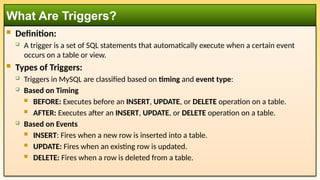
Definition:
Atrigger is a set of SQL statements that automatically execute when a certain event
occurs on a table or view.
Types of Triggers:
Triggers in MySQL are classified based on timing and event type:
Based on Timing
BEFORE: Executes before an INSERT, UPDATE, or DELETE operation on a table.
AFTER: Executes after an INSERT, UPDATE, or DELETE operation on a table.
Based on Events
INSERT: Fires when a new row is inserted into a table.
UPDATE: Fires when an existing row is updated.
DELETE: Fires when a row is deleted from a table.
What Are Triggers?
4.
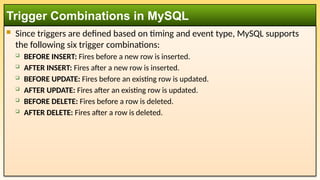
Since triggersare defined based on timing and event type, MySQL supports
the following six trigger combinations:
BEFORE INSERT: Fires before a new row is inserted.
AFTER INSERT: Fires after a new row is inserted.
BEFORE UPDATE: Fires before an existing row is updated.
AFTER UPDATE: Fires after an existing row is updated.
BEFORE DELETE: Fires before a row is deleted.
AFTER DELETE: Fires after a row is deleted.
Trigger Combinations in MySQL
5.
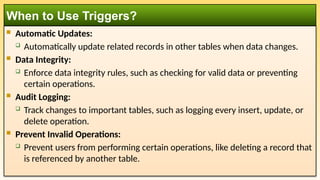
Automatic Updates:
Automatically update related records in other tables when data changes.
Data Integrity:
Enforce data integrity rules, such as checking for valid data or preventing
certain operations.
Audit Logging:
Track changes to important tables, such as logging every insert, update, or
delete operation.
Prevent Invalid Operations:
Prevent users from performing certain operations, like deleting a record that
is referenced by another table.
When to Use Triggers?
6.
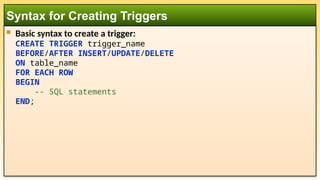
Basic syntaxto create a trigger:
CREATE TRIGGER trigger_name
BEFORE/AFTER INSERT/UPDATE/DELETE
ON table_name
FOR EACH ROW
BEGIN
-- SQL statements
END;
Syntax for Creating Triggers
7.
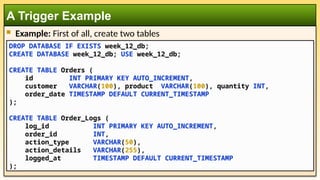
Example: Firstof all, create two tables
A Trigger Example
DROP DATABASE IF EXISTS week_12_db;
CREATE DATABASE week_12_db; USE week_12_db;
CREATE TABLE Orders (
id INT PRIMARY KEY AUTO_INCREMENT,
customer VARCHAR(100), product VARCHAR(100), quantity INT,
order_date TIMESTAMP DEFAULT CURRENT_TIMESTAMP
);
CREATE TABLE Order_Logs (
log_id INT PRIMARY KEY AUTO_INCREMENT,
order_id INT,
action_type VARCHAR(50),
action_details VARCHAR(255),
logged_at TIMESTAMP DEFAULT CURRENT_TIMESTAMP
);
8.
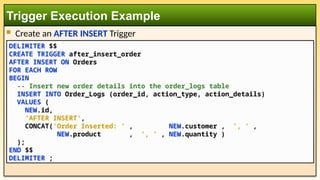
Create anAFTER INSERT Trigger
Trigger Execution Example
DELIMITER $$
CREATE TRIGGER after_insert_order
AFTER INSERT ON Orders
FOR EACH ROW
BEGIN
-- Insert new order details into the order_logs table
INSERT INTO Order_Logs (order_id, action_type, action_details)
VALUES (
NEW.id,
'AFTER INSERT',
CONCAT('Order Inserted: ' , NEW.customer , ', ' ,
NEW.product , ', ' , NEW.quantity )
);
END $$
DELIMITER ;
9.
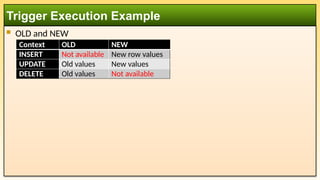
OLD andNEW
Trigger Execution Example
Context OLD NEW
INSERT Not available New row values
UPDATE Old values New values
DELETE Old values Not available
10.
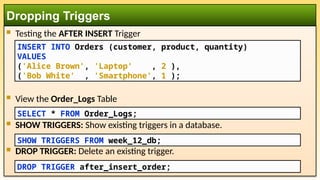
Testing theAFTER INSERT Trigger
View the Order_Logs Table
SHOW TRIGGERS: Show existing triggers in a database.
DROP TRIGGER: Delete an existing trigger.
Dropping Triggers
DROP TRIGGER after_insert_order;
INSERT INTO Orders (customer, product, quantity)
VALUES
('Alice Brown', 'Laptop' , 2 ),
('Bob White' , 'Smartphone', 1 );
SELECT * FROM Order_Logs;
SHOW TRIGGERS FROM week_12_db;
11.
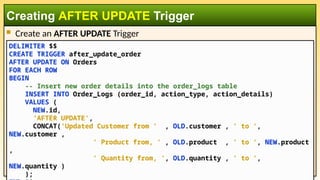
Create anAFTER UPDATE Trigger
Creating AFTER UPDATE Trigger
DELIMITER $$
CREATE TRIGGER after_update_order
AFTER UPDATE ON Orders
FOR EACH ROW
BEGIN
-- Insert new order details into the order_logs table
INSERT INTO Order_Logs (order_id, action_type, action_details)
VALUES (
NEW.id,
'AFTER UPDATE',
CONCAT('Updated Customer from ' , OLD.customer , ' to ',
NEW.customer ,
' Product from, ' , OLD.product , ' to ', NEW.product
,
' Quantity from, ', OLD.quantity , ' to ',
NEW.quantity )
);
12.
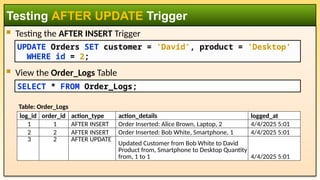
Testing theAFTER INSERT Trigger
View the Order_Logs Table
Testing AFTER UPDATE Trigger
UPDATE Orders SET customer = 'David', product = 'Desktop'
WHERE id = 2;
SELECT * FROM Order_Logs;
log_id order_id action_type action_details logged_at
1 1 AFTER INSERT Order Inserted: Alice Brown, Laptop, 2 4/4/2025 5:01
2 2 AFTER INSERT Order Inserted: Bob White, Smartphone, 1 4/4/2025 5:01
3 2 AFTER UPDATE
Updated Customer from Bob White to David
Product from, Smartphone to Desktop Quantity
from, 1 to 1 4/4/2025 5:01
Table: Order_Logs
13.
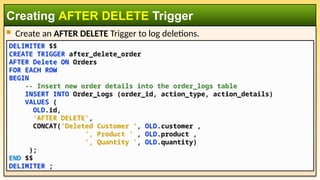
Create anAFTER DELETE Trigger to log deletions.
Creating AFTER DELETE Trigger
DELIMITER $$
CREATE TRIGGER after_delete_order
AFTER Delete ON Orders
FOR EACH ROW
BEGIN
-- Insert new order details into the order_logs table
INSERT INTO Order_Logs (order_id, action_type, action_details)
VALUES (
OLD.id,
'AFTER DELETE',
CONCAT('Deleted Customer ', OLD.customer ,
', Product ' , OLD.product ,
', Quantity ', OLD.quantity)
);
END $$
DELIMITER ;
14.
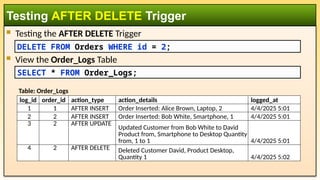
Testing theAFTER DELETE Trigger
View the Order_Logs Table
Testing AFTER DELETE Trigger
DELETE FROM Orders WHERE id = 2;
SELECT * FROM Order_Logs;
log_id order_id action_type action_details logged_at
1 1 AFTER INSERT Order Inserted: Alice Brown, Laptop, 2 4/4/2025 5:01
2 2 AFTER INSERT Order Inserted: Bob White, Smartphone, 1 4/4/2025 5:01
3 2 AFTER UPDATE
Updated Customer from Bob White to David
Product from, Smartphone to Desktop Quantity
from, 1 to 1 4/4/2025 5:01
4 2 AFTER DELETE Deleted Customer David, Product Desktop,
Quantity 1 4/4/2025 5:02
Table: Order_Logs
15.
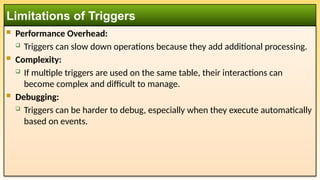
Performance Overhead:
Triggers can slow down operations because they add additional processing.
Complexity:
If multiple triggers are used on the same table, their interactions can
become complex and difficult to manage.
Debugging:
Triggers can be harder to debug, especially when they execute automatically
based on events.
Limitations of Triggers
16.
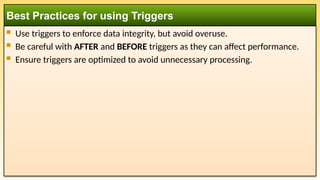
Use triggersto enforce data integrity, but avoid overuse.
Be careful with AFTER and BEFORE triggers as they can affect performance.
Ensure triggers are optimized to avoid unnecessary processing.
Best Practices for using Triggers



![[Www.pkbulk.blogspot.com]dbms11](https://cdn.slidesharecdn.com/ss_thumbnails/www-pkbul-blogspot-comdbms11-130615034624-phpapp02-thumbnail.jpg?width=640&height=640&fit=bounds)


