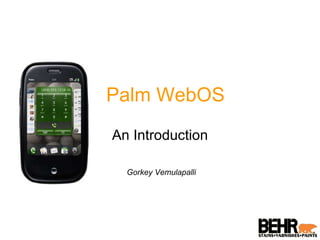
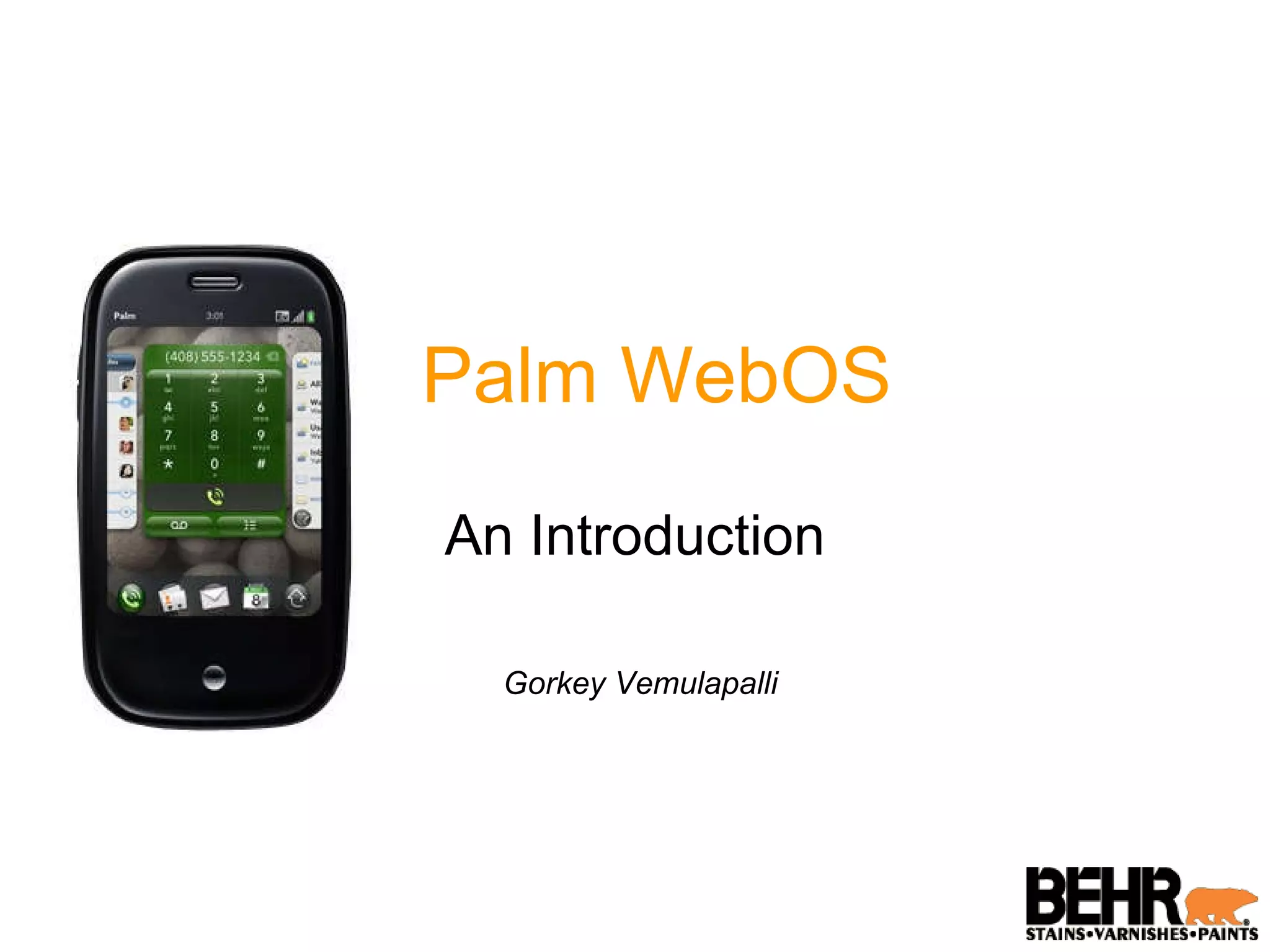
Palm WebOS An Introduction Gorkey Vemulapalli
What is WebOS? Palm's next generation operating system Designed around an incredibly fast and beautiful user experience and optimized for the multi-tasking user Integrates the power of a window-based operating system with the simplicity of a browser
What is WebOS? Embedded Linux operating system that hosts a custom User Interface (UI) System Manager built on standard browser technology System Manager provides a full range of system user interface features Navigation, application launching and lifecycle management, event management and notifications System status, local and web searches, and rendering application HTML/CSS/JavaScript code
Application Development Applications are built using standard web technologies and languages Have access to device-based services and data Think of webOS applications as native applications, but built from the same standard HTML, CSS and JavaScript
Application Development (contd..) Standard web development environment extended through a JavaScript framework Gives standardized UI widgets, and access to selected device hardware and services The user experience is optimized for launching and managing multiple applications at once.
Application Development (Contd..) WebOS is designed around multi-tasking Utterly simple to run background applications, to switch between applications in a single step, and to easily handle interruptions and events without losing context Build with typical design and implementation practices for Ajax applications
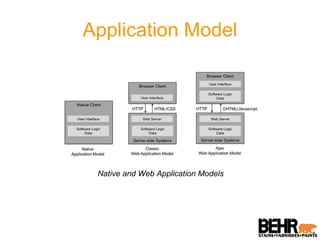
Application Model Native and Web Application Models
Application Model (Contd..) WebOS follows the mix of classic and Ajax Web Application models. Applications can run in the background, managing data, events and services behind the scenes while engaging the user when needed Create and manage your own persistent data using HTML5 storage functions
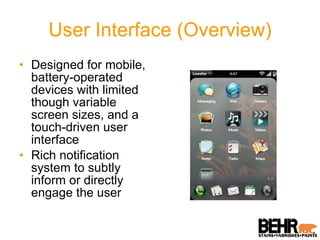
User Interface (Overview) Designed for mobile, battery-operated devices with limited though variable screen sizes, and a touch-driven user interface Rich notification system to subtly inform or directly engage the user
User Interface (Navigation) Navigation is based upon a few simple  gestures  with optional extensions tap  (act on the indicated object). Like open function back  (the inverse of  open) . reverses a view transition, as going from a child view to a parent view. scroll -  flick and quick drags are used to scroll through lists and other views In addition you can use pan, zoom, drag & drop, switch applications, switch views, search, filter lists and launch applications
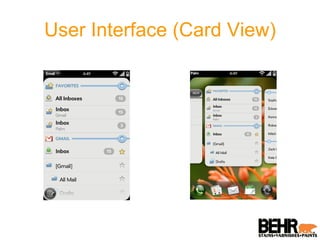
User Interface (Card View)
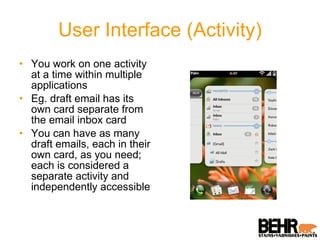
User Interface (Activity) You work on one activity at a time within multiple applications Eg. draft email has its own card separate from the email inbox card You can have as many draft emails, each in their own card, as you need; each is considered a separate activity and independently accessible
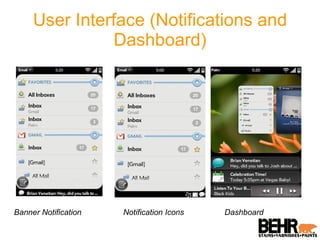
User Interface (Notifications and Dashboard) Banner Notification Notification Icons Dashboard
Mojo Application Framework A webOS application is similar to a web application based on standard HTML, CSS, and JavaScript, but the application lifecycle is different. The webOS APIs are delivered as a JavaScript framework, called Mojo To build full-featured webOS applications, many developers will also leverage HTML5 features such as video/audio tagging and database functions Prototype  JavaScript framework is bundled with Mojo to assist with registering for events and DOM handling
Mojo Application Framework Application structure , such as controllers, views, models, events, storage, notifications, logging and asserts UI widgets , including simple single-function widgets, complex multi-function widgets and integrated media viewers Services , including access to application data and cross-app launching, storage services, location services, cloud services, and accelerometer data
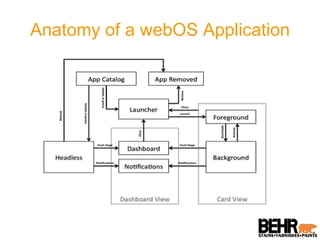
Anatomy of a webOS Application
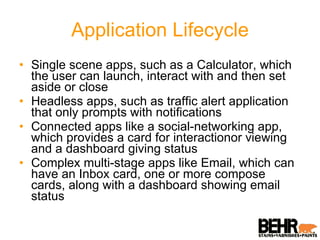
Application Lifecycle Single scene apps, such as a Calculator, which the user can launch, interact with and then set aside or close Headless apps, such as traffic alert application that only prompts with notifications Connected apps like a social-networking app, which provides a card for interactionor viewing and a dashboard giving status Complex multi-stage apps like Email, which can have an Inbox card, one or more compose cards, along with a dashboard showing email status
Events Palm webOS supports the standard DOM Level 2 event model UI Widgets have a number of custom events webOS Service functions work a bit differently, with registered callbacks instead of DOM-style events
Storage & Services Supports the HTML5 database functions directly and provides high-level functions to support simple (CRUD) operations Through Mojo Depot functions, you can create a local database and add, delete or retrieve records individually or as a set A service is an on-device server for any resource, data, or configuration that is exposed through the framework for use within an application  Services are called through a single controller function,  serviceRequest  request passes a JSON object specific to the called service and specifying callbacks for success and failure of the service request.
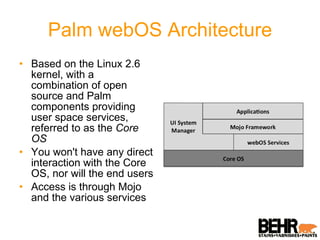
Palm webOS Architecture Based on the Linux 2.6 kernel, with a combination of open source and Palm components providing user space services, referred to as the  Core OS You won't have any direct interaction with the Core OS, nor will the end users Access is through Mojo and the various services
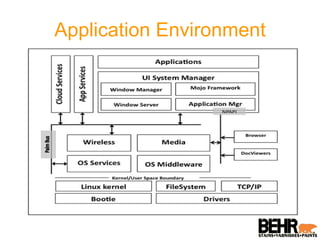
Application Environment
The End 5 minutes of question time starts now!
Questions 4 minutes left!
Questions 3 minutes left!
Questions 2 minutes left!
Questions 1 minute left!
Questions 30 seconds left!
Questions TIME IS UP! For more resources, visit  http:// developer.palm.com /

Palm WebOS Overview

  • 1.
    Palm WebOS AnIntroduction Gorkey Vemulapalli
  • 2.
    What is WebOS?Palm's next generation operating system Designed around an incredibly fast and beautiful user experience and optimized for the multi-tasking user Integrates the power of a window-based operating system with the simplicity of a browser
  • 3.
    What is WebOS?Embedded Linux operating system that hosts a custom User Interface (UI) System Manager built on standard browser technology System Manager provides a full range of system user interface features Navigation, application launching and lifecycle management, event management and notifications System status, local and web searches, and rendering application HTML/CSS/JavaScript code
  • 4.
    Application Development Applicationsare built using standard web technologies and languages Have access to device-based services and data Think of webOS applications as native applications, but built from the same standard HTML, CSS and JavaScript
  • 5.
    Application Development (contd..)Standard web development environment extended through a JavaScript framework Gives standardized UI widgets, and access to selected device hardware and services The user experience is optimized for launching and managing multiple applications at once.
  • 6.
    Application Development (Contd..)WebOS is designed around multi-tasking Utterly simple to run background applications, to switch between applications in a single step, and to easily handle interruptions and events without losing context Build with typical design and implementation practices for Ajax applications
  • 7.
    Application Model Nativeand Web Application Models
  • 8.
    Application Model (Contd..)WebOS follows the mix of classic and Ajax Web Application models. Applications can run in the background, managing data, events and services behind the scenes while engaging the user when needed Create and manage your own persistent data using HTML5 storage functions
  • 9.
    User Interface (Overview)Designed for mobile, battery-operated devices with limited though variable screen sizes, and a touch-driven user interface Rich notification system to subtly inform or directly engage the user
  • 10.
    User Interface (Navigation)Navigation is based upon a few simple gestures with optional extensions tap (act on the indicated object). Like open function back (the inverse of open) . reverses a view transition, as going from a child view to a parent view. scroll - flick and quick drags are used to scroll through lists and other views In addition you can use pan, zoom, drag & drop, switch applications, switch views, search, filter lists and launch applications
  • 11.
  • 12.
    User Interface (Activity)You work on one activity at a time within multiple applications Eg. draft email has its own card separate from the email inbox card You can have as many draft emails, each in their own card, as you need; each is considered a separate activity and independently accessible
  • 13.
    User Interface (Notificationsand Dashboard) Banner Notification Notification Icons Dashboard
  • 14.
    Mojo Application FrameworkA webOS application is similar to a web application based on standard HTML, CSS, and JavaScript, but the application lifecycle is different. The webOS APIs are delivered as a JavaScript framework, called Mojo To build full-featured webOS applications, many developers will also leverage HTML5 features such as video/audio tagging and database functions Prototype JavaScript framework is bundled with Mojo to assist with registering for events and DOM handling
  • 15.
    Mojo Application FrameworkApplication structure , such as controllers, views, models, events, storage, notifications, logging and asserts UI widgets , including simple single-function widgets, complex multi-function widgets and integrated media viewers Services , including access to application data and cross-app launching, storage services, location services, cloud services, and accelerometer data
  • 16.
    Anatomy of awebOS Application
  • 17.
    Application Lifecycle Singlescene apps, such as a Calculator, which the user can launch, interact with and then set aside or close Headless apps, such as traffic alert application that only prompts with notifications Connected apps like a social-networking app, which provides a card for interactionor viewing and a dashboard giving status Complex multi-stage apps like Email, which can have an Inbox card, one or more compose cards, along with a dashboard showing email status
  • 18.
    Events Palm webOSsupports the standard DOM Level 2 event model UI Widgets have a number of custom events webOS Service functions work a bit differently, with registered callbacks instead of DOM-style events
  • 19.
    Storage & ServicesSupports the HTML5 database functions directly and provides high-level functions to support simple (CRUD) operations Through Mojo Depot functions, you can create a local database and add, delete or retrieve records individually or as a set A service is an on-device server for any resource, data, or configuration that is exposed through the framework for use within an application Services are called through a single controller function, serviceRequest request passes a JSON object specific to the called service and specifying callbacks for success and failure of the service request.
  • 20.
    Palm webOS ArchitectureBased on the Linux 2.6 kernel, with a combination of open source and Palm components providing user space services, referred to as the Core OS You won't have any direct interaction with the Core OS, nor will the end users Access is through Mojo and the various services
  • 21.
  • 22.
    The End 5minutes of question time starts now!
  • 23.
  • 24.
  • 25.
  • 26.
  • 27.
  • 28.
    Questions TIME ISUP! For more resources, visit http:// developer.palm.com /