Developing Applications for webOS:  A Preview Presented by: Mitch Allen Software CTO, Palm
Will … Talk about Palm webOS Review the Mojo Framework Develop a Simple Application Q & A
Won’t … When…. ? Where… ? How much… ?
Palm  webOS Introduction
Palm webOS Features Palm’s next generation operating system Fast, beautiful, multi-tasking user experience Integrates a card-based OS with a web browser Applications are built with JavaScript, HTML & CSS using common web development tools
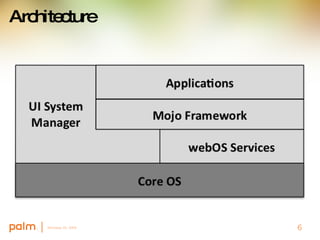
Architecture
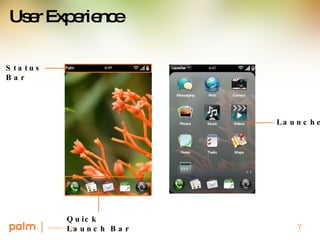
User Experience Quick Launch Bar Launcher Status Bar
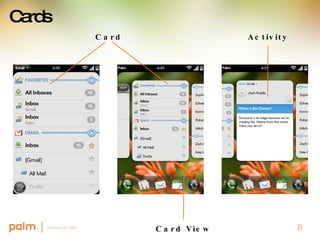
Cards Activity Card View Card
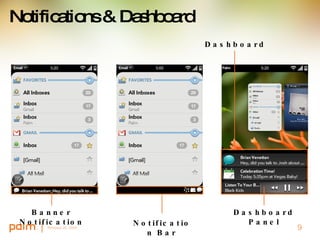
Notifications & Dashboard Notification Bar Banner Notification Dashboard Dashboard Panel
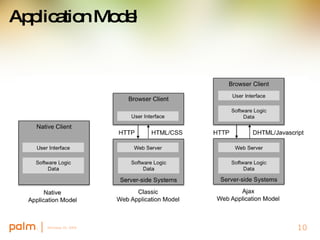
Application Model
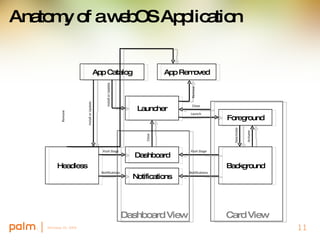
Anatomy of a webOS Application App Catalog Launcher Foreground Headless Background Dashboard Notifications App Removed Card View Dashboard View Close Launch Notifications Push Stage Remove Install or Update Install or Update Remove Notifications Push Stage Close Deactivate Activate
Mojo Developing webOS Applications
Mojo A  JavaScript framework Bundled with webOS Included as source in the SDK for reference Provides UI APIs, Widgets and Services Uses Prototype 1.6.3, which is also bundled with webOS
To Get Started It’s the web! All you need is a text editor and a web browser   It helps to know JavaScript, but you don’t need to be an expert Palm’s SDK includes: Mojo Framework & Documentation Emulator with DOM Inspector and JavaScript Debugger Tool bundles (project generator, app package tools)
Sample Application Build a Simple App Create a New Project Add a Scene Add a Widget Store local data Generate a Notification Use a Service In this example Macintosh TextMate & Safari With SDK Tool Bundles Emulator with Debugger
Stages & Scenes Stage HTML structure similar to a browser window A Card or Dashboard panel Scene Mutually exclusive views Can have many but must have one SceneStack Push and pop scenes
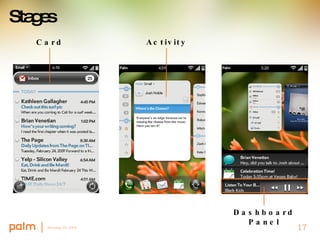
Stages Activity Card Dashboard Panel
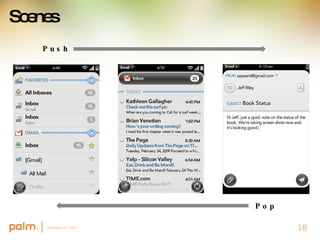
Scenes Push Pop
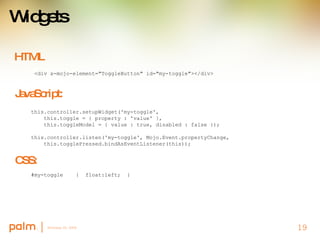
Widgets HTML   this.controller.setupWidget('my-toggle', this.toggle = { property : 'value' }, this.toggleModel = { value : true, disabled : false });   this.controller.listen('my-toggle', Mojo.Event.propertyChange, this.togglePressed.bindAsEventListener(this)); <div x-mojo-element=&quot;ToggleButton&quot; id=&quot;my-toggle&quot;></div>  JavaScript: CSS: #my-toggle  {  float:left;  }
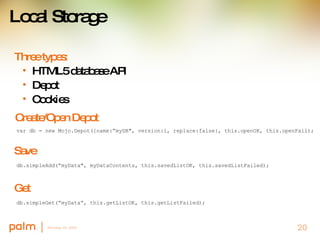
Local Storage Three types: HTML5 database API Depot Cookies Create/Open Depot var db = new Mojo.Depot({name:”myDB&quot;, version:1, replace:false}, this.openOK, this.openFail); Save db.simpleAdd(”myData&quot;, myDataContents, this.savedListOK, this.savedListFailed); Get db.simpleGet(”myData”, this.getListOK, this.getListFailed);
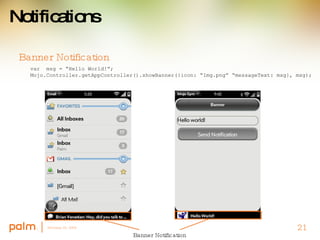
Notifications Banner Notification var  msg = “Hello World!”; Mojo.Controller.getAppController().showBanner({icon: “Img.png” “messageText: msg}, msg); Banner Notification
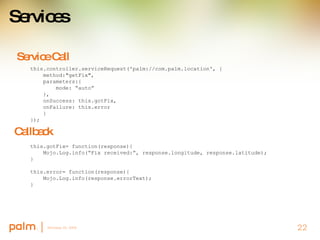
Services Service Call this.controller.serviceRequest('palm://com.palm.location', { method:&quot;getFix&quot;, parameters:{ mode: “auto” }, onSuccess: this.gotFix, onFailure: this.error } }); Callback this.gotFix= function(response){ Mojo.Log.info(“Fix received:”, response.longitude, response.latitude); } this.error= function(response){ Mojo.Log.info(response.errorText); }
Recap You’ve heard about: Palm webOS; native applications written in JavaScript Mojo framework; access to UI, APIs and Services It’s still early – there’s a lot more to come To learn more Official Palm website –  www.palm.com Other web resources Sign up at developer.palm.com for updates
Q&A For more information register at http://developer.palm.com
Thanks! For more information register at http://developer.palm.com

Developing Applications for WebOS

  • 1.
    Developing Applications forwebOS: A Preview Presented by: Mitch Allen Software CTO, Palm
  • 2.
    Will … Talkabout Palm webOS Review the Mojo Framework Develop a Simple Application Q & A
  • 3.
    Won’t … When….? Where… ? How much… ?
  • 4.
    Palm webOSIntroduction
  • 5.
    Palm webOS FeaturesPalm’s next generation operating system Fast, beautiful, multi-tasking user experience Integrates a card-based OS with a web browser Applications are built with JavaScript, HTML & CSS using common web development tools
  • 6.
  • 7.
    User Experience QuickLaunch Bar Launcher Status Bar
  • 8.
  • 9.
    Notifications & DashboardNotification Bar Banner Notification Dashboard Dashboard Panel
  • 10.
  • 11.
    Anatomy of awebOS Application App Catalog Launcher Foreground Headless Background Dashboard Notifications App Removed Card View Dashboard View Close Launch Notifications Push Stage Remove Install or Update Install or Update Remove Notifications Push Stage Close Deactivate Activate
  • 12.
  • 13.
    Mojo A JavaScript framework Bundled with webOS Included as source in the SDK for reference Provides UI APIs, Widgets and Services Uses Prototype 1.6.3, which is also bundled with webOS
  • 14.
    To Get StartedIt’s the web! All you need is a text editor and a web browser  It helps to know JavaScript, but you don’t need to be an expert Palm’s SDK includes: Mojo Framework & Documentation Emulator with DOM Inspector and JavaScript Debugger Tool bundles (project generator, app package tools)
  • 15.
    Sample Application Builda Simple App Create a New Project Add a Scene Add a Widget Store local data Generate a Notification Use a Service In this example Macintosh TextMate & Safari With SDK Tool Bundles Emulator with Debugger
  • 16.
    Stages & ScenesStage HTML structure similar to a browser window A Card or Dashboard panel Scene Mutually exclusive views Can have many but must have one SceneStack Push and pop scenes
  • 17.
    Stages Activity CardDashboard Panel
  • 18.
  • 19.
    Widgets HTML  this.controller.setupWidget('my-toggle', this.toggle = { property : 'value' }, this.toggleModel = { value : true, disabled : false });   this.controller.listen('my-toggle', Mojo.Event.propertyChange, this.togglePressed.bindAsEventListener(this)); <div x-mojo-element=&quot;ToggleButton&quot; id=&quot;my-toggle&quot;></div> JavaScript: CSS: #my-toggle { float:left; }
  • 20.
    Local Storage Threetypes: HTML5 database API Depot Cookies Create/Open Depot var db = new Mojo.Depot({name:”myDB&quot;, version:1, replace:false}, this.openOK, this.openFail); Save db.simpleAdd(”myData&quot;, myDataContents, this.savedListOK, this.savedListFailed); Get db.simpleGet(”myData”, this.getListOK, this.getListFailed);
  • 21.
    Notifications Banner Notificationvar msg = “Hello World!”; Mojo.Controller.getAppController().showBanner({icon: “Img.png” “messageText: msg}, msg); Banner Notification
  • 22.
    Services Service Callthis.controller.serviceRequest('palm://com.palm.location', { method:&quot;getFix&quot;, parameters:{ mode: “auto” }, onSuccess: this.gotFix, onFailure: this.error } }); Callback this.gotFix= function(response){ Mojo.Log.info(“Fix received:”, response.longitude, response.latitude); } this.error= function(response){ Mojo.Log.info(response.errorText); }
  • 23.
    Recap You’ve heardabout: Palm webOS; native applications written in JavaScript Mojo framework; access to UI, APIs and Services It’s still early – there’s a lot more to come To learn more Official Palm website – www.palm.com Other web resources Sign up at developer.palm.com for updates
  • 24.
    Q&A For moreinformation register at http://developer.palm.com
  • 25.
    Thanks! For moreinformation register at http://developer.palm.com

Editor's Notes

  • #2 Thanks, Kathryn and hello everyone. I’m Mitch Allen with Palm and I would like to start by thanking you for taking the time to tune into our webcast today. We’ve got a full hour planned for you, whether you’ve Come to check out Palm webOS for the first time or have scoured the web for everything on the webOS and are hoping to hear something new. I’ve been with Palm since 2000 when I joined Handspring to lead the software team and have been involved with webOS since the beginning. I am thrilled to be representing our terrific engineering and product teams back in Sunnyvale, who have done a tremendous job on the design and implementation of webOS and are working around the clock to get the Pre into stores as soon as possible and to get the SDK into your hands and all developers hands as well. We are all very excited to have a chance to share our work with you today. I’m joined by Paul Cousineau, who heads the Palm webOS and SDK product management team Paul introduces himself and talks about the Q&amp;A So please, submit questions at any time by typing them into the Q&amp;A portion of your webEx window