Keep Your Connected Nonprofit or
Library Secure
October 1, 2015
Using ReadyTalk
• Chat to ask questions
• All lines are muted
• If you lose your Internet
connection, reconnect using
the link emailed to you.
• If you lose your phone
connection, re-dial
the phone number
and re-join.
• ReadyTalk support:
800-843-9166
Your audio will play through your computer’s speakers. Hear an echo? You
may be logged in twice and will need to close one instance of ReadyTalk.
2
You Are Being Recorded…
• This webinar will be available on the TechSoup website
along with past webinars:
www.techsoup.org/community/events-webinars
• You can also view recorded webinars and videos on our
YouTube channel:
https://www.youtube.com/TechSoupVideo
• You will receive an email with this presentation,
recording, and links within a day.
• Tweet us @TechSoup or using hashtag: #techsoup or
#TechedUp
3
Keep Your Connected Nonprofit or
Library Secure
October 1, 2015
Presenters
5
Assisting with chat: Allyson Bliss and Ale Bezdikian, TechSoup
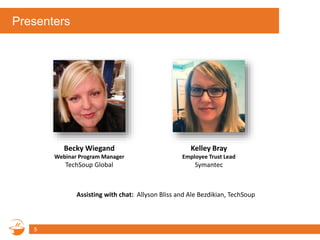
Becky Wiegand
Webinar Program Manager
TechSoup Global
Kelley Bray
Employee Trust Lead
Symantec
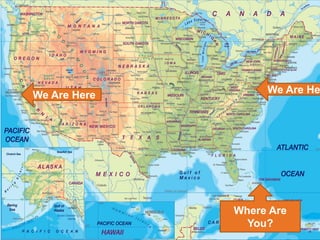
Where Are
You?
We Are Here
6
We Are He
Agenda
• Introduction to TechSoup
• The Problem – Quiz Time!
• The Common Approach to Solutions
• How Symantec Does It Differently
• Simple Security
• Donated Symantec and Other Security
• Q&A
7
About TechSoup Global
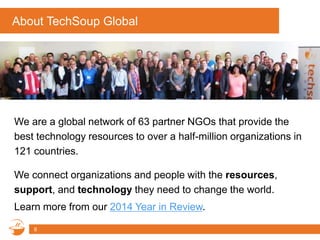
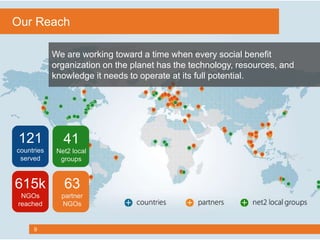
We are a global network of 63 partner NGOs that provide the
best technology resources to over a half-million organizations in
121 countries.
8
We connect organizations and people with the resources,
support, and technology they need to change the world.
Learn more from our 2014 Year in Review.
9
We are working toward a time when every social benefit
organization on the planet has the technology, resources, and
knowledge it needs to operate at its full potential.
121
countries
served
63
partner
NGOs
41
Net2 local
groups
615k
NGOs
reached
Our Reach
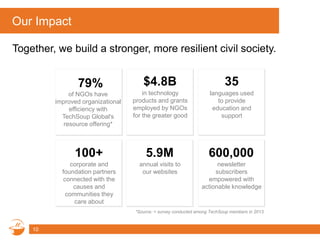
Our Impact
10
Together, we build a stronger, more resilient civil society.
$4.8B
in technology
products and grants
employed by NGOs
for the greater good
35
languages used
to provide
education and
support
100+
corporate and
foundation partners
connected with the
causes and
communities they
care about
5.9M
annual visits to
our websites
600,000
newsletter
subscribers
empowered with
actionable knowledge
79%
of NGOs have
improved organizational
efficiency with
TechSoup Global's
resource offering*
*Source: = survey conducted among TechSoup members in 2013.
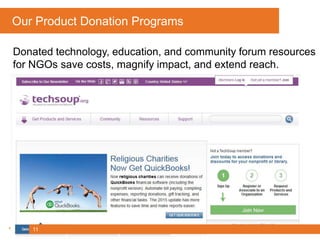
Our Product Donation Programs
Donated technology, education, and community forum resources
for NGOs save costs, magnify impact, and extend reach.
11
Participant Poll
Which of the following security tools are you using? (select
any)
• Avast! Free Antivirus
• Microsoft Security Essentials
• Windows Defender
• AVG Free Anti-Virus Free Edition
• Avira Free Antivirus
• Symantec Endpoint Protection
• McAfee VirusScan
• Norton Security
• AVG Internet Security
• Kaspersky Internet Security
12
13
Simple Security
Kelley Bray
Employee Trust Lead – Symantec Corporation
A little bit about me
• 5 years of Federal service
– Used to doing a lot with very little
• 2 years at SYMC
– Securing the company that secures the world
– Army of 1
• 3 kids growing up in the digital world
• kelley_bray@symantec.com
14
Agenda
• The problem
– Trivia
• The common approach to a solution
• How we do it differently at SYMC
• Simple Security
15
The Problem
• Rather than a lot of scary bullets, let’s play a little game
16
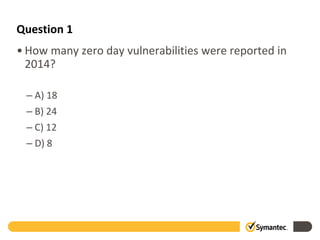
Question 1
• How many zero day vulnerabilities were reported in
2014?
– A) 18
– B) 24
– C) 12
– D) 8
2006 2007 2008 2009 2010 2011 2012
0
2
4
6
8
10
12
14
16
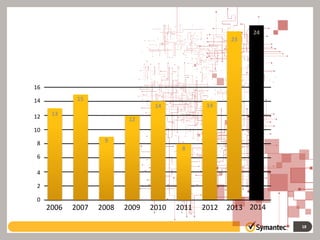
Answer: B
24 zero-day vulnerabilities were discovered
in 2014.
18
2013 2014
14
13
15
9
12
14
8
24
23
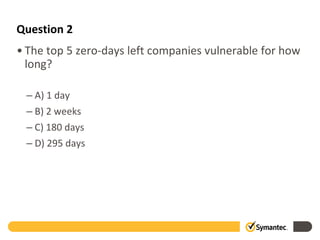
Question 2
• The top 5 zero-days left companies vulnerable for how
long?
– A) 1 day
– B) 2 weeks
– C) 180 days
– D) 295 days
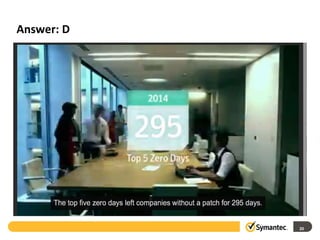
Answer: D
20
Question 3
What were the top three causes of data
breaches in 2014?
22
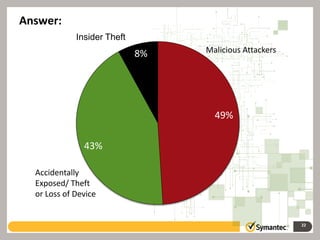
49%
43%
8% Malicious Attackers
Accidentally
Exposed/ Theft
or Loss of Device
Insider Theft
Answer:
Question 4
In 2014, Symantec analyzed over 6 million
Android apps and found that 1 in ____
contained malware
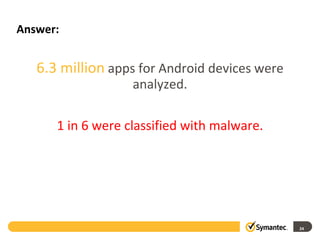
Answer:
6.3 million apps for Android devices were
analyzed.
1 in 6 were classified with malware.
24
You get it – the cyber world is bad
• Protection strategies vary
• Funds are limited
• Tech-speak isn’t for everyone.
25
SYMC – Our requirements
• Secure our network and user data
• Meet our compliance requirements
• Protect our brand
• Spend our money wisely
• Show improvement and impact
• New Hire and Annual Training
• National Cyber Security Awareness Month/Other Activities
• Employee Engagement
26
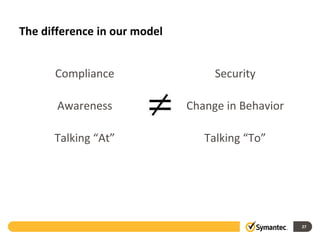
The difference in our model
Compliance
Awareness
Talking “At”
Security
Change in Behavior
Talking “To”
27
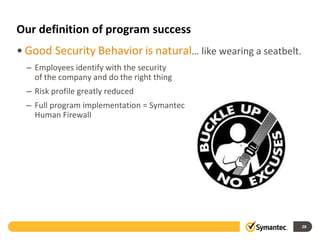
Our definition of program success
• Good Security Behavior is natural… like wearing a seatbelt.
– Employees identify with the security
of the company and do the right thing
– Risk profile greatly reduced
– Full program implementation = Symantec
Human Firewall
28
Simple security
• Basic security
– Anti Virus, Firewalls…and that’s about all the tech I know..
• Protecting your people is easier!
– And, it’s free!
– Good behavior transcends the walls of work and home
• Believe it or not, the basics go a long way
– Everyone is a target
29
Passwords
• Simple rules to creating and remembering a strong password
– Complexity: create a password that includes upper and lower case letters,
numbers and special characters
– Do not use PII: A lot of people use names and important dates from their
family and friends. Most of this information can be found online, so avoid
using initials, birthdays, address information and other PII in passwords.
Never use information that can be found (like your birthday) on Facebook
or other social media sites.
– Change your password every 30 days and Never use the same password
for your work computer that you use for home or website access.
– Use a passphrase to create (and help you remember!) your password.
Example: a song lyric, with complexity added, is an easy password to
remember, but difficult to detect. Use the first letter of each word:
• “New York State of Mind” becomes NYSOM, and then NYS0M123!
30
Beware!
• If it’s too good to be true…
– Airports and Starbucks are a hackers amusement park
– All those free USB’s
• Physical Security: Beware of your surroundings
– Do not process sensitive data in areas that are visible by others.
– Lock your computer and phone out of sight when necessary
• Manage sensitive data correctly
– Never leave sensitive documents on your desk or in the printer
31
Social Media
• We love the internet, but the internet doesn’t love us back
• If you wouldn’t post it on your front door, do not post it on
Facebook
• Would you share a bottle of water with a stranger?
• Do you know what geotagging is?
32
Phishing
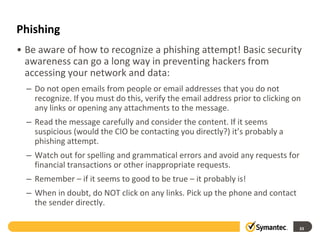
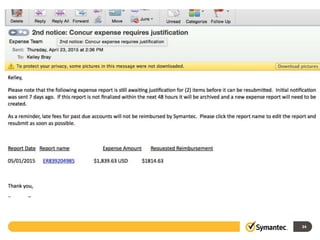
• Be aware of how to recognize a phishing attempt! Basic security
awareness can go a long way in preventing hackers from
accessing your network and data:
– Do not open emails from people or email addresses that you do not
recognize. If you must do this, verify the email address prior to clicking on
any links or opening any attachments to the message.
– Read the message carefully and consider the content. If it seems
suspicious (would the CIO be contacting you directly?) it’s probably a
phishing attempt.
– Watch out for spelling and grammatical errors and avoid any requests for
financial transactions or other inappropriate requests.
– Remember – if it seems to good to be true – it probably is!
– When in doubt, do NOT click on any links. Pick up the phone and contact
the sender directly.
33
34
How to get started
• Free Resources!
– Use these slides and provide basic education to your coworkers and
families
– National Cyber Security Alliance: www.staysafeonline.org
• Strategies for individuals and businesses
• Training
• Free virus scans
– Baseline Training (like what you see here)
• Or – on YouTube, check out the Norton #30SecTech videos for simple explanations to a lot
of technical terms
– Baseline Policy (you have to let people know what they are/not allowed
to do
– Basic software/network protection – keep those patches up to date!
35
Thank you!
• Questions?
36
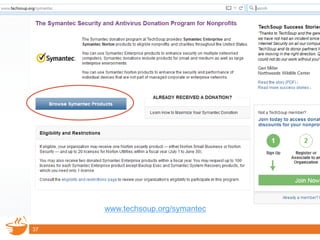
Symantec Donation Program
37
www.techsoup.org/symantec
38
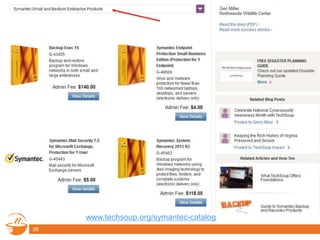
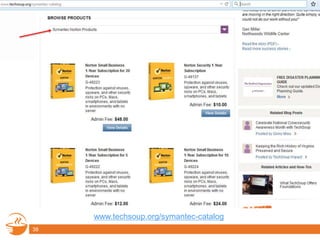
www.techsoup.org/symantec-catalog
39
www.techsoup.org/symantec-catalog
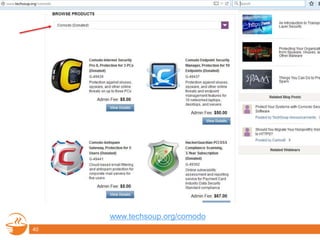
Additional Donated and Discounted Security Options
40
www.techsoup.org/comodo
Bitdefender
41
www.techsoup.org/bitdefender
42
www.techsoup.org/mailshell
43
www.techsoup.org/red-earth-software
Q & A
Please type your
questions in the
chat window.
Continue the discussion in
our Security forum.
56
Additional Resources
• Symantec Internet Security Threat Report 2015
• Celebrate National Cybersecurity Month with TechSoup
• 12 Steps to Stay Safer Online Guide (PDF)
• TechSoup’s Security Category
• Security Articles and How-Tos
• Symantec’s Norton Security for Nonprofits and Libraries
(webinar archive)
45
Learn and Share!
• Chat in one thing that you learned in today’s webinar that
you will try to implement.
• Will you share this information with your colleagues and
within your network?
46
Upcoming Webinars and Events
• 10/6: #NPTechChat: Civil Society Under Threat
• 10/14: Pinterest for Libraries: Building Community Through
Social Media
• 10/15: Do You Need the New Microsoft Office 2016 for
Windows?
• 10/15: Deadline for Next Adobe Creative Cloud Submissions!
• 10/22: Microsoft Office 2016 for Mac
Explore our webinar archives for more!
47
Connect with Us!
www.techsoupglobal.org
www.techsoup.org
facebook.com/techsoupglobal
twitter.com/techsoup
48
ReadyTalk offers dedicated product demos for
TechSoup organizations 4 times per week.
For more information: www.techsoup.org/readytalk
Please complete the post-event survey that will
pop up once you close this window.
Thank You to Our Webinar Sponsor!
49

Webinar - Keep Your Connected Nonprofit or Library Secure - 2015-10-01

  • 1.
    Keep Your ConnectedNonprofit or Library Secure October 1, 2015
  • 2.
    Using ReadyTalk • Chatto ask questions • All lines are muted • If you lose your Internet connection, reconnect using the link emailed to you. • If you lose your phone connection, re-dial the phone number and re-join. • ReadyTalk support: 800-843-9166 Your audio will play through your computer’s speakers. Hear an echo? You may be logged in twice and will need to close one instance of ReadyTalk. 2
  • 3.
    You Are BeingRecorded… • This webinar will be available on the TechSoup website along with past webinars: www.techsoup.org/community/events-webinars • You can also view recorded webinars and videos on our YouTube channel: https://www.youtube.com/TechSoupVideo • You will receive an email with this presentation, recording, and links within a day. • Tweet us @TechSoup or using hashtag: #techsoup or #TechedUp 3
  • 4.
    Keep Your ConnectedNonprofit or Library Secure October 1, 2015
  • 5.
    Presenters 5 Assisting with chat:Allyson Bliss and Ale Bezdikian, TechSoup Becky Wiegand Webinar Program Manager TechSoup Global Kelley Bray Employee Trust Lead Symantec
  • 6.
    Where Are You? We AreHere 6 We Are He
  • 7.
    Agenda • Introduction toTechSoup • The Problem – Quiz Time! • The Common Approach to Solutions • How Symantec Does It Differently • Simple Security • Donated Symantec and Other Security • Q&A 7
  • 8.
    About TechSoup Global Weare a global network of 63 partner NGOs that provide the best technology resources to over a half-million organizations in 121 countries. 8 We connect organizations and people with the resources, support, and technology they need to change the world. Learn more from our 2014 Year in Review.
  • 9.
    9 We are workingtoward a time when every social benefit organization on the planet has the technology, resources, and knowledge it needs to operate at its full potential. 121 countries served 63 partner NGOs 41 Net2 local groups 615k NGOs reached Our Reach
  • 10.
    Our Impact 10 Together, webuild a stronger, more resilient civil society. $4.8B in technology products and grants employed by NGOs for the greater good 35 languages used to provide education and support 100+ corporate and foundation partners connected with the causes and communities they care about 5.9M annual visits to our websites 600,000 newsletter subscribers empowered with actionable knowledge 79% of NGOs have improved organizational efficiency with TechSoup Global's resource offering* *Source: = survey conducted among TechSoup members in 2013.
  • 11.
    Our Product DonationPrograms Donated technology, education, and community forum resources for NGOs save costs, magnify impact, and extend reach. 11
  • 12.
    Participant Poll Which ofthe following security tools are you using? (select any) • Avast! Free Antivirus • Microsoft Security Essentials • Windows Defender • AVG Free Anti-Virus Free Edition • Avira Free Antivirus • Symantec Endpoint Protection • McAfee VirusScan • Norton Security • AVG Internet Security • Kaspersky Internet Security 12
  • 13.
    13 Simple Security Kelley Bray EmployeeTrust Lead – Symantec Corporation
  • 14.
    A little bitabout me • 5 years of Federal service – Used to doing a lot with very little • 2 years at SYMC – Securing the company that secures the world – Army of 1 • 3 kids growing up in the digital world • kelley_bray@symantec.com 14
  • 15.
    Agenda • The problem –Trivia • The common approach to a solution • How we do it differently at SYMC • Simple Security 15
  • 16.
    The Problem • Ratherthan a lot of scary bullets, let’s play a little game 16
  • 17.
    Question 1 • Howmany zero day vulnerabilities were reported in 2014? – A) 18 – B) 24 – C) 12 – D) 8
  • 18.
    2006 2007 20082009 2010 2011 2012 0 2 4 6 8 10 12 14 16 Answer: B 24 zero-day vulnerabilities were discovered in 2014. 18 2013 2014 14 13 15 9 12 14 8 24 23
  • 19.
    Question 2 • Thetop 5 zero-days left companies vulnerable for how long? – A) 1 day – B) 2 weeks – C) 180 days – D) 295 days
  • 20.
  • 21.
    Question 3 What werethe top three causes of data breaches in 2014?
  • 22.
    22 49% 43% 8% Malicious Attackers Accidentally Exposed/Theft or Loss of Device Insider Theft Answer:
  • 23.
    Question 4 In 2014,Symantec analyzed over 6 million Android apps and found that 1 in ____ contained malware
  • 24.
    Answer: 6.3 million appsfor Android devices were analyzed. 1 in 6 were classified with malware. 24
  • 25.
    You get it– the cyber world is bad • Protection strategies vary • Funds are limited • Tech-speak isn’t for everyone. 25
  • 26.
    SYMC – Ourrequirements • Secure our network and user data • Meet our compliance requirements • Protect our brand • Spend our money wisely • Show improvement and impact • New Hire and Annual Training • National Cyber Security Awareness Month/Other Activities • Employee Engagement 26
  • 27.
    The difference inour model Compliance Awareness Talking “At” Security Change in Behavior Talking “To” 27
  • 28.
    Our definition ofprogram success • Good Security Behavior is natural… like wearing a seatbelt. – Employees identify with the security of the company and do the right thing – Risk profile greatly reduced – Full program implementation = Symantec Human Firewall 28
  • 29.
    Simple security • Basicsecurity – Anti Virus, Firewalls…and that’s about all the tech I know.. • Protecting your people is easier! – And, it’s free! – Good behavior transcends the walls of work and home • Believe it or not, the basics go a long way – Everyone is a target 29
  • 30.
    Passwords • Simple rulesto creating and remembering a strong password – Complexity: create a password that includes upper and lower case letters, numbers and special characters – Do not use PII: A lot of people use names and important dates from their family and friends. Most of this information can be found online, so avoid using initials, birthdays, address information and other PII in passwords. Never use information that can be found (like your birthday) on Facebook or other social media sites. – Change your password every 30 days and Never use the same password for your work computer that you use for home or website access. – Use a passphrase to create (and help you remember!) your password. Example: a song lyric, with complexity added, is an easy password to remember, but difficult to detect. Use the first letter of each word: • “New York State of Mind” becomes NYSOM, and then NYS0M123! 30
  • 31.
    Beware! • If it’stoo good to be true… – Airports and Starbucks are a hackers amusement park – All those free USB’s • Physical Security: Beware of your surroundings – Do not process sensitive data in areas that are visible by others. – Lock your computer and phone out of sight when necessary • Manage sensitive data correctly – Never leave sensitive documents on your desk or in the printer 31
  • 32.
    Social Media • Welove the internet, but the internet doesn’t love us back • If you wouldn’t post it on your front door, do not post it on Facebook • Would you share a bottle of water with a stranger? • Do you know what geotagging is? 32
  • 33.
    Phishing • Be awareof how to recognize a phishing attempt! Basic security awareness can go a long way in preventing hackers from accessing your network and data: – Do not open emails from people or email addresses that you do not recognize. If you must do this, verify the email address prior to clicking on any links or opening any attachments to the message. – Read the message carefully and consider the content. If it seems suspicious (would the CIO be contacting you directly?) it’s probably a phishing attempt. – Watch out for spelling and grammatical errors and avoid any requests for financial transactions or other inappropriate requests. – Remember – if it seems to good to be true – it probably is! – When in doubt, do NOT click on any links. Pick up the phone and contact the sender directly. 33
  • 34.
  • 35.
    How to getstarted • Free Resources! – Use these slides and provide basic education to your coworkers and families – National Cyber Security Alliance: www.staysafeonline.org • Strategies for individuals and businesses • Training • Free virus scans – Baseline Training (like what you see here) • Or – on YouTube, check out the Norton #30SecTech videos for simple explanations to a lot of technical terms – Baseline Policy (you have to let people know what they are/not allowed to do – Basic software/network protection – keep those patches up to date! 35
  • 36.
  • 37.
  • 38.
  • 39.
  • 40.
    Additional Donated andDiscounted Security Options 40 www.techsoup.org/comodo
  • 41.
  • 42.
  • 43.
  • 44.
    Q & A Pleasetype your questions in the chat window. Continue the discussion in our Security forum. 56
  • 45.
    Additional Resources • SymantecInternet Security Threat Report 2015 • Celebrate National Cybersecurity Month with TechSoup • 12 Steps to Stay Safer Online Guide (PDF) • TechSoup’s Security Category • Security Articles and How-Tos • Symantec’s Norton Security for Nonprofits and Libraries (webinar archive) 45
  • 46.
    Learn and Share! •Chat in one thing that you learned in today’s webinar that you will try to implement. • Will you share this information with your colleagues and within your network? 46
  • 47.
    Upcoming Webinars andEvents • 10/6: #NPTechChat: Civil Society Under Threat • 10/14: Pinterest for Libraries: Building Community Through Social Media • 10/15: Do You Need the New Microsoft Office 2016 for Windows? • 10/15: Deadline for Next Adobe Creative Cloud Submissions! • 10/22: Microsoft Office 2016 for Mac Explore our webinar archives for more! 47
  • 48.
  • 49.
    ReadyTalk offers dedicatedproduct demos for TechSoup organizations 4 times per week. For more information: www.techsoup.org/readytalk Please complete the post-event survey that will pop up once you close this window. Thank You to Our Webinar Sponsor! 49

Editor's Notes

  • #19 This is a look at zero-day vulnerabilities since 2006. Between 2006 and 2012, zero-day vulnerabilities have been discovered at a fairly consistent rate. While we have seen highs of 15 in a year and lows of 8, they have bounced around each year between these two numbers. Then in 2013, that number shot up to 23 zero-day vulnerabilities discovered. We believe this is based on a new professionalization of zero-day discovery. There was demand and an active market for buying and selling these vulnerabilities – people could make money finding zero-day vulnerabilities. Again in 2014 we see that highs hit in 2013 were not an aberration, but a new plateau. 2014 had an all time high in 0-day vulnerabilities, confirming what we found in 2013.
  • #23 If we look at the top causes of data breaches, we’ve also seen a shift here. If you look at total incidents that were an accident (breaches in which data was accidentally exposed or devices like laptops and USB sticks were lost or stolen) – in 2013, that was 58% of all data breaches and in 2014, those accidental exposures dropped to 43%. In 2014, this shifted dramatically – where attackers are now being responsible for the majority of data breaches with 49%.
  • #50 49