1
WebAuthn and security keys =
unlocking the key to
authentication
John Fontana at Yubico
on Behalf of
Christiaan Brand, Product Manager, Google
2
It’s no secret -
passwords aren't enough
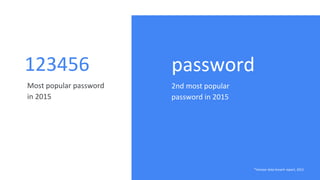
123456
Most popular password
in 2015
password
2nd most popular
password in 2015
*Verizon data breach report, 2015
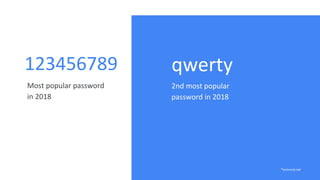
123456789
Most popular password
in 2018
qwerty
2nd most popular
password in 2018
*techviral.net
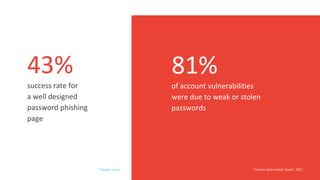
success rate for
a well designed
password phishing
page
of account vulnerabilities
were due to weak or stolen
passwords
*Verizon data breach report, 2017
43% 81%
*Google study
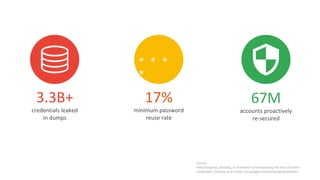
3.3B+
credentials leaked
in dumps
67M
accounts proactively
re-secured
17%
minimum password
reuse rate
* * *
*
Source:
Data breaches, phishing, or malware? Understanding the risks of stolen
credentials (Thomas et al.) https://ai.google/research/pubs/pub46437
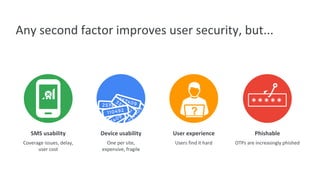
SMS usability
Coverage issues, delay,
user cost
Device usability
One per site,
expensive, fragile
User experience
Users find it hard
Phishable
OTPs are increasingly phished
?
Any second factor improves user security, but...
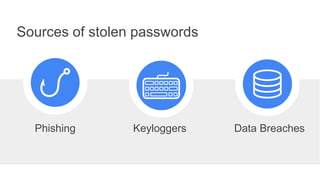
Sources of stolen passwords
Data BreachesKeyloggersPhishing
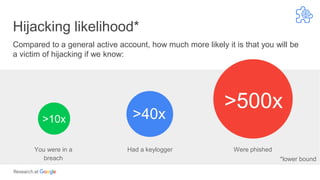
Hijacking likelihood*
Compared to a general active account, how much more likely it is that you will be
a victim of hijacking if we know:
*lower bound
Had a keyloggerYou were in a
breach
Were phished
>10x >40x
>500x
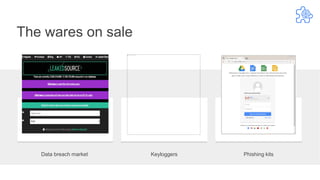
Data breach market Keyloggers Phishing kits
The wares on sale
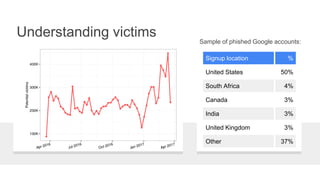
Understanding victims
Signup location %
United States 50%
South Africa 4%
Canada 3%
India 3%
United Kingdom 3%
Other 37%
Sample of phished Google accounts:
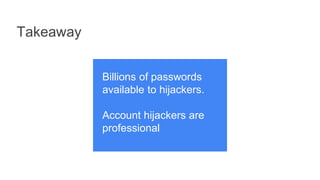
Takeaway
Billions of passwords
available to hijackers.
Account hijackers are
professional
15
At Google,
on our journey to replacing the
password, we started by making
the password safer
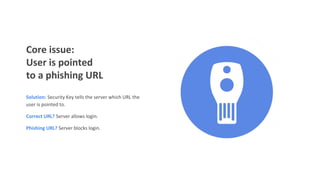
Core issue:
User is pointed
to a phishing URL
Solution: Security Key tells the server which URL the
user is pointed to.
Correct URL? Server allows login.
Phishing URL? Server blocks login.
17
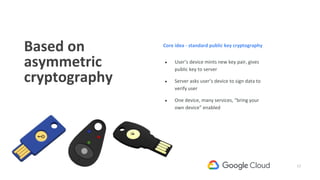
Based on
asymmetric
cryptography
● User’s device mints new key pair, gives
public key to server
● Server asks user’s device to sign data to
verify user
● One device, many services, “bring your
own device” enabled
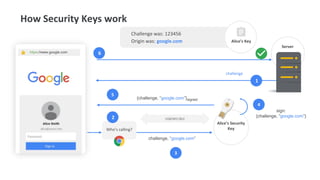
Core idea - standard public key cryptography
challenge, “google.com”
Server
How Security Keys work
Who’s calling?
sign:
{challenge, “google.com”}
{challenge, “google.com”}signed
Alice’s Security
Key
Challenge was: 123456
Origin was: google.com Alice’s Key
https://www.google.com
USB/NFC/BLE
5
challenge
1
6
2
3
4
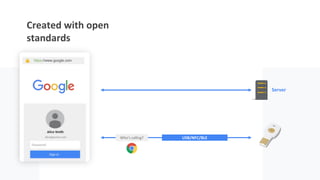
Created with open
standards
Server
USB/NFC/BLEWho’s calling?
https://www.google.com
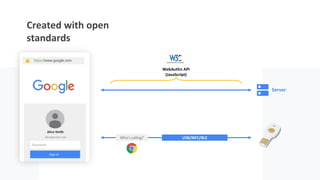
Created with open
standards
Server
USB/NFC/BLEWho’s calling?
https://www.google.com
WebAuthn API
(JavaScript)
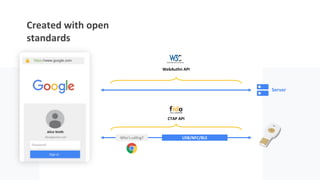
Created with open
standards
Server
USB/NFC/BLEWho’s calling?
https://www.google.com
WebAuthn API
CTAP API
22
We made the password a lot safer with U2F, but we
want to go one step further: we want to remove the
password from the equation
That’s where FIDO2 and WebAuthn come in
23
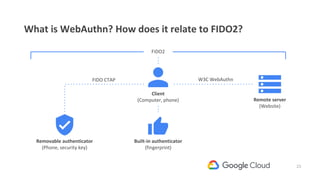
What is WebAuthn? How does it relate to FIDO2?
W3C WebAuthnFIDO CTAP
FIDO2
Client
(Computer, phone)
Built-in authenticator
(fingerprint)
Remote server
(Website)
Removable authenticator
(Phone, security key)
24
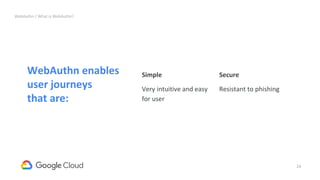
WebAuthn enables
user journeys
that are:
Simple
Very intuitive and easy
for user
Secure
Resistant to phishing
WebAuthn / What is WebAuthn?
25
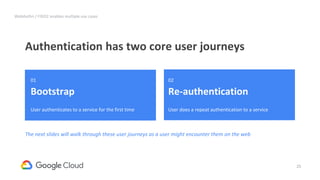
Authentication has two core user journeys
WebAuthn / FIDO2 enables multiple use cases
01
Bootstrap
User authenticates to a service for the first time
The next slides will walk through these user journeys as a user might encounter them on the web
02
Re-authentication
User does a repeat authentication to a service
26
Note that we’re inheriting
the strength of the
credentials from the initial
bootstrap
If in Step 1 we only ask the
user for a username +
password, the strength of all
the derived credentials are
only as good as a username
+ password.
If in Step 1 we ask for a
stronger credential (2nd
factor security key), all of
the derived credentials
would inherit those stronger
attributes too.
27
Meet
Elisa
28
Elisa wants to sign in to her bank
She starts on her mobile browser and
enrolls in fingerprint after sign-in
Registering and using built-in authenticator for re-auth (mobile web)
29
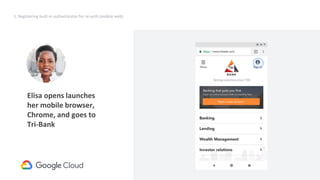
1. Registering built-in authenticator for re-auth (mobile web)
Request
UV=true
X-Plat=false
Result
credential
(internal,caBLE)
Elisa opens launches
her mobile browser,
Chrome, and goes to
Tri-Bank
30
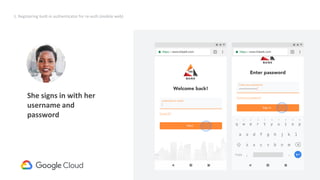
1. Registering built-in authenticator for re-auth (mobile web)
She signs in with her
username and
password
31
1. Registering built-in authenticator for re-auth (mobile web)
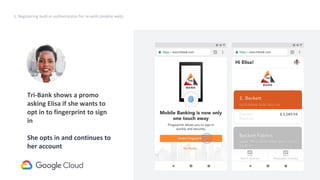
Tri-Bank shows a promo
asking Elisa if she wants to
opt in to fingerprint to sign
in
She opts in and continues to
her account
32
Silently determined whether a platform authenticator was available:
PublicKeyCredential.isUserVerifyingPlatformAuthenticatorAvailable().then(response => {
if (response === true) {
//User verifying platform authenticator is available!
} else {
//User verifying platform authenticator is NOT available.
}
Created the credential on the platform authenticator
navigator.credentials.create({
"publicKey": makeCredentialOptions
});
With values for makeCredentialOptions
○ excludeCredentials = [// registered ids ]
○ authenticatorSelection.authenticatorAttachment = 'platform'
○ authenticatorSelection.userVerification = 'required'
What happened behind the scenes?
Object contains “transport” info
33
● Transports is a way to indicate how authenticators can be reached
● Allowed values include
○ USB
○ NFC
○ BLE
○ Internal (corresponds to attachment=platform request type)
○ caBLE
● Transports are both returned when credentials are created, and set when requesting signatures.
● This allows the RP to
○ which use-cases are supported by the created credential
○ select the particular use-case they’re interested in (by modifying the transports)
More on transports
34
Elisa comes back to Tri-Bank in
another session
2a. Using built-in authenticator for re-auth (mobile web)
35
2a. Using built-in authenticator for re-auth (mobile web)
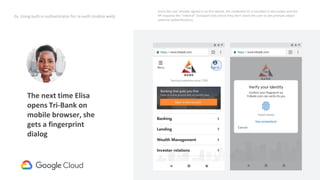
The next time Elisa
opens Tri-Bank on
mobile browser, she
gets a fingerprint
dialog
Request
credentialId
(internal)
Since the user already signed in on this device, the credential ID is encoded in the cookie and the
RP requests the “internal” transport only (since they don’t want the user to see prompts about
external authenticators).
36
2a. Using built-in authenticator for re-auth (mobile web)
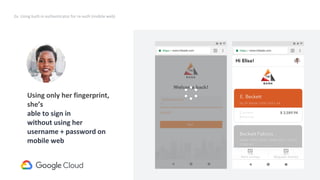
Using only her fingerprint,
she’s
able to sign in
without using her
username + password on
mobile web
Request
credentialId
(internal)
37
Created a signature using the platform authenticator
navigator.credentials.get({
"publicKey": requestOptions
});
With values for requestOptions
○ allowCredentials = [// credential associated with session and transport=internal ]
○ userVerification = true
What happened behind the scenes?
38
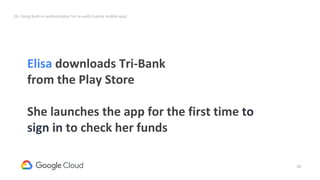
Elisa downloads Tri-Bank
from the Play Store
She launches the app for the first time to
sign in to check her funds
2b. Using built-in authenticator for re-auth (native mobile app)
39
Request
UV=true
X-Plat=false
Result
credential
(internal,caBLE)
Request
credentialId
(internal)
Request
(Alternative)
{empty
credentialId}
Will result in prompt
to insert removable
SK
2b. Using built-in authenticator for re-auth (native mobile app)
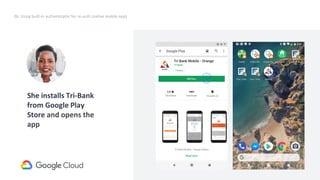
She installs Tri-Bank
from Google Play
Store and opens the
app
40
2b. Using built-in authenticator for re-auth (native mobile app)
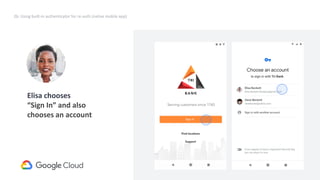
Elisa chooses
“Sign In” and also
chooses an account
Request
credentialId
(internal)
41
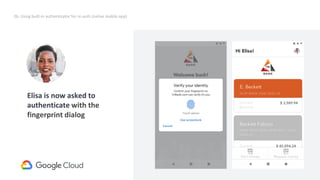
Elisa is now asked to
authenticate with the
fingerprint dialog
2b. Using built-in authenticator for re-auth (native mobile app)
42
Created a signature using the platform authenticator
navigator.credentials.get({
"publicKey": requestOptions
});
With values for requestOptions
○ allowCredentials = [// empty set ]
○ userVerification = true
What happened behind the scenes?
43
Elisa wants to sign in to
her bank on her desktop
computer and sign-in to
Tri-Bank without a
password
3. Cross-platform bootstrap
This is the part that is not released yet
44
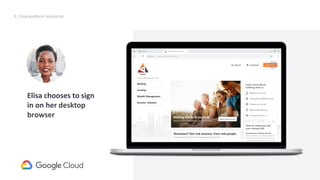
Elisa chooses to sign
in on her desktop
browser
Request
credentialId
(internal)
Request (Alternative)
{empty credentialId}
Will result in prompt to insert removable SK
3. Cross-platform bootstrap
45
Request
credentialId
(internal)
Request (Alternative)
{empty credentialId}
Will result in prompt to insert removable SK
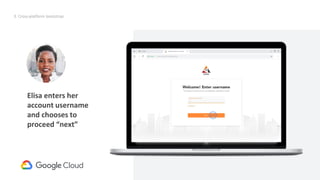
Elisa enters her
account username
and chooses to
proceed “next”
3. Cross-platform bootstrap
46
Request
credentialId
(internal)
Request (Alternative)
{empty credentialId}
Will result in prompt to insert removable SK
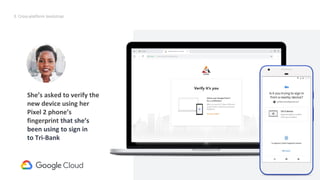
She’s asked to verify the
new device using her
Pixel 2 phone’s
fingerprint that she’s
been using to sign in
to Tri-Bank
3. Cross-platform bootstrap
47
Request
credentialId
(internal)
Request (Alternative)
{empty credentialId}
Will result in prompt to insert removable SK
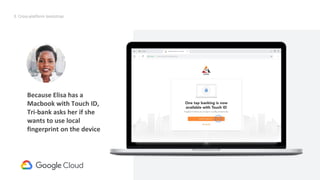
Because Elisa has a
Macbook with Touch ID,
Tri-bank asks her if she
wants to use local
fingerprint on the device
3. Cross-platform bootstrap
48
Request
credentialId
(internal)
Request (Alternative)
{empty credentialId}
Will result in prompt to insert removable SK
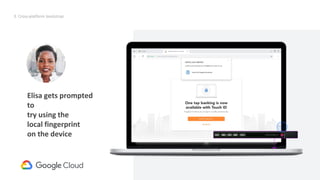
Elisa gets prompted
to
try using the
local fingerprint
on the device
3. Cross-platform bootstrap
49
Request
credentialId
(internal)
Request (Alternative)
{empty credentialId}
Will result in prompt to insert removable SK
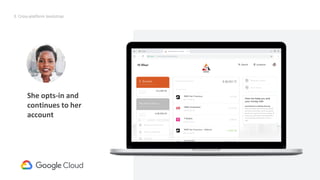
She opts-in and
continues to her
account
3. Cross-platform bootstrap
50
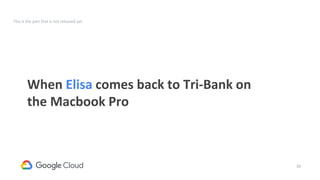
When Elisa comes back to Tri-Bank on
the Macbook Pro
This is the part that is not released yet
51
Request
credentialId
(internal)
Request (Alternative)
{empty credentialId}
Will result in prompt to insert removable SK
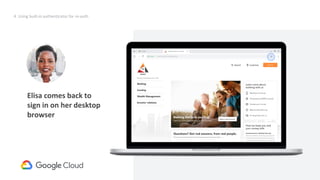
4. Using built-in authenticator for re-auth
Elisa comes back to
sign in on her desktop
browser
52
Request
credentialId
(internal)
Request (Alternative)
{empty credentialId}
Will result in prompt to insert removable SK
4. Using built-in authenticator for re-auth
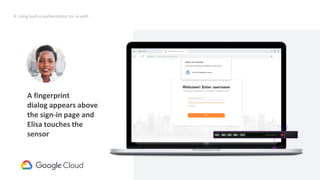
A fingerprint
dialog appears above
the sign-in page and
Elisa touches the
sensor
53
Request
credentialId
(internal)
Request (Alternative)
{empty credentialId}
Will result in prompt to insert removable SK
4. Using built-in authenticator for re-auth
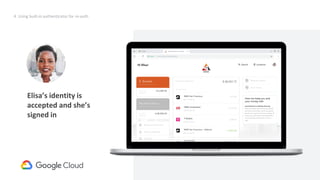
Elisa’s identity is
accepted and she’s
signed in
54
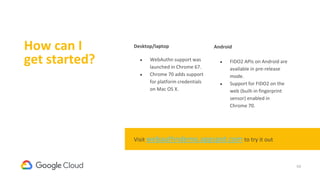
How can I
get started?
Desktop/laptop
● WebAuthn support was
launched in Chrome 67.
● Chrome 70 adds support
for platform credentials
on Mac OS X.
Android
● FIDO2 APIs on Android are
available in pre-release
mode.
● Support for FIDO2 on the
web (built-in fingerprint
sensor) enabled in
Chrome 70.
Visit webauthndemo.appspot.com to try it out
55
CTAP2 &
WEB AUTHN
UPDATE
56
Questions?
57
That’s a wrap

WebAuthn and Security Keys

  • 1.
    1 WebAuthn and securitykeys = unlocking the key to authentication John Fontana at Yubico on Behalf of Christiaan Brand, Product Manager, Google
  • 2.
    2 It’s no secret- passwords aren't enough
  • 3.
    123456 Most popular password in2015 password 2nd most popular password in 2015 *Verizon data breach report, 2015
  • 4.
    123456789 Most popular password in2018 qwerty 2nd most popular password in 2018 *techviral.net
  • 5.
    success rate for awell designed password phishing page of account vulnerabilities were due to weak or stolen passwords *Verizon data breach report, 2017 43% 81% *Google study
  • 6.
    3.3B+ credentials leaked in dumps 67M accountsproactively re-secured 17% minimum password reuse rate * * * * Source: Data breaches, phishing, or malware? Understanding the risks of stolen credentials (Thomas et al.) https://ai.google/research/pubs/pub46437
  • 8.
    SMS usability Coverage issues,delay, user cost Device usability One per site, expensive, fragile User experience Users find it hard Phishable OTPs are increasingly phished ? Any second factor improves user security, but...
  • 9.
    Sources of stolenpasswords Data BreachesKeyloggersPhishing
  • 10.
    Hijacking likelihood* Compared toa general active account, how much more likely it is that you will be a victim of hijacking if we know: *lower bound Had a keyloggerYou were in a breach Were phished >10x >40x >500x
  • 11.
    Data breach marketKeyloggers Phishing kits The wares on sale
  • 13.
    Understanding victims Signup location% United States 50% South Africa 4% Canada 3% India 3% United Kingdom 3% Other 37% Sample of phished Google accounts:
  • 14.
    Takeaway Billions of passwords availableto hijackers. Account hijackers are professional
  • 15.
    15 At Google, on ourjourney to replacing the password, we started by making the password safer
  • 16.
    Core issue: User ispointed to a phishing URL Solution: Security Key tells the server which URL the user is pointed to. Correct URL? Server allows login. Phishing URL? Server blocks login.
  • 17.
    17 Based on asymmetric cryptography ● User’sdevice mints new key pair, gives public key to server ● Server asks user’s device to sign data to verify user ● One device, many services, “bring your own device” enabled Core idea - standard public key cryptography
  • 18.
    challenge, “google.com” Server How SecurityKeys work Who’s calling? sign: {challenge, “google.com”} {challenge, “google.com”}signed Alice’s Security Key Challenge was: 123456 Origin was: google.com Alice’s Key https://www.google.com USB/NFC/BLE 5 challenge 1 6 2 3 4
  • 19.
    Created with open standards Server USB/NFC/BLEWho’scalling? https://www.google.com https://www.google.com
  • 20.
    Created with open standards Server USB/NFC/BLEWho’scalling? https://www.google.com https://www.google.com WebAuthn API (JavaScript)
  • 21.
    Created with open standards Server USB/NFC/BLEWho’scalling? https://www.google.com https://www.google.com WebAuthn API CTAP API
  • 22.
    22 We made thepassword a lot safer with U2F, but we want to go one step further: we want to remove the password from the equation That’s where FIDO2 and WebAuthn come in
  • 23.
    23 What is WebAuthn?How does it relate to FIDO2? W3C WebAuthnFIDO CTAP FIDO2 Client (Computer, phone) Built-in authenticator (fingerprint) Remote server (Website) Removable authenticator (Phone, security key)
  • 24.
    24 WebAuthn enables user journeys thatare: Simple Very intuitive and easy for user Secure Resistant to phishing WebAuthn / What is WebAuthn?
  • 25.
    25 Authentication has twocore user journeys WebAuthn / FIDO2 enables multiple use cases 01 Bootstrap User authenticates to a service for the first time The next slides will walk through these user journeys as a user might encounter them on the web 02 Re-authentication User does a repeat authentication to a service
  • 26.
    26 Note that we’reinheriting the strength of the credentials from the initial bootstrap If in Step 1 we only ask the user for a username + password, the strength of all the derived credentials are only as good as a username + password. If in Step 1 we ask for a stronger credential (2nd factor security key), all of the derived credentials would inherit those stronger attributes too.
  • 27.
  • 28.
    28 Elisa wants tosign in to her bank She starts on her mobile browser and enrolls in fingerprint after sign-in Registering and using built-in authenticator for re-auth (mobile web)
  • 29.
    29 1. Registering built-inauthenticator for re-auth (mobile web) Request UV=true X-Plat=false Result credential (internal,caBLE) Elisa opens launches her mobile browser, Chrome, and goes to Tri-Bank
  • 30.
    30 1. Registering built-inauthenticator for re-auth (mobile web) She signs in with her username and password
  • 31.
    31 1. Registering built-inauthenticator for re-auth (mobile web) Tri-Bank shows a promo asking Elisa if she wants to opt in to fingerprint to sign in She opts in and continues to her account
  • 32.
    32 Silently determined whethera platform authenticator was available: PublicKeyCredential.isUserVerifyingPlatformAuthenticatorAvailable().then(response => { if (response === true) { //User verifying platform authenticator is available! } else { //User verifying platform authenticator is NOT available. } Created the credential on the platform authenticator navigator.credentials.create({ "publicKey": makeCredentialOptions }); With values for makeCredentialOptions ○ excludeCredentials = [// registered ids ] ○ authenticatorSelection.authenticatorAttachment = 'platform' ○ authenticatorSelection.userVerification = 'required' What happened behind the scenes? Object contains “transport” info
  • 33.
    33 ● Transports isa way to indicate how authenticators can be reached ● Allowed values include ○ USB ○ NFC ○ BLE ○ Internal (corresponds to attachment=platform request type) ○ caBLE ● Transports are both returned when credentials are created, and set when requesting signatures. ● This allows the RP to ○ which use-cases are supported by the created credential ○ select the particular use-case they’re interested in (by modifying the transports) More on transports
  • 34.
    34 Elisa comes backto Tri-Bank in another session 2a. Using built-in authenticator for re-auth (mobile web)
  • 35.
    35 2a. Using built-inauthenticator for re-auth (mobile web) The next time Elisa opens Tri-Bank on mobile browser, she gets a fingerprint dialog Request credentialId (internal) Since the user already signed in on this device, the credential ID is encoded in the cookie and the RP requests the “internal” transport only (since they don’t want the user to see prompts about external authenticators).
  • 36.
    36 2a. Using built-inauthenticator for re-auth (mobile web) Using only her fingerprint, she’s able to sign in without using her username + password on mobile web Request credentialId (internal)
  • 37.
    37 Created a signatureusing the platform authenticator navigator.credentials.get({ "publicKey": requestOptions }); With values for requestOptions ○ allowCredentials = [// credential associated with session and transport=internal ] ○ userVerification = true What happened behind the scenes?
  • 38.
    38 Elisa downloads Tri-Bank fromthe Play Store She launches the app for the first time to sign in to check her funds 2b. Using built-in authenticator for re-auth (native mobile app)
  • 39.
    39 Request UV=true X-Plat=false Result credential (internal,caBLE) Request credentialId (internal) Request (Alternative) {empty credentialId} Will result inprompt to insert removable SK 2b. Using built-in authenticator for re-auth (native mobile app) She installs Tri-Bank from Google Play Store and opens the app
  • 40.
    40 2b. Using built-inauthenticator for re-auth (native mobile app) Elisa chooses “Sign In” and also chooses an account Request credentialId (internal)
  • 41.
    41 Elisa is nowasked to authenticate with the fingerprint dialog 2b. Using built-in authenticator for re-auth (native mobile app)
  • 42.
    42 Created a signatureusing the platform authenticator navigator.credentials.get({ "publicKey": requestOptions }); With values for requestOptions ○ allowCredentials = [// empty set ] ○ userVerification = true What happened behind the scenes?
  • 43.
    43 Elisa wants tosign in to her bank on her desktop computer and sign-in to Tri-Bank without a password 3. Cross-platform bootstrap This is the part that is not released yet
  • 44.
    44 Elisa chooses tosign in on her desktop browser Request credentialId (internal) Request (Alternative) {empty credentialId} Will result in prompt to insert removable SK 3. Cross-platform bootstrap
  • 45.
    45 Request credentialId (internal) Request (Alternative) {empty credentialId} Willresult in prompt to insert removable SK Elisa enters her account username and chooses to proceed “next” 3. Cross-platform bootstrap
  • 46.
    46 Request credentialId (internal) Request (Alternative) {empty credentialId} Willresult in prompt to insert removable SK She’s asked to verify the new device using her Pixel 2 phone’s fingerprint that she’s been using to sign in to Tri-Bank 3. Cross-platform bootstrap
  • 47.
    47 Request credentialId (internal) Request (Alternative) {empty credentialId} Willresult in prompt to insert removable SK Because Elisa has a Macbook with Touch ID, Tri-bank asks her if she wants to use local fingerprint on the device 3. Cross-platform bootstrap
  • 48.
    48 Request credentialId (internal) Request (Alternative) {empty credentialId} Willresult in prompt to insert removable SK Elisa gets prompted to try using the local fingerprint on the device 3. Cross-platform bootstrap
  • 49.
    49 Request credentialId (internal) Request (Alternative) {empty credentialId} Willresult in prompt to insert removable SK She opts-in and continues to her account 3. Cross-platform bootstrap
  • 50.
    50 When Elisa comesback to Tri-Bank on the Macbook Pro This is the part that is not released yet
  • 51.
    51 Request credentialId (internal) Request (Alternative) {empty credentialId} Willresult in prompt to insert removable SK 4. Using built-in authenticator for re-auth Elisa comes back to sign in on her desktop browser
  • 52.
    52 Request credentialId (internal) Request (Alternative) {empty credentialId} Willresult in prompt to insert removable SK 4. Using built-in authenticator for re-auth A fingerprint dialog appears above the sign-in page and Elisa touches the sensor
  • 53.
    53 Request credentialId (internal) Request (Alternative) {empty credentialId} Willresult in prompt to insert removable SK 4. Using built-in authenticator for re-auth Elisa’s identity is accepted and she’s signed in
  • 54.
    54 How can I getstarted? Desktop/laptop ● WebAuthn support was launched in Chrome 67. ● Chrome 70 adds support for platform credentials on Mac OS X. Android ● FIDO2 APIs on Android are available in pre-release mode. ● Support for FIDO2 on the web (built-in fingerprint sensor) enabled in Chrome 70. Visit webauthndemo.appspot.com to try it out
  • 55.
  • 56.
  • 57.