Identity Tech Talks #13
FIDO2 / WebAuthn
A W3C emerging standard
Cyril Grosjean
FIDO Alliance history
• February 2013: FIDO Alliance launched publicly
• December 2014: 1st specifications (FIDO 1.0, aka UAF / U2F) released
• November 2015: FIDO2 specifications submitted to the W3C for standardization
• February 2016: W3C starts work on WebAuthn, based on FIDO 2 Web APIs
• February 2017: UAF 1.1 released (Android attestation support, de-provisioning, ..)
• July 2017: U2F 1.2 releases (NFC and BLE support, ..)
• September 2017: FIDO 2 CTAP2 proposed draft
• August 2018: W3C WebAuthn candidate recommandation released
• September 2018: WebAuthn browsers adoption
FIDO 2.0
• FIDO 2.0 includes the W3C WebAuthn specs as well as CTAP (Client-to Authenticator
Protocol), which is still a draft
• FIDO 2.0 also includes UAF (passwordless authentication) and U2F (multi-factor
authentication)
• FIDO 2.0 introduces bound authenticators, in addition to roaming authenticators
• For bound authenticators, since the credentials reside on the device and can not be
exported, they can only be used by apps running on the device: a new device requires
new credentials. Usually speaking, credentials are linked to a (user,device,app) triplet.
• FIDO devices have metadata to make administrators aware of the specific device
features: it allows attestation, that is enterprise policy based device deployments
• The important pre-requisite is that the browser support WebauthN ! :
• https://webauthndemo.appspot.com ou https://webauthnsample.azurewebsites.net/
WebAuthn features
• Backed by Google, Microsoft, Paypal, Yubico, Mozilla .. But not Apple/Safari yet
• Strong authentication using PKI and challenge/response
• Credentials are unique to a user, service and device triplet
• Includes the registration or creation of credentials, with different types of attestation types
(Basic, Self, CA, Eliptic , None) and format ("packed", "FIDO U2F", "none ", "Androïd Key", ..)
• Includes the use of these credentials for strong authentication
• May require user identity verification, or just suggest it as preferred, or discourage it
• Supports token binding: allows proof of possession of the private key by the client to the web
server, preventing token export, replay or man in the middle attacks. Token binding is a
dedicated protocol (TLS extension) still in IETF draft status. It’s meant to be applicable to
OAUTH 2 bearer tokens too
• Protects against authenticator cloning thanks to signature counters
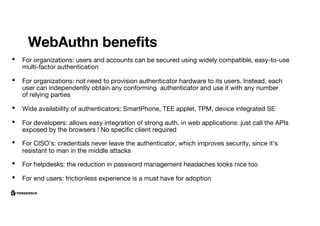
WebAuthn benefits
• For organizations: users and accounts can be secured using widely compatible, easy-to-use
multi-factor authentication
• For organizations: not need to provision authenticator hardware to its users. Instead, each
user can independently obtain any conforming authenticator and use it with any number
of relying parties
• Wide availability of authenticators: SmartPhone, TEE applet, TPM, device integrated SE
• For developers: allows easy integration of strong auth. in web applications: just call the APIs
exposed by the browsers ! No specific client required
• For CISO’s: credentials never leave the authenticator, which improves security, since it’s
resistant to man in the middle attacks
• For helpdesks: the reduction in password management headaches looks nice too
• For end users: frictionless experience is a must have for adoption
© 2018 ForgeRock. All rights reserved.
Registration
AM
User Store
1. User is strongly authenticated using
Authentication Trees
2. AM initiates Device Registration
a. AM can specify types of authenticators it will
accept
b. AM can also support attestation
3. The User Agent asks the Authenticator to
mint a new set of credentials (Public/Private
key pair)
4. The User Agent sends the Public Key to AM
5. AM stores the Public Key on the user profile
The Private Key never leaves the Authenticator
1. 2.
3.
4.
4.
5.
© 2018 ForgeRock. All rights reserved.
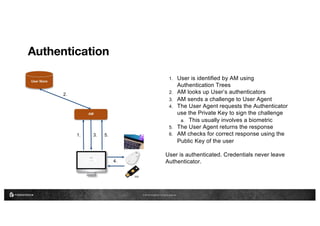
Authentication
AM
User Store
1. User is identified by AM using
Authentication Trees
2. AM looks up User’s authenticators
3. AM sends a challenge to User Agent
4. The User Agent requests the Authenticator
use the Private Key to sign the challenge
a. This usually involves a biometric
5. The User Agent returns the response
6. AM checks for correct response using the
Public Key of the user
User is authenticated. Credentials never leave
Authenticator.
1. 3.
4.
5.
2.
© 2018 ForgeRock. All rights reserved.
Demo
Thank You

WebAuthn & FIDO2

  • 1.
    Identity Tech Talks#13 FIDO2 / WebAuthn A W3C emerging standard Cyril Grosjean
  • 2.
    FIDO Alliance history •February 2013: FIDO Alliance launched publicly • December 2014: 1st specifications (FIDO 1.0, aka UAF / U2F) released • November 2015: FIDO2 specifications submitted to the W3C for standardization • February 2016: W3C starts work on WebAuthn, based on FIDO 2 Web APIs • February 2017: UAF 1.1 released (Android attestation support, de-provisioning, ..) • July 2017: U2F 1.2 releases (NFC and BLE support, ..) • September 2017: FIDO 2 CTAP2 proposed draft • August 2018: W3C WebAuthn candidate recommandation released • September 2018: WebAuthn browsers adoption
  • 3.
    FIDO 2.0 • FIDO2.0 includes the W3C WebAuthn specs as well as CTAP (Client-to Authenticator Protocol), which is still a draft • FIDO 2.0 also includes UAF (passwordless authentication) and U2F (multi-factor authentication) • FIDO 2.0 introduces bound authenticators, in addition to roaming authenticators • For bound authenticators, since the credentials reside on the device and can not be exported, they can only be used by apps running on the device: a new device requires new credentials. Usually speaking, credentials are linked to a (user,device,app) triplet. • FIDO devices have metadata to make administrators aware of the specific device features: it allows attestation, that is enterprise policy based device deployments • The important pre-requisite is that the browser support WebauthN ! : • https://webauthndemo.appspot.com ou https://webauthnsample.azurewebsites.net/
  • 4.
    WebAuthn features • Backedby Google, Microsoft, Paypal, Yubico, Mozilla .. But not Apple/Safari yet • Strong authentication using PKI and challenge/response • Credentials are unique to a user, service and device triplet • Includes the registration or creation of credentials, with different types of attestation types (Basic, Self, CA, Eliptic , None) and format ("packed", "FIDO U2F", "none ", "Androïd Key", ..) • Includes the use of these credentials for strong authentication • May require user identity verification, or just suggest it as preferred, or discourage it • Supports token binding: allows proof of possession of the private key by the client to the web server, preventing token export, replay or man in the middle attacks. Token binding is a dedicated protocol (TLS extension) still in IETF draft status. It’s meant to be applicable to OAUTH 2 bearer tokens too • Protects against authenticator cloning thanks to signature counters
  • 5.
    WebAuthn benefits • Fororganizations: users and accounts can be secured using widely compatible, easy-to-use multi-factor authentication • For organizations: not need to provision authenticator hardware to its users. Instead, each user can independently obtain any conforming authenticator and use it with any number of relying parties • Wide availability of authenticators: SmartPhone, TEE applet, TPM, device integrated SE • For developers: allows easy integration of strong auth. in web applications: just call the APIs exposed by the browsers ! No specific client required • For CISO’s: credentials never leave the authenticator, which improves security, since it’s resistant to man in the middle attacks • For helpdesks: the reduction in password management headaches looks nice too • For end users: frictionless experience is a must have for adoption
  • 6.
    © 2018 ForgeRock.All rights reserved. Registration AM User Store 1. User is strongly authenticated using Authentication Trees 2. AM initiates Device Registration a. AM can specify types of authenticators it will accept b. AM can also support attestation 3. The User Agent asks the Authenticator to mint a new set of credentials (Public/Private key pair) 4. The User Agent sends the Public Key to AM 5. AM stores the Public Key on the user profile The Private Key never leaves the Authenticator 1. 2. 3. 4. 4. 5.
  • 7.
    © 2018 ForgeRock.All rights reserved. Authentication AM User Store 1. User is identified by AM using Authentication Trees 2. AM looks up User’s authenticators 3. AM sends a challenge to User Agent 4. The User Agent requests the Authenticator use the Private Key to sign the challenge a. This usually involves a biometric 5. The User Agent returns the response 6. AM checks for correct response using the Public Key of the user User is authenticated. Credentials never leave Authenticator. 1. 3. 4. 5. 2.
  • 8.
    © 2018 ForgeRock.All rights reserved. Demo
  • 9.