Introduction to jQuery
JS ­ Probleme
JS ist eine Sprache, kein Framework
Features verhalten sich unterschiedlich in Browsern
Beispiel: window.onload
Zum Teil viel redundanter Code notwendig für einfache Aufgaben
Ajax
Feature Detection
DOM Manipulation / Element Selektion
JS ­ Enter jQuery
jQuery is a fast and concise JavaScript Library that simplifies HTML document
traversing, event handling, animating, and Ajax interactions for rapid web
development. jQuery is designed to change the way that you write JavaScript.
jquery.com
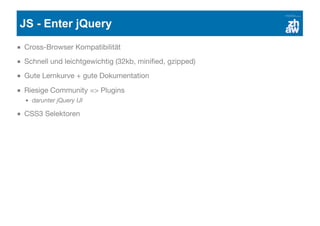
JS ­ Enter jQuery
Cross-Browser Kompatibilität
Schnell und leichtgewichtig (32kb, minified, gzipped)
Gute Lernkurve + gute Dokumentation
Riesige Community => Plugins
darunter jQuery UI
CSS3 Selektoren
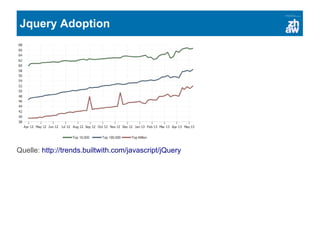
Jquery Adoption
Quelle: http://trends.builtwith.com/javascript/jQuery
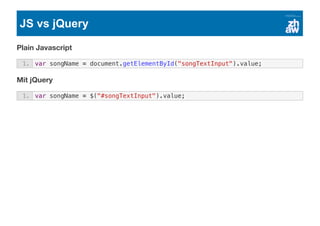
JS vs jQuery
Plain Javascript
Mit jQuery
1. var songName = document.getElementById("songTextInput").value;
1. var songName = $("#songTextInput").value;
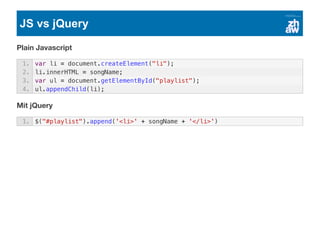
JS vs jQuery
Plain Javascript
Mit jQuery
1. var li = document.createElement("li");
2. li.innerHTML = songName;
3. var ul = document.getElementById("playlist");
4. ul.appendChild(li);
1. $("#playlist").append('<li>' + songName + '</li>')
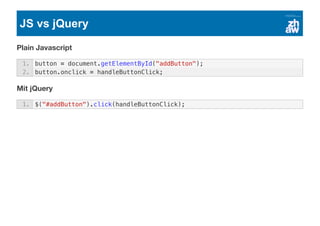
JS vs jQuery
Plain Javascript
Mit jQuery
1. button = document.getElementById("addButton");
2. button.onclick = handleButtonClick;
1. $("#addButton").click(handleButtonClick);
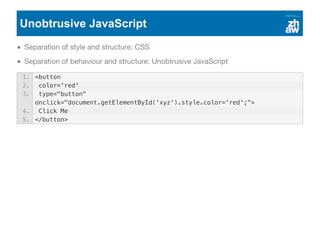
Unobtrusive JavaScript
Separation of style and structure: CSS
Separation of behaviour and structure: Unobtrusive JavaScript
1. <button
2. color='red'
3. type="button"
onclick="document.getElementById('xyz').style.color='red';">
4. Click Me
5. </button>
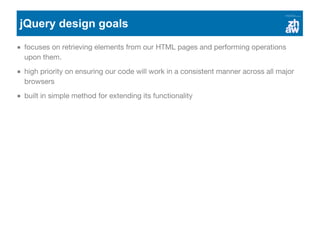
jQuery design goals
focuses on retrieving elements from our HTML pages and performing operations
upon them.
high priority on ensuring our code will work in a consistent manner across all major
browsers
built in simple method for extending its functionality
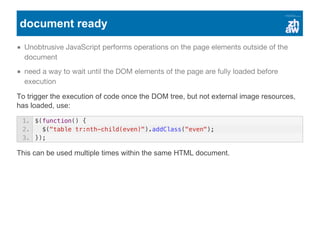
document ready
Unobtrusive JavaScript performs operations on the page elements outside of the
document
need a way to wait until the DOM elements of the page are fully loaded before
execution
To trigger the execution of code once the DOM tree, but not external image resources,
has loaded, use:
This can be used multiple times within the same HTML document.
1. $(function() {
2. $("table tr:nth-child(even)").addClass("even");
3. });
Selecting DOM elements
The jQuery wrapper
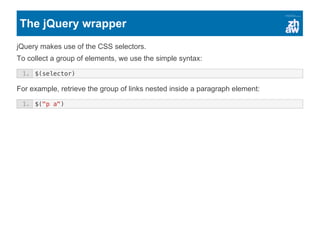
jQuery makes use of the CSS selectors.
To collect a group of elements, we use the simple syntax:
For example, retrieve the group of links nested inside a paragraph element:
1. $(selector)
1. $("p a")
The jQuery wrapper: Chaining
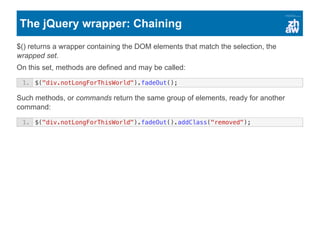
$() returns a wrapper containing the DOM elements that match the selection, the
wrapped set.
On this set, methods are defined and may be called:
Such methods, or commands return the same group of elements, ready for another
command:
1. $("div.notLongForThisWorld").fadeOut();
1. $("div.notLongForThisWorld").fadeOut().addClass("removed");
Using basic CSS selectors
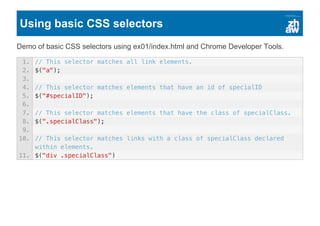
Demo of basic CSS selectors using ex01/index.html and Chrome Developer Tools.
1. // This selector matches all link elements.
2. $("a");
3.
4. // This selector matches elements that have an id of specialID
5. $("#specialID");
6.
7. // This selector matches elements that have the class of specialClass.
8. $(".specialClass");
9.
10. // This selector matches links with a class of specialClass declared
within elements.
11. $("div .specialClass")
The jQuery wrapper: Examples
1. // This selector selects all even elements.
2. $("p:even");
3.
4. // This selector selects the first row of each table.
5. $("tr:nth-child(1)");
6.
7. // This selector selects direct children of .
8. $("body > div");
9.
10. // This selector selects links to PDF files.
11. $("a[href$=pdf]");
12.
13. // This selector selects direct children of -containing links.
14. $("body > div:has(a)")
Child and attribute selectors
Demo of extended CSS selectors using ex01/index.html and Chrome Developer Tools.
1. // Match direct descendants
2. $("p > a");
3.
4. // Attribute selectors
5. $("input[type=text]")
6. $("a[href^=https://]")
7. $("a[href*=jquery.com]")
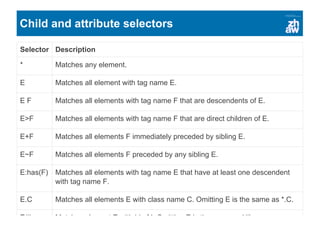
Child and attribute selectors
Selector Description
* Matches any element.
E Matches all element with tag name E.
E F Matches all elements with tag name F that are descendents of E.
E>F Matches all elements with tag name F that are direct children of E.
E+F Matches all elements F immediately preceded by sibling E.
E~F Matches all elements F preceded by any sibling E.
E:has(F) Matches all elements with tag name E that have at least one descendent
with tag name F.
E.C Matches all elements E with class name C. Omitting E is the same as *.C.
E#I Matches element E with id of I. Omitting E is the same as *#I.
E[A] Matches all elements E with attribute A of any value.
E[A=V] Matches all elements E with attribute A whose value is exactly V.
E[A^=V] Matches all elements E with attribute A whose value begins with V.
E[A$=V] Matches all elements E with attribute A whose value ends with V.
E[A*=V] Matches all elements E with attribute A whose value contains V.
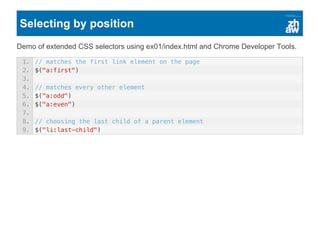
Selecting by position
Demo of extended CSS selectors using ex01/index.html and Chrome Developer Tools.
1. // matches the first link element on the page
2. $("a:first")
3.
4. // matches every other element
5. $("a:odd")
6. $("a:even")
7.
8. // choosing the last child of a parent element
9. $("li:last-child")
Selecting by position
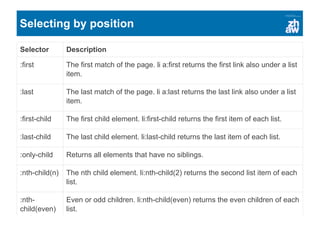
Selector Description
:first The first match of the page. li a:first returns the first link also under a list
item.
:last The last match of the page. li a:last returns the last link also under a list
item.
:first­child The first child element. li:first­child returns the first item of each list.
:last­child The last child element. li:last­child returns the last item of each list.
:only­child Returns all elements that have no siblings.
:nth­child(n) The nth child element. li:nth­child(2) returns the second list item of each
list.
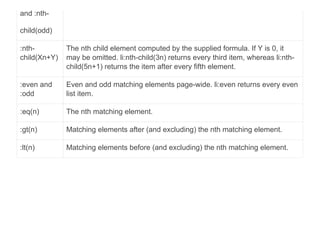
:nth­
child(even)
and :nth­
Even or odd children. li:nth­child(even) returns the even children of each
list.
and :nth­
child(odd)
:nth­
child(Xn+Y)
The nth child element computed by the supplied formula. If Y is 0, it
may be omitted. li:nth­child(3n) returns every third item, whereas li:nth­
child(5n+1) returns the item after every fifth element.
:even and
:odd
Even and odd matching elements page­wide. li:even returns every even
list item.
:eq(n) The nth matching element.
:gt(n) Matching elements after (and excluding) the nth matching element.
:lt(n) Matching elements before (and excluding) the nth matching element.
Custom jQuery selectors
There are even selections possible based on a characteristic that the CSS specification
did not anticipate.
Selector Description
:animated Selects elements that are currently under animated control.
:button Selects any button (input[type=submit], input[type=reset],
input[type=button], or button).
:checkbox Selects only check box elements (input[type=checkbox]).
:checked Selects only check boxes or radio buttons that are checked (supported
by CSS).
:contains(foo) Selects only elements containing the text foo.
:disabled Selects only form elements that are disabled in the interface
(supported by CSS).
:enabled Selects only form elements that are enabled in the interface
(supported by CSS).
:file Selects all file elements (input[type=file]).
:header Selects only elements that are headers; for example: h1 through h6
elements.
:hidden Selects only elements that are hidden.
:image Selects form images (input[type=image]).
:input Selects only form elements (input, select, textarea, button).
:not(filter) Negates the specified filter.
:parent Selects only elements that have children (including text), but not empty
elements.
:password Selects only password elements (input[type=password]).
:radio Selects only radio elements (input[type=radio]).
:reset Selects reset buttons (input[type=reset] or button[type=reset]).
:selected Selects option elements that are selected.
:submit Selects submit buttons (button[type=submit] or input[type=submit]).
:text Selects only text elements (input[type=text]).
:visible Selects only elements that are visible.
Generating and adjusting sets of elements
Generating new HTML
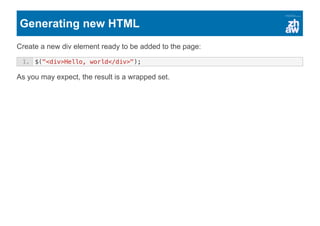
Create a new div element ready to be added to the page:
As you may expect, the result is a wrapped set.
1. $("<div>Hello, world</div>");
Generating new HTML
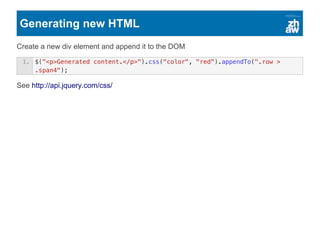
Create a new div element and append it to the DOM
See http://api.jquery.com/css/
1. $("<p>Generated content.</p>").css("color", "red").appendTo(".row >
.span4");
Determining the size of the wrapped set
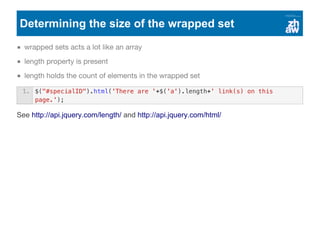
wrapped sets acts a lot like an array
length property is present
length holds the count of elements in the wrapped set
See http://api.jquery.com/length/ and http://api.jquery.com/html/
1. $("#specialID").html('There are '+$('a').length+' link(s) on this
page.');
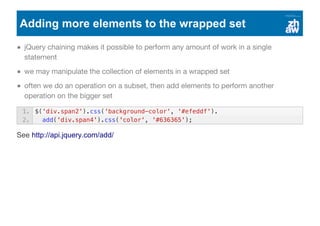
Adding more elements to the wrapped set
jQuery chaining makes it possible to perform any amount of work in a single
statement
we may manipulate the collection of elements in a wrapped set
often we do an operation on a subset, then add elements to perform another
operation on the bigger set
See http://api.jquery.com/add/
1. $('div.span2').css('background-color', '#efeddf').
2. add('div.span4').css('color', '#636365');
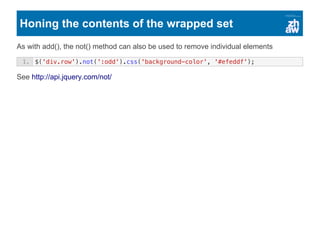
Honing the contents of the wrapped set
As with add(), the not() method can also be used to remove individual elements
See http://api.jquery.com/not/
1. $('div.row').not(':odd').css('background-color', '#efeddf');
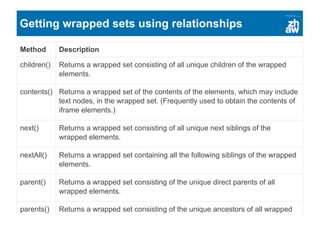
Getting wrapped sets using relationships
Method Description
children() Returns a wrapped set consisting of all unique children of the wrapped
elements.
contents() Returns a wrapped set of the contents of the elements, which may include
text nodes, in the wrapped set. (Frequently used to obtain the contents of
iframe elements.)
next() Returns a wrapped set consisting of all unique next siblings of the
wrapped elements.
nextAll() Returns a wrapped set containing all the following siblings of the wrapped
elements.
parent() Returns a wrapped set consisting of the unique direct parents of all
wrapped elements.
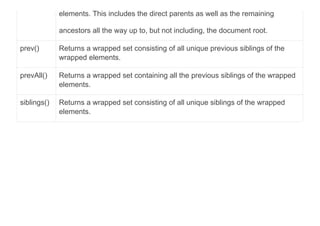
parents() Returns a wrapped set consisting of the unique ancestors of all wrapped
elements. This includes the direct parents as well as the remaining
ancestors all the way up to, but not including, the document root.
prev() Returns a wrapped set consisting of all unique previous siblings of the
wrapped elements.
prevAll() Returns a wrapped set containing all the previous siblings of the wrapped
elements.
siblings() Returns a wrapped set consisting of all unique siblings of the wrapped
elements.
Summary
jQuery provides a versatile and powerful set of selectors
jQuery allows us to create or augment a wrapped set using HTML fragments
jQuery provides a set of methods to adjust the wrapped set to hone the contents of
the set
The jQuery API explains all methods in detail: http://api.jquery.com/

Web2 - jQuery