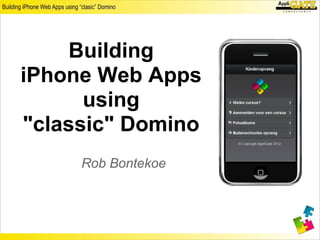
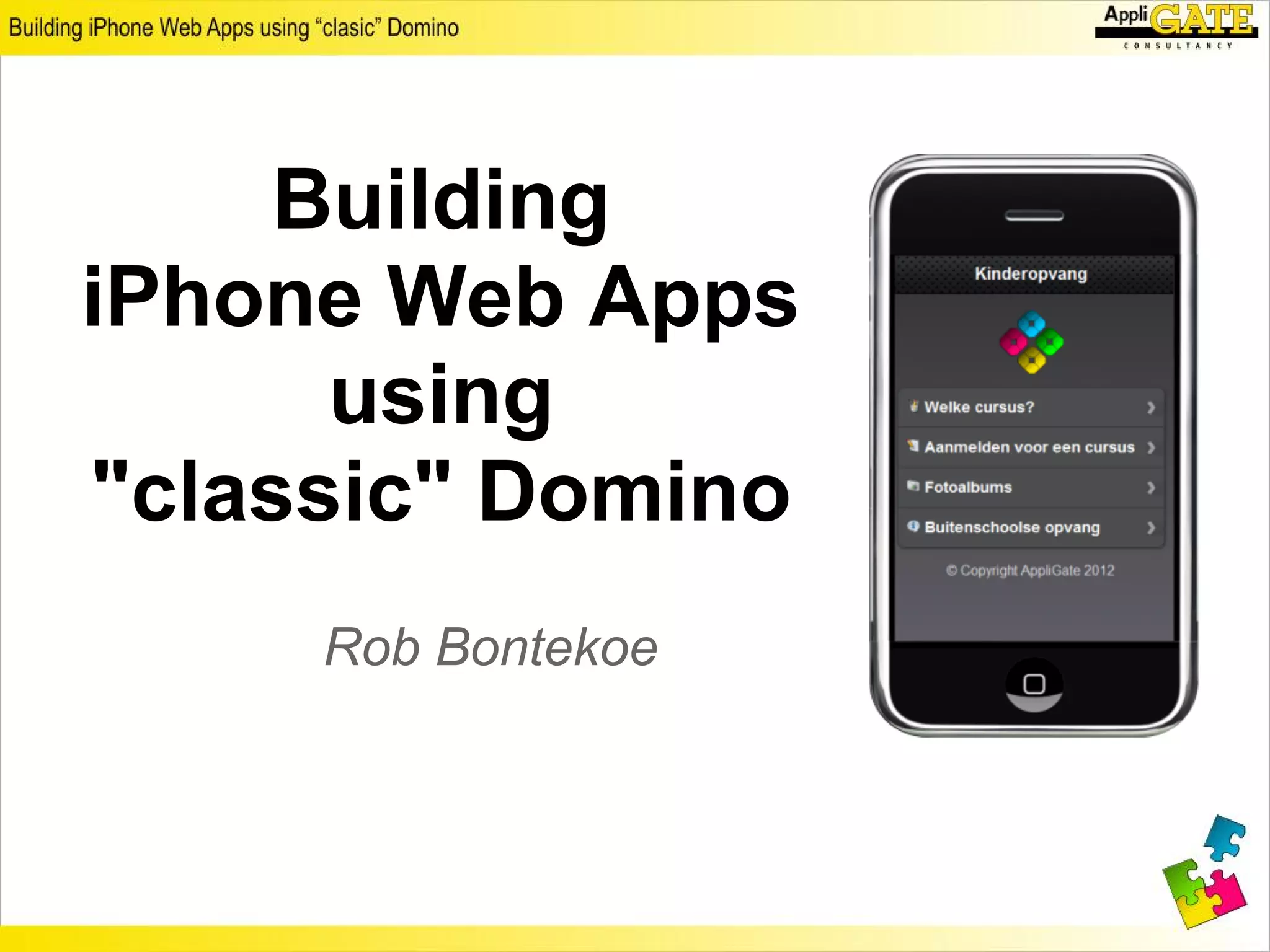
Building
iPhone Web Apps
      using
"classic" Domino
     Rob Bontekoe
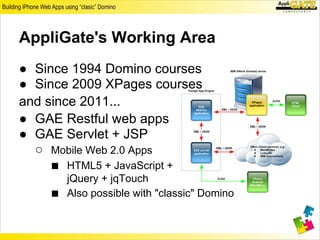
AppliGate's Working Area
● Since 1994 Domino courses
● Since 2009 XPages courses
and since 2011...
● GAE Restful web apps
● GAE Servlet + JSP
  ○ Mobile Web 2.0 Apps
     ■ HTML5 + JavaScript +
        jQuery + jqTouch
    ■   Also possible with "classic" Domino
Agenda iPhone Web Apps
● Demo application
● Required knowledge
  ○ Structure of a mobile web app
  ○ Initializing the app
  ○ Registering event handlers
  ○ Communication with servers using AJAX
● Using "classic" Domino
  ○ Design
  ○ <head> tag
  ○ <body> tag
● Summary and references
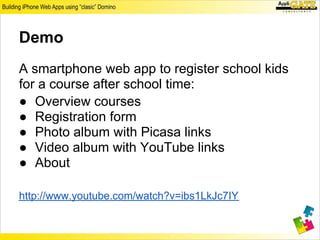
Demo
A smartphone web app to register school kids
for a course after school time:
● Overview courses
● Registration form
● Photo album with Picasa links
● Video album with YouTube links
● About
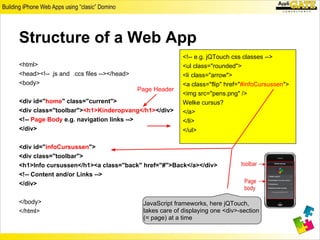
Structure of a Web App
                                                          <!-- e.g. jQTouch css classes -->
<html>                                                    <ul class="rounded">
<head><!-- .js and .css files --></head>                  <li class="arrow">
<body>                                                    <a class="flip" href="#infoCursussen">
                                           Page Header
                                                          <img src="pens.png" />
<div id="home" class="current">                           Welke cursus?
<div class="toolbar"><h1>Kinderopvang</h1></div>          </a>
<!-- Page Body e.g. navigation links -->                  </li>
</div>                                                    </ul>

<div id="infoCursussen">
<div class="toolbar">
<h1>Info cursussen</h1><a class="back" href="#">Back</a></div>
<!-- Content and/or Links -->
</div>

</body>                                     JavaScript frameworks, here jQTouch,
</html>                                     takes care of displaying one <div>-section
                                            (= page) at a time
JavaScript Frameworks
● XPages app with Mobile controls
● jQTouch
jQuery plugin
● Etc.
Initializing App
// In sb.js, application specific JavaScript library
var jQT = $.jQTouch( {
      icon: "icon.png", // 32 x 32 px
      startupScreen: "startup.jpg", // 320 x 460 px
      statusBar : "black",
      fixedViewPort : true
});

// check kind of browser
var userAgent = navigator.userAgent.toLowerCase();
var isiPhone = (userAgent.indexOf('iphone') != -1
|| userAgent.indexOf('ipod') != -1 || userAgent.indexOf('ipad') != -1) ? true :
false;
var clickEvent = isiPhone ? 'tap' : 'click';
Register an Event Handler
       the function will be invoked when the document has been
       loaded and the DOM is ready to be manipulated.

$( function() {     id used in button on HTML page
      $("#aanmeldButton").bind(clickEvent, function(e) {
          // get selected course                html tag reference
          var selectedCourse = $("input:radio[name=course]:checked").val();
          // set hidden field #course on #aanmelden form
          $("#course").val(selectedCourse);
          // add HTML to paragraph #myText on #aanmelden form
          $("#myText").html("<i>Aanmelding voor:</i><br />" + selectedCourse);
          // goto #aanmelden form
          jQT.goTo($("#aanmelden"));
      });
});
// $("#element_id") similair to getElementById("element_id")
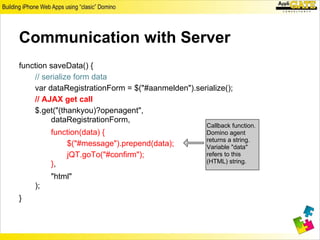
Communication with Server
function saveData() {
    // serialize form data
    var dataRegistrationForm = $("#aanmelden").serialize();
    // AJAX get call
    $.get("(thankyou)?openagent",
         dataRegistrationForm,
                                                   Callback function.
         function(data) {                          Domino agent
                                                   returns a string.
             $("#message").prepend(data);          Variable "data"
             jQT.goTo("#confirm");                 refers to this
         },                                        (HTML) string.

         "html"
    );
}
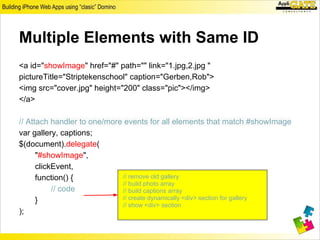
Multiple Elements with Same ID
<a id="showImage" href="#" path="" link="1.jpg,2.jpg "
pictureTitle="Striptekenschool" caption="Gerben,Rob">
<img src="cover.jpg" height="200" class="pic"></img>
</a>

// Attach handler to one/more events for all elements that match #showImage
var gallery, captions;
$(document).delegate(
      "#showImage",
      clickEvent,
      function() {           // remove old gallery
                             // build photo array
           // code           // build captions array
      }                      // create dynamically <div> section for gallery
                             // show <div> section
);
Call Back Function
function() {
    if (gallery != null) {gallery.remove()}
    var photoArray = $(this).attr("link").split(",");
    var photoObjectArray = new Array();
    var captionArray = $(this).attr("caption").split(",");
          for (i = 0; i < photoArray.length; i++) {
                photoObjectArray[i] = {src : "" + $(this).attr("path") + photoArray[i],
                     caption : "<font style='background-color:#999;width: 80%;'>"
                                             + captionArray[i] + "</font>"};
    }
    gallery = jQT.generateGallery("photo", photoObjectArray, { //code next page
    });
    jQT.goTo($("#photo"));
}
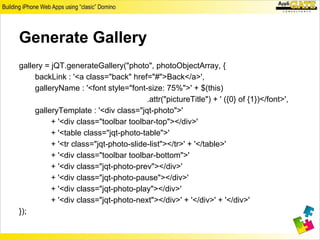
Generate Gallery
gallery = jQT.generateGallery("photo", photoObjectArray, {
     backLink : '<a class="back" href="#">Back</a>',
     galleryName : '<font style="font-size: 75%">' + $(this)
                                       .attr("pictureTitle") + ' ({0} of {1})</font>',
     galleryTemplate : '<div class="jqt-photo">'
          + '<div class="toolbar toolbar-top"></div>'
          + '<table class="jqt-photo-table">'
          + '<tr class="jqt-photo-slide-list"></tr>' + '</table>'
          + '<div class="toolbar toolbar-bottom">'
          + '<div class="jqt-photo-prev"></div>'
          + '<div class="jqt-photo-pause"></div>'
          + '<div class="jqt-photo-play"></div>'
          + '<div class="jqt-photo-next"></div>' + '</div>' + '</div>'
});
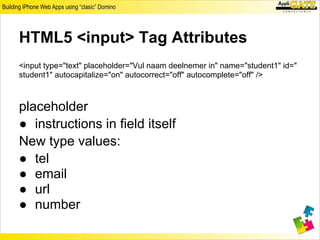
HTML5 <input> Tag Attributes
<input type="text" placeholder="Vul naam deelnemer in" name="student1" id="
student1" autocapitalize="on" autocorrect="off" autocomplete="off" />


placeholder
● instructions in field itself
New type values:
● tel
● email
● url
● number
Using "classic" Domino
● Design
● HTML header
● Body
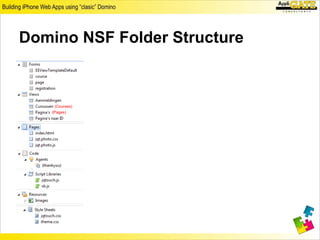
Domino NSF Folder Structure
Design
One HTML page
● Domino Page - index.html
● Properties info tab: Content type: HTML
● <head>
  ○ References to JS Libraries and .css files
● <body>
   ○ Embedded View
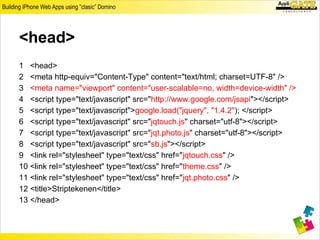
<head>
1 <head>
2 <meta http-equiv="Content-Type" content="text/html; charset=UTF-8" />
3 <meta name="viewport" content="user-scalable=no, width=device-width" />
4 <script type="text/javascript" src="http://www.google.com/jsapi"></script>
5 <script type="text/javascript">google.load("jquery", "1.4.2"); </script>
6 <script type="text/javascript" src="jqtouch.js" charset="utf-8"></script>
7 <script type="text/javascript" src="jqt.photo.js" charset="utf-8"></script>
8 <script type="text/javascript" src="sb.js"></script>
9 <link rel="stylesheet" type="text/css" href="jqtouch.css" />
10 <link rel="stylesheet" type="text/css" href="theme.css" />
11 <link rel="stylesheet" type="text/css" href="jqt.photo.css" />
12 <title>Striptekenen</title>
13 </head>
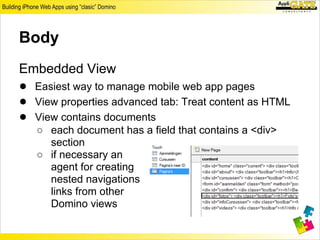
Body
Embedded View
● Easiest way to manage mobile web app pages
● View properties advanced tab: Treat content as HTML
● View contains documents
   ○ each document has a field that contains a <div>
     section
   ○ if necessary an
     agent for creating
     nested navigations
     links from other
     Domino views
Summary
● Build easy and quick very nice looking
  mobile web apps
  ○ HTML5 browser needed
  ○ iPhone, iPod, iPad
    ■ Activate jQTouch: icon and splash image
● Domino as a platform
   ○   Lot of HTML and JavaScript
   ○   Some knowledge of jQuery is required
   ○   Use Views to keep structure under control
   ○   Name conventions
   ○   jqTouch makes it all work
References
● Web sites
  ○ jQTouch: http://www.jqtouch.com/
  ○ jQuery: http://jquery.com/
  ○ AppliGate: http://www.appligate.nl
● Download
  ○ https://docs.google.com/open?id=0B6vS2p8k5hZMT2JiQVNIbjZhNTA
  ○ Images are copyrighted
● Books
  ○ Building iPhone Apps with HTML, CSS, and
     JavaScript, Jonathan Stark, O'Reilly
  ○ jQuery Pocket Reference, David Flanagan, O'Reilly
Building iPhone Web Apps using "classic" Domino

Building iPhone Web Apps using "classic" Domino

  • 1.
    Building iPhone Web Apps using "classic" Domino Rob Bontekoe
  • 2.
    AppliGate's Working Area ●Since 1994 Domino courses ● Since 2009 XPages courses and since 2011... ● GAE Restful web apps ● GAE Servlet + JSP ○ Mobile Web 2.0 Apps ■ HTML5 + JavaScript + jQuery + jqTouch ■ Also possible with "classic" Domino
  • 3.
    Agenda iPhone WebApps ● Demo application ● Required knowledge ○ Structure of a mobile web app ○ Initializing the app ○ Registering event handlers ○ Communication with servers using AJAX ● Using "classic" Domino ○ Design ○ <head> tag ○ <body> tag ● Summary and references
  • 4.
    Demo A smartphone webapp to register school kids for a course after school time: ● Overview courses ● Registration form ● Photo album with Picasa links ● Video album with YouTube links ● About
  • 5.
    Structure of aWeb App <!-- e.g. jQTouch css classes --> <html> <ul class="rounded"> <head><!-- .js and .css files --></head> <li class="arrow"> <body> <a class="flip" href="#infoCursussen"> Page Header <img src="pens.png" /> <div id="home" class="current"> Welke cursus? <div class="toolbar"><h1>Kinderopvang</h1></div> </a> <!-- Page Body e.g. navigation links --> </li> </div> </ul> <div id="infoCursussen"> <div class="toolbar"> <h1>Info cursussen</h1><a class="back" href="#">Back</a></div> <!-- Content and/or Links --> </div> </body> JavaScript frameworks, here jQTouch, </html> takes care of displaying one <div>-section (= page) at a time
  • 6.
    JavaScript Frameworks ● XPagesapp with Mobile controls ● jQTouch jQuery plugin ● Etc.
  • 7.
    Initializing App // Insb.js, application specific JavaScript library var jQT = $.jQTouch( { icon: "icon.png", // 32 x 32 px startupScreen: "startup.jpg", // 320 x 460 px statusBar : "black", fixedViewPort : true }); // check kind of browser var userAgent = navigator.userAgent.toLowerCase(); var isiPhone = (userAgent.indexOf('iphone') != -1 || userAgent.indexOf('ipod') != -1 || userAgent.indexOf('ipad') != -1) ? true : false; var clickEvent = isiPhone ? 'tap' : 'click';
  • 8.
    Register an EventHandler the function will be invoked when the document has been loaded and the DOM is ready to be manipulated. $( function() { id used in button on HTML page $("#aanmeldButton").bind(clickEvent, function(e) { // get selected course html tag reference var selectedCourse = $("input:radio[name=course]:checked").val(); // set hidden field #course on #aanmelden form $("#course").val(selectedCourse); // add HTML to paragraph #myText on #aanmelden form $("#myText").html("<i>Aanmelding voor:</i><br />" + selectedCourse); // goto #aanmelden form jQT.goTo($("#aanmelden")); }); }); // $("#element_id") similair to getElementById("element_id")
  • 9.
    Communication with Server functionsaveData() { // serialize form data var dataRegistrationForm = $("#aanmelden").serialize(); // AJAX get call $.get("(thankyou)?openagent", dataRegistrationForm, Callback function. function(data) { Domino agent returns a string. $("#message").prepend(data); Variable "data" jQT.goTo("#confirm"); refers to this }, (HTML) string. "html" ); }
  • 10.
    Multiple Elements withSame ID <a id="showImage" href="#" path="" link="1.jpg,2.jpg " pictureTitle="Striptekenschool" caption="Gerben,Rob"> <img src="cover.jpg" height="200" class="pic"></img> </a> // Attach handler to one/more events for all elements that match #showImage var gallery, captions; $(document).delegate( "#showImage", clickEvent, function() { // remove old gallery // build photo array // code // build captions array } // create dynamically <div> section for gallery // show <div> section );
  • 11.
    Call Back Function function(){ if (gallery != null) {gallery.remove()} var photoArray = $(this).attr("link").split(","); var photoObjectArray = new Array(); var captionArray = $(this).attr("caption").split(","); for (i = 0; i < photoArray.length; i++) { photoObjectArray[i] = {src : "" + $(this).attr("path") + photoArray[i], caption : "<font style='background-color:#999;width: 80%;'>" + captionArray[i] + "</font>"}; } gallery = jQT.generateGallery("photo", photoObjectArray, { //code next page }); jQT.goTo($("#photo")); }
  • 12.
    Generate Gallery gallery =jQT.generateGallery("photo", photoObjectArray, { backLink : '<a class="back" href="#">Back</a>', galleryName : '<font style="font-size: 75%">' + $(this) .attr("pictureTitle") + ' ({0} of {1})</font>', galleryTemplate : '<div class="jqt-photo">' + '<div class="toolbar toolbar-top"></div>' + '<table class="jqt-photo-table">' + '<tr class="jqt-photo-slide-list"></tr>' + '</table>' + '<div class="toolbar toolbar-bottom">' + '<div class="jqt-photo-prev"></div>' + '<div class="jqt-photo-pause"></div>' + '<div class="jqt-photo-play"></div>' + '<div class="jqt-photo-next"></div>' + '</div>' + '</div>' });
  • 13.
    HTML5 <input> TagAttributes <input type="text" placeholder="Vul naam deelnemer in" name="student1" id=" student1" autocapitalize="on" autocorrect="off" autocomplete="off" /> placeholder ● instructions in field itself New type values: ● tel ● email ● url ● number
  • 14.
    Using "classic" Domino ●Design ● HTML header ● Body
  • 15.
  • 16.
    Design One HTML page ●Domino Page - index.html ● Properties info tab: Content type: HTML ● <head> ○ References to JS Libraries and .css files ● <body> ○ Embedded View
  • 17.
    <head> 1 <head> 2 <metahttp-equiv="Content-Type" content="text/html; charset=UTF-8" /> 3 <meta name="viewport" content="user-scalable=no, width=device-width" /> 4 <script type="text/javascript" src="http://www.google.com/jsapi"></script> 5 <script type="text/javascript">google.load("jquery", "1.4.2"); </script> 6 <script type="text/javascript" src="jqtouch.js" charset="utf-8"></script> 7 <script type="text/javascript" src="jqt.photo.js" charset="utf-8"></script> 8 <script type="text/javascript" src="sb.js"></script> 9 <link rel="stylesheet" type="text/css" href="jqtouch.css" /> 10 <link rel="stylesheet" type="text/css" href="theme.css" /> 11 <link rel="stylesheet" type="text/css" href="jqt.photo.css" /> 12 <title>Striptekenen</title> 13 </head>
  • 18.
    Body Embedded View ● Easiestway to manage mobile web app pages ● View properties advanced tab: Treat content as HTML ● View contains documents ○ each document has a field that contains a <div> section ○ if necessary an agent for creating nested navigations links from other Domino views
  • 19.
    Summary ● Build easyand quick very nice looking mobile web apps ○ HTML5 browser needed ○ iPhone, iPod, iPad ■ Activate jQTouch: icon and splash image ● Domino as a platform ○ Lot of HTML and JavaScript ○ Some knowledge of jQuery is required ○ Use Views to keep structure under control ○ Name conventions ○ jqTouch makes it all work
  • 20.
    References ● Web sites ○ jQTouch: http://www.jqtouch.com/ ○ jQuery: http://jquery.com/ ○ AppliGate: http://www.appligate.nl ● Download ○ https://docs.google.com/open?id=0B6vS2p8k5hZMT2JiQVNIbjZhNTA ○ Images are copyrighted ● Books ○ Building iPhone Apps with HTML, CSS, and JavaScript, Jonathan Stark, O'Reilly ○ jQuery Pocket Reference, David Flanagan, O'Reilly