Introduction to jQuery 
Nagaraju Sangam, UI Developer
Agenda 
Introduction 
World without jQuery 
With jQuery 
Selectors 
Events 
Effects 
DOM traversal 
DOM manipulation 
Plug-Ins 
Demos
Objective 
To help you understand jQuery and to let you know where to explore more about jQuery.
Prerequisites 
Basic programming experience 
Little knowledge of JavaScript.
What is jQuery? 
A light weight framework for Client Side JavaScript. 
JavaScript Library/API 
jQuery library file is light weight 
It can be downloaded from http://www.jQuery.com 
An Open Source Project 
It is maintained by a group of developers, with a very active support base and thorough, well written documentation.
DOM traversal without jQuery? 
 document.all 
 document.getElementById 
 document.getElementByClassName 
 document.getElementByTagname 
 document.getElementByName 
 querySelectorAll
1. Cross Browser Issues 
document.all: It’s a MS implementation , supported by only IE4+ and Opera 5+ 
getElementById: IE5-7 return the element with name=“id". 
getElementByClassname: Opera4+ do not recognize when there is more than one class. 
Eg: <p class=“x y”></p> 
querySelectorAll : It’s new, not supported by few browsers. 
Source: http://www.quirksmode.org/dom/w3c_core.html
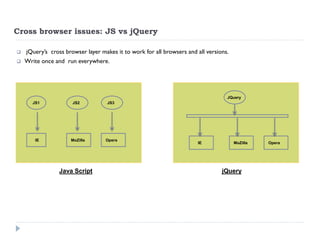
Cross browser issues: JS vs jQuery 
 jQuery’s cross browser layer makes it to work for all browsers and all versions. 
Write once and run everywhere. 
Java Script 
jQuery 
JS1 
IE 
JS2 
MoZilla 
JS3 
Opera 
IE 
MoZilla 
Opera 
JQuery
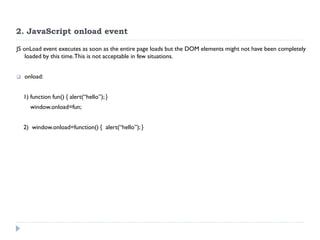
2. JavaScript onload event 
JS onLoad event executes as soon as the entire page loads but the DOM elements might not have been completely loaded by this time. This is not acceptable in few situations. 
onload: 
1) function fun() { alert(“hello”); } 
window.onload=fun; 
2) window.onload=function() { alert(“hello”); }
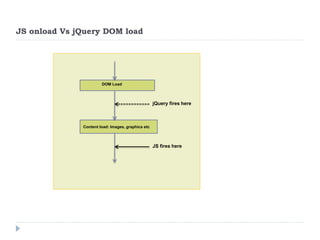
JS onload Vs jQuery DOM load 
DOM Load 
Content load: Images, graphics etc 
DOM Load 
Content load: Images, graphics etc 
jQuery fires here 
JS fires here
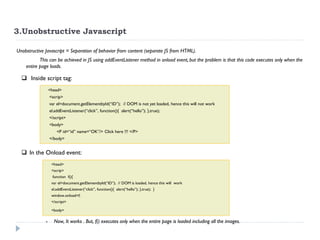
3.Unobstructive Javascript 
Unobstructive Javascript = Separation of behavior from content (separate JS from HTML). 
This can be achieved in JS using addEventListener method in onload event, but the problem is that this code executes only when the entire page loads. 
<head> <scrip> var el=document.getElementbyId(“ID”); // DOM is not yet loaded, hence this will not work el.addEventListener(“click”, function(){ alert(“hello”); },true); </script> <body> <P id=“id” name=“OK”/> Click here !!! </P> </body> 
In the Onload event: 
<head> <scrip> function f(){ var el=document.getElementbyId(“ID”); // DOM is loaded, hence this will work el.addEventListener(“click”, function(){ alert(“hello”); },true); } window.onload=f; </script> <body> 
-Now, It works . But, f() executes only when the entire page is loaded including all the images. 
 Inside script tag:
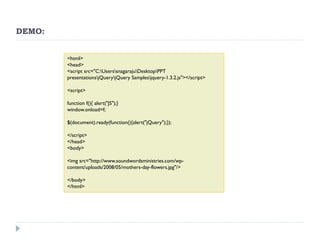
DEMO: 
<html> <head> <script src="C:UserssnagarajuDesktopPPT presentationsjQueryjQuery Samplesjquery-1.3.2.js"></script> <script> function f(){ alert("JS");} window.onload=f; $(document).ready(function(){alert("jQuery");}); </script> </head> <body> <img src="http://www.soundwordsministries.com/wp- content/uploads/2008/05/mothers-day-flowers.jpg"/> </body> </html>
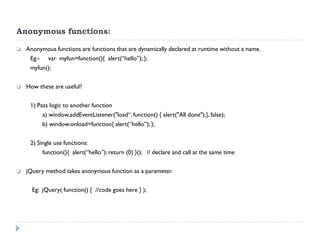
Anonymous functions: 
Anonymous functions are functions that are dynamically declared at runtime without a name. 
Eg:- var myfun=function(){ alert(“hello”); }; 
myfun(); 
How these are useful? 
1) Pass logic to another function 
a) window.addEventListener("load“, function() { alert("All done");}, false); 
b) window.onload=function{ alert(“hello”); }; 
2) Single use functions: 
function(){ alert(“hello”); return (0) }(); // declare and call at the same time 
jQuery method takes anonymous function as a parameter. 
Eg: jQuery( function() { //code goes here } );
Ease of Coding 
Display all div content in red color and bold font: - 
 Javascript 
var divs = document.getAllElementsByTagName(“div”); 
for(i=0;i<=divs.length;i=i+1) 
{ 
divs[i].style.color=“red”; 
divs[i].style.fontWeight=“bold”; 
} 
 jQuery 
$(“div”).css({ color:”red”; font-Weight:”bold”});
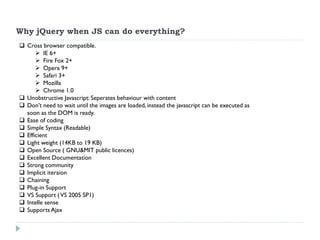
Why jQuery when JS can do everything? 
Cross browser compatible. 
IE 6+ 
Fire Fox 2+ 
Opera 9+ 
Safari 3+ 
Mozilla 
Chrome 1.0 
Unobstructive Javascript: Seperates behaviour with content 
Don’t need to wait until the images are loaded, instead the javascript can be executed as soon as the DOM is ready. 
Ease of coding 
Simple Syntax (Readable) 
Efficient 
Light weight (14KB to 19 KB) 
Open Source ( GNU&MIT public licences) 
Excellent Documentation 
Strong community 
Implicit iteraion 
Chaining 
Plug-in Support 
VS Support ( VS 2005 SP1) 
Intelle sense 
Supports Ajax
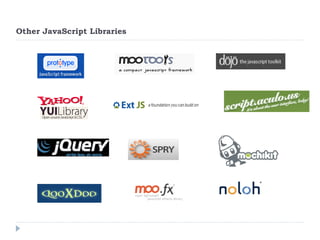
Other JavaScript Libraries
Other JavaScript Libraries 
Prototype (63+126kp scriptulo) : Will not deal with visual effects and animations. On top of it script.aculo.US deals with it. 
 Script.Aculo.US: More visual frame work, can’t integrate with other frameworks. Less community support. 
 Yahoo-UI: Large in size 
 Mootools: suitable for apps that require less js, less community support. 
 Dojo: So popular and efficient as jQuery. Not as simpler as jQuery.
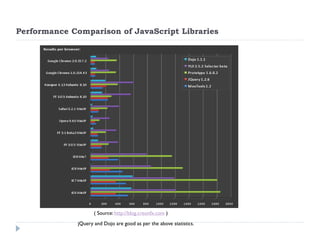
Performance Comparison of JavaScript Libraries 
jQuery and Dojo are good as per the above statistics. 
( Source: http://blog.creonfx.com )
jQuery Constructs 
jQuery() 
$() // short notation for jQuery() 
Create a different alias instead of jQuery to use in the rest of the script. 
var jQ = jQuery.noConflict(); 
jQ("div p").hide(); 
Usage of “$” shouldn’t create conflic with other frameworks? 
jQuery.noConflict(); 
$("content").style.display = 'none'; // now the $ is of the other framework
jQuery : on DOM load 
Below anonymous function executes as soon as the DOM loads. jQuery(document).ready( function(){ // code goes here…} ); 
Below is equalent to the above code jQuery( function(){ // code goes here…} );
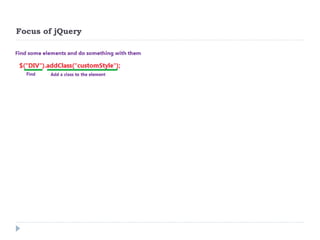
Focus of jQuery
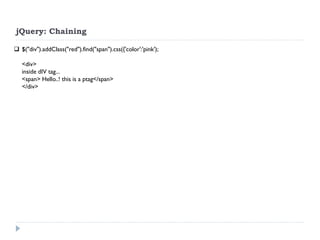
jQuery: Chaining 
$("div").addClass("red").find("span").css({'color':'pink'); 
<div> 
inside dIV tag... 
<span> Hello..! this is a ptag</span> 
</div>
jQuery: Selectors 
$(“*”) 
$(“div”) 
$(“.class”) 
$(“p.class”) 
$(DIV.note) 
$("a:first”) 
$("p a")  Get the anchor tags under P tags 
$("a[rel='home']") match attributes 
$('a:nth-child(4)') ==== $('a:eq(5)') 
$('li a[title=title]') 
$('li>a') direct Childs. 
$(..)[0]==$(..).get(0)
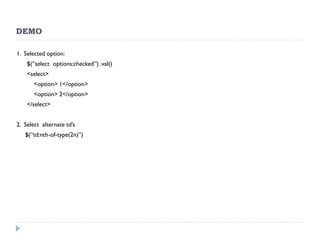
DEMO 
1. Selected option: 
$(“select options:checked”) .val() 
<select> 
<option> 1</option> 
<option> 2</option> 
</select> 
2. Select alternate td’s 
$(“td:nth-of-type(2n)”)
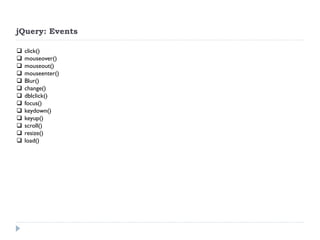
jQuery: Events 
click() 
mouseover() 
mouseout() 
mouseenter() 
Blur() 
change() 
dblclick() 
focus() 
keydown() 
keyup() 
scroll() 
resize() 
load()
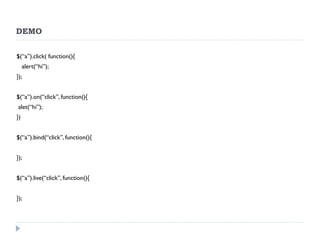
DEMO 
$(“a”).click( function(){ 
alert(“hi”); 
}); 
$(“a”).on(“click”, function(){ 
alet(“hi”); 
}) 
$(“a”).bind(“click”, function(){ 
}); 
$(“a”).live(“click”, function(){ 
});
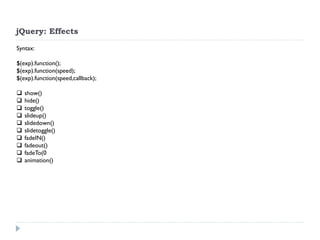
jQuery: Effects 
Syntax: $(exp).function(); $(exp).function(speed); $(exp).function(speed,callback); 
show() 
hide() 
toggle() 
slideup() 
slidedown() 
slidetoggle() 
fadeIN() 
fadeout() 
fadeTo(0 
animation()
DEMO
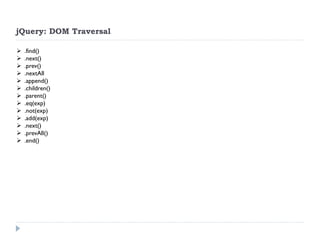
jQuery: DOM Traversal 
.find() 
.next() 
.prev() 
.nextAll 
.append() 
.children() 
.parent() 
.eq(exp) 
.not(exp) 
.add(exp) 
.next() 
.prevAll() 
.end()
DEMO
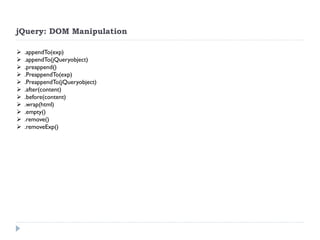
jQuery: DOM Manipulation 
.appendTo(exp) 
.appendTo(jQueryobject) 
.preappend() 
.PreappendTo(exp) 
.PreappendTo(jQueryobject) 
.after(content) 
.before(content) 
.wrap(html) 
.empty() 
.remove() 
.removeExp()
DEMO
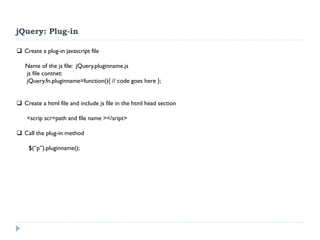
jQuery: Plug-in 
Create a plug-in javascript file Name of the js file: jQuery.pluginname.js js file contnet: jQuery.fn.pluginname=function(){ // code goes here }; 
Create a html file and include js file in the html head section <scrip scr=path and file name ></sript> 
Call the plug-in method $(“p”).pluginname();
DEMO
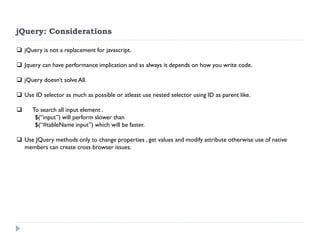
jQuery: Considerations 
jQuery is not a replacement for javascript. 
Jquery can have performance implication and as always it depends on how you write code. 
jQuery doesn’t solve All. 
Use ID selector as much as possible or atleast use nested selector using ID as parent like. 
 To search all input element . $(“input”) will perform slower than $(“#tableName input”) which will be faster. 
Use JQuery methods only to change properties , get values and modify attribute otherwise use of native members can create cross browser issues.
Who are using jQuery?
Questions???
References 
Reference Websites: 
www.jquery.com 
www.docs.jquery.com 
www.api.jquery.com 
http://www.learningjquery.com 
Video Tutorials: 
http://hiddenpixels.com/tutorials/jquery-beginners-video-tutorials/ 
http://www.bennadel.com/resources/presentations/jquery/video/index.htm 
http://blog.themeforest.net/tutorials/jquery-for-absolute-beginners-video-series/ 
http://tutorialvid.com/viewVideo.php?video_id=1644&title=jQuery_for_Beginners_Video_Tutorial_Part_4
Thank you…!!!

Introduction to jQuery

  • 1.
    Introduction to jQuery Nagaraju Sangam, UI Developer
  • 2.
    Agenda Introduction Worldwithout jQuery With jQuery Selectors Events Effects DOM traversal DOM manipulation Plug-Ins Demos
  • 3.
    Objective To helpyou understand jQuery and to let you know where to explore more about jQuery.
  • 4.
    Prerequisites Basic programmingexperience Little knowledge of JavaScript.
  • 5.
    What is jQuery? A light weight framework for Client Side JavaScript. JavaScript Library/API jQuery library file is light weight It can be downloaded from http://www.jQuery.com An Open Source Project It is maintained by a group of developers, with a very active support base and thorough, well written documentation.
  • 6.
    DOM traversal withoutjQuery?  document.all  document.getElementById  document.getElementByClassName  document.getElementByTagname  document.getElementByName  querySelectorAll
  • 7.
    1. Cross BrowserIssues document.all: It’s a MS implementation , supported by only IE4+ and Opera 5+ getElementById: IE5-7 return the element with name=“id". getElementByClassname: Opera4+ do not recognize when there is more than one class. Eg: <p class=“x y”></p> querySelectorAll : It’s new, not supported by few browsers. Source: http://www.quirksmode.org/dom/w3c_core.html
  • 8.
    Cross browser issues:JS vs jQuery  jQuery’s cross browser layer makes it to work for all browsers and all versions. Write once and run everywhere. Java Script jQuery JS1 IE JS2 MoZilla JS3 Opera IE MoZilla Opera JQuery
  • 9.
    2. JavaScript onloadevent JS onLoad event executes as soon as the entire page loads but the DOM elements might not have been completely loaded by this time. This is not acceptable in few situations. onload: 1) function fun() { alert(“hello”); } window.onload=fun; 2) window.onload=function() { alert(“hello”); }
  • 10.
    JS onload VsjQuery DOM load DOM Load Content load: Images, graphics etc DOM Load Content load: Images, graphics etc jQuery fires here JS fires here
  • 11.
    3.Unobstructive Javascript UnobstructiveJavascript = Separation of behavior from content (separate JS from HTML). This can be achieved in JS using addEventListener method in onload event, but the problem is that this code executes only when the entire page loads. <head> <scrip> var el=document.getElementbyId(“ID”); // DOM is not yet loaded, hence this will not work el.addEventListener(“click”, function(){ alert(“hello”); },true); </script> <body> <P id=“id” name=“OK”/> Click here !!! </P> </body> In the Onload event: <head> <scrip> function f(){ var el=document.getElementbyId(“ID”); // DOM is loaded, hence this will work el.addEventListener(“click”, function(){ alert(“hello”); },true); } window.onload=f; </script> <body> -Now, It works . But, f() executes only when the entire page is loaded including all the images.  Inside script tag:
  • 12.
    DEMO: <html> <head><script src="C:UserssnagarajuDesktopPPT presentationsjQueryjQuery Samplesjquery-1.3.2.js"></script> <script> function f(){ alert("JS");} window.onload=f; $(document).ready(function(){alert("jQuery");}); </script> </head> <body> <img src="http://www.soundwordsministries.com/wp- content/uploads/2008/05/mothers-day-flowers.jpg"/> </body> </html>
  • 13.
    Anonymous functions: Anonymousfunctions are functions that are dynamically declared at runtime without a name. Eg:- var myfun=function(){ alert(“hello”); }; myfun(); How these are useful? 1) Pass logic to another function a) window.addEventListener("load“, function() { alert("All done");}, false); b) window.onload=function{ alert(“hello”); }; 2) Single use functions: function(){ alert(“hello”); return (0) }(); // declare and call at the same time jQuery method takes anonymous function as a parameter. Eg: jQuery( function() { //code goes here } );
  • 14.
    Ease of Coding Display all div content in red color and bold font: -  Javascript var divs = document.getAllElementsByTagName(“div”); for(i=0;i<=divs.length;i=i+1) { divs[i].style.color=“red”; divs[i].style.fontWeight=“bold”; }  jQuery $(“div”).css({ color:”red”; font-Weight:”bold”});
  • 15.
    Why jQuery whenJS can do everything? Cross browser compatible. IE 6+ Fire Fox 2+ Opera 9+ Safari 3+ Mozilla Chrome 1.0 Unobstructive Javascript: Seperates behaviour with content Don’t need to wait until the images are loaded, instead the javascript can be executed as soon as the DOM is ready. Ease of coding Simple Syntax (Readable) Efficient Light weight (14KB to 19 KB) Open Source ( GNU&MIT public licences) Excellent Documentation Strong community Implicit iteraion Chaining Plug-in Support VS Support ( VS 2005 SP1) Intelle sense Supports Ajax
  • 16.
  • 17.
    Other JavaScript Libraries Prototype (63+126kp scriptulo) : Will not deal with visual effects and animations. On top of it script.aculo.US deals with it.  Script.Aculo.US: More visual frame work, can’t integrate with other frameworks. Less community support.  Yahoo-UI: Large in size  Mootools: suitable for apps that require less js, less community support.  Dojo: So popular and efficient as jQuery. Not as simpler as jQuery.
  • 18.
    Performance Comparison ofJavaScript Libraries jQuery and Dojo are good as per the above statistics. ( Source: http://blog.creonfx.com )
  • 19.
    jQuery Constructs jQuery() $() // short notation for jQuery() Create a different alias instead of jQuery to use in the rest of the script. var jQ = jQuery.noConflict(); jQ("div p").hide(); Usage of “$” shouldn’t create conflic with other frameworks? jQuery.noConflict(); $("content").style.display = 'none'; // now the $ is of the other framework
  • 20.
    jQuery : onDOM load Below anonymous function executes as soon as the DOM loads. jQuery(document).ready( function(){ // code goes here…} ); Below is equalent to the above code jQuery( function(){ // code goes here…} );
  • 21.
  • 22.
    jQuery: Chaining $("div").addClass("red").find("span").css({'color':'pink'); <div> inside dIV tag... <span> Hello..! this is a ptag</span> </div>
  • 23.
    jQuery: Selectors $(“*”) $(“div”) $(“.class”) $(“p.class”) $(DIV.note) $("a:first”) $("p a")  Get the anchor tags under P tags $("a[rel='home']") match attributes $('a:nth-child(4)') ==== $('a:eq(5)') $('li a[title=title]') $('li>a') direct Childs. $(..)[0]==$(..).get(0)
  • 24.
    DEMO 1. Selectedoption: $(“select options:checked”) .val() <select> <option> 1</option> <option> 2</option> </select> 2. Select alternate td’s $(“td:nth-of-type(2n)”)
  • 25.
    jQuery: Events click() mouseover() mouseout() mouseenter() Blur() change() dblclick() focus() keydown() keyup() scroll() resize() load()
  • 26.
    DEMO $(“a”).click( function(){ alert(“hi”); }); $(“a”).on(“click”, function(){ alet(“hi”); }) $(“a”).bind(“click”, function(){ }); $(“a”).live(“click”, function(){ });
  • 27.
    jQuery: Effects Syntax:$(exp).function(); $(exp).function(speed); $(exp).function(speed,callback); show() hide() toggle() slideup() slidedown() slidetoggle() fadeIN() fadeout() fadeTo(0 animation()
  • 28.
  • 29.
    jQuery: DOM Traversal .find() .next() .prev() .nextAll .append() .children() .parent() .eq(exp) .not(exp) .add(exp) .next() .prevAll() .end()
  • 30.
  • 31.
    jQuery: DOM Manipulation .appendTo(exp) .appendTo(jQueryobject) .preappend() .PreappendTo(exp) .PreappendTo(jQueryobject) .after(content) .before(content) .wrap(html) .empty() .remove() .removeExp()
  • 32.
  • 33.
    jQuery: Plug-in Createa plug-in javascript file Name of the js file: jQuery.pluginname.js js file contnet: jQuery.fn.pluginname=function(){ // code goes here }; Create a html file and include js file in the html head section <scrip scr=path and file name ></sript> Call the plug-in method $(“p”).pluginname();
  • 34.
  • 35.
    jQuery: Considerations jQueryis not a replacement for javascript. Jquery can have performance implication and as always it depends on how you write code. jQuery doesn’t solve All. Use ID selector as much as possible or atleast use nested selector using ID as parent like.  To search all input element . $(“input”) will perform slower than $(“#tableName input”) which will be faster. Use JQuery methods only to change properties , get values and modify attribute otherwise use of native members can create cross browser issues.
  • 36.
  • 37.
  • 38.
    References Reference Websites: www.jquery.com www.docs.jquery.com www.api.jquery.com http://www.learningjquery.com Video Tutorials: http://hiddenpixels.com/tutorials/jquery-beginners-video-tutorials/ http://www.bennadel.com/resources/presentations/jquery/video/index.htm http://blog.themeforest.net/tutorials/jquery-for-absolute-beginners-video-series/ http://tutorialvid.com/viewVideo.php?video_id=1644&title=jQuery_for_Beginners_Video_Tutorial_Part_4
  • 39.