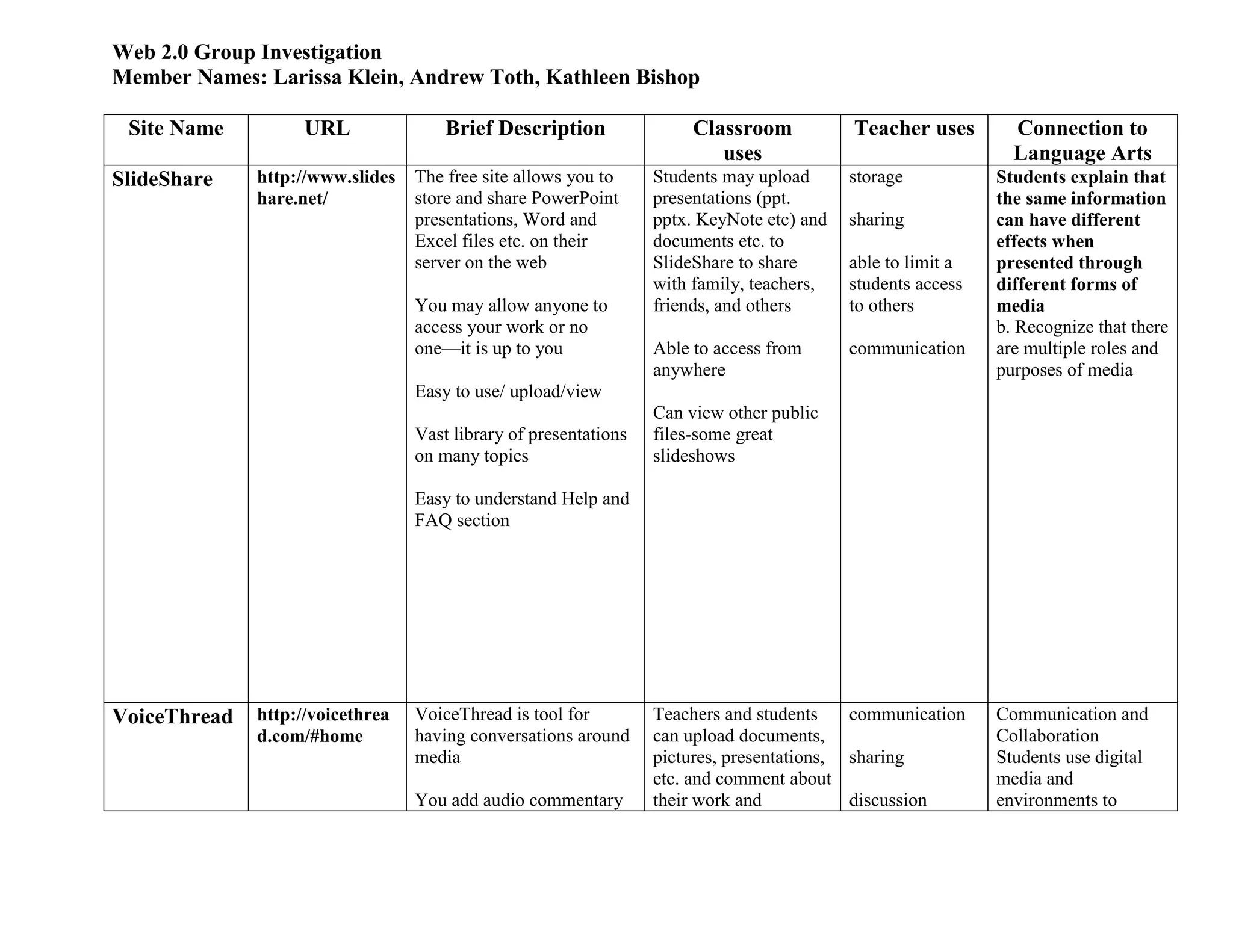
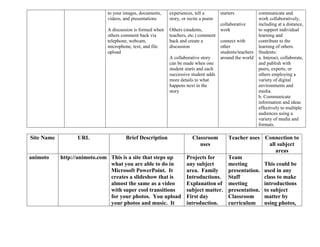
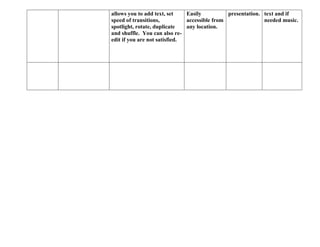
Web 2.0 Group Investigation<br />Member Names: Larissa Klein, Andrew Toth, Kathleen Bishop<br />Site NameURLBrief DescriptionClassroomusesTeacher usesConnection to Language ArtsSlideSharehttp://www.slideshare.net/The free site allows you to store and share PowerPoint presentations, Word and Excel files etc. on their server on the webYou may allow anyone to access your work or no one—it is up to youEasy to use/ upload/viewVast library of presentations on many topicsEasy to understand Help and FAQ sectionStudents may upload presentations (ppt. pptx. KeyNote etc) and documents etc. to SlideShare to share  with family, teachers, friends, and othersAble to access from anywhereCan view other public files-some great slideshowsstorage sharingable to limit a students access to otherscommunication   Students explain that the same information can have different effects when presented through different forms of mediab. Recognize that there are multiple roles and purposes of mediaVoiceThreadhttp://voicethread.com/#homeVoiceThread is tool for having conversations around mediaYou add audio commentary to your images, documents, videos, and presentationsA discussion is formed when others comment back via telephone, webcam, microphone, text, and file uploadTeachers and students can upload documents, pictures, presentations, etc. and comment about their work and experiences, tell a story, or recite a poemOthers (students, teachers, etc.) comment back and create a discussionA collaborative story can be made when one student starts and each successive student adds more details to what happens next in the storycommunicationsharingdiscussion starterscollaborative workconnect with other students/teachers around the worldCommunication and CollaborationStudents use digital media and environments to communicate and work collaboratively, including at a distance, to support individual learning and contribute to the learning of others. Students:a. Interact, collaborate, and publish with peers, experts, or others employing a variety of digital environments and media.b. Communicate information and ideas effectively to multiple audiences using a variety of media and formats.<br />Site NameURLBrief DescriptionClassroomusesTeacher usesConnection to all subject areasanimotohttp://animoto.comThis is a site that steps up what you are able to do in Microsoft PowerPoint.  It creates a slideshow that is almost the same as a video with super cool transitions for your photos.  You upload your photos and music.  It allows you to add text, set speed of transitions, spotlight, rotate, duplicate and shuffle.  You can also re-edit if you are not satisfied.Projects for any subject area.  FamilyIntroductions.Explanation of subject matter.  First day introduction.Easily accessible from any location.Team meeting presentation.Staff meeting presentation.Classroom curriculum presentation.This could be used in any class to make introductions to subject matter by using photos, text and if needed music.<br />
Web2 0 Klein Toth Bishop Complete

Web2 0 Klein Toth Bishop Complete

  • 1.
    Web 2.0 GroupInvestigation<br />Member Names: Larissa Klein, Andrew Toth, Kathleen Bishop<br />Site NameURLBrief DescriptionClassroomusesTeacher usesConnection to Language ArtsSlideSharehttp://www.slideshare.net/The free site allows you to store and share PowerPoint presentations, Word and Excel files etc. on their server on the webYou may allow anyone to access your work or no one—it is up to youEasy to use/ upload/viewVast library of presentations on many topicsEasy to understand Help and FAQ sectionStudents may upload presentations (ppt. pptx. KeyNote etc) and documents etc. to SlideShare to share with family, teachers, friends, and othersAble to access from anywhereCan view other public files-some great slideshowsstorage sharingable to limit a students access to otherscommunication Students explain that the same information can have different effects when presented through different forms of mediab. Recognize that there are multiple roles and purposes of mediaVoiceThreadhttp://voicethread.com/#homeVoiceThread is tool for having conversations around mediaYou add audio commentary to your images, documents, videos, and presentationsA discussion is formed when others comment back via telephone, webcam, microphone, text, and file uploadTeachers and students can upload documents, pictures, presentations, etc. and comment about their work and experiences, tell a story, or recite a poemOthers (students, teachers, etc.) comment back and create a discussionA collaborative story can be made when one student starts and each successive student adds more details to what happens next in the storycommunicationsharingdiscussion starterscollaborative workconnect with other students/teachers around the worldCommunication and CollaborationStudents use digital media and environments to communicate and work collaboratively, including at a distance, to support individual learning and contribute to the learning of others. Students:a. Interact, collaborate, and publish with peers, experts, or others employing a variety of digital environments and media.b. Communicate information and ideas effectively to multiple audiences using a variety of media and formats.<br />Site NameURLBrief DescriptionClassroomusesTeacher usesConnection to all subject areasanimotohttp://animoto.comThis is a site that steps up what you are able to do in Microsoft PowerPoint. It creates a slideshow that is almost the same as a video with super cool transitions for your photos. You upload your photos and music. It allows you to add text, set speed of transitions, spotlight, rotate, duplicate and shuffle. You can also re-edit if you are not satisfied.Projects for any subject area. FamilyIntroductions.Explanation of subject matter. First day introduction.Easily accessible from any location.Team meeting presentation.Staff meeting presentation.Classroom curriculum presentation.This could be used in any class to make introductions to subject matter by using photos, text and if needed music.<br />