Git.
From the thorns to the stars.
Сергей Моренец
25 апреля 2013 г.
Agenda
• Versioning and revision systems overview
• Git under the microscope
• Examples
• Q & A
Glossary
• VCS
• SCM
• RCS
Requirements
• Storing content
• Tracking changes to the content
• Distributing the content and history with
collaborators
Lost in selection
Magic pill
SCCS
• First VCS available on any Unix system
• Developed in SNOBOL at Bell Labs in 1972
• Prepared for IBM Systems/370 computers running
OS/360
• Its file format is used in BitKeeper and other VCS
• Introduced repositories and locking mechanism
CVS
• Ancestor of the revision control systems
• First released in 1986 by Dick Grune
• Simple technology with small learning curve
• Useful for sharing and backing up the files
• Tortoise CVS is a de facto client for CVS on Windows
• Introduces merging
• Lifecycle ended in 2008
Apache Subversion
• Created in 2000
• Used to host Apache software products, also
Mono, SourceForge, Google Code
• Most adopted SCM
• Atomic commits
• Maintains versioning for directories, renames, and
file metadata
• Better support for branches and tagging
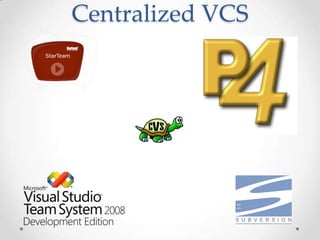
Centralized VCS
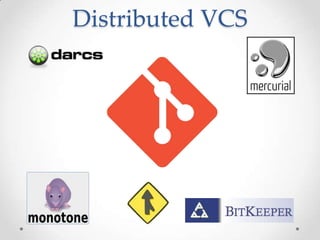
Distributed VCS
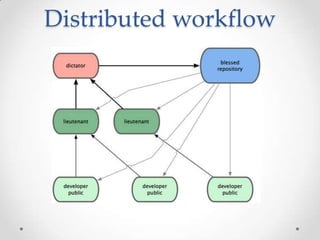
Distributed workflow
Git
• Distributed revision control and source code
management system
• Designed and developed by Linus Torvalds for
Linux kernel development
• Based on BitKeeper system
• The development began on April 2005
• Current version 1.8.2
Linus Torvalds
• Swedish-speaking Finnish American
• Chief architect and the project's coordinator of the
Linux kernel
• Names after Linus Pauling and Linus Van Pelt
• Second lieutenant of the Finnish Army
• Winner of Millennium Technology Prize in 2012
• Calls himself egotistical bastard
Git
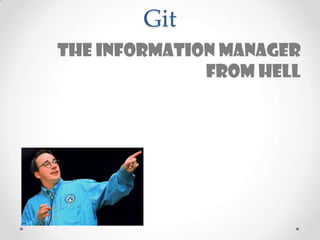
The information manager
from hell
Git
Global information
TRACKER
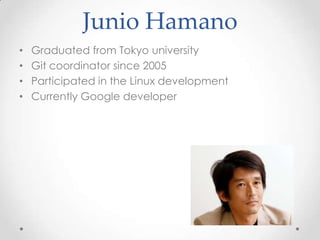
Junio Hamano
• Graduated from Tokyo university
• Git coordinator since 2005
• Participated in the Linux development
• Currently Google developer
Design Principles
• Take CVS as an example of what not to do
• Support distributed workflow
• Scaling to thousand developers
• Strong consistency and integrity support
• Free
Features
• Rapid branches and merging
• Distributed development
• Compatibility and emulation
• Performance breakthrough
• Revisions hashing
• Garbage collector
• Packed data storage
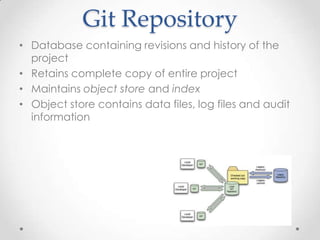
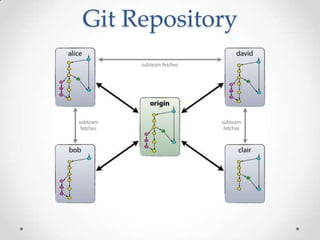
Git Repository
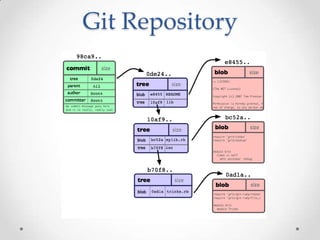
• Database containing revisions and history of the
project
• Retains complete copy of entire project
• Maintains object store and index
• Object store contains data files, log files and audit
information
Git Repository
Git Object Types
• Blobs
• Trees
• Commits
• Tags
Blobs
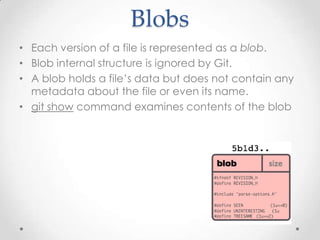
• Each version of a file is represented as a blob.
• Blob internal structure is ignored by Git.
• A blob holds a file’s data but does not contain any
metadata about the file or even its name.
• git show command examines contents of the blob
Trees
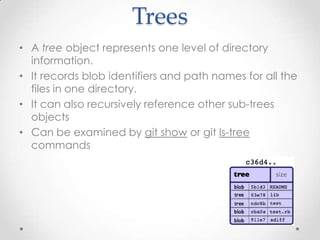
• A tree object represents one level of directory
information.
• It records blob identifiers and path names for all the
files in one directory.
• It can also recursively reference other sub-trees
objects
• Can be examined by git show or git ls-tree
commands
Commits
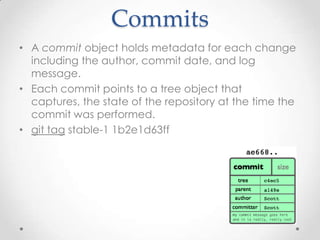
• A commit object holds metadata for each change
including the author, commit date, and log
message.
• Each commit points to a tree object that
captures, the state of the repository at the time the
commit was performed.
• git tag stable-1 1b2e1d63ff
Tags
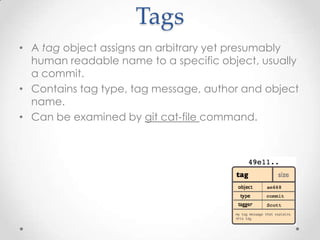
• A tag object assigns an arbitrary yet presumably
human readable name to a specific object, usually
a commit.
• Contains tag type, tag message, author and object
name.
• Can be examined by git cat-file command.
Git Repository
Git Object Model
• Object store is organized and implemented as a
content-addressable storage system.
• Each object has a unique name produced by
applying SHA1 to the contents of the object.
• SHA1 hash is a sufficient index or name for that
object in the object database.
• SHA1 values are 160-bit values that are represented
as a 40-digit hexadecimal number
• 9da581d910c9c4ac93557ca4859e767f5caf5169
Advantages
• Git can determine equality of the objects by
comparing names.
• The same content stored in two repositories will
always be stored under the same name.
• Corruptions errors can be detected by checking
that the object's name is still the SHA1 hash of its
contents.
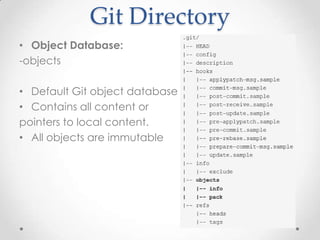
Name Vs Content
• Git stores each version of file not differences
• Path name is separated from file contents
• Object store is based on hashed computation on
file contents, not name
System Index mechanism Data store
Database Indexed Sequential
Access Method
Data records
Unix FS Directories(/path) Blocks of data
Git .git/objects/hash Blob/tree objects
Git Directory
• Stores all Git's history, configuration and meta
information for your project
• There is only one git directory per project
• By default it’s '.git' in the root of your project
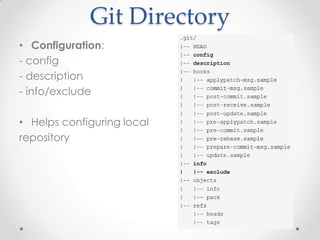
Git Directory
• Configuration:
- config
- description
- info/exclude
• Helps configuring local
repository
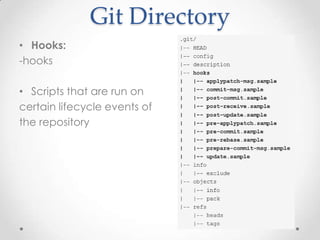
Git Directory
• Hooks:
-hooks
• Scripts that are run on
certain lifecycle events of
the repository
Git Directory
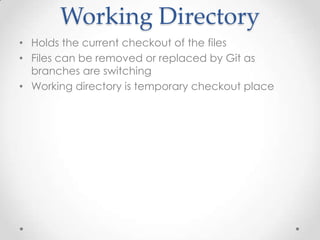
• Object Database:
-objects
• Default Git object database
• Contains all content or
pointers to local content.
• All objects are immutable
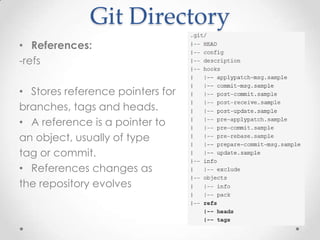
Git Directory
• References:
-refs
• Stores reference pointers for
branches, tags and heads.
• A reference is a pointer to
an object, usually of type
tag or commit.
• References changes as
the repository evolves
Working Directory
• Holds the current checkout of the files
• Files can be removed or replaced by Git as
branches are switching
• Working directory is temporary checkout place
Index
• The index is a temporary and dynamic binary file
that captures a version of the project’s overall
structure
• The project’s state could be represented by a
commit and a tree from any point in the project’s
history
• The index allows a separation between incremental
development steps and the committal of those
changes.
Index
• Staging area between your working directory and
your repository
• With commit data files from index are
committed, not from working directory
• Can be viewed by git status command.
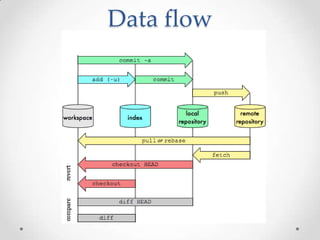
Data flow
Git Usage
• Command-line tool(Git Bash)
• Git GUI
• IDE Plugin(JGit-based)
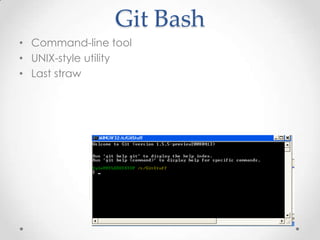
Git Bash
• Command-line tool
• UNIX-style utility
• Last straw
Git GUI
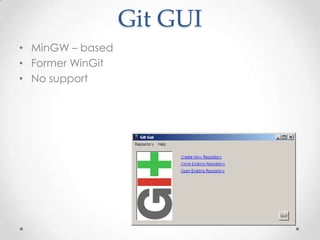
• MinGW – based
• Former WinGit
• No support
JGit
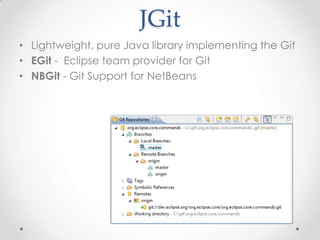
• Lightweight, pure Java library implementing the Git
• EGit - Eclipse team provider for Git
• NBGit - Git Support for NetBeans
Git Commands
• init
• checkout
• fetch
• pull
• reset
• merge
• log
Git Commands
• add
• commit
• push
• branch
• tag
First steps
• Clone repository
• Initialize repository
Clone Repository
• git clone git://git.kernel.org/pub/scm/git/git.git
• git clone http://www.kernel.org/pub/scm/git/git.git
Branching
• Branch is graph of commits
• Master branch is created by default
• HEAD is pointer to the current branch
• “git branch test” creates branch test.
• “git checkout master” switches to branch master.
• “git merge test” merges changes from test to
master.
• Merges are done automatically.
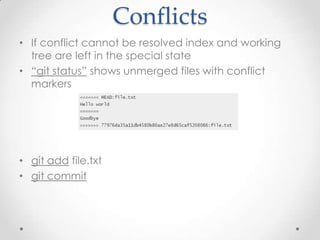
Conflicts
• If conflict cannot be resolved index and working
tree are left in the special state
• “git status” shows unmerged files with conflict
markers
• git add file.txt
• git commit
Roll Back
• Reset
• Checkout
• Revert
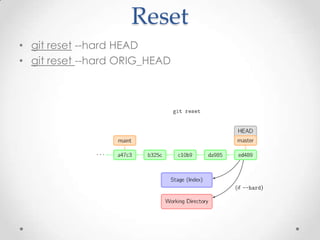
Reset
• git reset --hard HEAD
• git reset --hard ORIG_HEAD
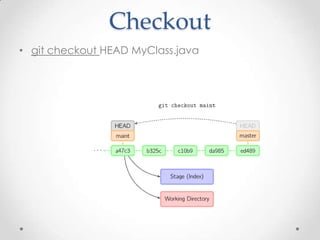
Checkout
• git checkout HEAD MyClass.java
Revert
• Rollbacks the last commit(s) in the repository
• git revert HEAD
• git revert HEAD~1 –m 2
Git References
• All references are named with a slash-separated
path name starting with "refs“.
• -The branch "test" is short for "refs/heads/test".
• The tag "v1.0" is short for "refs/tags/v1.0".
• "origin/master" is short for
“refs/remotes/origin/master"
Git References
• The HEAD file is a symbolic reference to the branch
we are currently using
• git symbolic-ref HEAD
• ref: refs/heads/master
Advanced Git
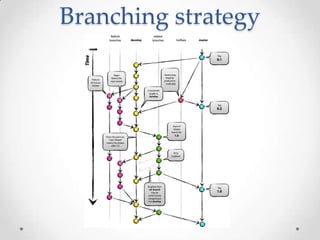
Branching strategy
• master
• develop
Branching strategy
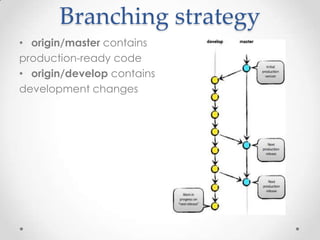
• origin/master contains
production-ready code
• origin/develop contains
development changes
Branching strategy
• Feature branches
• Release branches
• Hotfix branches
Feature Branches
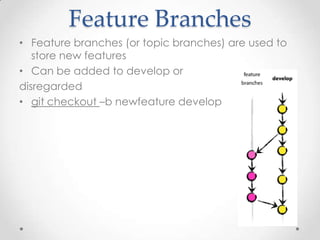
• Feature branches (or topic branches) are used to
store new features
• Can be added to develop or
disregarded
• git checkout –b newfeature develop
Release Branches
• Release branches support preparation of a new
production release
Hotfix branches
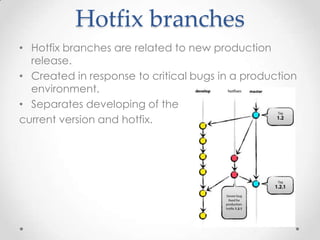
• Hotfix branches are related to new production
release.
• Created in response to critical bugs in a production
environment.
• Separates developing of the
current version and hotfix.
Branching strategy
Rebasing
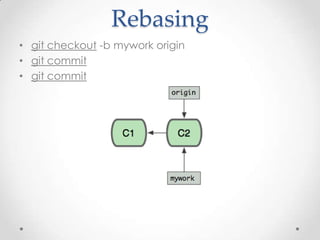
• git checkout -b mywork origin
• git commit
• git commit
Rebasing
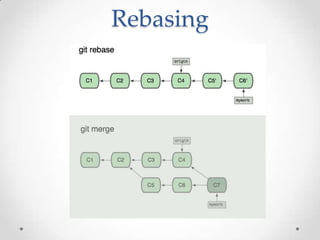
Rebasing
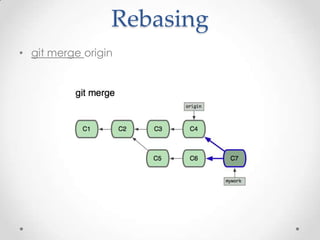
• git merge origin
Rebasing
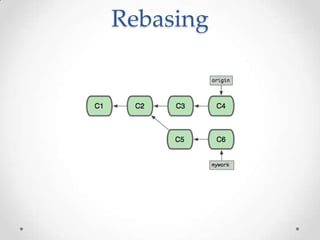
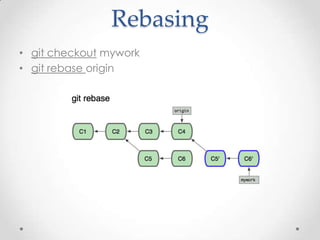
• git checkout mywork
• git rebase origin
Rebasing
Stashing
• git stash save “Stashing reason“
• …
• git stash apply
Treeishes
• 980e3ccdaac54a0d4de358f3fe5d718027d96aae
• 980e3ccdaac54a0d4
• 980e3cc
Treeishes
• 980e3ccdaac54a0d4de358f3fe5d718027d96aae
• origin/master
• refs/remotes/origin/master
• master
• refs/heads/master
• v1.0
• refs/tags/v1.0
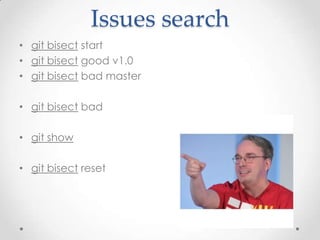
Issues search
• git bisect start
• git bisect good v1.0
• git bisect bad master
• git bisect bad
• git show
• git bisect reset
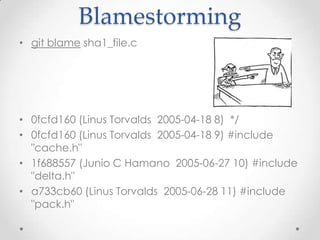
Blamestorming
• git blame sha1_file.c
• 0fcfd160 (Linus Torvalds 2005-04-18 8) */
• 0fcfd160 (Linus Torvalds 2005-04-18 9) #include
"cache.h"
• 1f688557 (Junio C Hamano 2005-06-27 10) #include
"delta.h"
• a733cb60 (Linus Torvalds 2005-06-28 11) #include
"pack.h"
Git Hooks
• Scripts placed in $GIT_DIR/hooks directory to trigger
action at certain points
• pre-commit
• commit-msg
• post-commit
• post-checkout
• post-merge
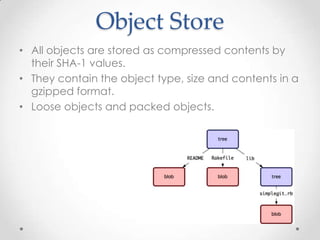
Object Store
• All objects are stored as compressed contents by
their SHA-1 values.
• They contain the object type, size and contents in a
gzipped format.
• Loose objects and packed objects.
Loose Objects
• Compressed data stored in a single file on disk
• Every object written to a separate file
• SHA1 ab04d884140f7b0cf8bbf86d6883869f16a46f65
• GIT_DIR/objects/ab/04d884140f7b0cf8bbf86d68838
69f16a46f65
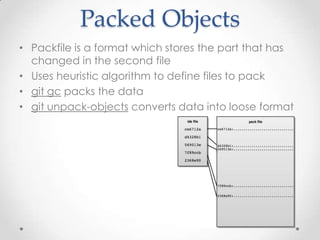
Packed Objects
• Packfile is a format which stores the part that has
changed in the second file
• Uses heuristic algorithm to define files to pack
• git gc packs the data
• git unpack-objects converts data into loose format
Ignoring files
• # Ignore any file named sample.txt.
• sample.txt
• # Ignore Eclipse files
• *.project
• # except my.project with manual setting.
• !my.project
• # Ignore objects and archives.
• *.[oa]
Scripting
• Ruby
• PHP
• Python
• Perl
Migration
• Script support
• CVS
• SVN
• Perforce
• Mercurial
• fast-support tool
Migration
• git-svn clone http://my-
project.googlecode.com/svn/trunk new-project
• ~/git.git/contrib/fast-import/git-p4 clone
//depot/project/main@all myproject
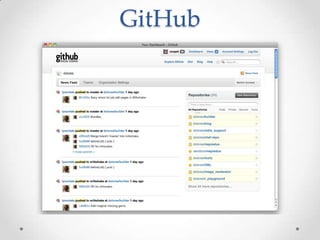
GitHub
GitHub
• Web-based hosting service
• Was launched in April 2008
• Git repository, paid for private projects and free for
open-source projects
• Run by Ruby on Rails & Erlang
• Provides feeds and followers
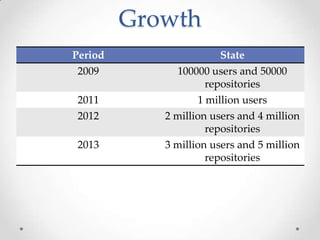
Growth
Period State
2009 100000 users and 50000
repositories
2011 1 million users
2012 2 million users and 4 million
repositories
2013 3 million users and 5 million
repositories
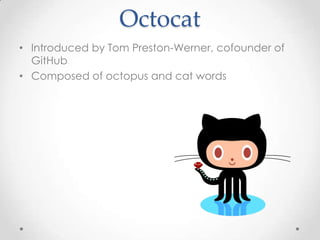
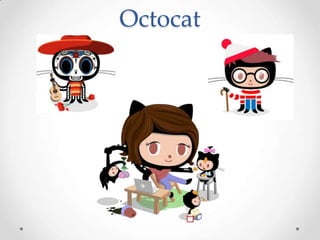
Octocat
• Introduced by Tom Preston-Werner, cofounder of
GitHub
• Composed of octopus and cat words
Octocat
Resources
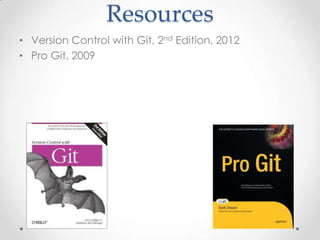
• Version Control with Git, 2nd Edition, 2012
• Pro Git, 2009
Pros
• Painless branching
• Separation between local repository and upstream
• Simplifies work in the distributed teams
• Dramatic increase in performance
• Integration with major VCS
Cons
• Repository security risks
• Latest revision question
• Pessimistic locks
• Big learning curve
• Commit identifiers
• Not optimal for single developers
Q&A
• Сергей Моренец, morenets@mail.ru

Git.From thorns to the stars

  • 1.
    Git. From the thornsto the stars. Сергей Моренец 25 апреля 2013 г.
  • 2.
    Agenda • Versioning andrevision systems overview • Git under the microscope • Examples • Q & A
  • 3.
  • 4.
    Requirements • Storing content •Tracking changes to the content • Distributing the content and history with collaborators
  • 5.
  • 6.
  • 7.
    SCCS • First VCSavailable on any Unix system • Developed in SNOBOL at Bell Labs in 1972 • Prepared for IBM Systems/370 computers running OS/360 • Its file format is used in BitKeeper and other VCS • Introduced repositories and locking mechanism
  • 8.
    CVS • Ancestor ofthe revision control systems • First released in 1986 by Dick Grune • Simple technology with small learning curve • Useful for sharing and backing up the files • Tortoise CVS is a de facto client for CVS on Windows • Introduces merging • Lifecycle ended in 2008
  • 9.
    Apache Subversion • Createdin 2000 • Used to host Apache software products, also Mono, SourceForge, Google Code • Most adopted SCM • Atomic commits • Maintains versioning for directories, renames, and file metadata • Better support for branches and tagging
  • 10.
  • 11.
  • 12.
  • 14.
    Git • Distributed revisioncontrol and source code management system • Designed and developed by Linus Torvalds for Linux kernel development • Based on BitKeeper system • The development began on April 2005 • Current version 1.8.2
  • 15.
    Linus Torvalds • Swedish-speakingFinnish American • Chief architect and the project's coordinator of the Linux kernel • Names after Linus Pauling and Linus Van Pelt • Second lieutenant of the Finnish Army • Winner of Millennium Technology Prize in 2012 • Calls himself egotistical bastard
  • 16.
  • 17.
  • 18.
    Junio Hamano • Graduatedfrom Tokyo university • Git coordinator since 2005 • Participated in the Linux development • Currently Google developer
  • 19.
    Design Principles • TakeCVS as an example of what not to do • Support distributed workflow • Scaling to thousand developers • Strong consistency and integrity support • Free
  • 20.
    Features • Rapid branchesand merging • Distributed development • Compatibility and emulation • Performance breakthrough • Revisions hashing • Garbage collector • Packed data storage
  • 21.
    Git Repository • Databasecontaining revisions and history of the project • Retains complete copy of entire project • Maintains object store and index • Object store contains data files, log files and audit information
  • 22.
  • 23.
    Git Object Types •Blobs • Trees • Commits • Tags
  • 24.
    Blobs • Each versionof a file is represented as a blob. • Blob internal structure is ignored by Git. • A blob holds a file’s data but does not contain any metadata about the file or even its name. • git show command examines contents of the blob
  • 25.
    Trees • A treeobject represents one level of directory information. • It records blob identifiers and path names for all the files in one directory. • It can also recursively reference other sub-trees objects • Can be examined by git show or git ls-tree commands
  • 26.
    Commits • A commitobject holds metadata for each change including the author, commit date, and log message. • Each commit points to a tree object that captures, the state of the repository at the time the commit was performed. • git tag stable-1 1b2e1d63ff
  • 27.
    Tags • A tagobject assigns an arbitrary yet presumably human readable name to a specific object, usually a commit. • Contains tag type, tag message, author and object name. • Can be examined by git cat-file command.
  • 28.
  • 29.
    Git Object Model •Object store is organized and implemented as a content-addressable storage system. • Each object has a unique name produced by applying SHA1 to the contents of the object. • SHA1 hash is a sufficient index or name for that object in the object database. • SHA1 values are 160-bit values that are represented as a 40-digit hexadecimal number • 9da581d910c9c4ac93557ca4859e767f5caf5169
  • 30.
    Advantages • Git candetermine equality of the objects by comparing names. • The same content stored in two repositories will always be stored under the same name. • Corruptions errors can be detected by checking that the object's name is still the SHA1 hash of its contents.
  • 31.
    Name Vs Content •Git stores each version of file not differences • Path name is separated from file contents • Object store is based on hashed computation on file contents, not name System Index mechanism Data store Database Indexed Sequential Access Method Data records Unix FS Directories(/path) Blocks of data Git .git/objects/hash Blob/tree objects
  • 32.
    Git Directory • Storesall Git's history, configuration and meta information for your project • There is only one git directory per project • By default it’s '.git' in the root of your project
  • 33.
    Git Directory • Configuration: -config - description - info/exclude • Helps configuring local repository
  • 34.
    Git Directory • Hooks: -hooks •Scripts that are run on certain lifecycle events of the repository
  • 35.
    Git Directory • ObjectDatabase: -objects • Default Git object database • Contains all content or pointers to local content. • All objects are immutable
  • 36.
    Git Directory • References: -refs •Stores reference pointers for branches, tags and heads. • A reference is a pointer to an object, usually of type tag or commit. • References changes as the repository evolves
  • 37.
    Working Directory • Holdsthe current checkout of the files • Files can be removed or replaced by Git as branches are switching • Working directory is temporary checkout place
  • 38.
    Index • The indexis a temporary and dynamic binary file that captures a version of the project’s overall structure • The project’s state could be represented by a commit and a tree from any point in the project’s history • The index allows a separation between incremental development steps and the committal of those changes.
  • 39.
    Index • Staging areabetween your working directory and your repository • With commit data files from index are committed, not from working directory • Can be viewed by git status command.
  • 40.
  • 41.
    Git Usage • Command-linetool(Git Bash) • Git GUI • IDE Plugin(JGit-based)
  • 42.
    Git Bash • Command-linetool • UNIX-style utility • Last straw
  • 43.
    Git GUI • MinGW– based • Former WinGit • No support
  • 44.
    JGit • Lightweight, pureJava library implementing the Git • EGit - Eclipse team provider for Git • NBGit - Git Support for NetBeans
  • 45.
    Git Commands • init •checkout • fetch • pull • reset • merge • log
  • 46.
    Git Commands • add •commit • push • branch • tag
  • 47.
    First steps • Clonerepository • Initialize repository
  • 48.
    Clone Repository • gitclone git://git.kernel.org/pub/scm/git/git.git • git clone http://www.kernel.org/pub/scm/git/git.git
  • 49.
    Branching • Branch isgraph of commits • Master branch is created by default • HEAD is pointer to the current branch • “git branch test” creates branch test. • “git checkout master” switches to branch master. • “git merge test” merges changes from test to master. • Merges are done automatically.
  • 50.
    Conflicts • If conflictcannot be resolved index and working tree are left in the special state • “git status” shows unmerged files with conflict markers • git add file.txt • git commit
  • 51.
    Roll Back • Reset •Checkout • Revert
  • 52.
    Reset • git reset--hard HEAD • git reset --hard ORIG_HEAD
  • 53.
    Checkout • git checkoutHEAD MyClass.java
  • 54.
    Revert • Rollbacks thelast commit(s) in the repository • git revert HEAD • git revert HEAD~1 –m 2
  • 55.
    Git References • Allreferences are named with a slash-separated path name starting with "refs“. • -The branch "test" is short for "refs/heads/test". • The tag "v1.0" is short for "refs/tags/v1.0". • "origin/master" is short for “refs/remotes/origin/master"
  • 56.
    Git References • TheHEAD file is a symbolic reference to the branch we are currently using • git symbolic-ref HEAD • ref: refs/heads/master
  • 57.
  • 58.
  • 59.
    Branching strategy • origin/mastercontains production-ready code • origin/develop contains development changes
  • 60.
    Branching strategy • Featurebranches • Release branches • Hotfix branches
  • 61.
    Feature Branches • Featurebranches (or topic branches) are used to store new features • Can be added to develop or disregarded • git checkout –b newfeature develop
  • 62.
    Release Branches • Releasebranches support preparation of a new production release
  • 63.
    Hotfix branches • Hotfixbranches are related to new production release. • Created in response to critical bugs in a production environment. • Separates developing of the current version and hotfix.
  • 64.
  • 65.
    Rebasing • git checkout-b mywork origin • git commit • git commit
  • 66.
  • 67.
  • 68.
    Rebasing • git checkoutmywork • git rebase origin
  • 69.
  • 70.
    Stashing • git stashsave “Stashing reason“ • … • git stash apply
  • 71.
  • 72.
    Treeishes • 980e3ccdaac54a0d4de358f3fe5d718027d96aae • origin/master •refs/remotes/origin/master • master • refs/heads/master • v1.0 • refs/tags/v1.0
  • 73.
    Issues search • gitbisect start • git bisect good v1.0 • git bisect bad master • git bisect bad • git show • git bisect reset
  • 74.
    Blamestorming • git blamesha1_file.c • 0fcfd160 (Linus Torvalds 2005-04-18 8) */ • 0fcfd160 (Linus Torvalds 2005-04-18 9) #include "cache.h" • 1f688557 (Junio C Hamano 2005-06-27 10) #include "delta.h" • a733cb60 (Linus Torvalds 2005-06-28 11) #include "pack.h"
  • 75.
    Git Hooks • Scriptsplaced in $GIT_DIR/hooks directory to trigger action at certain points • pre-commit • commit-msg • post-commit • post-checkout • post-merge
  • 76.
    Object Store • Allobjects are stored as compressed contents by their SHA-1 values. • They contain the object type, size and contents in a gzipped format. • Loose objects and packed objects.
  • 77.
    Loose Objects • Compresseddata stored in a single file on disk • Every object written to a separate file • SHA1 ab04d884140f7b0cf8bbf86d6883869f16a46f65 • GIT_DIR/objects/ab/04d884140f7b0cf8bbf86d68838 69f16a46f65
  • 78.
    Packed Objects • Packfileis a format which stores the part that has changed in the second file • Uses heuristic algorithm to define files to pack • git gc packs the data • git unpack-objects converts data into loose format
  • 79.
    Ignoring files • #Ignore any file named sample.txt. • sample.txt • # Ignore Eclipse files • *.project • # except my.project with manual setting. • !my.project • # Ignore objects and archives. • *.[oa]
  • 80.
  • 81.
    Migration • Script support •CVS • SVN • Perforce • Mercurial • fast-support tool
  • 82.
    Migration • git-svn clonehttp://my- project.googlecode.com/svn/trunk new-project • ~/git.git/contrib/fast-import/git-p4 clone //depot/project/main@all myproject
  • 83.
  • 84.
    GitHub • Web-based hostingservice • Was launched in April 2008 • Git repository, paid for private projects and free for open-source projects • Run by Ruby on Rails & Erlang • Provides feeds and followers
  • 85.
    Growth Period State 2009 100000users and 50000 repositories 2011 1 million users 2012 2 million users and 4 million repositories 2013 3 million users and 5 million repositories
  • 86.
    Octocat • Introduced byTom Preston-Werner, cofounder of GitHub • Composed of octopus and cat words
  • 87.
  • 88.
    Resources • Version Controlwith Git, 2nd Edition, 2012 • Pro Git, 2009
  • 89.
    Pros • Painless branching •Separation between local repository and upstream • Simplifies work in the distributed teams • Dramatic increase in performance • Integration with major VCS
  • 90.
    Cons • Repository securityrisks • Latest revision question • Pessimistic locks • Big learning curve • Commit identifiers • Not optimal for single developers
  • 91.