Gradle. 
Enemy at the gates. 
Сергей Моренец, morenets@mail.ru 
23 мая 2014 г.
About author 
• Works in IT since 2000 
• 10 year of Java SE/EE experience 
• Migrated to Gradle after 7 years of Ant/Maven 
usage 
• Regular speaker at Java conferences
Agenda 
• Builds tools overview 
• Gradle under the microscope 
• Examples 
• Q & A
Lost in selection
Magic pill
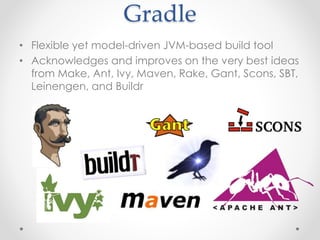
Gradle 
• Flexible yet model-driven JVM-based build tool 
• Acknowledges and improves on the very best ideas 
from Make, Ant, Ivy, Maven, Rake, Gant, Scons, SBT, 
Leinengen, and Buildr
Gradle 
• Flexibility of Ant 
• Dependency management from Ivy 
• Intelligence of Maven 
• Speed and hashing of Git 
• Metaprogramming power of Groovy
Apache Ant 
• Offers extreme flexibility 
• Imposes no convention 
• Lightweight dependency management
Apache Ivy 
• Cross-platform dependency management 
• Transitive dependencies 
• Enhanced support of repositories
Apache Maven 
• Offers rigid standards and support for dependency 
management 
• More difficult and inflexible standards/procedures 
• Declarative approach
Issue #1. XML 
• Large and complex files are hard to understand 
• Hierarchical structure limits the expressiveness 
of the format 
• Good format for the data and complex for the flow
Issues #2. Frameworkitis 
• Frameworkitis is the disease that a framework wants 
to do too much for you or it does it in a way that 
you don't want but you can't change it 
• The bigger the framework becomes, the greater the 
chances that it will want to do too much, the bigger 
the learning curves become, and the more difficult 
it becomes to maintain it 
• Group of small frameworks(toolkits) is better than 
big framework
Solution #1. Groovy 
• An agile and dynamic language for the Java 
Virtual Machine 
• Makes modern programming features available to 
Java developers with almost-zero learning curve 
• Provides the ability to statically type 
check and statically compile your code for 
robustness and performance 
• Supports Domain-Specific Languages and other 
compact syntax 
• Every Gradle build file is Groovy script
Gradle 
• First release in Apr 2008 
• Current version 1.12 released in April 2014 
• Used in Carrier, EADS, Hibernate, Grails, Groovy, 
Spring-Security and Spring-Integration
Hans Dockter 
• Founder of Gradle and Gradleware 
• 13 years of experience as a software developer, 
team leader, architect, trainer, and mentor 
• Previously worked at Jboss and founded Jboss-IDE 
• Holds a Diploma in Physics with a minor in Computer 
Science 
• Admirer of domain-driven-design
Slogan 
• Make the impossible possible 
• Make the possible easy 
• Make the easy elegant
Gradle overview 
• A flexible general purpose build tool 
• Declarative builds and build-by-convention plugins 
on top 
• Multi-project support 
• Powerful dependency management based on Ivy 
• Programming tool 
• Based on Groovy 
• Gradle is written in Java with a Groovy DSL layer on 
top
Build structure 
• Gradle build consists of one or more projects 
• Project contains one or more tasks 
• Task is fundamental unit of build activity 
• Tasks are named collections of build instructions 
• Tasks are the equivalent to Ant targets 
• Task is made up of actions
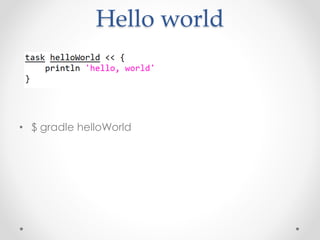
Hello world 
• $ gradle helloWorld
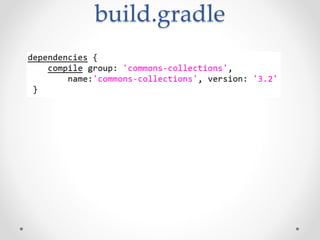
build.gradle
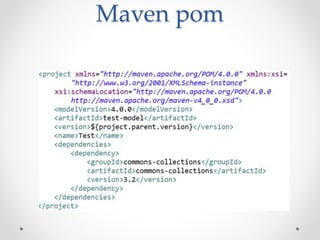
Maven pom
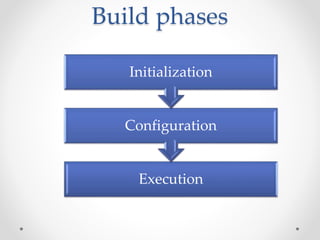
Build phases 
Initialization 
Configuration 
Execution
Initialization 
• Gradle defines which projects are involved in build 
• Project instance is defined for each involved 
project
Configuration 
• Task objects are assembled into an internal object 
model, usually called the DAG 
• The build scripts of all projects which are part of the 
build are executed 
• If “configuration on demand” feature is enabled 
then only relevant projects are configured
Execution 
• Gradle determines the subset of the tasks, created 
and configured during the configuration phase 
• Subset of tasks depends on the gradle command 
argument and the contents of the current directory. 
• Selected tasks are executed in the order required 
by their dependency relationships
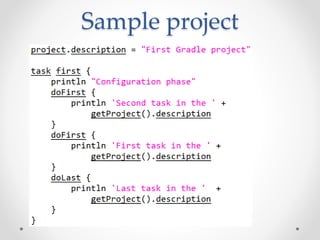
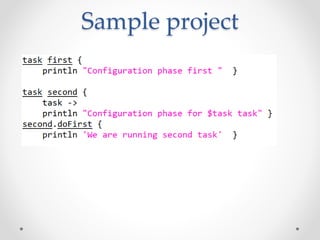
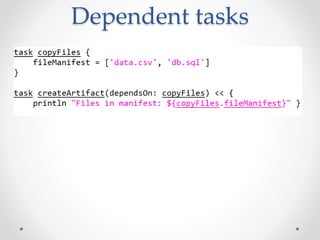
DefaultTask 
• dependsOn(task) 
• doFirst(closure) 
• doLast(closure) 
• onlyIf(closure)
Sample project
Sample project
Dependent tasks
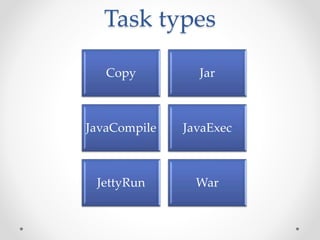
Task types 
Copy Jar 
JavaCompile JavaExec 
JettyRun War
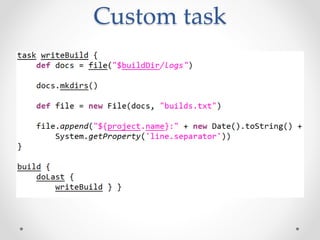
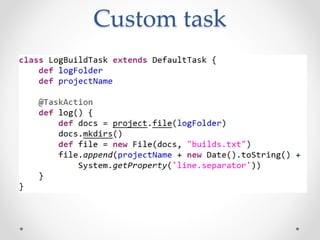
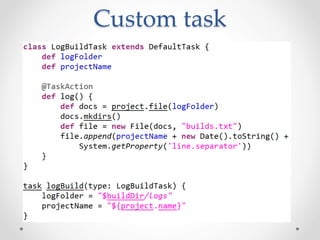
Custom task 
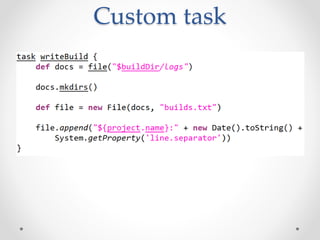
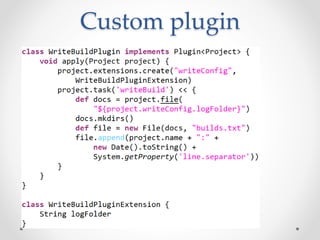
• Writes audit information at the end of the build 
• Audit information includes project name and build 
timestamp 
• Audit files are located in the separate folder
Custom task
Custom task
Custom task
Custom task
Multi-project builds 
• Build where you build more than one project during 
a single execution of Gradle 
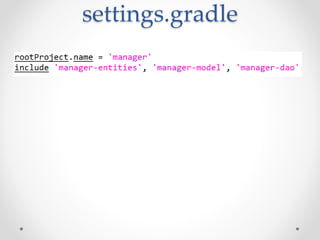
• Sub-projects should be defined in settings.gradle 
• Settings file is analyzed in the initialization phase 
when sub-projects are revealed and included into 
DAG 
• Sub-projects are sub-directories in the simplest case
settings.gradle
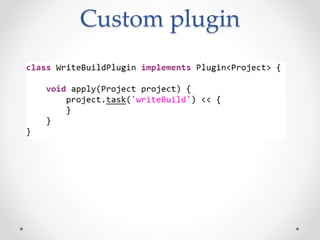
Plugin 
• Reusable pieces of build logic 
• Can be used in different projects/builds 
• Can be written in Groovy, Java or Scala
Plugin 
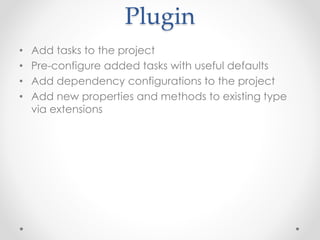
• Add tasks to the project 
• Pre-configure added tasks with useful defaults 
• Add dependency configurations to the project 
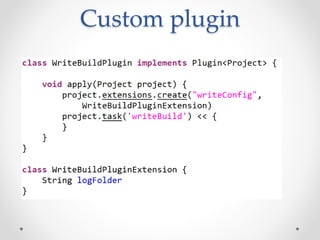
• Add new properties and methods to existing type 
via extensions
Plugins 
• Android 
• AspectJ 
• Flex 
• Grails 
• GWT 
• JavaScript 
• JAXB 
• Jenkins 
• SvnKit 
• Tomcat 
• Xslt
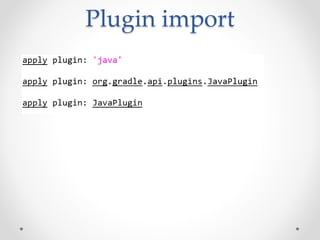
Plugin import
Packaging 
• Build script 
• buildSrc project 
• rootProjectDir/buildSrc/src/main/groovy 
• Standalone project
Custom plugin
Custom plugin
Custom plugin
Custom plugin 
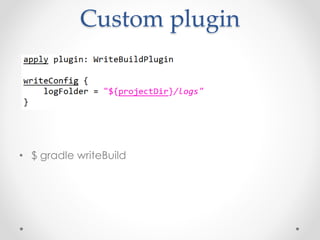
• $ gradle writeBuild
Custom plugin
Integration 
• Ant 
• Maven
Gradle and Ant 
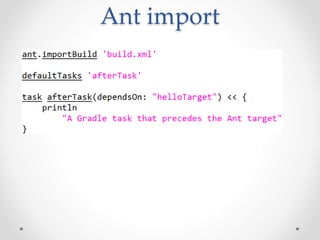
• Gradle is often described as Groovy-based Ant. 
• Competitor of Gant(Groovy Ant scripting) 
• Share DAG concept 
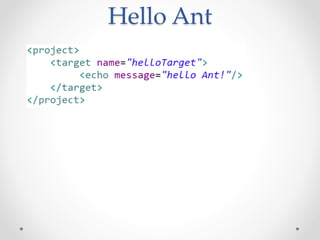
• Gradle tasks are similar to Ant targrets 
• Gradle variables(typeless) are close to Ant 
properties
Hello Ant
Ant import
Gradle and Maven
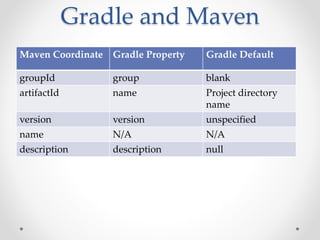
Gradle and Maven 
Maven Coordinate Gradle Property Gradle Default 
groupId group blank 
artifactId name Project directory 
name 
version version unspecified 
name N/A N/A 
description description null
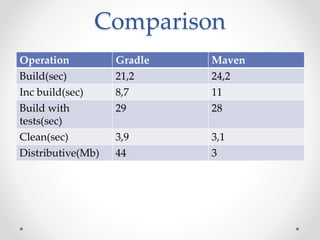
Comparison 
Operation Gradle Maven 
Build(sec) 21,2 24,2 
Inc build(sec) 8,7 11 
Build with 
29 28 
tests(sec) 
Clean(sec) 3,9 3,1 
Distributive(Mb) 44 3
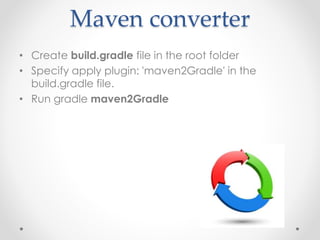
Maven converter 
• Create build.gradle file in the root folder 
• Specify apply plugin: 'maven2Gradle' in the 
build.gradle file. 
• Run gradle maven2Gradle
Maven Dependencies 
Scopes: 
• compile 
• provided 
• runtime 
• test 
• system 
• import
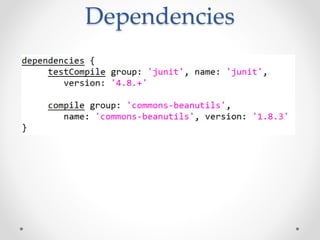
Dependencies
Gradle Dependencies 
configurations: 
• compile 
• default 
• testCompile 
• testRuntime 
• archives 
• runtime
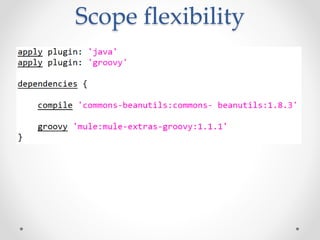
Scope flexibility
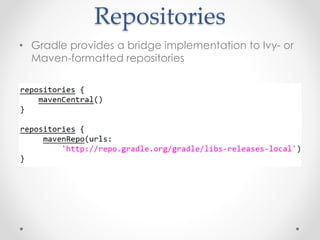
Repositories 
• Gradle provides a bridge implementation to Ivy- or 
Maven-formatted repositories
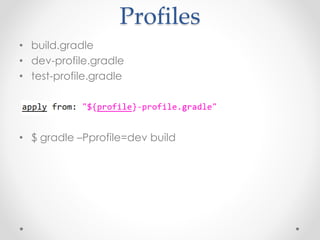
Profiles 
• build.gradle 
• dev-profile.gradle 
• test-profile.gradle 
• $ gradle –Pprofile=dev build
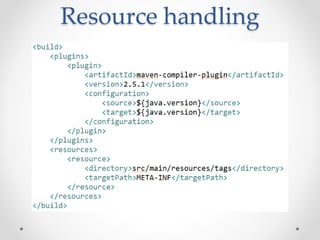
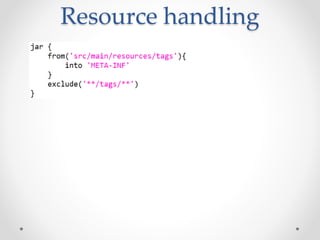
Resource handling
Resource handling
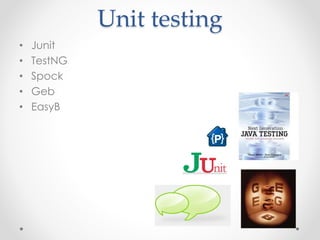
Unit testing 
• Junit 
• TestNG 
• Spock 
• Geb 
• EasyB
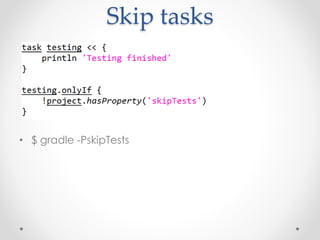
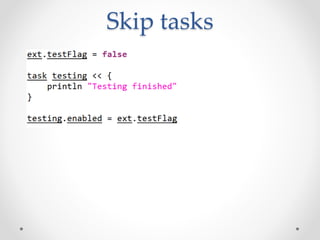
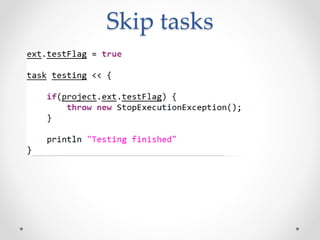
Skip tasks 
• $ gradle -PskipTests
Skip tasks
Skip tasks
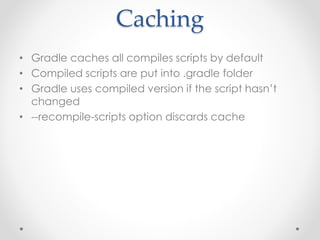
Caching 
• Gradle caches all compiles scripts by default 
• Compiled scripts are put into .gradle folder 
• Gradle uses compiled version if the script hasn’t 
changed 
• --recompile-scripts option discards cache
Practical tasks 
• Multiple projects 
• Liquibase 
• Deployment
Multiple projects 
• Huge project 
• Multiple sub-projects/pom.xml files 
• Complicated maintenance
Liquibase 
• Plugins for 2 and 3 versions 
• Lightweight front-end for Liquibase command-line 
• Gradle task for each Liquibase command
Deployment 
• Separate plugins for Jetty/Tomcat 
• General plugin for multiple containers
Pros 
• Native Java interaction 
• Ant/Maven integration 
• Transitive dependency management(based on 
Maven/Ivy) 
• Multiple third-party plugins(70+) 
• Incremental builds 
• Rapid development
Cons 
• Less efficient due to script nature 
• Large learning curve 
• Less community & industry support
Future 
• Testing toolkit for integration into business logic 
• Improved plugin portal and plugin development 
• Execution of Maven builds/plugins at runtime 
• Distributed testing 
• Parallel and distributed execution 
… to be continued 
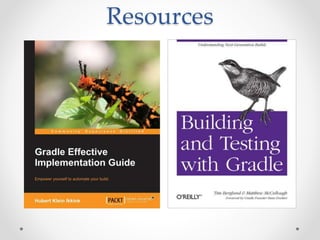
Resources
Practice 
• https://github.com/hibernate/hibernate-orm 
• https://github.com/SpringSource/spring-framework 
• https://github.com/gradle/gradle
Q&A 
• Сергей Моренец, morenets@mail.ru

Gradle.Enemy at the gates

  • 1.
    Gradle. Enemy atthe gates. Сергей Моренец, morenets@mail.ru 23 мая 2014 г.
  • 2.
    About author •Works in IT since 2000 • 10 year of Java SE/EE experience • Migrated to Gradle after 7 years of Ant/Maven usage • Regular speaker at Java conferences
  • 3.
    Agenda • Buildstools overview • Gradle under the microscope • Examples • Q & A
  • 4.
  • 5.
  • 6.
    Gradle • Flexibleyet model-driven JVM-based build tool • Acknowledges and improves on the very best ideas from Make, Ant, Ivy, Maven, Rake, Gant, Scons, SBT, Leinengen, and Buildr
  • 7.
    Gradle • Flexibilityof Ant • Dependency management from Ivy • Intelligence of Maven • Speed and hashing of Git • Metaprogramming power of Groovy
  • 8.
    Apache Ant •Offers extreme flexibility • Imposes no convention • Lightweight dependency management
  • 9.
    Apache Ivy •Cross-platform dependency management • Transitive dependencies • Enhanced support of repositories
  • 10.
    Apache Maven •Offers rigid standards and support for dependency management • More difficult and inflexible standards/procedures • Declarative approach
  • 11.
    Issue #1. XML • Large and complex files are hard to understand • Hierarchical structure limits the expressiveness of the format • Good format for the data and complex for the flow
  • 12.
    Issues #2. Frameworkitis • Frameworkitis is the disease that a framework wants to do too much for you or it does it in a way that you don't want but you can't change it • The bigger the framework becomes, the greater the chances that it will want to do too much, the bigger the learning curves become, and the more difficult it becomes to maintain it • Group of small frameworks(toolkits) is better than big framework
  • 13.
    Solution #1. Groovy • An agile and dynamic language for the Java Virtual Machine • Makes modern programming features available to Java developers with almost-zero learning curve • Provides the ability to statically type check and statically compile your code for robustness and performance • Supports Domain-Specific Languages and other compact syntax • Every Gradle build file is Groovy script
  • 14.
    Gradle • Firstrelease in Apr 2008 • Current version 1.12 released in April 2014 • Used in Carrier, EADS, Hibernate, Grails, Groovy, Spring-Security and Spring-Integration
  • 15.
    Hans Dockter •Founder of Gradle and Gradleware • 13 years of experience as a software developer, team leader, architect, trainer, and mentor • Previously worked at Jboss and founded Jboss-IDE • Holds a Diploma in Physics with a minor in Computer Science • Admirer of domain-driven-design
  • 16.
    Slogan • Makethe impossible possible • Make the possible easy • Make the easy elegant
  • 17.
    Gradle overview •A flexible general purpose build tool • Declarative builds and build-by-convention plugins on top • Multi-project support • Powerful dependency management based on Ivy • Programming tool • Based on Groovy • Gradle is written in Java with a Groovy DSL layer on top
  • 18.
    Build structure •Gradle build consists of one or more projects • Project contains one or more tasks • Task is fundamental unit of build activity • Tasks are named collections of build instructions • Tasks are the equivalent to Ant targets • Task is made up of actions
  • 19.
    Hello world •$ gradle helloWorld
  • 20.
  • 21.
  • 22.
    Build phases Initialization Configuration Execution
  • 23.
    Initialization • Gradledefines which projects are involved in build • Project instance is defined for each involved project
  • 24.
    Configuration • Taskobjects are assembled into an internal object model, usually called the DAG • The build scripts of all projects which are part of the build are executed • If “configuration on demand” feature is enabled then only relevant projects are configured
  • 25.
    Execution • Gradledetermines the subset of the tasks, created and configured during the configuration phase • Subset of tasks depends on the gradle command argument and the contents of the current directory. • Selected tasks are executed in the order required by their dependency relationships
  • 26.
    DefaultTask • dependsOn(task) • doFirst(closure) • doLast(closure) • onlyIf(closure)
  • 27.
  • 28.
  • 29.
  • 30.
    Task types CopyJar JavaCompile JavaExec JettyRun War
  • 31.
    Custom task •Writes audit information at the end of the build • Audit information includes project name and build timestamp • Audit files are located in the separate folder
  • 32.
  • 33.
  • 34.
  • 35.
  • 36.
    Multi-project builds •Build where you build more than one project during a single execution of Gradle • Sub-projects should be defined in settings.gradle • Settings file is analyzed in the initialization phase when sub-projects are revealed and included into DAG • Sub-projects are sub-directories in the simplest case
  • 37.
  • 38.
    Plugin • Reusablepieces of build logic • Can be used in different projects/builds • Can be written in Groovy, Java or Scala
  • 39.
    Plugin • Addtasks to the project • Pre-configure added tasks with useful defaults • Add dependency configurations to the project • Add new properties and methods to existing type via extensions
  • 40.
    Plugins • Android • AspectJ • Flex • Grails • GWT • JavaScript • JAXB • Jenkins • SvnKit • Tomcat • Xslt
  • 41.
  • 42.
    Packaging • Buildscript • buildSrc project • rootProjectDir/buildSrc/src/main/groovy • Standalone project
  • 43.
  • 44.
  • 45.
  • 46.
    Custom plugin •$ gradle writeBuild
  • 47.
  • 48.
  • 49.
    Gradle and Ant • Gradle is often described as Groovy-based Ant. • Competitor of Gant(Groovy Ant scripting) • Share DAG concept • Gradle tasks are similar to Ant targrets • Gradle variables(typeless) are close to Ant properties
  • 50.
  • 51.
  • 52.
  • 53.
    Gradle and Maven Maven Coordinate Gradle Property Gradle Default groupId group blank artifactId name Project directory name version version unspecified name N/A N/A description description null
  • 54.
    Comparison Operation GradleMaven Build(sec) 21,2 24,2 Inc build(sec) 8,7 11 Build with 29 28 tests(sec) Clean(sec) 3,9 3,1 Distributive(Mb) 44 3
  • 55.
    Maven converter •Create build.gradle file in the root folder • Specify apply plugin: 'maven2Gradle' in the build.gradle file. • Run gradle maven2Gradle
  • 56.
    Maven Dependencies Scopes: • compile • provided • runtime • test • system • import
  • 57.
  • 58.
    Gradle Dependencies configurations: • compile • default • testCompile • testRuntime • archives • runtime
  • 59.
  • 60.
    Repositories • Gradleprovides a bridge implementation to Ivy- or Maven-formatted repositories
  • 61.
    Profiles • build.gradle • dev-profile.gradle • test-profile.gradle • $ gradle –Pprofile=dev build
  • 62.
  • 63.
  • 64.
    Unit testing •Junit • TestNG • Spock • Geb • EasyB
  • 65.
    Skip tasks •$ gradle -PskipTests
  • 66.
  • 67.
  • 68.
    Caching • Gradlecaches all compiles scripts by default • Compiled scripts are put into .gradle folder • Gradle uses compiled version if the script hasn’t changed • --recompile-scripts option discards cache
  • 69.
    Practical tasks •Multiple projects • Liquibase • Deployment
  • 70.
    Multiple projects •Huge project • Multiple sub-projects/pom.xml files • Complicated maintenance
  • 71.
    Liquibase • Pluginsfor 2 and 3 versions • Lightweight front-end for Liquibase command-line • Gradle task for each Liquibase command
  • 72.
    Deployment • Separateplugins for Jetty/Tomcat • General plugin for multiple containers
  • 73.
    Pros • NativeJava interaction • Ant/Maven integration • Transitive dependency management(based on Maven/Ivy) • Multiple third-party plugins(70+) • Incremental builds • Rapid development
  • 74.
    Cons • Lessefficient due to script nature • Large learning curve • Less community & industry support
  • 75.
    Future • Testingtoolkit for integration into business logic • Improved plugin portal and plugin development • Execution of Maven builds/plugins at runtime • Distributed testing • Parallel and distributed execution … to be continued 
  • 76.
  • 77.
    Practice • https://github.com/hibernate/hibernate-orm • https://github.com/SpringSource/spring-framework • https://github.com/gradle/gradle
  • 78.
    Q&A • СергейМоренец, morenets@mail.ru