Web Analytics PlatformsHow (some of) the Main Ones Differ
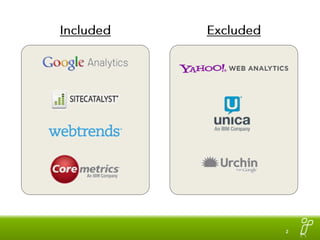
IncludedExcluded
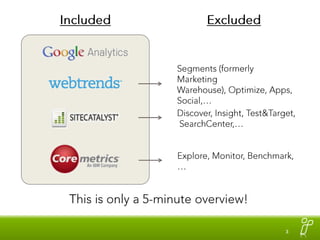
IncludedExcludedSegments (formerly Marketing Warehouse), Optimize, Apps, Social,…Discover, Insight, Test&Target, SearchCenter,…Explore, Monitor, Benchmark,…This is only a 5-minute overview!
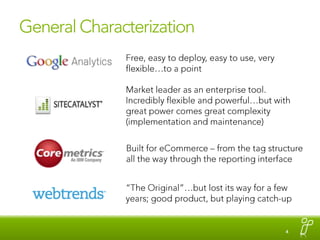
General CharacterizationFree, easy to deploy, easy to use, very flexible…to a pointMarket leader as an enterprise tool. Incredibly flexible and powerful…but with great power comes great complexity (implementation and maintenance) Built for eCommerce – from the tag structure all the way through the reporting interface“The Original”…but lost its way for a few years; good product, but playing catch-up
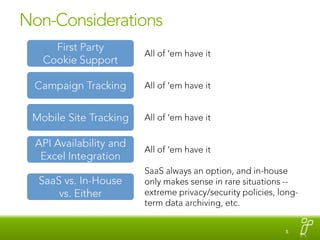
Non-ConsiderationsFirst PartyCookie SupportAll of ‘em have itCampaign TrackingAll of ‘em have itMobile Site TrackingAll of ‘em have itAPI Availability and Excel IntegrationAll of ‘em have itSaaS always an option, and in-house only makes sense in rare situations -- extreme privacy/security policies, long-term data archiving, etc.SaaS vs. In-House vs. Either
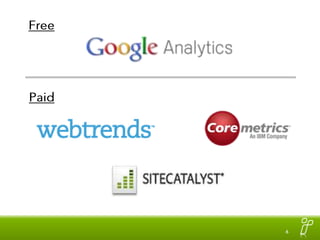
FreePaid
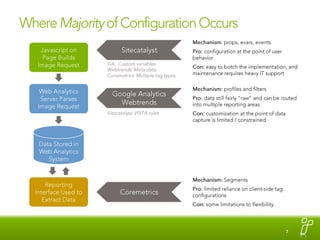
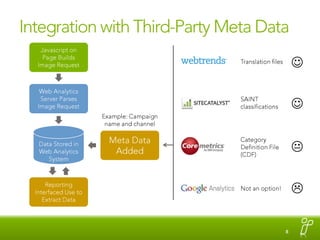
Where Majority of Configuration OccursMechanism: props, evars, eventsPro: configuration at the point of user behaviorCon: easy to botch the implementation, and maintenance requires heavy IT supportSitecatalystJavascript on Page Builds Image RequestGA:  Custom variablesWebtrends: Meta dataCoremetrics: Multiple tag typesWeb Analytics Server Parses Image RequestMechanism: profiles and filtersPro: data still fairly “raw” and can be routed into multiple reporting areasCon: customization at the point of data capture is limited / constrainedGoogle AnalyticsWebtrendsSitecatalyst: VISTA rulesData Stored in Web Analytics SystemMechanism: SegmentsPro: limited reliance on client-side tag configurationsCon: some limitations to flexibilityReporting Interface Used to Extract DataCoremetrics
Integration with Third-Party Meta DataJavascript on Page Builds Image RequestTranslation filesWeb Analytics Server Parses Image RequestSAINT classificationsExample: Campaign name and channelData Stored in Web Analytics SystemMeta Data AddedCategory Definition File (CDF)KReporting Interfaced Use to Extract DataNot an option!
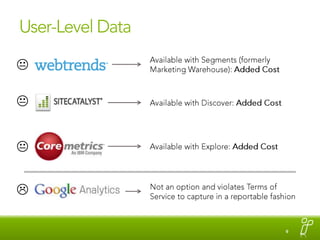
User-Level DataAvailable with Segments (formerly Marketing Warehouse): Added CostKKAvailable with Discover: Added CostKAvailable with Explore: Added CostNot an option and violates Terms of Service to capture in a reportable fashion
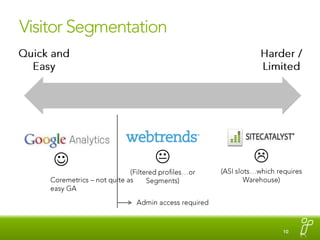
Visitor SegmentationQuick and EasyHarder / LimitedK(ASI slots…which requires Warehouse)(Filtered profiles…or Segments)Coremetrics – not quite as easy GAAdmin access required
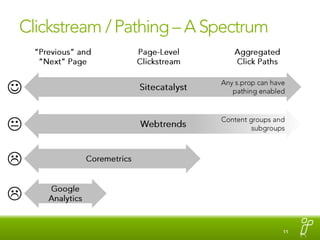
Clickstream / Pathing – A Spectrum“Previous” and “Next” PageAggregated Click PathsPage-Level ClickstreamAny s.prop can have pathing enabledSitecatalystKContent groups and subgroupsWebtrendsCoremetricsGoogleAnalytics
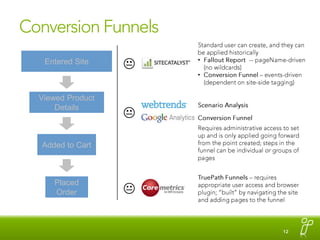
Conversion FunnelsStandard user can create, and they can be applied historicallyFallout Report  -- pageName-driven (no wildcards)
Conversion Funnel – events-driven (dependent on site-side tagging)Entered SiteKViewed Product DetailsScenario Analysis Conversion Funnel Requires administrative access to set up and is only applied going forward from the point created; steps in the funnel can be individual or groups of pagesKAdded to CartTruePath Funnels – requires appropriate user access and browser plugin; “built” by navigating the site and adding pages to the funnelPlaced OrderK
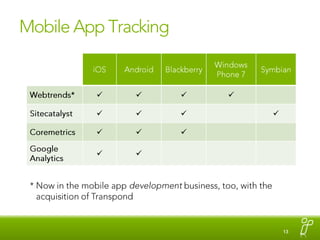
Mobile App Tracking* Now in the mobile app developmentbusiness, too, with the acquisition of Transpond
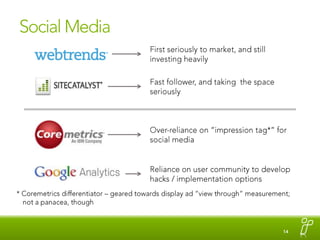
Social MediaFirst seriously to market, and still investing heavilyFast follower, and taking  the space seriouslyOver-reliance on “impression tag*” for social mediaReliance on user community to develop hacks / implementation options* Coremetrics differentiator – geared towards display ad “view through” measurement; not a panacea, though
Web Analytics Tools Comparison

Web Analytics Tools Comparison

  • 1.
    Web Analytics PlatformsHow(some of) the Main Ones Differ
  • 2.
  • 3.
    IncludedExcludedSegments (formerly MarketingWarehouse), Optimize, Apps, Social,…Discover, Insight, Test&Target, SearchCenter,…Explore, Monitor, Benchmark,…This is only a 5-minute overview!
  • 4.
    General CharacterizationFree, easyto deploy, easy to use, very flexible…to a pointMarket leader as an enterprise tool. Incredibly flexible and powerful…but with great power comes great complexity (implementation and maintenance) Built for eCommerce – from the tag structure all the way through the reporting interface“The Original”…but lost its way for a few years; good product, but playing catch-up
  • 5.
    Non-ConsiderationsFirst PartyCookie SupportAllof ‘em have itCampaign TrackingAll of ‘em have itMobile Site TrackingAll of ‘em have itAPI Availability and Excel IntegrationAll of ‘em have itSaaS always an option, and in-house only makes sense in rare situations -- extreme privacy/security policies, long-term data archiving, etc.SaaS vs. In-House vs. Either
  • 6.
  • 7.
    Where Majority ofConfiguration OccursMechanism: props, evars, eventsPro: configuration at the point of user behaviorCon: easy to botch the implementation, and maintenance requires heavy IT supportSitecatalystJavascript on Page Builds Image RequestGA: Custom variablesWebtrends: Meta dataCoremetrics: Multiple tag typesWeb Analytics Server Parses Image RequestMechanism: profiles and filtersPro: data still fairly “raw” and can be routed into multiple reporting areasCon: customization at the point of data capture is limited / constrainedGoogle AnalyticsWebtrendsSitecatalyst: VISTA rulesData Stored in Web Analytics SystemMechanism: SegmentsPro: limited reliance on client-side tag configurationsCon: some limitations to flexibilityReporting Interface Used to Extract DataCoremetrics
  • 8.
    Integration with Third-PartyMeta DataJavascript on Page Builds Image RequestTranslation filesWeb Analytics Server Parses Image RequestSAINT classificationsExample: Campaign name and channelData Stored in Web Analytics SystemMeta Data AddedCategory Definition File (CDF)KReporting Interfaced Use to Extract DataNot an option!
  • 9.
    User-Level DataAvailable withSegments (formerly Marketing Warehouse): Added CostKKAvailable with Discover: Added CostKAvailable with Explore: Added CostNot an option and violates Terms of Service to capture in a reportable fashion
  • 10.
    Visitor SegmentationQuick andEasyHarder / LimitedK(ASI slots…which requires Warehouse)(Filtered profiles…or Segments)Coremetrics – not quite as easy GAAdmin access required
  • 11.
    Clickstream / Pathing– A Spectrum“Previous” and “Next” PageAggregated Click PathsPage-Level ClickstreamAny s.prop can have pathing enabledSitecatalystKContent groups and subgroupsWebtrendsCoremetricsGoogleAnalytics
  • 12.
    Conversion FunnelsStandard usercan create, and they can be applied historicallyFallout Report -- pageName-driven (no wildcards)
  • 13.
    Conversion Funnel –events-driven (dependent on site-side tagging)Entered SiteKViewed Product DetailsScenario Analysis Conversion Funnel Requires administrative access to set up and is only applied going forward from the point created; steps in the funnel can be individual or groups of pagesKAdded to CartTruePath Funnels – requires appropriate user access and browser plugin; “built” by navigating the site and adding pages to the funnelPlaced OrderK
  • 14.
    Mobile App Tracking*Now in the mobile app developmentbusiness, too, with the acquisition of Transpond
  • 15.
    Social MediaFirst seriouslyto market, and still investing heavilyFast follower, and taking the space seriouslyOver-reliance on “impression tag*” for social mediaReliance on user community to develop hacks / implementation options* Coremetrics differentiator – geared towards display ad “view through” measurement; not a panacea, though

Editor's Notes

  • #3 There are lots of tools out there, but I focused on the major ones in the market. I don’t have enough depth of experience with Coremetrics to cover it on all fronts, so it is selectively included.
  • #4 All of the paid tools have a range of available add-ons. The main one is that they all have a “warehouse”-type tool that allows for deeper ad hoc analysis of data. This presentation is limited to the base packages and what they can do.
  • #5 There are a number of considerations that used to be relevant but really no longer are.
  • #6 Price – this is an easy one, in that Google Analytics is a free service and the other tools are not. As for which of the paid tools is “cheaper?” They all are negotiated contracts, and it’s going to come down to how good your procurement team is at negotiating deals as to what the final cost winds up being.
  • #7 This is the biggest fundamental difference that sets Sitecatalyst apart from other tools. Unfortunately, it’s also difficult to articulate succinctly. This gives Sitecatalyst a lot of its power and flexibility, in that it involves the highest amount of control right at the point where the user action occurs. The downside is that it requires a lot of up-front thought and planning to implement the tool in a way that makes use of that control, and it’s easy for an implementation to degrade quickly if someone who understands the rationale behind the eVar, prop, and events configuration isn’t available to keep an eye on things. In my experience, the staunchest supporters of Sitecatalyst are the first ones to point out that most implementations of the tool aren’t up to their standards, and, thus, aren’t delivering the value that they could.
  • #8 Campaign data is the most common example of “adding meta data.” In the case of Coremetrics and Google Analytics, some level of campaign data is embedded in the tracking parameters themselves, which has both its pros and cons. But, adding cost data, “roll-up” data, and other information can be very handy, and it’s simply not something that is available within Google Analytics (it can be done using the API, but this still means matching up data external to the tool itself).
  • #9 This is most useful if you are looking to feed site behavior for users into a CRM, marketing automation, or targeting engine. It’s forbidden with Google Analytics, and there is an added cost for doing this with any of the other tools – requires an add-on to the base package.
  • #10 Google Analytics absolutely shines at segmentation. A number of segments are available standard – new visitors, returning visitors, paid search visitors, organic search visitors, etc. – and can be applied to almost all of the reports in the tool. Creating advanced segments is fast and easy and can be performed by someone who only has user access to the tool. When a new segment is created, data is available historically – it’s not just data available from that point forward.With Webtrends, new profiles can be set up that only include traffic that meets certain criteria. But, to set these up requires admin access (and that a profile be available – this may or may not be the case depending on the terms of the contract), and the data is only available from that point forward unless historical data gets reprocessed.Sitecatalyst also has this capability using ASI slots, but that requires admin access and that the warehouse functionality is added to the base product (this can also be done using Discover, which sits on top of the warehouse and has an added cost)
  • #11 All tools have “previous/next” page functionality: “Where did visitors come to this page from?” and “Where did visitors go to immediately after this page?” Sitecatalyst and Webtrends have page-level clickstreams, but this really is seldom useful, as the most popular path through any site is typically only a fraction of a percent of all of the paths. Users all behave differently at the individual page level. Google Analytics does not offer this capability at all.Aggregated clickpaths can be very useful, in that they enable a “roll-up” of the content. Sitecatalyst has tremendous power in this area…assuming the s.props on the page are configured in a way that enable the desired aggregation.
  • #14 My time is up!