WEB 2.0What? Why? How?16 April, 2011RAK Chapter / TAEDTECH SIG Event
What is Web 2.0? Term popularized by Tim O’Reilly to describe changes in functions and features of the Web. Allows users to be more involved in contributing and interacting with the web.
Examples of Web 2.0 ServicesSocial NetworkingVideo SharingPhoto SharingSocial BookmarkingBlogsMicrobloggingPodcastsWikis
Benefits of using Web 2 with your studentsBrings material ALIVEAuthenticity
Literacy
Interaction
Vitality
EmpowermentWarschauer, Shetzer & Meloni, 2004
Authenticity:24-hour access to vast amounts of authentic material authentic communication and publishing opportunities
Literacy:The ability to read, write, communicate, research, and publish on the Internet represents important new forms of literacy needed in the 21st century.
Interaction:Interaction is the major means of acquiring a language and gaining fluency. Opportunities for students to interact with native and nonnative speakers from around the world both synchronously and asynchronously.
Vitality:	“Too often, classrooms are reflective of T.E.N.O.R. (teaching English for no obvious reason), as students get bogged down in memorizing grammar rules or decontextualized vocabulary. The Internet can inject an element of vitality into teaching and motivate students as they communicate in a medium that is flexible, multimodal, constantly changing, and connected to their real life needs”. (Warschauer, Shetzer & Meloni, 2004)
Empowerment:Mastery of the Internet is one step that students can take  to become autonomous lifelong learners.Allows students to find what they need when they need it and to collaborate with others to help construct new knowledge.
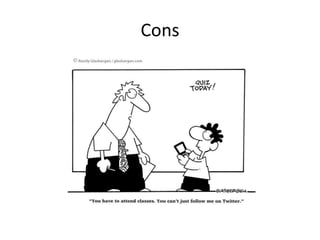
Cons
Before introducing any Web 2 tool to your students:  “Take time and reflect on your curricular goals and try to pinpoint areas that could be improved by the integration of a new tool or technology. Reflection is the key here, don’t jump into the world of Web 2.0 without a plan and a clear focus on what you want yourself, and your students, to get out of it”. (Frank Pileiro, 2011, http://techlearning.com/Blogs/37780)
Some more adviceWhat’s the pedigree?Who gains?Why is this the best way to do this?Does it pass the TEA test? (Training, Equipment, Access)What future possibilities does it open up?How can I make it work?(Harmer, 2007, pp. 195 – 197)
ExamplesVoxopop – audio discussion boardFlashcardExchangeEvernote – online note padPindax – online notice boardLive Binders – online organizer
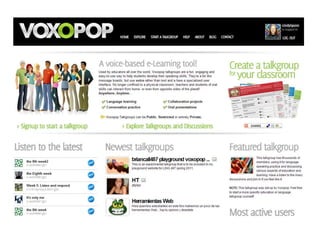
Voxopophttp://www.voxopop.com/Voxopop is the audio equivalent to a text based discussion board.Free but students have to register.
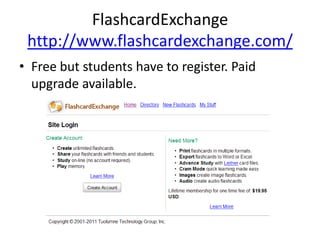
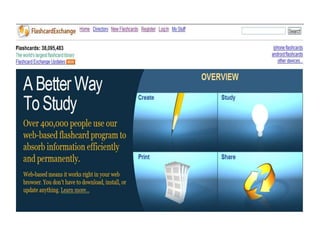
FlashcardExchangehttp://www.flashcardexchange.com/Free but students have to register. Paid upgrade available.
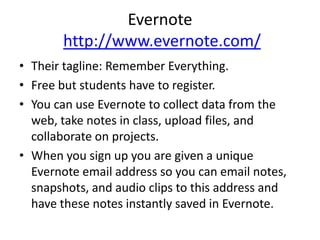
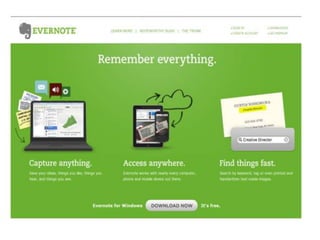
Evernotehttp://www.evernote.com/Their tagline: Remember Everything. Free but students have to register.You can use Evernote to collect data from the web, take notes in class, upload files, and collaborate on projects. When you sign up you are given a unique Evernote email address so you can email notes, snapshots, and audio clips to this address and have these notes instantly saved in Evernote.
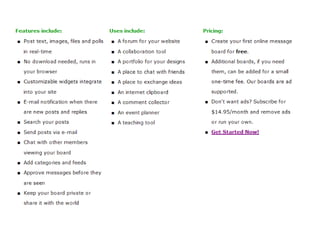
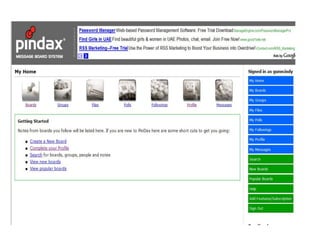
Pindaxhttp://pindax.com/Create public or private boards filled with notes.First board is free but students have to register. There is a charge for additional boards.Can be commented on by other users. Creates an online community Has a chat feature.
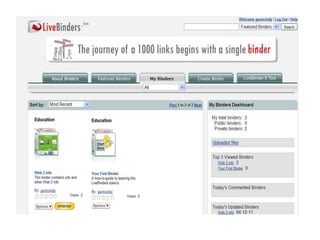
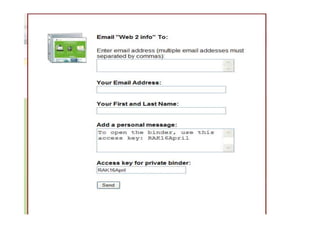
Live Bindershttp://livebinders.com/Free but students have to register.According to the website:LiveBinders is your 3-ring binder for the WebCollect your resourcesOrganize them neatly and easilyPresent them with pride

Web 2.0 - What? Why? How? - presentation by Dr Cindy Gunn

  • 1.
    WEB 2.0What? Why?How?16 April, 2011RAK Chapter / TAEDTECH SIG Event
  • 2.
    What is Web2.0? Term popularized by Tim O’Reilly to describe changes in functions and features of the Web. Allows users to be more involved in contributing and interacting with the web.
  • 3.
    Examples of Web2.0 ServicesSocial NetworkingVideo SharingPhoto SharingSocial BookmarkingBlogsMicrobloggingPodcastsWikis
  • 4.
    Benefits of usingWeb 2 with your studentsBrings material ALIVEAuthenticity
  • 5.
  • 6.
  • 7.
  • 8.
  • 9.
    Authenticity:24-hour access tovast amounts of authentic material authentic communication and publishing opportunities
  • 10.
    Literacy:The ability toread, write, communicate, research, and publish on the Internet represents important new forms of literacy needed in the 21st century.
  • 11.
    Interaction:Interaction is themajor means of acquiring a language and gaining fluency. Opportunities for students to interact with native and nonnative speakers from around the world both synchronously and asynchronously.
  • 12.
    Vitality: “Too often, classroomsare reflective of T.E.N.O.R. (teaching English for no obvious reason), as students get bogged down in memorizing grammar rules or decontextualized vocabulary. The Internet can inject an element of vitality into teaching and motivate students as they communicate in a medium that is flexible, multimodal, constantly changing, and connected to their real life needs”. (Warschauer, Shetzer & Meloni, 2004)
  • 13.
    Empowerment:Mastery of theInternet is one step that students can take to become autonomous lifelong learners.Allows students to find what they need when they need it and to collaborate with others to help construct new knowledge.
  • 14.
  • 15.
    Before introducing anyWeb 2 tool to your students: “Take time and reflect on your curricular goals and try to pinpoint areas that could be improved by the integration of a new tool or technology. Reflection is the key here, don’t jump into the world of Web 2.0 without a plan and a clear focus on what you want yourself, and your students, to get out of it”. (Frank Pileiro, 2011, http://techlearning.com/Blogs/37780)
  • 16.
    Some more adviceWhat’sthe pedigree?Who gains?Why is this the best way to do this?Does it pass the TEA test? (Training, Equipment, Access)What future possibilities does it open up?How can I make it work?(Harmer, 2007, pp. 195 – 197)
  • 17.
    ExamplesVoxopop – audiodiscussion boardFlashcardExchangeEvernote – online note padPindax – online notice boardLive Binders – online organizer
  • 18.
    Voxopophttp://www.voxopop.com/Voxopop is theaudio equivalent to a text based discussion board.Free but students have to register.
  • 20.
  • 22.
    Evernotehttp://www.evernote.com/Their tagline: RememberEverything. Free but students have to register.You can use Evernote to collect data from the web, take notes in class, upload files, and collaborate on projects. When you sign up you are given a unique Evernote email address so you can email notes, snapshots, and audio clips to this address and have these notes instantly saved in Evernote.
  • 24.
    Pindaxhttp://pindax.com/Create public orprivate boards filled with notes.First board is free but students have to register. There is a charge for additional boards.Can be commented on by other users. Creates an online community Has a chat feature.
  • 27.
    Live Bindershttp://livebinders.com/Free butstudents have to register.According to the website:LiveBinders is your 3-ring binder for the WebCollect your resourcesOrganize them neatly and easilyPresent them with pride