CA WA CA 7 Edition
Workload Agent Diagnostics
Bill Sherwin
Senior Principal Consultant
EMEA Workload Automation Team
April 2015
2 © 2015 CA. ALL RIGHTS RESERVED.
Agenda
AGENT OVERVIEW/ARCHITECTURE
CA 7 INTEGRATED AGENT SERVICES (IAS)
AGENT TROUBLESHOOTING
1
2
3
Agent Architecture
4 © 2015 CA. ALL RIGHTS RESERVED.
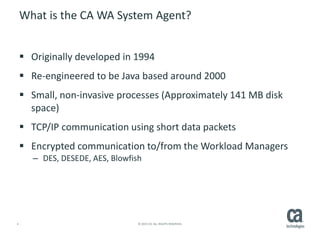
What is the CA WA System Agent?
 Originally developed in 1994
 Re-engineered to be Java based around 2000
 Small, non-invasive processes (Approximately 141 MB disk
space)
 TCP/IP communication using short data packets
 Encrypted communication to/from the Workload Managers
– DES, DESEDE, AES, Blowfish
5 © 2015 CA. ALL RIGHTS RESERVED.
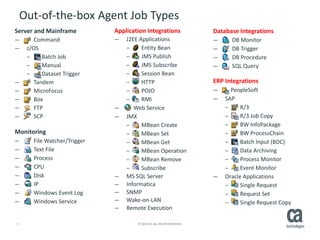
Out-of-the-box Agent Job Types
Server and Mainframe
Command
z/OS
Batch Job
Manual
Dataset Trigger
Tandem
MicroFocus
Box
FTP
SCP
Monitoring
File Watcher/Trigger
Text File
Process
CPU
Disk
IP
Windows Event Log
Windows Service
Database Integrations
DB Monitor
DB Trigger
DB Procedure
SQL Query
ERP Integrations
PeopleSoft
SAP
R/3
R/3 Job Copy
BW InfoPackage
BW ProcessChain
Batch Input (BDC)
Data Archiving
Process Monitor
Event Monitor
Oracle Applications
Single Request
Request Set
Single Request Copy
Application Integrations
J2EE Applications
Entity Bean
JMS Publish
JMS Subscribe
Session Bean
HTTP
POJO
RMI
Web Service
JMX
MBean Create
MBean Set
MBean Get
MBean Operation
MBean Remove
Subscribe
MS SQL Server
Informatica
SNMP
Wake-on-LAN
Remote Execution
6 © 2015 CA. ALL RIGHTS RESERVED.
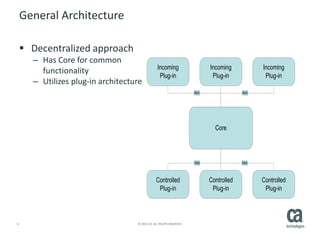
General Architecture
 Decentralized approach
– Has Core for common
functionality
– Utilizes plug-in architecture
Incoming
Plug-in
Core
Controlled
Plug-in
Controlled
Plug-in
Controlled
Plug-in
Incoming
Plug-in
Incoming
Plug-in
RMI RMI
RMI RMI
7 © 2015 CA. ALL RIGHTS RESERVED.
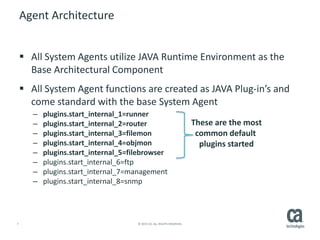
Agent Architecture
 All System Agents utilize JAVA Runtime Environment as the
Base Architectural Component
 All System Agent functions are created as JAVA Plug-in’s and
come standard with the base System Agent
– plugins.start_internal_1=runner
– plugins.start_internal_2=router
– plugins.start_internal_3=filemon
– plugins.start_internal_4=objmon
– plugins.start_internal_5=filebrowser
– plugins.start_internal_6=ftp
– plugins.start_internal_7=management
– plugins.start_internal_8=snmp
These are the most
common default
plugins started
8 © 2015 CA. ALL RIGHTS RESERVED.
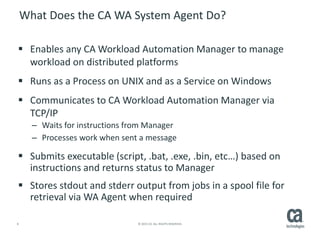
What Does the CA WA System Agent Do?
 Enables any CA Workload Automation Manager to manage
workload on distributed platforms
 Runs as a Process on UNIX and as a Service on Windows
 Communicates to CA Workload Automation Manager via
TCP/IP
– Waits for instructions from Manager
– Processes work when sent a message
 Submits executable (script, .bat, .exe, .bin, etc…) based on
instructions and returns status to Manager
 Stores stdout and stderr output from jobs in a spool file for
retrieval via WA Agent when required
9 © 2015 CA. ALL RIGHTS RESERVED.
What do the CA WA Application Integration Agents Do?
 Enables the functional interface to the specific Application to
start and monitor requests
– Logon with a specific Userid/password to make the request
– Interpret the Success or failure
– Cancel
– Restart
 Retrieve information from the Application
– Pre-defined job definitions (ABAPS, Workflows, Job lists, etc..)
– Read a job log
– Retrieve a job’s spool file output
10 © 2015 CA. ALL RIGHTS RESERVED.
Agent Communication
 Managers and Agents
communicate
asynchronously using
message queues
 Managers and Agents
communicate by sending
Automated Framework
Messages or AFMs
 AFM’s include:
– Date/Time Stamp
– Agent Name
– Address (Host, DNS, TCPIP)
– Command or Script to Execute
– User-id to Execute the
workload under
– Arguments for the Script or
Command
– Environment Variables
– Status information
11 © 2015 CA. ALL RIGHTS RESERVED.
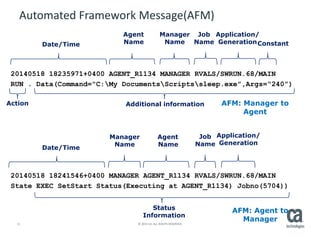
20140518 18235971+0400 AGENT_R1134 MANAGER RVALS/SWRUN.68/MAIN
RUN . Data(Command="C:My DocumentsScriptssleep.exe”,Args=“240”)
20140518 18241546+0400 MANAGER AGENT_R1134 RVALS/SWRUN.68/MAIN
State EXEC SetStart Status(Executing at AGENT_R1134) Jobno(5704))
Automated Framework Message(AFM)
Date/Time
Manager
Name
Agent
Name
Job
Name
Application/
Generation
Action
Date/Time
Manager
Name
Agent
Name
Job
Name
Application/
Generation
AFM: Manager to
Agent
AFM: Agent to
Manager
Additional information
Status
Information
Constant
12 © 2015 CA. ALL RIGHTS RESERVED.
Log Files
 The Communications between a Manager and Agent are logged
– Lifecycle of each job from start to finish
 Communications between internal Agent components are logged
 Logging Levels:
– 5 is the Default value in R11.3
– You should normally run with 1
 0, 1, or 2 - Creates logs for any errors including the receiver and transmitter logs.
Level 2 is adequate for production, unless problems arise requiring more details for
troubleshooting
 3 - Adds queues. If this value is specified, the agent ignores the log.maxsize
parameter
 4 or 5 - Adds debugging information. Use log level 5 for setup and initial testing
 6, 7, or 8 - Adds tracing information to diagnose a problem. These levels are not
intended for continuous use.
CA 7 Integrated Agent Services (IAS)
14 © 2015 CA. ALL RIGHTS RESERVED.
IAS Overview
 Performs all WA Agent communication in CA 7
 Runs as a sub-task in CA7ONL
 Sends job requests and receives status/data via AFM
 Logs all WA Agent communication sent and received
 Activated with XPDEF,AGENTJOB=YES
15 © 2015 CA. ALL RIGHTS RESERVED.
IAS Controls
 Command Functions using CA 7command
– /IAS,FUNC=xxxxxxxx
 FUNC=RECONFIG
– WA Agent definition AGENTDEF reload
 FUNC=LOGCLEAR and FUNC=LOGPRINT
– Primarily used for diagnostics
– LOGPRINT requires LOGDD=filename
– Spins off spool file in CA7ONL started task
16 © 2015 CA. ALL RIGHTS RESERVED.
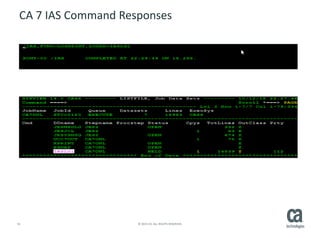
CA 7 IAS Command Responses
17 © 2015 CA. ALL RIGHTS RESERVED.
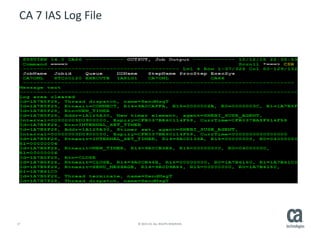
CA 7 IAS Log File
Agent Troubleshooting
19 © 2015 CA. ALL RIGHTS RESERVED.
General Methodology
 Use LOGPRINT to capture CA 7 IAS activity after error
 Use LOGCLEAR prior to any testing / error reproduction
 Compare with key WA Agent log files
– Receiver.log
– Transmitter.log
 Match message traffic
 Look for missing information
 Examine AFM values
20 © 2015 CA. ALL RIGHTS RESERVED.
Most Common Issues
 Connection problems
– IP Address and Port Settings
– Firewall Permissions
 Encryption disconnect
– Type and Key Value
 User Name and Password
– Authorisation and permissions
 Invalid Job Request
– Command and Parameters
 Job Execution Errors
– Job Type Specific
21 © 2015 CA. ALL RIGHTS RESERVED.
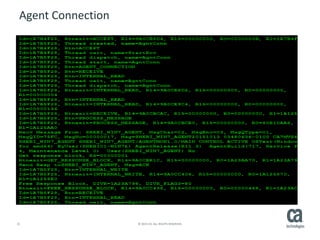
Agent Connection
22 © 2015 CA. ALL RIGHTS RESERVED.
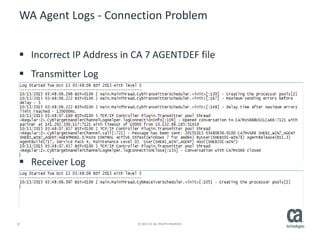
WA Agent Logs - Connection Problem
 Incorrect IP Address in CA 7 AGENTDEF file
 Transmitter Log
 Receiver Log
23 © 2015 CA. ALL RIGHTS RESERVED.
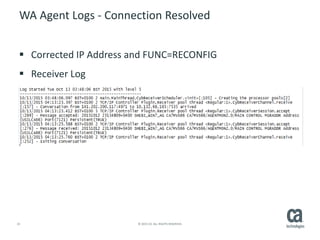
WA Agent Logs - Connection Resolved
 Corrected IP Address and FUNC=RECONFIG
 Receiver Log
24 © 2015 CA. ALL RIGHTS RESERVED.
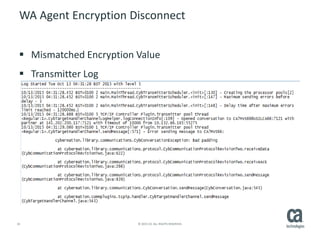
WA Agent Encryption Disconnect
 Mismatched Encryption Value
 Transmitter Log
25 © 2015 CA. ALL RIGHTS RESERVED.
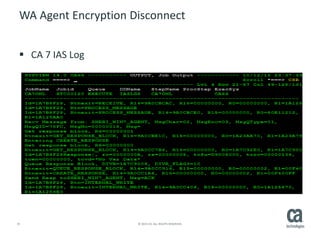
WA Agent Encryption Disconnect
 CA 7 IAS Log
26 © 2015 CA. ALL RIGHTS RESERVED.
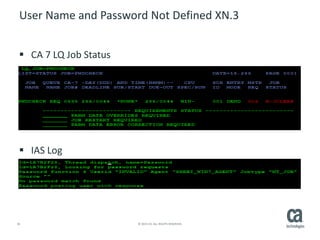
User Name and Password Not Defined XN.3
 CA 7 LQ Job Status
 IAS Log
27 © 2015 CA. ALL RIGHTS RESERVED.
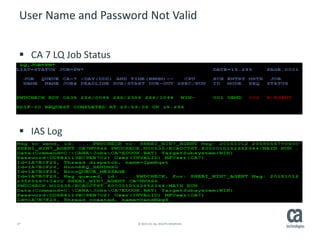
User Name and Password Not Valid
 CA 7 LQ Job Status
 IAS Log
28 © 2015 CA. ALL RIGHTS RESERVED.
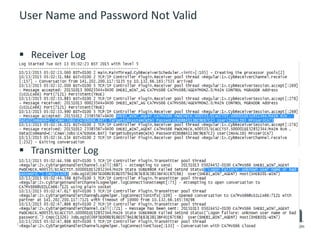
User Name and Password Not Valid
 Receiver Log
 Transmitter Log
29 © 2015 CA. ALL RIGHTS RESERVED.
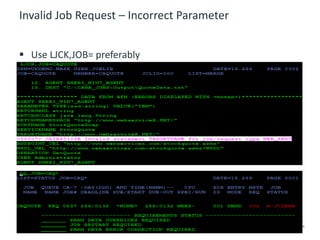
Invalid Job Request – Incorrect Parameter
 Use LJCK,JOB= preferably
30 © 2015 CA. ALL RIGHTS RESERVED.
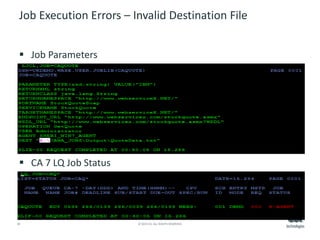
Job Execution Errors – Invalid Destination File
 Job Parameters
 CA 7 LQ Job Status
31 © 2015 CA. ALL RIGHTS RESERVED.
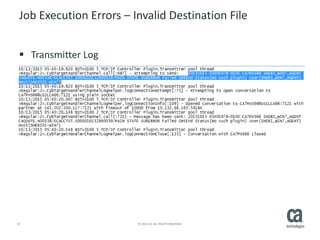
Job Execution Errors – Invalid Destination File
 Transmitter Log
32 © 2015 CA. ALL RIGHTS RESERVED.
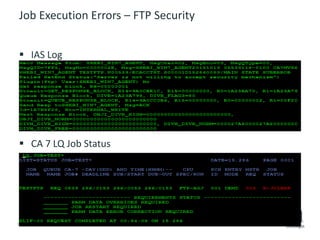
Job Execution Errors – FTP Security
 IAS Log
 CA 7 LQ Job Status
Senior Principal Consultant
Bill.Sherwin@ca.com
@cainc
slideshare.net/CAinc
linkedin.com/company/ca-technologies
ca.com
Bill Sherwin
34 © 2015 CA. ALL RIGHTS RESERVED.
Disclaimer
Certain information in this presentation may outline CA’s general product direction. This presentation shall not serve to (i) affect
the rights and/or obligations of CA or its licensees under any existing or future license agreement or services agreement relating
to any CA software product; or (ii) amend any product documentation or specifications for any CA software product. This
presentation is based on current information and resource allocations as of March, 2015 and is subject to change or
withdrawal by CA at any time without notice. The development, release and timing of any features or functionality
described in this presentation remain at CA’s sole discretion.
Notwithstanding anything in this presentation to the contrary, upon the general availability of any future CA product release
referenced in this presentation, CA may make such release available to new licensees in the form of a regularly scheduled major
product release. Such release may be made available to licensees of the product who are active subscribers to CA maintenance
and support, on a when and if-available basis. The information in this presentation is not deemed to be incorporated into any
contract.
Copyright © 2015 CA. All rights reserved. All trademarks, trade names, service marks and logos referenced herein belong to
their respective companies.
THIS PRESENTATION IS FOR YOUR INFORMATIONAL PURPOSES ONLY. CA assumes no responsibility for the accuracy or
completeness of the information. TO THE EXTENT PERMITTED BY APPLICABLE LAW, CA PROVIDES THIS DOCUMENT “AS IS”
WITHOUT WARRANTY OF ANY KIND, INCLUDING, WITHOUT LIMITATION, ANY IMPLIED WARRANTIES OF MERCHANTABILITY,
FITNESS FOR A PARTICULAR PURPOSE, OR NONINFRINGEMENT. I3n no event will CA be liable for any loss or damage, direct or
indirect, in connection with this presentation, including, without limitation, lost profits, lost investment, business interruption,
goodwill, or lost data, even if CA is expressly advised in advance of the possibility of such damages.

CA 7 Workload Agent Diagnostics - CA Workload Automation Technology Summit (WATS) 2015

  • 1.
    CA WA CA7 Edition Workload Agent Diagnostics Bill Sherwin Senior Principal Consultant EMEA Workload Automation Team April 2015
  • 2.
    2 © 2015CA. ALL RIGHTS RESERVED. Agenda AGENT OVERVIEW/ARCHITECTURE CA 7 INTEGRATED AGENT SERVICES (IAS) AGENT TROUBLESHOOTING 1 2 3
  • 3.
  • 4.
    4 © 2015CA. ALL RIGHTS RESERVED. What is the CA WA System Agent?  Originally developed in 1994  Re-engineered to be Java based around 2000  Small, non-invasive processes (Approximately 141 MB disk space)  TCP/IP communication using short data packets  Encrypted communication to/from the Workload Managers – DES, DESEDE, AES, Blowfish
  • 5.
    5 © 2015CA. ALL RIGHTS RESERVED. Out-of-the-box Agent Job Types Server and Mainframe Command z/OS Batch Job Manual Dataset Trigger Tandem MicroFocus Box FTP SCP Monitoring File Watcher/Trigger Text File Process CPU Disk IP Windows Event Log Windows Service Database Integrations DB Monitor DB Trigger DB Procedure SQL Query ERP Integrations PeopleSoft SAP R/3 R/3 Job Copy BW InfoPackage BW ProcessChain Batch Input (BDC) Data Archiving Process Monitor Event Monitor Oracle Applications Single Request Request Set Single Request Copy Application Integrations J2EE Applications Entity Bean JMS Publish JMS Subscribe Session Bean HTTP POJO RMI Web Service JMX MBean Create MBean Set MBean Get MBean Operation MBean Remove Subscribe MS SQL Server Informatica SNMP Wake-on-LAN Remote Execution
  • 6.
    6 © 2015CA. ALL RIGHTS RESERVED. General Architecture  Decentralized approach – Has Core for common functionality – Utilizes plug-in architecture Incoming Plug-in Core Controlled Plug-in Controlled Plug-in Controlled Plug-in Incoming Plug-in Incoming Plug-in RMI RMI RMI RMI
  • 7.
    7 © 2015CA. ALL RIGHTS RESERVED. Agent Architecture  All System Agents utilize JAVA Runtime Environment as the Base Architectural Component  All System Agent functions are created as JAVA Plug-in’s and come standard with the base System Agent – plugins.start_internal_1=runner – plugins.start_internal_2=router – plugins.start_internal_3=filemon – plugins.start_internal_4=objmon – plugins.start_internal_5=filebrowser – plugins.start_internal_6=ftp – plugins.start_internal_7=management – plugins.start_internal_8=snmp These are the most common default plugins started
  • 8.
    8 © 2015CA. ALL RIGHTS RESERVED. What Does the CA WA System Agent Do?  Enables any CA Workload Automation Manager to manage workload on distributed platforms  Runs as a Process on UNIX and as a Service on Windows  Communicates to CA Workload Automation Manager via TCP/IP – Waits for instructions from Manager – Processes work when sent a message  Submits executable (script, .bat, .exe, .bin, etc…) based on instructions and returns status to Manager  Stores stdout and stderr output from jobs in a spool file for retrieval via WA Agent when required
  • 9.
    9 © 2015CA. ALL RIGHTS RESERVED. What do the CA WA Application Integration Agents Do?  Enables the functional interface to the specific Application to start and monitor requests – Logon with a specific Userid/password to make the request – Interpret the Success or failure – Cancel – Restart  Retrieve information from the Application – Pre-defined job definitions (ABAPS, Workflows, Job lists, etc..) – Read a job log – Retrieve a job’s spool file output
  • 10.
    10 © 2015CA. ALL RIGHTS RESERVED. Agent Communication  Managers and Agents communicate asynchronously using message queues  Managers and Agents communicate by sending Automated Framework Messages or AFMs  AFM’s include: – Date/Time Stamp – Agent Name – Address (Host, DNS, TCPIP) – Command or Script to Execute – User-id to Execute the workload under – Arguments for the Script or Command – Environment Variables – Status information
  • 11.
    11 © 2015CA. ALL RIGHTS RESERVED. 20140518 18235971+0400 AGENT_R1134 MANAGER RVALS/SWRUN.68/MAIN RUN . Data(Command="C:My DocumentsScriptssleep.exe”,Args=“240”) 20140518 18241546+0400 MANAGER AGENT_R1134 RVALS/SWRUN.68/MAIN State EXEC SetStart Status(Executing at AGENT_R1134) Jobno(5704)) Automated Framework Message(AFM) Date/Time Manager Name Agent Name Job Name Application/ Generation Action Date/Time Manager Name Agent Name Job Name Application/ Generation AFM: Manager to Agent AFM: Agent to Manager Additional information Status Information Constant
  • 12.
    12 © 2015CA. ALL RIGHTS RESERVED. Log Files  The Communications between a Manager and Agent are logged – Lifecycle of each job from start to finish  Communications between internal Agent components are logged  Logging Levels: – 5 is the Default value in R11.3 – You should normally run with 1  0, 1, or 2 - Creates logs for any errors including the receiver and transmitter logs. Level 2 is adequate for production, unless problems arise requiring more details for troubleshooting  3 - Adds queues. If this value is specified, the agent ignores the log.maxsize parameter  4 or 5 - Adds debugging information. Use log level 5 for setup and initial testing  6, 7, or 8 - Adds tracing information to diagnose a problem. These levels are not intended for continuous use.
  • 13.
    CA 7 IntegratedAgent Services (IAS)
  • 14.
    14 © 2015CA. ALL RIGHTS RESERVED. IAS Overview  Performs all WA Agent communication in CA 7  Runs as a sub-task in CA7ONL  Sends job requests and receives status/data via AFM  Logs all WA Agent communication sent and received  Activated with XPDEF,AGENTJOB=YES
  • 15.
    15 © 2015CA. ALL RIGHTS RESERVED. IAS Controls  Command Functions using CA 7command – /IAS,FUNC=xxxxxxxx  FUNC=RECONFIG – WA Agent definition AGENTDEF reload  FUNC=LOGCLEAR and FUNC=LOGPRINT – Primarily used for diagnostics – LOGPRINT requires LOGDD=filename – Spins off spool file in CA7ONL started task
  • 16.
    16 © 2015CA. ALL RIGHTS RESERVED. CA 7 IAS Command Responses
  • 17.
    17 © 2015CA. ALL RIGHTS RESERVED. CA 7 IAS Log File
  • 18.
  • 19.
    19 © 2015CA. ALL RIGHTS RESERVED. General Methodology  Use LOGPRINT to capture CA 7 IAS activity after error  Use LOGCLEAR prior to any testing / error reproduction  Compare with key WA Agent log files – Receiver.log – Transmitter.log  Match message traffic  Look for missing information  Examine AFM values
  • 20.
    20 © 2015CA. ALL RIGHTS RESERVED. Most Common Issues  Connection problems – IP Address and Port Settings – Firewall Permissions  Encryption disconnect – Type and Key Value  User Name and Password – Authorisation and permissions  Invalid Job Request – Command and Parameters  Job Execution Errors – Job Type Specific
  • 21.
    21 © 2015CA. ALL RIGHTS RESERVED. Agent Connection
  • 22.
    22 © 2015CA. ALL RIGHTS RESERVED. WA Agent Logs - Connection Problem  Incorrect IP Address in CA 7 AGENTDEF file  Transmitter Log  Receiver Log
  • 23.
    23 © 2015CA. ALL RIGHTS RESERVED. WA Agent Logs - Connection Resolved  Corrected IP Address and FUNC=RECONFIG  Receiver Log
  • 24.
    24 © 2015CA. ALL RIGHTS RESERVED. WA Agent Encryption Disconnect  Mismatched Encryption Value  Transmitter Log
  • 25.
    25 © 2015CA. ALL RIGHTS RESERVED. WA Agent Encryption Disconnect  CA 7 IAS Log
  • 26.
    26 © 2015CA. ALL RIGHTS RESERVED. User Name and Password Not Defined XN.3  CA 7 LQ Job Status  IAS Log
  • 27.
    27 © 2015CA. ALL RIGHTS RESERVED. User Name and Password Not Valid  CA 7 LQ Job Status  IAS Log
  • 28.
    28 © 2015CA. ALL RIGHTS RESERVED. User Name and Password Not Valid  Receiver Log  Transmitter Log
  • 29.
    29 © 2015CA. ALL RIGHTS RESERVED. Invalid Job Request – Incorrect Parameter  Use LJCK,JOB= preferably
  • 30.
    30 © 2015CA. ALL RIGHTS RESERVED. Job Execution Errors – Invalid Destination File  Job Parameters  CA 7 LQ Job Status
  • 31.
    31 © 2015CA. ALL RIGHTS RESERVED. Job Execution Errors – Invalid Destination File  Transmitter Log
  • 32.
    32 © 2015CA. ALL RIGHTS RESERVED. Job Execution Errors – FTP Security  IAS Log  CA 7 LQ Job Status
  • 33.
  • 34.
    34 © 2015CA. ALL RIGHTS RESERVED. Disclaimer Certain information in this presentation may outline CA’s general product direction. This presentation shall not serve to (i) affect the rights and/or obligations of CA or its licensees under any existing or future license agreement or services agreement relating to any CA software product; or (ii) amend any product documentation or specifications for any CA software product. This presentation is based on current information and resource allocations as of March, 2015 and is subject to change or withdrawal by CA at any time without notice. The development, release and timing of any features or functionality described in this presentation remain at CA’s sole discretion. Notwithstanding anything in this presentation to the contrary, upon the general availability of any future CA product release referenced in this presentation, CA may make such release available to new licensees in the form of a regularly scheduled major product release. Such release may be made available to licensees of the product who are active subscribers to CA maintenance and support, on a when and if-available basis. The information in this presentation is not deemed to be incorporated into any contract. Copyright © 2015 CA. All rights reserved. All trademarks, trade names, service marks and logos referenced herein belong to their respective companies. THIS PRESENTATION IS FOR YOUR INFORMATIONAL PURPOSES ONLY. CA assumes no responsibility for the accuracy or completeness of the information. TO THE EXTENT PERMITTED BY APPLICABLE LAW, CA PROVIDES THIS DOCUMENT “AS IS” WITHOUT WARRANTY OF ANY KIND, INCLUDING, WITHOUT LIMITATION, ANY IMPLIED WARRANTIES OF MERCHANTABILITY, FITNESS FOR A PARTICULAR PURPOSE, OR NONINFRINGEMENT. I3n no event will CA be liable for any loss or damage, direct or indirect, in connection with this presentation, including, without limitation, lost profits, lost investment, business interruption, goodwill, or lost data, even if CA is expressly advised in advance of the possibility of such damages.