CA Workload
           Automation


           Session 12B
           John Rhodes
           ADC Austin Tech


Co-branded Logo Footprint
Aligned LEFT ON COVER ONLY
Must Fit Within This Space
What are we talking about?


     Workload automation for IBM i has traditionally been
      handled by IBM batch scheduling facilities–or-
      solutions focused on IBM i.
     Workload automation for other CA 2E/Plex platforms
      is a mixed bag in many cases.
     What happens when your environment becomes
      complex – with many OS targets?
     One solution: CA D-Series Automation with i5 agent


                                             Co-branded Logo Footprint
                                                    Aligned Right Edge
2                                            Must Fit Within This Space
Agenda


     Background
     The CA D-Series Solution
     The i5/OS agent


                                 Co-branded Logo Footprint
                                        Aligned Right Edge
3                                Must Fit Within This Space
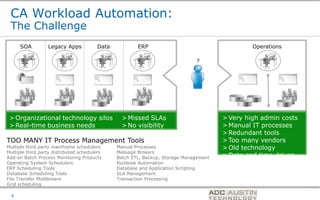
CA Workload Automation:
 The Challenge
      SOA         Legacy Apps            Data           ERP                                                          Operations

                                                                               ?


 > Organizational technology silos                > Missed SLAs                               > Very high admin costs
 > Real-time business needs                       > No visibility                             > Manual IT processes
                                                                                              > Redundant tools
TOO MANY IT Process Management Tools                                                          > Too many vendors
Multiple third party mainframe schedulers       Manual Processes                              > Old technology
Multiple third party distributed schedulers     Message Brokers
Add-on Batch Process Monitoring Products        Batch ETL, Backup, Storage Management         > Date and time driven
Operating System Schedulers                     Runbook Automation
ERP Scheduling Tools                            Database and Application Scripting
Database Scheduling Tools                       SLA Management
File Transfer Middleware                        Transaction Processing
Grid scheduling
                                                                                        Co-branded Logo Footprint
                                                                                               Aligned Right Edge
  4                                                                                     Must Fit Within This Space
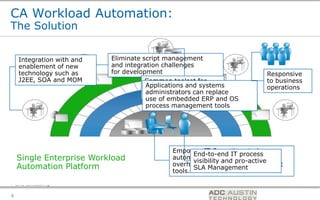
CA Workload Automation:
The Solution
     SOA          Legacy Apps     Data             ERP                                                     Operations

    Integration with and              Eliminate script management  ?
    enablement of new                 and integration challenges
    technology such as                for development                                                         Responsive
    J2EE, SOA and MOM                            Common toolset for                                           to business
                                                 Applications and systems
                                                 data management to                                           operations
                                                 administrators can replace
                                                 automate processes
                                                 use of embedded ERP and OS
                                                 process management tools
 > Organizational technology silos          > Missed SLAs                                > Very high admin costs
 > Real-time business needs                 > No visibility                              > Manual IT processes
                                                                                         > Redundant tools
TOO MANY IT Process Management Tools                                                     > Too many vendors
> Multiple third party mainframe schedulers   Manual Processes                           > Old technology
> Multiple third party distributed schedulers Message Brokers       Empower IT Operations to become
                                                                              End-to-end IT processtime driven
   Single Enterprise Workload ETL, Backup, Storage Management andDate and
> Add-on Batch Process Monitoring Products
> Operating System Schedulers
                                              Batch
                                                                              visibility
                                                                                         >
                                                                    automation evangelists, reduce
                                                                                            pro-active
                                              Runbook Automation overhead, and eliminate redundant
> ERP Scheduling Tools Platform
   Automation                                                                 SLA Management
                                              Database and Application Scripting
> Database Scheduling Tools                   SLA Management        tools.
> File Transfer Middleware                Transaction Processing
> Grid scheduling
                                                                              Co-branded Logo Footprint
                                                                                     Aligned Right Edge
5                                                                             Must Fit Within This Space
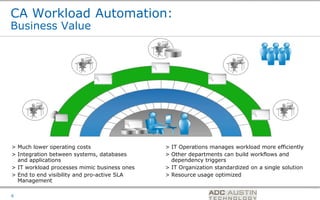
CA Workload Automation:
Business Value


> Much lower operating costs                  > IT Operations manages workload more efficiently
> Integration between systems, databases      > Other departments can build workflows and
  and applications                              dependency triggers
> IT workload processes mimic business ones   > IT Organization standardized on a single solution
> End to end visibility and pro-active SLA    > Resource usage optimized
  Management
                                                               Co-branded Logo Footprint
                                                                      Aligned Right Edge
6                                                              Must Fit Within This Space
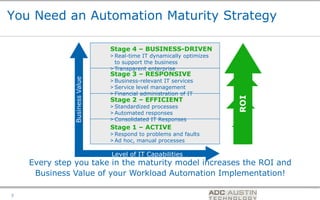
You Need an Automation Maturity Strategy

                               Stage 4 – BUSINESS-DRIVEN
                               > Real-time IT dynamically optimizes
                                 to support the business
                               > Transparent enterprise
                               Stage 3 – RESPONSIVE
              Business Value   > Business-relevant IT services
                               > Service level management
                               > Financial administration of IT


                                                                                       ROI ROI
                               Stage 2 – EFFICIENT
                               > Standardized processes


                                                                                     ROI ROI
                               > Automated responses
                               > Consolidated IT Responses
                               Stage 1 – ACTIVE
                               > Respond to problems and faults
                               > Ad hoc, manual processes

                               Level of IT Capabilities
    Every step you take in the maturity model increases the ROI and
     Business Value of your Workload Automation Implementation!

                                                                      Co-branded Logo Footprint
                                                                             Aligned Right Edge
7                                                                     Must Fit Within This Space
> End-to-end IT Process Management
     CA dSeries
     Workload
     Automation


                                     Co-branded Logo Footprint
                                            Aligned Right Edge
8                                    Must Fit Within This Space
What is CA dSeries Workload Automation?
> Data and Message-Driven IT Workload Automation
       More than just a Job Scheduler
       Trigger Workload in real-time based on granular business events

> Single point of Workload Management
       From Definition of Workload Process through Execution
       For all workload regardless of platform, operating system, processing
        object or geographical location

> Wide Breadth of Workload Types
       Utilizes a full array of Event Triggers and Sensors
       Integrates with Next Generation Technology
       Provides complete End-to-End Workload Automation for your real-time
        Enterprise


                                                      Co-branded Logo Footprint
                                                             Aligned Right Edge
9                                                     Must Fit Within This Space
What is CA dSeries Workload Automation?
 > Event-based automation and real-time triggering
        Schedule based on Operating System event sensors:
           – UNIX Processes and Windows Services
           – Disk and CPU capacity
           – Windows Event Log
        Text file contents
        IP connectivity
        File Monitors (create, update, delete and more)
        FTP activity
        Database Events such as Database Triggers and Monitors

 > Leverage automation capabilities beyond basic scheduling:
         ERP’s, Web Services, J2EE-type jobs
                                                 Co-branded Logo Footprint
10                                                     Aligned Right Edge
                                                 Must Fit Within This Space
Why CA dSeries Workload Automation?

> Easy to Deploy and Realize Value-savings
> Breadth of Job Types
> Workflow-Centric Approach
> Intuitive Drag-and-Drop User Interface
> Intuitive Scheduling Criteria & Calendaring
> Granular Event-Driven processing
> Dynamic Critical Path Monitoring
> Simulation & Forecasting

> Variable Substitution & Scripting
> Role-Based Security

                                                Co-branded Logo Footprint
                                                       Aligned Right Edge
11                                              Must Fit Within This Space
> End-to-end IT Process Management
     CA dSeries
     Workload
     Automation
     Architecture


                                     Co-branded Logo Footprint
                                            Aligned Right Edge
12                                   Must Fit Within This Space
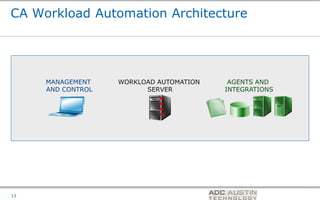
CA Workload Automation Architecture


     MANAGEMENT    WORKLOAD AUTOMATION            AGENTS AND
     AND CONTROL         SERVER                  INTEGRATIONS


                                         Co-branded Logo Footprint
                                                Aligned Right Edge
13                                       Must Fit Within This Space
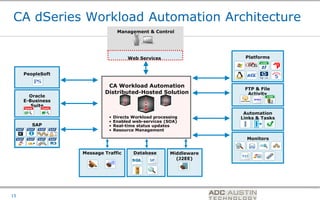
CA dSeries Workload Automation Architecture
                                 Management & Control


                                      Web Services                                         Platforms


     PeopleSoft

                           CA Workload Automation
                                                                                          FTP & File
                          Distributed-Hosted Solution                                      Activity
       Oracle
     E-Business
        Suite
                                                                                        Automation
                            •   Directs Workload processing                            Links & Tasks
                            •   Enabled web-services (SOA)
        SAP                 •   Real-time status updates
                            •   Resource Management

                                                                                            Monitors


                  Message Traffic       Database       Middleware
                                                         (J2EE)


                                                                    Co-branded Logo Footprint
                                                                           Aligned Right Edge
15                                                                  Must Fit Within This Space
CA dSeries
     Workload
     Automation
     Capabilities

     > Enterprise
       Scheduling and Event
       Automation

                              Co-branded Logo Footprint
                                     Aligned Right Edge
16                            Must Fit Within This Space
Ease of Installation and Orientation


> Quick Install, get up and running in an hour
      Disk Space, RDBMS
      No other 3rd Party or Companion Products Required

> Installs via Install Anywhere, character-based or
  graphical installation options

> Verification procedure to validate that all components are
  functioning properly


                                           Co-branded Logo Footprint
                                                  Aligned Right Edge
17                                         Must Fit Within This Space
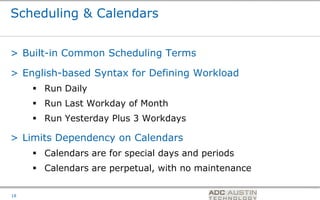
Scheduling & Calendars


> Built-in Common Scheduling Terms

> English-based Syntax for Defining Workload
      Run Daily
      Run Last Workday of Month
      Run Yesterday Plus 3 Workdays

> Limits Dependency on Calendars
      Calendars are for special days and periods
      Calendars are perpetual, with no maintenance

                                            Co-branded Logo Footprint
                                                   Aligned Right Edge
18                                          Must Fit Within This Space
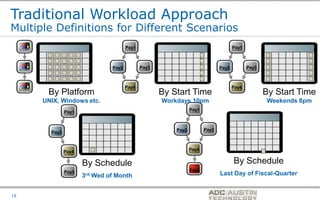
Traditional Workload Approach
Multiple Definitions for Different Scenarios
     Pay1                                   Pay1                                            Pay1


     Pay2                            Pay2          Pay3                            Pay2               Pay3


     Pay4                                   Pay4                                           Pay4
             By Platform                                  By Start Time                                      By Start Time
            UNIX, Windows etc.                            Workdays 10pm                                       Weekends 8pm
                                                                     Pay1
                     Pay1


                                                              Pay2          Pay3
              Pay2


                                                                     Pay4
                     Pay4

                            By Schedule                                                      By Schedule
                     Pay5                                            Pay6
                            3rd Wed of Month                                       Last Day of Fiscal-Quarter

                                                                               Co-branded Logo Footprint
                                                                                      Aligned Right Edge
19                                                                             Must Fit Within This Space
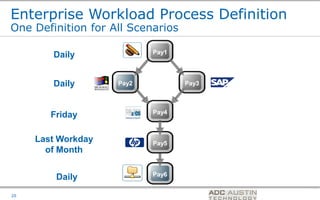
Enterprise Workload Process Definition
One Definition for All Scenarios

                           Pay1
        Daily


        Daily       Pay2           Pay3


                           Pay4
        Friday

     Last Workday          Pay5
       of Month

                           Pay6
         Daily
                                          Co-branded Logo Footprint
                                                 Aligned Right Edge
20                                        Must Fit Within This Space
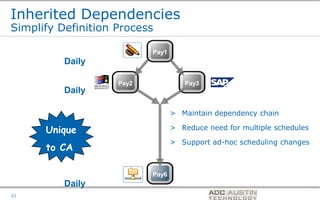
Inherited Dependencies
Simplify Definition Process

                           Pay1
          Daily

                    Pay2             Pay3
          Daily

                                  > Maintain dependency chain

      Unique                      > Reduce need for multiple schedules

                                  > Support ad-hoc scheduling changes
      to CA

                           Pay6
          Daily
                                             Co-branded Logo Footprint
                                                    Aligned Right Edge
21                                           Must Fit Within This Space
Application Triggering
Simplify Schedules

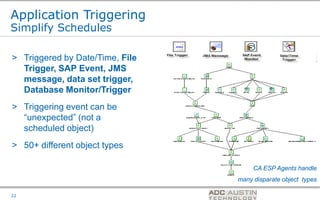
> Triggered by Date/Time, File
  Trigger, SAP Event, JMS
  message, data set trigger,
  Database Monitor/Trigger
> Triggering event can be
  “unexpected” (not a
  scheduled object)
> 50+ different object types

                                                              CA ESP Agents handle
                                                  many disparate object types
                                 Co-branded Logo Footprint
                                        Aligned Right Edge
22                               Must Fit Within This Space
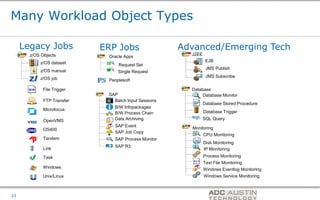
Many Workload Object Types

     Legacy Jobs            ERP Jobs                  Advanced/Emerging Tech
       z/OS Objects                                     J2EE
                             Oracle Apps
           z/OS dataset                                         EJB
                                 Request Set
                                                                JMS Publish
           z/OS manual           Single Request
           z/OS job                                             JMS Subscribe
                             Peoplesoft

             File Trigger                               Database
                             SAP                             Database Monitor
             FTP Transfer      Batch Input Sessions
                                                               Database Stored Procedure
                               B/W Infopackages
             Microfocus
                               B/W Process Chain               Database Trigger

             OpenVMS           Data Archiving                  SQL Query
                               SAP Event
             OS400                                      Monitoring
                               SAP Job Copy
                                                               CPU Monitoring
             Tandem            SAP Process Monitor
                                                               Disk Monitoring
                               SAP R3
             Link                                              IP Monitoring
             Task                                              Process Monitoring
                                                               Text File Monitoring
             Windows                                           Windows Eventlog Monitoring
             Unix/Linux                                        Windows Service Monitoring


                                                                      Co-branded Logo Footprint
                                                                             Aligned Right Edge
23                                                                    Must Fit Within This Space
Value of Event-sensors
Use Case Scenario
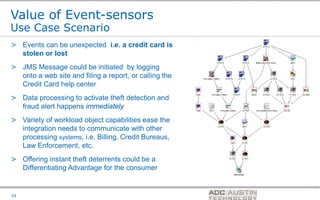
> Events can be unexpected i.e. a credit card is
  stolen or lost
> JMS Message could be initiated by logging
  onto a web site and filing a report, or calling the
  Credit Card help center
> Data processing to activate theft detection and
  fraud alert happens immediately
> Variety of workload object capabilities ease the
  integration needs to communicate with other
  processing systems, i.e. Billing, Credit Bureaus,
  Law Enforcement, etc.
> Offering instant theft deterrents could be a
  Differentiating Advantage for the consumer


                                                        Co-branded Logo Footprint
                                                               Aligned Right Edge
24                                                      Must Fit Within This Space
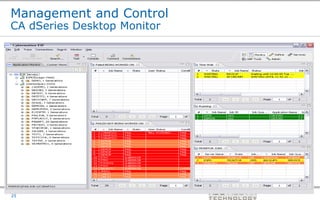
Management and Control
CA dSeries Desktop Monitor


                             Co-branded Logo Footprint
                                    Aligned Right Edge
25                           Must Fit Within This Space
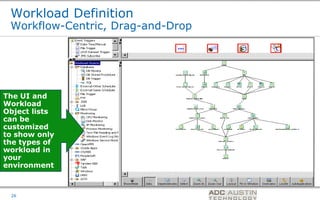
Workload Definition
 Workflow-Centric, Drag-and-Drop


The UI and
Workload
Object lists
can be
customized
to show only
the types of
workload in
your
environment


                                   Co-branded Logo Footprint
                                          Aligned Right Edge
 26                                Must Fit Within This Space
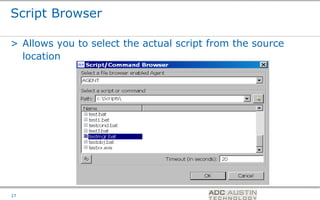
Script Browser

> Allows you to select the actual script from the source
  location


                                         Co-branded Logo Footprint
                                                Aligned Right Edge
27                                       Must Fit Within This Space
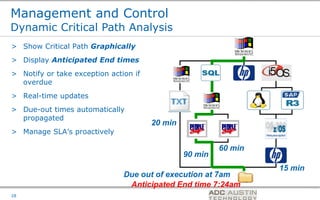
Management and Control
Dynamic Critical Path Analysis
> Show Critical Path Graphically
> Display Anticipated End times
> Notify or take exception action if
  overdue
> Real-time updates
> Due-out times automatically
  propagated
                                       20 min
> Manage SLA’s proactively                                     G
                                                            60 min
                                                90 min
                                                                                      15 min
                               Due out of execution at 7am
                                Anticipated End time 7:24am
                                                         Co-branded Logo Footprint
                                                                Aligned Right Edge
28                                                       Must Fit Within This Space
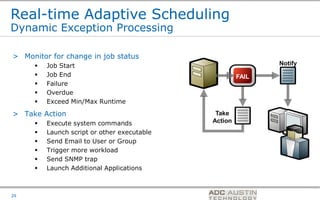
Real-time Adaptive Scheduling
Dynamic Exception Processing

> Monitor for change in job status
        Job Start                                                        Notify
        Job End                                             FAIL
        Failure
        Overdue
        Exceed Min/Max Runtime

> Take Action                                 Take
        Execute system commands             Action
        Launch script or other executable
        Send Email to User or Group
        Trigger more workload
        Send SNMP trap
        Launch Additional Applications


                                             Co-branded Logo Footprint
                                                    Aligned Right Edge
29                                           Must Fit Within This Space
Advanced Management Capabilities
Simulation

> Eliminate definition errors

> Simulate many “what-if” scenarios
      Which jobs will be selected on a holiday?
      What will it look like in the event of a disaster?
      What was scheduled last month end?
      Look for syntax errors
      Look for scheduling errors
      Validate expected results

> Preventing Production Outages
                                               Co-branded Logo Footprint
                                                      Aligned Right Edge
30                                             Must Fit Within This Space
Advanced Management Capabilities
Forecasting

> Forecast Reports for any time period in the future

> 24-hour and 7-day forecasts (Out-of-the-box)

> Can be customized for any criteria
      Start and End Time
      Application Name
      Event Name

> Both table view and Gantt view of forecasted workload


                                         Co-branded Logo Footprint
                                                Aligned Right Edge
31                                       Must Fit Within This Space
Role-Based Security


> Internal Security Manager

> Allows you to define Users and Groups
      Pre-defined Groups
      Can Clone Permissions from Users/Groups

> Granular to object level
      Calendars, Applications, Events, etc.


                                               Co-branded Logo Footprint
                                                      Aligned Right Edge
32                                             Must Fit Within This Space
Summary – CA dSeries provides:


> Ease of Use                 > Dynamic Critical Path
                                Monitoring
> Ease of Deployment
                              > Simulation & Forecasting
> Breadth of Integrations
                              > Variable Substitution &
> Workflow-Centric Approach
                                Scripting
> Scheduling Criteria &
                              > Role-Based Security
  Calendaring

> Business-Driven Events


                                         Co-branded Logo Footprint
                                                Aligned Right Edge
33                                       Must Fit Within This Space
CA ESP Workload
Automation
System Agent R7
for i5/OS
(OS/400)


                  Co-branded Logo Footprint
                         Aligned Right Edge
                  Must Fit Within This Space
i5/OS Agent Functionality

      > Brand new iSeries (i5/0S) agent

      > Written entirely in Java and based on the R7
        System Agent


                                                                                       Co-branded Logo Footprint
                                                                                              Aligned Right Edge
35   September 29, 2009   [Enter presentation title in footer]   Copyright © 2007 CA   Must Fit Within This Space
i5/OS Agent Functionality

      > File Monitoring
                 Support for both root and QSYS.LIB file systems
                          – File monitoring in root looks and feels the same
                            as other Unix agents
                          – File monitoring in QSYS.LIB looks and feels
                            similar to the V2 OS/400 agent

      > Object Monitor, File-browser, FTP, SNMP, Health
        Monitor, and Multiple Managers are all supported


                                                                                       Co-branded Logo Footprint
                                                                                              Aligned Right Edge
36   September 29, 2009   [Enter presentation title in footer]   Copyright © 2007 CA   Must Fit Within This Space
i5/OS Agent Functionality

      > Filebrowsing
                 Supports both root and QSYS.LIB file systems

      > Object Monitoring
                 Standard monitor types

      > FTP
                 Compression and SSL support
                 Support for ASCII and EBCDIC text transfers
                 Code page support

                                                                                       Co-branded Logo Footprint
                                                                                              Aligned Right Edge
37   September 29, 2009   [Enter presentation title in footer]   Copyright © 2007 CA   Must Fit Within This Space
Differences From V2 OS/400 Agent


      > File monitoring
                 Fully supported in the same fashion as the other R7
                  agents with the same restrictions. This lifts some of
                  the restrictions of the V2 agent.

      > Logging
                 The agent log files are now in the log subdirectory (in
                  ASCII text) of the product just like the other agents.

      > OS Support
                 Minimum OS release support is now V5R2M0 (V2
                  continues to be V4R4M0).
                                                                                       Co-branded Logo Footprint
                                                                                              Aligned Right Edge
38   September 29, 2009   [Enter presentation title in footer]   Copyright © 2007 CA   Must Fit Within This Space
Differences From V2 OS/400 Agent


      > Exit Codes
                 Job ending and severity codes are now supported
                  from both the job and any exit program specified by
                  CCEXIT
                 Old 0 and 4001 codes can be used instead if desired

      > Error Messages
                 iSeries error messages will propagate through to the
                  interface where appropriate (usually on submission or
                  failure errors)


                                                                                       Co-branded Logo Footprint
                                                                                              Aligned Right Edge
39   September 29, 2009   [Enter presentation title in footer]   Copyright © 2007 CA   Must Fit Within This Space
Questions


      http://adcaustintech.com
      – Product Information


                                  Co-branded Logo Footprint
                                         Aligned Right Edge
41                                Must Fit Within This Space

CA Workload Automation for IBM i

  • 1.
    CA Workload Automation Session 12B John Rhodes ADC Austin Tech Co-branded Logo Footprint Aligned LEFT ON COVER ONLY Must Fit Within This Space
  • 2.
    What are wetalking about?  Workload automation for IBM i has traditionally been handled by IBM batch scheduling facilities–or- solutions focused on IBM i.  Workload automation for other CA 2E/Plex platforms is a mixed bag in many cases.  What happens when your environment becomes complex – with many OS targets?  One solution: CA D-Series Automation with i5 agent Co-branded Logo Footprint Aligned Right Edge 2 Must Fit Within This Space
  • 3.
    Agenda  Background  The CA D-Series Solution  The i5/OS agent Co-branded Logo Footprint Aligned Right Edge 3 Must Fit Within This Space
  • 4.
    CA Workload Automation: The Challenge SOA Legacy Apps Data ERP Operations ? > Organizational technology silos > Missed SLAs > Very high admin costs > Real-time business needs > No visibility > Manual IT processes > Redundant tools TOO MANY IT Process Management Tools > Too many vendors Multiple third party mainframe schedulers Manual Processes > Old technology Multiple third party distributed schedulers Message Brokers Add-on Batch Process Monitoring Products Batch ETL, Backup, Storage Management > Date and time driven Operating System Schedulers Runbook Automation ERP Scheduling Tools Database and Application Scripting Database Scheduling Tools SLA Management File Transfer Middleware Transaction Processing Grid scheduling Co-branded Logo Footprint Aligned Right Edge 4 Must Fit Within This Space
  • 5.
    CA Workload Automation: TheSolution SOA Legacy Apps Data ERP Operations Integration with and Eliminate script management ? enablement of new and integration challenges technology such as for development Responsive J2EE, SOA and MOM Common toolset for to business Applications and systems data management to operations administrators can replace automate processes use of embedded ERP and OS process management tools > Organizational technology silos > Missed SLAs > Very high admin costs > Real-time business needs > No visibility > Manual IT processes > Redundant tools TOO MANY IT Process Management Tools > Too many vendors > Multiple third party mainframe schedulers Manual Processes > Old technology > Multiple third party distributed schedulers Message Brokers Empower IT Operations to become End-to-end IT processtime driven Single Enterprise Workload ETL, Backup, Storage Management andDate and > Add-on Batch Process Monitoring Products > Operating System Schedulers Batch visibility > automation evangelists, reduce pro-active Runbook Automation overhead, and eliminate redundant > ERP Scheduling Tools Platform Automation SLA Management Database and Application Scripting > Database Scheduling Tools SLA Management tools. > File Transfer Middleware Transaction Processing > Grid scheduling Co-branded Logo Footprint Aligned Right Edge 5 Must Fit Within This Space
  • 6.
    CA Workload Automation: BusinessValue > Much lower operating costs > IT Operations manages workload more efficiently > Integration between systems, databases > Other departments can build workflows and and applications dependency triggers > IT workload processes mimic business ones > IT Organization standardized on a single solution > End to end visibility and pro-active SLA > Resource usage optimized Management Co-branded Logo Footprint Aligned Right Edge 6 Must Fit Within This Space
  • 7.
    You Need anAutomation Maturity Strategy Stage 4 – BUSINESS-DRIVEN > Real-time IT dynamically optimizes to support the business > Transparent enterprise Stage 3 – RESPONSIVE Business Value > Business-relevant IT services > Service level management > Financial administration of IT ROI ROI Stage 2 – EFFICIENT > Standardized processes ROI ROI > Automated responses > Consolidated IT Responses Stage 1 – ACTIVE > Respond to problems and faults > Ad hoc, manual processes Level of IT Capabilities Every step you take in the maturity model increases the ROI and Business Value of your Workload Automation Implementation! Co-branded Logo Footprint Aligned Right Edge 7 Must Fit Within This Space
  • 8.
    > End-to-end ITProcess Management CA dSeries Workload Automation Co-branded Logo Footprint Aligned Right Edge 8 Must Fit Within This Space
  • 9.
    What is CAdSeries Workload Automation? > Data and Message-Driven IT Workload Automation  More than just a Job Scheduler  Trigger Workload in real-time based on granular business events > Single point of Workload Management  From Definition of Workload Process through Execution  For all workload regardless of platform, operating system, processing object or geographical location > Wide Breadth of Workload Types  Utilizes a full array of Event Triggers and Sensors  Integrates with Next Generation Technology  Provides complete End-to-End Workload Automation for your real-time Enterprise Co-branded Logo Footprint Aligned Right Edge 9 Must Fit Within This Space
  • 10.
    What is CAdSeries Workload Automation? > Event-based automation and real-time triggering  Schedule based on Operating System event sensors: – UNIX Processes and Windows Services – Disk and CPU capacity – Windows Event Log  Text file contents  IP connectivity  File Monitors (create, update, delete and more)  FTP activity  Database Events such as Database Triggers and Monitors > Leverage automation capabilities beyond basic scheduling: ERP’s, Web Services, J2EE-type jobs Co-branded Logo Footprint 10  Aligned Right Edge Must Fit Within This Space
  • 11.
    Why CA dSeriesWorkload Automation? > Easy to Deploy and Realize Value-savings > Breadth of Job Types > Workflow-Centric Approach > Intuitive Drag-and-Drop User Interface > Intuitive Scheduling Criteria & Calendaring > Granular Event-Driven processing > Dynamic Critical Path Monitoring > Simulation & Forecasting > Variable Substitution & Scripting > Role-Based Security Co-branded Logo Footprint Aligned Right Edge 11 Must Fit Within This Space
  • 12.
    > End-to-end ITProcess Management CA dSeries Workload Automation Architecture Co-branded Logo Footprint Aligned Right Edge 12 Must Fit Within This Space
  • 13.
    CA Workload AutomationArchitecture MANAGEMENT WORKLOAD AUTOMATION AGENTS AND AND CONTROL SERVER INTEGRATIONS Co-branded Logo Footprint Aligned Right Edge 13 Must Fit Within This Space
  • 14.
    CA dSeries WorkloadAutomation Architecture Management & Control Web Services Platforms PeopleSoft CA Workload Automation FTP & File Distributed-Hosted Solution Activity Oracle E-Business Suite Automation • Directs Workload processing Links & Tasks • Enabled web-services (SOA) SAP • Real-time status updates • Resource Management Monitors Message Traffic Database Middleware (J2EE) Co-branded Logo Footprint Aligned Right Edge 15 Must Fit Within This Space
  • 15.
    CA dSeries Workload Automation Capabilities > Enterprise Scheduling and Event Automation Co-branded Logo Footprint Aligned Right Edge 16 Must Fit Within This Space
  • 16.
    Ease of Installationand Orientation > Quick Install, get up and running in an hour  Disk Space, RDBMS  No other 3rd Party or Companion Products Required > Installs via Install Anywhere, character-based or graphical installation options > Verification procedure to validate that all components are functioning properly Co-branded Logo Footprint Aligned Right Edge 17 Must Fit Within This Space
  • 17.
    Scheduling & Calendars >Built-in Common Scheduling Terms > English-based Syntax for Defining Workload  Run Daily  Run Last Workday of Month  Run Yesterday Plus 3 Workdays > Limits Dependency on Calendars  Calendars are for special days and periods  Calendars are perpetual, with no maintenance Co-branded Logo Footprint Aligned Right Edge 18 Must Fit Within This Space
  • 18.
    Traditional Workload Approach MultipleDefinitions for Different Scenarios Pay1 Pay1 Pay1 Pay2 Pay2 Pay3 Pay2 Pay3 Pay4 Pay4 Pay4 By Platform By Start Time By Start Time UNIX, Windows etc. Workdays 10pm Weekends 8pm Pay1 Pay1 Pay2 Pay3 Pay2 Pay4 Pay4 By Schedule By Schedule Pay5 Pay6 3rd Wed of Month Last Day of Fiscal-Quarter Co-branded Logo Footprint Aligned Right Edge 19 Must Fit Within This Space
  • 19.
    Enterprise Workload ProcessDefinition One Definition for All Scenarios Pay1 Daily Daily Pay2 Pay3 Pay4 Friday Last Workday Pay5 of Month Pay6 Daily Co-branded Logo Footprint Aligned Right Edge 20 Must Fit Within This Space
  • 20.
    Inherited Dependencies Simplify DefinitionProcess Pay1 Daily Pay2 Pay3 Daily > Maintain dependency chain Unique > Reduce need for multiple schedules > Support ad-hoc scheduling changes to CA Pay6 Daily Co-branded Logo Footprint Aligned Right Edge 21 Must Fit Within This Space
  • 21.
    Application Triggering Simplify Schedules >Triggered by Date/Time, File Trigger, SAP Event, JMS message, data set trigger, Database Monitor/Trigger > Triggering event can be “unexpected” (not a scheduled object) > 50+ different object types CA ESP Agents handle many disparate object types Co-branded Logo Footprint Aligned Right Edge 22 Must Fit Within This Space
  • 22.
    Many Workload ObjectTypes Legacy Jobs ERP Jobs Advanced/Emerging Tech z/OS Objects J2EE Oracle Apps z/OS dataset EJB Request Set JMS Publish z/OS manual Single Request z/OS job JMS Subscribe Peoplesoft File Trigger Database SAP Database Monitor FTP Transfer Batch Input Sessions Database Stored Procedure B/W Infopackages Microfocus B/W Process Chain Database Trigger OpenVMS Data Archiving SQL Query SAP Event OS400 Monitoring SAP Job Copy CPU Monitoring Tandem SAP Process Monitor Disk Monitoring SAP R3 Link IP Monitoring Task Process Monitoring Text File Monitoring Windows Windows Eventlog Monitoring Unix/Linux Windows Service Monitoring Co-branded Logo Footprint Aligned Right Edge 23 Must Fit Within This Space
  • 23.
    Value of Event-sensors UseCase Scenario > Events can be unexpected i.e. a credit card is stolen or lost > JMS Message could be initiated by logging onto a web site and filing a report, or calling the Credit Card help center > Data processing to activate theft detection and fraud alert happens immediately > Variety of workload object capabilities ease the integration needs to communicate with other processing systems, i.e. Billing, Credit Bureaus, Law Enforcement, etc. > Offering instant theft deterrents could be a Differentiating Advantage for the consumer Co-branded Logo Footprint Aligned Right Edge 24 Must Fit Within This Space
  • 24.
    Management and Control CAdSeries Desktop Monitor Co-branded Logo Footprint Aligned Right Edge 25 Must Fit Within This Space
  • 25.
    Workload Definition Workflow-Centric,Drag-and-Drop The UI and Workload Object lists can be customized to show only the types of workload in your environment Co-branded Logo Footprint Aligned Right Edge 26 Must Fit Within This Space
  • 26.
    Script Browser > Allowsyou to select the actual script from the source location Co-branded Logo Footprint Aligned Right Edge 27 Must Fit Within This Space
  • 27.
    Management and Control DynamicCritical Path Analysis > Show Critical Path Graphically > Display Anticipated End times > Notify or take exception action if overdue > Real-time updates > Due-out times automatically propagated 20 min > Manage SLA’s proactively G 60 min 90 min 15 min Due out of execution at 7am Anticipated End time 7:24am Co-branded Logo Footprint Aligned Right Edge 28 Must Fit Within This Space
  • 28.
    Real-time Adaptive Scheduling DynamicException Processing > Monitor for change in job status  Job Start Notify  Job End FAIL  Failure  Overdue  Exceed Min/Max Runtime > Take Action Take  Execute system commands Action  Launch script or other executable  Send Email to User or Group  Trigger more workload  Send SNMP trap  Launch Additional Applications Co-branded Logo Footprint Aligned Right Edge 29 Must Fit Within This Space
  • 29.
    Advanced Management Capabilities Simulation >Eliminate definition errors > Simulate many “what-if” scenarios  Which jobs will be selected on a holiday?  What will it look like in the event of a disaster?  What was scheduled last month end?  Look for syntax errors  Look for scheduling errors  Validate expected results > Preventing Production Outages Co-branded Logo Footprint Aligned Right Edge 30 Must Fit Within This Space
  • 30.
    Advanced Management Capabilities Forecasting >Forecast Reports for any time period in the future > 24-hour and 7-day forecasts (Out-of-the-box) > Can be customized for any criteria  Start and End Time  Application Name  Event Name > Both table view and Gantt view of forecasted workload Co-branded Logo Footprint Aligned Right Edge 31 Must Fit Within This Space
  • 31.
    Role-Based Security > InternalSecurity Manager > Allows you to define Users and Groups  Pre-defined Groups  Can Clone Permissions from Users/Groups > Granular to object level  Calendars, Applications, Events, etc. Co-branded Logo Footprint Aligned Right Edge 32 Must Fit Within This Space
  • 32.
    Summary – CAdSeries provides: > Ease of Use > Dynamic Critical Path Monitoring > Ease of Deployment > Simulation & Forecasting > Breadth of Integrations > Variable Substitution & > Workflow-Centric Approach Scripting > Scheduling Criteria & > Role-Based Security Calendaring > Business-Driven Events Co-branded Logo Footprint Aligned Right Edge 33 Must Fit Within This Space
  • 33.
    CA ESP Workload Automation SystemAgent R7 for i5/OS (OS/400) Co-branded Logo Footprint Aligned Right Edge Must Fit Within This Space
  • 34.
    i5/OS Agent Functionality > Brand new iSeries (i5/0S) agent > Written entirely in Java and based on the R7 System Agent Co-branded Logo Footprint Aligned Right Edge 35 September 29, 2009 [Enter presentation title in footer] Copyright © 2007 CA Must Fit Within This Space
  • 35.
    i5/OS Agent Functionality > File Monitoring  Support for both root and QSYS.LIB file systems – File monitoring in root looks and feels the same as other Unix agents – File monitoring in QSYS.LIB looks and feels similar to the V2 OS/400 agent > Object Monitor, File-browser, FTP, SNMP, Health Monitor, and Multiple Managers are all supported Co-branded Logo Footprint Aligned Right Edge 36 September 29, 2009 [Enter presentation title in footer] Copyright © 2007 CA Must Fit Within This Space
  • 36.
    i5/OS Agent Functionality > Filebrowsing  Supports both root and QSYS.LIB file systems > Object Monitoring  Standard monitor types > FTP  Compression and SSL support  Support for ASCII and EBCDIC text transfers  Code page support Co-branded Logo Footprint Aligned Right Edge 37 September 29, 2009 [Enter presentation title in footer] Copyright © 2007 CA Must Fit Within This Space
  • 37.
    Differences From V2OS/400 Agent > File monitoring  Fully supported in the same fashion as the other R7 agents with the same restrictions. This lifts some of the restrictions of the V2 agent. > Logging  The agent log files are now in the log subdirectory (in ASCII text) of the product just like the other agents. > OS Support  Minimum OS release support is now V5R2M0 (V2 continues to be V4R4M0). Co-branded Logo Footprint Aligned Right Edge 38 September 29, 2009 [Enter presentation title in footer] Copyright © 2007 CA Must Fit Within This Space
  • 38.
    Differences From V2OS/400 Agent > Exit Codes  Job ending and severity codes are now supported from both the job and any exit program specified by CCEXIT  Old 0 and 4001 codes can be used instead if desired > Error Messages  iSeries error messages will propagate through to the interface where appropriate (usually on submission or failure errors) Co-branded Logo Footprint Aligned Right Edge 39 September 29, 2009 [Enter presentation title in footer] Copyright © 2007 CA Must Fit Within This Space
  • 39.
    Questions  http://adcaustintech.com – Product Information Co-branded Logo Footprint Aligned Right Edge 41 Must Fit Within This Space