Testing Complex SOA based architectures
SOA downside for testing High Rate of Change Highly Complex Massive Reuse + Increased Risk of Failure
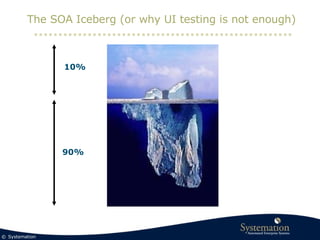
The SOA Iceberg (or why UI testing is not enough) 10% 90%
The SOA Iceberg (or why UI testing is not enough) The User Interface The SOA based infrastructure behind the interface 10% 90% Thin client BPM ESB Composition Services Adapters Legacy systems
UI Testing, Error found… Customers Policies Claims ERP Credit Card System CRM Accounting Bank Services S S S S S S S S S S S S S S S S S S S S A+B A+B A+B A+B A+B A+B A+B A+B A+B App App App App Business Process Applications Legacy Applications
UI Testing, User interface says OK… Customers Policies Claims ERP Credit Card System CRM Accounting Bank Services S S S S S S S S S S S S S S S S S S S S A+B A+B A+B A+B A+B A+B A+B A+B A+B App App App App Business Process Applications Legacy Applications
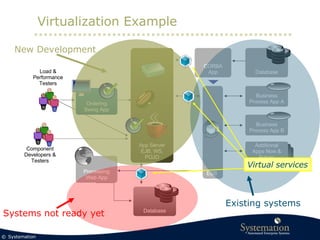
Virtualization Example Ordering Swing App Processing Web App CORBA App ESB Business Process App A Business Process App B Additional Apps Now & Future Database Database App Server EJB, WS, POJO Load & Performance Testers Component Developers & Testers New Development Existing systems Systems not ready yet
Virtualization Example Ordering Swing App Processing Web App CORBA App ESB Business Process App A Business Process App B Additional Apps Now & Future Database Database App Server EJB, WS, POJO Load & Performance Testers Component Developers & Testers New Development Existing systems Systems not ready yet Virtual services
Introduction LISA from iTKO
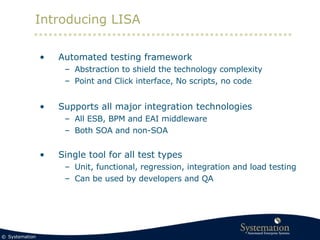
Introducing LISA Automated testing framework  Abstraction to shield the technology complexity Point and Click interface, No scripts, no code Supports all major integration technologies All ESB, BPM and EAI middleware Both SOA and non-SOA Single tool for all test types Unit, functional, regression, integration and load testing Can be used by developers and QA
How LISA Tests components 1 Connect      2 Gather info 3 Invoke      4 Get response 5 React   Component LISA Validate the component Apply Test Data Add test to a larger testprocess 6 Next Step
Combine Steps in a Workflow Connect Component Test Component Handle Error Verify level 1 Verify level 2 Undo action Close connection Your System iTKO LISA Steps   Your System iTKO LISA Connect      Gather info Invoke      Get response React   Steps   Your System iTKO LISA Connect      Gather info Invoke      Get response React   Steps   Your System iTKO LISA Connect      Gather info Invoke      Get response React   Steps   Your System iTKO LISA Connect      Gather info Invoke      Get response React   Steps   Your System iTKO LISA Connect      Gather info Invoke      Get response React   Steps   Your System iTKO LISA Connect      Gather info Invoke      Get response React   Steps  
LISA supported technologies All web Technologies (SOAP, REST, …) All major integration technologies (ESB, EAI, BPM, Messaging, Corba, …)  Including Tibco, Oracle/Bea, IBM, webMethods, … Web UI (HTML, AJAX, Flash, Swing, …)  Databases Java technologies (Java, J2EE, JMS, EJB, Jdbc, Junit, RMI, …)
Summary   For SOA test automation is required Look for test automation for complex SOA based application infrastructures Don’t do manual testing Need a single solution for All technologies + full middleware support All test types (from unit to performance testing) Should support both developers and QA Very important: Virtualization  Simplifies integration and E2E testing  Removes dependencies Simulates assets needed for testing

Lisa

  • 1.
    Testing Complex SOAbased architectures
  • 2.
    SOA downside fortesting High Rate of Change Highly Complex Massive Reuse + Increased Risk of Failure
  • 3.
    The SOA Iceberg(or why UI testing is not enough) 10% 90%
  • 4.
    The SOA Iceberg(or why UI testing is not enough) The User Interface The SOA based infrastructure behind the interface 10% 90% Thin client BPM ESB Composition Services Adapters Legacy systems
  • 5.
    UI Testing, Errorfound… Customers Policies Claims ERP Credit Card System CRM Accounting Bank Services S S S S S S S S S S S S S S S S S S S S A+B A+B A+B A+B A+B A+B A+B A+B A+B App App App App Business Process Applications Legacy Applications
  • 6.
    UI Testing, Userinterface says OK… Customers Policies Claims ERP Credit Card System CRM Accounting Bank Services S S S S S S S S S S S S S S S S S S S S A+B A+B A+B A+B A+B A+B A+B A+B A+B App App App App Business Process Applications Legacy Applications
  • 7.
    Virtualization Example OrderingSwing App Processing Web App CORBA App ESB Business Process App A Business Process App B Additional Apps Now & Future Database Database App Server EJB, WS, POJO Load & Performance Testers Component Developers & Testers New Development Existing systems Systems not ready yet
  • 8.
    Virtualization Example OrderingSwing App Processing Web App CORBA App ESB Business Process App A Business Process App B Additional Apps Now & Future Database Database App Server EJB, WS, POJO Load & Performance Testers Component Developers & Testers New Development Existing systems Systems not ready yet Virtual services
  • 9.
  • 10.
    Introducing LISA Automatedtesting framework Abstraction to shield the technology complexity Point and Click interface, No scripts, no code Supports all major integration technologies All ESB, BPM and EAI middleware Both SOA and non-SOA Single tool for all test types Unit, functional, regression, integration and load testing Can be used by developers and QA
  • 11.
    How LISA Testscomponents 1 Connect   2 Gather info 3 Invoke   4 Get response 5 React  Component LISA Validate the component Apply Test Data Add test to a larger testprocess 6 Next Step
  • 12.
    Combine Steps ina Workflow Connect Component Test Component Handle Error Verify level 1 Verify level 2 Undo action Close connection Your System iTKO LISA Steps  Your System iTKO LISA Connect   Gather info Invoke   Get response React  Steps  Your System iTKO LISA Connect   Gather info Invoke   Get response React  Steps  Your System iTKO LISA Connect   Gather info Invoke   Get response React  Steps  Your System iTKO LISA Connect   Gather info Invoke   Get response React  Steps  Your System iTKO LISA Connect   Gather info Invoke   Get response React  Steps  Your System iTKO LISA Connect   Gather info Invoke   Get response React  Steps 
  • 13.
    LISA supported technologiesAll web Technologies (SOAP, REST, …) All major integration technologies (ESB, EAI, BPM, Messaging, Corba, …) Including Tibco, Oracle/Bea, IBM, webMethods, … Web UI (HTML, AJAX, Flash, Swing, …) Databases Java technologies (Java, J2EE, JMS, EJB, Jdbc, Junit, RMI, …)
  • 14.
    Summary For SOA test automation is required Look for test automation for complex SOA based application infrastructures Don’t do manual testing Need a single solution for All technologies + full middleware support All test types (from unit to performance testing) Should support both developers and QA Very important: Virtualization Simplifies integration and E2E testing Removes dependencies Simulates assets needed for testing