VS510S Hot Sheet

System PN 53600_02
Balboa Instruments

System Model # VSP-VS510S-DCAH


Base PCBA PN
VS510S – 53601_01                53600_02-97.PDF 04/12/2005
Circuit Board Configuration


     240 Volt AC Connections (RED AC when 120V heater jumper is not attached)

     120 Volt AC Connections (WHITE AC)
J23 & W1 . . Pump 1

J6 & W12 . . Pump 2

J29 . . . . . . . Ozone
Must be the same volt-
age as pump 1

J47 & W2 . . Stereo

J17/26 & W7
. . . . . . . . . . Blower

J20 . . . . . . . Light
12 V Only
                                                                                                              Circuit Board Layout


                                                          Optional Aux Relay Board 240V (J33 & W 12)
                                       R    B    W   G
                                  K1
                                           W12       J6   J4 to Black AC on Main Board (J62)

                                                          J2 to J60 on Main Board (EXT – Near Switchbank A)

                             J2            J4
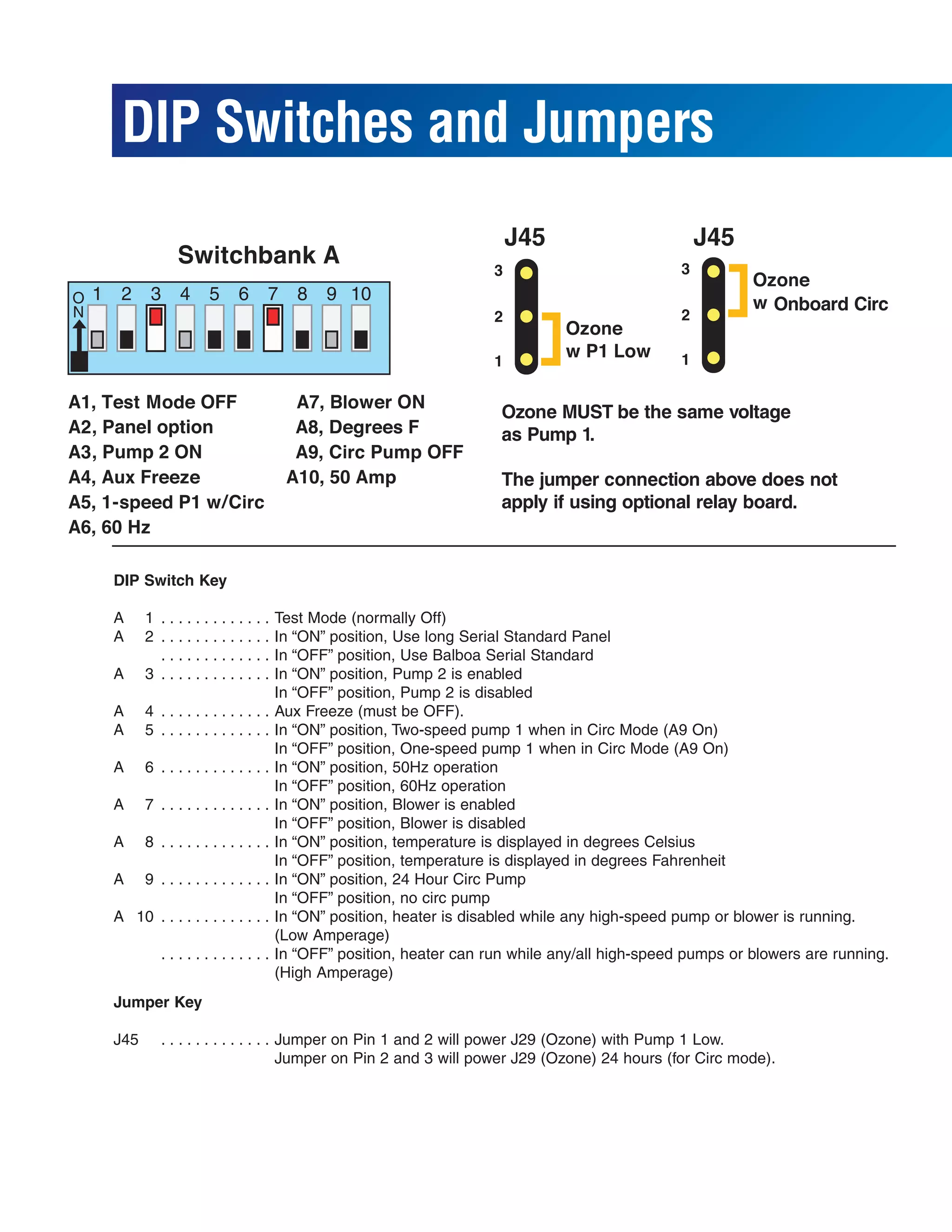
DIP Switches and Jumpers
                                                                   J45                        J45


, Panel option
, Pump 2 ON


  DIP Switch Key

  A     1 .............            Test Mode (normally Off)
  A     2 .............            In “ON” position, Use long Serial Standard Panel
          .............            In “OFF” position, Use Balboa Serial Standard
  A     3 .............            In “ON” position, Pump 2 is enabled
                                   In “OFF” position, Pump 2 is disabled
  A     4 .............            Aux Freeze (must be OFF).
  A     5 .............            In “ON” position, Two-speed pump 1 when in Circ Mode (A9 On)
                                   In “OFF” position, One-speed pump 1 when in Circ Mode (A9 On)
  A     6 .............            In “ON” position, 50Hz operation
                                   In “OFF” position, 60Hz operation
  A     7 .............            In “ON” position, Blower is enabled
                                   In “OFF” position, Blower is disabled
  A     8 .............            In “ON” position, temperature is displayed in degrees Celsius
                                   In “OFF” position, temperature is displayed in degrees Fahrenheit
  A     9 .............            In “ON” position, 24 Hour Circ Pump
                                   In “OFF” position, no circ pump
  A 10 . . . . . . . . . . . . .   In “ON” position, heater is disabled while any high-speed pump or blower is running.
                                   (Low Amperage)
           .............           In “OFF” position, heater can run while any/all high-speed pumps or blowers are running.
                                   (High Amperage)
  Jumper Key

  J45      . . . . . . . . . . . . . Jumper on Pin 1 and 2 will power J29 (Ozone) with Pump 1 Low.
                                     Jumper on Pin 2 and 3 will power J29 (Ozone) 24 hours (for Circ mode).
Ozone Connections
The Ozone Generator and Pump 1 must be the same voltage. J45 should be set on pins
1 and 2 to operate the Ozone Generator with Pump 1 Low.

If you are configuring the Ozone to run 24 hours with a circ pump by setting J45 to pins
2 and 3, connect W13 directly to White AC or Red AC without the other wires.
The pin next to ground determines voltage on these connectors. Ground is typically the
bottom pin of the white connector (if the flat sides of the top and bottom holes are to the
left and the heater connections are on the bottom edge of the board).

The pin next to the bottom (ground) pin of J29 is fed by W13 and sets the voltage in
the connector.

If the board is set up to operate a 120V ozone generator, the connector on the ozone
generator is likely to be configured correctly, but should be compared to the
illustration below.

If a 240V ozone generator is required, be sure the red wire in the ozone cord is
positioned in the connector next to the green ground wire as described below.

Note: A special tool is required to remove the pins from the connector body once they
are snapped in place. Check with your Balboa Account Manager for information on pur-
chasing a pin-removal tool.


Ozone connector configuration for 120V 60Hz
                                                                        B
                                                Black conductor
                  Use this slot for the leftover Red conductor
            Install the White conductor here for 120V ozone
                                                                             G
                                               Green conductor

Ozone connector configuration for 240V 60Hz
                                                                        B
                                               Black conductor
               Use this slot for the leftover White conductor
             Install the Red conductor here for 240V ozone
                                                                             G
                                              Green conductor
Panel Configurations

Vs510 s

  • 1.
    VS510S Hot Sheet SystemPN 53600_02 Balboa Instruments System Model # VSP-VS510S-DCAH Base PCBA PN VS510S – 53601_01 53600_02-97.PDF 04/12/2005
  • 2.
    Circuit Board Configuration 240 Volt AC Connections (RED AC when 120V heater jumper is not attached) 120 Volt AC Connections (WHITE AC)
  • 3.
    J23 & W1. . Pump 1 J6 & W12 . . Pump 2 J29 . . . . . . . Ozone Must be the same volt- age as pump 1 J47 & W2 . . Stereo J17/26 & W7 . . . . . . . . . . Blower J20 . . . . . . . Light 12 V Only Circuit Board Layout Optional Aux Relay Board 240V (J33 & W 12) R B W G K1 W12 J6 J4 to Black AC on Main Board (J62) J2 to J60 on Main Board (EXT – Near Switchbank A) J2 J4
  • 4.
    DIP Switches andJumpers J45 J45 , Panel option , Pump 2 ON DIP Switch Key A 1 ............. Test Mode (normally Off) A 2 ............. In “ON” position, Use long Serial Standard Panel ............. In “OFF” position, Use Balboa Serial Standard A 3 ............. In “ON” position, Pump 2 is enabled In “OFF” position, Pump 2 is disabled A 4 ............. Aux Freeze (must be OFF). A 5 ............. In “ON” position, Two-speed pump 1 when in Circ Mode (A9 On) In “OFF” position, One-speed pump 1 when in Circ Mode (A9 On) A 6 ............. In “ON” position, 50Hz operation In “OFF” position, 60Hz operation A 7 ............. In “ON” position, Blower is enabled In “OFF” position, Blower is disabled A 8 ............. In “ON” position, temperature is displayed in degrees Celsius In “OFF” position, temperature is displayed in degrees Fahrenheit A 9 ............. In “ON” position, 24 Hour Circ Pump In “OFF” position, no circ pump A 10 . . . . . . . . . . . . . In “ON” position, heater is disabled while any high-speed pump or blower is running. (Low Amperage) ............. In “OFF” position, heater can run while any/all high-speed pumps or blowers are running. (High Amperage) Jumper Key J45 . . . . . . . . . . . . . Jumper on Pin 1 and 2 will power J29 (Ozone) with Pump 1 Low. Jumper on Pin 2 and 3 will power J29 (Ozone) 24 hours (for Circ mode).
  • 5.
    Ozone Connections The OzoneGenerator and Pump 1 must be the same voltage. J45 should be set on pins 1 and 2 to operate the Ozone Generator with Pump 1 Low. If you are configuring the Ozone to run 24 hours with a circ pump by setting J45 to pins 2 and 3, connect W13 directly to White AC or Red AC without the other wires. The pin next to ground determines voltage on these connectors. Ground is typically the bottom pin of the white connector (if the flat sides of the top and bottom holes are to the left and the heater connections are on the bottom edge of the board). The pin next to the bottom (ground) pin of J29 is fed by W13 and sets the voltage in the connector. If the board is set up to operate a 120V ozone generator, the connector on the ozone generator is likely to be configured correctly, but should be compared to the illustration below. If a 240V ozone generator is required, be sure the red wire in the ozone cord is positioned in the connector next to the green ground wire as described below. Note: A special tool is required to remove the pins from the connector body once they are snapped in place. Check with your Balboa Account Manager for information on pur- chasing a pin-removal tool. Ozone connector configuration for 120V 60Hz B Black conductor Use this slot for the leftover Red conductor Install the White conductor here for 120V ozone G Green conductor Ozone connector configuration for 240V 60Hz B Black conductor Use this slot for the leftover White conductor Install the Red conductor here for 240V ozone G Green conductor
  • 6.