© 2015 VMware Inc. All rights reserved.
Why Choose vCloud Suite Std Over vSOM
Anil Gupta (AJ), vExpert
Blog: www.walkonblock.com
Upcoming Blog: www.letsvrealize.com
Some screens may vary as per edition
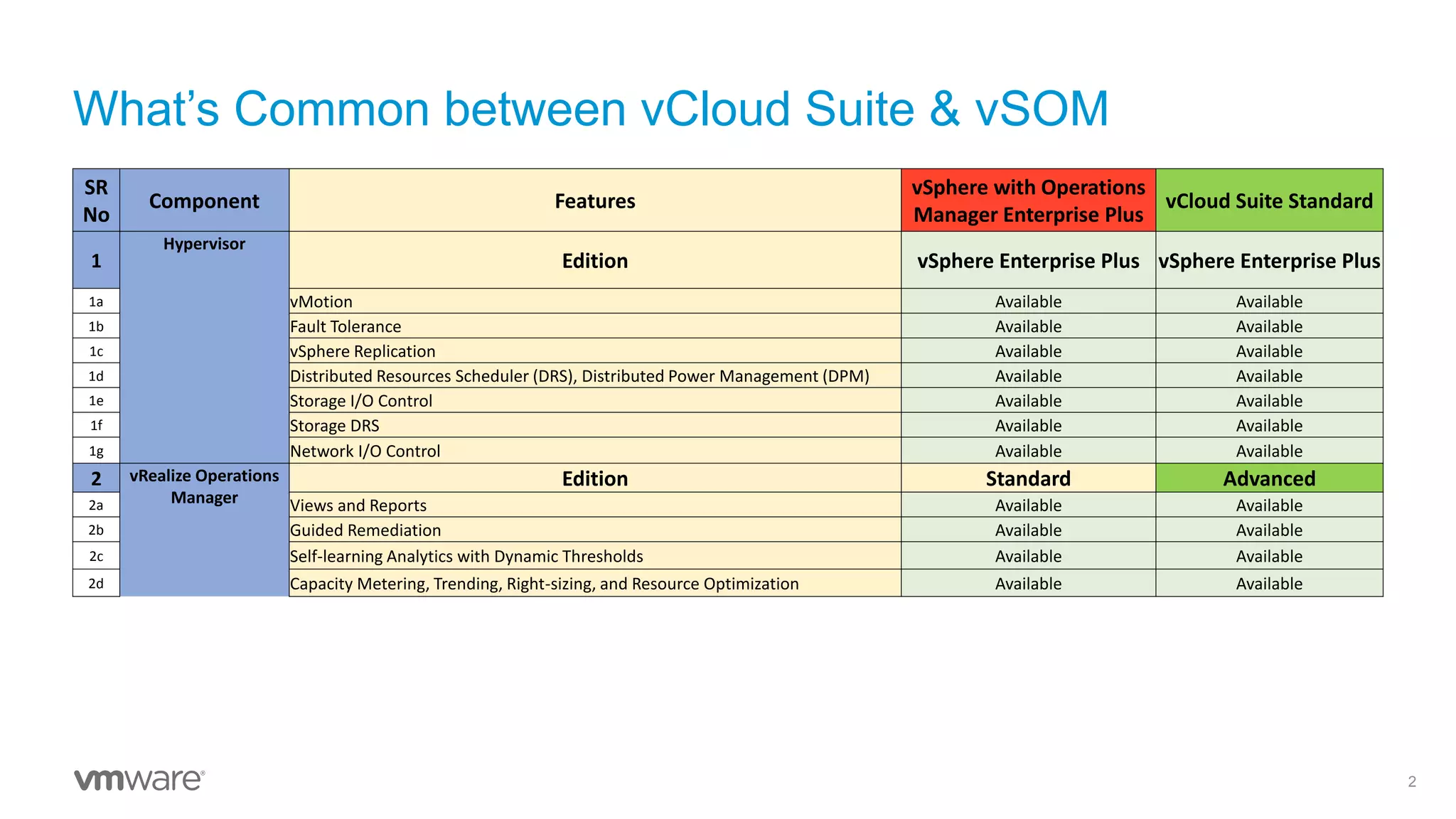
What’s Common between vCloud Suite & vSOM
2
SR
No
Component Features
vSphere with Operations
Manager Enterprise Plus
vCloud Suite Standard
1
Hypervisor
Edition vSphere Enterprise Plus vSphere Enterprise Plus
1a vMotion Available Available
1b Fault Tolerance Available Available
1c vSphere Replication Available Available
1d Distributed Resources Scheduler (DRS), Distributed Power Management (DPM) Available Available
1e Storage I/O Control Available Available
1f Storage DRS Available Available
1g Network I/O Control Available Available
2 vRealize Operations
Manager
Edition Standard Advanced
2a Views and Reports Available Available
2b Guided Remediation Available Available
2c Self-learning Analytics with Dynamic Thresholds Available Available
2d Capacity Metering, Trending, Right-sizing, and Resource Optimization Available Available
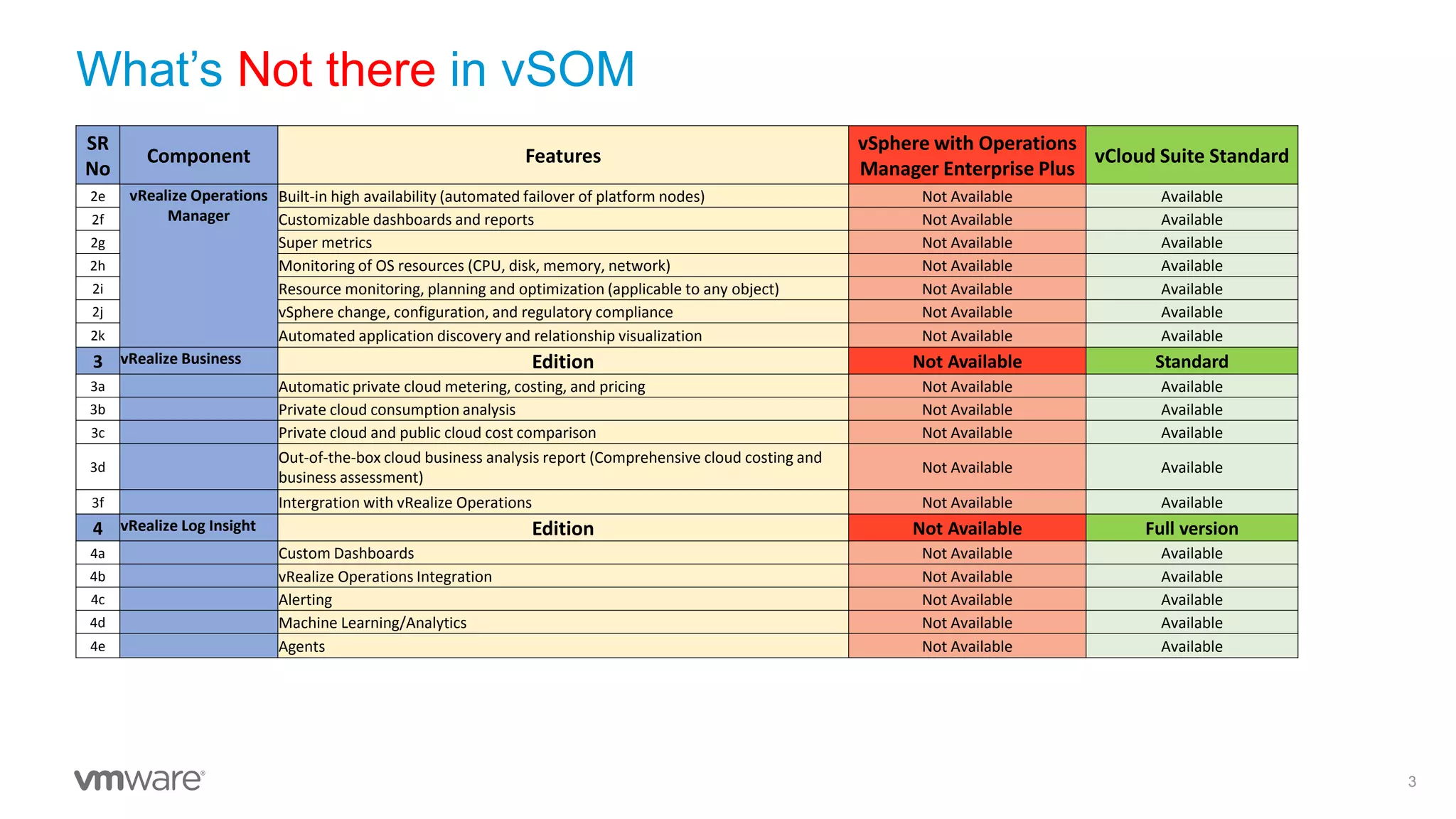
What’s Not there in vSOM
3
SR
No
Component Features
vSphere with Operations
Manager Enterprise Plus
vCloud Suite Standard
2e vRealize Operations
Manager
Built-in high availability (automated failover of platform nodes) Not Available Available
2f Customizable dashboards and reports Not Available Available
2g Super metrics Not Available Available
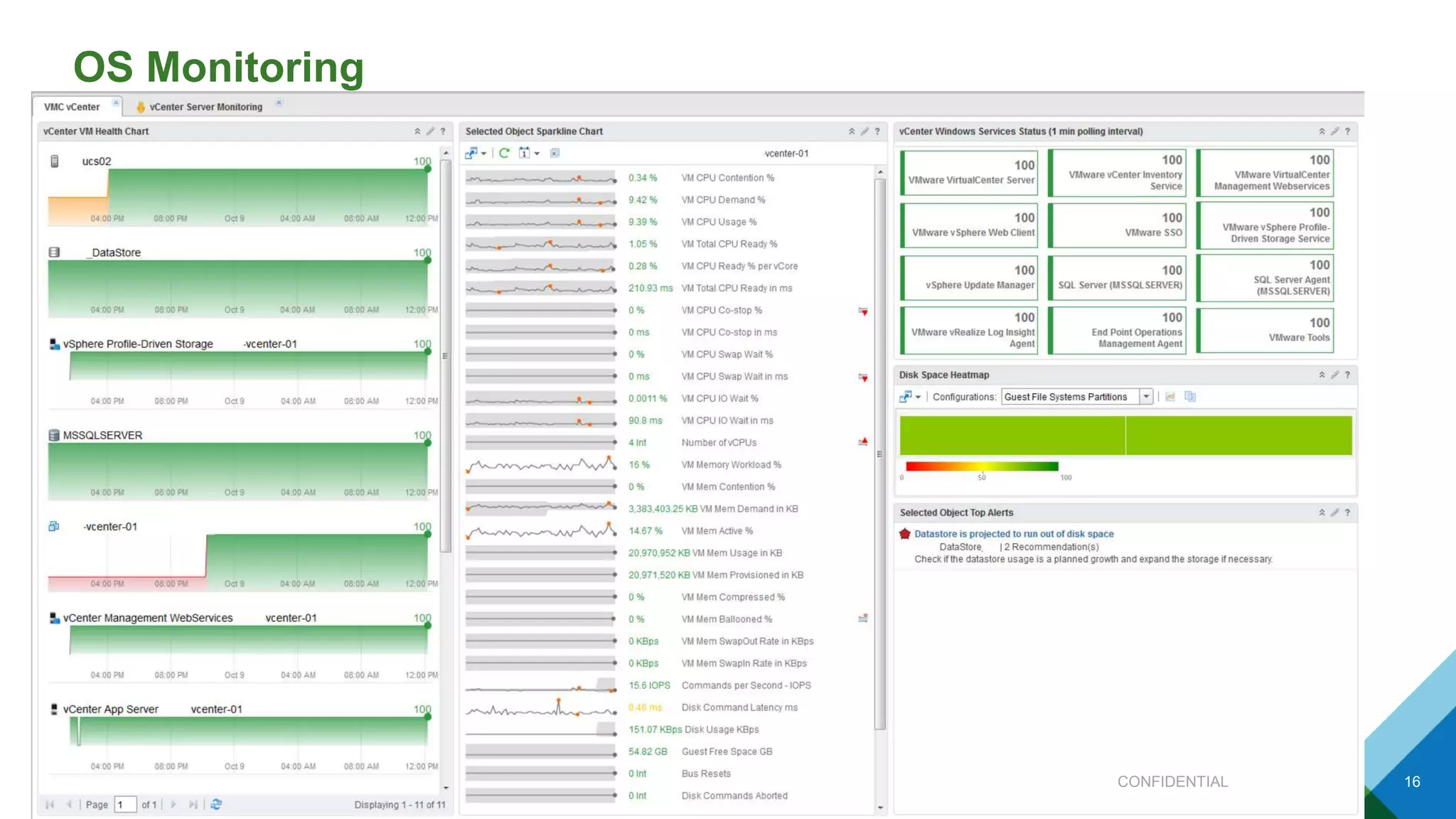
2h Monitoring of OS resources (CPU, disk, memory, network) Not Available Available
2i Resource monitoring, planning and optimization (applicable to any object) Not Available Available
2j vSphere change, configuration, and regulatory compliance Not Available Available
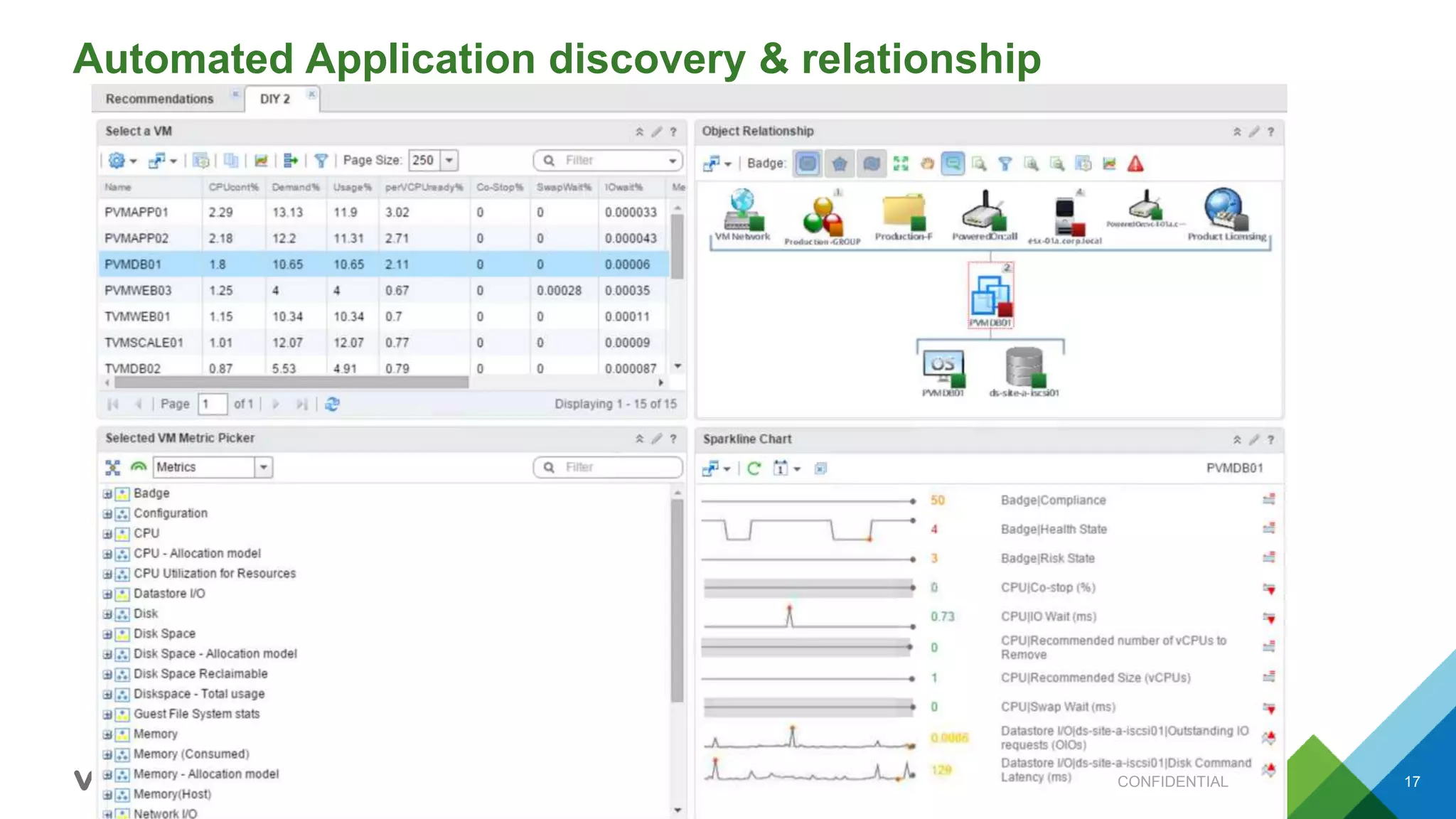
2k Automated application discovery and relationship visualization Not Available Available
3 vRealize Business Edition Not Available Standard
3a Automatic private cloud metering, costing, and pricing Not Available Available
3b Private cloud consumption analysis Not Available Available
3c Private cloud and public cloud cost comparison Not Available Available
3d
Out-of-the-box cloud business analysis report (Comprehensive cloud costing and
business assessment)
Not Available Available
3f Intergration with vRealize Operations Not Available Available
4 vRealize Log Insight Edition Not Available Full version
4a Custom Dashboards Not Available Available
4b vRealize Operations Integration Not Available Available
4c Alerting Not Available Available
4d Machine Learning/Analytics Not Available Available
4e Agents Not Available Available
© 2015 VMware Inc. All rights reserved.
vRealize Operations Standard
The information on the roadmap is intended to outline our general product direction and it should not be relied on in
making a purchasing decision. It is for informational purposes only and may not be incorporated into any contract.
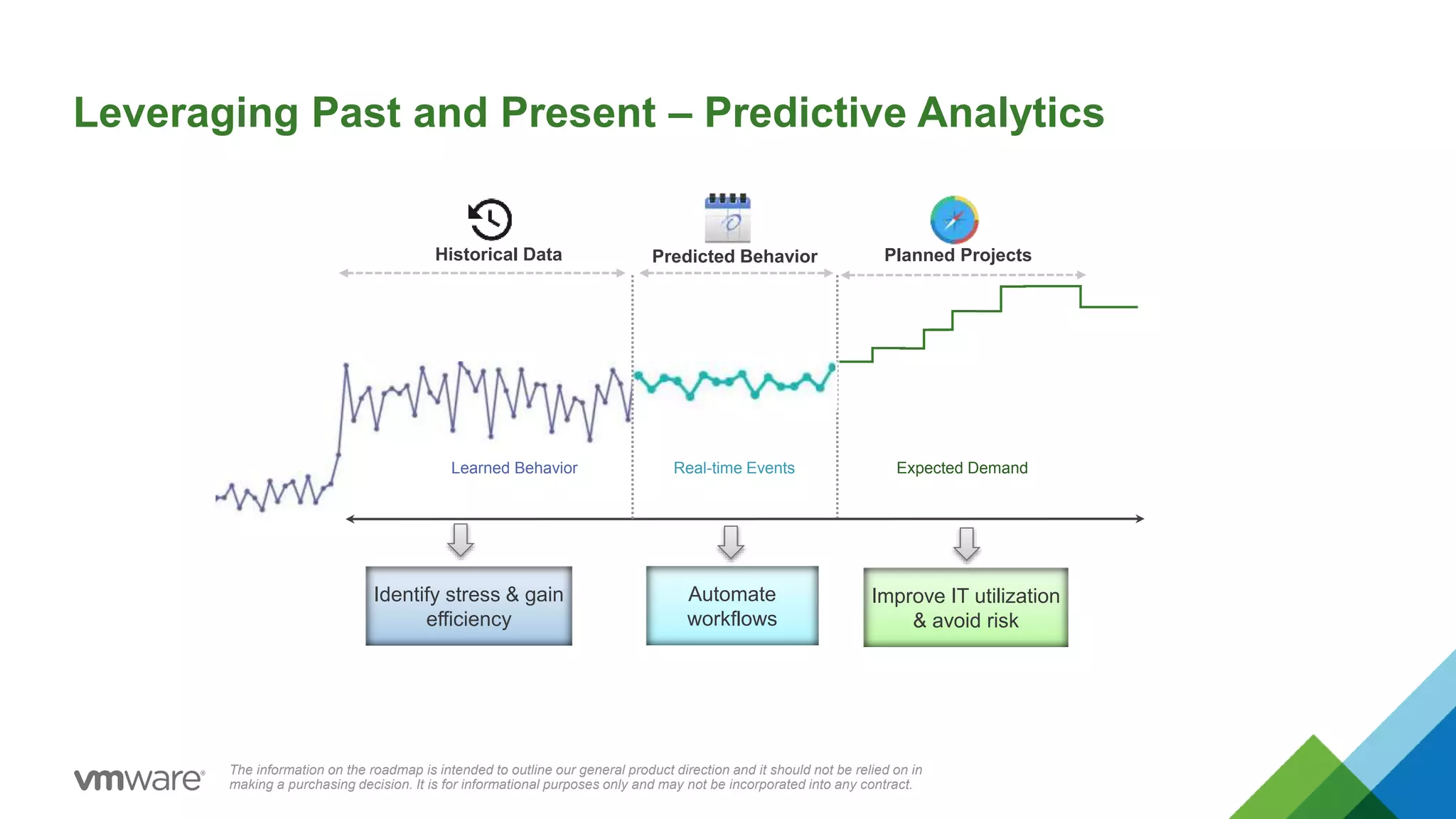
Learned Behavior
Historical Data Planned ProjectsPredicted Behavior
Leveraging Past and Present – Predictive Analytics
Expected DemandReal-time Events
Automate
workflows
Improve IT utilization
& avoid risk
Identify stress & gain
efficiency
The information on the roadmap is intended to outline our general product direction and it should not be relied on in
making a purchasing decision. It is for informational purposes only and may not be incorporated into any contract.
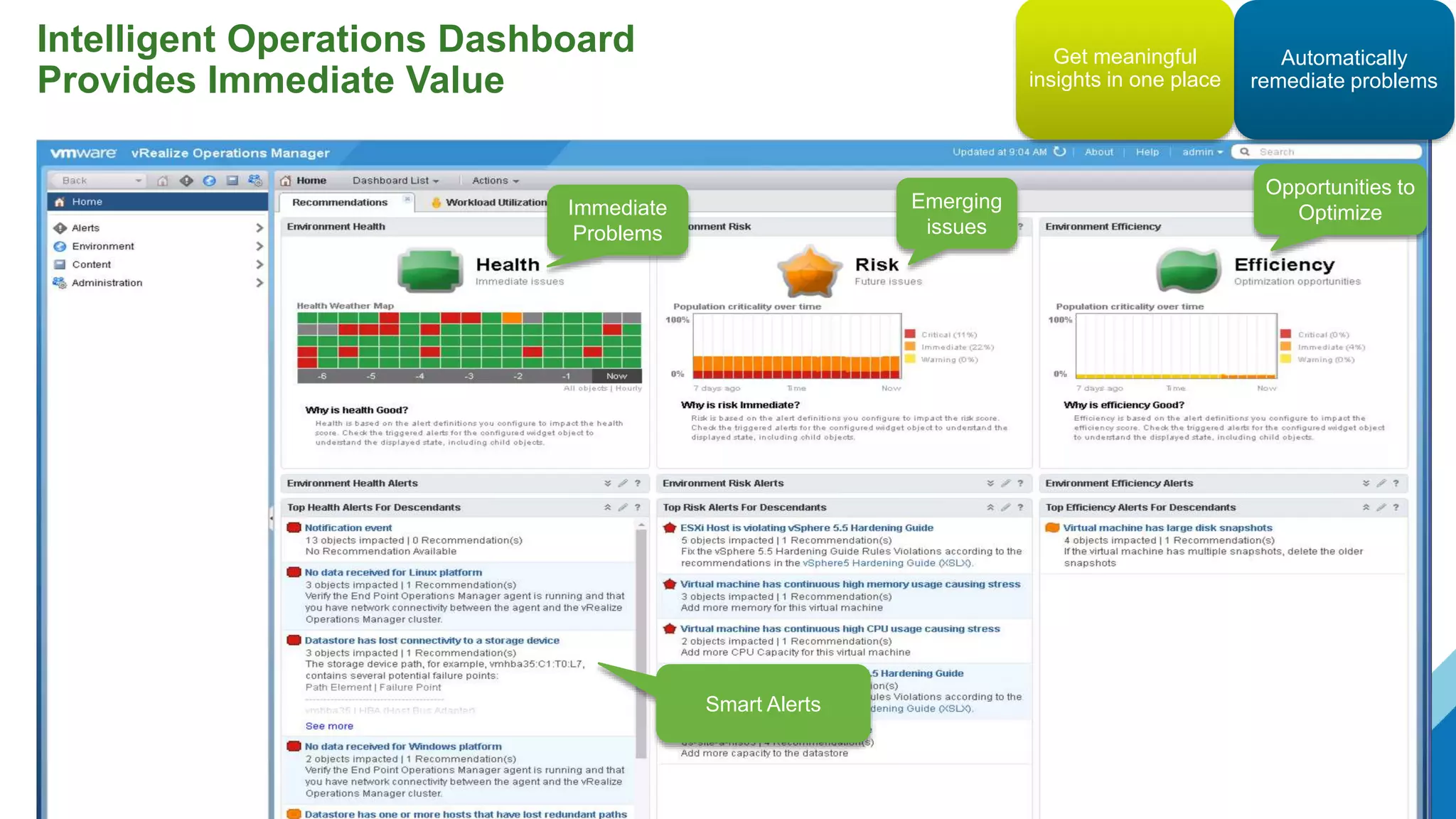
Intelligent Operations Dashboard
Provides Immediate Value
Immediate
Problems
Emerging
issues
Opportunities to
Optimize
Smart Alerts
Automatically
remediate problems
Get meaningful
insights in one place
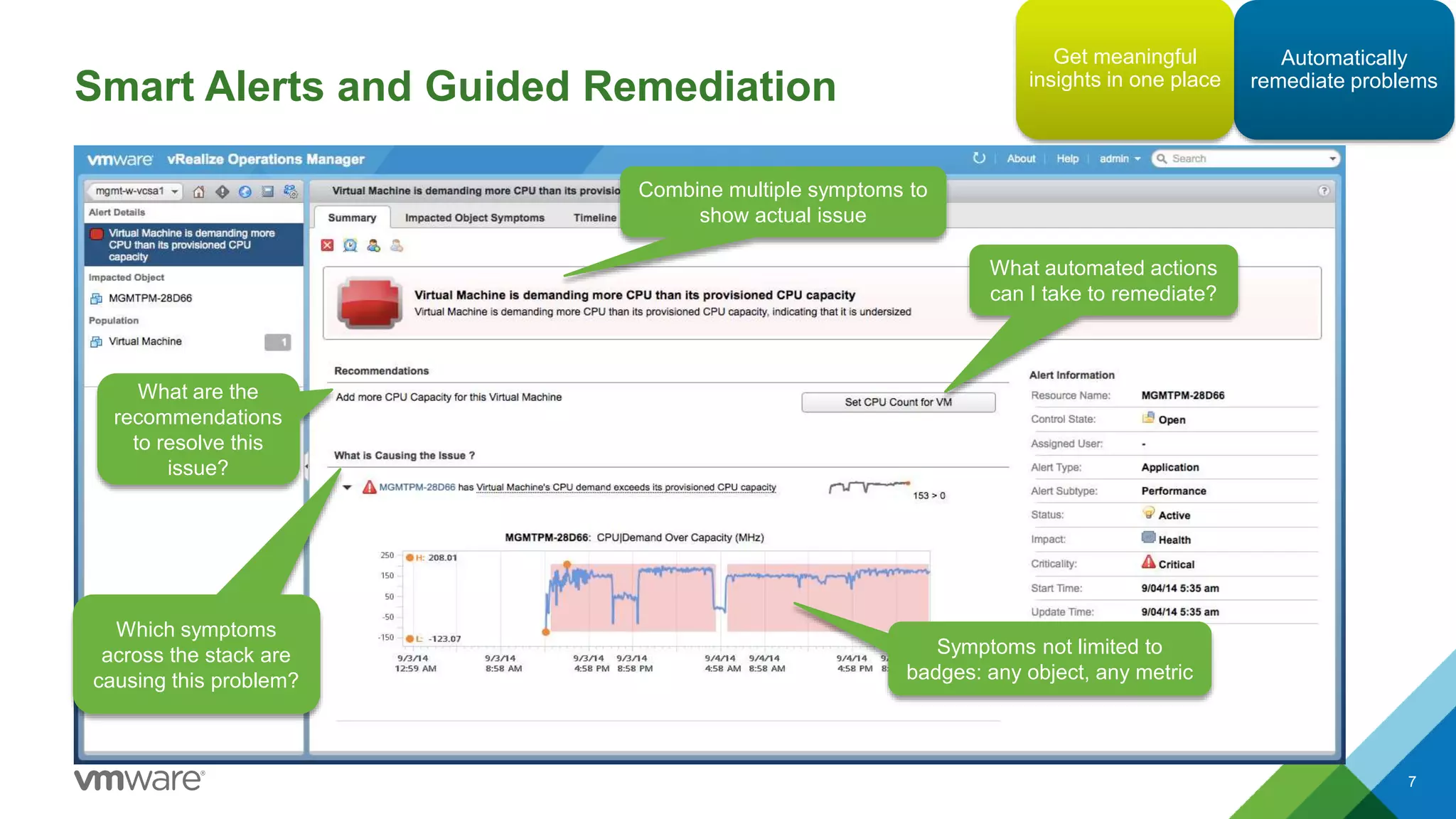
Smart Alerts and Guided Remediation
7
Combine multiple symptoms to
show actual issue
Symptoms not limited to
badges: any object, any metric
What are the
recommendations
to resolve this
issue?
What automated actions
can I take to remediate?
Which symptoms
across the stack are
causing this problem?
Automatically
remediate problems
Get meaningful
insights in one place
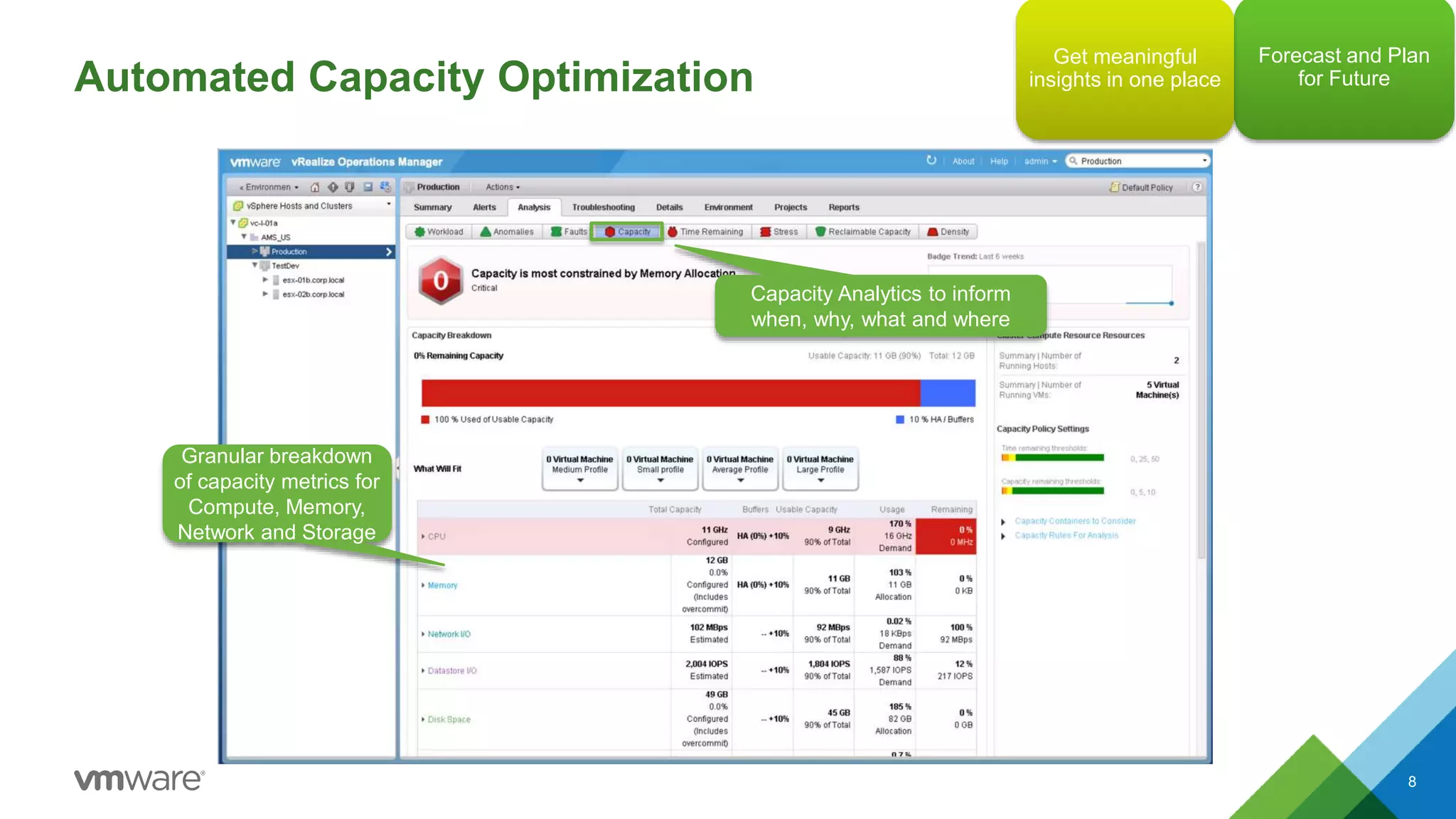
Automated Capacity Optimization
8
Capacity Analytics to inform
when, why, what and where
Granular breakdown
of capacity metrics for
Compute, Memory,
Network and Storage
Forecast and Plan
for Future
Get meaningful
insights in one place
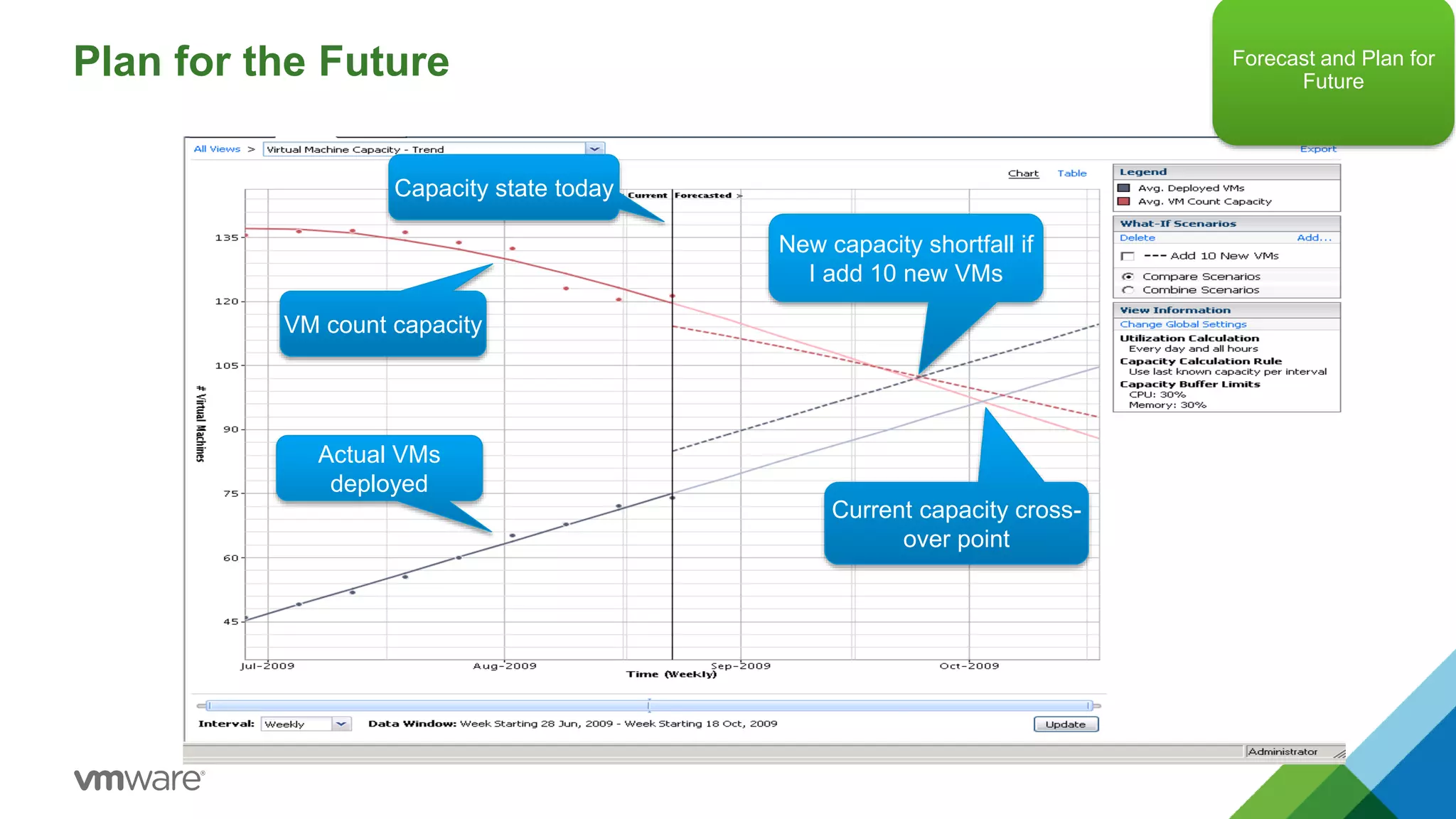
Plan for the Future
Current capacity cross-
over point
Actual VMs
deployed
VM count capacity
Capacity state today
New capacity shortfall if
I add 10 new VMs
Forecast and Plan for
Future
© 2015 VMware Inc. All rights reserved.
vRealize Operations Advanced
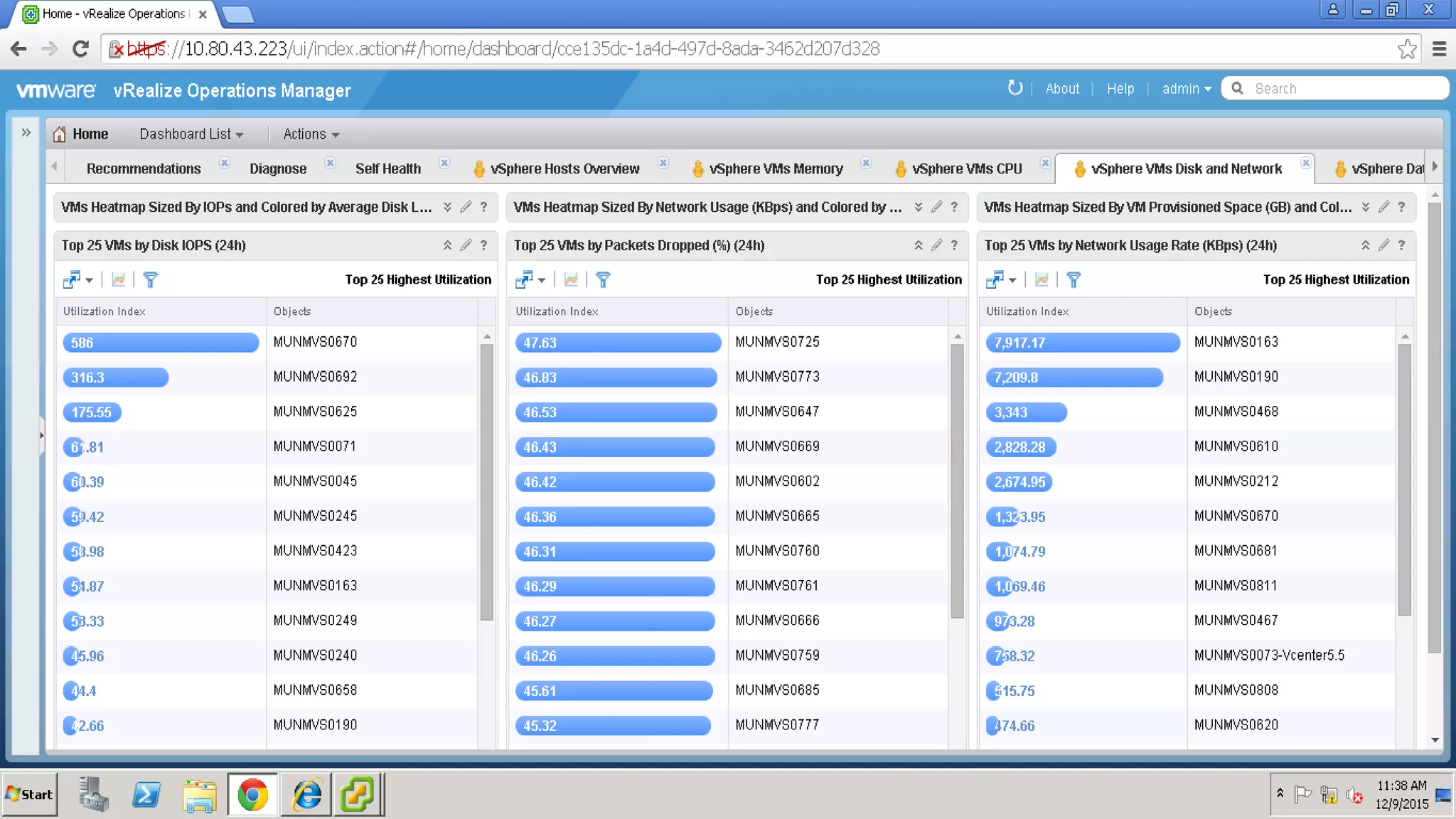
vRealize Operations - Top 25 VM’s by IOPS, Network Usage, Packet Drops
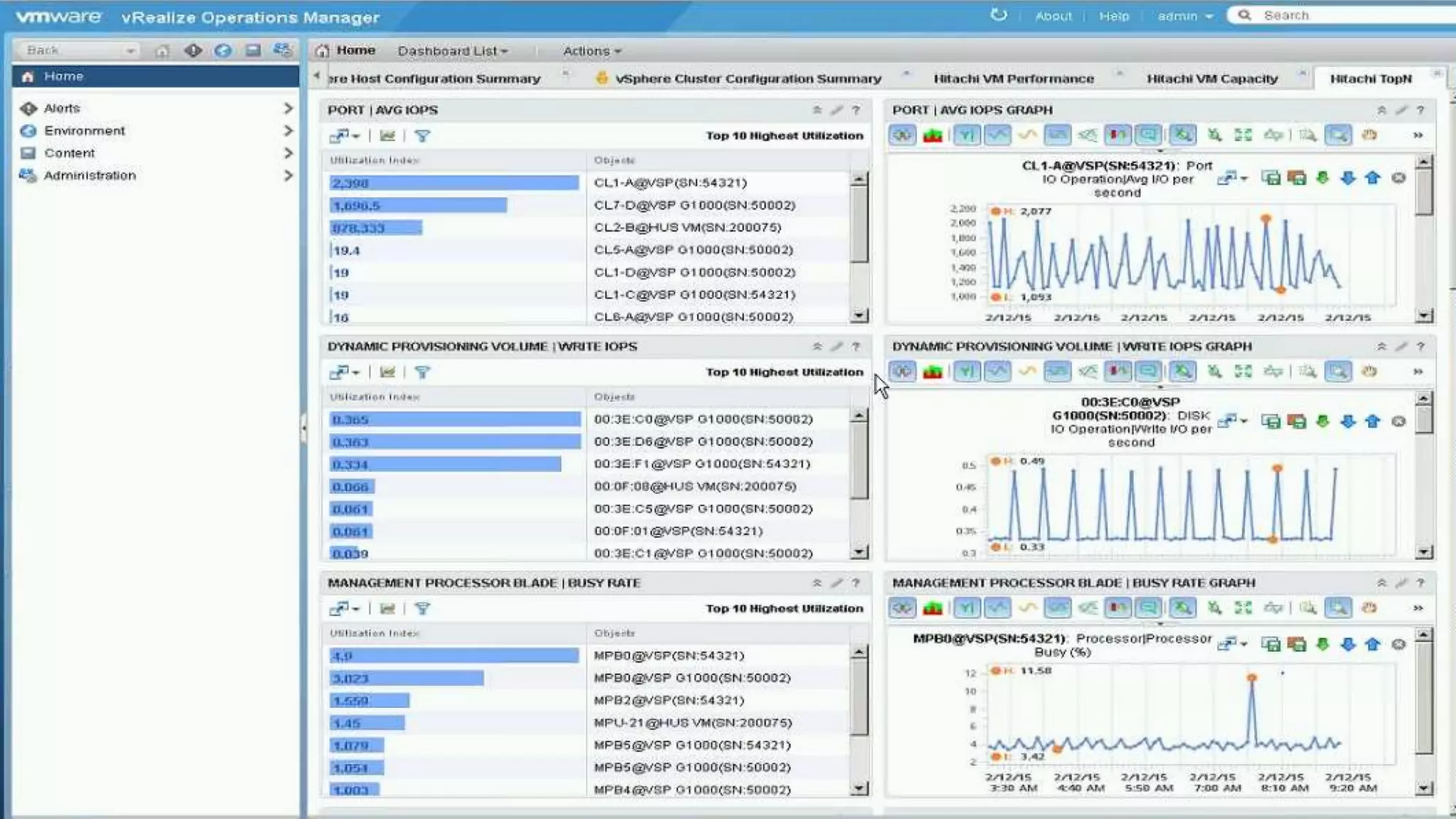
vRealize Operations - Storage Dashboard – Avg IOPS, Write IOPS …
13
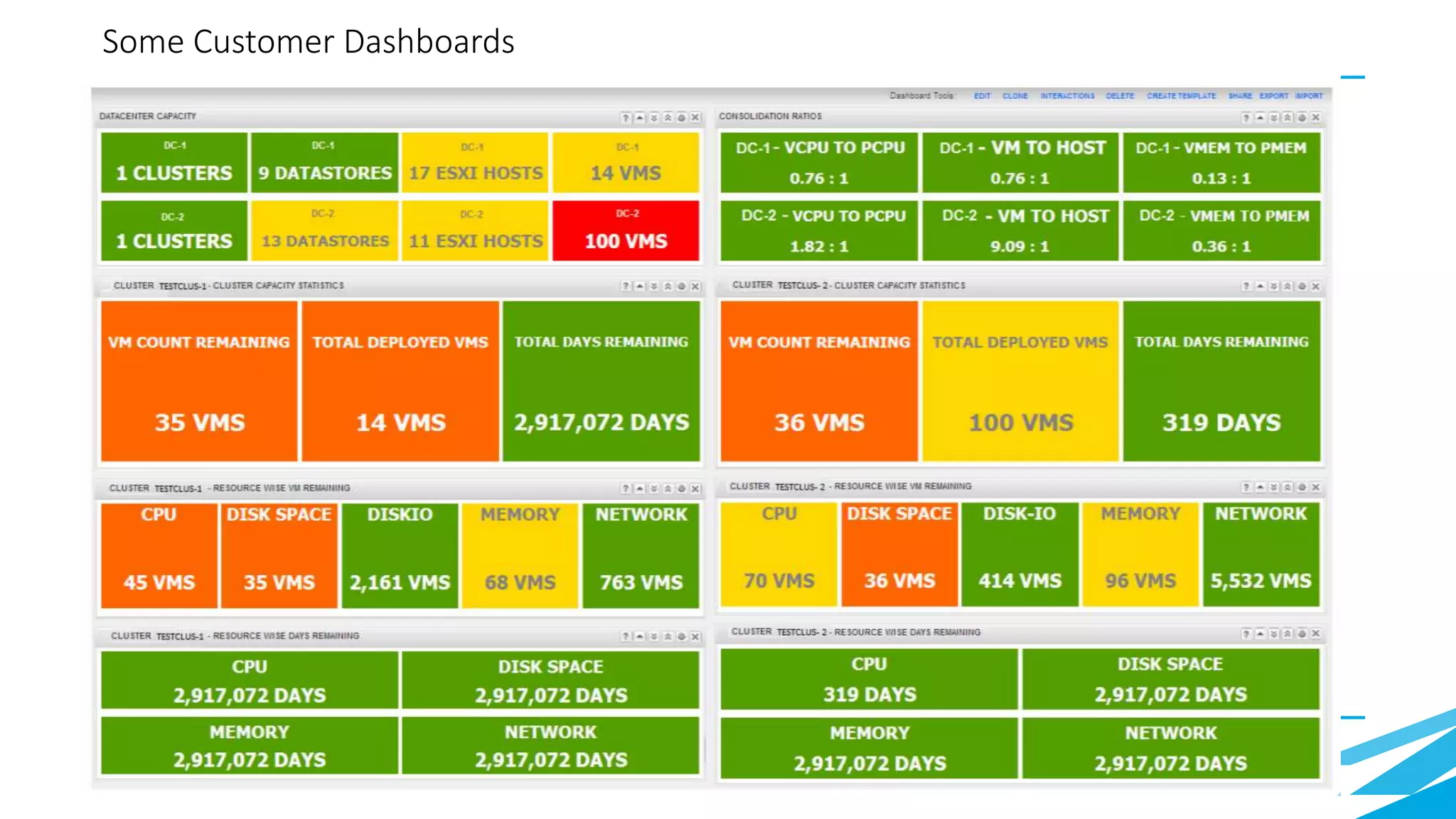
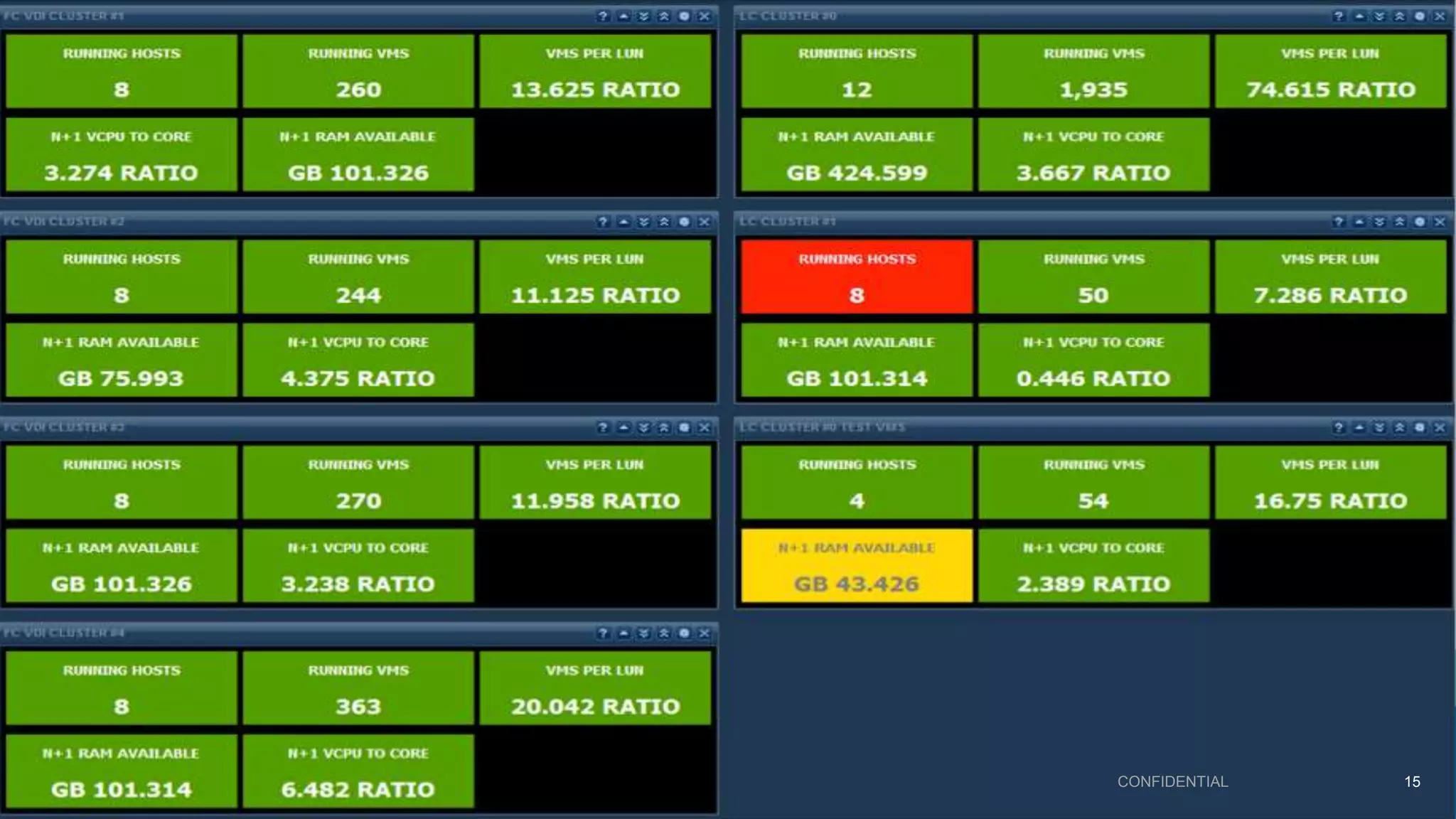
Some Customer Dashboards
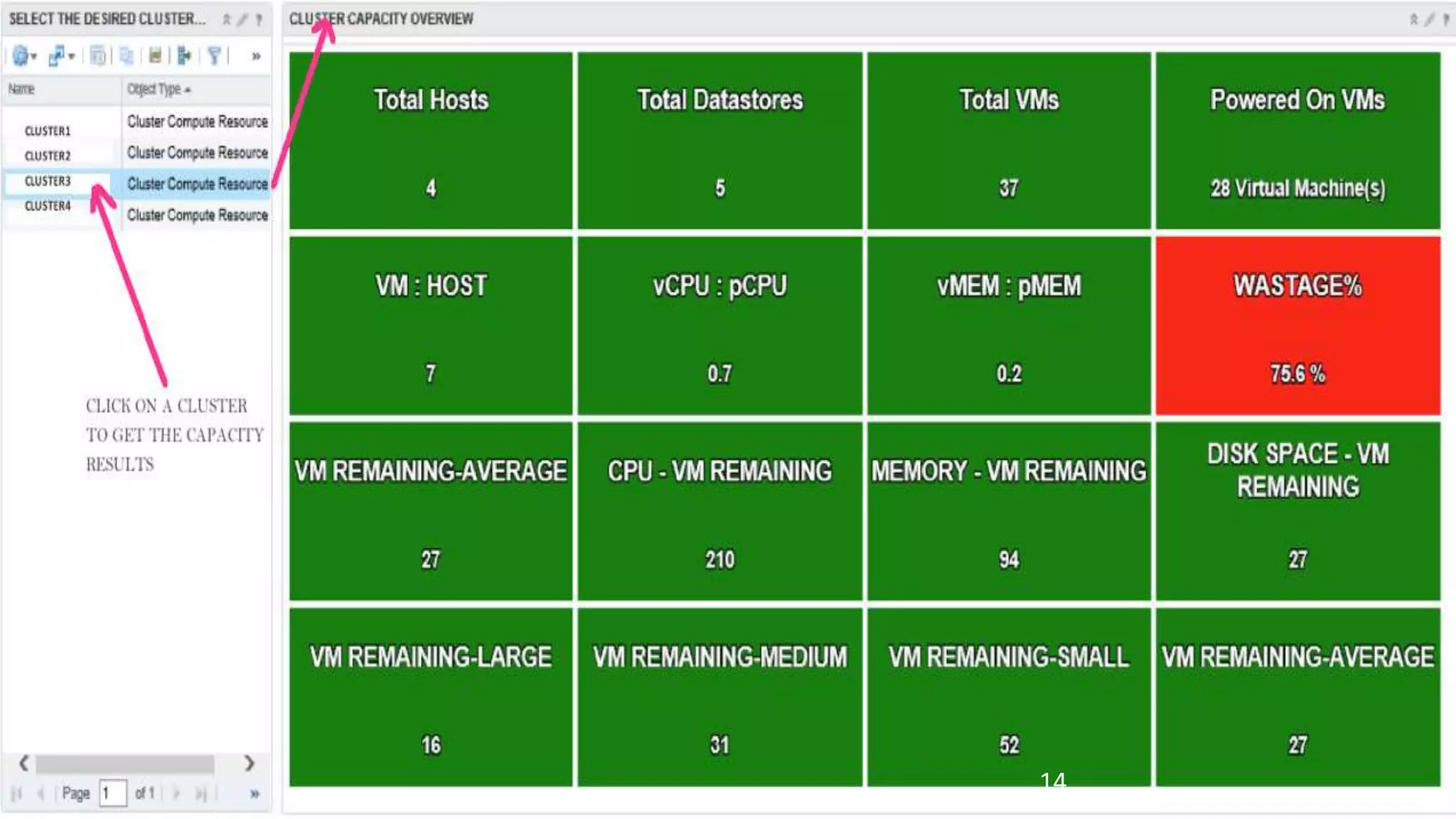
vRealize Operations - Cluster Capacity Overview
14
CONFIDENTIAL 15
OS Monitoring
CONFIDENTIAL 16
Automated Application discovery & relationship
CONFIDENTIAL 17
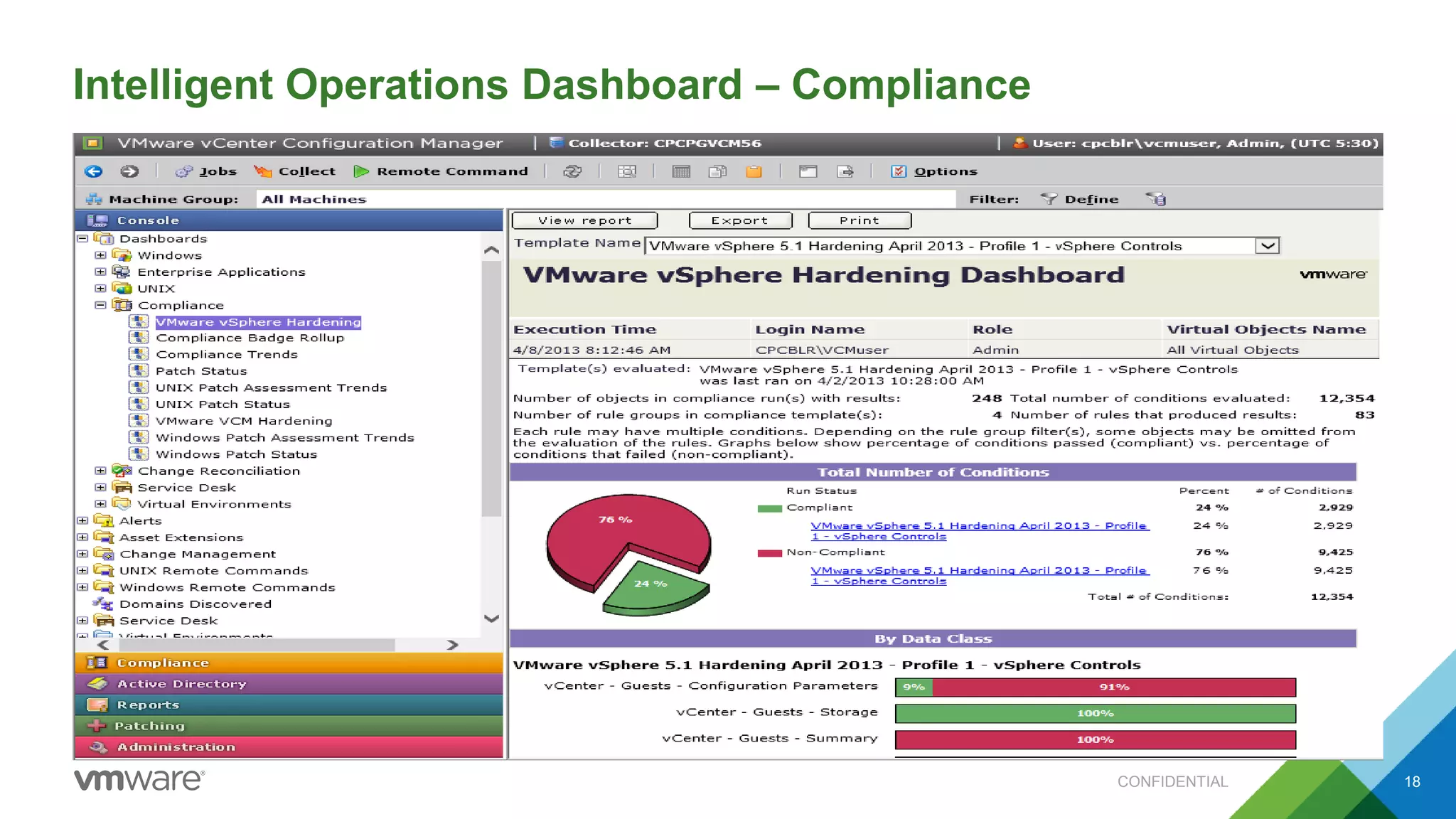
Intelligent Operations Dashboard – Compliance
CONFIDENTIAL 18
© 2015 VMware Inc. All rights reserved.
After Event – Log Analysis
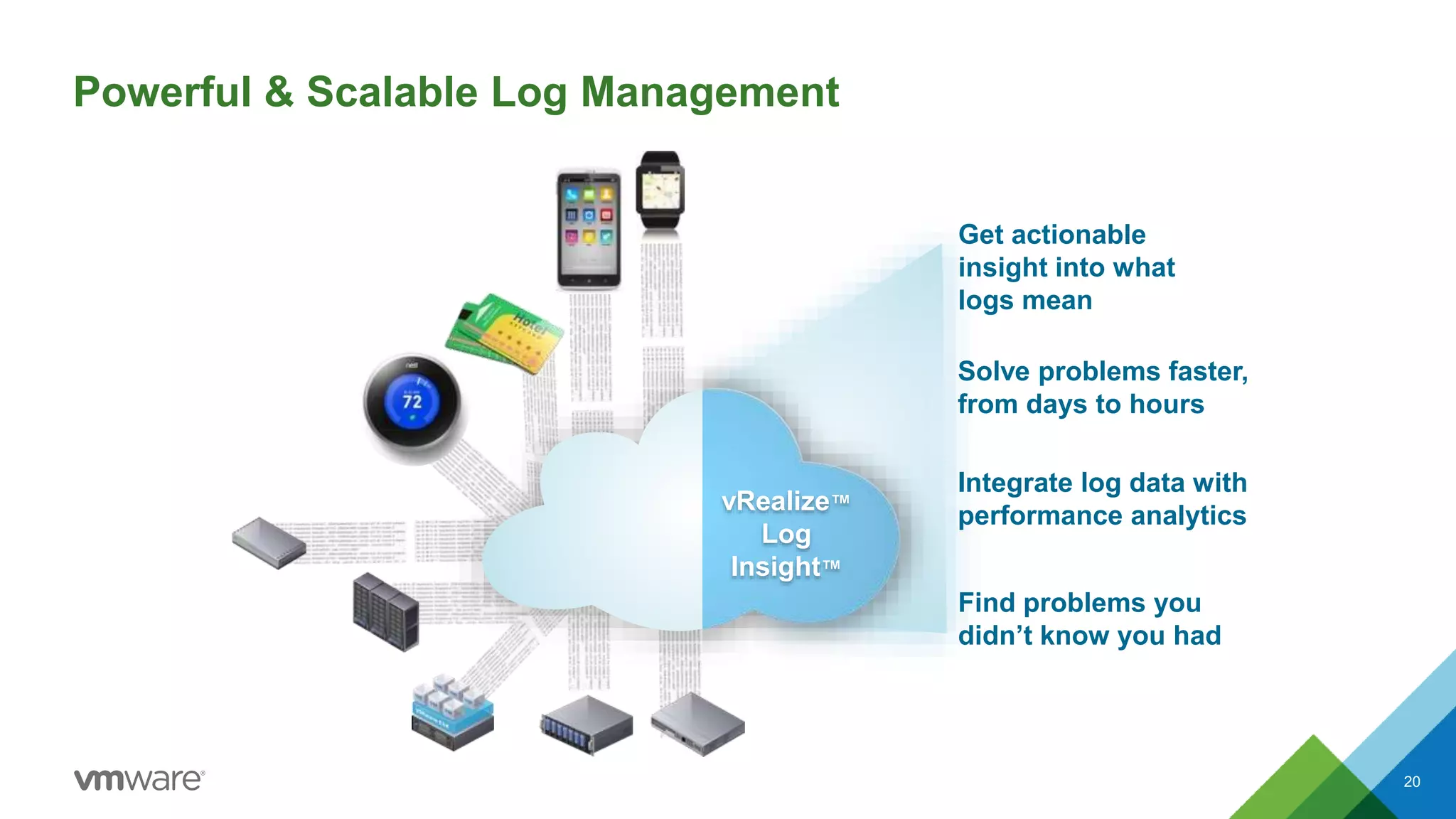
Powerful & Scalable Log Management
20
Solve problems faster,
from days to hours
vRealize™
Log
Insight™
Find problems you
didn’t know you had
Get actionable
insight into what
logs mean
Integrate log data with
performance analytics
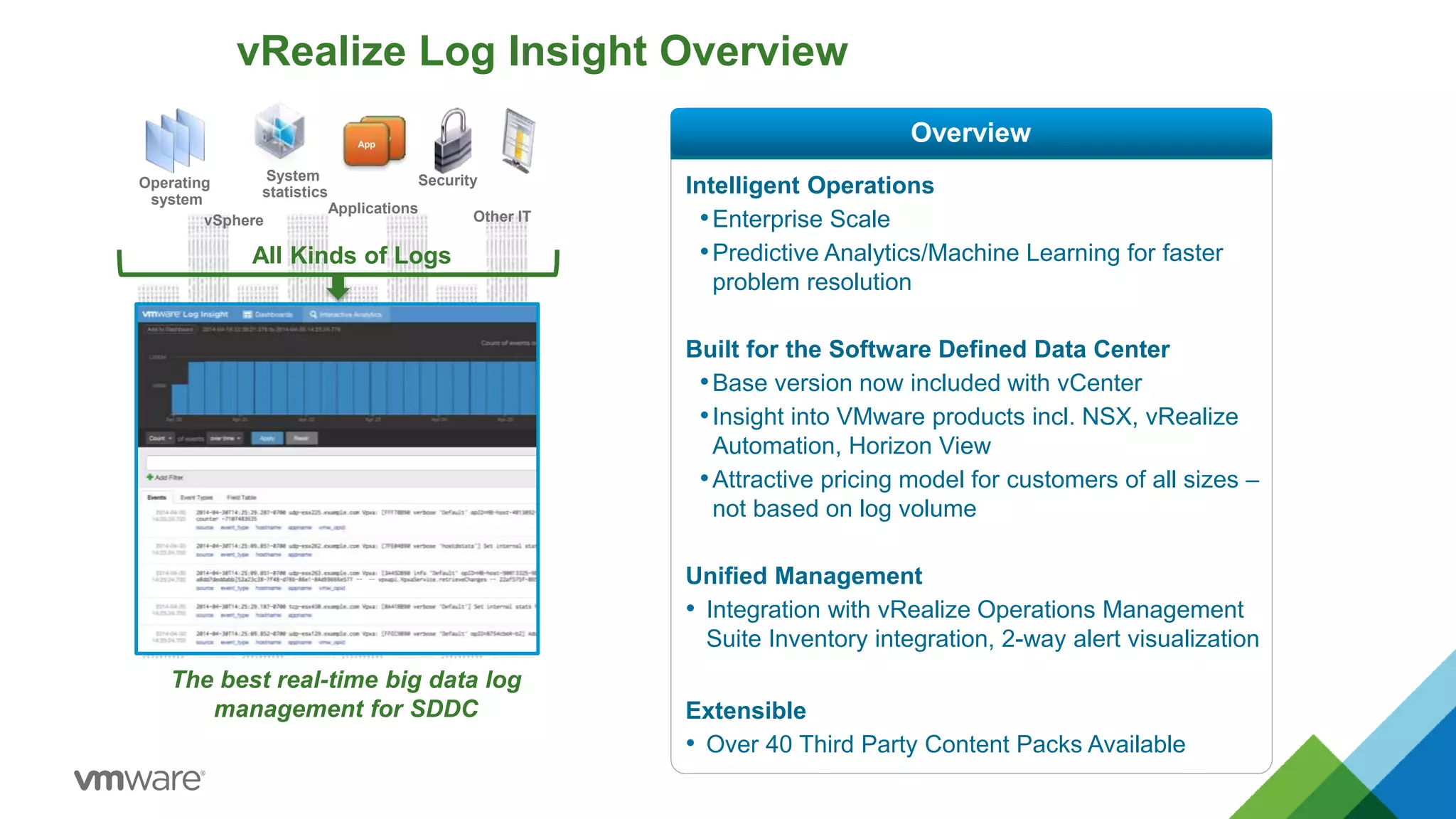
vRealize Log Insight Overview
Intelligent Operations
•Enterprise Scale
•Predictive Analytics/Machine Learning for faster
problem resolution
Built for the Software Defined Data Center
•Base version now included with vCenter
•Insight into VMware products incl. NSX, vRealize
Automation, Horizon View
•Attractive pricing model for customers of all sizes –
not based on log volume
Unified Management
• Integration with vRealize Operations Management
Suite Inventory integration, 2-way alert visualization
Extensible
• Over 40 Third Party Content Packs Available
The best real-time big data log
management for SDDC
Operating
system
vSphere
System
statistics
Applications
Security
Other IT
All Kinds of Logs
Log Insight 2.0
Analyze
Discover
Search
Visualize
IT Operations
Security
Compliance
40B events 10 event types
…by machine learning
OverviewApp
App
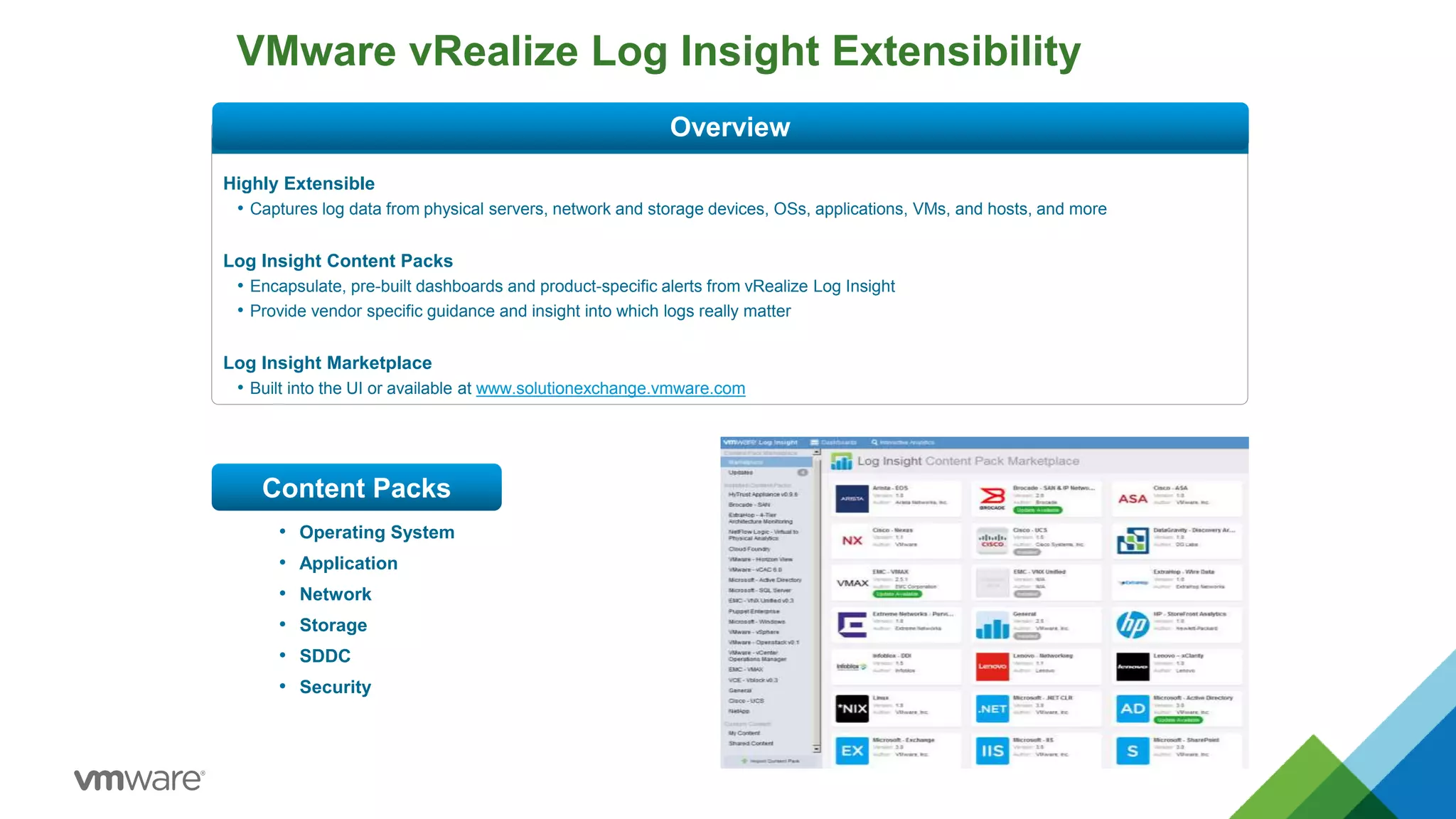
VMware vRealize Log Insight Extensibility
Highly Extensible
• Captures log data from physical servers, network and storage devices, OSs, applications, VMs, and hosts, and more
Log Insight Content Packs
• Encapsulate, pre-built dashboards and product-specific alerts from vRealize Log Insight
• Provide vendor specific guidance and insight into which logs really matter
Log Insight Marketplace
• Built into the UI or available at www.solutionexchange.vmware.com
Content Packs
Overview
• Operating System
• Application
• Network
• Storage
• SDDC
• Security
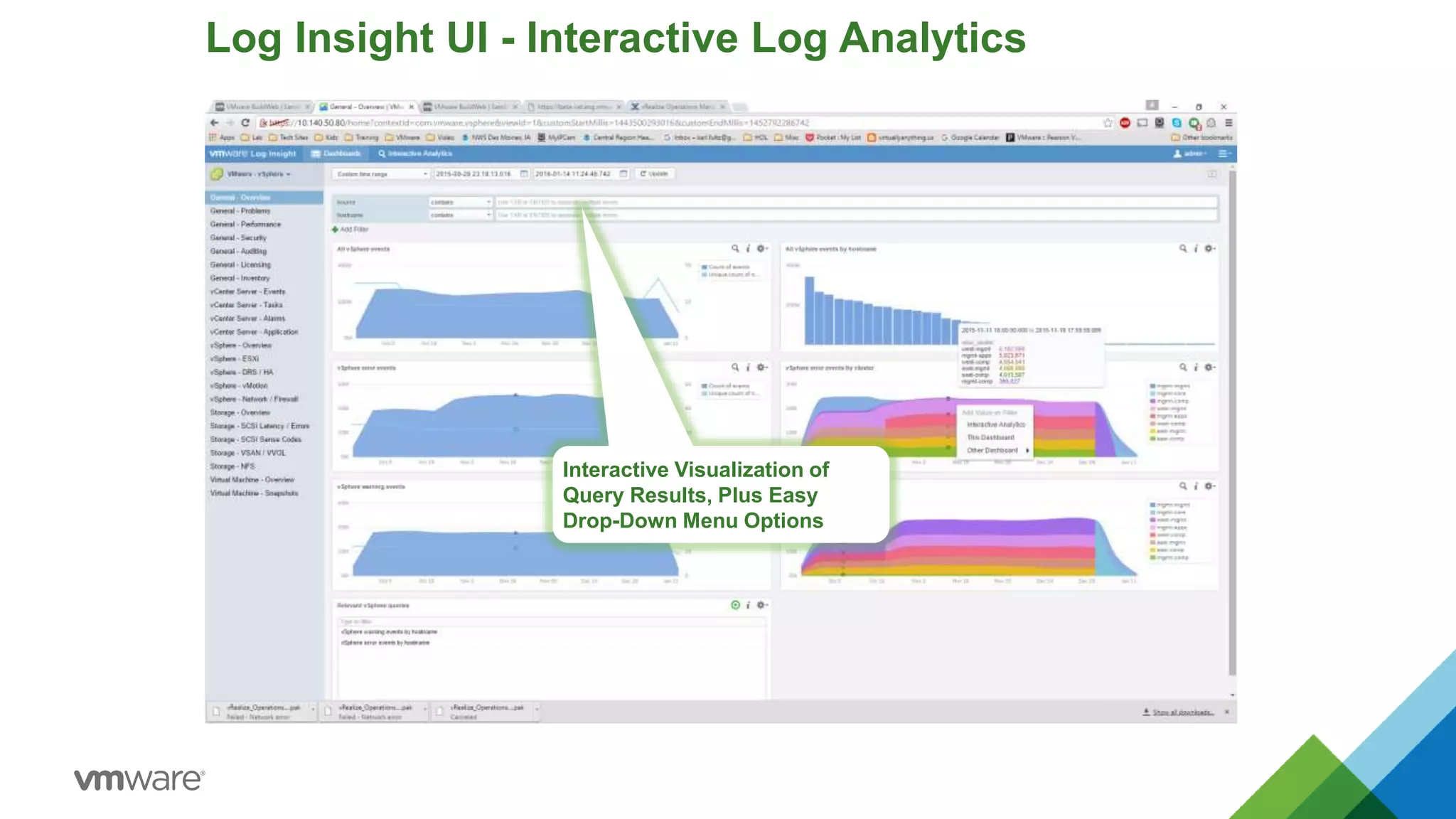
Log Insight UI - Interactive Log Analytics
Interactive Visualization of
Query Results, Plus Easy
Drop-Down Menu Options
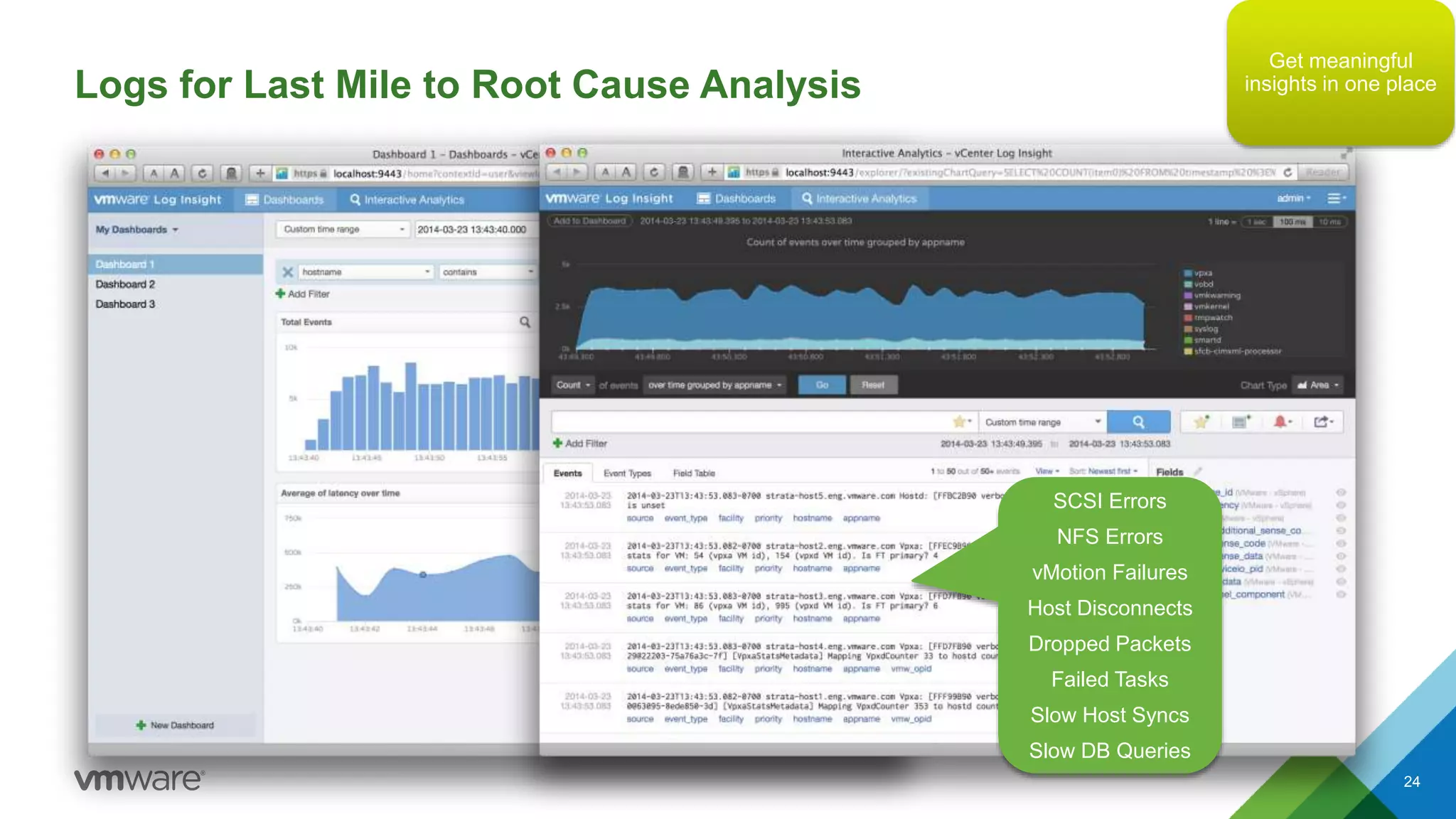
Logs for Last Mile to Root Cause Analysis
24
SCSI Errors
NFS Errors
vMotion Failures
Host Disconnects
Dropped Packets
Failed Tasks
Slow Host Syncs
Slow DB Queries
Get meaningful
insights in one place
© 2015 VMware Inc. All rights reserved.
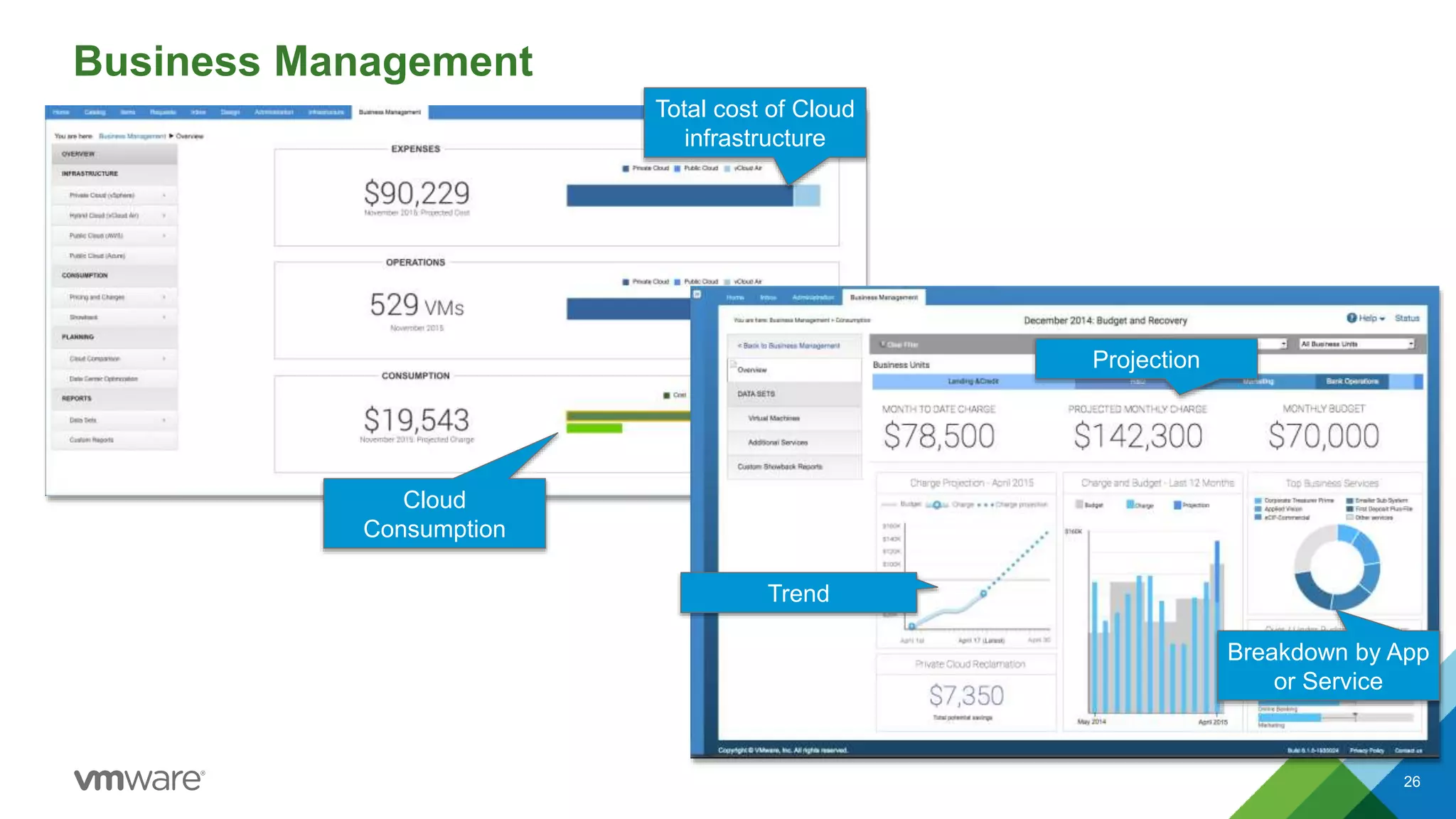
vRealize Business
Business Management
26
Total cost of Cloud
infrastructure
Cloud
Consumption
Projection
Trend
Breakdown by App
or Service
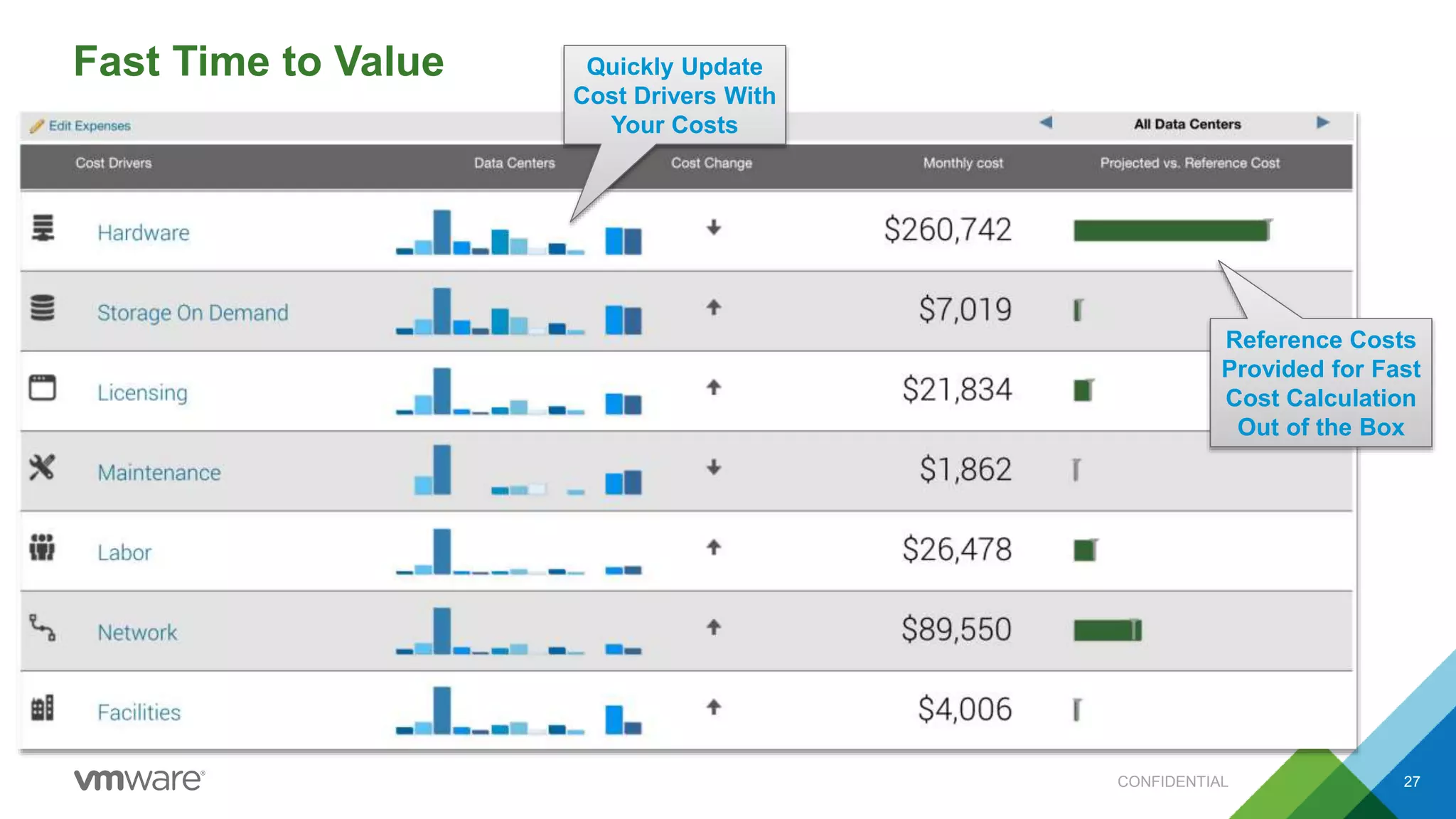
Fast Time to Value
CONFIDENTIAL 27
Quickly Update
Cost Drivers With
Your Costs
Reference Costs
Provided for Fast
Cost Calculation
Out of the Box
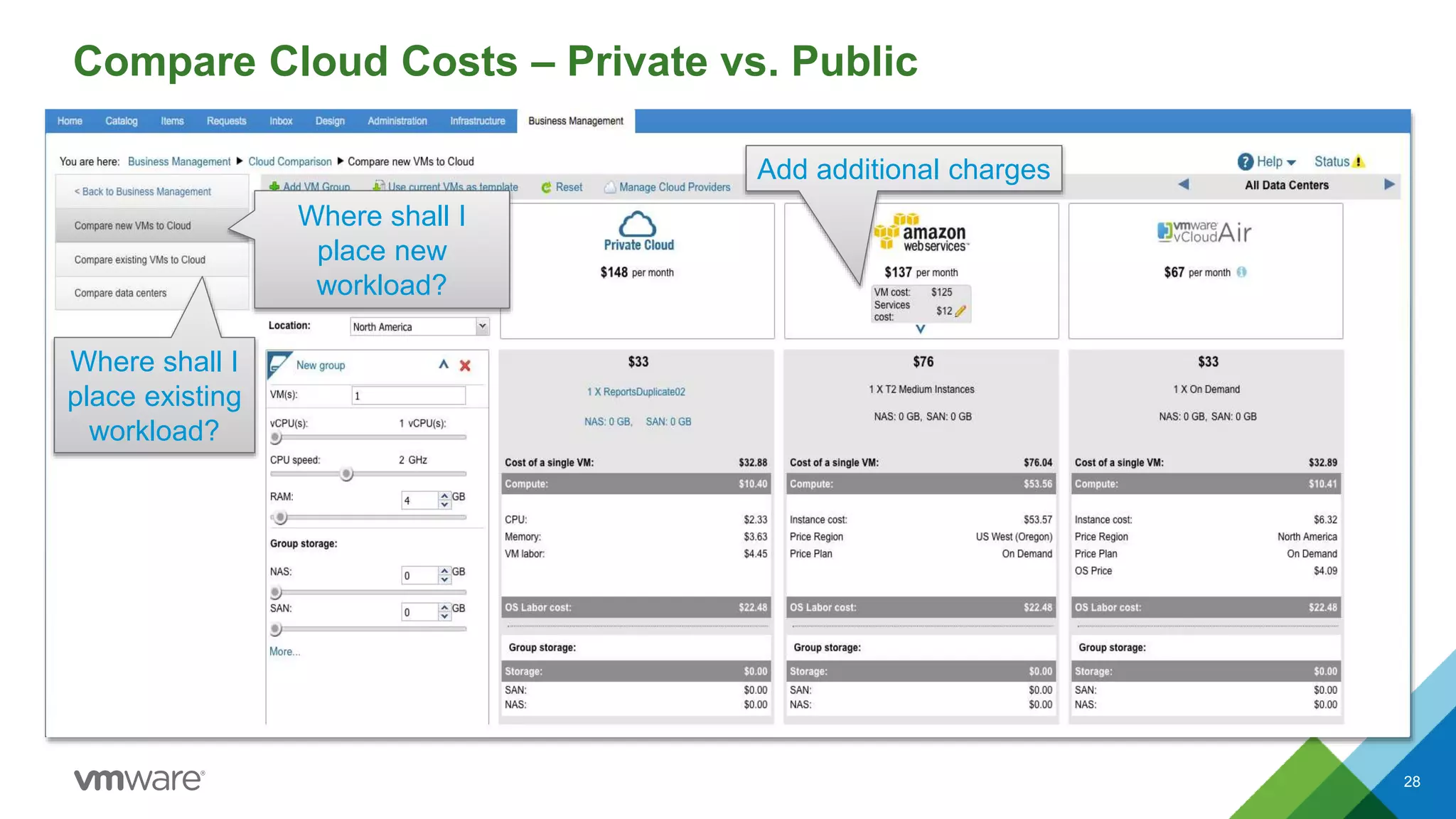
Compare Cloud Costs – Private vs. Public
28
Where shall I
place existing
workload?
Where shall I
place new
workload?
Add additional charges
© 2015 VMware Inc. All rights reserved.
Why VMware
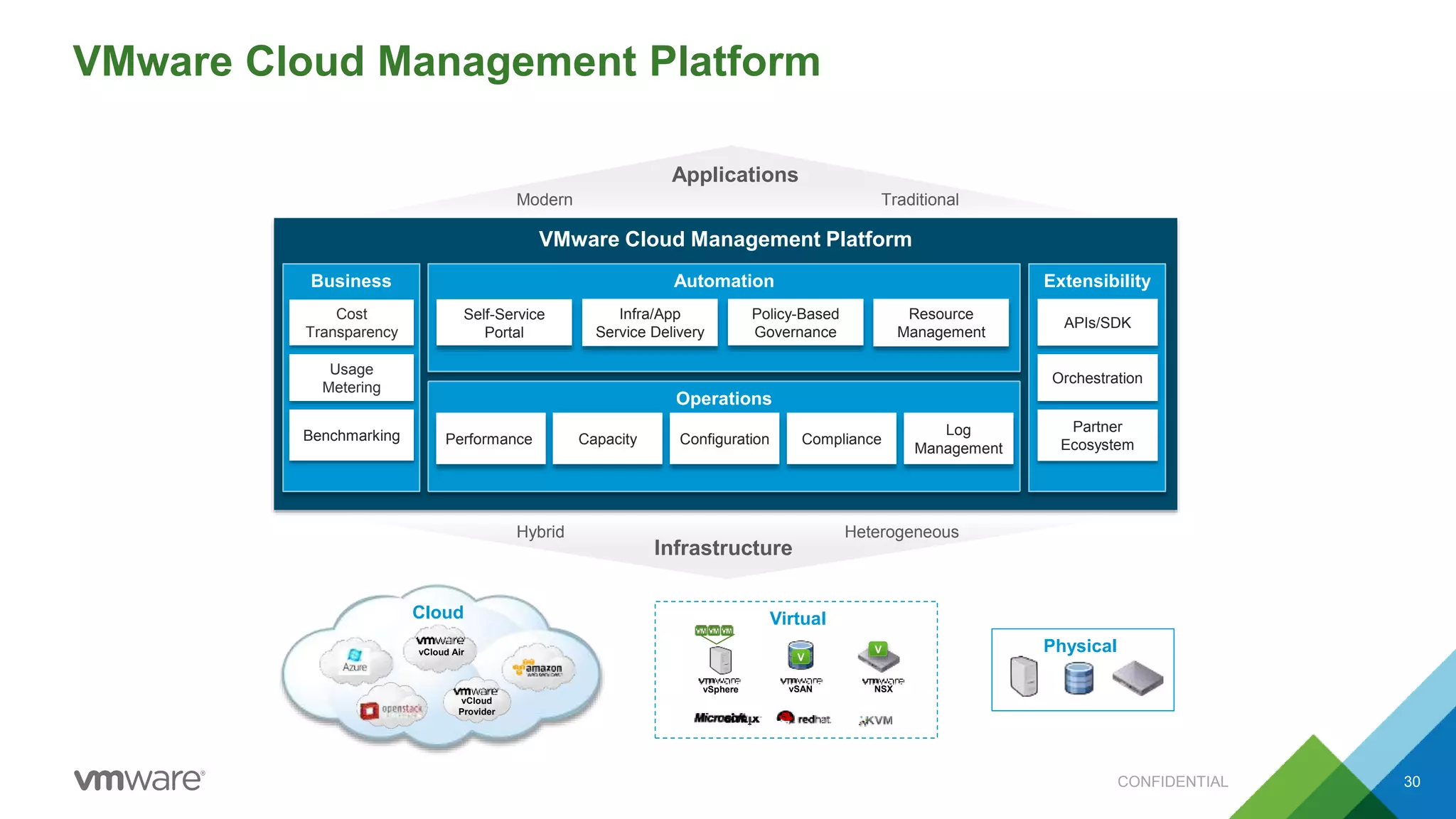
VMware Cloud Management Platform
30
Business Extensibility
Operations
Automation
Partner
Ecosystem
APIs/SDK
Cost
Transparency
Benchmarking
Usage
Metering
VMware Cloud Management Platform
Orchestration
Infrastructure
Performance ComplianceConfigurationCapacity
Log
Management
Virtual
vSphere vSAN NSX
V
V
TraditionalModern
Applications
Physical
HeterogeneousHybrid
vCloud Air
vCloud
Provider
Cloud
Self-Service
Portal
Infra/App
Service Delivery
Policy-Based
Governance
Resource
Management
CONFIDENTIAL
#1 VMware leader in WW Datacenter Automation Software, with the
largest market share. [Source 2: IDC 2016].
#1 VMware leader in WW Cloud Systems Management SW, with
largest share. [Source 3: IDC 2016].
80% VMware largest x86 virtualization market share, present in 80%
of data centers. [Source 1: Gartner 2016].
Analyst and customer validation of VMware leadership in several
markets
53% VMware is the most preferred private cloud provider, followed by
OpenStack at 18%, and Microsoft at 17%. [Source 4: Gartner DC
Conference December 2015]. CONFIDENTIAL
CONFIDENTIAL 32
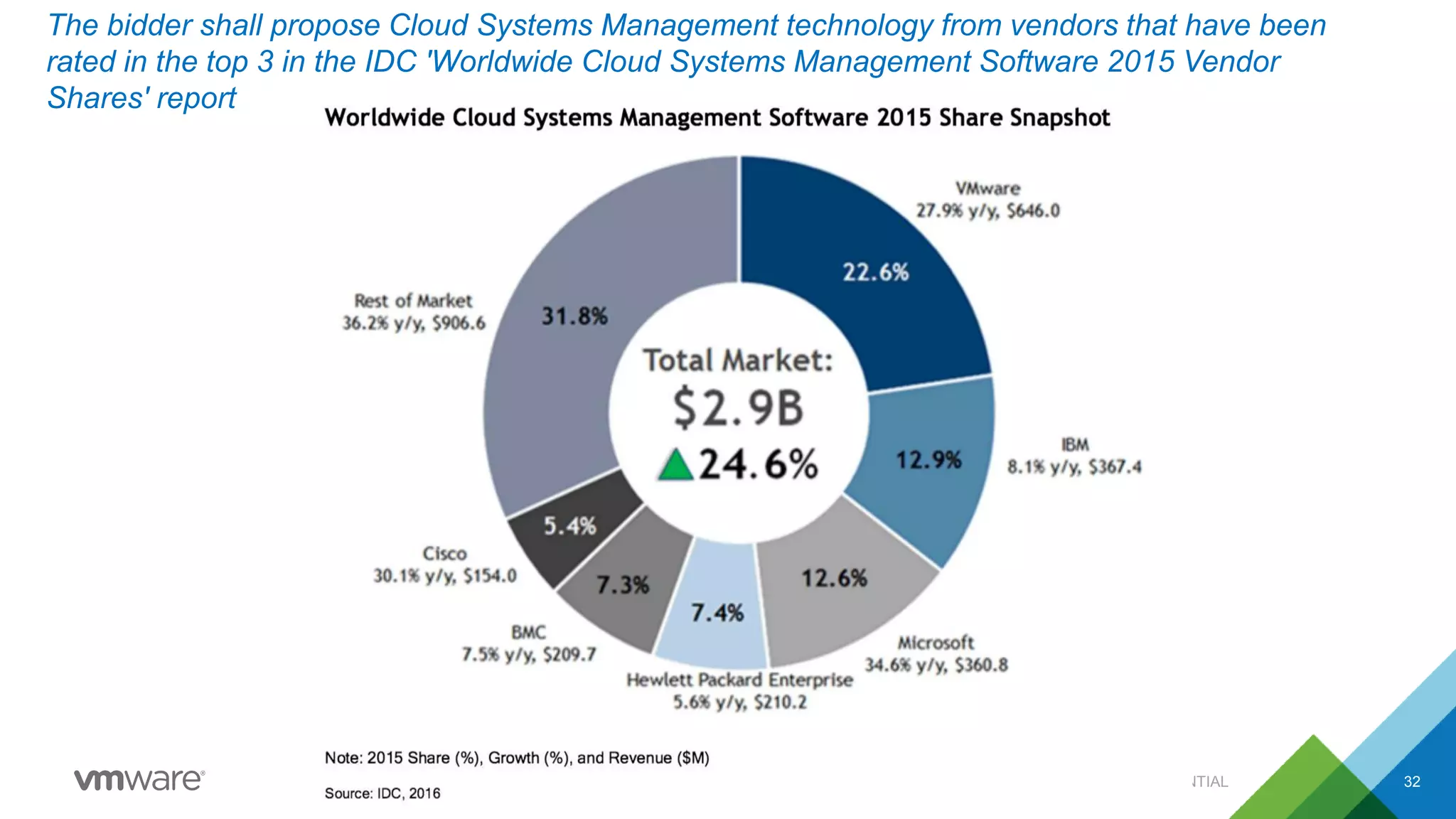
The bidder shall propose Cloud Systems Management technology from vendors that have been
rated in the top 3 in the IDC 'Worldwide Cloud Systems Management Software 2015 Vendor
Shares' report
CONFIDENTIAL 33
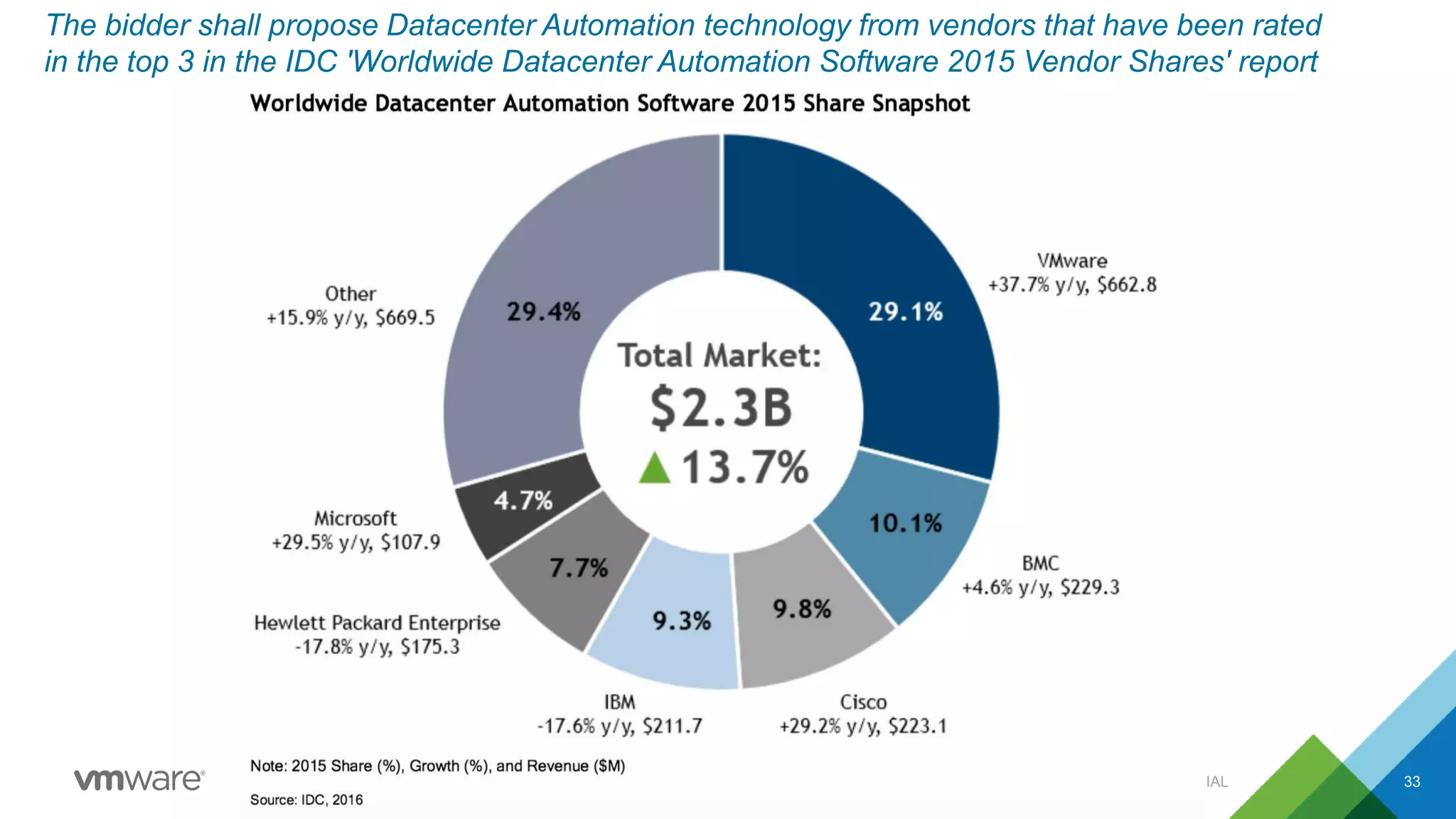
The bidder shall propose Datacenter Automation technology from vendors that have been rated
in the top 3 in the IDC 'Worldwide Datacenter Automation Software 2015 Vendor Shares' report
Together we can make a difference
Lets vRealize
CONFIDENTIAL 34

Why choose VMware vCloud Suite Standard over vSOM

  • 1.
    © 2015 VMwareInc. All rights reserved. Why Choose vCloud Suite Std Over vSOM Anil Gupta (AJ), vExpert Blog: www.walkonblock.com Upcoming Blog: www.letsvrealize.com Some screens may vary as per edition
  • 2.
    What’s Common betweenvCloud Suite & vSOM 2 SR No Component Features vSphere with Operations Manager Enterprise Plus vCloud Suite Standard 1 Hypervisor Edition vSphere Enterprise Plus vSphere Enterprise Plus 1a vMotion Available Available 1b Fault Tolerance Available Available 1c vSphere Replication Available Available 1d Distributed Resources Scheduler (DRS), Distributed Power Management (DPM) Available Available 1e Storage I/O Control Available Available 1f Storage DRS Available Available 1g Network I/O Control Available Available 2 vRealize Operations Manager Edition Standard Advanced 2a Views and Reports Available Available 2b Guided Remediation Available Available 2c Self-learning Analytics with Dynamic Thresholds Available Available 2d Capacity Metering, Trending, Right-sizing, and Resource Optimization Available Available
  • 3.
    What’s Not therein vSOM 3 SR No Component Features vSphere with Operations Manager Enterprise Plus vCloud Suite Standard 2e vRealize Operations Manager Built-in high availability (automated failover of platform nodes) Not Available Available 2f Customizable dashboards and reports Not Available Available 2g Super metrics Not Available Available 2h Monitoring of OS resources (CPU, disk, memory, network) Not Available Available 2i Resource monitoring, planning and optimization (applicable to any object) Not Available Available 2j vSphere change, configuration, and regulatory compliance Not Available Available 2k Automated application discovery and relationship visualization Not Available Available 3 vRealize Business Edition Not Available Standard 3a Automatic private cloud metering, costing, and pricing Not Available Available 3b Private cloud consumption analysis Not Available Available 3c Private cloud and public cloud cost comparison Not Available Available 3d Out-of-the-box cloud business analysis report (Comprehensive cloud costing and business assessment) Not Available Available 3f Intergration with vRealize Operations Not Available Available 4 vRealize Log Insight Edition Not Available Full version 4a Custom Dashboards Not Available Available 4b vRealize Operations Integration Not Available Available 4c Alerting Not Available Available 4d Machine Learning/Analytics Not Available Available 4e Agents Not Available Available
  • 4.
    © 2015 VMwareInc. All rights reserved. vRealize Operations Standard
  • 5.
    The information onthe roadmap is intended to outline our general product direction and it should not be relied on in making a purchasing decision. It is for informational purposes only and may not be incorporated into any contract. Learned Behavior Historical Data Planned ProjectsPredicted Behavior Leveraging Past and Present – Predictive Analytics Expected DemandReal-time Events Automate workflows Improve IT utilization & avoid risk Identify stress & gain efficiency
  • 6.
    The information onthe roadmap is intended to outline our general product direction and it should not be relied on in making a purchasing decision. It is for informational purposes only and may not be incorporated into any contract. Intelligent Operations Dashboard Provides Immediate Value Immediate Problems Emerging issues Opportunities to Optimize Smart Alerts Automatically remediate problems Get meaningful insights in one place
  • 7.
    Smart Alerts andGuided Remediation 7 Combine multiple symptoms to show actual issue Symptoms not limited to badges: any object, any metric What are the recommendations to resolve this issue? What automated actions can I take to remediate? Which symptoms across the stack are causing this problem? Automatically remediate problems Get meaningful insights in one place
  • 8.
    Automated Capacity Optimization 8 CapacityAnalytics to inform when, why, what and where Granular breakdown of capacity metrics for Compute, Memory, Network and Storage Forecast and Plan for Future Get meaningful insights in one place
  • 9.
    Plan for theFuture Current capacity cross- over point Actual VMs deployed VM count capacity Capacity state today New capacity shortfall if I add 10 new VMs Forecast and Plan for Future
  • 10.
    © 2015 VMwareInc. All rights reserved. vRealize Operations Advanced
  • 11.
    vRealize Operations -Top 25 VM’s by IOPS, Network Usage, Packet Drops
  • 12.
    vRealize Operations -Storage Dashboard – Avg IOPS, Write IOPS …
  • 13.
  • 14.
    vRealize Operations -Cluster Capacity Overview 14
  • 15.
  • 16.
  • 17.
    Automated Application discovery& relationship CONFIDENTIAL 17
  • 18.
    Intelligent Operations Dashboard– Compliance CONFIDENTIAL 18
  • 19.
    © 2015 VMwareInc. All rights reserved. After Event – Log Analysis
  • 20.
    Powerful & ScalableLog Management 20 Solve problems faster, from days to hours vRealize™ Log Insight™ Find problems you didn’t know you had Get actionable insight into what logs mean Integrate log data with performance analytics
  • 21.
    vRealize Log InsightOverview Intelligent Operations •Enterprise Scale •Predictive Analytics/Machine Learning for faster problem resolution Built for the Software Defined Data Center •Base version now included with vCenter •Insight into VMware products incl. NSX, vRealize Automation, Horizon View •Attractive pricing model for customers of all sizes – not based on log volume Unified Management • Integration with vRealize Operations Management Suite Inventory integration, 2-way alert visualization Extensible • Over 40 Third Party Content Packs Available The best real-time big data log management for SDDC Operating system vSphere System statistics Applications Security Other IT All Kinds of Logs Log Insight 2.0 Analyze Discover Search Visualize IT Operations Security Compliance 40B events 10 event types …by machine learning OverviewApp App
  • 22.
    VMware vRealize LogInsight Extensibility Highly Extensible • Captures log data from physical servers, network and storage devices, OSs, applications, VMs, and hosts, and more Log Insight Content Packs • Encapsulate, pre-built dashboards and product-specific alerts from vRealize Log Insight • Provide vendor specific guidance and insight into which logs really matter Log Insight Marketplace • Built into the UI or available at www.solutionexchange.vmware.com Content Packs Overview • Operating System • Application • Network • Storage • SDDC • Security
  • 23.
    Log Insight UI- Interactive Log Analytics Interactive Visualization of Query Results, Plus Easy Drop-Down Menu Options
  • 24.
    Logs for LastMile to Root Cause Analysis 24 SCSI Errors NFS Errors vMotion Failures Host Disconnects Dropped Packets Failed Tasks Slow Host Syncs Slow DB Queries Get meaningful insights in one place
  • 25.
    © 2015 VMwareInc. All rights reserved. vRealize Business
  • 26.
    Business Management 26 Total costof Cloud infrastructure Cloud Consumption Projection Trend Breakdown by App or Service
  • 27.
    Fast Time toValue CONFIDENTIAL 27 Quickly Update Cost Drivers With Your Costs Reference Costs Provided for Fast Cost Calculation Out of the Box
  • 28.
    Compare Cloud Costs– Private vs. Public 28 Where shall I place existing workload? Where shall I place new workload? Add additional charges
  • 29.
    © 2015 VMwareInc. All rights reserved. Why VMware
  • 30.
    VMware Cloud ManagementPlatform 30 Business Extensibility Operations Automation Partner Ecosystem APIs/SDK Cost Transparency Benchmarking Usage Metering VMware Cloud Management Platform Orchestration Infrastructure Performance ComplianceConfigurationCapacity Log Management Virtual vSphere vSAN NSX V V TraditionalModern Applications Physical HeterogeneousHybrid vCloud Air vCloud Provider Cloud Self-Service Portal Infra/App Service Delivery Policy-Based Governance Resource Management CONFIDENTIAL
  • 31.
    #1 VMware leaderin WW Datacenter Automation Software, with the largest market share. [Source 2: IDC 2016]. #1 VMware leader in WW Cloud Systems Management SW, with largest share. [Source 3: IDC 2016]. 80% VMware largest x86 virtualization market share, present in 80% of data centers. [Source 1: Gartner 2016]. Analyst and customer validation of VMware leadership in several markets 53% VMware is the most preferred private cloud provider, followed by OpenStack at 18%, and Microsoft at 17%. [Source 4: Gartner DC Conference December 2015]. CONFIDENTIAL
  • 32.
    CONFIDENTIAL 32 The biddershall propose Cloud Systems Management technology from vendors that have been rated in the top 3 in the IDC 'Worldwide Cloud Systems Management Software 2015 Vendor Shares' report
  • 33.
    CONFIDENTIAL 33 The biddershall propose Datacenter Automation technology from vendors that have been rated in the top 3 in the IDC 'Worldwide Datacenter Automation Software 2015 Vendor Shares' report
  • 34.
    Together we canmake a difference Lets vRealize CONFIDENTIAL 34

Editor's Notes

  • #6 Analytics can be used to leverage past, present and expected future behavior to get better insights into your specific environment. Traditional monitoring tool and one-size-fits all approaches don't cut it, no matter how cheap they say they are. And then the other point is that in a modern datacenter, the virtualization platform and the management tools work together to help you deliver more value to your business. Example:  automation - placement and balancing of workloads (DRS, Storage DRS) are enhanced by the recommendations and actions suggested by vR Ops to find better hosts/clusters if demands change and to proactively relocate workloads based on stress patterns.  
  • #7 The intelligent dashboard in vSOM and vROps is the key to everything. It provides real time information on: Health = Immediate problems Risk = Future problems Efficiency = Opportunities to Optimize When the customer sees the product dashboard results from their environment, the data is very compelling. We give you an easy way to present that data to your customer.
  • #10 vSphere with Operations Management has a great tool that allows you to plan for the future with Trend analysis. You can perform what-if analysis based on taking a certain action and see how that action impacts capacity. Here you see trends charts that can look into the future and help you determine how much time you have remaining before you run out of capacity. Here you see a view of the tool with your current VM count capacity and number of VMs that you have deployed. <CLICK> You also see based on your usage at what point in the future you will run out of capacity. <CLICK> Now let’s say that you need to add 10 new VMs. Notice that the point that your current capacity will run out shifts to account for this. This type of trend analysis ensures that you can you plan for the future and always have the capacity you need when you need it. When you are able to address problems before they arise, you keep the your business critical applications available and your business running closing the gap between business expectations and the ability of IT to deliver.
  • #21 The Basics Centralized log management for your entire stack Search & analyze log data for real-time troubleshooting Anyone in the organization can access log data without compromising production systems Best for VMware by VMware Optimized for vSphere logs, vSphere analytics are built in Automatic ESXi configuration for collection Integration with vRealize Operations Very easy to deploy, intuitive to use Simple & predictable pricing model Log Insight can digest any type of log data. Users do not need to think about it, they can just send their data to Log Insight. Automatically identifies structures in the data and create a high performance index for performing analytics Unlike databases there is no need to engage DB admins to Extract Transform and Load (ETL) the data…Just send it over It scales up and down very well. It can ingest TBs of data per node per day. It is much faster and much more efficient than the competition It has a configurable retention policy, i.e. you attach 500GB storage and if it runs out of space it rotates the old data out. Optionally they can be written to an archive, making it virtually maintenance free It ships with out of the box knowledge of vSphere and many other logs in the form of a Content Pack, a collection of queries, alerts, dashboards and fields. A vast library of VMware and 3rd party Content Packs are also available.
  • #22 VMware offers a comprehensive operations management solution for the cloud era. vRealize Operations Management Suite is a highly automated and integrated analytics platform and operations console that provides visibility into the health of your infrastructure and applications across hybrid clouds and heterogeneous environments. There are three key areas of focus for VMware’s approach to simplify and automate Operations Management. The first is Intelligent Operations, using patented analytics to provide better visibility into datacenter operations. vRealize Operations analyzes millions of metrics from vSphere and existing monitoring tools to learn the behavior of your infrastructure. It then sets dynamic thresholds that trigger smart alerts so you can proactively address building performance problems. The second area is Policy-based Automation, leveraging policies and thresholds to trigger orchestration workflows across a white variety of tasks, rather than manual intervention to kick off a script. These automated tasks include incident and problem remediation, policy enforcement for continuous compliance, and capacity analysis and planning to improve resource utilization. The third area is Unified Management, providing operations team with a unified view of what's happening in their highly virtualized and cloud environments. vRealize Operations delivers this unified view in three ways: first, through converged infrastructure management of network, storage and compute; second, through integration of the key disciplines of performance, capacity and configuration management; and third, through a consistent management approach across virtual, physical and private/public cloud domains. As shown here, customers are reaping the benefits of this approach.
  • #23 There are roughly 40 content packs available for additional VMware and 3rd party solutions. Each come with their own set of built-in queries, dashboards and alerts specific to that solution and are extremely simple to add.
  • #24 On the fly dashboard creation based on search criteria. Create custom dashboards that align with your needs and saved for re-use .
  • #25 Operations teams can greatly benefit from unlocking the largely untapped value hidden in logs to improve service levels. The ability to quickly search for patterns and details in logs is critical for ops teams get to the root cause quickly.
  • #27  Cost estimates cover the full scope of infrastructure related costs including the cost of server, storage and network infrastructure. Benchmarks also address the cost of facilities that host the infrastructure, labor that manages the infrastructure, and the cost of software maintenance for the operating systems running within the infrastructure. You can easily inspect the cost drivers we use. We are explicit around how the costs of each category of infrastructure expense is calculated so you can see both the logic and the cost drivers being used to determine the cost of your infrastructure. All the cost driver benchmarks we supply can be overridden with user defined metrics. For instance if the hourly rate you pay for labor is significantly different than what we have within our benchmarks you can update the labor rate and that update will cascade throughout any calculations that rely on the labor rate. You’ll want to decide carefully when and where to override the benchmarks we provide. You want to focus your time and energy providing refined cost drivers where they will make a material difference. If you do update a benchmark we provide with a user defined cost driver we still keep track of the original benchmark as a reference point so you can see how much better or worse you are doing compared to VMware supplied benchmarks. The service costs can be broken down into the various cost drivers, and detailed granularity can show the cost of a VM or view the cost by demand (i.e. consumer group). Showback is available by LOB/Customer of the resources
  • #29 Not only do we provide you the basis for understanding the cost of your infrastructure but we give you the ability to understand how your costs compare to those of public cloud providers. VMware provides you with the ability to configure a single VM or a group of VMs to a specific standard – say a specific amount of memory, CPU, etc. Then you can compare that specification to that same configuration available through a public cloud provider such as Amazon, Azure or vCloud Air. This gives you the ability to understand whether your costs are competitive with that of Public Cloud alternatives.
  • #31 Automation – self-service infrastructure and applications across multiple hypervisors, private and public cloud with both speed and control. Infrastructure and applications services are requested via a self-service portal where authorized administrators, developers or business users can select services that comply with pre-defined business rules. Service delivery is highly automated. Logical infrastructure and application blueprints model services that can be deployed in any approved cloud environment. The right levels of resources are automatically allocated based on business need and service-level requirements. Workloads are dynamically and continually orchestrated and balanced as dictated by changing demand. Operations – manage infrastructure and applications in physical, virtual, and cloud environments with integrated capacity, performance, log, and configuration management. With a scale-out and resilient operations platform, administrators get control over performance, capacity and configuration management. Predictive analytics and smart alerts help identify and rectify potential issues before they impact service quality. Intuitive performance dashboards provide app-to-storage visibility across physical, virtual and cloud environments. Log management capabilities extend analytics to unstructured data, for better root-cause analysis and faster problem resolution. Over- and under-provisioned VMs are right-sized to balance service level requirements with resource utilization. Powerful capacity modeling identifies “what if” scenarios to anticipate and optimize future infrastructure spend. Policy-based automation of key IT processes and compliance standards improves efficiency. Business – align IT spending with business priorities by getting full transparency of infrastructure and application cost and service quality. CIOs and IT executives can demonstrate and compare the costs of complex initiatives and investments, including private and public clouds. Users can see the cost of service in the service catalog. Visibility and transparency of the types, cost and quality of IT services consumed by a business unit, enable show and charge back the quantity and types of IT services consumed. Industry benchmark data and reporting help compare IT expenses to peer companies and cloud service providers, for informed sourcing decisions that drive down costs. Unified Management – use a common set of tools across on-premises and public clouds with a unified management experience and fast time to value. Use one platform to deliver business speed and agility, with IT control and efficiency. Use one platform to provision and management applications and infrastructure on-site and in the cloud, and for both traditional and cloud-native application architectures. Use one platform to give both users and infrastructure administrators’ power at their fingertips to complete tasks that previously required handoffs between multiple functional groups. Extensibility – Open interface and orchestration engine with application program interface (API), command line interface (CLI) and user interface (UI) gives users flexibility to combine and consume services in ways that best fit needs. vSphere, Hyper-V, KVM, NSX, VSAN, OpenStack, Amazon, Azure, vCloud Air Brocade, EMC, F5, BlueMedora, Arista, Kemp, …
  • #32 Gartner Vendor Rating: VMware. Published: 23 December 2015. Gartner Vendor Rating: EMC. Published 9 May 2016. IDC WW Datacenter Automation Software Market Shares, 2015. VMware 29.1%, BMC 10.1%, Cisco 9.8%, IBM 9.3%, HPE 7.7%, Microsoft 4.7%, rest of market 29.4%. Published June 2016. IDC WW Cloud Systems Management Software Market Shares, 2015. VMware 22.6%, IBM 12.9%, Microsoft 12.6%. HPE 7.4%, BMC 7.3%, Cisco 5.4%, rest of market 31.8%. Published June 2016. Gartner Data Center Conference December 2015. Live audience poll enterprise IT managers n=259. First place VMware 53%. Second place OpenStack at 18%. Third place Microsoft at 17%. Gartner DCC 2015 live poll results available here: https://vmshare.vmware.com/products/competition/Virtualization%20Competition%20Docs/Gartner%20Data%20Center%20Conference%202015/Session%20Presentations%20and%20Poll%20Results/lsc34-d2-lsc34_d2_poll_results.pdf