© 2014 VMware Inc. All rights reserved.
vSphere Optimization
Assessment (VOA) with
(VCOPS)
Deepak Fernandes
ADITYA VENKATESH
Sr.Technical Specialist (backup/vmware)
© 2014 VMware Inc. All rights reserved.
Agenda
•Increase in virtualized Environment
•Why VCOPS
•Architecture
•Dashboard
•Installation and Configuration
•Reports
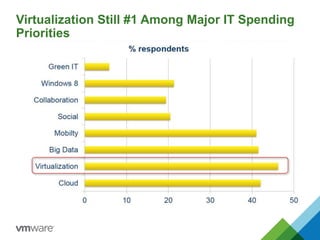
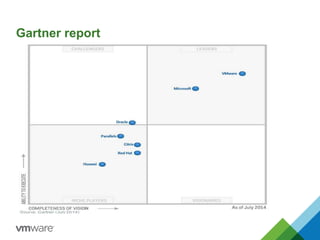
Virtualization Still #1 Among Major IT Spending
Priorities
Gartner report
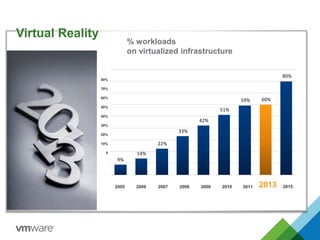
Virtual Reality
9%
14%
22%
33%
42%
51%
59% 60%
80%
% workloads
on virtualized infrastructure
2005 2006 2007 2008 2009 2010 2011 2013
80%
70%
60%
50%
40%
30%
20%
10%
0
2015
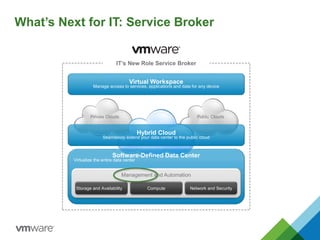
What’s Next for IT: Service Broker
Public CloudsPrivate Clouds
Hybrid Cloud
Seamlessly extend your data center to the public cloud
Virtual Workspace
Manage access to services, applications and data for any device
IT’s New Role Service Broker
Software-Defined Data Center
Virtualize the entire data center
Management and Automation
Storage and Availability Compute Network and Security
What is vSphere with Operations
Management?
ESX Server
App
OS
App
OS
App
OS
App
OS
App
OS
App
OS
App
OS
App
OS
App
OS
App
OS
Gen 2:
Server Hypervisor
• Complete OS/App fault
isolation
• Encapsulation of virtual
machines
• Hardware Independence
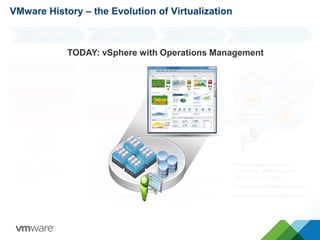
VMware History – the Evolution of Virtualization
App
OS
App
OS
App
OS
App
OS
App
OS
HOST OS
VMware Server (GSX)
Gen 1:
Client Hypervisor
• Higher utilization
• Some OS/App fault
isolation
Gen 3:
Virtual Infrastructure
• Centralized
management
• Move virtual machines
while running
• Automatic business
continuity
Central management
via vCenter
Gen 4:
vSphere
• Policy-based control of
compute, network, and
storage resources
• Security and fault tolerance
• Focus is on the application
Foundation for
Cloud
VIP
VIP
TODAY: vSphere with Operations Management
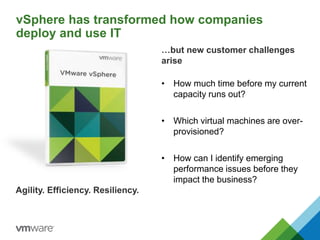
vSphere has transformed how companies
deploy and use IT
Agility. Efficiency. Resiliency.
• How much time before my current
capacity runs out?
• Which virtual machines are over-
provisioned?
• How can I identify emerging
performance issues before they
impact the business?
…but new customer challenges
arise
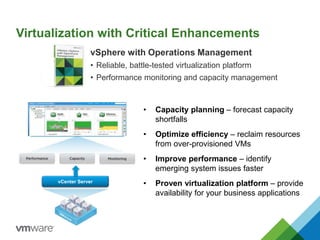
• Capacity planning – forecast capacity
shortfalls
• Optimize efficiency – reclaim resources
from over-provisioned VMs
• Improve performance – identify
emerging system issues faster
• Proven virtualization platform – provide
availability for your business applications
VMware vSphere
The proven compute virtualization platform
vSphere with Operations Management
• Reliable, battle-tested virtualization platform
• Performance monitoring and capacity management
Virtualization with Critical Enhancements
vCenter Server
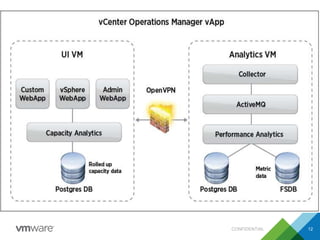
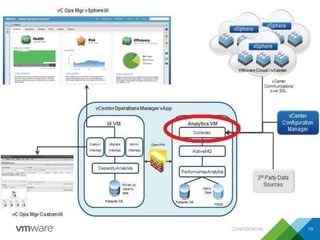
Architecture
CONFIDENTIAL 11
CONFIDENTIAL 12
CONFIDENTIAL 13
Pre-requisities
CONFIDENTIAL 14
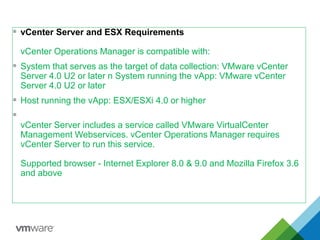
 vCenter Server and ESX Requirements
vCenter Operations Manager is compatible with:
 System that serves as the target of data collection: VMware vCenter
Server 4.0 U2 or later n System running the vApp: VMware vCenter
Server 4.0 U2 or later
 Host running the vApp: ESX/ESXi 4.0 or higher

vCenter Server includes a service called VMware VirtualCenter
Management Webservices. vCenter Operations Manager requires
vCenter Server to run this service.
Supported browser - Internet Explorer 8.0 & 9.0 and Mozilla Firefox 3.6
and above
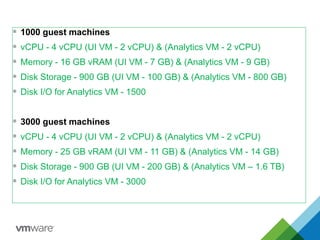
 1000 guest machines
 vCPU - 4 vCPU (UI VM - 2 vCPU) & (Analytics VM - 2 vCPU)
 Memory - 16 GB vRAM (UI VM - 7 GB) & (Analytics VM - 9 GB)
 Disk Storage - 900 GB (UI VM - 100 GB) & (Analytics VM - 800 GB)
 Disk I/O for Analytics VM - 1500
 3000 guest machines
 vCPU - 4 vCPU (UI VM - 2 vCPU) & (Analytics VM - 2 vCPU)
 Memory - 25 GB vRAM (UI VM - 11 GB) & (Analytics VM - 14 GB)
 Disk Storage - 900 GB (UI VM - 200 GB) & (Analytics VM – 1.6 TB)
 Disk I/O for Analytics VM - 3000
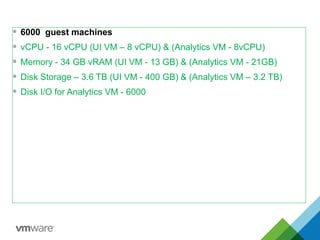
 6000 guest machines
 vCPU - 16 vCPU (UI VM – 8 vCPU) & (Analytics VM - 8vCPU)
 Memory - 34 GB vRAM (UI VM - 13 GB) & (Analytics VM - 21GB)
 Disk Storage – 3.6 TB (UI VM - 400 GB) & (Analytics VM – 3.2 TB)
 Disk I/O for Analytics VM - 6000
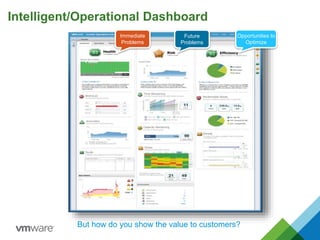
Intelligent/Operational Dashboard
Immediate
Problems
Future
Problems
Opportunities to
Optimize
But how do you show the value to customers?
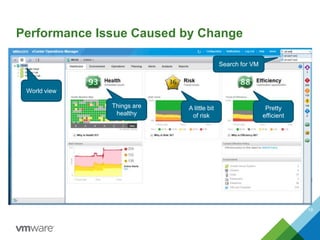
Performance Issue Caused by Change
19
Search for VM
Things are
healthy
A little bit
of risk
Pretty
efficient
World view
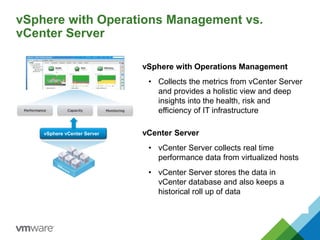
vSphere with Operations Management vs.
vCenter Server
vSphere vCenter Server vCenter Server
• vCenter Server collects real time
performance data from virtualized hosts
• vCenter Server stores the data in
vCenter database and also keeps a
historical roll up of data
vSphere with Operations Management
• Collects the metrics from vCenter Server
and provides a holistic view and deep
insights into the health, risk and
efficiency of IT infrastructure
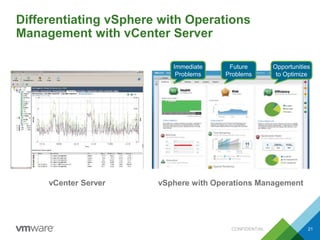
Differentiating vSphere with Operations
Management with vCenter Server
CONFIDENTIAL 21
vCenter Server vSphere with Operations Management
Immediate
Problems
Future
Problems
Opportunities
to Optimize
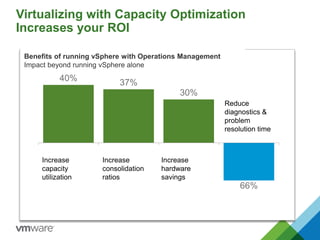
Virtualizing with Capacity Optimization
Increases your ROI
40% 37%
30%
66%
Increase
capacity
utilization
Increase
consolidation
ratios
Increase
hardware
savings
Reduce
diagnostics &
problem
resolution time
Benefits of running vSphere with Operations Management
Impact beyond running vSphere alone
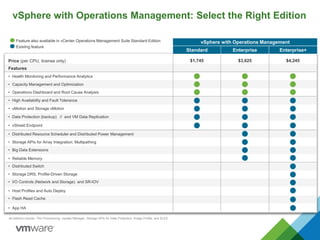
Price (per CPU, license only)
Features
• Health Monitoring and Performance Analytics
• High Availability and Fault Tolerance
• vMotion and Storage vMotion
• Host Profiles and Auto Deploy
• Storage DRS, Profile-Driven Storage
All editions include: Thin Provisioning, Update Manager, Storage APIs for Data Protection, Image Profile, and SLES
Feature also available in vCenter Operations Management Suite Standard Edition
• Capacity Management and Optimization
• Operations Dashboard and Root Cause Analysis
• I/O Controls (Network and Storage) and SR-IOV
$1,745 $3,625 $4,245
vSphere with Operations Management
Standard Enterprise Enterprise+
• Reliable Memory
• Data Protection (backup) // and VM Data Replication
• vShield Endpoint
• Storage APIs for Array Integration, Multipathing
• Distributed Resource Scheduler and Distributed Power Management
• Big Data Extensions
• Flash Read Cache
• Distributed Switch
Existing feature
• App HA
vSphere with Operations Management: Select the Right Edition
© 2014 VMware Inc. All rights reserved.
Deepak Fernandes
ADITYA VENKATESH
No – 9223856725
Email id- adityav@softcell.com
Thank you

vmware optimization

  • 1.
    © 2014 VMwareInc. All rights reserved. vSphere Optimization Assessment (VOA) with (VCOPS) Deepak Fernandes ADITYA VENKATESH Sr.Technical Specialist (backup/vmware)
  • 2.
    © 2014 VMwareInc. All rights reserved. Agenda •Increase in virtualized Environment •Why VCOPS •Architecture •Dashboard •Installation and Configuration •Reports
  • 3.
    Virtualization Still #1Among Major IT Spending Priorities
  • 4.
  • 5.
    Virtual Reality 9% 14% 22% 33% 42% 51% 59% 60% 80% %workloads on virtualized infrastructure 2005 2006 2007 2008 2009 2010 2011 2013 80% 70% 60% 50% 40% 30% 20% 10% 0 2015
  • 6.
    What’s Next forIT: Service Broker Public CloudsPrivate Clouds Hybrid Cloud Seamlessly extend your data center to the public cloud Virtual Workspace Manage access to services, applications and data for any device IT’s New Role Service Broker Software-Defined Data Center Virtualize the entire data center Management and Automation Storage and Availability Compute Network and Security
  • 7.
    What is vSpherewith Operations Management?
  • 8.
    ESX Server App OS App OS App OS App OS App OS App OS App OS App OS App OS App OS Gen 2: ServerHypervisor • Complete OS/App fault isolation • Encapsulation of virtual machines • Hardware Independence VMware History – the Evolution of Virtualization App OS App OS App OS App OS App OS HOST OS VMware Server (GSX) Gen 1: Client Hypervisor • Higher utilization • Some OS/App fault isolation Gen 3: Virtual Infrastructure • Centralized management • Move virtual machines while running • Automatic business continuity Central management via vCenter Gen 4: vSphere • Policy-based control of compute, network, and storage resources • Security and fault tolerance • Focus is on the application Foundation for Cloud VIP VIP TODAY: vSphere with Operations Management
  • 9.
    vSphere has transformedhow companies deploy and use IT Agility. Efficiency. Resiliency. • How much time before my current capacity runs out? • Which virtual machines are over- provisioned? • How can I identify emerging performance issues before they impact the business? …but new customer challenges arise
  • 10.
    • Capacity planning– forecast capacity shortfalls • Optimize efficiency – reclaim resources from over-provisioned VMs • Improve performance – identify emerging system issues faster • Proven virtualization platform – provide availability for your business applications VMware vSphere The proven compute virtualization platform vSphere with Operations Management • Reliable, battle-tested virtualization platform • Performance monitoring and capacity management Virtualization with Critical Enhancements vCenter Server
  • 11.
  • 12.
  • 13.
  • 14.
  • 15.
     vCenter Serverand ESX Requirements vCenter Operations Manager is compatible with:  System that serves as the target of data collection: VMware vCenter Server 4.0 U2 or later n System running the vApp: VMware vCenter Server 4.0 U2 or later  Host running the vApp: ESX/ESXi 4.0 or higher  vCenter Server includes a service called VMware VirtualCenter Management Webservices. vCenter Operations Manager requires vCenter Server to run this service. Supported browser - Internet Explorer 8.0 & 9.0 and Mozilla Firefox 3.6 and above
  • 16.
     1000 guestmachines  vCPU - 4 vCPU (UI VM - 2 vCPU) & (Analytics VM - 2 vCPU)  Memory - 16 GB vRAM (UI VM - 7 GB) & (Analytics VM - 9 GB)  Disk Storage - 900 GB (UI VM - 100 GB) & (Analytics VM - 800 GB)  Disk I/O for Analytics VM - 1500  3000 guest machines  vCPU - 4 vCPU (UI VM - 2 vCPU) & (Analytics VM - 2 vCPU)  Memory - 25 GB vRAM (UI VM - 11 GB) & (Analytics VM - 14 GB)  Disk Storage - 900 GB (UI VM - 200 GB) & (Analytics VM – 1.6 TB)  Disk I/O for Analytics VM - 3000
  • 17.
     6000 guestmachines  vCPU - 16 vCPU (UI VM – 8 vCPU) & (Analytics VM - 8vCPU)  Memory - 34 GB vRAM (UI VM - 13 GB) & (Analytics VM - 21GB)  Disk Storage – 3.6 TB (UI VM - 400 GB) & (Analytics VM – 3.2 TB)  Disk I/O for Analytics VM - 6000
  • 18.
  • 19.
    Performance Issue Causedby Change 19 Search for VM Things are healthy A little bit of risk Pretty efficient World view
  • 20.
    vSphere with OperationsManagement vs. vCenter Server vSphere vCenter Server vCenter Server • vCenter Server collects real time performance data from virtualized hosts • vCenter Server stores the data in vCenter database and also keeps a historical roll up of data vSphere with Operations Management • Collects the metrics from vCenter Server and provides a holistic view and deep insights into the health, risk and efficiency of IT infrastructure
  • 21.
    Differentiating vSphere withOperations Management with vCenter Server CONFIDENTIAL 21 vCenter Server vSphere with Operations Management Immediate Problems Future Problems Opportunities to Optimize
  • 22.
    Virtualizing with CapacityOptimization Increases your ROI 40% 37% 30% 66% Increase capacity utilization Increase consolidation ratios Increase hardware savings Reduce diagnostics & problem resolution time Benefits of running vSphere with Operations Management Impact beyond running vSphere alone
  • 23.
    Price (per CPU,license only) Features • Health Monitoring and Performance Analytics • High Availability and Fault Tolerance • vMotion and Storage vMotion • Host Profiles and Auto Deploy • Storage DRS, Profile-Driven Storage All editions include: Thin Provisioning, Update Manager, Storage APIs for Data Protection, Image Profile, and SLES Feature also available in vCenter Operations Management Suite Standard Edition • Capacity Management and Optimization • Operations Dashboard and Root Cause Analysis • I/O Controls (Network and Storage) and SR-IOV $1,745 $3,625 $4,245 vSphere with Operations Management Standard Enterprise Enterprise+ • Reliable Memory • Data Protection (backup) // and VM Data Replication • vShield Endpoint • Storage APIs for Array Integration, Multipathing • Distributed Resource Scheduler and Distributed Power Management • Big Data Extensions • Flash Read Cache • Distributed Switch Existing feature • App HA vSphere with Operations Management: Select the Right Edition
  • 24.
    © 2014 VMwareInc. All rights reserved. Deepak Fernandes ADITYA VENKATESH No – 9223856725 Email id- adityav@softcell.com Thank you