Agenda
• Introduction
• History
• AJAXbased client
• noVNC introduction
• New API: createConsoleEndpoint
• Extra security validation
• Secure websockettraffic port
• VM console connection security
• Summary
1
About Me
• Senior Software Engineer at ShapeBlue
• Apache CloudStack Committer & PMC member
• Dad, husband, tennis and football (soccer) fan
2
VNC (Virtual Network Computing)
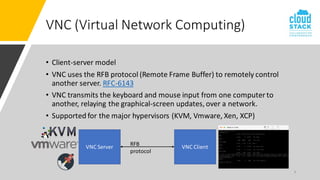
• Client-server model
• VNC uses the RFB protocol (Remote Frame Buffer) to remotely control
another server. RFC-6143
• VNC transmits the keyboard and mouse input from one computer to
another, relaying the graphical-screen updates, over a network.
• Supported for the major hypervisors (KVM, Vmware, Xen, XCP)
3
VNC Server VNC Client
RFB
protocol
Console Proxy VM
CloudStack VM Console Access
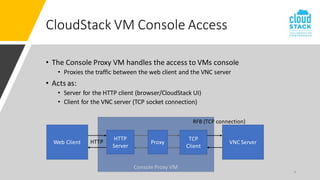
• The Console Proxy VM handles the access to VMs console
• Proxies the traffic between the web client and the VNC server
• Acts as:
• Server for the HTTP client (browser/CloudStack UI)
• Client for the VNC server (TCP socket connection)
4
HTTP
Server
TCP
Client
VNC Server
Web Client Proxy
HTTP
RFB (TCP connection)
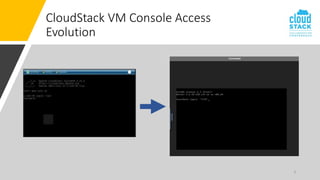
CloudStack VM Console Access
Evolution
5
Console Proxy VM
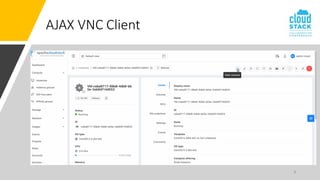
CloudStack VM Console Access (Legacy)
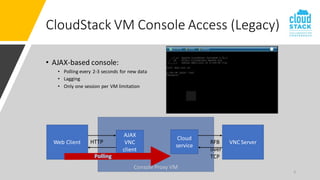
• AJAX-based console:
• Polling every 2-3 seconds for new data
• Lagging
• Only one session per VM limitation
6
AJAX
VNC
client
Cloud
service
VNC Server
Web Client HTTP RFB
over
TCP
Console Proxy VM
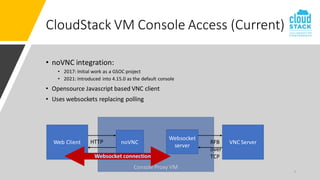
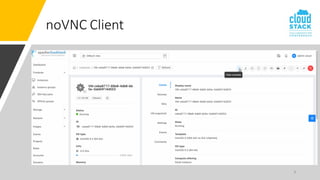
• noVNC integration:
• 2017: Initial work as a GSOC project
• 2021: Introduced into 4.15.0 as the default console
• Opensource Javascript based VNC client
• Uses websockets replacing polling
7
CloudStack VM Console Access (Current)
noVNC
Websocket
server
VNC Server
Web Client HTTP RFB
over
TCP
8
AJAX VNC Client
9
noVNC Client
10
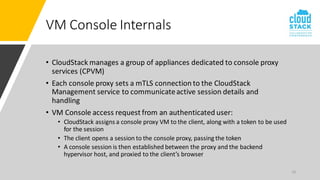
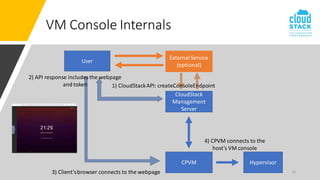
VM Console Internals
• CloudStack manages a group of appliances dedicated to console proxy
services (CPVM)
• Each console proxy sets a mTLS connection to the CloudStack
Management service to communicateactive session details and
handling
• VM Console access request from an authenticated user:
• CloudStack assigns a console proxy VM to the client, along with a token to be used
for the session
• The client opens a session to the console proxy, passing the token
• A console session is then established between the proxy and the backend
hypervisor host, and proxied to the client’s browser
11
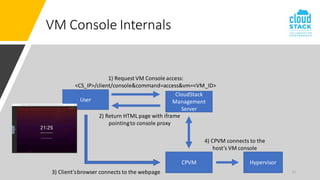
VM Console Internals
CloudStack
Management
Server
User
1) Request VM Console access:
<CS_IP>/client/console&command=access&vm=<VM_ID>
2) Return HTML page with iframe
pointingto console proxy
CPVM Hypervisor
3) Client’sbrowser connects to the webpage
4) CPVM connects to the
host’s VM console
12
VM Console Internals
CloudStack
Management
Server
User
1) CloudStackAPI: createConsoleEndpoint
2) API response includes the webpage
and token
CPVM Hypervisor
3) Client’sbrowser connects to the webpage
4) CPVM connects to the
host’s VM console
External Service
(optional)
13
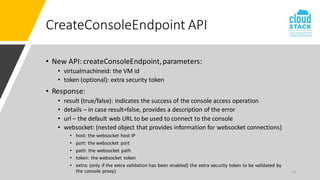
CreateConsoleEndpoint API
• New API: createConsoleEndpoint,parameters:
• virtualmachineid: the VM id
• token (optional): extra security token
• Response:
• result (true/false): indicates the success of the console access operation
• details – in case result=false, provides a description of the error
• url – the default web URL to be used to connect to the console
• websocket: (nested object that provides information for websocket connections)
• host: the websocket host IP
• port: the websocket port
• path: the websocket path
• token: the websocket token
• extra: (only if the extra validation has been enabled) the extra security token to be validated by
the console proxy)
14
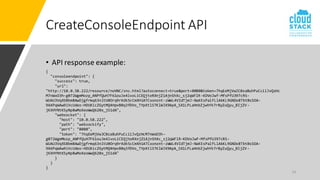
CreateConsoleEndpoint API
• API response example:
{
"consoleendpoint": {
"success": true,
"url":
"http://10.0.58.222/resource/noVNC/vnc.html?autoconnect=true&port=8080&token=7hqEeMjVwJC0zaBuhPuCciiJvQzHc
M7nWxO3h-g072WgmMozp_ANPfQuH7F61ouJe4lvoLiCEQjtoRXnjZ1AjnShXc_sj2qWFlR-KDVoJwf-MfsPfU397cRS-
WUAU3VqXSBbm8AwDjgfrmq63nltU0Orq9rXdk5cCmXHiATCxonznt-zWWL4VIdTjmJ-NaKEsPalfLlAkKL9GNDx8TbtBsSOA-
9AXPqWAw9iVcUdeo-HDUXicZGytMQ4HpvB0q3fDVo_TYpXtlSTKlWJX9ApA_SX1LPLaHnbZjwhYk7rByZuQyu_BIjZV-
jKXHYNtKSyNp8wMoXeoWwQ620x_jS1dA",
"websocket": {
"host": "10.0.58.222",
"path": "websockify",
"port": "8080",
"token": "7hqEeMjVwJC0zaBuhPuCciiJvQzHcM7nWxO3h-
g072WgmMozp_ANPfQuH7F61ouJe4lvoLiCEQjtoRXnjZ1AjnShXc_sj2qWFlR-KDVoJwf-MfsPfU397cRS-
WUAU3VqXSBbm8AwDjgfrmq63nltU0Orq9rXdk5cCmXHiATCxonznt-zWWL4VIdTjmJ-NaKEsPalfLlAkKL9GNDx8TbtBsSOA-
9AXPqWAw9iVcUdeo-HDUXicZGytMQ4HpvB0q3fDVo_TYpXtlSTKlWJX9ApA_SX1LPLaHnbZjwhYk7rByZuQyu_BIjZV-
jKXHYNtKSyNp8wMoXeoWwQ620x_jS1dA"
}
}
}
15
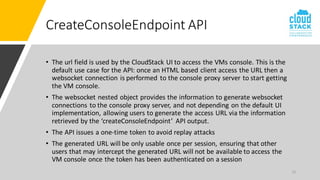
CreateConsoleEndpoint API
• The url field is used by the CloudStack UI to access the VMs console. This is the
default use case for the API: once an HTML based client access the URL then a
websocket connection is performed to the console proxy server to start getting
the VM console.
• The websocket nested object provides the information to generate websocket
connections to the console proxy server, and not depending on the default UI
implementation, allowing users to generate the access URL via the information
retrieved by the ‘createConsoleEndpoint’ API output.
• The API issues a one-time token to avoid replay attacks
• The generated URL will be only usable once per session, ensuring that other
users that may intercept the generated URL will not be available to access the
VM console once the token has been authenticated on a session
16
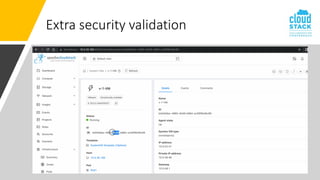
Extra security validation
• Demo time!
• Generate console endpoint for VM
• Try reusing the URL -> replication attack avoid
• Generate console endpoint for VM with extra token validation
• Pass a different token for validation -> FAILURE
17
Extra security validation
18
Extra security validation
19
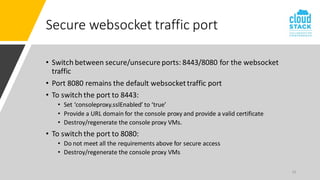
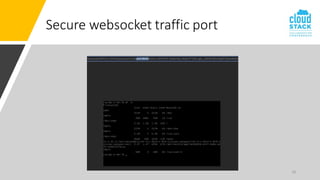
Secure websocket traffic port
• Switch between secure/unsecure ports: 8443/8080 for the websocket
traffic
• Port 8080 remains the default websockettraffic port
• To switch the port to 8443:
• Set ‘consoleproxy.sslEnabled’ to ‘true’
• Provide a URL domain for the console proxy and provide a valid certificate
• Destroy/regenerate the console proxy VMs.
• To switch the port to 8080:
• Do not meet all the requirements above for secure access
• Destroy/regenerate the console proxy VMs
20
Secure websocket traffic port
21
VM Console Connection Security
• The connection between the CPVM to the VM Console is unencrypted
and password protected
• Proposed solution: KVM only
• Using the CA framework pre-existing CPVM and KVM hosts certificates,
establish a TLS connection between the CPVM and the VM Console on
the host
• Enable TLS on libvirt: https://wiki.libvirt.org/page/VNCTLSSetup
• Requirement: vnc_tls = 1 on the /etc/libvirt/qemu.conf file
• Set private key and TLS server certificates for QEMU access
• Restart libvirtd service
22
VM Console Connection Security
23
VM Console Connection Security
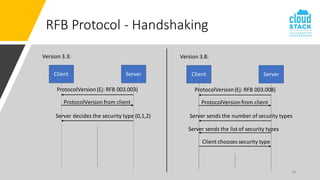
• Limitation: RFB protocol version 3.3 does not offer TLS security on the
handshake
• The security-type may only take the value 0, 1 or 2.
• A value of 0 means that the connection has failed
• 1=None
• 2=VNC Authentication (password authentication)
• RFB version 3.7 and onwards offer more security types (including
Vencrypt)
• RFB protocol RFC: RFC-6143
24
RFB Protocol - Handshaking
Version 3.3:
Client Server
ProtocolVersion(Ej: RFB 003.003)
ProtocolVersionfrom client
Server decides the security type (0,1,2)
Version 3.8:
Client Server
ProtocolVersion(Ej: RFB 003.008)
ProtocolVersionfrom client
Server sends the list of security types
Server sends the number of security types
Client chooses security type
25
RFB Protocol - Handshaking
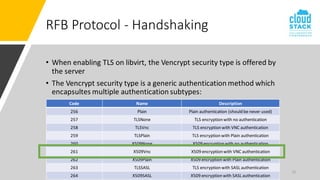
• When enabling TLS on libvirt, the Vencrypt security type is offered by
the server
• The Vencrypt security type is a generic authentication method which
encapsultes multiple authentication subtypes:
Code Name Description
256 Plain Plain authentication (should be never used)
257 TLSNone TLS encryption with no authentication
258 TLSVnc TLS encryption with VNC authentication
259 TLSPlain TLS encryption with Plain authentication
260 X509None X509 encryption with no authentication
261 X509Vnc X509 encryption with VNC authentication
262 X509Plain X509 encryption with Plain authentication
263 TLSSASL TLS encryption with SASL authentication
264 X509SASL X509 encryption with SASL authentication
26
VM Console Connection Security
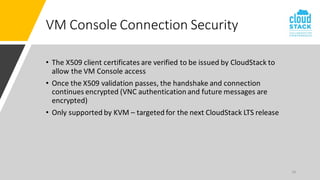
• The X509 client certificates are verified to be issued by CloudStack to
allow the VM Console access
• Once the X509 validation passes, the handshake and connection
continues encrypted (VNC authentication and future messages are
encrypted)
• Only supported by KVM – targeted for the next CloudStack LTS release
27
Summary
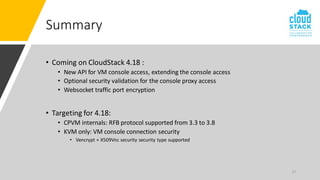
• Coming on CloudStack 4.18 :
• New API for VM console access, extending the console access
• Optional security validation for the console proxy access
• Websocket traffic port encryption
• Targeting for 4.18:
• CPVM internals: RFB protocol supported from 3.3 to 3.8
• KVM only: VM console connection security
• Vencrypt + X509Vnc security security type supported
Thanks!
NicolasVazquez
nicolas.vazquez@shapeblue.com
nvazquez@apache.org
@nvazquezuy
nvazquez

VM Console Enhancements

  • 1.
    Agenda • Introduction • History •AJAXbased client • noVNC introduction • New API: createConsoleEndpoint • Extra security validation • Secure websockettraffic port • VM console connection security • Summary 1
  • 2.
    About Me • SeniorSoftware Engineer at ShapeBlue • Apache CloudStack Committer & PMC member • Dad, husband, tennis and football (soccer) fan 2
  • 3.
    VNC (Virtual NetworkComputing) • Client-server model • VNC uses the RFB protocol (Remote Frame Buffer) to remotely control another server. RFC-6143 • VNC transmits the keyboard and mouse input from one computer to another, relaying the graphical-screen updates, over a network. • Supported for the major hypervisors (KVM, Vmware, Xen, XCP) 3 VNC Server VNC Client RFB protocol
  • 4.
    Console Proxy VM CloudStackVM Console Access • The Console Proxy VM handles the access to VMs console • Proxies the traffic between the web client and the VNC server • Acts as: • Server for the HTTP client (browser/CloudStack UI) • Client for the VNC server (TCP socket connection) 4 HTTP Server TCP Client VNC Server Web Client Proxy HTTP RFB (TCP connection)
  • 5.
    CloudStack VM ConsoleAccess Evolution 5
  • 6.
    Console Proxy VM CloudStackVM Console Access (Legacy) • AJAX-based console: • Polling every 2-3 seconds for new data • Lagging • Only one session per VM limitation 6 AJAX VNC client Cloud service VNC Server Web Client HTTP RFB over TCP
  • 7.
    Console Proxy VM •noVNC integration: • 2017: Initial work as a GSOC project • 2021: Introduced into 4.15.0 as the default console • Opensource Javascript based VNC client • Uses websockets replacing polling 7 CloudStack VM Console Access (Current) noVNC Websocket server VNC Server Web Client HTTP RFB over TCP
  • 8.
  • 9.
  • 10.
    10 VM Console Internals •CloudStack manages a group of appliances dedicated to console proxy services (CPVM) • Each console proxy sets a mTLS connection to the CloudStack Management service to communicateactive session details and handling • VM Console access request from an authenticated user: • CloudStack assigns a console proxy VM to the client, along with a token to be used for the session • The client opens a session to the console proxy, passing the token • A console session is then established between the proxy and the backend hypervisor host, and proxied to the client’s browser
  • 11.
    11 VM Console Internals CloudStack Management Server User 1)Request VM Console access: <CS_IP>/client/console&command=access&vm=<VM_ID> 2) Return HTML page with iframe pointingto console proxy CPVM Hypervisor 3) Client’sbrowser connects to the webpage 4) CPVM connects to the host’s VM console
  • 12.
    12 VM Console Internals CloudStack Management Server User 1)CloudStackAPI: createConsoleEndpoint 2) API response includes the webpage and token CPVM Hypervisor 3) Client’sbrowser connects to the webpage 4) CPVM connects to the host’s VM console External Service (optional)
  • 13.
    13 CreateConsoleEndpoint API • NewAPI: createConsoleEndpoint,parameters: • virtualmachineid: the VM id • token (optional): extra security token • Response: • result (true/false): indicates the success of the console access operation • details – in case result=false, provides a description of the error • url – the default web URL to be used to connect to the console • websocket: (nested object that provides information for websocket connections) • host: the websocket host IP • port: the websocket port • path: the websocket path • token: the websocket token • extra: (only if the extra validation has been enabled) the extra security token to be validated by the console proxy)
  • 14.
    14 CreateConsoleEndpoint API • APIresponse example: { "consoleendpoint": { "success": true, "url": "http://10.0.58.222/resource/noVNC/vnc.html?autoconnect=true&port=8080&token=7hqEeMjVwJC0zaBuhPuCciiJvQzHc M7nWxO3h-g072WgmMozp_ANPfQuH7F61ouJe4lvoLiCEQjtoRXnjZ1AjnShXc_sj2qWFlR-KDVoJwf-MfsPfU397cRS- WUAU3VqXSBbm8AwDjgfrmq63nltU0Orq9rXdk5cCmXHiATCxonznt-zWWL4VIdTjmJ-NaKEsPalfLlAkKL9GNDx8TbtBsSOA- 9AXPqWAw9iVcUdeo-HDUXicZGytMQ4HpvB0q3fDVo_TYpXtlSTKlWJX9ApA_SX1LPLaHnbZjwhYk7rByZuQyu_BIjZV- jKXHYNtKSyNp8wMoXeoWwQ620x_jS1dA", "websocket": { "host": "10.0.58.222", "path": "websockify", "port": "8080", "token": "7hqEeMjVwJC0zaBuhPuCciiJvQzHcM7nWxO3h- g072WgmMozp_ANPfQuH7F61ouJe4lvoLiCEQjtoRXnjZ1AjnShXc_sj2qWFlR-KDVoJwf-MfsPfU397cRS- WUAU3VqXSBbm8AwDjgfrmq63nltU0Orq9rXdk5cCmXHiATCxonznt-zWWL4VIdTjmJ-NaKEsPalfLlAkKL9GNDx8TbtBsSOA- 9AXPqWAw9iVcUdeo-HDUXicZGytMQ4HpvB0q3fDVo_TYpXtlSTKlWJX9ApA_SX1LPLaHnbZjwhYk7rByZuQyu_BIjZV- jKXHYNtKSyNp8wMoXeoWwQ620x_jS1dA" } } }
  • 15.
    15 CreateConsoleEndpoint API • Theurl field is used by the CloudStack UI to access the VMs console. This is the default use case for the API: once an HTML based client access the URL then a websocket connection is performed to the console proxy server to start getting the VM console. • The websocket nested object provides the information to generate websocket connections to the console proxy server, and not depending on the default UI implementation, allowing users to generate the access URL via the information retrieved by the ‘createConsoleEndpoint’ API output. • The API issues a one-time token to avoid replay attacks • The generated URL will be only usable once per session, ensuring that other users that may intercept the generated URL will not be available to access the VM console once the token has been authenticated on a session
  • 16.
    16 Extra security validation •Demo time! • Generate console endpoint for VM • Try reusing the URL -> replication attack avoid • Generate console endpoint for VM with extra token validation • Pass a different token for validation -> FAILURE
  • 17.
  • 18.
  • 19.
    19 Secure websocket trafficport • Switch between secure/unsecure ports: 8443/8080 for the websocket traffic • Port 8080 remains the default websockettraffic port • To switch the port to 8443: • Set ‘consoleproxy.sslEnabled’ to ‘true’ • Provide a URL domain for the console proxy and provide a valid certificate • Destroy/regenerate the console proxy VMs. • To switch the port to 8080: • Do not meet all the requirements above for secure access • Destroy/regenerate the console proxy VMs
  • 20.
  • 21.
    21 VM Console ConnectionSecurity • The connection between the CPVM to the VM Console is unencrypted and password protected • Proposed solution: KVM only • Using the CA framework pre-existing CPVM and KVM hosts certificates, establish a TLS connection between the CPVM and the VM Console on the host • Enable TLS on libvirt: https://wiki.libvirt.org/page/VNCTLSSetup • Requirement: vnc_tls = 1 on the /etc/libvirt/qemu.conf file • Set private key and TLS server certificates for QEMU access • Restart libvirtd service
  • 22.
  • 23.
    23 VM Console ConnectionSecurity • Limitation: RFB protocol version 3.3 does not offer TLS security on the handshake • The security-type may only take the value 0, 1 or 2. • A value of 0 means that the connection has failed • 1=None • 2=VNC Authentication (password authentication) • RFB version 3.7 and onwards offer more security types (including Vencrypt) • RFB protocol RFC: RFC-6143
  • 24.
    24 RFB Protocol -Handshaking Version 3.3: Client Server ProtocolVersion(Ej: RFB 003.003) ProtocolVersionfrom client Server decides the security type (0,1,2) Version 3.8: Client Server ProtocolVersion(Ej: RFB 003.008) ProtocolVersionfrom client Server sends the list of security types Server sends the number of security types Client chooses security type
  • 25.
    25 RFB Protocol -Handshaking • When enabling TLS on libvirt, the Vencrypt security type is offered by the server • The Vencrypt security type is a generic authentication method which encapsultes multiple authentication subtypes: Code Name Description 256 Plain Plain authentication (should be never used) 257 TLSNone TLS encryption with no authentication 258 TLSVnc TLS encryption with VNC authentication 259 TLSPlain TLS encryption with Plain authentication 260 X509None X509 encryption with no authentication 261 X509Vnc X509 encryption with VNC authentication 262 X509Plain X509 encryption with Plain authentication 263 TLSSASL TLS encryption with SASL authentication 264 X509SASL X509 encryption with SASL authentication
  • 26.
    26 VM Console ConnectionSecurity • The X509 client certificates are verified to be issued by CloudStack to allow the VM Console access • Once the X509 validation passes, the handshake and connection continues encrypted (VNC authentication and future messages are encrypted) • Only supported by KVM – targeted for the next CloudStack LTS release
  • 27.
    27 Summary • Coming onCloudStack 4.18 : • New API for VM console access, extending the console access • Optional security validation for the console proxy access • Websocket traffic port encryption • Targeting for 4.18: • CPVM internals: RFB protocol supported from 3.3 to 3.8 • KVM only: VM console connection security • Vencrypt + X509Vnc security security type supported
  • 28.