Smuggling TCP traffic
through HTTP
Dávid Halász
dhalasz@redhat.com
About me
Software Engineer at Red Hat in Brno
Working on the ManageIQ UI
and remote consoles
and notifications
and many other stuff
mostly in Ruby
Maintaining the SASS port of PatternFly
@skateman on GitHub
💓💎💓
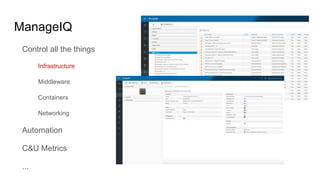
ManageIQ
Control all the things
Infrastructure
Middleware
Containers
Networking
Automation
C&U Metrics
...
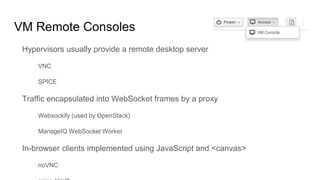
VM Remote Consoles
Hypervisors usually provide a remote desktop server
VNC
SPICE
Traffic encapsulated into WebSocket frames by a proxy
Websockify (used by OpenStack)
ManageIQ WebSocket Worker
In-browser clients implemented using JavaScript and <canvas>
noVNC
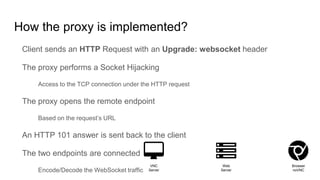
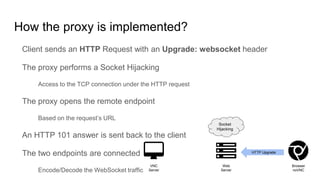
How the proxy is implemented?
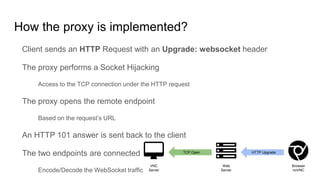
Client sends an HTTP Request with an Upgrade: websocket header
The proxy performs a Socket Hijacking
Access to the TCP connection under the HTTP request
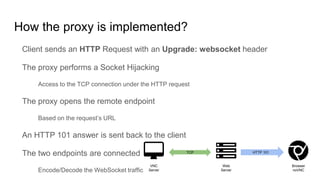
The proxy opens the remote endpoint
Based on the request’s URL
An HTTP 101 answer is sent back to the client
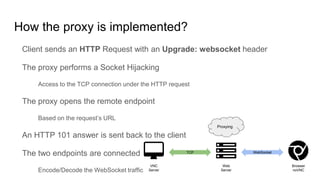
The two endpoints are connected
Encode/Decode the WebSocket traffic
Browser
noVNC
Web
Server
VNC
Server
How the proxy is implemented?
Client sends an HTTP Request with an Upgrade: websocket header
The proxy performs a Socket Hijacking
Access to the TCP connection under the HTTP request
The proxy opens the remote endpoint
Based on the request’s URL
An HTTP 101 answer is sent back to the client
The two endpoints are connected
Encode/Decode the WebSocket traffic
Browser
noVNC
Web
Server
VNC
Server
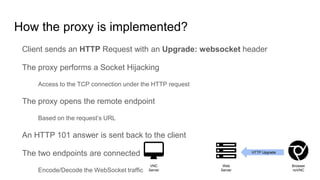
HTTP Upgrade
How the proxy is implemented?
Client sends an HTTP Request with an Upgrade: websocket header
The proxy performs a Socket Hijacking
Access to the TCP connection under the HTTP request
The proxy opens the remote endpoint
Based on the request’s URL
An HTTP 101 answer is sent back to the client
The two endpoints are connected
Encode/Decode the WebSocket traffic
Browser
noVNC
Web
Server
VNC
Server
HTTP Upgrade
Socket
Hijacking
How the proxy is implemented?
Client sends an HTTP Request with an Upgrade: websocket header
The proxy performs a Socket Hijacking
Access to the TCP connection under the HTTP request
The proxy opens the remote endpoint
Based on the request’s URL
An HTTP 101 answer is sent back to the client
The two endpoints are connected
Encode/Decode the WebSocket traffic
Browser
noVNC
Web
Server
VNC
Server
HTTP UpgradeTCP Open
How the proxy is implemented?
Client sends an HTTP Request with an Upgrade: websocket header
The proxy performs a Socket Hijacking
Access to the TCP connection under the HTTP request
The proxy opens the remote endpoint
Based on the request’s URL
An HTTP 101 answer is sent back to the client
The two endpoints are connected
Encode/Decode the WebSocket traffic
Browser
noVNC
Web
Server
VNC
Server
TCP HTTP 101
How the proxy is implemented?
Client sends an HTTP Request with an Upgrade: websocket header
The proxy performs a Socket Hijacking
Access to the TCP connection under the HTTP request
The proxy opens the remote endpoint
Based on the request’s URL
An HTTP 101 answer is sent back to the client
The two endpoints are connected
Encode/Decode the WebSocket traffic
Browser
noVNC
Web
Server
VNC
Server
TCP WebSocket
Proxying
HTTP Upgrade
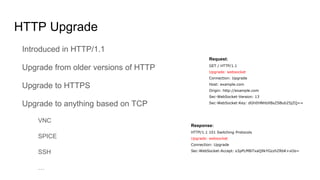
Introduced in HTTP/1.1
Upgrade from older versions of HTTP
Upgrade to HTTPS
Upgrade to anything based on TCP
VNC
SPICE
SSH
…
Request:
GET / HTTP/1.1
Upgrade: websocket
Connection: Upgrade
Host: example.com
Origin: http://example.com
Sec-WebSocket-Version: 13
Sec-WebSocket-Key: dGhlIHNhbXBsZSBub25jZQ==
Response:
HTTP/1.1 101 Switching Protocols
Upgrade: websocket
Connection: Upgrade
Sec-WebSocket-Accept: s3pPLMBiTxaQ9kYGzzhZRbK+xOo=
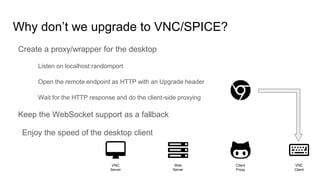
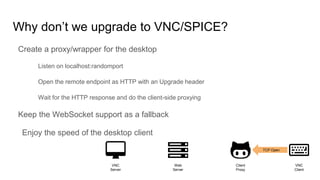
Why don’t we upgrade to VNC/SPICE?
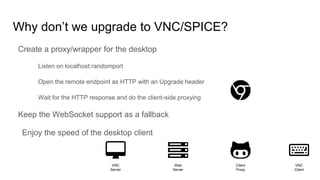
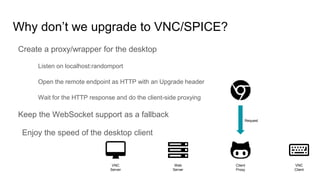
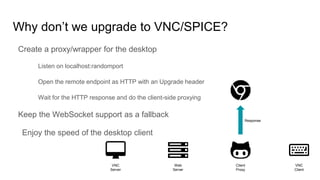
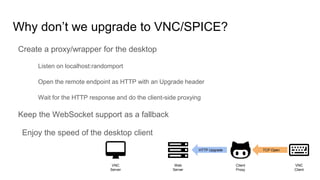
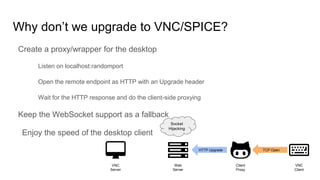
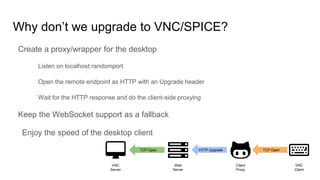
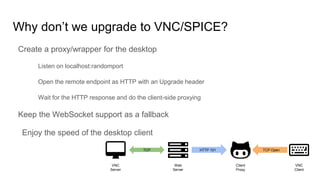
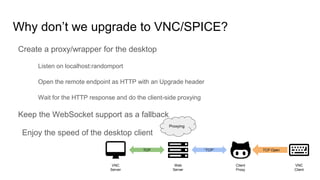
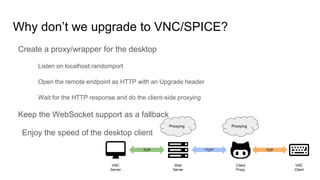
Create a proxy/wrapper for the desktop
Listen on localhost:randomport
Open the remote endpoint as HTTP with an Upgrade header
Wait for the HTTP response and do the client-side proxying
Keep the WebSocket support as a fallback
Enjoy the speed of the desktop client
VNC
Server
Web
Server
Client
Proxy
VNC
Client
Why don’t we upgrade to VNC/SPICE?
Create a proxy/wrapper for the desktop
Listen on localhost:randomport
Open the remote endpoint as HTTP with an Upgrade header
Wait for the HTTP response and do the client-side proxying
Keep the WebSocket support as a fallback
Enjoy the speed of the desktop client
VNC
Server
Web
Server
Client
Proxy
VNC
Client
Request
Why don’t we upgrade to VNC/SPICE?
Create a proxy/wrapper for the desktop
Listen on localhost:randomport
Open the remote endpoint as HTTP with an Upgrade header
Wait for the HTTP response and do the client-side proxying
Keep the WebSocket support as a fallback
Enjoy the speed of the desktop client
VNC
Server
Web
Server
Client
Proxy
VNC
Client
Response
Why don’t we upgrade to VNC/SPICE?
Create a proxy/wrapper for the desktop
Listen on localhost:randomport
Open the remote endpoint as HTTP with an Upgrade header
Wait for the HTTP response and do the client-side proxying
Keep the WebSocket support as a fallback
Enjoy the speed of the desktop client
VNC
Server
Web
Server
Client
Proxy
VNC
Client
Why don’t we upgrade to VNC/SPICE?
Create a proxy/wrapper for the desktop
Listen on localhost:randomport
Open the remote endpoint as HTTP with an Upgrade header
Wait for the HTTP response and do the client-side proxying
Keep the WebSocket support as a fallback
Enjoy the speed of the desktop client
VNC
Server
Web
Server
Client
Proxy
VNC
Client
TCP Open
Why don’t we upgrade to VNC/SPICE?
Create a proxy/wrapper for the desktop
Listen on localhost:randomport
Open the remote endpoint as HTTP with an Upgrade header
Wait for the HTTP response and do the client-side proxying
Keep the WebSocket support as a fallback
Enjoy the speed of the desktop client
VNC
Server
Web
Server
Client
Proxy
VNC
Client
TCP OpenHTTP Upgrade
Why don’t we upgrade to VNC/SPICE?
Create a proxy/wrapper for the desktop
Listen on localhost:randomport
Open the remote endpoint as HTTP with an Upgrade header
Wait for the HTTP response and do the client-side proxying
Keep the WebSocket support as a fallback
Enjoy the speed of the desktop client
VNC
Server
Web
Server
Client
Proxy
VNC
Client
TCP OpenHTTP Upgrade
Socket
Hijacking
Why don’t we upgrade to VNC/SPICE?
Create a proxy/wrapper for the desktop
Listen on localhost:randomport
Open the remote endpoint as HTTP with an Upgrade header
Wait for the HTTP response and do the client-side proxying
Keep the WebSocket support as a fallback
Enjoy the speed of the desktop client
VNC
Server
Web
Server
Client
Proxy
VNC
Client
TCP OpenHTTP UpgradeTCP Open
Why don’t we upgrade to VNC/SPICE?
Create a proxy/wrapper for the desktop
Listen on localhost:randomport
Open the remote endpoint as HTTP with an Upgrade header
Wait for the HTTP response and do the client-side proxying
Keep the WebSocket support as a fallback
Enjoy the speed of the desktop client
VNC
Server
Web
Server
Client
Proxy
VNC
Client
TCP OpenTCP HTTP 101
Why don’t we upgrade to VNC/SPICE?
Create a proxy/wrapper for the desktop
Listen on localhost:randomport
Open the remote endpoint as HTTP with an Upgrade header
Wait for the HTTP response and do the client-side proxying
Keep the WebSocket support as a fallback
Enjoy the speed of the desktop client
VNC
Server
Web
Server
Client
Proxy
VNC
Client
TCP OpenTCP
Proxying
“TCP”
Why don’t we upgrade to VNC/SPICE?
Create a proxy/wrapper for the desktop
Listen on localhost:randomport
Open the remote endpoint as HTTP with an Upgrade header
Wait for the HTTP response and do the client-side proxying
Keep the WebSocket support as a fallback
Enjoy the speed of the desktop client
VNC
Server
Web
Server
Client
Proxy
VNC
Client
TCP
Proxying
“TCP” TCP
Proxying
Purr
An (incomplete) implementation of the TCP “smuggling”
Server implemented in Ruby using Rack
Client-side proxy
The scary part implemented in Go
Controlled by a browser extension using the Native Messaging API
Extension accessible from Web Applications using a JS library (TODO)
It can “smuggle” anything TCP-based through HTTP
It has a nice logo of a purring cat
Thank you for your attention!
Find the project on GitHub: http://github.com/skateman/purr
Reach out if you are interested in integrating it in your product
Feel free to contribute, there is a lot to do:
Distribution of the client
JS frontend library
HTTPS support
Tests for the Go code
Integration tests

Smuggling TCP traffic through HTTP

  • 1.
    Smuggling TCP traffic throughHTTP Dávid Halász dhalasz@redhat.com
  • 2.
    About me Software Engineerat Red Hat in Brno Working on the ManageIQ UI and remote consoles and notifications and many other stuff mostly in Ruby Maintaining the SASS port of PatternFly @skateman on GitHub 💓💎💓
  • 3.
    ManageIQ Control all thethings Infrastructure Middleware Containers Networking Automation C&U Metrics ...
  • 4.
    VM Remote Consoles Hypervisorsusually provide a remote desktop server VNC SPICE Traffic encapsulated into WebSocket frames by a proxy Websockify (used by OpenStack) ManageIQ WebSocket Worker In-browser clients implemented using JavaScript and <canvas> noVNC
  • 5.
    How the proxyis implemented? Client sends an HTTP Request with an Upgrade: websocket header The proxy performs a Socket Hijacking Access to the TCP connection under the HTTP request The proxy opens the remote endpoint Based on the request’s URL An HTTP 101 answer is sent back to the client The two endpoints are connected Encode/Decode the WebSocket traffic Browser noVNC Web Server VNC Server
  • 6.
    How the proxyis implemented? Client sends an HTTP Request with an Upgrade: websocket header The proxy performs a Socket Hijacking Access to the TCP connection under the HTTP request The proxy opens the remote endpoint Based on the request’s URL An HTTP 101 answer is sent back to the client The two endpoints are connected Encode/Decode the WebSocket traffic Browser noVNC Web Server VNC Server HTTP Upgrade
  • 7.
    How the proxyis implemented? Client sends an HTTP Request with an Upgrade: websocket header The proxy performs a Socket Hijacking Access to the TCP connection under the HTTP request The proxy opens the remote endpoint Based on the request’s URL An HTTP 101 answer is sent back to the client The two endpoints are connected Encode/Decode the WebSocket traffic Browser noVNC Web Server VNC Server HTTP Upgrade Socket Hijacking
  • 8.
    How the proxyis implemented? Client sends an HTTP Request with an Upgrade: websocket header The proxy performs a Socket Hijacking Access to the TCP connection under the HTTP request The proxy opens the remote endpoint Based on the request’s URL An HTTP 101 answer is sent back to the client The two endpoints are connected Encode/Decode the WebSocket traffic Browser noVNC Web Server VNC Server HTTP UpgradeTCP Open
  • 9.
    How the proxyis implemented? Client sends an HTTP Request with an Upgrade: websocket header The proxy performs a Socket Hijacking Access to the TCP connection under the HTTP request The proxy opens the remote endpoint Based on the request’s URL An HTTP 101 answer is sent back to the client The two endpoints are connected Encode/Decode the WebSocket traffic Browser noVNC Web Server VNC Server TCP HTTP 101
  • 10.
    How the proxyis implemented? Client sends an HTTP Request with an Upgrade: websocket header The proxy performs a Socket Hijacking Access to the TCP connection under the HTTP request The proxy opens the remote endpoint Based on the request’s URL An HTTP 101 answer is sent back to the client The two endpoints are connected Encode/Decode the WebSocket traffic Browser noVNC Web Server VNC Server TCP WebSocket Proxying
  • 11.
    HTTP Upgrade Introduced inHTTP/1.1 Upgrade from older versions of HTTP Upgrade to HTTPS Upgrade to anything based on TCP VNC SPICE SSH … Request: GET / HTTP/1.1 Upgrade: websocket Connection: Upgrade Host: example.com Origin: http://example.com Sec-WebSocket-Version: 13 Sec-WebSocket-Key: dGhlIHNhbXBsZSBub25jZQ== Response: HTTP/1.1 101 Switching Protocols Upgrade: websocket Connection: Upgrade Sec-WebSocket-Accept: s3pPLMBiTxaQ9kYGzzhZRbK+xOo=
  • 12.
    Why don’t weupgrade to VNC/SPICE? Create a proxy/wrapper for the desktop Listen on localhost:randomport Open the remote endpoint as HTTP with an Upgrade header Wait for the HTTP response and do the client-side proxying Keep the WebSocket support as a fallback Enjoy the speed of the desktop client VNC Server Web Server Client Proxy VNC Client
  • 13.
    Why don’t weupgrade to VNC/SPICE? Create a proxy/wrapper for the desktop Listen on localhost:randomport Open the remote endpoint as HTTP with an Upgrade header Wait for the HTTP response and do the client-side proxying Keep the WebSocket support as a fallback Enjoy the speed of the desktop client VNC Server Web Server Client Proxy VNC Client Request
  • 14.
    Why don’t weupgrade to VNC/SPICE? Create a proxy/wrapper for the desktop Listen on localhost:randomport Open the remote endpoint as HTTP with an Upgrade header Wait for the HTTP response and do the client-side proxying Keep the WebSocket support as a fallback Enjoy the speed of the desktop client VNC Server Web Server Client Proxy VNC Client Response
  • 15.
    Why don’t weupgrade to VNC/SPICE? Create a proxy/wrapper for the desktop Listen on localhost:randomport Open the remote endpoint as HTTP with an Upgrade header Wait for the HTTP response and do the client-side proxying Keep the WebSocket support as a fallback Enjoy the speed of the desktop client VNC Server Web Server Client Proxy VNC Client
  • 16.
    Why don’t weupgrade to VNC/SPICE? Create a proxy/wrapper for the desktop Listen on localhost:randomport Open the remote endpoint as HTTP with an Upgrade header Wait for the HTTP response and do the client-side proxying Keep the WebSocket support as a fallback Enjoy the speed of the desktop client VNC Server Web Server Client Proxy VNC Client TCP Open
  • 17.
    Why don’t weupgrade to VNC/SPICE? Create a proxy/wrapper for the desktop Listen on localhost:randomport Open the remote endpoint as HTTP with an Upgrade header Wait for the HTTP response and do the client-side proxying Keep the WebSocket support as a fallback Enjoy the speed of the desktop client VNC Server Web Server Client Proxy VNC Client TCP OpenHTTP Upgrade
  • 18.
    Why don’t weupgrade to VNC/SPICE? Create a proxy/wrapper for the desktop Listen on localhost:randomport Open the remote endpoint as HTTP with an Upgrade header Wait for the HTTP response and do the client-side proxying Keep the WebSocket support as a fallback Enjoy the speed of the desktop client VNC Server Web Server Client Proxy VNC Client TCP OpenHTTP Upgrade Socket Hijacking
  • 19.
    Why don’t weupgrade to VNC/SPICE? Create a proxy/wrapper for the desktop Listen on localhost:randomport Open the remote endpoint as HTTP with an Upgrade header Wait for the HTTP response and do the client-side proxying Keep the WebSocket support as a fallback Enjoy the speed of the desktop client VNC Server Web Server Client Proxy VNC Client TCP OpenHTTP UpgradeTCP Open
  • 20.
    Why don’t weupgrade to VNC/SPICE? Create a proxy/wrapper for the desktop Listen on localhost:randomport Open the remote endpoint as HTTP with an Upgrade header Wait for the HTTP response and do the client-side proxying Keep the WebSocket support as a fallback Enjoy the speed of the desktop client VNC Server Web Server Client Proxy VNC Client TCP OpenTCP HTTP 101
  • 21.
    Why don’t weupgrade to VNC/SPICE? Create a proxy/wrapper for the desktop Listen on localhost:randomport Open the remote endpoint as HTTP with an Upgrade header Wait for the HTTP response and do the client-side proxying Keep the WebSocket support as a fallback Enjoy the speed of the desktop client VNC Server Web Server Client Proxy VNC Client TCP OpenTCP Proxying “TCP”
  • 22.
    Why don’t weupgrade to VNC/SPICE? Create a proxy/wrapper for the desktop Listen on localhost:randomport Open the remote endpoint as HTTP with an Upgrade header Wait for the HTTP response and do the client-side proxying Keep the WebSocket support as a fallback Enjoy the speed of the desktop client VNC Server Web Server Client Proxy VNC Client TCP Proxying “TCP” TCP Proxying
  • 23.
    Purr An (incomplete) implementationof the TCP “smuggling” Server implemented in Ruby using Rack Client-side proxy The scary part implemented in Go Controlled by a browser extension using the Native Messaging API Extension accessible from Web Applications using a JS library (TODO) It can “smuggle” anything TCP-based through HTTP It has a nice logo of a purring cat
  • 24.
    Thank you foryour attention! Find the project on GitHub: http://github.com/skateman/purr Reach out if you are interested in integrating it in your product Feel free to contribute, there is a lot to do: Distribution of the client JS frontend library HTTPS support Tests for the Go code Integration tests