

Stretching
CloudStack Over
Multiple
Datacenters
May 2025
Public
2
• Wido den Hollander (1986)
• Born and live in the Netherlands
• CTO @ Your.Online
• Started my own hosting company in 2003
• Techie in my heart
• Open Source & Tech
• Apache CloudStack developer and PMC member
• Ceph evangelist
• IPv6 fanatic
Who am I?
Wido den Hollander
3
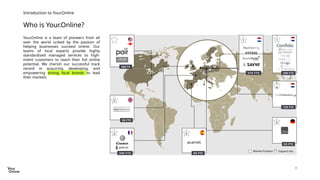
Who is Your.Online?
Introduction to Your.Online
Your.Online is a team of pioneers from all
over the world united by the passion of
helping businesses succeed online. Our
teams of local experts provide highly
standardized managed services to high-
intent customers to reach their full online
potential. We cherish our successful track
record in acquiring, developing, and
empowering strong local brands to lead
their markets
48FTE
1
310 FTE
5
30 FTE
2
200 FTE
5
60 FTE
Expand into
Market Position
5
50 FTE
1
200 FTE
120 FTE
1
0
4
• We run two large Apache CloudStack deployments
• Yourhosting in the Netherlands
• Axarnet in Spain
• More deployments coming in 2025!
We love CloudStack!
Apache CloudStack @ Your.Online
Infrastructure at Your.Online
5
Building a multi DC CloudStack environment
Multi DC
It’s common for people to request a CloudStack setup that supports VM failover/migration
between datacenters
But is this possible? What do you need? And how do you build it?
Hint: Yes, it’s possible and you need VXLAN, EVPN and BGP
6
Building a multi DC CloudStack environment
Multi DC
7
Building a multi DC CloudStack environment
Multi DC
Ok, let’s continue and dive a bit deeper.
8
Building a multi DC CloudStack environment
Multi DC
Everything in CloudStack begins with the network.
A solid network design is the foundation for everything you build.
9
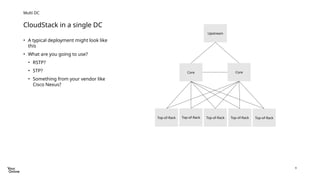
• A typical deployment might look like
this
• What are you going to use?
• RSTP?
• STP?
• Something from your vendor like
Cisco Nexus?
CloudStack in a single DC
Multi DC
Core
Top-of-Rack Top-of-Rack Top-of-Rack Top-of-Rack Top-of-Rack
Upstream
Core
10
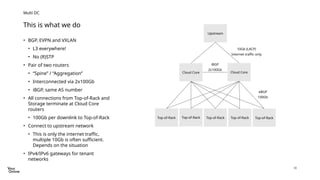
• BGP, EVPN and VXLAN
• L3 everywhere!
• No (R)STP
• Pair of two routers
• “Spine” / “Aggregation”
• Interconnected via 2x100Gb
• iBGP, same AS number
• All connections from Top-of-Rack and
Storage terminate at Cloud Core
routers
• 100Gb per downlink to Top-of-Rack
• Connect to upstream network
• This is only the internet traffic,
multiple 10Gb is often sufficient.
Depends on the situation
• IPv4/IPv6 gateways for tenant
networks
This is what we do
Multi DC
Cloud Core
Top-of-Rack Top-of-Rack Top-of-Rack Top-of-Rack Top-of-Rack
Upstream
Cloud Core
eBGP
100Gb
iBGP
2x100Gb
10Gb (LACP)
Internet traffic only
11
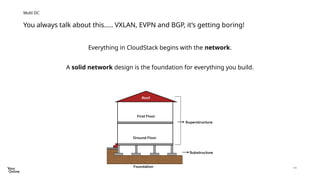
You always talk about this….. VXLAN, EVPN and BGP, it’s getting boring!
Multi DC
Everything in CloudStack begins with the network.
A solid network design is the foundation for everything you build.
12
• 100Gb/25Gb
• VXLAN+EVPN+BGP is the underlying network technology
• Full L3 network
• No L2 (VLANs) present
• BGP everywhere, up to the hypervisor
• Mixture of Juniper and Cumulus Linux on switches/routers
• IPv6-first
• Only IPv4 where needed
• BGP operates exclusively via IPv6 (RFC5549)
I recommend you have a look at one of my previous talks I gave about these networking setups 
Our networking setup
Multi DC
13
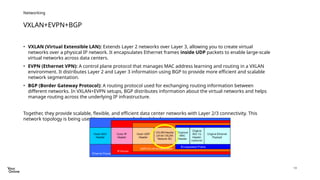
• VXLAN (Virtual Extensible LAN): Extends Layer 2 networks over Layer 3, allowing you to create virtual
networks over a physical IP network. It encapsulates Ethernet frames inside UDP packets to enable large-scale
virtual networks across data centers.
• EVPN (Ethernet VPN): A control plane protocol that manages MAC address learning and routing in a VXLAN
environment. It distributes Layer 2 and Layer 3 information using BGP to provide more efficient and scalable
network segmentation.
• BGP (Border Gateway Protocol): A routing protocol used for exchanging routing information between
different networks. In VXLAN+EVPN setups, BGP distributes information about the virtual networks and helps
manage routing across the underlying IP infrastructure.
Together, they provide scalable, flexible, and efficient data center networks with Layer 2/3 connectivity. This
network topology is being used by many large-scale cloud deployments.
VXLAN+EVPN+BGP
Networking
14
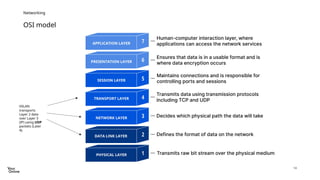
OSI model
Networking
VXLAN
transports
Layer 2 data
over Layer 3
(IP) using UDP
packets (Later
4).
15
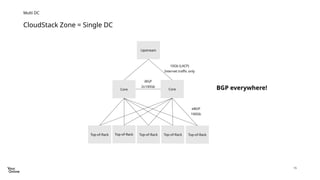
Multi DC
Core
Top-of-Rack Top-of-Rack Top-of-Rack Top-of-Rack Top-of-Rack
Upstream
Core
eBGP
100Gb
iBGP
2x100Gb
10Gb (LACP)
Internet traffic only
CloudStack Zone = Single DC
BGP everywhere!
16
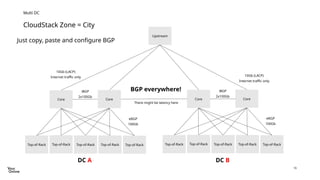
Multi DC
Core
Top-of-Rack Top-of-Rack Top-of-Rack Top-of-Rack Top-of-Rack
Upstream
Core
eBGP
100Gb
iBGP
2x100Gb
10Gb (LACP)
Internet traffic only
CloudStack Zone = City
Core
Top-of-Rack Top-of-Rack Top-of-Rack Top-of-Rack Top-of-Rack
Core
eBGP
100Gb
iBGP
2x100Gb
10Gb (LACP)
Internet traffic only
BGP everywhere!
Just copy, paste and configure BGP
DC A DC B
There might be latency here
17
CloudStack Zone = City
Multi DC
18
• It’s not that difficult!
• Once you have a working BGP, EVPN and VXLAN environment you can easily stretch it
• It starts with the network!
• BGP can do this
• VXLAN Anycast gateways are magic
It’s easy
Multi DC
19
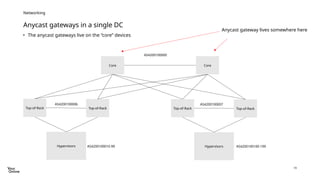
• The anycast gateways live on the “core” devices
Anycast gateways in a single DC
Networking
Hypervisors
Top-of-Rack Top-of-Rack
Core Core
Hypervisors
Top-of-Rack Top-of-Rack
AS4200100006 AS4200100007
AS4200100000
AS4200100010-99 AS4200100100-199
Anycast gateway lives somewhere here
20
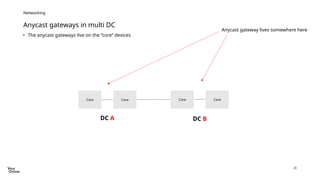
• The anycast gateways live on the “core” devices
Anycast gateways in multi DC
Networking
Core Core
Anycast gateway lives somewhere here
Core Core
DC A DC B
21
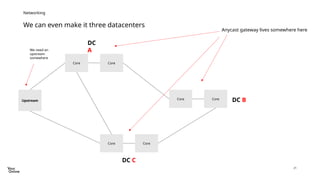
We can even make it three datacenters
Networking
Core Core
Anycast gateway lives somewhere here
DC
A
DC B
Core Core
Core Core
DC C
Upstream
We need an
upstream
somewhere
22
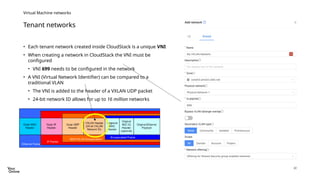
Tenant networks
Virtual Machine networks
• Each tenant network created inside CloudStack is a unique VNI
• When creating a network in CloudStack the VNI must be
configured
• VNI 699 needs to be configured in the network
• A VNI (Virtual Network Identifier) can be compared to a
traditional VLAN
• The VNI is added to the header of a VXLAN UDP packet
• 24-bit network ID allows for up to 16 million networks
23
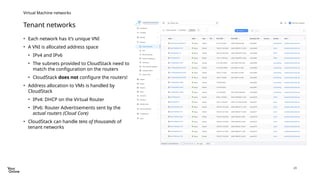
Tenant networks
Virtual Machine networks
• Each network has it’s unique VNI
• A VNI is allocated address space
• IPv4 and IPv6
• The subnets provided to CloudStack need to
match the configuration on the routers
• CloudStack does not configure the routers!
• Address allocation to VMs is handled by
CloudStack
• IPv4: DHCP on the Virtual Router
• IPv6: Router Advertisements sent by the
actual routers (Cloud Core)
• CloudStack can handle tens of thousands of
tenant networks
24
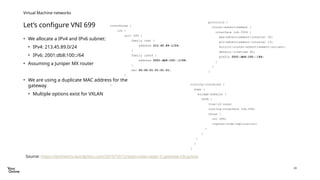
Let’s configure VNI 699
Virtual Machine networks
• We allocate a IPv4 and IPv6 subnet:
• IPv4: 213.45.89.0/24
• IPv6: 2001:db8:100::/64
• Assuming a Juniper MX router
• We are using a duplicate MAC address for the
gateway
• Multiple options exist for VXLAN
Source: https://danhearty.wordpress.com/2019/10/12/evpn-vxlan-layer-3-gateway-irb-junos/
interfaces {
irb {
unit 699 {
family inet {
address 213.45.89.1/24;
}
family inet6 {
address 2001:db8:100::1/64;
}
mac 00:00:01:01:01:01;
}
}
}
protocols {
router-advertisement {
interface irb.3504 {
max-advertisement-interval 30;
min-advertisement-interval 10;
solicit-router-advertisement-unicast;
default-lifetime 60;
prefix 2001:db8:100::/64;
}
}
}
routing-instances {
evpn {
bridge-domains {
v699 {
vlan-id none;
routing-interface irb.699;
vxlan {
vni 699;
ingress-node-replication;
}
}
}
}
}
25
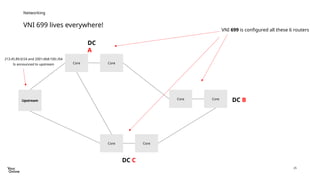
VNI 699 lives everywhere!
Networking
Core Core
VNI 699 is configured all these 6 routers
DC
A
DC B
Core Core
Core Core
DC C
Upstream
213.45.89.0/24 and 2001:db8:100::/64
Is announced to upstream
26
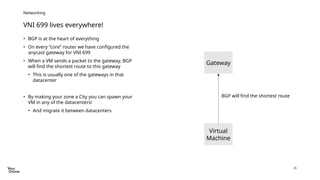
VNI 699 lives everywhere!
Networking
• BGP is at the heart of everything
• On every “core” router we have configured the
anycast gateway for VNI 699
• When a VM sends a packet to the gateway, BGP
will find the shortest route to this gateway
• This is usually one of the gateways in that
datacenter
• By making your zone a City you can spawn your
VM in any of the datacenters!
• And migrate it between datacenters
Virtual
Machine
Gateway
BGP will find the shortest route
27
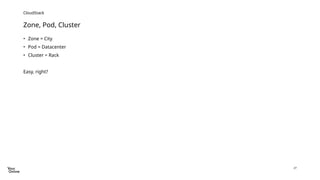
Zone, Pod, Cluster
CloudStack
• Zone = City
• Pod = Datacenter
• Cluster = Rack
Easy, right?
28
My advice
CloudStack
• Take it easy!
• Make sure you have a working BGP, EVPN and VXLAN setup
before trying to get it working underneath CloudStack
• Build something with plain Linux
• Integrate IPv6 from day 1 into this environment
• Be ready to fail and get frustrated
• BGP allows you to create amazing things, don’t follow all the
vendor guidelines, use them as inspiratation
29
• Network is the foundation of your environment
• VXLAN, BGP and EVPN provide you all the flexibility
• BGP allows for building a full L3 network
• Anycast VXLAN gateways allow for quick routing
• You can use any VNI in any datacenter
Summary
@widodh
wido@denhollander.io
blog.widodh.nl
Stretching CloudStack over multiple datacenters

Stretching CloudStack over multiple datacenters

  • 1.
  • 2.
    2 • Wido denHollander (1986) • Born and live in the Netherlands • CTO @ Your.Online • Started my own hosting company in 2003 • Techie in my heart • Open Source & Tech • Apache CloudStack developer and PMC member • Ceph evangelist • IPv6 fanatic Who am I? Wido den Hollander
  • 3.
    3 Who is Your.Online? Introductionto Your.Online Your.Online is a team of pioneers from all over the world united by the passion of helping businesses succeed online. Our teams of local experts provide highly standardized managed services to high- intent customers to reach their full online potential. We cherish our successful track record in acquiring, developing, and empowering strong local brands to lead their markets 48FTE 1 310 FTE 5 30 FTE 2 200 FTE 5 60 FTE Expand into Market Position 5 50 FTE 1 200 FTE 120 FTE 1 0
  • 4.
    4 • We runtwo large Apache CloudStack deployments • Yourhosting in the Netherlands • Axarnet in Spain • More deployments coming in 2025! We love CloudStack! Apache CloudStack @ Your.Online Infrastructure at Your.Online
  • 5.
    5 Building a multiDC CloudStack environment Multi DC It’s common for people to request a CloudStack setup that supports VM failover/migration between datacenters But is this possible? What do you need? And how do you build it? Hint: Yes, it’s possible and you need VXLAN, EVPN and BGP
  • 6.
    6 Building a multiDC CloudStack environment Multi DC
  • 7.
    7 Building a multiDC CloudStack environment Multi DC Ok, let’s continue and dive a bit deeper.
  • 8.
    8 Building a multiDC CloudStack environment Multi DC Everything in CloudStack begins with the network. A solid network design is the foundation for everything you build.
  • 9.
    9 • A typicaldeployment might look like this • What are you going to use? • RSTP? • STP? • Something from your vendor like Cisco Nexus? CloudStack in a single DC Multi DC Core Top-of-Rack Top-of-Rack Top-of-Rack Top-of-Rack Top-of-Rack Upstream Core
  • 10.
    10 • BGP, EVPNand VXLAN • L3 everywhere! • No (R)STP • Pair of two routers • “Spine” / “Aggregation” • Interconnected via 2x100Gb • iBGP, same AS number • All connections from Top-of-Rack and Storage terminate at Cloud Core routers • 100Gb per downlink to Top-of-Rack • Connect to upstream network • This is only the internet traffic, multiple 10Gb is often sufficient. Depends on the situation • IPv4/IPv6 gateways for tenant networks This is what we do Multi DC Cloud Core Top-of-Rack Top-of-Rack Top-of-Rack Top-of-Rack Top-of-Rack Upstream Cloud Core eBGP 100Gb iBGP 2x100Gb 10Gb (LACP) Internet traffic only
  • 11.
    11 You always talkabout this….. VXLAN, EVPN and BGP, it’s getting boring! Multi DC Everything in CloudStack begins with the network. A solid network design is the foundation for everything you build.
  • 12.
    12 • 100Gb/25Gb • VXLAN+EVPN+BGPis the underlying network technology • Full L3 network • No L2 (VLANs) present • BGP everywhere, up to the hypervisor • Mixture of Juniper and Cumulus Linux on switches/routers • IPv6-first • Only IPv4 where needed • BGP operates exclusively via IPv6 (RFC5549) I recommend you have a look at one of my previous talks I gave about these networking setups  Our networking setup Multi DC
  • 13.
    13 • VXLAN (VirtualExtensible LAN): Extends Layer 2 networks over Layer 3, allowing you to create virtual networks over a physical IP network. It encapsulates Ethernet frames inside UDP packets to enable large-scale virtual networks across data centers. • EVPN (Ethernet VPN): A control plane protocol that manages MAC address learning and routing in a VXLAN environment. It distributes Layer 2 and Layer 3 information using BGP to provide more efficient and scalable network segmentation. • BGP (Border Gateway Protocol): A routing protocol used for exchanging routing information between different networks. In VXLAN+EVPN setups, BGP distributes information about the virtual networks and helps manage routing across the underlying IP infrastructure. Together, they provide scalable, flexible, and efficient data center networks with Layer 2/3 connectivity. This network topology is being used by many large-scale cloud deployments. VXLAN+EVPN+BGP Networking
  • 14.
    14 OSI model Networking VXLAN transports Layer 2data over Layer 3 (IP) using UDP packets (Later 4).
  • 15.
    15 Multi DC Core Top-of-Rack Top-of-RackTop-of-Rack Top-of-Rack Top-of-Rack Upstream Core eBGP 100Gb iBGP 2x100Gb 10Gb (LACP) Internet traffic only CloudStack Zone = Single DC BGP everywhere!
  • 16.
    16 Multi DC Core Top-of-Rack Top-of-RackTop-of-Rack Top-of-Rack Top-of-Rack Upstream Core eBGP 100Gb iBGP 2x100Gb 10Gb (LACP) Internet traffic only CloudStack Zone = City Core Top-of-Rack Top-of-Rack Top-of-Rack Top-of-Rack Top-of-Rack Core eBGP 100Gb iBGP 2x100Gb 10Gb (LACP) Internet traffic only BGP everywhere! Just copy, paste and configure BGP DC A DC B There might be latency here
  • 17.
    17 CloudStack Zone =City Multi DC
  • 18.
    18 • It’s notthat difficult! • Once you have a working BGP, EVPN and VXLAN environment you can easily stretch it • It starts with the network! • BGP can do this • VXLAN Anycast gateways are magic It’s easy Multi DC
  • 19.
    19 • The anycastgateways live on the “core” devices Anycast gateways in a single DC Networking Hypervisors Top-of-Rack Top-of-Rack Core Core Hypervisors Top-of-Rack Top-of-Rack AS4200100006 AS4200100007 AS4200100000 AS4200100010-99 AS4200100100-199 Anycast gateway lives somewhere here
  • 20.
    20 • The anycastgateways live on the “core” devices Anycast gateways in multi DC Networking Core Core Anycast gateway lives somewhere here Core Core DC A DC B
  • 21.
    21 We can evenmake it three datacenters Networking Core Core Anycast gateway lives somewhere here DC A DC B Core Core Core Core DC C Upstream We need an upstream somewhere
  • 22.
    22 Tenant networks Virtual Machinenetworks • Each tenant network created inside CloudStack is a unique VNI • When creating a network in CloudStack the VNI must be configured • VNI 699 needs to be configured in the network • A VNI (Virtual Network Identifier) can be compared to a traditional VLAN • The VNI is added to the header of a VXLAN UDP packet • 24-bit network ID allows for up to 16 million networks
  • 23.
    23 Tenant networks Virtual Machinenetworks • Each network has it’s unique VNI • A VNI is allocated address space • IPv4 and IPv6 • The subnets provided to CloudStack need to match the configuration on the routers • CloudStack does not configure the routers! • Address allocation to VMs is handled by CloudStack • IPv4: DHCP on the Virtual Router • IPv6: Router Advertisements sent by the actual routers (Cloud Core) • CloudStack can handle tens of thousands of tenant networks
  • 24.
    24 Let’s configure VNI699 Virtual Machine networks • We allocate a IPv4 and IPv6 subnet: • IPv4: 213.45.89.0/24 • IPv6: 2001:db8:100::/64 • Assuming a Juniper MX router • We are using a duplicate MAC address for the gateway • Multiple options exist for VXLAN Source: https://danhearty.wordpress.com/2019/10/12/evpn-vxlan-layer-3-gateway-irb-junos/ interfaces { irb { unit 699 { family inet { address 213.45.89.1/24; } family inet6 { address 2001:db8:100::1/64; } mac 00:00:01:01:01:01; } } } protocols { router-advertisement { interface irb.3504 { max-advertisement-interval 30; min-advertisement-interval 10; solicit-router-advertisement-unicast; default-lifetime 60; prefix 2001:db8:100::/64; } } } routing-instances { evpn { bridge-domains { v699 { vlan-id none; routing-interface irb.699; vxlan { vni 699; ingress-node-replication; } } } } }
  • 25.
    25 VNI 699 liveseverywhere! Networking Core Core VNI 699 is configured all these 6 routers DC A DC B Core Core Core Core DC C Upstream 213.45.89.0/24 and 2001:db8:100::/64 Is announced to upstream
  • 26.
    26 VNI 699 liveseverywhere! Networking • BGP is at the heart of everything • On every “core” router we have configured the anycast gateway for VNI 699 • When a VM sends a packet to the gateway, BGP will find the shortest route to this gateway • This is usually one of the gateways in that datacenter • By making your zone a City you can spawn your VM in any of the datacenters! • And migrate it between datacenters Virtual Machine Gateway BGP will find the shortest route
  • 27.
    27 Zone, Pod, Cluster CloudStack •Zone = City • Pod = Datacenter • Cluster = Rack Easy, right?
  • 28.
    28 My advice CloudStack • Takeit easy! • Make sure you have a working BGP, EVPN and VXLAN setup before trying to get it working underneath CloudStack • Build something with plain Linux • Integrate IPv6 from day 1 into this environment • Be ready to fail and get frustrated • BGP allows you to create amazing things, don’t follow all the vendor guidelines, use them as inspiratation
  • 29.
    29 • Network isthe foundation of your environment • VXLAN, BGP and EVPN provide you all the flexibility • BGP allows for building a full L3 network • Anycast VXLAN gateways allow for quick routing • You can use any VNI in any datacenter Summary @widodh wido@denhollander.io blog.widodh.nl