Learning Tableau-
Step by step guide
Venkat Reddy Konasani
Contents
• Step-1 Tableau Introduction
• Step-2 Connecting to Data
• Step-3 Building basic views
• Step-4 Data manipulations and Calculated fields
• Step-5 Tableau Dashboards
• Step-6 Advanced Data Options
• Step-7 Advanced graph Options
VenkataReddyKonasani
Prerequisites
• Bit of data base knowledge
• Basic idea on visualizations and dash boards
• Windows OS with minimum 2 GB RAM
• Latest version of Tableau public or Tableau Trail
VenkataReddyKonasani
Step-1 Tableau
Introduction
Contents
• Why Tabeau
• Introduction to Tableau
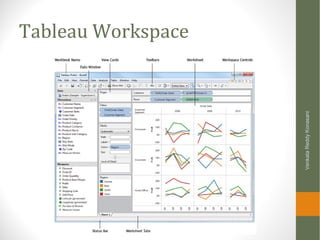
• Tableau workspace and various options
• Navigating in tableau
• Tableau Repository
VenkataReddyKonasani
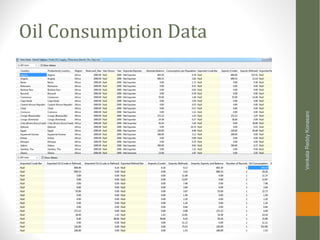
Oil Consumption Data
VenkataReddyKonasani
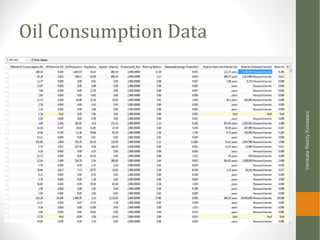
Oil Consumption Data
VenkataReddyKonasani
Aim is to understand
That oil consumption data shows below details
•Cure Oil, refined oil imports and Exports by country also
weighted by population
•Reserves left by country and by region
•Consumption by population over the time
Really??? Is it easy to get the picture?
VenkataReddyKonasani
What is Tableau
• Tableau is a rapid BI software
• Great visualizations: Allows anyone to connect to data,
visualize and create interactive, sharable dashboards in a few
clicks
• Ease of use: It's easy enough that any Excel user can learn it,
but powerful enough to satisfy even the most complex
analytical problems.
• Fast: We can create parallelized dashboards, quick filters and
calculations
VenkataReddyKonasani
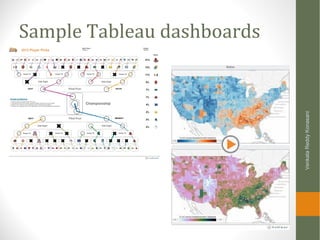
Sample Tableau dashboards
VenkataReddyKonasani
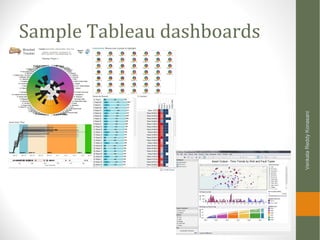
Sample Tableau dashboards
VenkataReddyKonasani
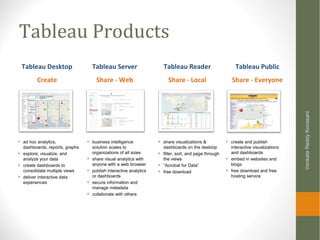
Tableau Products
VenkataReddyKonasani
Tableau Desktop
Create
Tableau Server
Share - Web
Tableau Reader
Share - Local
+ business intelligence
solution scales to
organizations of all sizes
+ share visual analytics with
anyone with a web browser
+ publish interactive analytics
or dashboards
+ secure information and
manage metadata
+ collaborate with others
+ share visualizations &
dashboards on the desktop
+ filter, sort, and page through
the views
+ “Acrobat for Data”
+ free download
+ ad hoc analytics,
dashboards, reports, graphs
+ explore, visualize, and
analyze your data
+ create dashboards to
consolidate multiple views
+ deliver interactive data
experiences
Tableau Public
Share - Everyone
+ create and publish
interactive visualizations
and dashboards
+ embed in websites and
blogs
+ free download and free
hosting service
Tableau Public
• Can connect to Microsoft Excel, Microsoft Access, and text files
• It has a limit of 100,000 rows of data that is allowed in any
single connection
• You can not save your work using Tableau public
VenkataReddyKonasani
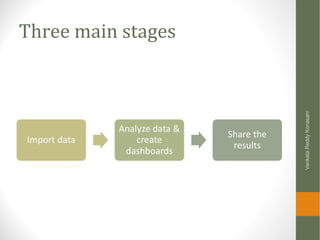
Three main stages
VenkataReddyKonasani
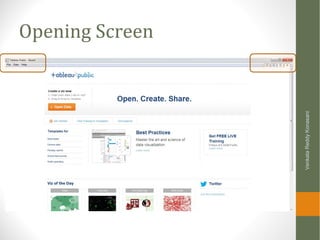
Opening Screen
VenkataReddyKonasani
Basics
• Opening a new sheet
• File>>New
• Connect to data
• Data>>Connect to data
VenkataReddyKonasani
Demo
• Starting Tableau
• Open a new workbook
• Adding additional sheets
• Data connection tab
• Various data connection options
• Adding a new dash board
• Various graph options
VenkataReddyKonasani
Tableau Workspace
VenkataReddyKonasani
Workbook and worksheets
• Each workbook can contain worksheets and dashboards.
• Worksheet is where you build views of your data by dragging
and dropping fields onto shelves
• A dashboard is a combination of several worksheets that you
can arrange for presentation or to monitor
• The sheets, whether worksheets or dashboards, display along
the bottom of the workbook as tabs
VenkataReddyKonasani
Lab
• Start Tableau
• Open a new workbook
• Add one additional sheet
• Identify data connection tab
• Can we connect to MySQL server?
• Can we connect to txt file?
• How to go back to workbook from connect to data window?
• Add a new dashboard
• Where are various types of graphs options available?
• Can we draw pie chart using Tableau?
VenkataReddyKonasani
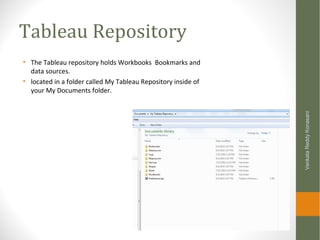
Tableau Repository
• The Tableau repository holds Workbooks Bookmarks and
data sources.
• located in a folder called My Tableau Repository inside of
your My Documents folder.
VenkataReddyKonasani
Tableau Files and File types
• Workbooks
• Tableau workbook files have the .twb file extension and are
marked with the workbook icon. Workbooks hold one or more
worksheets and dashboards.
• Bookmarks
• Tableau bookmark files have the .tbm file extension and are
marked with the bookmark icon. Bookmarks contain a single
worksheet and are an easy way to quickly share your work.
• Packaged Workbooks
• Tableau packaged workbooks have the .twbx file extension and
are marked with the packaged workbook icon. Packaged
workbooks contain a workbook along with any supporting local
file data sources and background images. This format is the best
way to package your work for sharing with others who don’t have
access to the data.
VenkataReddyKonasani
Tableau Files and File types
• Data Extract Files
• Tableau data extract files have the .tde file extension and are
marked with the extract icon. Extract files are a local copy of a
subset or entire data source that you can use to share data, work
offline, and improve database performance.
• Data Connection Files
• Tableau data connection files have the .tds file extension and are
marked with the data connection icon. Data connection files are
shortcuts for quickly connecting to data sources that you use
often.
VenkataReddyKonasani
Step2-Connecting to
Data
Venkat Reddy
Contents
• Connecting to flat files
• Connecting to DB files
• Connecting to server
• Conditional importing
• Editing a Connection
VenkataReddyKonasani
Demo: Connecting to Desktop files
• Connecting to excel file
• Connecting to superstore sales in sales data folder
• Snapshot view of the data
• Connecting to txt file
• Connecting to survey data
• Connecting to access file
• Connecting to survey data
VenkataReddyKonasani
Lab: Connecting to Desktop
files
• Download the online sales data.csv
• Snapshot view of the data
• Connect to healthcare database
• Connect to survey data
• Create a table for client
• Create a table for clinet_manager
VenkataReddyKonasani
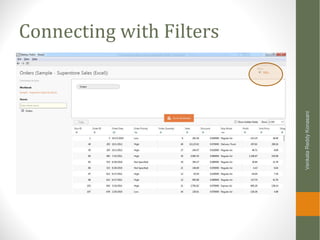
Connecting with Filters
VenkataReddyKonasani
Demo: Customized data import
• Import sales by country data
• Where sales channel=“Online”
VenkataReddyKonasani
Lab: Customized data import
• Download data using filters from survey DB
• Only data where overall rating =5 and client level is more than 7
from S2012 table(Client id more than 70,000,000)
• Download data using filters from healthcare data(health
claim.csv)
• Only data where days admitted is atleast 6 and claim amount is
more than 10,000
VenkataReddyKonasani
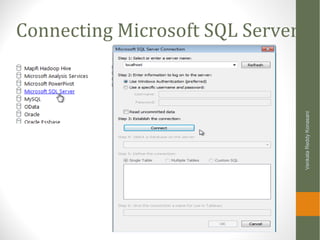
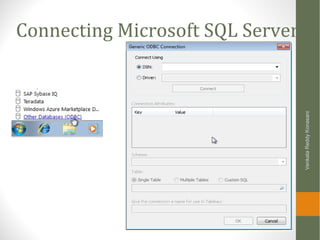
Connecting Microsoft SQL Server
VenkataReddyKonasani
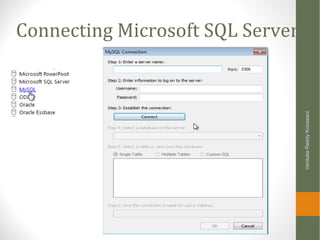
Connecting Microsoft SQL Server
VenkataReddyKonasani
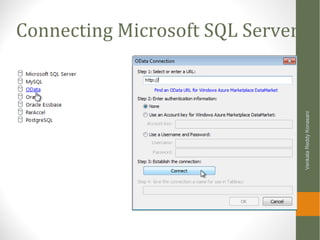
Connecting Microsoft SQL Server
VenkataReddyKonasani
Connecting Microsoft SQL Server
Data roles
• Dimensions:
• Qualitative, categorical information is a dimension
• Gender : Male & Female
• Region
• Marital Status
• Measures
• Numeric variables / Quantitative values
• Age
• Income
• Credit score
VenkataReddyKonasani
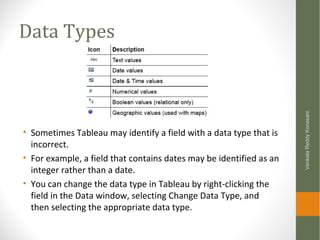
Data Types
• Sometimes Tableau may identify a field with a data type that is
incorrect.
• For example, a field that contains dates may be identified as an
integer rather than a date.
• You can change the data type in Tableau by right-clicking the
field in the Data window, selecting Change Data Type, and
then selecting the appropriate data type.
VenkataReddyKonasani
Lab: Data Roles
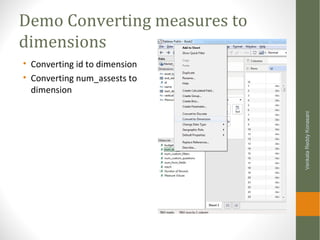
• What are the measures and dimensions in TV commercials
data (spot data sheet)
• What are the measures and dimensions in world bank data
VenkataReddyKonasani
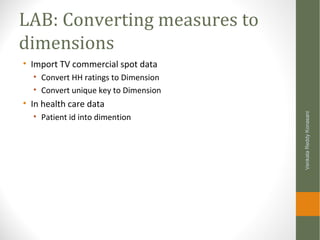
Demo Converting measures to
dimensions
• Converting id to dimension
• Converting num_assests to
dimension
VenkataReddyKonasani
LAB: Converting measures to
dimensions
• Import TV commercial spot data
• Convert HH ratings to Dimension
• Convert unique key to Dimension
• In health care data
• Patient id into dimention
VenkataReddyKonasani
Editing the connection
• Connect to cars data>>>Edit data source>>Hide Origin Field
• Show hidden fields to get back and then unhide
VenkataReddyKonasani
LAB: Edit Connection
• Edit survey data connection and hide the two fields response
and quality
• Edit survey data connection and add a filter on communication
>=3
VenkataReddyKonasani
Renaming the connection
• Edit Connection >>.Change the name of connection
• Cars data to cars_2014
VenkataReddyKonasani
LAB: Renaming the
connection
• Rename survey data to customer survey
• Connect to market data one and rename it to market
campaign data
VenkataReddyKonasani
Other Data connection related
operations
• Duplicating connection
• Close Connection
VenkataReddyKonasani
Step-3: Building basic
views
Demo: Basic views
• Superstore data
• Sum of order quantity by product category
• Sum of order quantity by month & year
• Changing the graph type
VenkataReddyKonasani
Lab: Basic views
• Connect to Price Web Data(Price_web_data.csv)
• Draw a bar graph to show total sales(count of rows) by brand
• Which brand sold the most number of items
• Change it to pie chart
• Sort the bargraph
• Which are the top two brands based on list price
• Draw graph that shows average list price for each brand
VenkataReddyKonasani
Demo : Trend chart
• Price web data day wise count of products
VenkataReddyKonasani
Lab: Trend Chart
• Import market one data
• Draw a time series chart of number of campaigns by date
• Draw a time series chart of number of campaigns by month
• Draw a time series chart for budget and identify the month with
maximum budget
VenkataReddyKonasani
LAB: Other Charts
• Import cars data, create a tree map chart for make vs items
sold(count ids)
• Import TV commercials spot data, create a vertical bar chart
for network id vs average spot cost. Change the chart for
vertical to horizontal
• Import telecom bill data, show average bill(current charges)
and count of customers(Del number) in each customer
segment. Identify the best segment (which customer segment
has very high bill and very high number of customers)
VenkataReddyKonasani
Demo: Formatting the graphs-
Color and size
• Representing Average unit price & total ordered quantity per
Product category & subcategory in superstore data
VenkataReddyKonasani
Lab: Formatting the graphs-Color
and size
• Identify the best rated brand from online sales data(price web)
• Draw a graph(other than bubble chart) on online sales data to show
• Review count as size
• Average rating as color for each brand
• Import Market campaign data
• Identify the top 5 verticals. A vertical with significant budget and significant
number of campaigns(rows).
• Identify the most productive vertical in market campaign data. A vertical
that has highest reach with least budget is the best vertical
• Identify the best car make in cars data(low MSRP and high
horse power)
• Identify the most profitable customer segment from telecom bill
data
• Draw bubble chart on billing data by each customer segment
• Size of the bubble is average bill(Current charges)
• Color of bubble as count of accounts
VenkataReddyKonasani
Adding Reference lines
• Adding reference line average age to age in healthcare data
VenkataReddyKonasani
Lab: Adding reference line
• In price web data, what are the brands that got above average
ratings? Add a reference line
• Add average list price reference line in price web data-Avg list
price by brand
• Add a mean reference line to days admitted in health care data
VenkataReddyKonasani
Demo: GIS graph
• City wise bill on the map
• Count if accounts as size
• Total Bill as colour
VenkataReddyKonasani
Lab: GIS graph
• Connect to Sales_by_country_v1.csv(inside super store folder)
• Show number of units sold for each county
• Draw a fill map fill graph
• Connect to world bank data(data by country tab)
• Create a GIS graph to show GDP by country
• Create a GIS graph to show total population by country
VenkataReddyKonasani
Step-4 : Data manipulations and
Calculated fields
Contents
• Calculated fields
• Working with dates
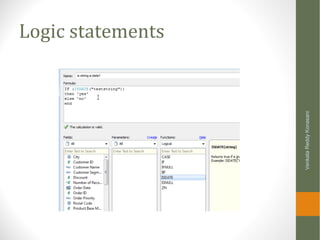
• Logic statements
• Working with filters
VenkataReddyKonasani
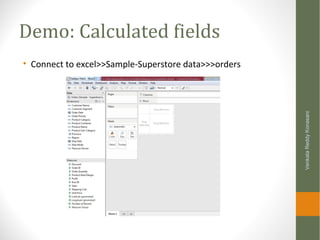
Demo: Calculated fields
• Connect to excel>>Sample-Superstore data>>>orders
VenkataReddyKonasani
Demo: Calculated fields
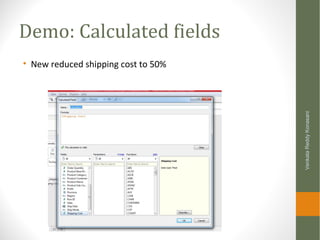
• New reduced shipping cost to 50%
VenkataReddyKonasani
Lab: Calculated fields
• Connect to Sample-Superstore data excel file
• Create a new discounted unit price from actual unit price field.
Reduce the price by 10% and create a new field as disc_price
• Create a new shipping cost. Reduce the shipping cost by by
30% and create a new field new_ship_cost
• Create a new field “final_price” which is sum of disc_price &
new_ship_cost
• What is the average final price?
VenkataReddyKonasani
Working with dates
VenkataReddyKonasani
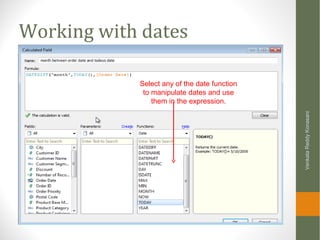
Select any of the date function
to manipulate dates and use
them in the expression.
Demo: Working with dates
• Delay indicator in Super store data [Ship Date]-[Order Date]
VenkataReddyKonasani
Lab: Working with dates
• Connect to Telco_Bill_data_v1 in telecom data folder
• Calculate age of account in moths, today-account active date
• Draw a graph that shows Del number & age on network. Sort it by
age
• Connect to Market_data_raw.xls in Market_data folder
• Calculate the interval of campaign (end date –start date)
• Convert id into dimension and draw a graph between id & interval
VenkataReddyKonasani
Logic statements
VenkataReddyKonasani
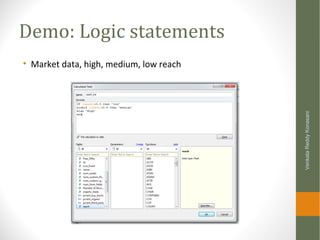
Demo: Logic statements
• Market data, high, medium, low reach
VenkataReddyKonasani
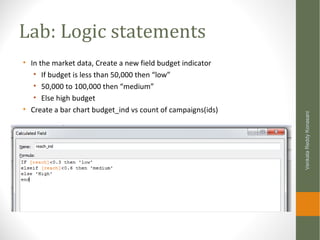
Lab: Logic statements
• In the market data, Create a new field budget indicator
• If budget is less than 50,000 then “low”
• 50,000 to 100,000 then “medium”
• Else high budget
• Create a bar chart budget_ind vs count of campaigns(ids)
VenkataReddyKonasani
Working with filters
VenkataReddyKonasani
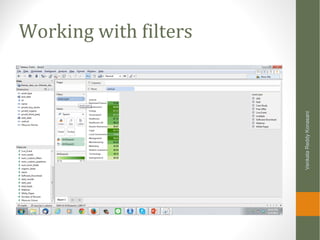
Demo: Working with filters
• Reach by vertical in market data
• Add asset type as filter
VenkataReddyKonasani
Lab: Working with filters
• Connect to sales data (Sample - Superstore Sales (Excel).xls)
• Create graph for order quantity (sum) by product sub category
• Add province as filter, show quick filter
• Add customer segment as second filter show quick filter
• Change them to single value dropdown
• Connect to price web data
• Crate a time series graph for number of items sold per day
• Use site name and brand as filters
• Change the filter type to multiple value drop down for brand
• Single value drop down for site
• Change the filter type to global and local
VenkataReddyKonasani
Step-5
Tableau Dashboards
Dashboards
VenkataReddyKonasani
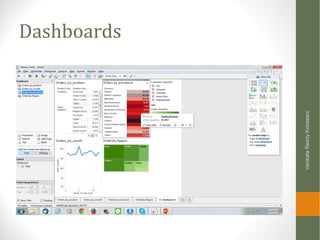
Demo: Creating a Dashboard
• In superstore data
• Orders by product, by province, by month & by region
VenkataReddyKonasani
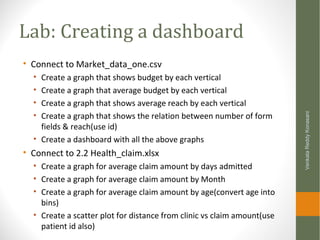
Lab: Creating a dashboard
• Connect to Market_data_one.csv
• Create a graph that shows budget by each vertical
• Create a graph that average budget by each vertical
• Create a graph that shows average reach by each vertical
• Create a graph that shows the relation between number of form
fields & reach(use id)
• Create a dashboard with all the above graphs
• Connect to 2.2 Health_claim.xlsx
• Create a graph for average claim amount by days admitted
• Create a graph for average claim amount by Month
• Create a graph for average claim amount by age(convert age into
bins)
• Create a scatter plot for distance from clinic vs claim amount(use
patient id also)
VenkataReddyKonasani
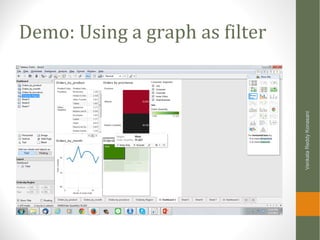
Demo: Using a graph as filter
VenkataReddyKonasani
Step-6: Advanced Data
Options
Contents
• Clipboard data
• Connecting two data sources
• Joining data sources
• Creating hierarchies
• Measure values and Measure names
• Number of records
VenkataReddyKonasani
Copying Data from clipboard
• Demo:
• Copy air travel data to clipboard
• Worksheet>>Data>>paste data
VenkataReddyKonasani
LAB: Copying Data from clipboard
• Copy petrol consumption data and crate a data connection by
pasting it; Change the connection name to petrol consumption
data
• Copy data from Price_web_data Analysis.csv and paste it in
tableau; Change the connection name to price web data
VenkataReddyKonasani
Connecting two data sources
• Demo:
• In TV commercial data, we have orders data and commercial spot
data.
• We want to draw an are graph to see whether the spot really
effects the order quantity. Do you think if the spot cost is high the
number of orders are also high
VenkataReddyKonasani
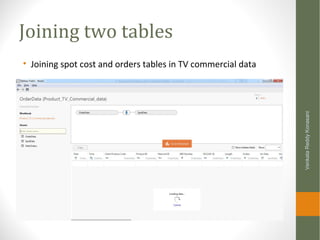
Joining two tables
• Joining spot cost and orders tables in TV commercial data
VenkataReddyKonasani
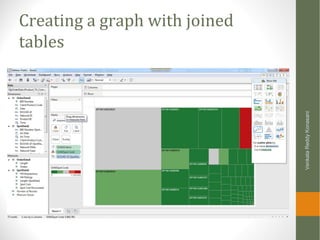
Creating a graph with joined
tables
VenkataReddyKonasani
LAB: Joining two tables
• In TV commercial data, connect orders to spots based on ISCI/
AD-iD
• Draw a graph time(date from orders table) vs spot cost
• Draw a graph that shows total orders and average spot cost for
each network
• Connect market one and market raw data
• Draw a scatter plot between budget(raw data) and reach(market
one)
VenkataReddyKonasani
Creating a Hierarchy
• For example, a data source may have fields for Country, State,
and City. These fields could be grouped into a hierarchy called
Location.
• Right-click one or more selected fields in the Data window and
select Create Hierarchy
• In the Data window, drag and drop a field directly on top of
another field.
VenkataReddyKonasani
Demo : Creating Hierarchy
• In superstore data drag and drop customer name on customer
segment
• Create a graph using customer segment hierarchy vs orders
VenkataReddyKonasani
LAB: Creating Hierarchies
• Import superstore data create below hierarchies
• Product category
• Product sub category
• Product name
• Draw a graph to show profit by product hierarchy
• Import cars data
• Crate hierarchy for make and model
• Draw a graph to show average price by make model hirarchy
• What if we create a hierarchy for model and make??
VenkataReddyKonasani
LAB: Removing Hierarchies
• Remove all the hierarchies that are created
VenkataReddyKonasani
Measure Values and Measure
Names
• The Data window contains a few fields that are not part of
your data source, two of which are Measure Names and
Measure Values
• Measure Values: All the measures of your data source
collected into one field.
• Measure Names: Contains all the names of the measures
collected into a single dimension.
VenkataReddyKonasani
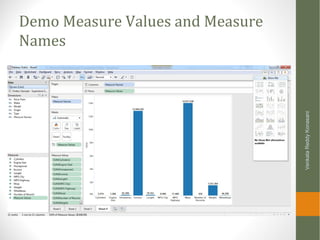
Demo Measure Values and Measure
Names
VenkataReddyKonasani
LAB: Measure Values and
Measure Names
• Import health claim data
• Draw a graph measure names against measure values
• Can we recreate the input data table using measure values and
measure names?
VenkataReddyKonasani
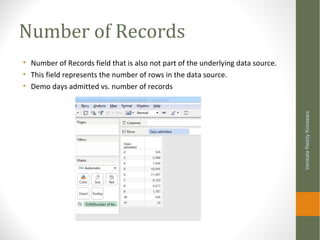
Number of Records
• Number of Records field that is also not part of the underlying data source.
• This field represents the number of rows in the data source.
• Demo days admitted vs. number of records
VenkataReddyKonasani
LAB: Number of records
• Find the frequency of each brand in cars data
• Find the frequency of each brand in price web data
VenkataReddyKonasani
Latitude and Longitude
• Tableau automatically geocodes your data and includes
Latitude (generated) and Longitude (generated) fields. You can
use these fields to overlay your data on live maps.
• Lat & Long for province in superstore data
VenkataReddyKonasani
Step-7: Advanced graph
Options
Contents
• Sorting
• Groups
• Sets
• Actions
• Parameters
VenkataReddyKonasani
Sorting
• Display your data in ascending or descending order based on
other fields or custom formulas using computed sorts.
VenkataReddyKonasani
LAB: Sorting
• Create a graph for price web data, brand vs average list price,
sort the result by average list price
• Create a graph for telecom bill data; customer segment vs
average bill. Sort it by bill amount
VenkataReddyKonasani
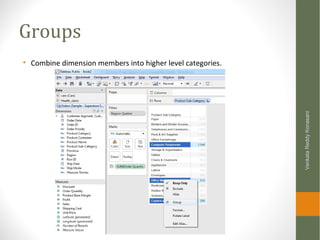
Groups
• Combine dimension members into higher level categories.
VenkataReddyKonasani
Lab Groups
• Import market_one.csv
• Create a table for vertical vs sum of number of records
• Combine last four verticals as a single group
• Import price web data
• Create a table for brand vs count of records
• Combine the last 10 brands
VenkataReddyKonasani
Sets
• Set is almost like a dynamic subset.
• Sometimes we may want to crate a subset by collecting all the
data points of our interest
• Outliers
• Points falling in a certain region
VenkataReddyKonasani
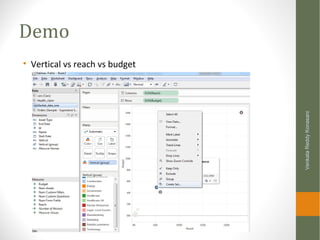
Demo
• Vertical vs reach vs budget
VenkataReddyKonasani
LAB: Sets
• Create a graph for claim amount vs distance from clinic. There
is a higher chance in case of patients travelling more than 100
kms(100K meters); Select all such cases and create a different
set
• Create a graph for telecom billing data
• Bar chart for Customer segment vs average bill(Current Charges)
• Sort them based on average current changes
• Create a set based on last five groups
• What is the count of accounts and average bill for the subset?
VenkataReddyKonasani
Actions –Filter Action
• Worksheet >>Actions
• Demo: Cars data
• MSRP vs MPG vs Make
• Add action
VenkataReddyKonasani
LAB: Action
• Import Telecom billing data
• Create a bar graph to show the average of current charges in each
customer segment. Add filter action
• Remove filter action and add highlight action, what is the
difference?
• Import TV commercial spot data
• Create a graph to show network name along with average spot
cost.
• Add URL action , redirect the highlighted part to google.com
VenkataReddyKonasani
Outliers
• Mean
• Median
• Quartiles
• Outliers
VenkataReddyKonasani
Box Plots to identify outliers
• Draw a boxplot to identify the outliers in claim amount vs
patient id
VenkataReddyKonasani
Boxplots and outliers
• Draw a boxplot to identify the outliers in claim amount vs
patient id
• Remove outliers and recreate the box plot(use filter on claim
amount)
• Draw a boxplot to identify the outliers in current charges in
telecom bill data (use del number as id)
• Draw a boxplot to identify the outliers in age of patients in
health claim data. Are there any outliers?
VenkataReddyKonasani
Thank You
VenkataReddyKonasani

Learning Tableau - Data, Graphs, Filters, Dashboards and Advanced features

  • 1.
    Learning Tableau- Step bystep guide Venkat Reddy Konasani
  • 2.
    Contents • Step-1 TableauIntroduction • Step-2 Connecting to Data • Step-3 Building basic views • Step-4 Data manipulations and Calculated fields • Step-5 Tableau Dashboards • Step-6 Advanced Data Options • Step-7 Advanced graph Options VenkataReddyKonasani
  • 3.
    Prerequisites • Bit ofdata base knowledge • Basic idea on visualizations and dash boards • Windows OS with minimum 2 GB RAM • Latest version of Tableau public or Tableau Trail VenkataReddyKonasani
  • 4.
  • 5.
    Contents • Why Tabeau •Introduction to Tableau • Tableau workspace and various options • Navigating in tableau • Tableau Repository VenkataReddyKonasani
  • 6.
  • 7.
  • 8.
    Aim is tounderstand That oil consumption data shows below details •Cure Oil, refined oil imports and Exports by country also weighted by population •Reserves left by country and by region •Consumption by population over the time Really??? Is it easy to get the picture? VenkataReddyKonasani
  • 9.
    What is Tableau •Tableau is a rapid BI software • Great visualizations: Allows anyone to connect to data, visualize and create interactive, sharable dashboards in a few clicks • Ease of use: It's easy enough that any Excel user can learn it, but powerful enough to satisfy even the most complex analytical problems. • Fast: We can create parallelized dashboards, quick filters and calculations VenkataReddyKonasani
  • 10.
  • 11.
  • 12.
    Tableau Products VenkataReddyKonasani Tableau Desktop Create TableauServer Share - Web Tableau Reader Share - Local + business intelligence solution scales to organizations of all sizes + share visual analytics with anyone with a web browser + publish interactive analytics or dashboards + secure information and manage metadata + collaborate with others + share visualizations & dashboards on the desktop + filter, sort, and page through the views + “Acrobat for Data” + free download + ad hoc analytics, dashboards, reports, graphs + explore, visualize, and analyze your data + create dashboards to consolidate multiple views + deliver interactive data experiences Tableau Public Share - Everyone + create and publish interactive visualizations and dashboards + embed in websites and blogs + free download and free hosting service
  • 13.
    Tableau Public • Canconnect to Microsoft Excel, Microsoft Access, and text files • It has a limit of 100,000 rows of data that is allowed in any single connection • You can not save your work using Tableau public VenkataReddyKonasani
  • 14.
  • 15.
  • 16.
    Basics • Opening anew sheet • File>>New • Connect to data • Data>>Connect to data VenkataReddyKonasani
  • 17.
    Demo • Starting Tableau •Open a new workbook • Adding additional sheets • Data connection tab • Various data connection options • Adding a new dash board • Various graph options VenkataReddyKonasani
  • 18.
  • 19.
    Workbook and worksheets •Each workbook can contain worksheets and dashboards. • Worksheet is where you build views of your data by dragging and dropping fields onto shelves • A dashboard is a combination of several worksheets that you can arrange for presentation or to monitor • The sheets, whether worksheets or dashboards, display along the bottom of the workbook as tabs VenkataReddyKonasani
  • 20.
    Lab • Start Tableau •Open a new workbook • Add one additional sheet • Identify data connection tab • Can we connect to MySQL server? • Can we connect to txt file? • How to go back to workbook from connect to data window? • Add a new dashboard • Where are various types of graphs options available? • Can we draw pie chart using Tableau? VenkataReddyKonasani
  • 21.
    Tableau Repository • TheTableau repository holds Workbooks Bookmarks and data sources. • located in a folder called My Tableau Repository inside of your My Documents folder. VenkataReddyKonasani
  • 22.
    Tableau Files andFile types • Workbooks • Tableau workbook files have the .twb file extension and are marked with the workbook icon. Workbooks hold one or more worksheets and dashboards. • Bookmarks • Tableau bookmark files have the .tbm file extension and are marked with the bookmark icon. Bookmarks contain a single worksheet and are an easy way to quickly share your work. • Packaged Workbooks • Tableau packaged workbooks have the .twbx file extension and are marked with the packaged workbook icon. Packaged workbooks contain a workbook along with any supporting local file data sources and background images. This format is the best way to package your work for sharing with others who don’t have access to the data. VenkataReddyKonasani
  • 23.
    Tableau Files andFile types • Data Extract Files • Tableau data extract files have the .tde file extension and are marked with the extract icon. Extract files are a local copy of a subset or entire data source that you can use to share data, work offline, and improve database performance. • Data Connection Files • Tableau data connection files have the .tds file extension and are marked with the data connection icon. Data connection files are shortcuts for quickly connecting to data sources that you use often. VenkataReddyKonasani
  • 24.
  • 25.
    Contents • Connecting toflat files • Connecting to DB files • Connecting to server • Conditional importing • Editing a Connection VenkataReddyKonasani
  • 26.
    Demo: Connecting toDesktop files • Connecting to excel file • Connecting to superstore sales in sales data folder • Snapshot view of the data • Connecting to txt file • Connecting to survey data • Connecting to access file • Connecting to survey data VenkataReddyKonasani
  • 27.
    Lab: Connecting toDesktop files • Download the online sales data.csv • Snapshot view of the data • Connect to healthcare database • Connect to survey data • Create a table for client • Create a table for clinet_manager VenkataReddyKonasani
  • 28.
  • 29.
    Demo: Customized dataimport • Import sales by country data • Where sales channel=“Online” VenkataReddyKonasani
  • 30.
    Lab: Customized dataimport • Download data using filters from survey DB • Only data where overall rating =5 and client level is more than 7 from S2012 table(Client id more than 70,000,000) • Download data using filters from healthcare data(health claim.csv) • Only data where days admitted is atleast 6 and claim amount is more than 10,000 VenkataReddyKonasani
  • 31.
    Connecting Microsoft SQLServer VenkataReddyKonasani
  • 32.
  • 33.
  • 34.
  • 35.
    Data roles • Dimensions: •Qualitative, categorical information is a dimension • Gender : Male & Female • Region • Marital Status • Measures • Numeric variables / Quantitative values • Age • Income • Credit score VenkataReddyKonasani
  • 36.
    Data Types • SometimesTableau may identify a field with a data type that is incorrect. • For example, a field that contains dates may be identified as an integer rather than a date. • You can change the data type in Tableau by right-clicking the field in the Data window, selecting Change Data Type, and then selecting the appropriate data type. VenkataReddyKonasani
  • 37.
    Lab: Data Roles •What are the measures and dimensions in TV commercials data (spot data sheet) • What are the measures and dimensions in world bank data VenkataReddyKonasani
  • 38.
    Demo Converting measuresto dimensions • Converting id to dimension • Converting num_assests to dimension VenkataReddyKonasani
  • 39.
    LAB: Converting measuresto dimensions • Import TV commercial spot data • Convert HH ratings to Dimension • Convert unique key to Dimension • In health care data • Patient id into dimention VenkataReddyKonasani
  • 40.
    Editing the connection •Connect to cars data>>>Edit data source>>Hide Origin Field • Show hidden fields to get back and then unhide VenkataReddyKonasani
  • 41.
    LAB: Edit Connection •Edit survey data connection and hide the two fields response and quality • Edit survey data connection and add a filter on communication >=3 VenkataReddyKonasani
  • 42.
    Renaming the connection •Edit Connection >>.Change the name of connection • Cars data to cars_2014 VenkataReddyKonasani
  • 43.
    LAB: Renaming the connection •Rename survey data to customer survey • Connect to market data one and rename it to market campaign data VenkataReddyKonasani
  • 44.
    Other Data connectionrelated operations • Duplicating connection • Close Connection VenkataReddyKonasani
  • 45.
  • 46.
    Demo: Basic views •Superstore data • Sum of order quantity by product category • Sum of order quantity by month & year • Changing the graph type VenkataReddyKonasani
  • 47.
    Lab: Basic views •Connect to Price Web Data(Price_web_data.csv) • Draw a bar graph to show total sales(count of rows) by brand • Which brand sold the most number of items • Change it to pie chart • Sort the bargraph • Which are the top two brands based on list price • Draw graph that shows average list price for each brand VenkataReddyKonasani
  • 48.
    Demo : Trendchart • Price web data day wise count of products VenkataReddyKonasani
  • 49.
    Lab: Trend Chart •Import market one data • Draw a time series chart of number of campaigns by date • Draw a time series chart of number of campaigns by month • Draw a time series chart for budget and identify the month with maximum budget VenkataReddyKonasani
  • 50.
    LAB: Other Charts •Import cars data, create a tree map chart for make vs items sold(count ids) • Import TV commercials spot data, create a vertical bar chart for network id vs average spot cost. Change the chart for vertical to horizontal • Import telecom bill data, show average bill(current charges) and count of customers(Del number) in each customer segment. Identify the best segment (which customer segment has very high bill and very high number of customers) VenkataReddyKonasani
  • 51.
    Demo: Formatting thegraphs- Color and size • Representing Average unit price & total ordered quantity per Product category & subcategory in superstore data VenkataReddyKonasani
  • 52.
    Lab: Formatting thegraphs-Color and size • Identify the best rated brand from online sales data(price web) • Draw a graph(other than bubble chart) on online sales data to show • Review count as size • Average rating as color for each brand • Import Market campaign data • Identify the top 5 verticals. A vertical with significant budget and significant number of campaigns(rows). • Identify the most productive vertical in market campaign data. A vertical that has highest reach with least budget is the best vertical • Identify the best car make in cars data(low MSRP and high horse power) • Identify the most profitable customer segment from telecom bill data • Draw bubble chart on billing data by each customer segment • Size of the bubble is average bill(Current charges) • Color of bubble as count of accounts VenkataReddyKonasani
  • 53.
    Adding Reference lines •Adding reference line average age to age in healthcare data VenkataReddyKonasani
  • 54.
    Lab: Adding referenceline • In price web data, what are the brands that got above average ratings? Add a reference line • Add average list price reference line in price web data-Avg list price by brand • Add a mean reference line to days admitted in health care data VenkataReddyKonasani
  • 55.
    Demo: GIS graph •City wise bill on the map • Count if accounts as size • Total Bill as colour VenkataReddyKonasani
  • 56.
    Lab: GIS graph •Connect to Sales_by_country_v1.csv(inside super store folder) • Show number of units sold for each county • Draw a fill map fill graph • Connect to world bank data(data by country tab) • Create a GIS graph to show GDP by country • Create a GIS graph to show total population by country VenkataReddyKonasani
  • 57.
    Step-4 : Datamanipulations and Calculated fields
  • 58.
    Contents • Calculated fields •Working with dates • Logic statements • Working with filters VenkataReddyKonasani
  • 59.
    Demo: Calculated fields •Connect to excel>>Sample-Superstore data>>>orders VenkataReddyKonasani
  • 60.
    Demo: Calculated fields •New reduced shipping cost to 50% VenkataReddyKonasani
  • 61.
    Lab: Calculated fields •Connect to Sample-Superstore data excel file • Create a new discounted unit price from actual unit price field. Reduce the price by 10% and create a new field as disc_price • Create a new shipping cost. Reduce the shipping cost by by 30% and create a new field new_ship_cost • Create a new field “final_price” which is sum of disc_price & new_ship_cost • What is the average final price? VenkataReddyKonasani
  • 62.
    Working with dates VenkataReddyKonasani Selectany of the date function to manipulate dates and use them in the expression.
  • 63.
    Demo: Working withdates • Delay indicator in Super store data [Ship Date]-[Order Date] VenkataReddyKonasani
  • 64.
    Lab: Working withdates • Connect to Telco_Bill_data_v1 in telecom data folder • Calculate age of account in moths, today-account active date • Draw a graph that shows Del number & age on network. Sort it by age • Connect to Market_data_raw.xls in Market_data folder • Calculate the interval of campaign (end date –start date) • Convert id into dimension and draw a graph between id & interval VenkataReddyKonasani
  • 65.
  • 66.
    Demo: Logic statements •Market data, high, medium, low reach VenkataReddyKonasani
  • 67.
    Lab: Logic statements •In the market data, Create a new field budget indicator • If budget is less than 50,000 then “low” • 50,000 to 100,000 then “medium” • Else high budget • Create a bar chart budget_ind vs count of campaigns(ids) VenkataReddyKonasani
  • 68.
  • 69.
    Demo: Working withfilters • Reach by vertical in market data • Add asset type as filter VenkataReddyKonasani
  • 70.
    Lab: Working withfilters • Connect to sales data (Sample - Superstore Sales (Excel).xls) • Create graph for order quantity (sum) by product sub category • Add province as filter, show quick filter • Add customer segment as second filter show quick filter • Change them to single value dropdown • Connect to price web data • Crate a time series graph for number of items sold per day • Use site name and brand as filters • Change the filter type to multiple value drop down for brand • Single value drop down for site • Change the filter type to global and local VenkataReddyKonasani
  • 71.
  • 72.
  • 73.
    Demo: Creating aDashboard • In superstore data • Orders by product, by province, by month & by region VenkataReddyKonasani
  • 74.
    Lab: Creating adashboard • Connect to Market_data_one.csv • Create a graph that shows budget by each vertical • Create a graph that average budget by each vertical • Create a graph that shows average reach by each vertical • Create a graph that shows the relation between number of form fields & reach(use id) • Create a dashboard with all the above graphs • Connect to 2.2 Health_claim.xlsx • Create a graph for average claim amount by days admitted • Create a graph for average claim amount by Month • Create a graph for average claim amount by age(convert age into bins) • Create a scatter plot for distance from clinic vs claim amount(use patient id also) VenkataReddyKonasani
  • 75.
    Demo: Using agraph as filter VenkataReddyKonasani
  • 76.
  • 77.
    Contents • Clipboard data •Connecting two data sources • Joining data sources • Creating hierarchies • Measure values and Measure names • Number of records VenkataReddyKonasani
  • 78.
    Copying Data fromclipboard • Demo: • Copy air travel data to clipboard • Worksheet>>Data>>paste data VenkataReddyKonasani
  • 79.
    LAB: Copying Datafrom clipboard • Copy petrol consumption data and crate a data connection by pasting it; Change the connection name to petrol consumption data • Copy data from Price_web_data Analysis.csv and paste it in tableau; Change the connection name to price web data VenkataReddyKonasani
  • 80.
    Connecting two datasources • Demo: • In TV commercial data, we have orders data and commercial spot data. • We want to draw an are graph to see whether the spot really effects the order quantity. Do you think if the spot cost is high the number of orders are also high VenkataReddyKonasani
  • 81.
    Joining two tables •Joining spot cost and orders tables in TV commercial data VenkataReddyKonasani
  • 82.
    Creating a graphwith joined tables VenkataReddyKonasani
  • 83.
    LAB: Joining twotables • In TV commercial data, connect orders to spots based on ISCI/ AD-iD • Draw a graph time(date from orders table) vs spot cost • Draw a graph that shows total orders and average spot cost for each network • Connect market one and market raw data • Draw a scatter plot between budget(raw data) and reach(market one) VenkataReddyKonasani
  • 84.
    Creating a Hierarchy •For example, a data source may have fields for Country, State, and City. These fields could be grouped into a hierarchy called Location. • Right-click one or more selected fields in the Data window and select Create Hierarchy • In the Data window, drag and drop a field directly on top of another field. VenkataReddyKonasani
  • 85.
    Demo : CreatingHierarchy • In superstore data drag and drop customer name on customer segment • Create a graph using customer segment hierarchy vs orders VenkataReddyKonasani
  • 86.
    LAB: Creating Hierarchies •Import superstore data create below hierarchies • Product category • Product sub category • Product name • Draw a graph to show profit by product hierarchy • Import cars data • Crate hierarchy for make and model • Draw a graph to show average price by make model hirarchy • What if we create a hierarchy for model and make?? VenkataReddyKonasani
  • 87.
    LAB: Removing Hierarchies •Remove all the hierarchies that are created VenkataReddyKonasani
  • 88.
    Measure Values andMeasure Names • The Data window contains a few fields that are not part of your data source, two of which are Measure Names and Measure Values • Measure Values: All the measures of your data source collected into one field. • Measure Names: Contains all the names of the measures collected into a single dimension. VenkataReddyKonasani
  • 89.
    Demo Measure Valuesand Measure Names VenkataReddyKonasani
  • 90.
    LAB: Measure Valuesand Measure Names • Import health claim data • Draw a graph measure names against measure values • Can we recreate the input data table using measure values and measure names? VenkataReddyKonasani
  • 91.
    Number of Records •Number of Records field that is also not part of the underlying data source. • This field represents the number of rows in the data source. • Demo days admitted vs. number of records VenkataReddyKonasani
  • 92.
    LAB: Number ofrecords • Find the frequency of each brand in cars data • Find the frequency of each brand in price web data VenkataReddyKonasani
  • 93.
    Latitude and Longitude •Tableau automatically geocodes your data and includes Latitude (generated) and Longitude (generated) fields. You can use these fields to overlay your data on live maps. • Lat & Long for province in superstore data VenkataReddyKonasani
  • 94.
  • 95.
    Contents • Sorting • Groups •Sets • Actions • Parameters VenkataReddyKonasani
  • 96.
    Sorting • Display yourdata in ascending or descending order based on other fields or custom formulas using computed sorts. VenkataReddyKonasani
  • 97.
    LAB: Sorting • Createa graph for price web data, brand vs average list price, sort the result by average list price • Create a graph for telecom bill data; customer segment vs average bill. Sort it by bill amount VenkataReddyKonasani
  • 98.
    Groups • Combine dimensionmembers into higher level categories. VenkataReddyKonasani
  • 99.
    Lab Groups • Importmarket_one.csv • Create a table for vertical vs sum of number of records • Combine last four verticals as a single group • Import price web data • Create a table for brand vs count of records • Combine the last 10 brands VenkataReddyKonasani
  • 100.
    Sets • Set isalmost like a dynamic subset. • Sometimes we may want to crate a subset by collecting all the data points of our interest • Outliers • Points falling in a certain region VenkataReddyKonasani
  • 101.
    Demo • Vertical vsreach vs budget VenkataReddyKonasani
  • 102.
    LAB: Sets • Createa graph for claim amount vs distance from clinic. There is a higher chance in case of patients travelling more than 100 kms(100K meters); Select all such cases and create a different set • Create a graph for telecom billing data • Bar chart for Customer segment vs average bill(Current Charges) • Sort them based on average current changes • Create a set based on last five groups • What is the count of accounts and average bill for the subset? VenkataReddyKonasani
  • 103.
    Actions –Filter Action •Worksheet >>Actions • Demo: Cars data • MSRP vs MPG vs Make • Add action VenkataReddyKonasani
  • 104.
    LAB: Action • ImportTelecom billing data • Create a bar graph to show the average of current charges in each customer segment. Add filter action • Remove filter action and add highlight action, what is the difference? • Import TV commercial spot data • Create a graph to show network name along with average spot cost. • Add URL action , redirect the highlighted part to google.com VenkataReddyKonasani
  • 105.
    Outliers • Mean • Median •Quartiles • Outliers VenkataReddyKonasani
  • 106.
    Box Plots toidentify outliers • Draw a boxplot to identify the outliers in claim amount vs patient id VenkataReddyKonasani
  • 107.
    Boxplots and outliers •Draw a boxplot to identify the outliers in claim amount vs patient id • Remove outliers and recreate the box plot(use filter on claim amount) • Draw a boxplot to identify the outliers in current charges in telecom bill data (use del number as id) • Draw a boxplot to identify the outliers in age of patients in health claim data. Are there any outliers? VenkataReddyKonasani
  • 108.