Power BI Overview
Gal Vekselman
January 1st, 2018
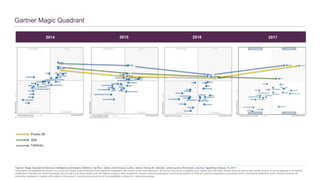
Gartner Magic Quadrant
2014 2015 2016 2017
Tableau
Power BI
Qlik
*Gartner “Magic Quadrant for Business Intelligence and Analytics Platforms,” by Rita L. Sallam, Cindi Howson, Carlie J. Idoine, Thomas W. Oestreich, James Laurence Richardson, and Joao Tapadinhas February 16, 2017
This graphic was published by Gartner, Inc. as part of a larger research document and should be evaluated in the context of the entire document. The Gartner document is available upon request from Microsoft. Gartner does not endorse any vendor, product or service depicted in its research
publications, and does not advise technology users to select only those vendors with the highest ratings or other designation. Gartner research publications consist of the opinions of Gartner's research organization and should not be construed as statements of fact. Gartner disclaims all
warranties, expressed or implied, with respect to this research, including any warranties of merchantability or fitness for a particular purpose.
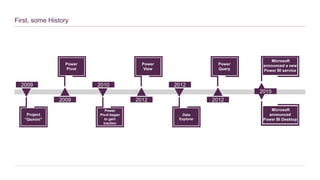
First, some History
Project
“Gemini”
2009
2009
Power
Pivot
Power
Pivot began
to gain
traction
2010
2012
Power
View
Data
Explorer
2012
2012
Power
Query
2015
Microsoft
announced a new
Power BI service
Microsoft
announced
Power BI Desktop
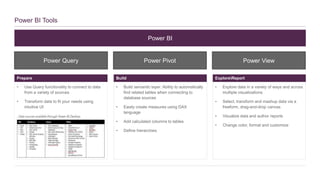
Power BI Tools
• Use Query functionality to connect to data
from a variety of sources
• Transform data to fit your needs using
intuitive UI
• Build semantic layer: Ability to automatically
find related tables when connecting to
database sources
• Easily create measures using DAX
language
• Add calculated columns to tables
• Define hierarchies
• Explore data in a variety of ways and across
multiple visualizations
• Select, transform and mashup data via a
freeform, drag-and-drop canvas
• Visualize data and author reports
• Change color, format and customize
Prepare Build ExploreReport
Power BI
Power Query Power Pivot Power View
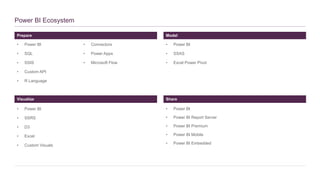
Prepare
Power BI Ecosystem
• Power BI
• SQL
• SSIS
• Custom API
• R Language
Visualize
Model
• Power BI
• SSAS
• Excel Power Pivot
• Power BI
• SSRS
• D3
• Excel
• Custom Visuals
Share
• Power BI
• Power BI Report Server
• Power BI Premium
• Power BI Mobile
• Power BI Embedded
• Connectors
• Power Apps
• Microsoft Flow
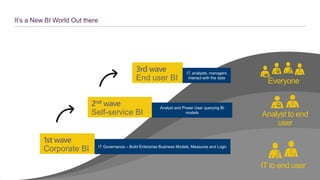
It’s a New BI World Out there
IT to end user
Analyst to end
user
Everyone
3rd wave
End user BI
1st wave
Corporate BI
2nd wave
Self-service BI
IT Governance – Build Enterprise Business Models, Measures and Logic
Analyst and Power User querying BI
models
IT, analysts, managers
interact with the data
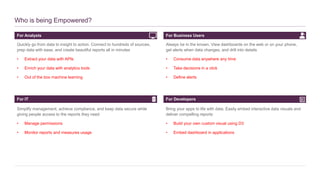
For Analysts
Who is being Empowered?
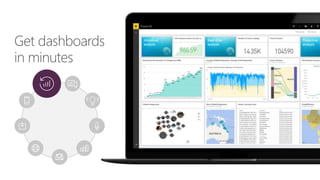
Quickly go from data to insight to action. Connect to hundreds of sources,
prep data with ease, and create beautiful reports all in minutes
• Extract your data with APIs
• Enrich your data with analytics tools
• Out of the box machine learning
For IT
For Business Users
Always be in the known. View dashboards on the web or on your phone,
get alerts when data changes, and drill into details
• Consume data anywhere any time
• Take decisions in a click
• Define alerts
Simplify management, achieve compliance, and keep data secure while
giving people access to the reports they need
• Manage permissions
• Monitor reports and measures usage
For Developers
Bring your apps to life with data. Easily embed interactive data visuals and
deliver compelling reports
• Build your own custom visual using D3
• Embed dashboard in applications
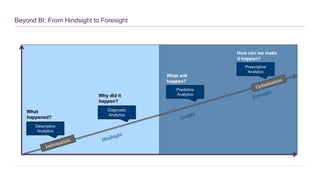
Beyond BI: From Hindsight to Foresight
Descriptive
Analytics
Diagnostic
Analytics
Predictive
Analytics
Prescriptive
Analytics
What
happened?
Why did it
happen?
What will
happen?
How can we make
it happen?
Demo
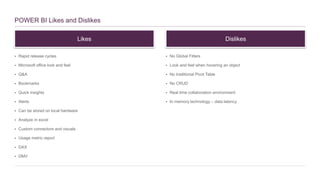
POWER BI Likes and Dislikes
 Rapid release cycles
 Microsoft office look and feel
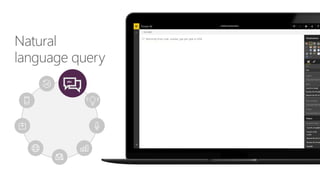
 Q&A
 Bookmarks
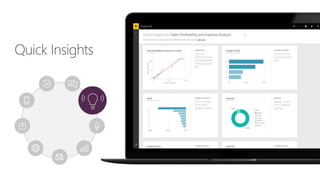
 Quick insights
 Alerts
 Can be stored on local hardware
 Analyze in excel
 Custom connectors and visuals
 Usage metric report
 DAX
 DMV
 No Global Filters
 Look and feel when hovering an object
 No traditional Pivot Table
 No CRUD
 Real time collaboration environment
 In memory technology – data latency
Likes Dislikes
Appendix
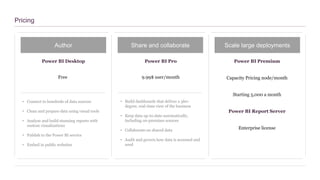
Pricing
Author Share and collaborate Scale large deployments
Power BI Desktop Power BI Pro Power BI Premium
Free 9.99$ user/month Capacity Pricing node/month
• Connect to hundreds of data sources
• Clean and prepare data using visual tools
• Analyze and build stunning reports with
custom visualizations
• Publish to the Power BI service
• Embed in public websites
• Build dashboards that deliver a 360-
degree, real-time view of the business
• Keep data up-to-date automatically,
including on-premises sources
• Collaborate on shared data
• Audit and govern how data is accessed and
used
Starting 5,000 a month
Power BI Report Server
Enterprise license
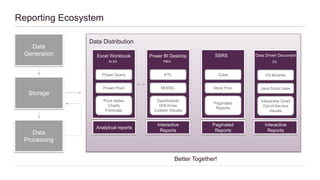
Data
Generation
Storage
Data
Processing
Data Distribution
Better Together!
Excel Workbook
XLSX
Power Query
Power Pivot
Pivot tables
Charts
Formulas
Power BI Desktop
PBIX
ETL
MODEL
Dashboards
Drill throw
Custom Visuals
SSRS
Cube
Store Proc
Paginated
Reports
Data Driven Document
D3
D3 libraries
Java Script base
Interactive Chart
Out-of-the-box
visuals
Analytical reports
Interactive
Reports
Paginated
Reports
Reporting Ecosystem
Interactive
Reports
Useful links
• First Experience Using Power BI Desktop
• Power BI General Availability: Features
• Introduction to Power BI
• Excel to Power BI webinar
• Custom Power BI Visualizations
Request features and share your ideas:
https://ideas.powerbi.com/
Ask questions in the forums:
http://community.powerbi.com/
Read the documentation:
http://docs.microsoft.com/power-bi/

Power BI Overview

  • 1.
    Power BI Overview GalVekselman January 1st, 2018
  • 2.
    Gartner Magic Quadrant 20142015 2016 2017 Tableau Power BI Qlik *Gartner “Magic Quadrant for Business Intelligence and Analytics Platforms,” by Rita L. Sallam, Cindi Howson, Carlie J. Idoine, Thomas W. Oestreich, James Laurence Richardson, and Joao Tapadinhas February 16, 2017 This graphic was published by Gartner, Inc. as part of a larger research document and should be evaluated in the context of the entire document. The Gartner document is available upon request from Microsoft. Gartner does not endorse any vendor, product or service depicted in its research publications, and does not advise technology users to select only those vendors with the highest ratings or other designation. Gartner research publications consist of the opinions of Gartner's research organization and should not be construed as statements of fact. Gartner disclaims all warranties, expressed or implied, with respect to this research, including any warranties of merchantability or fitness for a particular purpose.
  • 3.
    First, some History Project “Gemini” 2009 2009 Power Pivot Power Pivotbegan to gain traction 2010 2012 Power View Data Explorer 2012 2012 Power Query 2015 Microsoft announced a new Power BI service Microsoft announced Power BI Desktop
  • 4.
    Power BI Tools •Use Query functionality to connect to data from a variety of sources • Transform data to fit your needs using intuitive UI • Build semantic layer: Ability to automatically find related tables when connecting to database sources • Easily create measures using DAX language • Add calculated columns to tables • Define hierarchies • Explore data in a variety of ways and across multiple visualizations • Select, transform and mashup data via a freeform, drag-and-drop canvas • Visualize data and author reports • Change color, format and customize Prepare Build ExploreReport Power BI Power Query Power Pivot Power View
  • 5.
    Prepare Power BI Ecosystem •Power BI • SQL • SSIS • Custom API • R Language Visualize Model • Power BI • SSAS • Excel Power Pivot • Power BI • SSRS • D3 • Excel • Custom Visuals Share • Power BI • Power BI Report Server • Power BI Premium • Power BI Mobile • Power BI Embedded • Connectors • Power Apps • Microsoft Flow
  • 6.
    It’s a NewBI World Out there IT to end user Analyst to end user Everyone 3rd wave End user BI 1st wave Corporate BI 2nd wave Self-service BI IT Governance – Build Enterprise Business Models, Measures and Logic Analyst and Power User querying BI models IT, analysts, managers interact with the data
  • 7.
    For Analysts Who isbeing Empowered? Quickly go from data to insight to action. Connect to hundreds of sources, prep data with ease, and create beautiful reports all in minutes • Extract your data with APIs • Enrich your data with analytics tools • Out of the box machine learning For IT For Business Users Always be in the known. View dashboards on the web or on your phone, get alerts when data changes, and drill into details • Consume data anywhere any time • Take decisions in a click • Define alerts Simplify management, achieve compliance, and keep data secure while giving people access to the reports they need • Manage permissions • Monitor reports and measures usage For Developers Bring your apps to life with data. Easily embed interactive data visuals and deliver compelling reports • Build your own custom visual using D3 • Embed dashboard in applications
  • 8.
    Beyond BI: FromHindsight to Foresight Descriptive Analytics Diagnostic Analytics Predictive Analytics Prescriptive Analytics What happened? Why did it happen? What will happen? How can we make it happen?
  • 9.
  • 10.
    POWER BI Likesand Dislikes  Rapid release cycles  Microsoft office look and feel  Q&A  Bookmarks  Quick insights  Alerts  Can be stored on local hardware  Analyze in excel  Custom connectors and visuals  Usage metric report  DAX  DMV  No Global Filters  Look and feel when hovering an object  No traditional Pivot Table  No CRUD  Real time collaboration environment  In memory technology – data latency Likes Dislikes
  • 21.
  • 22.
    Pricing Author Share andcollaborate Scale large deployments Power BI Desktop Power BI Pro Power BI Premium Free 9.99$ user/month Capacity Pricing node/month • Connect to hundreds of data sources • Clean and prepare data using visual tools • Analyze and build stunning reports with custom visualizations • Publish to the Power BI service • Embed in public websites • Build dashboards that deliver a 360- degree, real-time view of the business • Keep data up-to-date automatically, including on-premises sources • Collaborate on shared data • Audit and govern how data is accessed and used Starting 5,000 a month Power BI Report Server Enterprise license
  • 23.
    Data Generation Storage Data Processing Data Distribution Better Together! ExcelWorkbook XLSX Power Query Power Pivot Pivot tables Charts Formulas Power BI Desktop PBIX ETL MODEL Dashboards Drill throw Custom Visuals SSRS Cube Store Proc Paginated Reports Data Driven Document D3 D3 libraries Java Script base Interactive Chart Out-of-the-box visuals Analytical reports Interactive Reports Paginated Reports Reporting Ecosystem Interactive Reports
  • 24.
    Useful links • FirstExperience Using Power BI Desktop • Power BI General Availability: Features • Introduction to Power BI • Excel to Power BI webinar • Custom Power BI Visualizations
  • 25.
    Request features andshare your ideas: https://ideas.powerbi.com/ Ask questions in the forums: http://community.powerbi.com/ Read the documentation: http://docs.microsoft.com/power-bi/

Editor's Notes

  • #3 Prepare – Get and Clean the data Modeling - Create relationships between tables and measures Visualize – analyze and visualize the data Share & collaborate – share the report and keep it up to date
  • #4 Magic Quadrant (MQ) refers to a series published by IT consulting firm Gartner of market research reports that rely on proprietary qualitative data analysis methods to demonstrate market trends, such as direction, maturity and participants. Positioning Technology Players Within a Specific Market Which are the competing players in the major technology markets? How are they positioned to help you over the long haul? A Gartner Magic Quadrant is a culmination of research in a specific market, giving you a wide-angle view of the relative positions of the market's competitors. By applying a graphical treatment and a uniform set of evaluation criteria, a Magic Quadrant helps you quickly ascertain how well technology providers are executing their stated visions and how well they are performing against Gartner's market view.
  • #5 1. Project Gemini is the Analysis Services 2. It is next version of Analysis Services, which will ship before SQL11, as part of SQL Server “Kilimanjaro” 3. It uses column oriented processing and in memory storage as core technological principals
  • #8 The 1st wave of BI, what is often called "traditional BI", required IT support to serve the end users in their quest for data analysis. You probably all have that in your organization - an Analysis Services pulling data from various data sources in the data warehouse and doing some complex modeling to provide processed data which was then consumed through Excel or other analysis tools. This is an amazing technology, which launched the BI capabilities of organizations lightyears ahead and provided real data driven decision making. But the life cycle of those requests were often months, for altering the model, which made the actions that were taken from the data driven decisions less effective. Then came the 2nd wave, what is called the "self-service BI", which allowed the business analysts to analyze data on the fly and provide value to the end user. This is also familiar to all of you, since this is what all of us are doing when we analyze data in Excel, for example, or the more analysis focused tools like Tableau or Qlik. These 1st and 2nd wave solutions and tools are still super important for BI, and will remain so for many years to come. They are part of the what the 3rd wave of BI is providing, and that is "BI for everyone". It is the ability of the end user to get data, analyze it, and gain insights with almost no technical skills. It does not replace the other two waves, it is built on top of them, to provide a better BI solution to end users in the organization.
  • #10 Arima Corr plot Clustering Decision trees
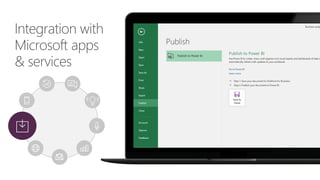
  • #20 Team collaboration through support for Office 365 Groups Seamless navigation to other workloads in Office 365 Use Excel data and pin live charts to your Power BI dashboards View Excel spreadsheets through support for Excel Online
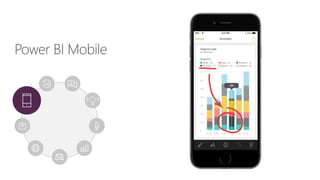
  • #21 Native apps for iPad, iPhone, Android and Windows devices Receive alerts to important changes in your data Share and collaborate with colleagues and take action Mobile Q&A
  • #22 Its not about what they can do. Its about who can do it