Virus & Worms – Virus
Analysis
Session Flow

• Spyware Overview.
• Difference between Virus, Worms &
Trojans.
• Virus Life Cycle.
• Modes of transmission
• Methods to Avoid detection
• Virus Analysis
• Virus Detection
Spyware Overview
•
•

Spyware is a piece of software that gets installed on computer without
your consent.
It collects your personal information without you being aware of it.

•

Change how your computer or web browser is configured and bombard
you with online advertisements.

•

Spyware programs are notorious for being difficult to remove on your
own and slows down your PC.

•

A program gets installed in the background while you are doing
something else on Internet.

•

Spyware has fairly widespread because your cable modem or DSL
connection is always connected.
Difference Between
Virus,Worms & Trojans
•

Virus is an application that self replicates by injecting its
code into other data files.Virus spreads and attempts to
consume specific targets (corrupts) and are normally
executables.

•

Worm copies itself over a network. Unlike a computer virus,
it does not need to attach itself to an existing program .It
consumes bandwidth and increase traffic in a network .

•

Trojan is a program that once executed performs a task
other than expected.
Modes of Transmission
•
•
•
•
•
•
•

IRC
Email Attachments
Physical Access
Browser & email Software Bugs
Advertisements
Fake Programs
Untrusted Sites & freeware Software
• Your computer can be infected even if
files are just copied
• Can be a stealth virus
• Viruses can carry other viruses
• Can make the system never show outward
signs
• Can stay on the computer even if the
computer is formatted.
Phases of virus
•

Most of the viruses operate in two phases.

•

Infection Phase – In this phase virus developers decide

•
•

-

•
•
•
•
•
•
•

When to Infect program
Which programs to infect

Some viruses infect the computer as soon as virus file installed in
computer.
Some viruses infect computer at specific date,time or perticular
event.
Attack Phase - In this phase Virus will
Delete files.
Replicate itself to another PCs.
Corrupt targets only
Virus Indications
Following are some of the common indications of
Virus when it infects system.
Files have strange name than the normal.
File extensions can also be changed.
Program takes longer time to load than the
normal.
• Victim will not be able to open some programs.
• Programs getting corrupted without any reasons.
•
•
•
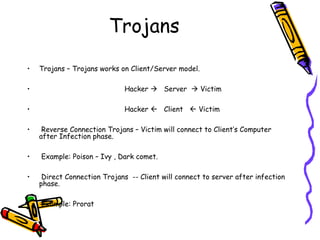
Trojans
•

Trojans – Trojans works on Client/Server model.

•

Hacker  Server  Victim

•

Hacker  Client  Victim

•
•
•
•

Reverse Connection Trojans – Victim will connect to Client’s Computer
after Infection phase.
Example: Poison – Ivy , Dark comet.
Direct Connection Trojans -- Client will connect to server after infection
phase.
Example: Prorat
Virus Types
•

Following are some of the common indications of Virus when it infects
system.

•

Macro Virus – Spreads & Infects database files.

•

File Virus – Infects Executables.

•

Source Code Virus – Affects & Damage source code.

•

Network Virus – Spreads via network elements & protocols.

•

Boot Virus – Infects boot sectors & records.

•

Terminate & stay resident virus – remains permanently in the memory
during the work session even after target host is executed & terminated.
Methods to Avoid
Detection
• Same “last Modified” Date.
• Killing tasks of Antivirus Software
• Avoiding Bait files & other
undesirable hosts
• Making stealth virus
• Self Modification on each Infection
• Encryption with variable key.
Same “last Modified” Date
•

Same “last Modified” Date.

•

In order to avoid detection by users, some viruses employ
different kinds of deception.

•

Some old viruses, especially on the MS-DOS platform,
make sure that the "last modified" date of a host file stays
the same when the file is infected by the virus.

•

This approach sometimes fool anti-virus software.
Killing Antivirus Tasks
• Some viruses try to avoid detection
by killing the tasks associated with
antivirus software before it can
detect them.
Avoiding Bait files
•

Bait files (or goat files) are files that are specially created
by anti-virus software, or by anti-virus professionals
themselves, to be infected by a virus.

•

Many anti-virus programs perform an integrity check of
their own code.

•

Infecting such programs will therefore increase the
likelihood that the virus is detected.

•

Anti-virus professionals can use bait files to take a sample
of a virus
Stealth Request
• Some viruses try to trick anti-virus
software by intercepting its requests to
the operating system.
• The virus can then return an uninfected
version of the file to the anti-virus
software, so that it seems that the file is
"clean".
Self Modifications
• Some viruses try to trick anti-virus
software by modifying themselves on
each modifications
• As file signatures are modified,
Antivirus softwares find it difficult
to detect.
Encryption with variable
key
• Some viruses use simple methods to
encipher the code.
•

The virus is encrypted with different
encryption keys on each infections.

• The AV cannot scan such files directly
using conventional methods.
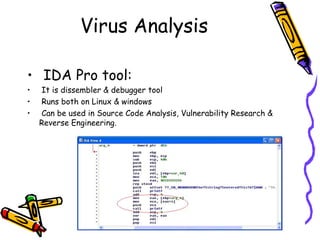
Virus Analysis
• IDA Pro tool:
•
•
•

It is dissembler & debugger tool
Runs both on Linux & windows
Can be used in Source Code Analysis, Vulnerability Research &
Reverse Engineering.
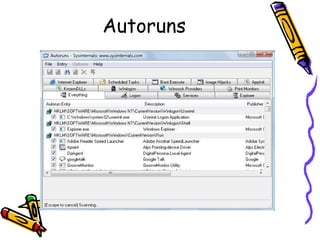
Autoruns
THANK YOU

virus,worms & analysis

  • 1.
    Virus & Worms– Virus Analysis
  • 2.
    Session Flow • SpywareOverview. • Difference between Virus, Worms & Trojans. • Virus Life Cycle. • Modes of transmission • Methods to Avoid detection • Virus Analysis • Virus Detection
  • 3.
    Spyware Overview • • Spyware isa piece of software that gets installed on computer without your consent. It collects your personal information without you being aware of it. • Change how your computer or web browser is configured and bombard you with online advertisements. • Spyware programs are notorious for being difficult to remove on your own and slows down your PC. • A program gets installed in the background while you are doing something else on Internet. • Spyware has fairly widespread because your cable modem or DSL connection is always connected.
  • 4.
    Difference Between Virus,Worms &Trojans • Virus is an application that self replicates by injecting its code into other data files.Virus spreads and attempts to consume specific targets (corrupts) and are normally executables. • Worm copies itself over a network. Unlike a computer virus, it does not need to attach itself to an existing program .It consumes bandwidth and increase traffic in a network . • Trojan is a program that once executed performs a task other than expected.
  • 5.
    Modes of Transmission • • • • • • • IRC EmailAttachments Physical Access Browser & email Software Bugs Advertisements Fake Programs Untrusted Sites & freeware Software
  • 6.
    • Your computercan be infected even if files are just copied • Can be a stealth virus • Viruses can carry other viruses • Can make the system never show outward signs • Can stay on the computer even if the computer is formatted.
  • 7.
    Phases of virus • Mostof the viruses operate in two phases. • Infection Phase – In this phase virus developers decide • • - • • • • • • • When to Infect program Which programs to infect Some viruses infect the computer as soon as virus file installed in computer. Some viruses infect computer at specific date,time or perticular event. Attack Phase - In this phase Virus will Delete files. Replicate itself to another PCs. Corrupt targets only
  • 8.
    Virus Indications Following aresome of the common indications of Virus when it infects system. Files have strange name than the normal. File extensions can also be changed. Program takes longer time to load than the normal. • Victim will not be able to open some programs. • Programs getting corrupted without any reasons. • • •
  • 9.
    Trojans • Trojans – Trojansworks on Client/Server model. • Hacker  Server  Victim • Hacker  Client  Victim • • • • Reverse Connection Trojans – Victim will connect to Client’s Computer after Infection phase. Example: Poison – Ivy , Dark comet. Direct Connection Trojans -- Client will connect to server after infection phase. Example: Prorat
  • 10.
    Virus Types • Following aresome of the common indications of Virus when it infects system. • Macro Virus – Spreads & Infects database files. • File Virus – Infects Executables. • Source Code Virus – Affects & Damage source code. • Network Virus – Spreads via network elements & protocols. • Boot Virus – Infects boot sectors & records. • Terminate & stay resident virus – remains permanently in the memory during the work session even after target host is executed & terminated.
  • 11.
    Methods to Avoid Detection •Same “last Modified” Date. • Killing tasks of Antivirus Software • Avoiding Bait files & other undesirable hosts • Making stealth virus • Self Modification on each Infection • Encryption with variable key.
  • 12.
    Same “last Modified”Date • Same “last Modified” Date. • In order to avoid detection by users, some viruses employ different kinds of deception. • Some old viruses, especially on the MS-DOS platform, make sure that the "last modified" date of a host file stays the same when the file is infected by the virus. • This approach sometimes fool anti-virus software.
  • 13.
    Killing Antivirus Tasks •Some viruses try to avoid detection by killing the tasks associated with antivirus software before it can detect them.
  • 14.
    Avoiding Bait files • Baitfiles (or goat files) are files that are specially created by anti-virus software, or by anti-virus professionals themselves, to be infected by a virus. • Many anti-virus programs perform an integrity check of their own code. • Infecting such programs will therefore increase the likelihood that the virus is detected. • Anti-virus professionals can use bait files to take a sample of a virus
  • 15.
    Stealth Request • Someviruses try to trick anti-virus software by intercepting its requests to the operating system. • The virus can then return an uninfected version of the file to the anti-virus software, so that it seems that the file is "clean".
  • 16.
    Self Modifications • Someviruses try to trick anti-virus software by modifying themselves on each modifications • As file signatures are modified, Antivirus softwares find it difficult to detect.
  • 17.
    Encryption with variable key •Some viruses use simple methods to encipher the code. • The virus is encrypted with different encryption keys on each infections. • The AV cannot scan such files directly using conventional methods.
  • 18.
    Virus Analysis • IDAPro tool: • • • It is dissembler & debugger tool Runs both on Linux & windows Can be used in Source Code Analysis, Vulnerability Research & Reverse Engineering.
  • 19.
  • 20.