 Computer viruses are a type of software
program that, like biological virus
reproduces and spread itself
 Some Virus may display on a message on
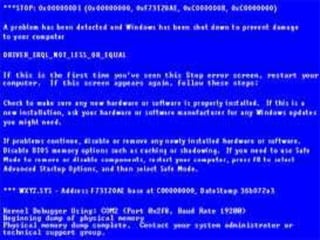
the screen ,others may slow down the pc
 They can also erase files or even format
your floppy or hard disk and the crash the
system
 Letters looks like they are falling to the bottom of
the screen.
 The computer system becomes slow.
 The size of available free memory reduces.
 The hard disk runs out of space.
 The computer does not boot.
 Computer viruses spread by attaching
themselves to other computer program files
 When you exchange a file or pen drive with a
virus, the virus spreads from one computer to the
another
 Viruses also spreads when a Computer Engineer
comes to repair your system and puts his/her
diagnostics disks in your PC
 Boot viruses:- The boot virus copies the virus code in the
boot sector
 Polymorphic viruses:- They are coded in such a way that
they infect a system and change their signature
 Macro viruses:- Macros are blocks of code written to
automate frequently performed tasks and embedded in a
program file
 Worms:- Worms are program that replicate and spread to
other system
 Trojans:- A Trojan is a program file that claims to do
something but it actually does something that is not required
 Install an Antivirus software
 Regularly update the program
 Open email attachment files only if you are expecting the
attached files, or the sender is known and has confirmed
sending the file
 Try to avoid downloading and installing software from the
Internet
 Install only registered copies of software on the system
 Norton Anti-Virus
 MacAfee
 Avast
 Quick Heal
 Panda
 For better and safe computation anti-virus
software should be installed and be
helpful for global network system freely.
Computer virus

Computer virus

  • 2.
     Computer virusesare a type of software program that, like biological virus reproduces and spread itself  Some Virus may display on a message on the screen ,others may slow down the pc  They can also erase files or even format your floppy or hard disk and the crash the system
  • 3.
     Letters lookslike they are falling to the bottom of the screen.  The computer system becomes slow.  The size of available free memory reduces.  The hard disk runs out of space.  The computer does not boot.
  • 5.
     Computer virusesspread by attaching themselves to other computer program files  When you exchange a file or pen drive with a virus, the virus spreads from one computer to the another  Viruses also spreads when a Computer Engineer comes to repair your system and puts his/her diagnostics disks in your PC
  • 6.
     Boot viruses:-The boot virus copies the virus code in the boot sector  Polymorphic viruses:- They are coded in such a way that they infect a system and change their signature  Macro viruses:- Macros are blocks of code written to automate frequently performed tasks and embedded in a program file  Worms:- Worms are program that replicate and spread to other system  Trojans:- A Trojan is a program file that claims to do something but it actually does something that is not required
  • 7.
     Install anAntivirus software  Regularly update the program  Open email attachment files only if you are expecting the attached files, or the sender is known and has confirmed sending the file  Try to avoid downloading and installing software from the Internet  Install only registered copies of software on the system
  • 8.
     Norton Anti-Virus MacAfee  Avast  Quick Heal  Panda
  • 9.
     For betterand safe computation anti-virus software should be installed and be helpful for global network system freely.