
A 
PRESENTATION ON 
VIRTUAL REALITY TECHNOLOGY 
Presented By: 
Yogesh Kumar Kewlani 
B. Tech. (CSE)
CONTENT 
• WHAT IS VIRTUAL REALITY? 
• WHY WE NEED VIRTUAL REALITY? 
• VIRTUAL REALITY SYSTEMS 
• VIRTUAL REALITY HARDWARE 
• VIRTUAL REALITY DEVELOPING 
TOOLS 
• THE FUTURE OF VIRTUAL REALITY
WHAT IS VIRTUAL REALITY ? 
• VIRTUAL REALITY IS, PLAINLY SPEAKING, SEEING AN 
IMAGINARY WORLD, RATHER THAN THE REAL ONE. SEEING, 
HEARING, SMELLING, TESTING, FEELING. THE IMAGINARY 
WORLD IS A SIMULATION RUNNING IN A COMPUTER. THE 
SENSE DATA IS FED BY SOME SYSTEM TO OUR BRAIN. 
• A MEDIUM COMPOSED OF INTERACTIVE COMPUTER 
SIMULATIONS GIVING USERS THE FEELING OF BEING 
PRESENT IN THE SIMULATIONS.
WHY VIRTUAL REALITY IS NEEDED? 
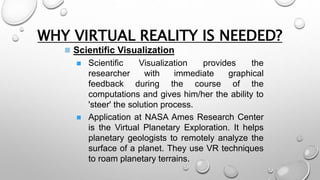
 Scientific Visualization 
 Scientific Visualization provides the 
researcher with immediate graphical 
feedback during the course of the 
computations and gives him/her the ability to 
'steer' the solution process. 
 Application at NASA Ames Research Center 
is the Virtual Planetary Exploration. It helps 
planetary geologists to remotely analyze the 
surface of a planet. They use VR techniques 
to roam planetary terrains.
NASA VR Mars navigation 
simulation 
Geologists 
remotely analyzing 
the surface of a 
planet at NASA
WHY VIRTUAL REALITY IS NEEDED? 
 Medicine 
 Until now experimental research and 
education in medicine was mainly based on 
dissection and study of plastic models. 
Computerized 3D human models provide a 
new approach to research and education in 
medicine. Experimenting medical research 
with virtual patients will be a reality. 
 We will be able to create not only realistic 
looking virtual patients, but also histological 
and bone structures. With the simulation of 
the entire physiology of the human body,
REAL 3D ULTRASOUND 
EXPERIMENT
EXPOSURE THERAPY FOR 
ACROPHOBIA 
Virtual Elevator
WHY VIRTUAL REALITY IS NEEDED? 
 Education and training 
The most common example is the flight 
simulator. This type of simulator has shown the 
benefits of simulation environments for 
training. They have lower operating costs and 
are safer to use than real aircraft. 
They also allow the simulation of dangerous 
scenarios not allowable with real aircraft.
VIRTUAL REALITY SYSTEMS 
VR SYSTEMS CAN BE DIVIDED INTO THREE GROUPS 
• NON-IMMERSIVE SYSTEMS (LIKE 
WORKSTATIONS) 
SEE INFORMATION ABOUT THE REAL WORLD, 
PRESENTED VIA COMPUTER - LOCATION BASED 
SERVICES, GIS . 
• HYBRID SYSTEMS (GRAPHICS ON TOP OF 
REAL WORLD) ALSO CALLED: AUGMENTED 
REALITY SYSTEMS 
STAY IN REAL WORLD, BUT SEE SIMULATED OBJECTS 
• IMMERSIVE SYSTEMS (LIKE HMD OR CAVE) 
SEE SIMULATED WORLD AND "BE" IN THAT SIMULATED 
WORLD
Non-immersive systems 
“Through- the - window” 
Large display, but 
doesn’t surround 
the user.
Augmented reality 
Stay in real world, but see simulated objects 
Information 
Visualization
More Augmented reality 
Stay in real world, but see simulated objects 
AR Museums
More Augmented reality 
Stay in real world, but see simulated objects 
Augmented Reality can 
be used for training as 
well as for assembly 
purpose
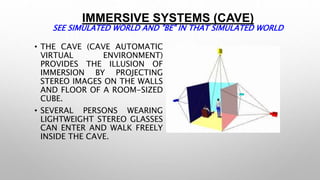
IMMERSIVE SYSTEMS (CAVE) 
SEE SIMULATED WORLD AND "BE" IN THAT SIMULATED WORLD 
• THE CAVE (CAVE AUTOMATIC 
VIRTUAL ENVIRONMENT) 
PROVIDES THE ILLUSION OF 
IMMERSION BY PROJECTING 
STEREO IMAGES ON THE WALLS 
AND FLOOR OF A ROOM-SIZED 
CUBE. 
• SEVERAL PERSONS WEARING 
LIGHTWEIGHT STEREO GLASSES 
CAN ENTER AND WALK FREELY 
INSIDE THE CAVE.
CAVE Pictures 
See simulated world and "be" in that simulated world 
Illusions of immersion
HARDWARE USED IN VR 
• INPUT DEVICES: 
A VARIETY OF INPUT DEVICES ALLOW 
THE USER TO NAVIGATE THROUGH A 
VIRTUAL ENVIRONMENT AND TO 
INTERACT WITH VIRTUAL OBJECTS. 
DIRECTIONAL SOUND, TACTILE AND 
FORCE FEEDBACK DEVICES, VOICE 
RECOGNITION AND OTHER 
TECHNOLOGIES ARE BEING EMPLOYED 
TO ENRICH THE IMMERSIVE 
EXPERIENCE AND TO CREATE MORE 
"SENSUALIZED" INTERFACES.
INPUT DEVICES (THE DATA GLOVE) 
the sensors measure the bending angles of the joints of the thumb and 
the lower and middle knuckles of the others fingers, Attached to the 
back is a Polhemus sensor to measure orientation and position of the 
gloved hand. This 
information, along with the ten flex angles for the knuckles is 
transmitted through a serial communication line to the host computer.
INPUT DEVICES (MOTION TRACKERS) 
The Motion Tracking system is based on magnetic sensors which are 
attached to the user. Most common are sensors measuring the 
intensity of a magnetic field generated at a reference point. The motion 
of the different segments is tracked using magnetic sensors . These 
sensors return raw data (e.g. positions and orientations) expressed in a 
single frame system..
OTHER INPUT DEVICES 
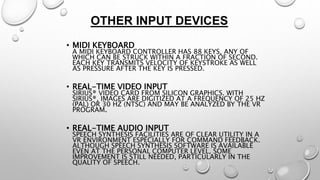
• MIDI KEYBOARD 
A MIDI KEYBOARD CONTROLLER HAS 88 KEYS, ANY OF 
WHICH CAN BE STRUCK WITHIN A FRACTION OF SECOND. 
EACH KEY TRANSMITS VELOCITY OF KEYSTROKE AS WELL 
AS PRESSURE AFTER THE KEY IS PRESSED. 
• REAL-TIME VIDEO INPUT 
SIRIUS® VIDEO CARD FROM SILICON GRAPHICS. WITH 
SIRIUS®, IMAGES ARE DIGITIZED AT A FREQUENCY OF 25 HZ 
(PAL) OR 30 HZ (NTSC) AND MAY BE ANALYZED BY THE VR 
PROGRAM. 
• REAL-TIME AUDIO INPUT 
SPEECH SYNTHESIS FACILITIES ARE OF CLEAR UTILITY IN A 
VR ENVIRONMENT ESPECIALLY FOR COMMAND FEEDBACK. 
ALTHOUGH SPEECH SYNTHESIS SOFTWARE IS AVAILABLE 
EVEN AT THE PERSONAL COMPUTER LEVEL, SOME 
IMPROVEMENT IS STILL NEEDED, PARTICULARLY IN THE 
QUALITY OF SPEECH.
OUTPUT DEVICES 
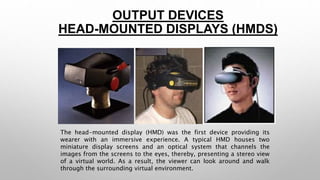
HEAD-MOUNTED DISPLAYS (HMDS) 
The head-mounted display (HMD) was the first device providing its 
wearer with an immersive experience. A typical HMD houses two 
miniature display screens and an optical system that channels the 
images from the screens to the eyes, thereby, presenting a stereo view 
of a virtual world. As a result, the viewer can look around and walk 
through the surrounding virtual environment.
BOOM (BINOCULAR OMNI-ORIENTATION 
MONITOR) 
The BOOM (Binocular Omni-Orientation Monitor) from Fake space is a 
head-coupled stereoscopic display device. Screens and optical system 
are housed in a box that is attached to a multi-link arm. The user 
looks into the box through two holes, sees the virtual world, and can 
guide the box to any position within the operational volume of the 
device.
HAPTIC INTERFACES AND TACTILE 
FEEDBACK FOR VE APPLICATIONS 
CyberGrasp 
Haptic feedback interface enables user to actually "touch" computer-generated 
objects and experience force feedback via the human hand. 
The CyberGrasp® is a lightweight, unencumbering force-reflecting 
exoskeleton that fits over a 
CyberGlove® and adds resistive force feedback to each finger. With the 
CyberGrasp® force feedback system, users are able to explore the 
physical 
properties of computer-generated 3D objects they manipulate in a 
simulated 'virtual world.'
VIRTUAL REALITY DEVELOPING 
TOOLS 
(VIRTUAL REALITY MODELING 
LANGUAGE) 
• IN ADDITION TO HTML (HYPERTEXT MARKUP LANGUAGE), 
THAT HAS BECOME A STANDARD AUTHORING TOOL FOR 
THE CREATION OF HOME PAGES, VRML PROVIDES THREE-DIMENSIONAL 
WORLDS WITH INTEGRATED HYPERLINKS ON 
THE WEB.. 
• THE VIEWING OF VRML MODELS VIA A VRML PLUG-IN FOR 
WEB BROWSERS IS USUALLY DONE ON A GRAPHICS 
MONITOR UNDER MOUSE-CONTROL AND, THEREFORE, NOT 
FULLY IMMERSIVE. 
• HOWEVER THE SYNTAX AND DATA STRUCTURE OF VRML 
PROVIDE AN EXCELLENT TOOL FOR THE MODELING OF 
THREE-DIMENSIONAL WORLDS THAT ARE FUNCTIONAL 
AND INTERACTIVE AND THAT CAN, ULTIMATELY, BE 
TRANSFERRED INTO FULLY IMMERSIVE VIEWING SYSTEMS. 
• THE CURRENT VERSION VRML 2.0 HAS BECOME AN 
INTERNATIONAL ISO/IEC STANDARD UNDER THE NAME 
VRML97.
THE FUTURE OF VIRTUAL 
REALITY 
• VIRTUAL REALITY IS A GROWING INDUSTRY 
• PC AND SPECIALIZED HARDWARE ARE GETTING BETTER, 
FASTER AND CHEAPER BECAUSE OF DEVELOPMENT IN VR. 
• MAYBE 3D USER INTERFACES WILL REPLACE THE WINDOWS 
BASED ONES? 
• HUGE DEMAND FOR VRML PROGRAMMERS IN NEAR 
FUTURE. 
• REVOLUTION IN GAMING INDUSTRIES
“SO A VIRTUAL REALITY IS A 
SYNTHETIC SENSORY EXPERIENCE 
WHICH MAY ONE DAY BE 
INDISTINGUISHABLE FROM THE 
REAL PHYSICAL WORLD “ 
- KALAWSKY, R.S.
REFERENCES 
• http://www.vrs.org.uk/ 
• http://electronics.howstuffworks.com/gadgets/other-gadgets/virtual-reality8. 
htm 
• http://www.cs.uic.edu/~kenyon/conferences/nasa/workshop_noor.html
THANKS…

Virtual Reality

  • 1.
    A PRESENTATION ON VIRTUAL REALITY TECHNOLOGY Presented By: Yogesh Kumar Kewlani B. Tech. (CSE)
  • 2.
    CONTENT • WHATIS VIRTUAL REALITY? • WHY WE NEED VIRTUAL REALITY? • VIRTUAL REALITY SYSTEMS • VIRTUAL REALITY HARDWARE • VIRTUAL REALITY DEVELOPING TOOLS • THE FUTURE OF VIRTUAL REALITY
  • 3.
    WHAT IS VIRTUALREALITY ? • VIRTUAL REALITY IS, PLAINLY SPEAKING, SEEING AN IMAGINARY WORLD, RATHER THAN THE REAL ONE. SEEING, HEARING, SMELLING, TESTING, FEELING. THE IMAGINARY WORLD IS A SIMULATION RUNNING IN A COMPUTER. THE SENSE DATA IS FED BY SOME SYSTEM TO OUR BRAIN. • A MEDIUM COMPOSED OF INTERACTIVE COMPUTER SIMULATIONS GIVING USERS THE FEELING OF BEING PRESENT IN THE SIMULATIONS.
  • 4.
    WHY VIRTUAL REALITYIS NEEDED?  Scientific Visualization  Scientific Visualization provides the researcher with immediate graphical feedback during the course of the computations and gives him/her the ability to 'steer' the solution process.  Application at NASA Ames Research Center is the Virtual Planetary Exploration. It helps planetary geologists to remotely analyze the surface of a planet. They use VR techniques to roam planetary terrains.
  • 5.
    NASA VR Marsnavigation simulation Geologists remotely analyzing the surface of a planet at NASA
  • 6.
    WHY VIRTUAL REALITYIS NEEDED?  Medicine  Until now experimental research and education in medicine was mainly based on dissection and study of plastic models. Computerized 3D human models provide a new approach to research and education in medicine. Experimenting medical research with virtual patients will be a reality.  We will be able to create not only realistic looking virtual patients, but also histological and bone structures. With the simulation of the entire physiology of the human body,
  • 7.
    REAL 3D ULTRASOUND EXPERIMENT
  • 8.
    EXPOSURE THERAPY FOR ACROPHOBIA Virtual Elevator
  • 9.
    WHY VIRTUAL REALITYIS NEEDED?  Education and training The most common example is the flight simulator. This type of simulator has shown the benefits of simulation environments for training. They have lower operating costs and are safer to use than real aircraft. They also allow the simulation of dangerous scenarios not allowable with real aircraft.
  • 10.
    VIRTUAL REALITY SYSTEMS VR SYSTEMS CAN BE DIVIDED INTO THREE GROUPS • NON-IMMERSIVE SYSTEMS (LIKE WORKSTATIONS) SEE INFORMATION ABOUT THE REAL WORLD, PRESENTED VIA COMPUTER - LOCATION BASED SERVICES, GIS . • HYBRID SYSTEMS (GRAPHICS ON TOP OF REAL WORLD) ALSO CALLED: AUGMENTED REALITY SYSTEMS STAY IN REAL WORLD, BUT SEE SIMULATED OBJECTS • IMMERSIVE SYSTEMS (LIKE HMD OR CAVE) SEE SIMULATED WORLD AND "BE" IN THAT SIMULATED WORLD
  • 11.
    Non-immersive systems “Through-the - window” Large display, but doesn’t surround the user.
  • 12.
    Augmented reality Stayin real world, but see simulated objects Information Visualization
  • 13.
    More Augmented reality Stay in real world, but see simulated objects AR Museums
  • 14.
    More Augmented reality Stay in real world, but see simulated objects Augmented Reality can be used for training as well as for assembly purpose
  • 15.
    IMMERSIVE SYSTEMS (CAVE) SEE SIMULATED WORLD AND "BE" IN THAT SIMULATED WORLD • THE CAVE (CAVE AUTOMATIC VIRTUAL ENVIRONMENT) PROVIDES THE ILLUSION OF IMMERSION BY PROJECTING STEREO IMAGES ON THE WALLS AND FLOOR OF A ROOM-SIZED CUBE. • SEVERAL PERSONS WEARING LIGHTWEIGHT STEREO GLASSES CAN ENTER AND WALK FREELY INSIDE THE CAVE.
  • 16.
    CAVE Pictures Seesimulated world and "be" in that simulated world Illusions of immersion
  • 17.
    HARDWARE USED INVR • INPUT DEVICES: A VARIETY OF INPUT DEVICES ALLOW THE USER TO NAVIGATE THROUGH A VIRTUAL ENVIRONMENT AND TO INTERACT WITH VIRTUAL OBJECTS. DIRECTIONAL SOUND, TACTILE AND FORCE FEEDBACK DEVICES, VOICE RECOGNITION AND OTHER TECHNOLOGIES ARE BEING EMPLOYED TO ENRICH THE IMMERSIVE EXPERIENCE AND TO CREATE MORE "SENSUALIZED" INTERFACES.
  • 18.
    INPUT DEVICES (THEDATA GLOVE) the sensors measure the bending angles of the joints of the thumb and the lower and middle knuckles of the others fingers, Attached to the back is a Polhemus sensor to measure orientation and position of the gloved hand. This information, along with the ten flex angles for the knuckles is transmitted through a serial communication line to the host computer.
  • 19.
    INPUT DEVICES (MOTIONTRACKERS) The Motion Tracking system is based on magnetic sensors which are attached to the user. Most common are sensors measuring the intensity of a magnetic field generated at a reference point. The motion of the different segments is tracked using magnetic sensors . These sensors return raw data (e.g. positions and orientations) expressed in a single frame system..
  • 20.
    OTHER INPUT DEVICES • MIDI KEYBOARD A MIDI KEYBOARD CONTROLLER HAS 88 KEYS, ANY OF WHICH CAN BE STRUCK WITHIN A FRACTION OF SECOND. EACH KEY TRANSMITS VELOCITY OF KEYSTROKE AS WELL AS PRESSURE AFTER THE KEY IS PRESSED. • REAL-TIME VIDEO INPUT SIRIUS® VIDEO CARD FROM SILICON GRAPHICS. WITH SIRIUS®, IMAGES ARE DIGITIZED AT A FREQUENCY OF 25 HZ (PAL) OR 30 HZ (NTSC) AND MAY BE ANALYZED BY THE VR PROGRAM. • REAL-TIME AUDIO INPUT SPEECH SYNTHESIS FACILITIES ARE OF CLEAR UTILITY IN A VR ENVIRONMENT ESPECIALLY FOR COMMAND FEEDBACK. ALTHOUGH SPEECH SYNTHESIS SOFTWARE IS AVAILABLE EVEN AT THE PERSONAL COMPUTER LEVEL, SOME IMPROVEMENT IS STILL NEEDED, PARTICULARLY IN THE QUALITY OF SPEECH.
  • 21.
    OUTPUT DEVICES HEAD-MOUNTEDDISPLAYS (HMDS) The head-mounted display (HMD) was the first device providing its wearer with an immersive experience. A typical HMD houses two miniature display screens and an optical system that channels the images from the screens to the eyes, thereby, presenting a stereo view of a virtual world. As a result, the viewer can look around and walk through the surrounding virtual environment.
  • 22.
    BOOM (BINOCULAR OMNI-ORIENTATION MONITOR) The BOOM (Binocular Omni-Orientation Monitor) from Fake space is a head-coupled stereoscopic display device. Screens and optical system are housed in a box that is attached to a multi-link arm. The user looks into the box through two holes, sees the virtual world, and can guide the box to any position within the operational volume of the device.
  • 23.
    HAPTIC INTERFACES ANDTACTILE FEEDBACK FOR VE APPLICATIONS CyberGrasp Haptic feedback interface enables user to actually "touch" computer-generated objects and experience force feedback via the human hand. The CyberGrasp® is a lightweight, unencumbering force-reflecting exoskeleton that fits over a CyberGlove® and adds resistive force feedback to each finger. With the CyberGrasp® force feedback system, users are able to explore the physical properties of computer-generated 3D objects they manipulate in a simulated 'virtual world.'
  • 24.
    VIRTUAL REALITY DEVELOPING TOOLS (VIRTUAL REALITY MODELING LANGUAGE) • IN ADDITION TO HTML (HYPERTEXT MARKUP LANGUAGE), THAT HAS BECOME A STANDARD AUTHORING TOOL FOR THE CREATION OF HOME PAGES, VRML PROVIDES THREE-DIMENSIONAL WORLDS WITH INTEGRATED HYPERLINKS ON THE WEB.. • THE VIEWING OF VRML MODELS VIA A VRML PLUG-IN FOR WEB BROWSERS IS USUALLY DONE ON A GRAPHICS MONITOR UNDER MOUSE-CONTROL AND, THEREFORE, NOT FULLY IMMERSIVE. • HOWEVER THE SYNTAX AND DATA STRUCTURE OF VRML PROVIDE AN EXCELLENT TOOL FOR THE MODELING OF THREE-DIMENSIONAL WORLDS THAT ARE FUNCTIONAL AND INTERACTIVE AND THAT CAN, ULTIMATELY, BE TRANSFERRED INTO FULLY IMMERSIVE VIEWING SYSTEMS. • THE CURRENT VERSION VRML 2.0 HAS BECOME AN INTERNATIONAL ISO/IEC STANDARD UNDER THE NAME VRML97.
  • 25.
    THE FUTURE OFVIRTUAL REALITY • VIRTUAL REALITY IS A GROWING INDUSTRY • PC AND SPECIALIZED HARDWARE ARE GETTING BETTER, FASTER AND CHEAPER BECAUSE OF DEVELOPMENT IN VR. • MAYBE 3D USER INTERFACES WILL REPLACE THE WINDOWS BASED ONES? • HUGE DEMAND FOR VRML PROGRAMMERS IN NEAR FUTURE. • REVOLUTION IN GAMING INDUSTRIES
  • 26.
    “SO A VIRTUALREALITY IS A SYNTHETIC SENSORY EXPERIENCE WHICH MAY ONE DAY BE INDISTINGUISHABLE FROM THE REAL PHYSICAL WORLD “ - KALAWSKY, R.S.
  • 27.
    REFERENCES • http://www.vrs.org.uk/ • http://electronics.howstuffworks.com/gadgets/other-gadgets/virtual-reality8. htm • http://www.cs.uic.edu/~kenyon/conferences/nasa/workshop_noor.html
  • 28.