VIRTUAL
MACHINE
Mohammed Twaha
Srinivas University, Mukka
TOPICS
What is virtual machine
What are VMs used for
Benefits of using VMs
Types of virtual machine
Architecture of virtual machine
Pros and cons of VM
21/11/2022
VIRTUAL
MACHINE
2
WHAT’S VIRTUAL
MACHINE
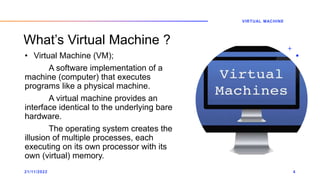
What’s Virtual Machine ?
• Virtual Machine (VM);
A software implementation of a
machine (computer) that executes
programs like a physical machine.
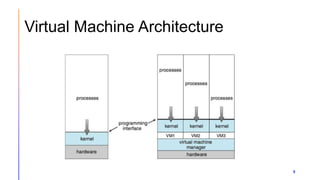
A virtual machine provides an
interface identical to the underlying bare
hardware.
The operating system creates the
illusion of multiple processes, each
executing on its own processor with its
own (virtual) memory.
21/11/2022
VIRTUAL MACHINE
4
What are VMs used for?
• Building and deploying apps to the cloud.
• Trying out a new operating system (OS), including beta
releases.
• Spinning up a new environment to make it simpler and quicker
for developers to run dev-test scenarios.
• Backing up your existing OS.
• Accessing virus-infected data or running an old application by
installing an older OS.
• Running software or apps on operating systems that they
weren't originally intended for.
5
What are the benefits of using VMs?
• Cost savings—running multiple virtual environments from one
piece of infrastructure means that you can drastically reduce
your physical infrastructure footprint.
• Agility and speed—Spinning up a VM is relatively easy and
quick and is much simpler than provisioning an entire new
environment for your developers. Virtualization makes the
process of running dev-test scenarios a lot quicker.
• Scalability—VMs allow you to more easily scale your apps by
adding more physical or virtual servers to distribute the
workload across multiple VMs.
6
• Security benefits— Because virtual machines run in multiple
operating systems, using a guest operating system on a VM
allows you to run apps of questionable security and protects
your host operating system. VMs also allow for better security
forensics, and are often used to safely study computer viruses,
isolating the viruses to avoid risking their host computer.
• Lowered downtime—VMs are so portable and easy to move
from one hypervisor to another on a different machine—this
means that they are a great solution for backup, in the event the
host goes down unexpectedly.
7
Types of Virtual Machine :
• System virtual machines – Hardware virtual machine Provides a
complete system platform environment which supports the execution
of a complete operating system (OS).
• Process virtual machine – Application virtual machine Provides a
platform-independent programming environment that abstracts away
details of the underlying hardware or operating system from software
or application runtime.
• Example:
• Hardware virtual machine: VMWare, Xen, Virtual box .
• Application virtual machine: Java Virtual Machine, .NET Framework
8
Virtual Machine Architecture
9
Advantages of VM
• Familiar Interfaces
• Isolation
- Each OS Run separately with Its own Virtual resources.
• High Availability
- If one VM Server is failed then easily access data from another one.
• Scalability
- Add or Remove resources easily
• Backup with Fast Recovery
- Using VMDK data recovery tool
• Reduction of Cost
- It save cost by running multi OS on single machine.
- Sharing o Hardware
Disadvantages of VM
11
• Difficulty in direct access to hardware.
• Great RAM consumption since each virtual machine will
occupy a separate area of the Same.
• Great use of disk space, since it takes all the files for each
operating system installed on each virtual machine.
• A virtual machine is less efficient than an actual machine
when it accesses the host hard drive indirectly.
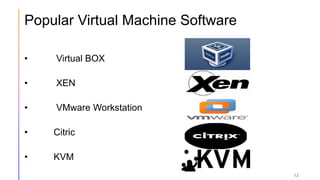
Popular Virtual Machine Software
• Virtual BOX
• XEN
• VMware Workstation
• Citric
• KVM
12
21/11/2022 13
VIRTUAL
MACHINE
THANK YOU

Virtual Machine

  • 1.
  • 2.
    TOPICS What is virtualmachine What are VMs used for Benefits of using VMs Types of virtual machine Architecture of virtual machine Pros and cons of VM 21/11/2022 VIRTUAL MACHINE 2
  • 3.
  • 4.
    What’s Virtual Machine? • Virtual Machine (VM); A software implementation of a machine (computer) that executes programs like a physical machine. A virtual machine provides an interface identical to the underlying bare hardware. The operating system creates the illusion of multiple processes, each executing on its own processor with its own (virtual) memory. 21/11/2022 VIRTUAL MACHINE 4
  • 5.
    What are VMsused for? • Building and deploying apps to the cloud. • Trying out a new operating system (OS), including beta releases. • Spinning up a new environment to make it simpler and quicker for developers to run dev-test scenarios. • Backing up your existing OS. • Accessing virus-infected data or running an old application by installing an older OS. • Running software or apps on operating systems that they weren't originally intended for. 5
  • 6.
    What are thebenefits of using VMs? • Cost savings—running multiple virtual environments from one piece of infrastructure means that you can drastically reduce your physical infrastructure footprint. • Agility and speed—Spinning up a VM is relatively easy and quick and is much simpler than provisioning an entire new environment for your developers. Virtualization makes the process of running dev-test scenarios a lot quicker. • Scalability—VMs allow you to more easily scale your apps by adding more physical or virtual servers to distribute the workload across multiple VMs. 6
  • 7.
    • Security benefits—Because virtual machines run in multiple operating systems, using a guest operating system on a VM allows you to run apps of questionable security and protects your host operating system. VMs also allow for better security forensics, and are often used to safely study computer viruses, isolating the viruses to avoid risking their host computer. • Lowered downtime—VMs are so portable and easy to move from one hypervisor to another on a different machine—this means that they are a great solution for backup, in the event the host goes down unexpectedly. 7
  • 8.
    Types of VirtualMachine : • System virtual machines – Hardware virtual machine Provides a complete system platform environment which supports the execution of a complete operating system (OS). • Process virtual machine – Application virtual machine Provides a platform-independent programming environment that abstracts away details of the underlying hardware or operating system from software or application runtime. • Example: • Hardware virtual machine: VMWare, Xen, Virtual box . • Application virtual machine: Java Virtual Machine, .NET Framework 8
  • 9.
  • 10.
    Advantages of VM •Familiar Interfaces • Isolation - Each OS Run separately with Its own Virtual resources. • High Availability - If one VM Server is failed then easily access data from another one. • Scalability - Add or Remove resources easily • Backup with Fast Recovery - Using VMDK data recovery tool • Reduction of Cost - It save cost by running multi OS on single machine. - Sharing o Hardware
  • 11.
    Disadvantages of VM 11 •Difficulty in direct access to hardware. • Great RAM consumption since each virtual machine will occupy a separate area of the Same. • Great use of disk space, since it takes all the files for each operating system installed on each virtual machine. • A virtual machine is less efficient than an actual machine when it accesses the host hard drive indirectly.
  • 12.
    Popular Virtual MachineSoftware • Virtual BOX • XEN • VMware Workstation • Citric • KVM 12
  • 13.