Production Reflection
Chloe Ross
Process
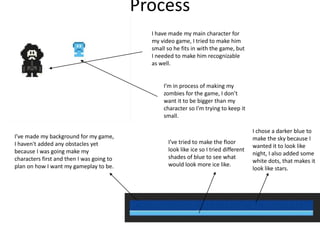
I have made my main character for
my video game, I tried to make him
small so he fits in with the game, but
I needed to make him recognizable
as well.
I’m in process of making my
zombies for the game, I don’t
want it to be bigger than my
character so I'm trying to keep it
small.
I’ve made my background for my game,
I haven't added any obstacles yet
because I was going make my
characters first and then I was going to
plan on how I want my gameplay to be.
I’ve tried to make the floor
look like ice so I tried different
shades of blue to see what
would look more ice like.
I chose a darker blue to
make the sky because I
wanted it to look like
night, I also added some
white dots, that makes it
look like stars.
Process
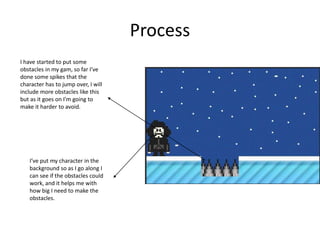
I have started to put some
obstacles in my gam, so far I’ve
done some spikes that the
character has to jump over, I will
include more obstacles like this
but as it goes on I’m going to
make it harder to avoid.
I’ve put my character in the
background so as I go along I
can see if the obstacles could
work, and it helps me with
how big I need to make the
obstacles.
Process
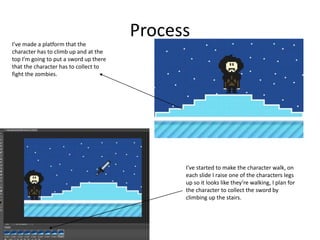
I’ve made a platform that the
character has to climb up and at the
top I’m going to put a sword up there
that the character has to collect to
fight the zombies.
I’ve started to make the character walk, on
each slide I raise one of the characters legs
up so it looks like they’re walking, I plan for
the character to collect the sword by
climbing up the stairs.
Process
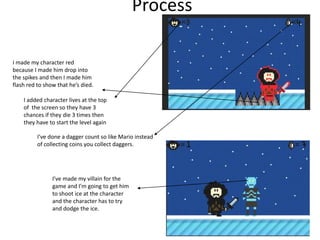
I made my character red
because I made him drop into
the spikes and then I made him
flash red to show that he’s died.
I added character lives at the top
of the screen so they have 3
chances if they die 3 times then
they have to start the level again
I’ve done a dagger count so like Mario instead
of collecting coins you collect daggers.
I’ve made my villain for the
game and I’m going to get him
to shoot ice at the character
and the character has to try
and dodge the ice.
Process
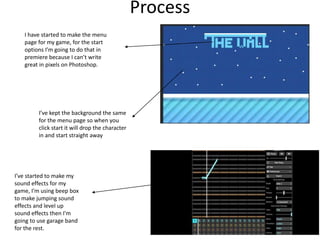
I have started to make the menu
page for my game, for the start
options I’m going to do that in
premiere because I can’t write
great in pixels on Photoshop.
I’ve kept the background the same
for the menu page so when you
click start it will drop the character
in and start straight away
I’ve started to make my
sound effects for my
game, I’m using beep box
to make jumping sound
effects and level up
sound effects then I'm
going to use garage band
for the rest.
process
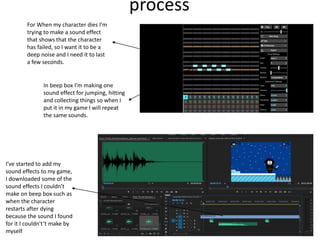
For When my character dies I’m
trying to make a sound effect
that shows that the character
has failed, so I want it to be a
deep noise and I need it to last
a few seconds.
In beep box I’m making one
sound effect for jumping, hitting
and collecting things so when I
put it in my game I will repeat
the same sounds.
I’ve started to add my
sound effects to my game,
I downloaded some of the
sound effects I couldn't
make on beep box such as
when the character
restarts after dying
because the sound I found
for it I couldn't’t make by
myself
Process
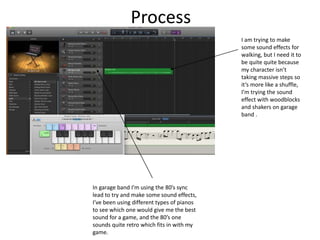
In garage band I’m using the 80’s sync
lead to try and make some sound effects,
I’ve been using different types of pianos
to see which one would give me the best
sound for a game, and the 80’s one
sounds quite retro which fits in with my
game.
I am trying to make
some sound effects for
walking, but I need it to
be quite quite because
my character isn’t
taking massive steps so
it’s more like a shuffle,
I’m trying the sound
effect with woodblocks
and shakers on garage
band .
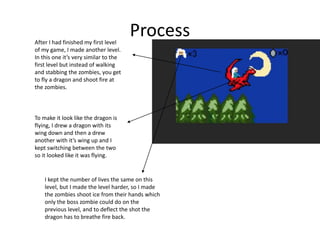
ProcessAfter I had finished my first level
of my game, I made another level.
In this one it’s very similar to the
first level but instead of walking
and stabbing the zombies, you get
to fly a dragon and shoot fire at
the zombies.
To make it look like the dragon is
flying, I drew a dragon with its
wing down and then a drew
another with it’s wing up and I
kept switching between the two
so it looked like it was flying.
I kept the number of lives the same on this
level, but I made the level harder, so I made
the zombies shoot ice from their hands which
only the boss zombie could do on the
previous level, and to deflect the shot the
dragon has to breathe fire back.
Process
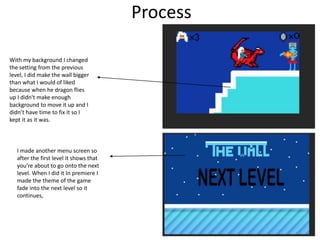
With my background I changed
the setting from the previous
level, I did make the wall bigger
than what I would of liked
because when he dragon flies
up I didn't make enough
background to move it up and I
didn’t have time to fix it so I
kept it as it was.
I made another menu screen so
after the first level it shows that
you’re about to go onto the next
level. When I did it In premiere I
made the theme of the game
fade into the next level so it
continues,

Video game production reflection

  • 1.
  • 2.
    Process I have mademy main character for my video game, I tried to make him small so he fits in with the game, but I needed to make him recognizable as well. I’m in process of making my zombies for the game, I don’t want it to be bigger than my character so I'm trying to keep it small. I’ve made my background for my game, I haven't added any obstacles yet because I was going make my characters first and then I was going to plan on how I want my gameplay to be. I’ve tried to make the floor look like ice so I tried different shades of blue to see what would look more ice like. I chose a darker blue to make the sky because I wanted it to look like night, I also added some white dots, that makes it look like stars.
  • 3.
    Process I have startedto put some obstacles in my gam, so far I’ve done some spikes that the character has to jump over, I will include more obstacles like this but as it goes on I’m going to make it harder to avoid. I’ve put my character in the background so as I go along I can see if the obstacles could work, and it helps me with how big I need to make the obstacles.
  • 4.
    Process I’ve made aplatform that the character has to climb up and at the top I’m going to put a sword up there that the character has to collect to fight the zombies. I’ve started to make the character walk, on each slide I raise one of the characters legs up so it looks like they’re walking, I plan for the character to collect the sword by climbing up the stairs.
  • 5.
    Process I made mycharacter red because I made him drop into the spikes and then I made him flash red to show that he’s died. I added character lives at the top of the screen so they have 3 chances if they die 3 times then they have to start the level again I’ve done a dagger count so like Mario instead of collecting coins you collect daggers. I’ve made my villain for the game and I’m going to get him to shoot ice at the character and the character has to try and dodge the ice.
  • 6.
    Process I have startedto make the menu page for my game, for the start options I’m going to do that in premiere because I can’t write great in pixels on Photoshop. I’ve kept the background the same for the menu page so when you click start it will drop the character in and start straight away I’ve started to make my sound effects for my game, I’m using beep box to make jumping sound effects and level up sound effects then I'm going to use garage band for the rest.
  • 7.
    process For When mycharacter dies I’m trying to make a sound effect that shows that the character has failed, so I want it to be a deep noise and I need it to last a few seconds. In beep box I’m making one sound effect for jumping, hitting and collecting things so when I put it in my game I will repeat the same sounds. I’ve started to add my sound effects to my game, I downloaded some of the sound effects I couldn't make on beep box such as when the character restarts after dying because the sound I found for it I couldn't’t make by myself
  • 8.
    Process In garage bandI’m using the 80’s sync lead to try and make some sound effects, I’ve been using different types of pianos to see which one would give me the best sound for a game, and the 80’s one sounds quite retro which fits in with my game. I am trying to make some sound effects for walking, but I need it to be quite quite because my character isn’t taking massive steps so it’s more like a shuffle, I’m trying the sound effect with woodblocks and shakers on garage band .
  • 9.
    ProcessAfter I hadfinished my first level of my game, I made another level. In this one it’s very similar to the first level but instead of walking and stabbing the zombies, you get to fly a dragon and shoot fire at the zombies. To make it look like the dragon is flying, I drew a dragon with its wing down and then a drew another with it’s wing up and I kept switching between the two so it looked like it was flying. I kept the number of lives the same on this level, but I made the level harder, so I made the zombies shoot ice from their hands which only the boss zombie could do on the previous level, and to deflect the shot the dragon has to breathe fire back.
  • 10.
    Process With my backgroundI changed the setting from the previous level, I did make the wall bigger than what I would of liked because when he dragon flies up I didn't make enough background to move it up and I didn’t have time to fix it so I kept it as it was. I made another menu screen so after the first level it shows that you’re about to go onto the next level. When I did it In premiere I made the theme of the game fade into the next level so it continues,

Editor's Notes

  • #3 Discuss the tools and processes used in your production. Log your thoughts and feelings about your work.
  • #4 Discuss the tools and processes used in your production. Log your thoughts and feelings about your work.
  • #5 Discuss the tools and processes used in your production. Log your thoughts and feelings about your work.
  • #6 Discuss the tools and processes used in your production. Log your thoughts and feelings about your work.
  • #7 Discuss the tools and processes used in your production. Log your thoughts and feelings about your work.