Prof. Mukesh N Tekwani (mukeshtekwani@outlook.com)
Video Conferencing
What Is Video Conferencing (VC)?
1. It is a medium of communication where audio is
accompanied by a live picture or video.
2. VC an be relayed over the Internet or over satellite links
3. VC can also be carried out using cell phones
4. VC can be carried out from the comfort of your
home/office or from special video conferencing studio
2
Types of Video Conferencing
1. The two types of VC are based on the number of
locations participating in the VC session.
2. Point-to-point location
3. Multipoint session
3
Point-to-Point Video Conferencing
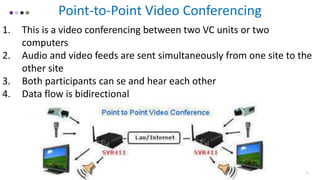
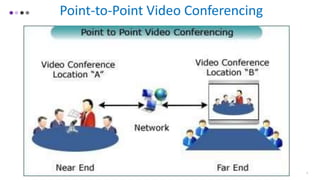
1. This is a video conferencing between two VC units or two
computers
2. Audio and video feeds are sent simultaneously from one site to the
other site
3. Both participants can se and hear each other
4. Data flow is bidirectional
4
5
Point-to-Point Video Conferencing
MultiPoint Video Conferencing
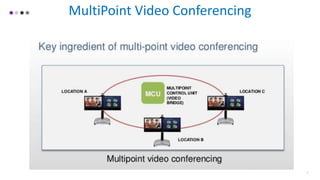
1. This is a video conferencing between two or more VC units
2. Even hundreds of sites may be involved
3. All participants are connected to a central server, Multipoint Control
Unit (MCU)
4. The MCU selects images and audio, mixes them and sends the
resulting audio and video to every participant
6
7
MultiPoint Video Conferencing
Desktop Conferencing
1. Here, the participant uses her own desktop computer for video
conferencing.
2. Dedicated video conferencing room is not used
3. Advantages – not expensive, easily available, portable
4. Disadvantages – multipoint conferencing can be difficult due to
bandwidth limits
8
Managing Video Conferencing
1. Microphone muting – allow only1 person to speak, mute mics of
others. Mic control could be centrally controlled or left to each
speaker (push-to-talk mechanism on mic)
2. Camera panning - focus on person speaking
3. Live streaming – live broadcast on social media like Twitter, Google,
You Tube, FaceBook, etc
9
Advantages of Video Conferencing
1. Save cost of travelling
2. Fast – saves time on people assembling at one place
3. Can be recorded for future reference
4. Participants in different locations can work on the same document
5. An expert can investigate a problem without visiting the site
6. Green – no carbon footprint as travelling is avoided.
10
Disadvantages of Video Conferencing
1. No personal touch
2. Negotiations are not easy
3. Fast Internet connections are needed
4. Good quality equipment can be expensive especially for multipoint
VC
5. There can be a short time lag between audio and video
11
Applications of Video Conferencing
1. Journalism
2. Graphics design
3. Banking
4. Finance
5. Insurance
6. Investments
7. Real-Estate
8. Medicine
9. Education
10. Law
11. Tourism
12. Give your own ideas where it can be used….. 12
THANK YOU
PROF. MUKESH N TEKWANI
MUKESHTEKWANI@OUTLOOK.COM
WWW.SLIDESHARE.NET/MUKESHNT
Feb 4, 2019

Video conferencing

  • 1.
    Prof. Mukesh NTekwani (mukeshtekwani@outlook.com) Video Conferencing
  • 2.
    What Is VideoConferencing (VC)? 1. It is a medium of communication where audio is accompanied by a live picture or video. 2. VC an be relayed over the Internet or over satellite links 3. VC can also be carried out using cell phones 4. VC can be carried out from the comfort of your home/office or from special video conferencing studio 2
  • 3.
    Types of VideoConferencing 1. The two types of VC are based on the number of locations participating in the VC session. 2. Point-to-point location 3. Multipoint session 3
  • 4.
    Point-to-Point Video Conferencing 1.This is a video conferencing between two VC units or two computers 2. Audio and video feeds are sent simultaneously from one site to the other site 3. Both participants can se and hear each other 4. Data flow is bidirectional 4
  • 5.
  • 6.
    MultiPoint Video Conferencing 1.This is a video conferencing between two or more VC units 2. Even hundreds of sites may be involved 3. All participants are connected to a central server, Multipoint Control Unit (MCU) 4. The MCU selects images and audio, mixes them and sends the resulting audio and video to every participant 6
  • 7.
  • 8.
    Desktop Conferencing 1. Here,the participant uses her own desktop computer for video conferencing. 2. Dedicated video conferencing room is not used 3. Advantages – not expensive, easily available, portable 4. Disadvantages – multipoint conferencing can be difficult due to bandwidth limits 8
  • 9.
    Managing Video Conferencing 1.Microphone muting – allow only1 person to speak, mute mics of others. Mic control could be centrally controlled or left to each speaker (push-to-talk mechanism on mic) 2. Camera panning - focus on person speaking 3. Live streaming – live broadcast on social media like Twitter, Google, You Tube, FaceBook, etc 9
  • 10.
    Advantages of VideoConferencing 1. Save cost of travelling 2. Fast – saves time on people assembling at one place 3. Can be recorded for future reference 4. Participants in different locations can work on the same document 5. An expert can investigate a problem without visiting the site 6. Green – no carbon footprint as travelling is avoided. 10
  • 11.
    Disadvantages of VideoConferencing 1. No personal touch 2. Negotiations are not easy 3. Fast Internet connections are needed 4. Good quality equipment can be expensive especially for multipoint VC 5. There can be a short time lag between audio and video 11
  • 12.
    Applications of VideoConferencing 1. Journalism 2. Graphics design 3. Banking 4. Finance 5. Insurance 6. Investments 7. Real-Estate 8. Medicine 9. Education 10. Law 11. Tourism 12. Give your own ideas where it can be used….. 12
  • 13.
    THANK YOU PROF. MUKESHN TEKWANI MUKESHTEKWANI@OUTLOOK.COM WWW.SLIDESHARE.NET/MUKESHNT Feb 4, 2019