VHF-HF/SSB-AIS
Terry Sparks
Commander USN Retired
Agenda
 What Communications Systems are Available?
 License Requirements
 What Can I Expect when using the different Systems
 Operation of VHF
 Use of Portable VHF
Agenda
 Break – 20 minutes
 Digital Selective Calling (DSC)
 Maritime Mobile Service Identity (MMSI)
 Automatic Identification System (AIS)
 Installation of VHF Radios
 Installation of AIS Receiver
What is Available
 VHF Marine Radio (Very High Frequency)
 VHF Hand Held Radios
 HF/SSB Radio (High Frequency/ Single Sideband)
 Cell Phone
 AIS (Automated Information System)
 Satellite Phone also available, but not part of training.
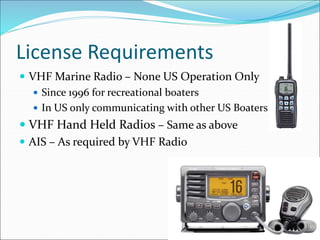
License Requirements
 VHF Marine Radio – None US Operation Only
 Since 1996 for recreational boaters
 In US only communicating with other US Boaters
 VHF Hand Held Radios – Same as above
 AIS – As required by VHF Radio
License Requirements
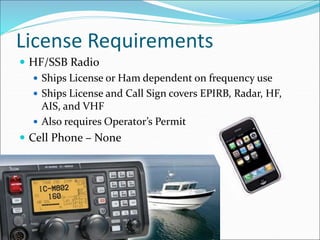
 HF/SSB Radio
 Ships License or Ham dependent on frequency use
 Ships License and Call Sign covers EPIRB, Radar, HF,
AIS, and VHF
 Also requires Operator’s Permit
 Cell Phone – None
Prospective of the Horizon
 Horizon in NM=
 Distance to the horizon in Nautical Miles
 1.17 X square root Sum of heights
 Height of Self + Height of other
 So if you are both at 8 feet
 1.17 X SQRT(8 + 8)
 1.17 X 4
 = 4.68 NM
 A 50 foot Mast at both locations = 11.7 NM
What Can I Expect
 VHF Marine Radio
 Line of site Communications
 Top of Mast to Radio Tower could be 40 miles
 Boat to Boat may only be 3-11 miles
 VHF Hand Held Radios
 1-3 miles depending on your position and the contact antenna
height.
 HF/SSB Radio - Potentially Around the world
 Cell Phone – Similar to VHF to cell tower, then the world.
 AIS – Similar to VHF,
 But will work at very low signal levels (digital signal).
Why install a VHF Radio?
Chances are:
1. You do not have the Cell phone number of the boat
100 yards away.
2. You do not have the Cell phone number of the Coast
Guard.
3. You do not have the Cell phone number of the Ship
headed your way.
4. Your Cell phone will not work.
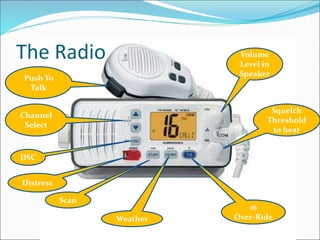
The Radio Volume
Level in
Speaker
Squelch
Threshold
to hear
16
Over-Ride
Push To
Talk
Distress
Channel
Select
Scan
DSC
Weather
Channel Use
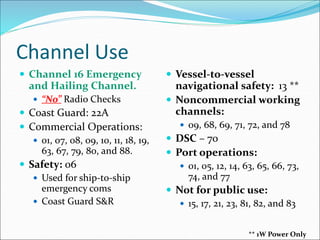
 Channel 16 Emergency
and Hailing Channel.
 “No” Radio Checks
 Coast Guard: 22A
 Commercial Operations:
 01, 07, 08, 09, 10, 11, 18, 19,
63, 67, 79, 80, and 88.
 Safety: 06
 Used for ship-to-ship
emergency coms
 Coast Guard S&R
 Vessel-to-vessel
navigational safety: 13 **
 Noncommercial working
channels:
 09, 68, 69, 71, 72, and 78
 DSC – 70
 Port operations:
 01, 05, 12, 14, 63, 65, 66, 73,
74, and 77
 Not for public use:
 15, 17, 21, 23, 81, 82, and 83
** 1W Power Only
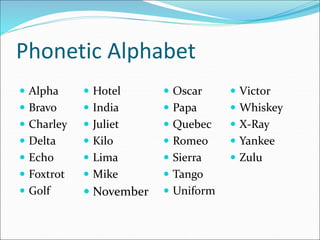
Phonetic Alphabet
 Alpha
 Bravo
 Charley
 Delta
 Echo
 Foxtrot
 Golf
 Oscar
 Papa
 Quebec
 Romeo
 Sierra
 Tango
 Uniform
 Hotel
 India
 Juliet
 Kilo
 Lima
 Mike
 November
 Victor
 Whiskey
 X-Ray
 Yankee
 Zulu
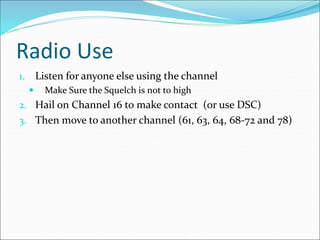
Radio Use
1. Listen for anyone else using the channel
 Make Sure the Squelch is not to high
2. Hail on Channel 16 to make contact (or use DSC)
3. Then move to another channel (61, 63, 64, 68-72 and 78)
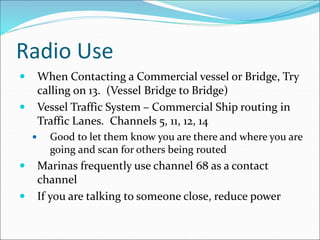
Radio Use
 When Contacting a Commercial vessel or Bridge, Try
calling on 13. (Vessel Bridge to Bridge)
 Vessel Traffic System – Commercial Ship routing in
Traffic Lanes. Channels 5, 11, 12, 14
 Good to let them know you are there and where you are
going and scan for others being routed
 Marinas frequently use channel 68 as a contact
channel
 If you are talking to someone close, reduce power
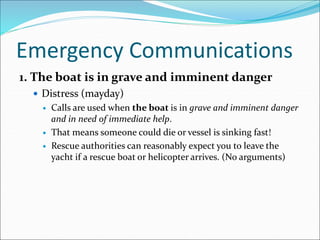
Emergency Communications
1. The boat is in grave and imminent danger
 Distress (mayday)
 Calls are used when the boat is in grave and imminent danger
and in need of immediate help.
 That means someone could die or vessel is sinking fast!
 Rescue authorities can reasonably expect you to leave the
yacht if a rescue boat or helicopter arrives. (No arguments)
Emergency Communications
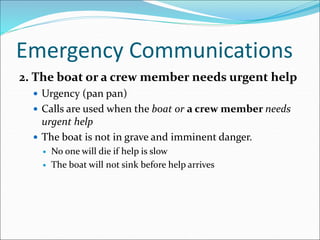
2. The boat or a crew member needs urgent help
 Urgency (pan pan)
 Calls are used when the boat or a crew member needs
urgent help
 The boat is not in grave and imminent danger.
 No one will die if help is slow
 The boat will not sink before help arrives
Emergency Communications
Example: On Channel 16
Pan Pan, Pan Pan, Pan Pan,
This is the vessel Lead Weight.
We have a slow leak and the engine has failed.
We are at Lat 47.234 Lon 126.234 drifting west at a speed of
approximately 1 knot.
There are 4 people on board. All have life Jackets on.
Lead Weight is a brown vessel with white trim.
Standing by on channel 16
Emergency Communications
3. Safety (SECURITÉ)
 securtité
 Calls are used for navigation or weather warnings.
 Pronounced – “say cure it tay”.
Example: On Channel 16
Securite, Securite, Securite, There is a large log floating
under the water at Lat 47.234 Lon 126.234 drifting East at
approximately 0.5 knots.
VHF Operation – Emergency Communications
1. Call on Channel 16
2. Listen for Clear Channel
3. Repeat: Mayday, Mayday, Mayday
4. Provide Call Sign (3 times) and Name of Vessel
5. Provide Position information – “Lat & Lon”
VHF Operation – Emergency Communications
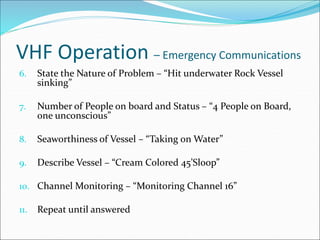
6. State the Nature of Problem – “Hit underwater Rock Vessel
sinking”
7. Number of People on board and Status – “4 People on Board,
one unconscious”
8. Seaworthiness of Vessel – “Taking on Water”
9. Describe Vessel – “Cream Colored 45’Sloop”
10. Channel Monitoring – “Monitoring Channel 16”
11. Repeat until answered
Emergency Communications
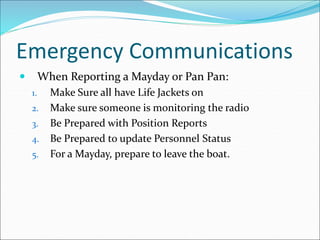
 When Reporting a Mayday or Pan Pan:
1. Make Sure all have Life Jackets on
2. Make sure someone is monitoring the radio
3. Be Prepared with Position Reports
4. Be Prepared to update Personnel Status
5. For a Mayday, prepare to leave the boat.
Use of Portable VHF
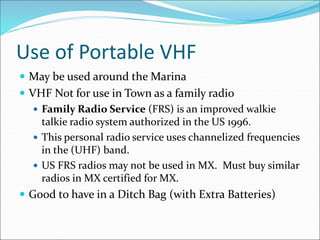
 May be used around the Marina
 VHF Not for use in Town as a family radio
 Family Radio Service (FRS) is an improved walkie
talkie radio system authorized in the US 1996.
 This personal radio service uses channelized frequencies
in the (UHF) band.
 US FRS radios may not be used in MX. Must buy similar
radios in MX certified for MX.
 Good to have in a Ditch Bag (with Extra Batteries)
Digital Selective Calling (DSC)
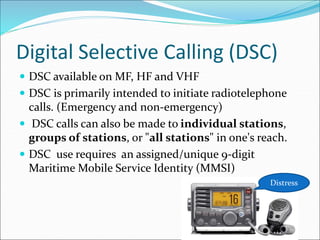
 DSC available on MF, HF and VHF
 DSC is primarily intended to initiate radiotelephone
calls. (Emergency and non-emergency)
 DSC calls can also be made to individual stations,
groups of stations, or "all stations" in one's reach.
 DSC use requires an assigned/unique 9-digit
Maritime Mobile Service Identity (MMSI)
Distress
Digital Selective Calling (DSC)
 DSC radio - ability to send an automatic "mayday" that
identifies the vessel and location.
 Radio May also send information on Type of Issue
 Must be set up with MMSI number
 Must be tied to GPS position Data to be effective
Digital Selective Calling (DSC)
 Allows contacting a friend via DSC without hailing on
channel 16
 Like using your cell phone.
 Private ship-to-ship calls to other vessels equipped with
DSC radio.
 If you know the MMSI number of the radio you are
calling only that vessel will receive you message.
 DSC allows contacting of a Group /Club Privately
MMSI Numbers
 Unique nine (9) Digit FCC Identification Number
 Like your Telephone Number for Radios
 Included with Ships License from FCC
 May also be Obtained from Boat US and Sea Tow
MMSI Numbers
 US VHF Users Only
 http://www.boatus.com/mmsi/
 http://www.seasmartvhf.com/
 Those Who Travel/Communicate Outside the U.S.
 http://wireless.fcc.gov/services/index.htm?job=licensin
g&id=ship_stations
 Must apply to the Federal Communications Commission for a
ship station license.
 Ships License includes an MMSI
 Also need Operators Permit
 Installation of Marine SSB requires Ships License
AIS
 Digital Communication of Ships information
 Transmitted on VHF Radio Frequencies
 Channels 87 and 88B
AIS Classes
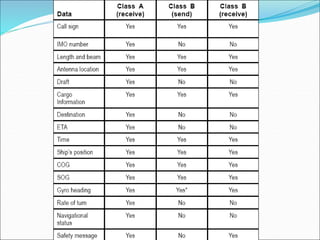
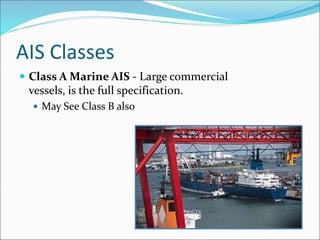
 Class A Marine AIS - Large commercial
vessels, is the full specification.
 May See Class B also
AIS Classes
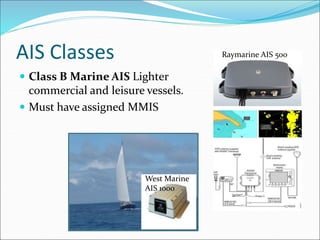
 Class B Marine AIS Lighter
commercial and leisure vessels.
 Must have assigned MMIS
Raymarine AIS 500
West Marine
AIS 1000
AIS Classes
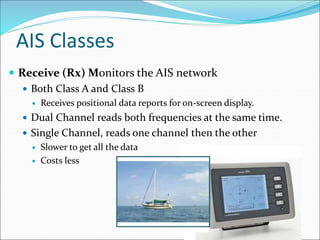
 Receive (Rx) Monitors the AIS network
 Both Class A and Class B
 Receives positional data reports for on-screen display.
 Dual Channel reads both frequencies at the same time.
 Single Channel, reads one channel then the other
 Slower to get all the data
 Costs less
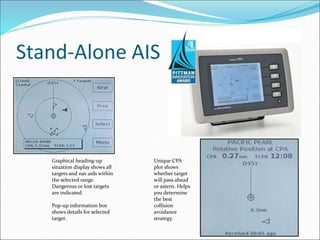
Stand-Alone AIS
Graphical heading-up
situation display shows all
targets and nav aids within
the selected range.
Dangerous or lost targets
are indicated.
Pop-up information box
shows details for selected
target.
Unique CPA
plot shows
whether target
will pass ahead
or astern. Helps
you determine
the best
collision
avoidance
strategy.
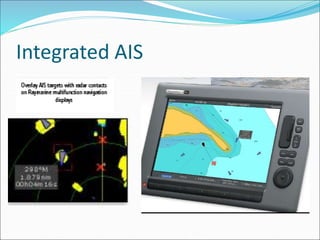
Integrated AIS
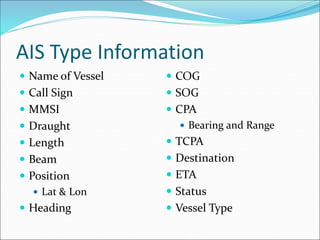
AIS Type Information
 Name of Vessel
 Call Sign
 MMSI
 Draught
 Length
 Beam
 Position
 Lat & Lon
 Heading
 COG
 SOG
 CPA
 Bearing and Range
 TCPA
 Destination
 ETA
 Status
 Vessel Type
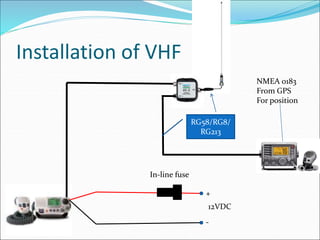
Installation of VHF
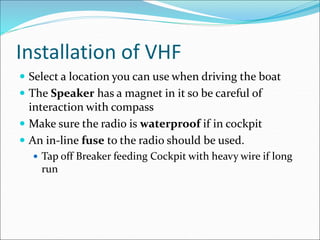
 Select a location you can use when driving the boat
 The Speaker has a magnet in it so be careful of
interaction with compass
 Make sure the radio is waterproof if in cockpit
 An in-line fuse to the radio should be used.
 Tap off Breaker feeding Cockpit with heavy wire if long
run
Installation of VHF
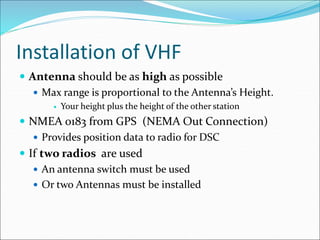
 Antenna should be as high as possible
 Max range is proportional to the Antenna’s Height.
 Your height plus the height of the other station
 NMEA 0183 from GPS (NEMA Out Connection)
 Provides position data to radio for DSC
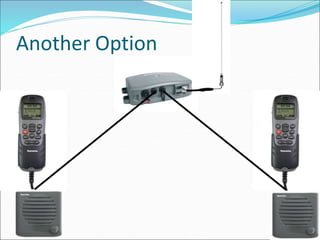
 If two radios are used
 An antenna switch must be used
 Or two Antennas must be installed
Installation of VHF
RG58/RG8/
RG213
+
-
12VDC
In-line fuse
NMEA 0183
From GPS
For position
Another Option
Installation of VHF - Issues
 Hum in the radio can occur when charger is on
 Poor filtering on charger (Goes away with Charger off)
 Can add a large capacitor at point of connection to 12V
power.
 Poor connection to antenna can result in
 Minimal received signal
 No transmitted signal
 Burning out radio output amplifier
Installation of VHF - Issues
 Speaker too close to Compass
 Compass will mot read properly
 Long power run to radio with to small of wire
 Poor radio operation as battery voltage decreases
 No static out of radio with squelch low
 Microphone is keyed
 Static out of radio
 Turn squelch control up to quiet radio
Installation of AIS Receiver
 Stand-Alone Units
 Have own display
 Provides relative position data of Class A&B AIS.
 Specific Requirements should be listed in Vendor
Installation
 Vendors Include:
 Furuno AIS FA150
 VESPER Marine AISWatchMate
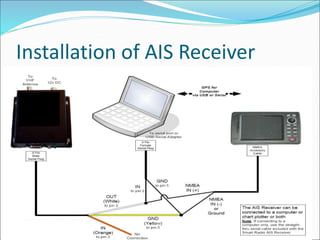
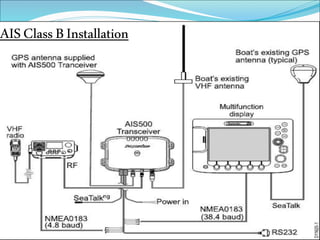
Installation of AIS Receiver
 Integrated Receiver and GPS Display
 Components
 Antenna
 AIS Receiver
 Connection to Graphical Display or PC
 Many Vendors of single and dual Channel Receivers
 AIS units use a default baud rate of 38400
 Can connect to NEMA in on Multifunction Display
 Can be wired to connect to a 9 pin RS232
 Can then adapt to a USB Port
Installation of AIS Receiver
AISClassBInstallation
To Keep you Safe at Sea!
West Marine
AIS 1000

VHF Radio.ppt

  • 1.
  • 2.
    Agenda  What CommunicationsSystems are Available?  License Requirements  What Can I Expect when using the different Systems  Operation of VHF  Use of Portable VHF
  • 3.
    Agenda  Break –20 minutes  Digital Selective Calling (DSC)  Maritime Mobile Service Identity (MMSI)  Automatic Identification System (AIS)  Installation of VHF Radios  Installation of AIS Receiver
  • 5.
    What is Available VHF Marine Radio (Very High Frequency)  VHF Hand Held Radios  HF/SSB Radio (High Frequency/ Single Sideband)  Cell Phone  AIS (Automated Information System)  Satellite Phone also available, but not part of training.
  • 7.
    License Requirements  VHFMarine Radio – None US Operation Only  Since 1996 for recreational boaters  In US only communicating with other US Boaters  VHF Hand Held Radios – Same as above  AIS – As required by VHF Radio
  • 8.
    License Requirements  HF/SSBRadio  Ships License or Ham dependent on frequency use  Ships License and Call Sign covers EPIRB, Radar, HF, AIS, and VHF  Also requires Operator’s Permit  Cell Phone – None
  • 10.
    Prospective of theHorizon  Horizon in NM=  Distance to the horizon in Nautical Miles  1.17 X square root Sum of heights  Height of Self + Height of other  So if you are both at 8 feet  1.17 X SQRT(8 + 8)  1.17 X 4  = 4.68 NM  A 50 foot Mast at both locations = 11.7 NM
  • 11.
    What Can IExpect  VHF Marine Radio  Line of site Communications  Top of Mast to Radio Tower could be 40 miles  Boat to Boat may only be 3-11 miles  VHF Hand Held Radios  1-3 miles depending on your position and the contact antenna height.  HF/SSB Radio - Potentially Around the world  Cell Phone – Similar to VHF to cell tower, then the world.  AIS – Similar to VHF,  But will work at very low signal levels (digital signal).
  • 12.
    Why install aVHF Radio? Chances are: 1. You do not have the Cell phone number of the boat 100 yards away. 2. You do not have the Cell phone number of the Coast Guard. 3. You do not have the Cell phone number of the Ship headed your way. 4. Your Cell phone will not work.
  • 14.
    The Radio Volume Levelin Speaker Squelch Threshold to hear 16 Over-Ride Push To Talk Distress Channel Select Scan DSC Weather
  • 15.
    Channel Use  Channel16 Emergency and Hailing Channel.  “No” Radio Checks  Coast Guard: 22A  Commercial Operations:  01, 07, 08, 09, 10, 11, 18, 19, 63, 67, 79, 80, and 88.  Safety: 06  Used for ship-to-ship emergency coms  Coast Guard S&R  Vessel-to-vessel navigational safety: 13 **  Noncommercial working channels:  09, 68, 69, 71, 72, and 78  DSC – 70  Port operations:  01, 05, 12, 14, 63, 65, 66, 73, 74, and 77  Not for public use:  15, 17, 21, 23, 81, 82, and 83 ** 1W Power Only
  • 16.
    Phonetic Alphabet  Alpha Bravo  Charley  Delta  Echo  Foxtrot  Golf  Oscar  Papa  Quebec  Romeo  Sierra  Tango  Uniform  Hotel  India  Juliet  Kilo  Lima  Mike  November  Victor  Whiskey  X-Ray  Yankee  Zulu
  • 17.
    Radio Use 1. Listenfor anyone else using the channel  Make Sure the Squelch is not to high 2. Hail on Channel 16 to make contact (or use DSC) 3. Then move to another channel (61, 63, 64, 68-72 and 78)
  • 18.
    Radio Use  WhenContacting a Commercial vessel or Bridge, Try calling on 13. (Vessel Bridge to Bridge)  Vessel Traffic System – Commercial Ship routing in Traffic Lanes. Channels 5, 11, 12, 14  Good to let them know you are there and where you are going and scan for others being routed  Marinas frequently use channel 68 as a contact channel  If you are talking to someone close, reduce power
  • 19.
    Emergency Communications 1. Theboat is in grave and imminent danger  Distress (mayday)  Calls are used when the boat is in grave and imminent danger and in need of immediate help.  That means someone could die or vessel is sinking fast!  Rescue authorities can reasonably expect you to leave the yacht if a rescue boat or helicopter arrives. (No arguments)
  • 20.
    Emergency Communications 2. Theboat or a crew member needs urgent help  Urgency (pan pan)  Calls are used when the boat or a crew member needs urgent help  The boat is not in grave and imminent danger.  No one will die if help is slow  The boat will not sink before help arrives
  • 21.
    Emergency Communications Example: OnChannel 16 Pan Pan, Pan Pan, Pan Pan, This is the vessel Lead Weight. We have a slow leak and the engine has failed. We are at Lat 47.234 Lon 126.234 drifting west at a speed of approximately 1 knot. There are 4 people on board. All have life Jackets on. Lead Weight is a brown vessel with white trim. Standing by on channel 16
  • 22.
    Emergency Communications 3. Safety(SECURITÉ)  securtité  Calls are used for navigation or weather warnings.  Pronounced – “say cure it tay”. Example: On Channel 16 Securite, Securite, Securite, There is a large log floating under the water at Lat 47.234 Lon 126.234 drifting East at approximately 0.5 knots.
  • 23.
    VHF Operation –Emergency Communications 1. Call on Channel 16 2. Listen for Clear Channel 3. Repeat: Mayday, Mayday, Mayday 4. Provide Call Sign (3 times) and Name of Vessel 5. Provide Position information – “Lat & Lon”
  • 24.
    VHF Operation –Emergency Communications 6. State the Nature of Problem – “Hit underwater Rock Vessel sinking” 7. Number of People on board and Status – “4 People on Board, one unconscious” 8. Seaworthiness of Vessel – “Taking on Water” 9. Describe Vessel – “Cream Colored 45’Sloop” 10. Channel Monitoring – “Monitoring Channel 16” 11. Repeat until answered
  • 25.
    Emergency Communications  WhenReporting a Mayday or Pan Pan: 1. Make Sure all have Life Jackets on 2. Make sure someone is monitoring the radio 3. Be Prepared with Position Reports 4. Be Prepared to update Personnel Status 5. For a Mayday, prepare to leave the boat.
  • 27.
    Use of PortableVHF  May be used around the Marina  VHF Not for use in Town as a family radio  Family Radio Service (FRS) is an improved walkie talkie radio system authorized in the US 1996.  This personal radio service uses channelized frequencies in the (UHF) band.  US FRS radios may not be used in MX. Must buy similar radios in MX certified for MX.  Good to have in a Ditch Bag (with Extra Batteries)
  • 29.
    Digital Selective Calling(DSC)  DSC available on MF, HF and VHF  DSC is primarily intended to initiate radiotelephone calls. (Emergency and non-emergency)  DSC calls can also be made to individual stations, groups of stations, or "all stations" in one's reach.  DSC use requires an assigned/unique 9-digit Maritime Mobile Service Identity (MMSI) Distress
  • 30.
    Digital Selective Calling(DSC)  DSC radio - ability to send an automatic "mayday" that identifies the vessel and location.  Radio May also send information on Type of Issue  Must be set up with MMSI number  Must be tied to GPS position Data to be effective
  • 31.
    Digital Selective Calling(DSC)  Allows contacting a friend via DSC without hailing on channel 16  Like using your cell phone.  Private ship-to-ship calls to other vessels equipped with DSC radio.  If you know the MMSI number of the radio you are calling only that vessel will receive you message.  DSC allows contacting of a Group /Club Privately
  • 33.
    MMSI Numbers  Uniquenine (9) Digit FCC Identification Number  Like your Telephone Number for Radios  Included with Ships License from FCC  May also be Obtained from Boat US and Sea Tow
  • 34.
    MMSI Numbers  USVHF Users Only  http://www.boatus.com/mmsi/  http://www.seasmartvhf.com/  Those Who Travel/Communicate Outside the U.S.  http://wireless.fcc.gov/services/index.htm?job=licensin g&id=ship_stations  Must apply to the Federal Communications Commission for a ship station license.  Ships License includes an MMSI  Also need Operators Permit  Installation of Marine SSB requires Ships License
  • 36.
    AIS  Digital Communicationof Ships information  Transmitted on VHF Radio Frequencies  Channels 87 and 88B
  • 37.
    AIS Classes  ClassA Marine AIS - Large commercial vessels, is the full specification.  May See Class B also
  • 38.
    AIS Classes  ClassB Marine AIS Lighter commercial and leisure vessels.  Must have assigned MMIS Raymarine AIS 500 West Marine AIS 1000
  • 39.
    AIS Classes  Receive(Rx) Monitors the AIS network  Both Class A and Class B  Receives positional data reports for on-screen display.  Dual Channel reads both frequencies at the same time.  Single Channel, reads one channel then the other  Slower to get all the data  Costs less
  • 40.
    Stand-Alone AIS Graphical heading-up situationdisplay shows all targets and nav aids within the selected range. Dangerous or lost targets are indicated. Pop-up information box shows details for selected target. Unique CPA plot shows whether target will pass ahead or astern. Helps you determine the best collision avoidance strategy.
  • 41.
  • 42.
    AIS Type Information Name of Vessel  Call Sign  MMSI  Draught  Length  Beam  Position  Lat & Lon  Heading  COG  SOG  CPA  Bearing and Range  TCPA  Destination  ETA  Status  Vessel Type
  • 45.
    Installation of VHF Select a location you can use when driving the boat  The Speaker has a magnet in it so be careful of interaction with compass  Make sure the radio is waterproof if in cockpit  An in-line fuse to the radio should be used.  Tap off Breaker feeding Cockpit with heavy wire if long run
  • 46.
    Installation of VHF Antenna should be as high as possible  Max range is proportional to the Antenna’s Height.  Your height plus the height of the other station  NMEA 0183 from GPS (NEMA Out Connection)  Provides position data to radio for DSC  If two radios are used  An antenna switch must be used  Or two Antennas must be installed
  • 47.
    Installation of VHF RG58/RG8/ RG213 + - 12VDC In-linefuse NMEA 0183 From GPS For position
  • 48.
  • 49.
    Installation of VHF- Issues  Hum in the radio can occur when charger is on  Poor filtering on charger (Goes away with Charger off)  Can add a large capacitor at point of connection to 12V power.  Poor connection to antenna can result in  Minimal received signal  No transmitted signal  Burning out radio output amplifier
  • 50.
    Installation of VHF- Issues  Speaker too close to Compass  Compass will mot read properly  Long power run to radio with to small of wire  Poor radio operation as battery voltage decreases  No static out of radio with squelch low  Microphone is keyed  Static out of radio  Turn squelch control up to quiet radio
  • 52.
    Installation of AISReceiver  Stand-Alone Units  Have own display  Provides relative position data of Class A&B AIS.  Specific Requirements should be listed in Vendor Installation  Vendors Include:  Furuno AIS FA150  VESPER Marine AISWatchMate
  • 53.
    Installation of AISReceiver  Integrated Receiver and GPS Display  Components  Antenna  AIS Receiver  Connection to Graphical Display or PC  Many Vendors of single and dual Channel Receivers  AIS units use a default baud rate of 38400  Can connect to NEMA in on Multifunction Display  Can be wired to connect to a 9 pin RS232  Can then adapt to a USB Port
  • 54.
  • 55.
  • 56.
    To Keep youSafe at Sea! West Marine AIS 1000