Maximizer Software
Company Background - Varenya 
• An ISO 9001:2008 & Nasscom member technology company offering end-to-end 
solution in the field of Information Technology & Process automation. 
• Proven track-record of successful deliveries in the field of SMB/SME & large enterprise 
application management & process automation. 
• Skilled and experienced team of 10+ engineers 
• Highly responsive and committed management team 
• Association with Industry leaders for product support 
• Partnership with OEMs for Mobility , Cloud & Analytics Solution 
• In house developed Automation & Intelligent Platform Solutions for telecom & BFSI 
• Lead partner with Maximizer CRM
Company Background - Maximizer 
 Global leading CRM provider to small and medium enterprises (SME) 
and divisions of large enterprises 
 CRM pioneer since 1988 
 Part of the billion-dollar Concord Pacific Group 
 Innovation driven by People, Process and Technology 
 1.0 million+ users, 120000+ Maximizer customers helped worldwide 
 Predominantly sell via our Maximizer Partner Channel 
Strong Performer: 
Mid-Market CRM, SFA, 
Customer Service 
10 Must-Have Apps 
for BlackBerry
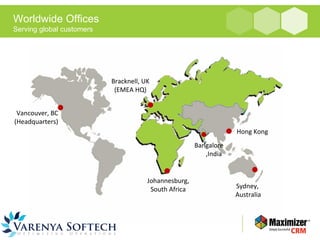
Worldwide Offices 
Serving global customers 
Vancouver, BC 
(Headquarters) 
Hong Kong 
Johannesburg, 
South Africa Sydney, 
Australia 
Bracknell, UK 
(EMEA HQ) 
Bangalore 
,India
Who are some of our customers? 
• Challenge: Territory managers on the road across 26 US territories with 
an average of 6 to 10 visits per day had to plan at evenings... 
• Results: Increase customer face time and productivity by 17% 
Reduce staff downtime with access to customers data and activity on 
mobile 
”...Executives gain strategic advantage in having near real-time customer 
information flowing in from the field.” - Byron MacPhee, US VP of Sales, 
SIGVARIS USA 
Global leader in compression 
therapy products adopted 
MaxMobile
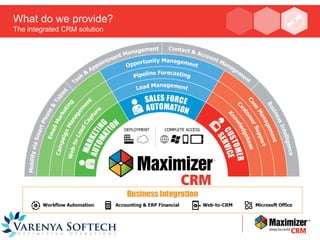
What do we provide? 
The integrated CRM solution
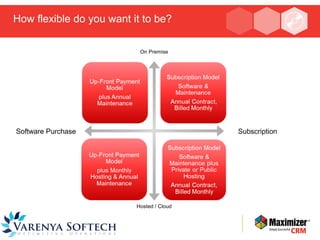
How flexible do you want it to be? 
Deployment & Pricing Flexibility 
On Premise 
Software Purchase Subscription 
Hosted / Cloud
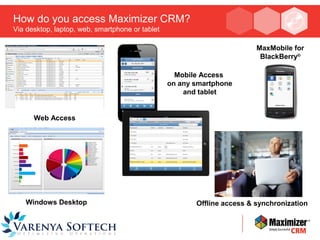
How do you access Maximizer CRM? 
Via desktop, laptop, web, smartphone or tablet 
Windows Desktop 
Mobile Access 
on any smartphone 
and tablet 
Offline access & synchronization 
Web Access 
MaxMobile for 
BlackBerry®
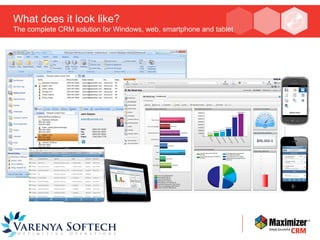
What does it look like? 
The complete CRM solution for Windows, web, smartphone and tablet
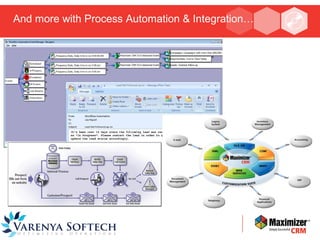
And more with Process Automation & Integration…
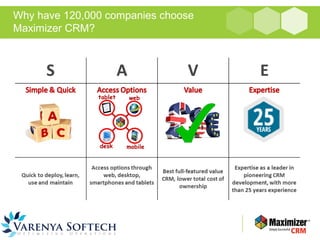
Why have 120,000 companies choose 
Maximizer CRM?
For more information: 
Visit our website www.varenyasoftech.com 
Call us on +91 80 66440660 
Or email us at sales@varenyasoftech.com

Varenya maximizer crm

  • 1.
  • 2.
    Company Background -Varenya • An ISO 9001:2008 & Nasscom member technology company offering end-to-end solution in the field of Information Technology & Process automation. • Proven track-record of successful deliveries in the field of SMB/SME & large enterprise application management & process automation. • Skilled and experienced team of 10+ engineers • Highly responsive and committed management team • Association with Industry leaders for product support • Partnership with OEMs for Mobility , Cloud & Analytics Solution • In house developed Automation & Intelligent Platform Solutions for telecom & BFSI • Lead partner with Maximizer CRM
  • 3.
    Company Background -Maximizer  Global leading CRM provider to small and medium enterprises (SME) and divisions of large enterprises  CRM pioneer since 1988  Part of the billion-dollar Concord Pacific Group  Innovation driven by People, Process and Technology  1.0 million+ users, 120000+ Maximizer customers helped worldwide  Predominantly sell via our Maximizer Partner Channel Strong Performer: Mid-Market CRM, SFA, Customer Service 10 Must-Have Apps for BlackBerry
  • 4.
    Worldwide Offices Servingglobal customers Vancouver, BC (Headquarters) Hong Kong Johannesburg, South Africa Sydney, Australia Bracknell, UK (EMEA HQ) Bangalore ,India
  • 5.
    Who are someof our customers? • Challenge: Territory managers on the road across 26 US territories with an average of 6 to 10 visits per day had to plan at evenings... • Results: Increase customer face time and productivity by 17% Reduce staff downtime with access to customers data and activity on mobile ”...Executives gain strategic advantage in having near real-time customer information flowing in from the field.” - Byron MacPhee, US VP of Sales, SIGVARIS USA Global leader in compression therapy products adopted MaxMobile
  • 6.
    What do weprovide? The integrated CRM solution
  • 7.
    How flexible doyou want it to be? Deployment & Pricing Flexibility On Premise Software Purchase Subscription Hosted / Cloud
  • 8.
    How do youaccess Maximizer CRM? Via desktop, laptop, web, smartphone or tablet Windows Desktop Mobile Access on any smartphone and tablet Offline access & synchronization Web Access MaxMobile for BlackBerry®
  • 9.
    What does itlook like? The complete CRM solution for Windows, web, smartphone and tablet
  • 10.
    And more withProcess Automation & Integration…
  • 11.
    Why have 120,000companies choose Maximizer CRM?
  • 12.
    For more information: Visit our website www.varenyasoftech.com Call us on +91 80 66440660 Or email us at sales@varenyasoftech.com

Editor's Notes

  • #8 Explain the different options available to our end users. If a customer has a limited budget, or a ceiling on their budget then perhaps an OPR is an option for them to start with, it can always be moved on premise at a later date. Please explain to the new partners that we have a USP for Maximizer. Please explain some of the following points to new partners. This will give them some insight into the type of questions they might want to consider asking with partner hosted opportunities 1) Hardware   Establish whether they are MAC users, this will have an effect on MS Office and MS Outlook plugins not working and will lead to additional time (for the prospect / client)   2) Browsers   We know the supported browsers, but I tend to encourage the use of Firefox, specifically for user CRMA, with the browser to clear the history on exit, this keeps it fresh and as fast as it can be.   3) Broadband   When conducting demos, I will try and provide the demo using our remote login software, on the prospects / clients computer, in this way they can see the product performance for themselves.   If I think the performance is not too good, then I provide tips i.e. preference settings (number of returned results) working with smaller amounts of data by using “Favourite Lists” or “Saved Searches” It is important at this stage to make sure that the prospect is happy with the performance, and indeed on-going through the sales process   4) Initial Data If you can get some data from the prospect to import into Maximizer from them to trial for 14 days, this will always help. It is also a good way to gauge how they currently work, so you could set up, “column views” that will reflect their current way of working fro example.   5) Existing clients   What version, size of database(s) which will need to be merged, being mindful that a 1GB pervasive solution will likely increased to 1.7GB (rough guide), this will have a bearing on the data base limit and whether they should increase (subject to number of users).   6) Email   Establish existing email solution / provider (we will need the login credentials) and the server of hosted email provider will need to permit CRMA to relay emails. This is an important part of the qualification, if they are intending on sending out regular email campaigns and they do not already have their own smtp server, then they should absolutely consider purchasing MaxMail packs.
  • #12 Key Features in V13   Revised Opportunity Windows and tabs New Alarms and Alerts Panel Excel Reporting: Forecast, Pipeline etc. Conditional Mandatory UDFs for Opportunities Key Field list improvements: Titles, sections, pop-up descriptions, ability to hide fields Improvements to Work Add-on Changes to headers and toolbars VOIP/IM outbound calling Column Alignment option Web Search option Audit changes feature for address book Grid cursors different based on mouse-over Help videos Accounts tab in WME Webform improvements Migration Tools Following Tab Framework improvements Full Language Versions Chrome Browser Support