


The Experience Matters
UX & DESIGN RIYADH
Welcome to our monthly meetup!
3PM: Meet, Greet & Network
4PM: Usability Guidelines for Websites &
Mobile Apps
The Experience Matters
USABILITY GUIDELINES FOR
WEBSITES & MOBILE APPS
The Experience Matters
THE EXPERIENCE MATTERS
Riyadh 28/02/2015UX & Design Meetup @UXBERT
© 2015 - Riyadh, Saudi Arabia – Confidential & Proprietary
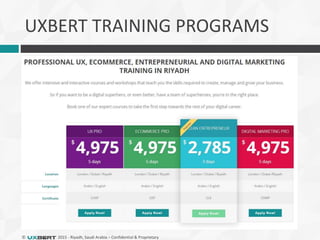
UXBERT TRAINING PROGRAMS
© 2015 - Riyadh, Saudi Arabia – Confidential & Proprietary
Nationality:
Experience: 11 Years
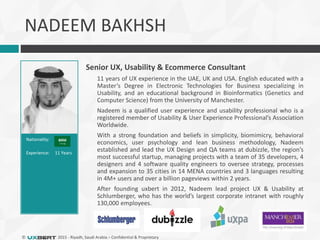
NADEEM BAKHSH
Senior UX, Usability & Ecommerce Consultant
11 years of UX experience in the UAE, UK and USA. English educated with a
Master’s Degree in Electronic Technologies for Business specializing in
Usability, and an educational background in Bioinformatics (Genetics and
Computer Science) from the University of Manchester.
Nadeem is a qualified user experience and usability professional who is a
registered member of Usability & User Experience Professional’s Association
Worldwide.
With a strong foundation and beliefs in simplicity, biomimicry, behavioral
economics, user psychology and lean business methodology, Nadeem
established and lead the UX Design and QA teams at dubizzle, the region’s
most successful startup, managing projects with a team of 35 developers, 4
designers and 4 software quality engineers to oversee strategy, processes
and expansion to 35 cities in 14 MENA countries and 3 languages resulting
in 4M+ users and over a billion pageviews within 2 years.
After founding uxbert in 2012, Nadeem lead project UX & Usability at
Schlumberger, who has the world’s largest corporate intranet with roughly
130,000 employees.
© 2015 - Riyadh, Saudi Arabia – Confidential & Proprietary
Nationality:
Experience: 8 Years
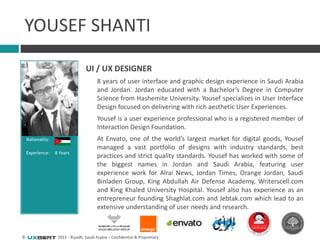
YOUSEF SHANTI
UI / UX DESIGNER
8 years of user interface and graphic design experience in Saudi Arabia
and Jordan. Jordan educated with a Bachelor’s Degree in Computer
Science from Hashemite University. Yousef specializes in User Interface
Design focused on delivering with rich aesthetic User Experiences.
Yousef is a user experience professional who is a registered member of
Interaction Design Foundation.
At Envato, one of the world’s largest market for digital goods, Yousef
managed a vast portfolio of designs with industry standards, best
practices and strict quality standards. Yousef has worked with some of
the biggest names in Jordan and Saudi Arabia, featuring user
experience work for Alrai News, Jordan Times, Orange Jordan, Saudi
Binladen Group, King Abdullah Air Defense Academy, Writerscell.com
and King Khaled University Hospital. Yousef also has experience as an
entrepreneur founding Shaghlat.com and Jebtak.com which lead to an
extensive understanding of user needs and research.
© 2015 - Riyadh, Saudi Arabia – Confidential & Proprietary
WHAT
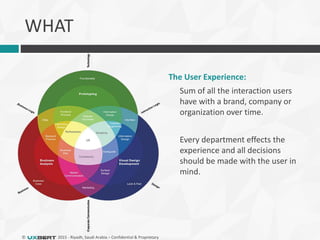
The User Experience:
Sum of all the interaction users
have with a brand, company or
organization over time.
Every department effects the
experience and all decisions
should be made with the user in
mind.
© 2015 - Riyadh, Saudi Arabia – Confidential & Proprietary
WHAT IS USER EXPERIENCE?
It’s more than usability.
 The way a product behaves and is used in the real
world.
 A positive user experience is one in which the
goals of both the user and the business are met.
 Usability is one attribute of a successful user
experience, but usability alone does not make an
experience positive for the user.
© 2015 - Riyadh, Saudi Arabia – Confidential & Proprietary
 What is your core?
 What supporting information does the core
need?
 How do users get to the core?
 Assuming users found what they were looking
for, what can they do next?
UX ENSURES A CLEARLY DEFINED CORE
© 2015 - Riyadh, Saudi Arabia – Confidential & Proprietary
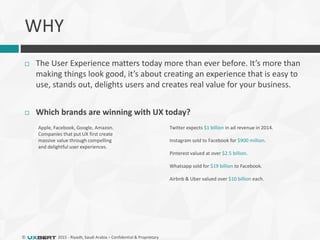
 The User Experience matters today more than ever before. It’s more than
making things look good, it’s about creating an experience that is easy to
use, stands out, delights users and creates real value for your business.
 Which brands are winning with UX today?
Apple, Facebook, Google, Amazon.
Companies that put UX first create
massive value through compelling
and delightful user experiences.
Twitter expects $1 billion in ad revenue in 2014.
Instagram sold to Facebook for $900 million.
Pinterest valued at over $2.5 billion.
Whatsapp sold for $19 billion to Facebook.
Airbnb & Uber valued over $10 billion each.
WHY
© 2015 - Riyadh, Saudi Arabia – Confidential & Proprietary
DISRUPTIVE TRANSFORMATION
 UX and most importantly user expectations are touching new
benchmarks in this digital age.
 Today users have more options to choose from resulting in
less acceptance for the average and unusable, and more
demand for added value.
 Electronic services are competing with traditional methods
with improved efficiency and simplicity. Technology offers
‘more’ and reaches everyone where they are, rather than
asking users to reach for it.
© 2015 - Riyadh, Saudi Arabia – Confidential & Proprietary
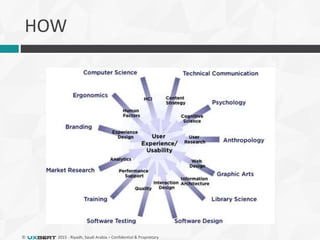
HOW
© 2015 - Riyadh, Saudi Arabia – Confidential & Proprietary
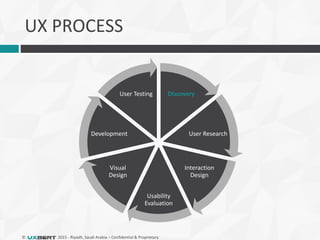
UX PROCESS
Discovery
User Research
Interaction
Design
Usability
Evaluation
Visual
Design
Development
User Testing
© 2015 - Riyadh, Saudi Arabia – Confidential & Proprietary
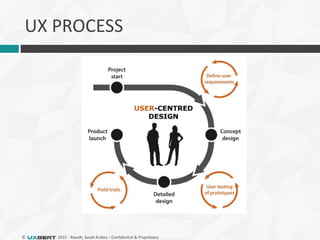
UX PROCESS
© 2015 - Riyadh, Saudi Arabia – Confidential & Proprietary
USER CENTRED DESIGN (UCD)
 A process that focuses on the end users’ needs,
wants, and limitations extensively throughout
the product development lifecycle.
 There is user testing and validation between
every step of the process, from the start of
strategy.
 Analyze and foresee how users are likely to use a
product, but also to test the validity of their
assumptions with regards to user behavior in real
world tests with actual users.
© 2015 - Riyadh, Saudi Arabia – Confidential & Proprietary
WHY USER-CENTERED DESIGN
 A user-centered design process will
 Give you a product that users love and will want to use
 Save you development time and cost
 Reduce support costs
 Provide a foundation for word-of-mouth marketing
 Increase profits
© 2015 - Riyadh, Saudi Arabia – Confidential & Proprietary
DESIGN JOURNEYS NOT PAGES
 Do not design a page.
 Design a real world story into a user journey, a flow
of pages from the user need/goal step by step
through to completion.
 Design the most important story first.
 Don’t forget to make pleasant errors and have a
friendly tone of voice.
© 2015 - Riyadh, Saudi Arabia – Confidential & Proprietary
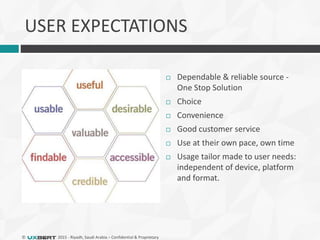
USER EXPECTATIONS
 Dependable & reliable source -
One Stop Solution
 Choice
 Convenience
 Good customer service
 Use at their own pace, own time
 Usage tailor made to user needs:
independent of device, platform
and format.
© 2015 - Riyadh, Saudi Arabia – Confidential & Proprietary
DESIGN VS DEVELOPMENT
 Experience design matters, investment in design pays off
 Beautiful, results-driven Smart Site that improves over time.
 Integrated smart analytics customized to business metrics
 Integrated viral growth of engine, customized for business growth
 User centered design process with integration of usability
principles and guidelines to minimize long term costs of:
 Usability Issues
 Training
 Costly redevelopment
© 2015 - Riyadh, Saudi Arabia – Confidential & Proprietary
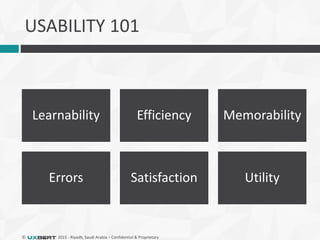
USABILITY 101
Learnability Efficiency Memorability
Errors Satisfaction Utility
© 2015 - Riyadh, Saudi Arabia – Confidential & Proprietary
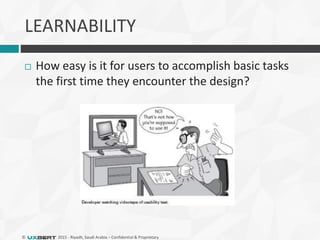
LEARNABILITY
 How easy is it for users to accomplish basic tasks
the first time they encounter the design?
© 2015 - Riyadh, Saudi Arabia – Confidential & Proprietary
EFFICIENCY
 Once users have learned the design, how quickly
can they perform tasks?
© 2015 - Riyadh, Saudi Arabia – Confidential & Proprietary
MEMORABILITY
 When users return to the design after a period of
not using it, how easily can they reestablish
proficiency?
© 2015 - Riyadh, Saudi Arabia – Confidential & Proprietary
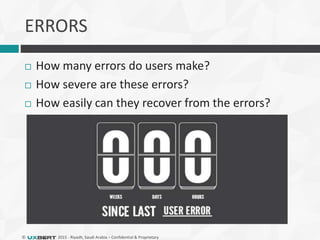
ERRORS
 How many errors do users make?
 How severe are these errors?
 How easily can they recover from the errors?
© 2015 - Riyadh, Saudi Arabia – Confidential & Proprietary
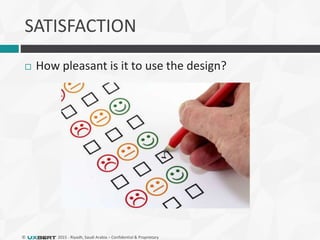
SATISFACTION
 How pleasant is it to use the design?
© 2015 - Riyadh, Saudi Arabia – Confidential & Proprietary
UTILITY
 Design’s functionality: Does it do what users need?
© 2015 - Riyadh, Saudi Arabia – Confidential & Proprietary
USABILITY ‘HOME RUN’
Jakob Nielsen’s principles for a successful website:
High quality content
Often updated
Minimal down time
Easy to use
Relevant to users’ needs
Unique to the online world
Net-centric corporate culture
© 2015 - Riyadh, Saudi Arabia – Confidential & Proprietary
Why Usability is Important
 Usability is a necessary condition for survival on
the web
 If a website is difficult to use people leave
 If the homepage fails to clearly state what a company
offers and what users can do on the site, people leave
 If users get lost on a website, they leave
 If a website’s information is hard to read or doesn’t
answer users’ key questions, they leave
 The first law of e-commerce is that if users cannot
find the product, they cannot buy it either
© 2015 - Riyadh, Saudi Arabia – Confidential & Proprietary
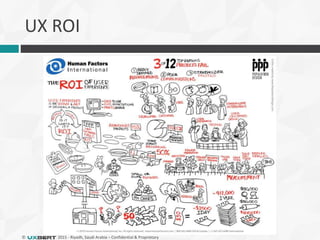
UX ROI
© 2015 - Riyadh, Saudi Arabia – Confidential & Proprietary
USABILITY ROI
 “Every $1 invested in usability returns between
$10 and $100” – IBM
 “Spending 10% of your development budget on
usability should improve your conversion rate by
83%” – Nielsen Norman Group
© 2015 - Riyadh, Saudi Arabia – Confidential & Proprietary
EVALUATING USABILITY
 2 types of evaluation methods
 Expert Review
 An expert or handful of experts use the interface to try and
find problems
 They evaluate the interface by using heuristics or
guidelines
 Usability Testing
 Involves testing real users
 Users are asked to use the system and performing real
tasks
 The aim is to observe them and see where they struggle
© 2015 - Riyadh, Saudi Arabia – Confidential & Proprietary
EXPERT REVIEWS
 Advantages
 Usability defects found early at low cost
 Findings can usually be generalized to whole interface
 Relatively quick to carry out
 Disadvantages
 Tends to over-emphasize visual design and layout
problems
 Hard to prioritize problems
 Doesn’t capture real user behavior
© 2015 - Riyadh, Saudi Arabia – Confidential & Proprietary
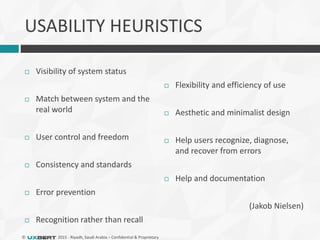
USABILITY HEURISTICS
 Visibility of system status
 Match between system and the
real world
 User control and freedom
 Consistency and standards
 Error prevention
 Recognition rather than recall
 Flexibility and efficiency of use
 Aesthetic and minimalist design
 Help users recognize, diagnose,
and recover from errors
 Help and documentation
(Jakob Nielsen)
© 2015 - Riyadh, Saudi Arabia – Confidential & Proprietary
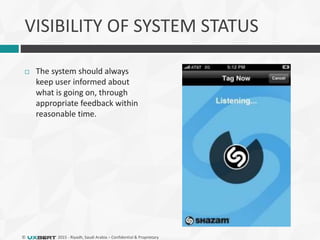
VISIBILITY OF SYSTEM STATUS
 The system should always
keep user informed about
what is going on, through
appropriate feedback within
reasonable time.
© 2015 - Riyadh, Saudi Arabia – Confidential & Proprietary
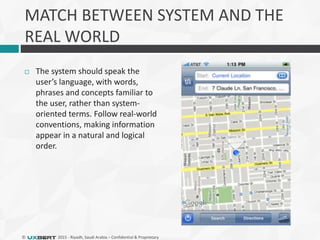
MATCH BETWEEN SYSTEM AND THE
REAL WORLD
 The system should speak the
user’s language, with words,
phrases and concepts familiar to
the user, rather than system-
oriented terms. Follow real-world
conventions, making information
appear in a natural and logical
order.
© 2015 - Riyadh, Saudi Arabia – Confidential & Proprietary
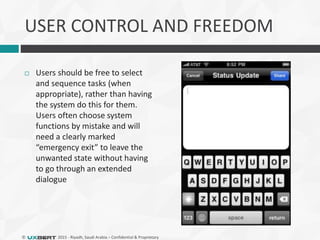
USER CONTROL AND FREEDOM
 Users should be free to select
and sequence tasks (when
appropriate), rather than having
the system do this for them.
Users often choose system
functions by mistake and will
need a clearly marked
“emergency exit” to leave the
unwanted state without having
to go through an extended
dialogue
© 2015 - Riyadh, Saudi Arabia – Confidential & Proprietary
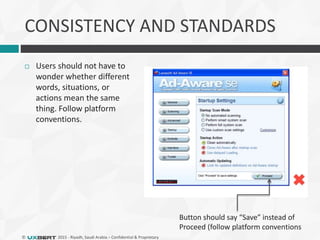
CONSISTENCY AND STANDARDS
 Users should not have to
wonder whether different
words, situations, or
actions mean the same
thing. Follow platform
conventions.
Button should say “Save” instead of
Proceed (follow platform conventions
© 2015 - Riyadh, Saudi Arabia – Confidential & Proprietary
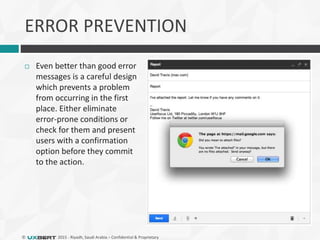
ERROR PREVENTION
 Even better than good error
messages is a careful design
which prevents a problem
from occurring in the first
place. Either eliminate
error-prone conditions or
check for them and present
users with a confirmation
option before they commit
to the action.
© 2015 - Riyadh, Saudi Arabia – Confidential & Proprietary
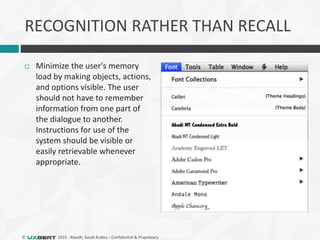
RECOGNITION RATHER THAN RECALL
 Minimize the user's memory
load by making objects, actions,
and options visible. The user
should not have to remember
information from one part of
the dialogue to another.
Instructions for use of the
system should be visible or
easily retrievable whenever
appropriate.
© 2015 - Riyadh, Saudi Arabia – Confidential & Proprietary
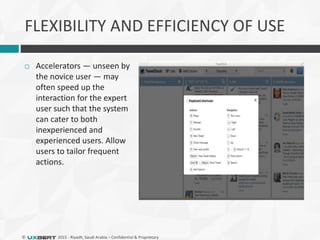
FLEXIBILITY AND EFFICIENCY OF USE
 Accelerators — unseen by
the novice user — may
often speed up the
interaction for the expert
user such that the system
can cater to both
inexperienced and
experienced users. Allow
users to tailor frequent
actions.
© 2015 - Riyadh, Saudi Arabia – Confidential & Proprietary
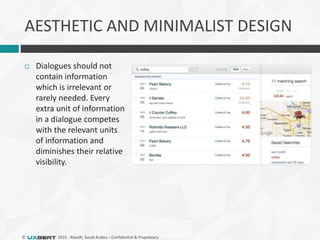
AESTHETIC AND MINIMALIST DESIGN
 Dialogues should not
contain information
which is irrelevant or
rarely needed. Every
extra unit of information
in a dialogue competes
with the relevant units
of information and
diminishes their relative
visibility.
© 2015 - Riyadh, Saudi Arabia – Confidential & Proprietary
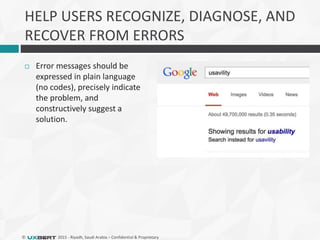
HELP USERS RECOGNIZE, DIAGNOSE, AND
RECOVER FROM ERRORS
 Error messages should be
expressed in plain language
(no codes), precisely indicate
the problem, and
constructively suggest a
solution.
© 2015 - Riyadh, Saudi Arabia – Confidential & Proprietary
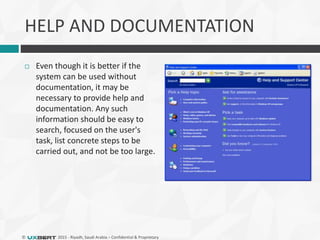
HELP AND DOCUMENTATION
 Even though it is better if the
system can be used without
documentation, it may be
necessary to provide help and
documentation. Any such
information should be easy to
search, focused on the user's
task, list concrete steps to be
carried out, and not be too large.
© 2015 - Riyadh, Saudi Arabia – Confidential & Proprietary
8 GOLDEN RULES OF UI DESIGN
 Strive for consistency
 Enable frequent users to use
shortcuts
 Offer informative feedback
 Design dialog to yield closure
 Offer simple error handling
 Permit easy reversal of actions
 Support internal locus of control
 Reduce short-term memory load
(Ben Shneiderman)
© 2015 - Riyadh, Saudi Arabia – Confidential & Proprietary
THANK YOU!
 We are hiring – uxbert.com/careers
 iOS Mobile Developers
 Android Developers
 Designers
 Sign up for the next workshop on
meetup.uxbert.com
© 2015 - Riyadh, Saudi Arabia – Confidential & Proprietary

UX & Design Riyadh: Usability Guidelines for Websites & Mobile Apps

  • 1.
    The Experience Matters UX& DESIGN RIYADH Welcome to our monthly meetup! 3PM: Meet, Greet & Network 4PM: Usability Guidelines for Websites & Mobile Apps
  • 2.
    The Experience Matters USABILITYGUIDELINES FOR WEBSITES & MOBILE APPS
  • 3.
  • 4.
    THE EXPERIENCE MATTERS Riyadh28/02/2015UX & Design Meetup @UXBERT
  • 5.
    © 2015 -Riyadh, Saudi Arabia – Confidential & Proprietary
  • 6.
    © 2015 -Riyadh, Saudi Arabia – Confidential & Proprietary UXBERT TRAINING PROGRAMS
  • 7.
    © 2015 -Riyadh, Saudi Arabia – Confidential & Proprietary Nationality: Experience: 11 Years NADEEM BAKHSH Senior UX, Usability & Ecommerce Consultant 11 years of UX experience in the UAE, UK and USA. English educated with a Master’s Degree in Electronic Technologies for Business specializing in Usability, and an educational background in Bioinformatics (Genetics and Computer Science) from the University of Manchester. Nadeem is a qualified user experience and usability professional who is a registered member of Usability & User Experience Professional’s Association Worldwide. With a strong foundation and beliefs in simplicity, biomimicry, behavioral economics, user psychology and lean business methodology, Nadeem established and lead the UX Design and QA teams at dubizzle, the region’s most successful startup, managing projects with a team of 35 developers, 4 designers and 4 software quality engineers to oversee strategy, processes and expansion to 35 cities in 14 MENA countries and 3 languages resulting in 4M+ users and over a billion pageviews within 2 years. After founding uxbert in 2012, Nadeem lead project UX & Usability at Schlumberger, who has the world’s largest corporate intranet with roughly 130,000 employees.
  • 8.
    © 2015 -Riyadh, Saudi Arabia – Confidential & Proprietary Nationality: Experience: 8 Years YOUSEF SHANTI UI / UX DESIGNER 8 years of user interface and graphic design experience in Saudi Arabia and Jordan. Jordan educated with a Bachelor’s Degree in Computer Science from Hashemite University. Yousef specializes in User Interface Design focused on delivering with rich aesthetic User Experiences. Yousef is a user experience professional who is a registered member of Interaction Design Foundation. At Envato, one of the world’s largest market for digital goods, Yousef managed a vast portfolio of designs with industry standards, best practices and strict quality standards. Yousef has worked with some of the biggest names in Jordan and Saudi Arabia, featuring user experience work for Alrai News, Jordan Times, Orange Jordan, Saudi Binladen Group, King Abdullah Air Defense Academy, Writerscell.com and King Khaled University Hospital. Yousef also has experience as an entrepreneur founding Shaghlat.com and Jebtak.com which lead to an extensive understanding of user needs and research.
  • 9.
    © 2015 -Riyadh, Saudi Arabia – Confidential & Proprietary WHAT The User Experience: Sum of all the interaction users have with a brand, company or organization over time. Every department effects the experience and all decisions should be made with the user in mind.
  • 10.
    © 2015 -Riyadh, Saudi Arabia – Confidential & Proprietary WHAT IS USER EXPERIENCE? It’s more than usability.  The way a product behaves and is used in the real world.  A positive user experience is one in which the goals of both the user and the business are met.  Usability is one attribute of a successful user experience, but usability alone does not make an experience positive for the user.
  • 11.
    © 2015 -Riyadh, Saudi Arabia – Confidential & Proprietary  What is your core?  What supporting information does the core need?  How do users get to the core?  Assuming users found what they were looking for, what can they do next? UX ENSURES A CLEARLY DEFINED CORE
  • 12.
    © 2015 -Riyadh, Saudi Arabia – Confidential & Proprietary  The User Experience matters today more than ever before. It’s more than making things look good, it’s about creating an experience that is easy to use, stands out, delights users and creates real value for your business.  Which brands are winning with UX today? Apple, Facebook, Google, Amazon. Companies that put UX first create massive value through compelling and delightful user experiences. Twitter expects $1 billion in ad revenue in 2014. Instagram sold to Facebook for $900 million. Pinterest valued at over $2.5 billion. Whatsapp sold for $19 billion to Facebook. Airbnb & Uber valued over $10 billion each. WHY
  • 13.
    © 2015 -Riyadh, Saudi Arabia – Confidential & Proprietary DISRUPTIVE TRANSFORMATION  UX and most importantly user expectations are touching new benchmarks in this digital age.  Today users have more options to choose from resulting in less acceptance for the average and unusable, and more demand for added value.  Electronic services are competing with traditional methods with improved efficiency and simplicity. Technology offers ‘more’ and reaches everyone where they are, rather than asking users to reach for it.
  • 14.
    © 2015 -Riyadh, Saudi Arabia – Confidential & Proprietary HOW
  • 15.
    © 2015 -Riyadh, Saudi Arabia – Confidential & Proprietary UX PROCESS Discovery User Research Interaction Design Usability Evaluation Visual Design Development User Testing
  • 16.
    © 2015 -Riyadh, Saudi Arabia – Confidential & Proprietary UX PROCESS
  • 17.
    © 2015 -Riyadh, Saudi Arabia – Confidential & Proprietary USER CENTRED DESIGN (UCD)  A process that focuses on the end users’ needs, wants, and limitations extensively throughout the product development lifecycle.  There is user testing and validation between every step of the process, from the start of strategy.  Analyze and foresee how users are likely to use a product, but also to test the validity of their assumptions with regards to user behavior in real world tests with actual users.
  • 18.
    © 2015 -Riyadh, Saudi Arabia – Confidential & Proprietary WHY USER-CENTERED DESIGN  A user-centered design process will  Give you a product that users love and will want to use  Save you development time and cost  Reduce support costs  Provide a foundation for word-of-mouth marketing  Increase profits
  • 19.
    © 2015 -Riyadh, Saudi Arabia – Confidential & Proprietary DESIGN JOURNEYS NOT PAGES  Do not design a page.  Design a real world story into a user journey, a flow of pages from the user need/goal step by step through to completion.  Design the most important story first.  Don’t forget to make pleasant errors and have a friendly tone of voice.
  • 20.
    © 2015 -Riyadh, Saudi Arabia – Confidential & Proprietary USER EXPECTATIONS  Dependable & reliable source - One Stop Solution  Choice  Convenience  Good customer service  Use at their own pace, own time  Usage tailor made to user needs: independent of device, platform and format.
  • 21.
    © 2015 -Riyadh, Saudi Arabia – Confidential & Proprietary DESIGN VS DEVELOPMENT  Experience design matters, investment in design pays off  Beautiful, results-driven Smart Site that improves over time.  Integrated smart analytics customized to business metrics  Integrated viral growth of engine, customized for business growth  User centered design process with integration of usability principles and guidelines to minimize long term costs of:  Usability Issues  Training  Costly redevelopment
  • 22.
    © 2015 -Riyadh, Saudi Arabia – Confidential & Proprietary USABILITY 101 Learnability Efficiency Memorability Errors Satisfaction Utility
  • 23.
    © 2015 -Riyadh, Saudi Arabia – Confidential & Proprietary LEARNABILITY  How easy is it for users to accomplish basic tasks the first time they encounter the design?
  • 24.
    © 2015 -Riyadh, Saudi Arabia – Confidential & Proprietary EFFICIENCY  Once users have learned the design, how quickly can they perform tasks?
  • 25.
    © 2015 -Riyadh, Saudi Arabia – Confidential & Proprietary MEMORABILITY  When users return to the design after a period of not using it, how easily can they reestablish proficiency?
  • 26.
    © 2015 -Riyadh, Saudi Arabia – Confidential & Proprietary ERRORS  How many errors do users make?  How severe are these errors?  How easily can they recover from the errors?
  • 27.
    © 2015 -Riyadh, Saudi Arabia – Confidential & Proprietary SATISFACTION  How pleasant is it to use the design?
  • 28.
    © 2015 -Riyadh, Saudi Arabia – Confidential & Proprietary UTILITY  Design’s functionality: Does it do what users need?
  • 29.
    © 2015 -Riyadh, Saudi Arabia – Confidential & Proprietary USABILITY ‘HOME RUN’ Jakob Nielsen’s principles for a successful website: High quality content Often updated Minimal down time Easy to use Relevant to users’ needs Unique to the online world Net-centric corporate culture
  • 30.
    © 2015 -Riyadh, Saudi Arabia – Confidential & Proprietary Why Usability is Important  Usability is a necessary condition for survival on the web  If a website is difficult to use people leave  If the homepage fails to clearly state what a company offers and what users can do on the site, people leave  If users get lost on a website, they leave  If a website’s information is hard to read or doesn’t answer users’ key questions, they leave  The first law of e-commerce is that if users cannot find the product, they cannot buy it either
  • 31.
    © 2015 -Riyadh, Saudi Arabia – Confidential & Proprietary UX ROI
  • 32.
    © 2015 -Riyadh, Saudi Arabia – Confidential & Proprietary USABILITY ROI  “Every $1 invested in usability returns between $10 and $100” – IBM  “Spending 10% of your development budget on usability should improve your conversion rate by 83%” – Nielsen Norman Group
  • 33.
    © 2015 -Riyadh, Saudi Arabia – Confidential & Proprietary EVALUATING USABILITY  2 types of evaluation methods  Expert Review  An expert or handful of experts use the interface to try and find problems  They evaluate the interface by using heuristics or guidelines  Usability Testing  Involves testing real users  Users are asked to use the system and performing real tasks  The aim is to observe them and see where they struggle
  • 34.
    © 2015 -Riyadh, Saudi Arabia – Confidential & Proprietary EXPERT REVIEWS  Advantages  Usability defects found early at low cost  Findings can usually be generalized to whole interface  Relatively quick to carry out  Disadvantages  Tends to over-emphasize visual design and layout problems  Hard to prioritize problems  Doesn’t capture real user behavior
  • 35.
    © 2015 -Riyadh, Saudi Arabia – Confidential & Proprietary USABILITY HEURISTICS  Visibility of system status  Match between system and the real world  User control and freedom  Consistency and standards  Error prevention  Recognition rather than recall  Flexibility and efficiency of use  Aesthetic and minimalist design  Help users recognize, diagnose, and recover from errors  Help and documentation (Jakob Nielsen)
  • 36.
    © 2015 -Riyadh, Saudi Arabia – Confidential & Proprietary VISIBILITY OF SYSTEM STATUS  The system should always keep user informed about what is going on, through appropriate feedback within reasonable time.
  • 37.
    © 2015 -Riyadh, Saudi Arabia – Confidential & Proprietary MATCH BETWEEN SYSTEM AND THE REAL WORLD  The system should speak the user’s language, with words, phrases and concepts familiar to the user, rather than system- oriented terms. Follow real-world conventions, making information appear in a natural and logical order.
  • 38.
    © 2015 -Riyadh, Saudi Arabia – Confidential & Proprietary USER CONTROL AND FREEDOM  Users should be free to select and sequence tasks (when appropriate), rather than having the system do this for them. Users often choose system functions by mistake and will need a clearly marked “emergency exit” to leave the unwanted state without having to go through an extended dialogue
  • 39.
    © 2015 -Riyadh, Saudi Arabia – Confidential & Proprietary CONSISTENCY AND STANDARDS  Users should not have to wonder whether different words, situations, or actions mean the same thing. Follow platform conventions. Button should say “Save” instead of Proceed (follow platform conventions
  • 40.
    © 2015 -Riyadh, Saudi Arabia – Confidential & Proprietary ERROR PREVENTION  Even better than good error messages is a careful design which prevents a problem from occurring in the first place. Either eliminate error-prone conditions or check for them and present users with a confirmation option before they commit to the action.
  • 41.
    © 2015 -Riyadh, Saudi Arabia – Confidential & Proprietary RECOGNITION RATHER THAN RECALL  Minimize the user's memory load by making objects, actions, and options visible. The user should not have to remember information from one part of the dialogue to another. Instructions for use of the system should be visible or easily retrievable whenever appropriate.
  • 42.
    © 2015 -Riyadh, Saudi Arabia – Confidential & Proprietary FLEXIBILITY AND EFFICIENCY OF USE  Accelerators — unseen by the novice user — may often speed up the interaction for the expert user such that the system can cater to both inexperienced and experienced users. Allow users to tailor frequent actions.
  • 43.
    © 2015 -Riyadh, Saudi Arabia – Confidential & Proprietary AESTHETIC AND MINIMALIST DESIGN  Dialogues should not contain information which is irrelevant or rarely needed. Every extra unit of information in a dialogue competes with the relevant units of information and diminishes their relative visibility.
  • 44.
    © 2015 -Riyadh, Saudi Arabia – Confidential & Proprietary HELP USERS RECOGNIZE, DIAGNOSE, AND RECOVER FROM ERRORS  Error messages should be expressed in plain language (no codes), precisely indicate the problem, and constructively suggest a solution.
  • 45.
    © 2015 -Riyadh, Saudi Arabia – Confidential & Proprietary HELP AND DOCUMENTATION  Even though it is better if the system can be used without documentation, it may be necessary to provide help and documentation. Any such information should be easy to search, focused on the user's task, list concrete steps to be carried out, and not be too large.
  • 46.
    © 2015 -Riyadh, Saudi Arabia – Confidential & Proprietary 8 GOLDEN RULES OF UI DESIGN  Strive for consistency  Enable frequent users to use shortcuts  Offer informative feedback  Design dialog to yield closure  Offer simple error handling  Permit easy reversal of actions  Support internal locus of control  Reduce short-term memory load (Ben Shneiderman)
  • 47.
    © 2015 -Riyadh, Saudi Arabia – Confidential & Proprietary THANK YOU!  We are hiring – uxbert.com/careers  iOS Mobile Developers  Android Developers  Designers  Sign up for the next workshop on meetup.uxbert.com
  • 48.
    © 2015 -Riyadh, Saudi Arabia – Confidential & Proprietary

Editor's Notes

  • #12 The core is the reason users come to your website, i.e for Google, the core is the search results. For a shop the core is a product Photos, technical information, price, flowery description, reviews, video, case study etc. Sometimes visitors arrive at the core via the main navigation or search of site. But they might also come directly from Google or another website, social media or offline marketing. What is the call to action? Every subsequent interaction should bring some kind of value to your business (a conversion - sign up to newsletter, fill in contact form, add to cart, checkout, click to like on Facebook, share on social media, pick up the phone and call you.).
  • #49 Research, Training & Consulting User Experience Design Usability Engineering & Conversion Optimization Mobile & Web Development & Ecommerce