
UX / UI DESIGN PROCESS
STUDIO CREATIVE ME
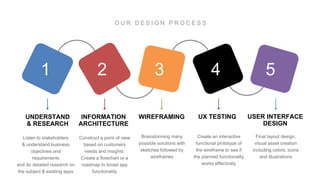
42 531
UNDERSTAND
& RESEARCH
INFORMATION
ARCHITECTURE
WIREFRAMING UX TESTING USER INTERFACE
DESIGN
CLIENT BRIEF
UNDERSTAND & RESEARCH
INFORMATION
ARCHITECURE
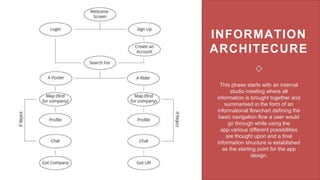
This phase starts with an internal
studio meeting where all
information is brought together and
summarised in the form of an
informational flowchart defining the
basic navigation flow a user would
go through while using the
app.various different possibilities
are thought upon and a final
information structure is established
as the starting point for the app
design.
CONCEPT
SKETCHES
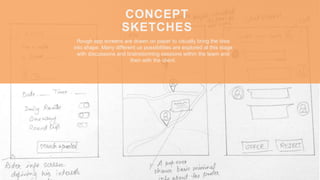
Rough app screens are drawn on paper to visually bring the idea
into shape. Many different ux possibilities are explored at this stage
with discussions and brainstorming sessions within the team and
then with the client.
WIREFRAMING
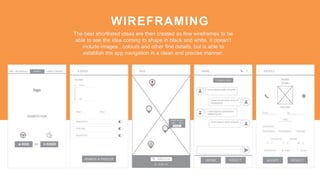
The best shortlisted ideas are then created as fine wireframes to be
able to see the idea coming to shape in black and white. It doesn’t
include images , colours and other fine details, but is able to
establish the app navigation in a clean and precise manner.
UX TESTING
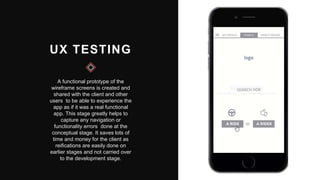
A functional prototype of the
wireframe screens is created and
shared with the client and other
users to be able to experience the
app as if it was a real functional
app. This stage greatly helps to
capture any navigation or
functionality errors done at the
conceptual stage. It saves lots of
time and money for the client as
reifications are easily done on
earlier stages and not carried over
to the development stage.
USER
INTERFACE
DESIGN
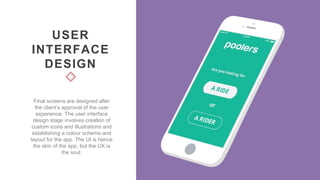
Final screens are designed after
the client’s approval of the user
experience. The user interface
design stage involves creation of
custom icons and illustrations and
establishing a colour scheme and
layout for the app. The UI is hence
the skin of the app, but the UX is
the soul.
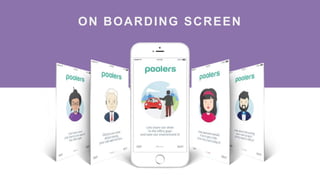
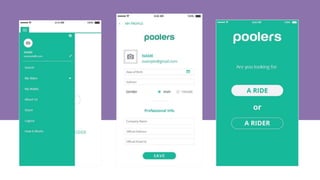
ON BOARDING SCREEN
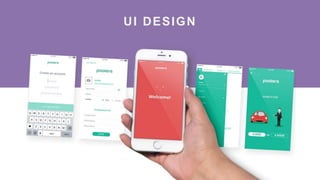
UI DESIGN
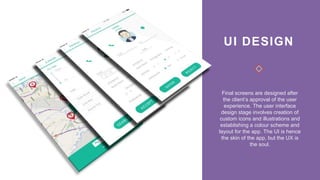
UI DESIGN
Final screens are designed after
the client’s approval of the user
experience. The user interface
design stage involves creation of
custom icons and illustrations and
establishing a colour scheme and
layout for the app. The UI is hence
the skin of the app, but the UX is
the soul.
Thanks for watching :)
© COPYRIGHT / STUDIO CREATIVEME 2017

UX/UI design process - Studio CreativeMe

  • 1.
    UX / UIDESIGN PROCESS STUDIO CREATIVE ME
  • 2.
  • 3.
  • 4.
    INFORMATION ARCHITECURE This phase startswith an internal studio meeting where all information is brought together and summarised in the form of an informational flowchart defining the basic navigation flow a user would go through while using the app.various different possibilities are thought upon and a final information structure is established as the starting point for the app design.
  • 5.
    CONCEPT SKETCHES Rough app screensare drawn on paper to visually bring the idea into shape. Many different ux possibilities are explored at this stage with discussions and brainstorming sessions within the team and then with the client.
  • 6.
    WIREFRAMING The best shortlistedideas are then created as fine wireframes to be able to see the idea coming to shape in black and white. It doesn’t include images , colours and other fine details, but is able to establish the app navigation in a clean and precise manner.
  • 7.
    UX TESTING A functionalprototype of the wireframe screens is created and shared with the client and other users to be able to experience the app as if it was a real functional app. This stage greatly helps to capture any navigation or functionality errors done at the conceptual stage. It saves lots of time and money for the client as reifications are easily done on earlier stages and not carried over to the development stage.
  • 8.
    USER INTERFACE DESIGN Final screens aredesigned after the client’s approval of the user experience. The user interface design stage involves creation of custom icons and illustrations and establishing a colour scheme and layout for the app. The UI is hence the skin of the app, but the UX is the soul.
  • 9.
  • 10.
  • 11.
    UI DESIGN Final screensare designed after the client’s approval of the user experience. The user interface design stage involves creation of custom icons and illustrations and establishing a colour scheme and layout for the app. The UI is hence the skin of the app, but the UX is the soul.
  • 13.
    Thanks for watching:) © COPYRIGHT / STUDIO CREATIVEME 2017