Florida Memory Project
     Florida’s Digital Archive


    Present Measures of Usability
  Future Site and Recommendations


                   Vanja Anderson and Florence
                             Paisey
The Golden Rule

A Web Site Should Never Get in the Way of the User
What is The Florida Memory Project?

The Florida Memory Project is Florida’s Online
               Digital Archive


              http://www.floridamemory.com/
Myth
Build It and They Will Come – Not Going to Happen!
What is Usability?


“Usability is the “basic ability of users to achieve their
 goals within a system. Usability should account for
            affective aspects of interaction.”


                               Blandford& Buchanan, 2002
Usability and the Florida Memory Project

Marty, Alemanne& McClure (2010) identified a range of issues
   that affect the ability of the user to achieve their goals.


  As recommended, the development team at the Florida Memory
  Project have overhauled the site.

  However, the development team would like to conduct several
  usability tests on the older site.

  The purpose is to identify the targeted user reactions to the old
  site with a view to ensuring the same usability problems are not
  repeated.
Did you Know?

        A Homepage is Viewed
More Than Any Other Page on a Website !
So . . .
Homepages are Real Estate

•Home Page Architecture is your Identity

•Central Issues:
   •   A Logo for Identity
   •   A Liquid Page
   •   A Clearly Visible Search Feature
   •   Multiple Navigation Menus
   •   Harmonious Color – Websafe
   •   Effective Use of All Space – Less is
       More!
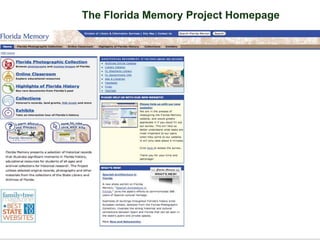
The Florida Memory Project Homepage
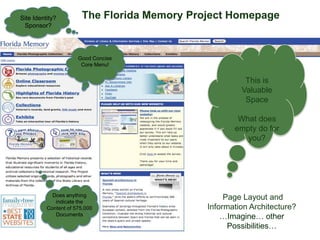
Site Identity?         The Florida Memory Project Homepage
 Sponsor?


                      Good Concise
                       Core Menu!


                                                       This is
                                                      Valuable
                                                       Space

                                                     What does
                                                    empty do for
                                                       you?


            Does anything                         Page Layout and
             indicate the
          Content of 575,000                 Information Architecture?
             Documents                           …Imagine… other
                                                   Possibilities…
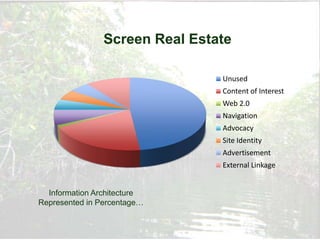
Screen Real Estate

                                Unused
                                Content of Interest
                                Web 2.0
                                Navigation
                                Advocacy
                                Site Identity
                                Advertisement
                                External Linkage


  Information Architecture
Represented in Percentage…
Florida Mangroves
Usability Methods
Four Approaches

•Heuristics

• Think Aloud

• Cognitive Walkthrough

• Interview
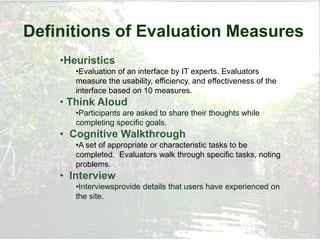
Definitions of Evaluation Measures
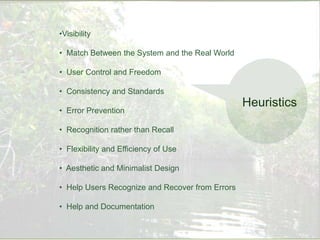
    •Heuristics
       •Evaluation of an interface by IT experts. Evaluators
       measure the usability, efficiency, and effectiveness of the
       interface based on 10 measures.
    • Think Aloud
       •Participants are asked to share their thoughts while
       completing specific goals.
    • Cognitive Walkthrough
       •A set of appropriate or characteristic tasks to be
       completed. Evaluators walk through specific tasks, noting
       problems.
    • Interview
       •Interviewsprovide details that users have experienced on
       the site.
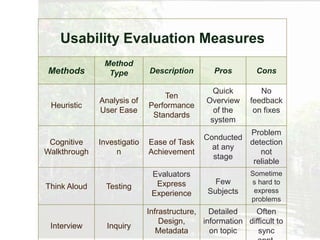
Usability Evaluation Measures
               Method
Methods         Type         Description        Pros         Cons

                                                Quick         No
                                 Ten
              Analysis of                     Overview     feedback
 Heuristic                   Performance
              User Ease                         of the      on fixes
                              Standards
                                               system
                                                       Problem
                                             Conducted
 Cognitive    Investigatio   Ease of Task              detection
                                               at any
Walkthrough        n         Achievement                  not
                                               stage
                                                        reliable
                              Evaluators                   Sometime
                               Express          Few        s hard to
Think Aloud     Testing                                     express
                              Experience      Subjects
                                                           problems
                             Infrastructure,   Detailed    Often
                                 Design,     information difficult to
 Interview      Inquiry
                                Metadata       on topic     sync
•Visibility

• Match Between the System and the Real World

• User Control and Freedom

• Consistency and Standards
                                                 Heuristics
• Error Prevention

• Recognition rather than Recall

• Flexibility and Efficiency of Use

• Aesthetic and Minimalist Design

• Help Users Recognize and Recover from Errors

• Help and Documentation
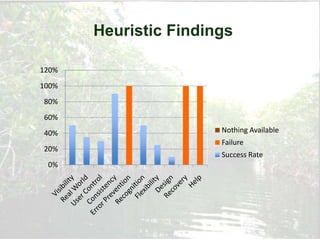
Heuristic Findings

120%
100%
80%
60%
40%                    Nothing Available
                       Failure
20%
                       Success Rate
 0%
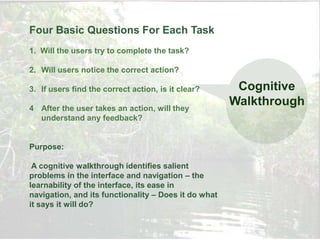
Four Basic Questions For Each Task
1. Will the users try to complete the task?

2. Will users notice the correct action?

3. If users find the correct action, is it clear?      Cognitive
4 After the user takes an action, will they
                                                      Walkthrough
  understand any feedback?


Purpose:

 A cognitive walkthrough identifies salient
problems in the interface and navigation – the
learnability of the interface, its ease in
navigation, and its functionality – Does it do what
it says it will do?
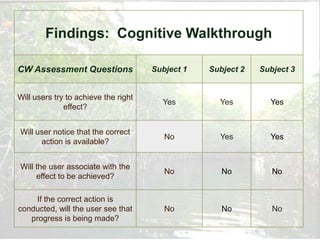
Findings: Cognitive Walkthrough

CW Assessment Questions               Subject 1   Subject 2   Subject 3


Will users try to achieve the right
                                        Yes         Yes         Yes
              effect?


Will user notice that the correct
                                         No         Yes         Yes
      action is available?


Will the user associate with the
                                         No          No          No
     effect to be achieved?

    If the correct action is
conducted, will the user see that        No          No          No
   progress is being made?
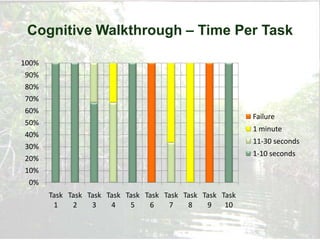
Cognitive Walkthrough – Time Per Task

100%
 90%
 80%
 70%
 60%
                                                           Failure
 50%
                                                           1 minute
 40%
                                                           11-30 seconds
 30%
                                                           1-10 seconds
 20%
 10%
  0%
       Task Task Task Task Task Task Task Task Task Task
        1    2    3    4    5    6    7    8    9    10
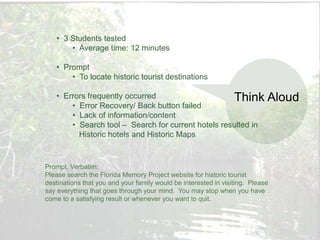
• 3 Students tested
       • Average time: 12 minutes

   • Prompt
       • To locate historic tourist destinations

   • Errors frequently occurred                     Think                   Aloud
       • Error Recovery/ Back button failed
       • Lack of information/content
       • Search tool – Search for current hotels resulted in
         Historic hotels and Historic Maps


Prompt, Verbatim:
Please search the Florida Memory Project website for historic tourist
destinations that you and your family would be interested in visiting. Please
say everything that goes through your mind. You may stop when you have
come to a satisfying result or whenever you want to quit.
Interview
New, completely overhauled Florida Memory Project site is
scheduled to be launched on July 1st.


Direction for overhauling the site is based on the recommendations
of Dr. Charles McClure, Nicole Alemanne, and Dr. Paul Marty.

Discussed many issues…
Some Questions Posed
I understand that you have more than 550,000 documents that are difficult to access due to their
storage in 9 different databases – have you had a chance to address this?

      Yes. We hired an IT expert. He has integrated all databases into 1 platform, Omeka – as
      recommended. All records have been migrated.

How are you handing backup?

      The Raid or Buffalo system is under consideration now.

How do you envision your target audience—your main users?

      Years of data collected through log analysis, user requests—email, phone, records.
      They are: historians, genealogists, teachers, archivists, publishers, students.

The Homepage points out that ―selected‖ materials are placed online. What criteria do you use?

      The materials most requested by these groups – our new main navigation bar targets
the   6 main collections. In order – Photography, Video, Audio, Collections, Exhibits, Class.
      We also have a new search feature that works across collections.

What is your greatest challenge right now as you reconfigure the system and site?

      Borne digital materials are difficult. We need to establish guidelines and standards.
Improved!
Core Issues:
   •Data has been migrated to a unified database – Omeka

   • Backup data – Raid or Buffalo systems

   • Collections can be cross searched

   • Option to select for photographs in color or B&W

   • Metadata has been standardized using MARC AMC

   • Subject access through LOC subject headings & folksonomy

   • Strategies for the preservation of borne digital

   • Quiet, Minimalist Interface Design
Recommendations
To make site more Florida Friendly include:
•Spanish Language Option

• Create Personal Archive and Storybook

• Embedded Video Tutorial for Using Archives and Site

• Hurricane Digital Memory Bank

• Online Archive Shop
References
United States. State Library and Archives of Florida. Florida Memory Project.
  Retrieved from http://www.floridamemory.org

Fuhr, N., Giannis, T. Aalberg, T. et al. (2007). Evaluation of digital libraries.
International Journal of Digital Libraries, 8, 21-38.

Hoppmann, T. K. (2007). Examining the ―point of frustration‖: The think aloud
  method applied to online search tasks. Quality and Quantity, 43, 211-224.

Marty, P., Alemanne, N., & McClure, C. (2010). Florida Memory Project—long
  range plan: Final report. Information Institute, Florida State University. FL:
  Tallahassee.

United States. U.S. Department of Health and Human Services. Usability: Your
   guide for developing usable and useful websites. The Homepage. Retrieved from
http:www.usability.gov

Zaphiris, P. Kurniawan, S. (2007). Human computer interaction research in web design and
evaluation. London: Idea Group.

Florida Memory Project and Usability

  • 1.
    Florida Memory Project Florida’s Digital Archive Present Measures of Usability Future Site and Recommendations Vanja Anderson and Florence Paisey
  • 2.
    The Golden Rule AWeb Site Should Never Get in the Way of the User
  • 3.
    What is TheFlorida Memory Project? The Florida Memory Project is Florida’s Online Digital Archive http://www.floridamemory.com/
  • 4.
    Myth Build It andThey Will Come – Not Going to Happen!
  • 5.
    What is Usability? “Usabilityis the “basic ability of users to achieve their goals within a system. Usability should account for affective aspects of interaction.” Blandford& Buchanan, 2002
  • 6.
    Usability and theFlorida Memory Project Marty, Alemanne& McClure (2010) identified a range of issues that affect the ability of the user to achieve their goals. As recommended, the development team at the Florida Memory Project have overhauled the site. However, the development team would like to conduct several usability tests on the older site. The purpose is to identify the targeted user reactions to the old site with a view to ensuring the same usability problems are not repeated.
  • 7.
    Did you Know? A Homepage is Viewed More Than Any Other Page on a Website !
  • 8.
  • 9.
    Homepages are RealEstate •Home Page Architecture is your Identity •Central Issues: • A Logo for Identity • A Liquid Page • A Clearly Visible Search Feature • Multiple Navigation Menus • Harmonious Color – Websafe • Effective Use of All Space – Less is More!
  • 10.
    The Florida MemoryProject Homepage
  • 11.
    Site Identity? The Florida Memory Project Homepage Sponsor? Good Concise Core Menu! This is Valuable Space What does empty do for you? Does anything Page Layout and indicate the Content of 575,000 Information Architecture? Documents …Imagine… other Possibilities…
  • 12.
    Screen Real Estate Unused Content of Interest Web 2.0 Navigation Advocacy Site Identity Advertisement External Linkage Information Architecture Represented in Percentage…
  • 13.
  • 14.
    Usability Methods Four Approaches •Heuristics •Think Aloud • Cognitive Walkthrough • Interview
  • 15.
    Definitions of EvaluationMeasures •Heuristics •Evaluation of an interface by IT experts. Evaluators measure the usability, efficiency, and effectiveness of the interface based on 10 measures. • Think Aloud •Participants are asked to share their thoughts while completing specific goals. • Cognitive Walkthrough •A set of appropriate or characteristic tasks to be completed. Evaluators walk through specific tasks, noting problems. • Interview •Interviewsprovide details that users have experienced on the site.
  • 16.
    Usability Evaluation Measures Method Methods Type Description Pros Cons Quick No Ten Analysis of Overview feedback Heuristic Performance User Ease of the on fixes Standards system Problem Conducted Cognitive Investigatio Ease of Task detection at any Walkthrough n Achievement not stage reliable Evaluators Sometime Express Few s hard to Think Aloud Testing express Experience Subjects problems Infrastructure, Detailed Often Design, information difficult to Interview Inquiry Metadata on topic sync
  • 17.
    •Visibility • Match Betweenthe System and the Real World • User Control and Freedom • Consistency and Standards Heuristics • Error Prevention • Recognition rather than Recall • Flexibility and Efficiency of Use • Aesthetic and Minimalist Design • Help Users Recognize and Recover from Errors • Help and Documentation
  • 18.
    Heuristic Findings 120% 100% 80% 60% 40% Nothing Available Failure 20% Success Rate 0%
  • 19.
    Four Basic QuestionsFor Each Task 1. Will the users try to complete the task? 2. Will users notice the correct action? 3. If users find the correct action, is it clear? Cognitive 4 After the user takes an action, will they Walkthrough understand any feedback? Purpose: A cognitive walkthrough identifies salient problems in the interface and navigation – the learnability of the interface, its ease in navigation, and its functionality – Does it do what it says it will do?
  • 20.
    Findings: Cognitive Walkthrough CWAssessment Questions Subject 1 Subject 2 Subject 3 Will users try to achieve the right Yes Yes Yes effect? Will user notice that the correct No Yes Yes action is available? Will the user associate with the No No No effect to be achieved? If the correct action is conducted, will the user see that No No No progress is being made?
  • 21.
    Cognitive Walkthrough –Time Per Task 100% 90% 80% 70% 60% Failure 50% 1 minute 40% 11-30 seconds 30% 1-10 seconds 20% 10% 0% Task Task Task Task Task Task Task Task Task Task 1 2 3 4 5 6 7 8 9 10
  • 22.
    • 3 Studentstested • Average time: 12 minutes • Prompt • To locate historic tourist destinations • Errors frequently occurred Think Aloud • Error Recovery/ Back button failed • Lack of information/content • Search tool – Search for current hotels resulted in Historic hotels and Historic Maps Prompt, Verbatim: Please search the Florida Memory Project website for historic tourist destinations that you and your family would be interested in visiting. Please say everything that goes through your mind. You may stop when you have come to a satisfying result or whenever you want to quit.
  • 23.
    Interview New, completely overhauledFlorida Memory Project site is scheduled to be launched on July 1st. Direction for overhauling the site is based on the recommendations of Dr. Charles McClure, Nicole Alemanne, and Dr. Paul Marty. Discussed many issues…
  • 24.
    Some Questions Posed Iunderstand that you have more than 550,000 documents that are difficult to access due to their storage in 9 different databases – have you had a chance to address this? Yes. We hired an IT expert. He has integrated all databases into 1 platform, Omeka – as recommended. All records have been migrated. How are you handing backup? The Raid or Buffalo system is under consideration now. How do you envision your target audience—your main users? Years of data collected through log analysis, user requests—email, phone, records. They are: historians, genealogists, teachers, archivists, publishers, students. The Homepage points out that ―selected‖ materials are placed online. What criteria do you use? The materials most requested by these groups – our new main navigation bar targets the 6 main collections. In order – Photography, Video, Audio, Collections, Exhibits, Class. We also have a new search feature that works across collections. What is your greatest challenge right now as you reconfigure the system and site? Borne digital materials are difficult. We need to establish guidelines and standards.
  • 25.
    Improved! Core Issues: •Data has been migrated to a unified database – Omeka • Backup data – Raid or Buffalo systems • Collections can be cross searched • Option to select for photographs in color or B&W • Metadata has been standardized using MARC AMC • Subject access through LOC subject headings & folksonomy • Strategies for the preservation of borne digital • Quiet, Minimalist Interface Design
  • 26.
    Recommendations To make sitemore Florida Friendly include: •Spanish Language Option • Create Personal Archive and Storybook • Embedded Video Tutorial for Using Archives and Site • Hurricane Digital Memory Bank • Online Archive Shop
  • 27.
    References United States. StateLibrary and Archives of Florida. Florida Memory Project. Retrieved from http://www.floridamemory.org Fuhr, N., Giannis, T. Aalberg, T. et al. (2007). Evaluation of digital libraries. International Journal of Digital Libraries, 8, 21-38. Hoppmann, T. K. (2007). Examining the ―point of frustration‖: The think aloud method applied to online search tasks. Quality and Quantity, 43, 211-224. Marty, P., Alemanne, N., & McClure, C. (2010). Florida Memory Project—long range plan: Final report. Information Institute, Florida State University. FL: Tallahassee. United States. U.S. Department of Health and Human Services. Usability: Your guide for developing usable and useful websites. The Homepage. Retrieved from http:www.usability.gov Zaphiris, P. Kurniawan, S. (2007). Human computer interaction research in web design and evaluation. London: Idea Group.

Editor's Notes

  • #4 The mission is to provide access to documents of Florida’s history for “historians, genealogists, teachers, and students from across the state and beyond.” It provides support for K-12 Education as mandated by the “Sunshine State Standards” …Sunshine State Standards identify the core knowledge base for K-12 education.
  • #7 The Archives supervisor explicitly asked me if I would let her see the results of what we found.
  • #15 Heuristics –Evaluation of an interface by one or more human experts. Evaluators measure the usability, efficiency, and effectiveness of the interface based on 10 usability heuristics originally defined by Nielson.Think Aloud –Cognitive WalkthroughInterview