Intel® Teach Program Essentials Course
Intel® Teach Program Essentials Course The Intel ®  Teach Program is a worldwide initiative to provide teachers with the skills to effectively integrate technology into existing curriculum to improve student learning.  The goal of the Intel ®  Teach Essentials Course is to help classroom teachers develop student-centered learning through technology integration and project-based approaches.
Outcome Return to School with a Product    When teachers return to the classroom, the technology-rich  Unit Portfolio they created  during the course will be  ready for use  to raise the level of excellence in the classroom and meet the important learning objectives and 21 st  century skills.
Expectations Through the course, teacher receive  32  hours classroom training (incorporates hands-on use of the Internet, blog, wiki and multimedia software) and  16 hours of  planning activities  supplement the training.   learn how, when, and where to incorporate technology tools and resources into their current curriculum with the goal of gearing students for the 21 st  century. learn new ways to create ongoing assessment tools and align unit plan with curriculum guidelines/specifications.
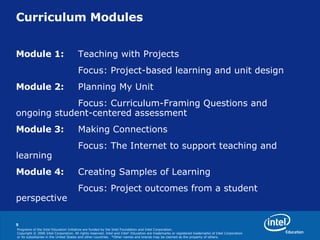
Curriculum Modules Module 1:   Teaching with Projects Focus: Project-based learning and unit design Module 2:   Planning My Unit Focus: Curriculum-Framing Questions and  ongoing student-centered assessment Module 3:   Making Connections Focus: The Internet to support teaching and  learning Module 4:   Creating Samples of Learning Focus: Project outcomes from a student  perspective
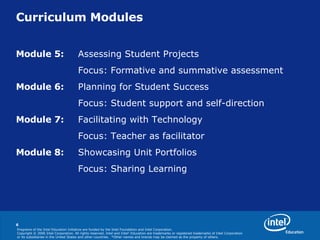
Curriculum Modules Module 5:   Assessing Student Projects Focus: Formative and summative assessment Module 6:   Planning for Student Success Focus:  Student support and self-direction Module 7:   Facilitating with Technology Focus: Teacher as facilitator Module 8:   Showcasing Unit Portfolios Focus: Sharing Learning
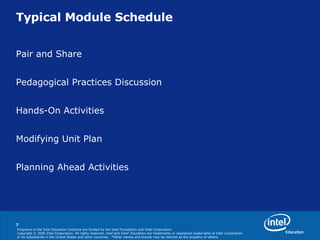
Typical Module Schedule Pair and Share Pedagogical Practices Discussion Hands-On Activities  Modifying Unit Plan Planning Ahead Activities
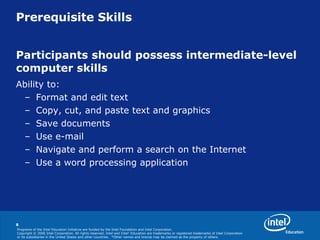
Prerequisite Skills Participants should possess intermediate-level  computer skills  Ability to: Format and edit text Copy, cut, and paste text and graphics Save documents Use e-mail Navigate and perform a search on the Internet Use a word processing application
Looking Ahead http://www.intel.com/education/my   http://www.anyconnection.com/intelteach
Contact Yap Yee Khiong 0126390536 [email_address]
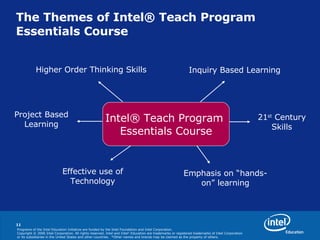
The Themes of Intel® Teach Program Essentials Course  Intel® Teach Program  Essentials Course Higher Order Thinking Skills Project Based Learning 21 st  Century Skills Inquiry Based Learning Effective use of Technology Emphasis on “hands-on” learning

Intel Teach Program V10

  • 1.
    Intel® Teach ProgramEssentials Course
  • 2.
    Intel® Teach ProgramEssentials Course The Intel ® Teach Program is a worldwide initiative to provide teachers with the skills to effectively integrate technology into existing curriculum to improve student learning. The goal of the Intel ® Teach Essentials Course is to help classroom teachers develop student-centered learning through technology integration and project-based approaches.
  • 3.
    Outcome Return toSchool with a Product    When teachers return to the classroom, the technology-rich Unit Portfolio they created during the course will be ready for use to raise the level of excellence in the classroom and meet the important learning objectives and 21 st century skills.
  • 4.
    Expectations Through thecourse, teacher receive 32 hours classroom training (incorporates hands-on use of the Internet, blog, wiki and multimedia software) and 16 hours of planning activities supplement the training. learn how, when, and where to incorporate technology tools and resources into their current curriculum with the goal of gearing students for the 21 st century. learn new ways to create ongoing assessment tools and align unit plan with curriculum guidelines/specifications.
  • 5.
    Curriculum Modules Module1: Teaching with Projects Focus: Project-based learning and unit design Module 2: Planning My Unit Focus: Curriculum-Framing Questions and ongoing student-centered assessment Module 3: Making Connections Focus: The Internet to support teaching and learning Module 4: Creating Samples of Learning Focus: Project outcomes from a student perspective
  • 6.
    Curriculum Modules Module5: Assessing Student Projects Focus: Formative and summative assessment Module 6: Planning for Student Success Focus: Student support and self-direction Module 7: Facilitating with Technology Focus: Teacher as facilitator Module 8: Showcasing Unit Portfolios Focus: Sharing Learning
  • 7.
    Typical Module SchedulePair and Share Pedagogical Practices Discussion Hands-On Activities Modifying Unit Plan Planning Ahead Activities
  • 8.
    Prerequisite Skills Participantsshould possess intermediate-level computer skills Ability to: Format and edit text Copy, cut, and paste text and graphics Save documents Use e-mail Navigate and perform a search on the Internet Use a word processing application
  • 9.
    Looking Ahead http://www.intel.com/education/my http://www.anyconnection.com/intelteach
  • 10.
    Contact Yap YeeKhiong 0126390536 [email_address]
  • 11.
    The Themes ofIntel® Teach Program Essentials Course Intel® Teach Program Essentials Course Higher Order Thinking Skills Project Based Learning 21 st Century Skills Inquiry Based Learning Effective use of Technology Emphasis on “hands-on” learning