Partner and Reseller Enablement
Cloud Journey webinar series
Post Sales Track
Using the Partner
Community
Gil Shaham Sam Seto
Post-Sales Enablement Partner Community Programs
gshaham@salesforce.com sseto@salesforce.com
November 1st 2016
Today’s Agenda
•Who we are?
•The Cloud Journey webinar series
•"How to find your way in the PC" practical insight
•The per Role Enablement
•Questions and wrap-up
​
Who Are We?
Emerging Reseller Enablement
Team
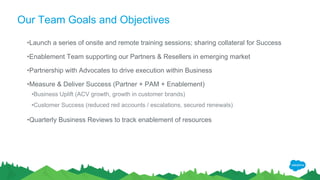
Our Team Goals and Objectives
•Launch a series of onsite and remote training sessions; sharing collateral for Success
•Enablement Team supporting our Partners & Resellers in emerging market
•Partnership with Advocates to drive execution within Business
•Measure & Deliver Success (Partner + PAM + Enablement)
•Business Uplift (ACV growth, growth in customer brands)
•Customer Success (reduced red accounts / escalations, secured renewals)
•Quarterly Business Reviews to track enablement of resources
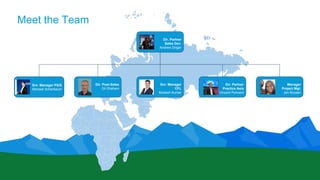
Meet the Team
Snr. Manager PS/S
Michael Scherbaum
Dir. Post-Sales
Gil Shaham
Snr. Manager
CFL
Mukesh Kumar
Dir. Partner
Practice Asia
Vincent Poncent
Manager
Project Mgt.
Jen Boysen
Dir. Partner
Sales Dev.
Andrew Zinger
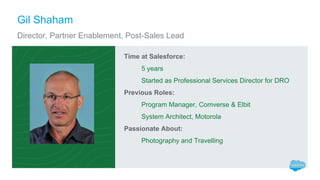
Time at Salesforce:
5 years
Started as Professional Services Director for DRO
Previous Roles:
Program Manager, Comverse & Elbit
System Architect, Motorola
Passionate About:
Photography and Travelling
Gil Shaham
Director, Partner Enablement, Post-Sales Lead
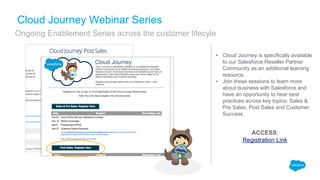
▪ Cloud Journey is specifically available
to our Salesforce Reseller Partner
Community as an additional learning
resource.
▪ Join these sessions to learn more
about business with Salesforce and
have an opportunity to hear best
practices across key topics: Sales &
Pre Sales, Post Sales and Customer
Success.
Cloud Journey Webinar Series
Ongoing Enablement Series across the customer lifecyle
ACCESS:
Registration Link
"How to Find Your Way in
The Partner Community"
Sam Seto
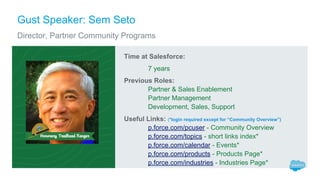
Gust Speaker: Sem Seto
Director, Partner Community Programs
Time at Salesforce:
7 years
Previous Roles:
Partner & Sales Enablement
Partner Management
Development, Sales, Support
Useful Links: (*login required except for “Community Overview”)
p.force.com/pcuser - Community Overview
p.force.com/topics - short links index*
p.force.com/calendar - Events*
p.force.com/products - Products Page*
p.force.com/industries - Industries Page*
"How to Find Your Way in The Partner Community"
Live Tour
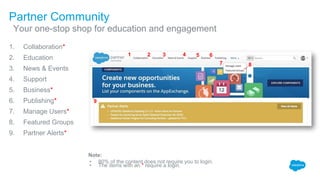
Partner Community
​Your one-stop shop for education and engagement
1. Collaboration*
2. Education
3. News & Events
4. Support
5. Business*
6. Publishing*
7. Manage Users*
8. Featured Groups
9. Partner Alerts*
Note:
• 80% of the content does not require you to login.
• The items with an * require a login.
1 2 3 4 5 6
7
9
8
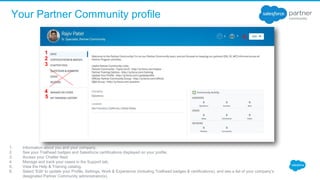
Your Partner Community profile
1. Information about you and your company.
2. See your Trailhead badges and Salesforce certifications displayed on your profile.
3. Access your Chatter feed.
4. Manage and track your cases in the Support tab.
5. View the Help & Training catalog.
6. Select ‘Edit’ to update your Profile, Settings, Work & Experience (including Trailhead badges & certifications), and see a list of your company’s
designated Partner Community administrator(s).
1
2
3
4
5
6.
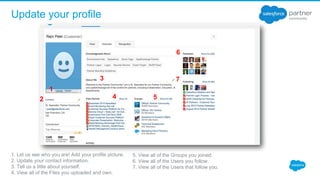
Update your profile
1. Let us see who you are! Add your profile picture.
2. Update your contact information.
3. Tell us a little about yourself.
4. View all of the Files you uploaded and own.
1
2
3
4
6
7
5
5. View all of the Groups you joined.
6. View all of the Users you follow.
7. View all of the Users that follow you.
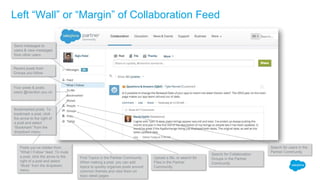
Left “Wall” or “Margin” of Collaboration Feed
Send messages to
users & view messages
from other users
Recent posts from
Groups you follow
Your posts & posts
users @mention you on
Posts you’ve hidden from
“What I Follow” feed. To mute
a post, click the arrow to the
right of a post and select
“Mute” from the dropdown
menu
Search for users in the
Partner Community
Search for Collaboration
Groups in the Partner
Community
Upload a file, or search for
Files in the Partner
Community
Find Topics in the Partner Community.
When making a post, you can add
topics to quickly organize posts around
common themes and view them on
topic detail pages
Bookmarked posts. To
bookmark a post, click
the arrow to the right of
a post and select
“Bookmark” from the
dropdown menu
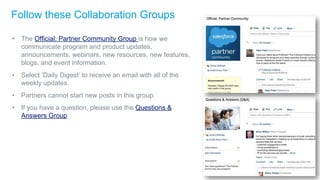
Follow these Collaboration Groups
• The Official: Partner Community Group is how we
communicate program and product updates,
announcements, webinars, new resources, new features,
blogs, and event information.
• Select ‘Daily Digest’ to receive an email with all of the
weekly updates.
• Partners cannot start new posts in this group.
• If you have a question, please use the Questions &
Answers Group.
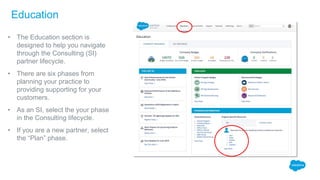
Education
• The Education section is
designed to help you navigate
through the Consulting (SI)
partner lifecycle.
• There are six phases from
planning your practice to
providing supporting for your
customers.
• As an SI, select the your phase
in the Consulting lifecycle.
• If you are a new partner, select
the “Plan” phase.
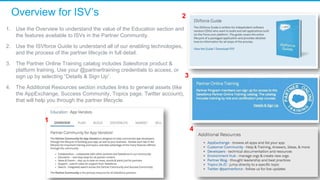
Overview for ISV’s
1. Use the Overview to understand the value of the Education section and
the features available to ISVs in the Partner Community.
2. Use the ISVforce Guide to understand all of our enabling technologies,
and the process of the partner lifecycle in full detail.
3. The Partner Online Training catalog includes Salesforce product &
platform training. Use your @partnertraining credentials to access, or
sign up by selecting “Details & Sign Up”.
4. The Additional Resources section includes links to general assets (like
the AppExchange, Success Community, Topics page, Twitter account),
that will help you through the partner lifecycle.
1
2
3
4
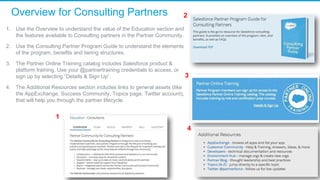
Overview for Consulting Partners
1. Use the Overview to understand the value of the Education section and
the features available to Consulting partners in the Partner Community.
2. Use the Consulting Partner Program Guide to understand the elements
of the program, benefits and tiering structures.
3. The Partner Online Training catalog includes Salesforce product &
platform training. Use your @partnertraining credentials to access, or
sign up by selecting “Details & Sign Up”.
4. The Additional Resources section includes links to general assets (like
the AppExchange, Success Community, Topics page, Twitter account),
that will help you through the partner lifecycle.
1
2
3
4
"Dialogue questions"
● "What daily routine would you recommend me as a partner employee to have in the Partner
Community"
● "I need to get a demo/test org - how do I do this”
● "If I am going to implement CTI (Computer Telephony Integration) in my project and I want to
get technical info and best practices, how would you look for that in the Partner
Community?"
● "I have a problem in a test with Selenium IDE Extension for Firefox in Console - how can I
get some help in the Partner Community?”
Post-Sales learning Journey
Post Sale Chatter Group
Live Tour
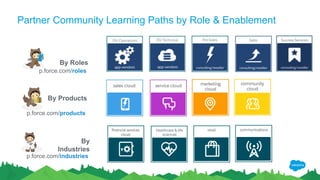
Partner Community Learning Paths by Role & Enablement
By Products
By
Industries
By Roles
p.force.com/roles
p.force.com/products
p.force.com/industries
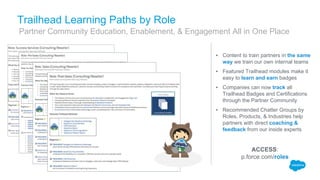
Trailhead Learning Paths by Role
▪ Content to train partners in the same
way we train our own internal teams
▪ Featured Trailhead modules make it
easy to learn and earn badges
▪ Companies can now track all
Trailhead Badges and Certifications
through the Partner Community
▪ Recommended Chatter Groups by
Roles, Products, & Industries help
partners with direct coaching &
feedback from our inside experts
ACCESS:
p.force.com/roles
​Partner Community Education, Enablement, & Engagement All in One Place
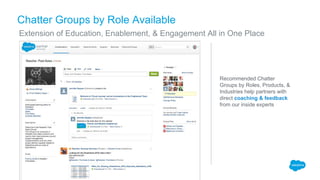
Chatter Groups by Role Available
​Extension of Education, Enablement, & Engagement All in One Place
Recommended Chatter
Groups by Roles, Products, &
Industries help partners with
direct coaching & feedback
from our inside experts
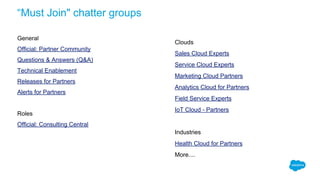
“Must Join" chatter groups
General
Official: Partner Community
Questions & Answers (Q&A)
Technical Enablement
Releases for Partners
Alerts for Partners
Roles
Official: Consulting Central
Clouds
Sales Cloud Experts
Service Cloud Experts
Marketing Cloud Partners
Analytics Cloud for Partners
Field Service Experts
IoT Cloud - Partners
Industries
Health Cloud for Partners
More....
Q&A
Thank Y u

Using the partner community

  • 1.
    Partner and ResellerEnablement Cloud Journey webinar series Post Sales Track Using the Partner Community Gil Shaham Sam Seto Post-Sales Enablement Partner Community Programs gshaham@salesforce.com sseto@salesforce.com November 1st 2016
  • 2.
    Today’s Agenda •Who weare? •The Cloud Journey webinar series •"How to find your way in the PC" practical insight •The per Role Enablement •Questions and wrap-up ​
  • 3.
    Who Are We? EmergingReseller Enablement Team
  • 4.
    Our Team Goalsand Objectives •Launch a series of onsite and remote training sessions; sharing collateral for Success •Enablement Team supporting our Partners & Resellers in emerging market •Partnership with Advocates to drive execution within Business •Measure & Deliver Success (Partner + PAM + Enablement) •Business Uplift (ACV growth, growth in customer brands) •Customer Success (reduced red accounts / escalations, secured renewals) •Quarterly Business Reviews to track enablement of resources
  • 5.
    Meet the Team Snr.Manager PS/S Michael Scherbaum Dir. Post-Sales Gil Shaham Snr. Manager CFL Mukesh Kumar Dir. Partner Practice Asia Vincent Poncent Manager Project Mgt. Jen Boysen Dir. Partner Sales Dev. Andrew Zinger
  • 6.
    Time at Salesforce: 5years Started as Professional Services Director for DRO Previous Roles: Program Manager, Comverse & Elbit System Architect, Motorola Passionate About: Photography and Travelling Gil Shaham Director, Partner Enablement, Post-Sales Lead
  • 7.
    ▪ Cloud Journeyis specifically available to our Salesforce Reseller Partner Community as an additional learning resource. ▪ Join these sessions to learn more about business with Salesforce and have an opportunity to hear best practices across key topics: Sales & Pre Sales, Post Sales and Customer Success. Cloud Journey Webinar Series Ongoing Enablement Series across the customer lifecyle ACCESS: Registration Link
  • 8.
    "How to FindYour Way in The Partner Community" Sam Seto
  • 9.
    Gust Speaker: SemSeto Director, Partner Community Programs Time at Salesforce: 7 years Previous Roles: Partner & Sales Enablement Partner Management Development, Sales, Support Useful Links: (*login required except for “Community Overview”) p.force.com/pcuser - Community Overview p.force.com/topics - short links index* p.force.com/calendar - Events* p.force.com/products - Products Page* p.force.com/industries - Industries Page*
  • 10.
    "How to FindYour Way in The Partner Community" Live Tour
  • 11.
    Partner Community ​Your one-stopshop for education and engagement 1. Collaboration* 2. Education 3. News & Events 4. Support 5. Business* 6. Publishing* 7. Manage Users* 8. Featured Groups 9. Partner Alerts* Note: • 80% of the content does not require you to login. • The items with an * require a login. 1 2 3 4 5 6 7 9 8
  • 12.
    Your Partner Communityprofile 1. Information about you and your company. 2. See your Trailhead badges and Salesforce certifications displayed on your profile. 3. Access your Chatter feed. 4. Manage and track your cases in the Support tab. 5. View the Help & Training catalog. 6. Select ‘Edit’ to update your Profile, Settings, Work & Experience (including Trailhead badges & certifications), and see a list of your company’s designated Partner Community administrator(s). 1 2 3 4 5 6.
  • 13.
    Update your profile 1.Let us see who you are! Add your profile picture. 2. Update your contact information. 3. Tell us a little about yourself. 4. View all of the Files you uploaded and own. 1 2 3 4 6 7 5 5. View all of the Groups you joined. 6. View all of the Users you follow. 7. View all of the Users that follow you.
  • 14.
    Left “Wall” or“Margin” of Collaboration Feed Send messages to users & view messages from other users Recent posts from Groups you follow Your posts & posts users @mention you on Posts you’ve hidden from “What I Follow” feed. To mute a post, click the arrow to the right of a post and select “Mute” from the dropdown menu Search for users in the Partner Community Search for Collaboration Groups in the Partner Community Upload a file, or search for Files in the Partner Community Find Topics in the Partner Community. When making a post, you can add topics to quickly organize posts around common themes and view them on topic detail pages Bookmarked posts. To bookmark a post, click the arrow to the right of a post and select “Bookmark” from the dropdown menu
  • 15.
    Follow these CollaborationGroups • The Official: Partner Community Group is how we communicate program and product updates, announcements, webinars, new resources, new features, blogs, and event information. • Select ‘Daily Digest’ to receive an email with all of the weekly updates. • Partners cannot start new posts in this group. • If you have a question, please use the Questions & Answers Group.
  • 16.
    Education • The Educationsection is designed to help you navigate through the Consulting (SI) partner lifecycle. • There are six phases from planning your practice to providing supporting for your customers. • As an SI, select the your phase in the Consulting lifecycle. • If you are a new partner, select the “Plan” phase.
  • 17.
    Overview for ISV’s 1.Use the Overview to understand the value of the Education section and the features available to ISVs in the Partner Community. 2. Use the ISVforce Guide to understand all of our enabling technologies, and the process of the partner lifecycle in full detail. 3. The Partner Online Training catalog includes Salesforce product & platform training. Use your @partnertraining credentials to access, or sign up by selecting “Details & Sign Up”. 4. The Additional Resources section includes links to general assets (like the AppExchange, Success Community, Topics page, Twitter account), that will help you through the partner lifecycle. 1 2 3 4
  • 18.
    Overview for ConsultingPartners 1. Use the Overview to understand the value of the Education section and the features available to Consulting partners in the Partner Community. 2. Use the Consulting Partner Program Guide to understand the elements of the program, benefits and tiering structures. 3. The Partner Online Training catalog includes Salesforce product & platform training. Use your @partnertraining credentials to access, or sign up by selecting “Details & Sign Up”. 4. The Additional Resources section includes links to general assets (like the AppExchange, Success Community, Topics page, Twitter account), that will help you through the partner lifecycle. 1 2 3 4
  • 19.
    "Dialogue questions" ● "Whatdaily routine would you recommend me as a partner employee to have in the Partner Community" ● "I need to get a demo/test org - how do I do this” ● "If I am going to implement CTI (Computer Telephony Integration) in my project and I want to get technical info and best practices, how would you look for that in the Partner Community?" ● "I have a problem in a test with Selenium IDE Extension for Firefox in Console - how can I get some help in the Partner Community?”
  • 20.
    Post-Sales learning Journey PostSale Chatter Group Live Tour
  • 21.
    Partner Community LearningPaths by Role & Enablement By Products By Industries By Roles p.force.com/roles p.force.com/products p.force.com/industries
  • 22.
    Trailhead Learning Pathsby Role ▪ Content to train partners in the same way we train our own internal teams ▪ Featured Trailhead modules make it easy to learn and earn badges ▪ Companies can now track all Trailhead Badges and Certifications through the Partner Community ▪ Recommended Chatter Groups by Roles, Products, & Industries help partners with direct coaching & feedback from our inside experts ACCESS: p.force.com/roles ​Partner Community Education, Enablement, & Engagement All in One Place
  • 23.
    Chatter Groups byRole Available ​Extension of Education, Enablement, & Engagement All in One Place Recommended Chatter Groups by Roles, Products, & Industries help partners with direct coaching & feedback from our inside experts
  • 24.
    “Must Join" chattergroups General Official: Partner Community Questions & Answers (Q&A) Technical Enablement Releases for Partners Alerts for Partners Roles Official: Consulting Central Clouds Sales Cloud Experts Service Cloud Experts Marketing Cloud Partners Analytics Cloud for Partners Field Service Experts IoT Cloud - Partners Industries Health Cloud for Partners More....
  • 25.
  • 26.