Create Your Own Portfolio Site
on Salesforce Experience Cloud!
@websmithc, websmithc@gmail.com
Christine Smith, Salesforce Consultant at Accenture
https://developer.salesforce.com/signup
Use Your Developer Org
Agenda
• What is a portfolio ?
• Sample site
• Building your own portfolio site
• Trailhead module
• Additional pages
• Navigation
• Content and Search Engine Optimization (SEO) tips
• URL shortener: https://sforce.co
Create Your Own Portfolio Site on Salesforce Experience Cloud!
“Career portfolios help document education, work samples and skills.
People use career portfolios to apply for jobs, apply to college or training programs. They are
more in-depth than a resume, which is used to summarize the above in one or two pages. Career
portfolios serve as proof of one's skills, abilities, and potential in the future.
Career portfolios help with a job or acceptance into higher education institutes. A career portfolio
should be personal and contain critical information. Items that should be included include (but are
not limited to) personal information, evaluations, sample work, a business portrait, and
awards and acknowledgments.”
https://en.wikipedia.org/wiki/Career_portfolio
What is a Portfolio?
URL redirects to the actual URL of
my Experience Cloud home page
at
• https://cloudsmith-developer-
edition.na112.force.com/portfolio/s/
My Portfolio Site - https://sforce.co/3szmJVn
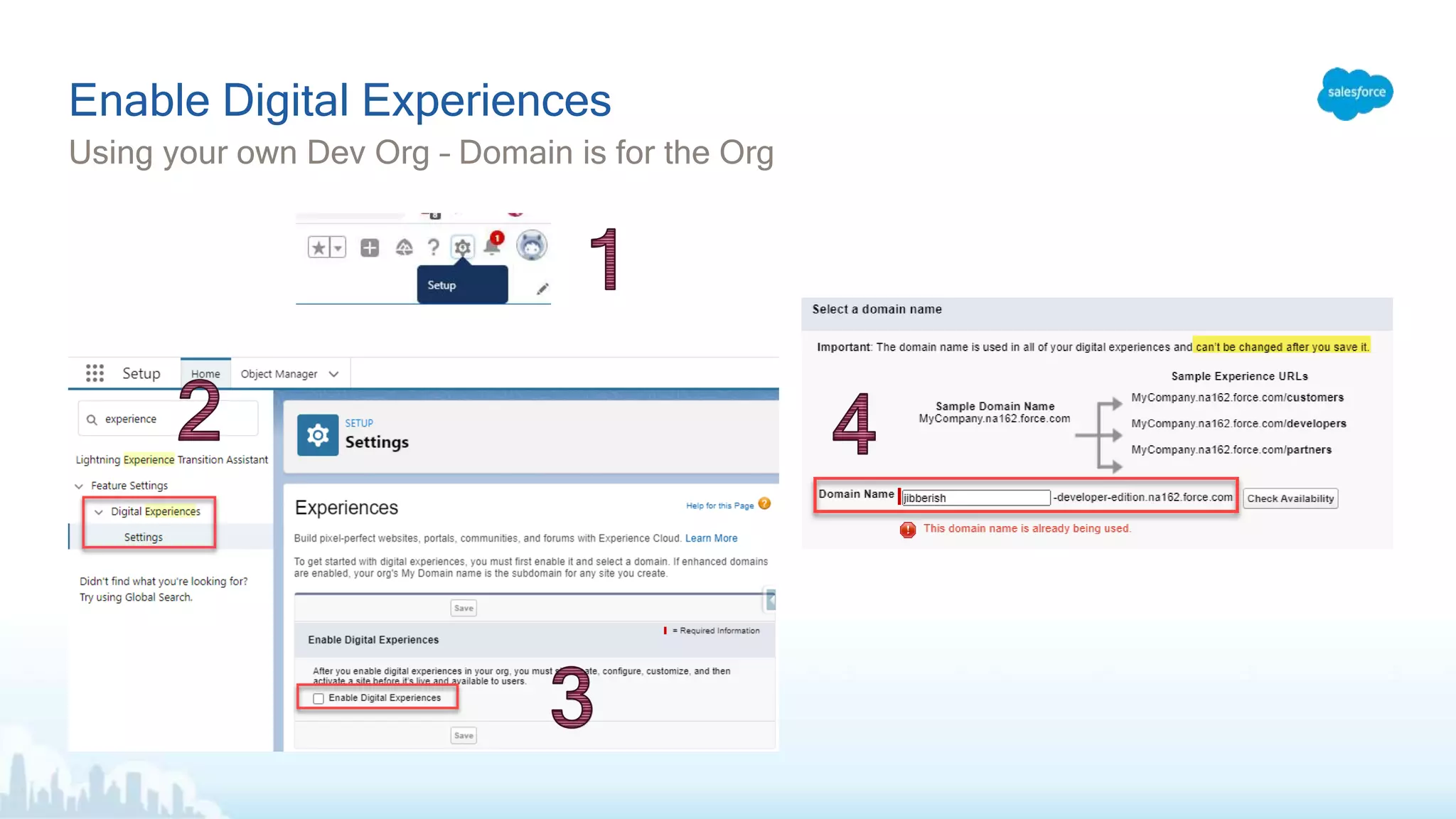
Using your own Dev Org – Domain is for the Org
Enable Digital Experiences
Click ‘New’ to create the site…
Success!
Choose the template, give the site a name and URL…
Eventually…..
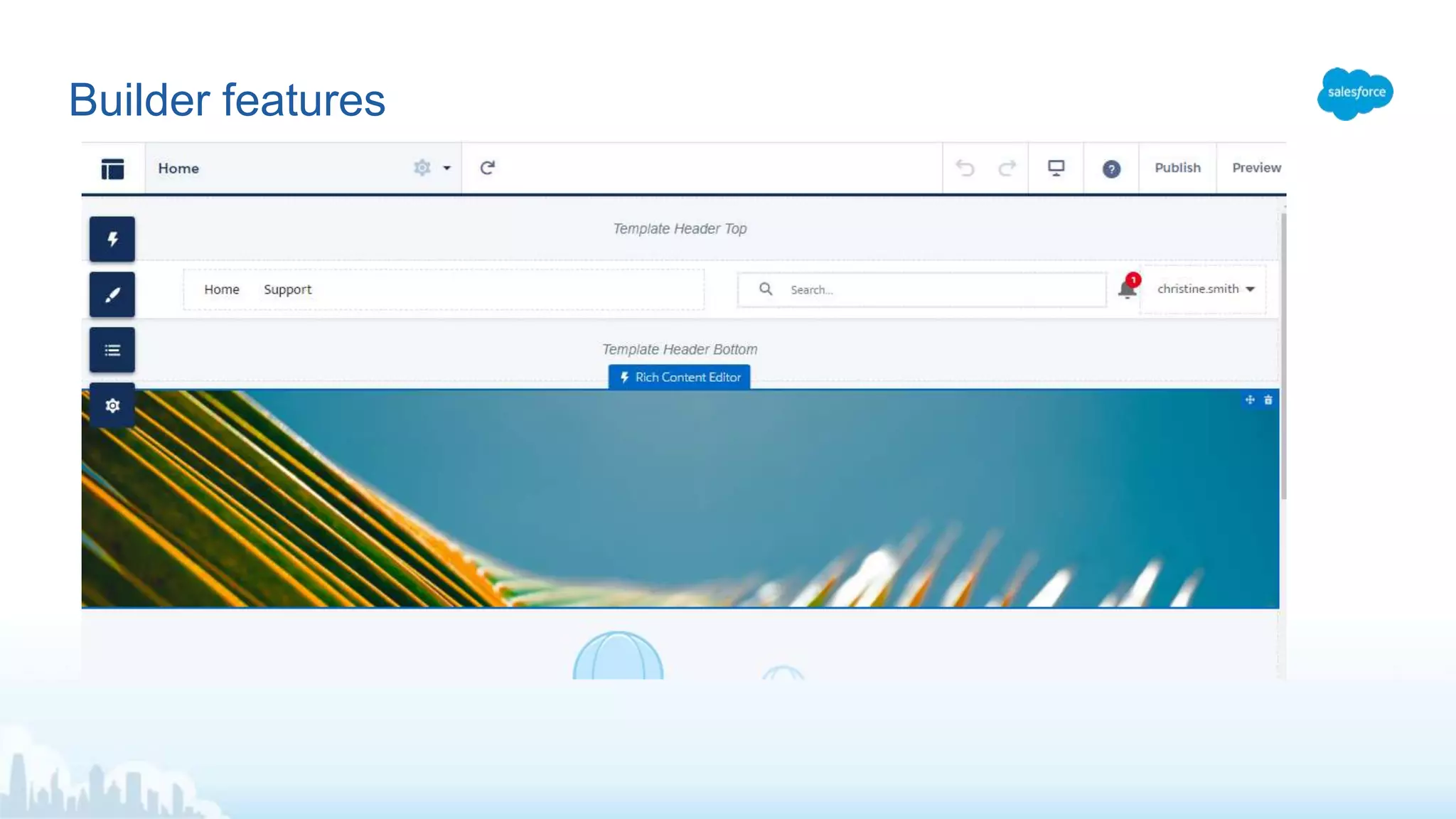
Builder features
Add background image, headshot, headline
Builder – Edit Content
Tip: Don’t make the image so tall that the user has
to scroll to see content.
Drag and drop Components on the page, like Rich Content Editor
Adding Content
Headings are the outline of the page (for HTML/SEO)
Content structure of a web page
Suggestions: About Me, Education, Experience, Sample Work
New Pages
New Page - Layout
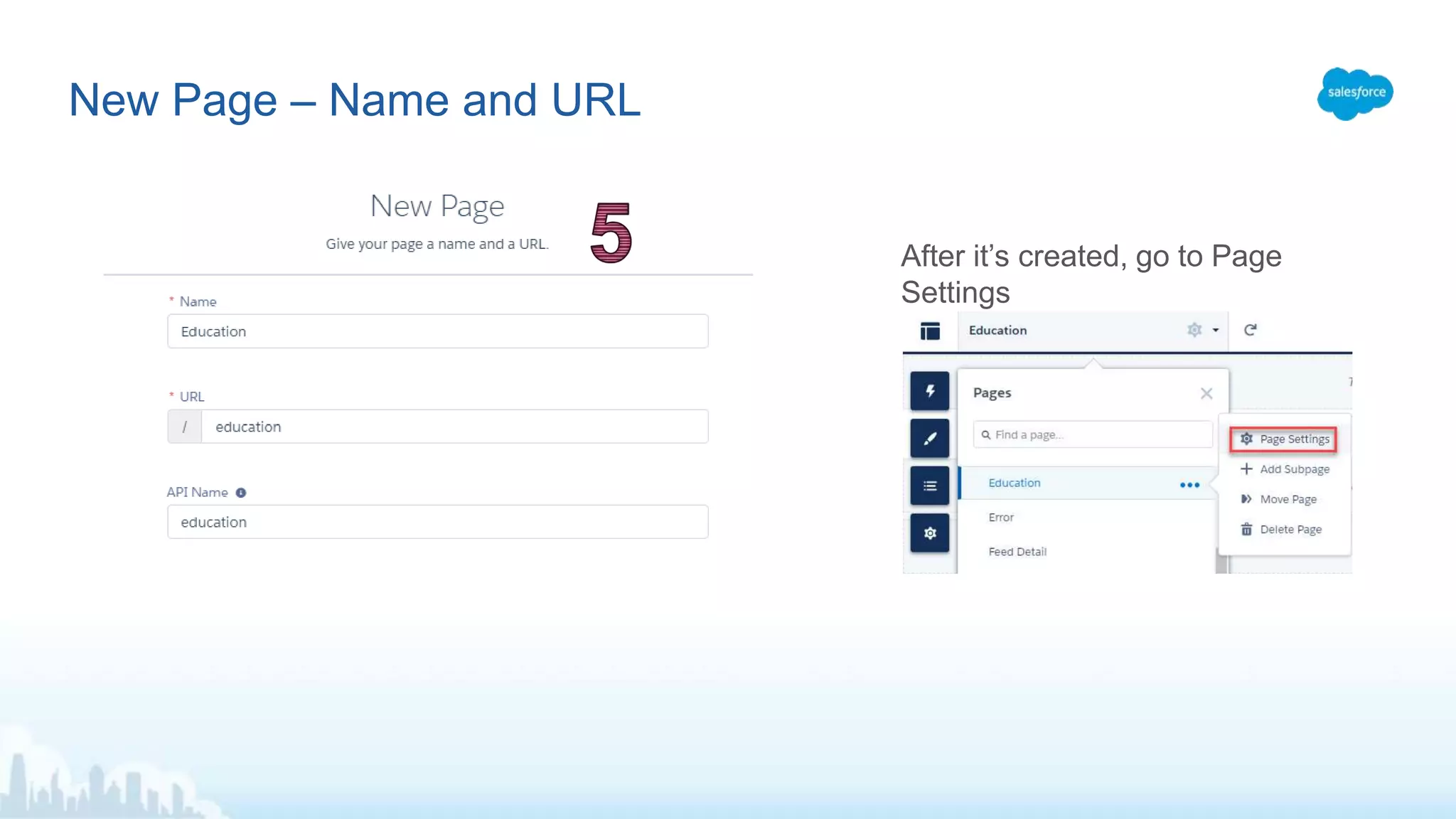
New Page – Name and URL
After it’s created, go to Page
Settings
Page Settings – Public
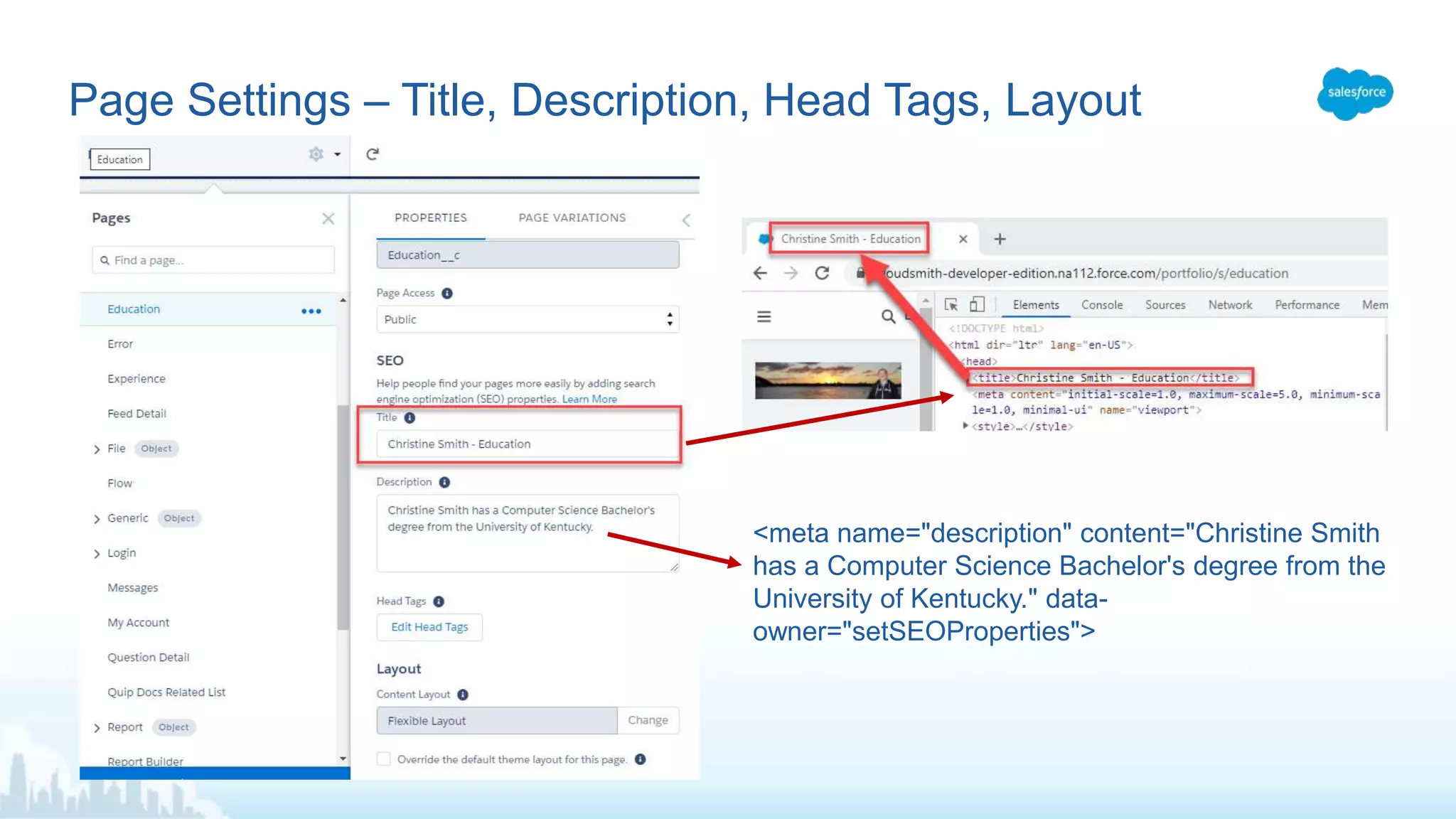
Page Settings – Title, Description, Head Tags, Layout
<meta name="description" content="Christine Smith
has a Computer Science Bachelor's degree from the
University of Kentucky." data-
owner="setSEOProperties">
Navigation
Tile Menu Edit
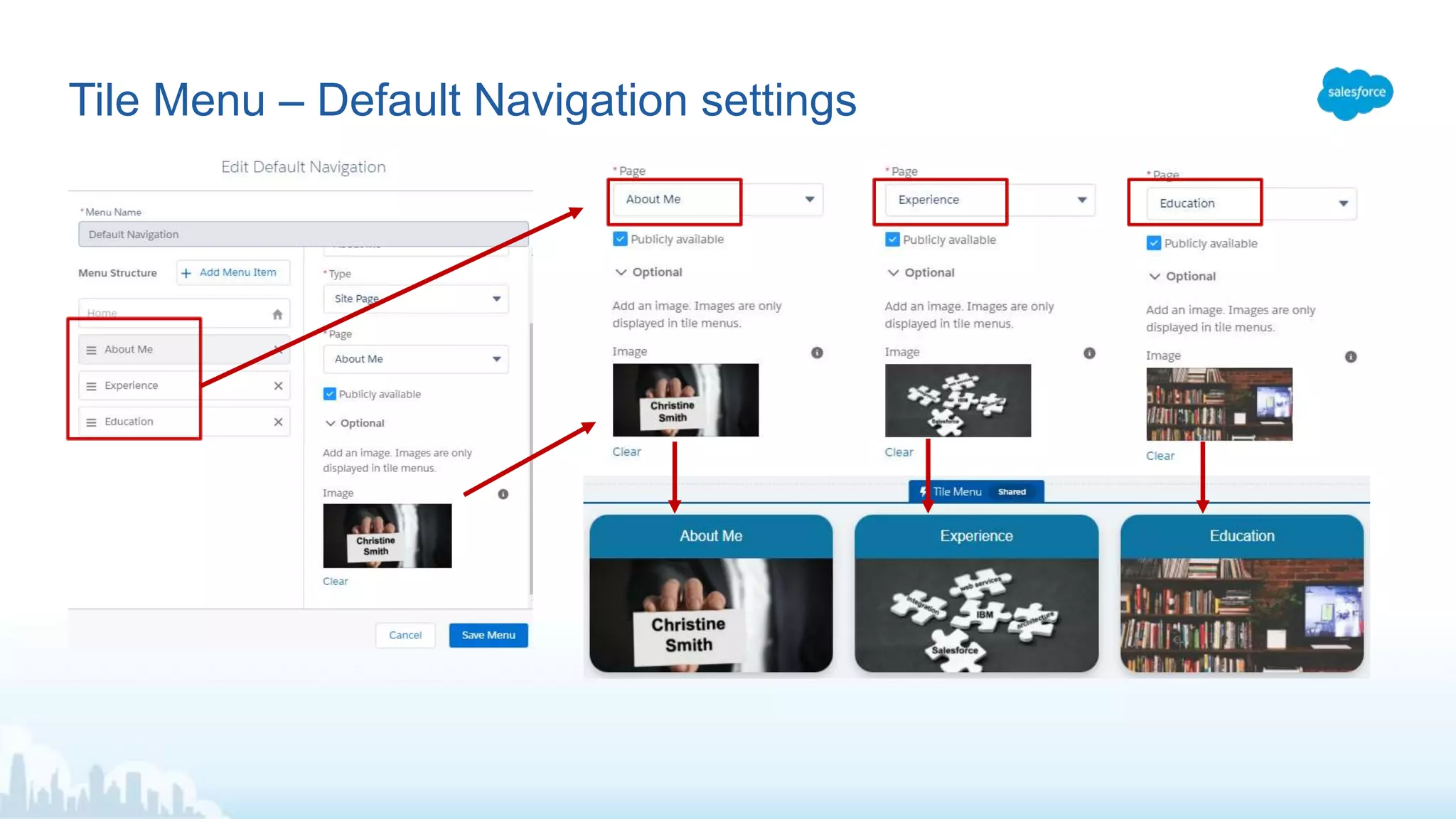
Tile Menu – Default Navigation settings
Quick Links
My Certifications Link:
1. Go to
https://trailhead.salesforce.com/credentials/verification
2. Enter your email under “Verify a Salesforce Certified
Professional” and click search
3. Click “Show Credentials” and then “Print View”
4. Grab the URL of the page as the link for “My
Certifications”
Quick Links
Take it to the next level
• Plan your site structure, pages and navigation
• Add images
• Add content (start with your resume!)
• Publish and test it
• Put the link on your resume, LinkedIn and Trailblazer.me profile
Enjoy your new portfolio site!
To create your short URL,
• Go to https://bitly.com
• Enter the Salesforce URL
• Click Shorten
• Result: https://sforce.co/3jxrZH2
URL Shortener – https://bitly.com
Finish the module - Build your Personal Portfolio on Salesforce -
https://trailhead.salesforce.com/en/content/learn/projects/build-your-personal-portfolio-on-
salesforce
You’ll need some (non-copyrighted) images.
• https://pixabay.com/
• https://www.freeimages.com/
• Or supply your own images!
Reference Links

Building Your Portfolio Site on Salesforce Experience Cloud

  • 1.
    Create Your OwnPortfolio Site on Salesforce Experience Cloud! @websmithc, websmithc@gmail.com Christine Smith, Salesforce Consultant at Accenture
  • 2.
  • 3.
    Agenda • What isa portfolio ? • Sample site • Building your own portfolio site • Trailhead module • Additional pages • Navigation • Content and Search Engine Optimization (SEO) tips • URL shortener: https://sforce.co Create Your Own Portfolio Site on Salesforce Experience Cloud!
  • 4.
    “Career portfolios helpdocument education, work samples and skills. People use career portfolios to apply for jobs, apply to college or training programs. They are more in-depth than a resume, which is used to summarize the above in one or two pages. Career portfolios serve as proof of one's skills, abilities, and potential in the future. Career portfolios help with a job or acceptance into higher education institutes. A career portfolio should be personal and contain critical information. Items that should be included include (but are not limited to) personal information, evaluations, sample work, a business portrait, and awards and acknowledgments.” https://en.wikipedia.org/wiki/Career_portfolio What is a Portfolio?
  • 5.
    URL redirects tothe actual URL of my Experience Cloud home page at • https://cloudsmith-developer- edition.na112.force.com/portfolio/s/ My Portfolio Site - https://sforce.co/3szmJVn
  • 6.
    Using your ownDev Org – Domain is for the Org Enable Digital Experiences
  • 7.
    Click ‘New’ tocreate the site… Success!
  • 8.
    Choose the template,give the site a name and URL… Eventually…..
  • 9.
  • 10.
    Add background image,headshot, headline Builder – Edit Content Tip: Don’t make the image so tall that the user has to scroll to see content.
  • 11.
    Drag and dropComponents on the page, like Rich Content Editor Adding Content
  • 12.
    Headings are theoutline of the page (for HTML/SEO) Content structure of a web page
  • 13.
    Suggestions: About Me,Education, Experience, Sample Work New Pages
  • 14.
    New Page -Layout
  • 15.
    New Page –Name and URL After it’s created, go to Page Settings
  • 16.
  • 17.
    Page Settings –Title, Description, Head Tags, Layout <meta name="description" content="Christine Smith has a Computer Science Bachelor's degree from the University of Kentucky." data- owner="setSEOProperties">
  • 18.
  • 19.
  • 20.
    Tile Menu –Default Navigation settings
  • 21.
  • 22.
    My Certifications Link: 1.Go to https://trailhead.salesforce.com/credentials/verification 2. Enter your email under “Verify a Salesforce Certified Professional” and click search 3. Click “Show Credentials” and then “Print View” 4. Grab the URL of the page as the link for “My Certifications” Quick Links
  • 23.
    Take it tothe next level • Plan your site structure, pages and navigation • Add images • Add content (start with your resume!) • Publish and test it • Put the link on your resume, LinkedIn and Trailblazer.me profile Enjoy your new portfolio site!
  • 24.
    To create yourshort URL, • Go to https://bitly.com • Enter the Salesforce URL • Click Shorten • Result: https://sforce.co/3jxrZH2 URL Shortener – https://bitly.com
  • 25.
    Finish the module- Build your Personal Portfolio on Salesforce - https://trailhead.salesforce.com/en/content/learn/projects/build-your-personal-portfolio-on- salesforce You’ll need some (non-copyrighted) images. • https://pixabay.com/ • https://www.freeimages.com/ • Or supply your own images! Reference Links

Editor's Notes

  • #2 Open Dev Org, set laser pointer Intro